

Managing billing in SaaS businesses is already complex, but handling return invoices adds another layer of difficulty that many teams underestimate. Unlike one-time transactions, SaaS billing involves continuous subscription changes, upgrades, downgrades, and cancellations that all impact invoicing. Each of these actions may require adjustments in billing, often resulting in return invoices that must be calculated and issued accurately. Without a structured system, this process quickly becomes overwhelming and prone to errors.
Return invoices are commonly triggered by scenarios such as refunds, billing corrections, or mid-cycle subscription changes. For example, when a customer downgrades a plan or cancels early, businesses must calculate prorated refunds and issue corresponding credits. Handling these adjustments manually increases the risk of miscalculations and inconsistent records. Over time, these issues can lead to financial discrepancies and customer dissatisfaction.
This is where saas return invoice automation becomes essential. Automated invoicing systems simplify the creation, tracking, and reconciliation of return invoices. They ensure accuracy, reduce manual workload, and provide real-time visibility into billing adjustments. As a result, SaaS companies can maintain financial control while delivering a seamless billing experience to customers.
What Are Return Invoices in SaaS?
Return invoices, also known as credit invoices, are documents issued to adjust or reverse previously billed charges in a SaaS environment. They are typically generated when a customer is owed a refund, receives a billing correction, or changes their subscription plan. These invoices ensure that financial records remain accurate and reflect the true amount owed or credited.
In SaaS, return invoices are commonly used for scenarios such as service downgrades, early cancellations, or overbilling corrections. For instance, if a customer cancels a subscription halfway through a billing cycle, a return invoice is issued to credit the unused portion. This ensures fairness and transparency in billing.
Unlike standard invoices, which request payment, return invoices reduce or offset charges. They are closely tied to the original invoice and must be tracked carefully to maintain proper accounting. This makes automation particularly valuable for managing these transactions efficiently.
Why Return Invoice Management Is Challenging in SaaS
Return invoice management in SaaS is challenging due to the high volume of subscription changes that occur regularly. Customers frequently upgrade, downgrade, or cancel services, each requiring billing adjustments. Managing these changes manually increases complexity and workload for finance teams.
Another major challenge is tracking refunds and credits accurately. Without automation, businesses must manually calculate adjustments and ensure they are correctly applied to customer accounts. This process is time-consuming and prone to human error, especially when dealing with large volumes of transactions.
Prorated billing calculations also add complexity. Determining the exact refund amount for partial usage requires precise calculations based on billing cycles and usage periods. Additionally, reconciling return invoices with original transactions can be difficult without a centralized system, leading to inconsistencies in financial records.
Common Scenarios That Require Return Invoices
Subscription cancellations or early terminations
When customers cancel their subscriptions before the end of a billing cycle, businesses must calculate and issue refunds for unused services. This often involves prorating charges based on the remaining time. Accurate return invoices ensure fair billing and maintain customer trust.
Plan downgrades or pricing adjustments
Customers may switch to lower-tier plans, requiring adjustments to previously billed amounts. Return invoices are used to credit the difference between the original and new pricing. This ensures billing remains accurate and transparent.
Billing errors or duplicate charges
Mistakes such as overbilling or duplicate invoices can occur in manual systems. Return invoices are issued to correct these errors and refund the excess amount. This helps maintain credibility and customer satisfaction.
Refunds for unused services
Customers may request refunds for services they did not fully utilize. Return invoices document these refunds and ensure proper accounting. This is especially important for maintaining accurate financial records.
Promotional credits or service-level agreements (SLAs)
Businesses may issue credits as part of promotions or SLA commitments. Return invoices are used to apply these credits to customer accounts. This ensures transparency and compliance with agreed terms.
How Automated Invoicing Works in SaaS
Automated invoicing systems generate invoices based on subscription activity without manual intervention. When a customer signs up, renews, or modifies a plan, the system automatically creates the appropriate billing document. This ensures consistency and eliminates delays in invoice generation.
These systems also handle complex calculations such as prorated charges and refunds. By using predefined rules and real-time data, they ensure accuracy in every transaction. This reduces the risk of errors that are common in manual processes.
Additionally, automated invoicing integrates with payment gateways and accounting systems. This allows businesses to track payments, refunds, and adjustments in real time. The result is a fully connected billing ecosystem that improves efficiency and visibility.
How Automated Invoicing Simplifies Return Invoice Management
Automated invoicing simplifies return invoice management by generating credit invoices automatically whenever billing adjustments occur. This eliminates the need for manual calculations and ensures that all changes are accurately reflected. It also speeds up the process, allowing businesses to handle adjustments more efficiently.
The system ensures precise calculations for refunds and credits, especially in cases involving prorated billing. It also maintains a direct link between the original invoice and the return invoice, making reconciliation easier. This improves financial accuracy and reduces confusion.
Automation also reduces administrative workload by handling repetitive tasks. Finance teams no longer need to manually track every adjustment or create return invoices from scratch. This allows them to focus on strategic financial management rather than routine tasks.
Key Features That Support Return Invoice Automation
Automated credit and return invoice generation
Modern SaaS return invoice automation systems automatically create credit or return invoices whenever a billing adjustment, refund, or downgrade occurs. This eliminates the need for manual invoice creation and ensures that every transaction is properly documented in real time. It also helps maintain consistency in formatting, compliance, and financial reporting across all billing activities.
Proration and adjustment calculation tools
Accurate proration is essential when customers upgrade, downgrade, or cancel subscriptions mid-cycle. Automated systems calculate partial charges, refunds, or credits based on usage and billing periods without human intervention. This significantly reduces errors and ensures customers are billed fairly and transparently.
Real-time billing updates and tracking
SaaS return invoice automation platforms update billing records instantly whenever changes occur in a customer’s subscription. Finance teams can monitor adjustments, refunds, and credits through real-time dashboards and reporting tools. This visibility improves decision-making and ensures that no transaction is overlooked or delayed.
Integration with subscription and payment systems
Automated invoicing systems integrate seamlessly with subscription management platforms and payment gateways. This ensures that all billing data flows smoothly between systems, reducing data silos and reconciliation issues. It also allows return invoices to reflect accurate payment statuses and transaction histories.
Audit trails for all billing changes
Every adjustment, refund, or return invoice is recorded with a detailed audit trail. This includes timestamps, user actions, and the reason for the billing change, which is essential for compliance and financial audits. It also helps resolve disputes quickly by providing a clear history of all transactions.
Customizable workflows for approvals and refunds
Businesses can configure workflows to require approvals before issuing refunds or generating return invoices. This adds an extra layer of control and prevents unauthorized or incorrect billing adjustments. It also ensures that internal processes align with company policies and financial governance standards.
The Role of Recurring Billing in Return Invoice Management
Recurring billing systems play a crucial role in supporting saas return invoice automation by automatically tracking subscription activity. Every upgrade, downgrade, or cancellation is recorded in real time, triggering the appropriate billing adjustments. This ensures that return invoices are generated accurately without manual intervention.
These systems also adjust billing cycles dynamically based on customer actions. For example, if a customer upgrades mid-cycle, the system recalculates charges and applies the necessary credits or additional fees. This ensures that billing remains consistent and fair.
By automating these processes, recurring billing reduces discrepancies and improves overall billing accuracy. It ensures that all adjustments are handled consistently across the system. This is essential for maintaining trust and transparency with customers.
Common Challenges Without Automation
Manual return invoice management often leads to calculation errors, especially when dealing with prorated refunds. These mistakes can result in incorrect billing and customer dissatisfaction. Fixing these errors also consumes valuable time and resources.
Delays in issuing return invoices are another common problem. Without automation, businesses may take days or weeks to process adjustments. This negatively impacts customer experience and slows down financial reconciliation.
Inconsistent tracking of billing changes can also create confusion. Without a centralized system, it becomes difficult to match return invoices with original transactions. This increases the risk of disputes and inaccurate financial reporting.
Best Practices for Managing Return Invoices in SaaS
Automate invoice and return invoice generation
Implementing SaaS return invoice automation ensures that all billing adjustments are handled consistently and without delays. Automated systems generate return invoices instantly when triggers like cancellations or downgrades occur. This reduces administrative workload and improves overall billing efficiency.
Clearly define refund and adjustment policies
Having well-documented refund and billing adjustment policies helps ensure consistency across all customer transactions. Customers understand what to expect, and internal teams have clear guidelines to follow when issuing return invoices. This reduces confusion, disputes, and inconsistencies in billing practices.
Maintain detailed records of all billing changes
Keeping comprehensive records of every billing adjustment, including return invoices and credits, is essential for financial accuracy. Automated systems make it easy to store and retrieve this information when needed. This also supports compliance requirements and simplifies audits.
Regularly reconcile invoices and credits
Periodic reconciliation ensures that all return invoices are correctly matched with their original transactions. This helps identify discrepancies early and prevents financial reporting errors. Automated tools can assist by flagging mismatches and providing reconciliation reports.
Provide transparency to customers through detailed invoices
Clear and detailed return invoices help customers understand why a refund or adjustment was made. This transparency builds trust and reduces the likelihood of disputes or support inquiries. Automated systems can include itemized details, proration breakdowns, and explanations directly in the invoice.
How Automation Improves SaaS Billing Accuracy
Automation significantly reduces human errors in calculations and data entry. By relying on predefined rules and real-time data, systems ensure that every invoice and return invoice is accurate. This improves overall financial reliability.
It also ensures consistent handling of subscription changes. Whether a customer upgrades, downgrades, or cancels, the system applies the correct billing adjustments automatically. This eliminates inconsistencies across transactions.
Real-time visibility into billing data further enhances accuracy. Businesses can monitor all transactions and adjustments instantly. This supports better decision-making and ensures compliance with financial standards.
Key Benefits of Automated Return Invoice Management
- Improves billing accuracy and consistency: Automation ensures that all invoices and adjustments are calculated correctly. This reduces discrepancies and improves reliability. It also builds trust with customers.
- Reduces manual workload and errors: Automated systems handle repetitive tasks, freeing up staff time. This reduces the risk of human error. It also improves operational efficiency.
- Enhances customer transparency and trust: Clear and accurate invoices help customers understand their charges. This reduces disputes and improves satisfaction. It also strengthens long-term relationships.
- Speeds up refund and adjustment processes: Automation allows businesses to process refunds quickly. This improves customer experience. It also ensures timely financial reconciliation.
- Supports scalable SaaS operations: As businesses grow, automation helps manage increasing transaction volumes. This ensures efficiency without adding administrative burden. It supports long-term scalability.
Common Use Cases
- SaaS subscription cancellations: Return invoices are used to process refunds for unused subscription periods. This ensures fair billing. It also maintains accurate financial records.
- Plan upgrades and downgrades: Billing adjustments are required when customers change plans. Return invoices handle these changes efficiently. This ensures consistency in pricing.
- Free trial conversions and adjustments: Customers transitioning from free trials may require billing corrections. Return invoices help manage these adjustments. This ensures accurate billing.
- Enterprise contract modifications: Large contracts often involve custom billing terms and changes. Return invoices ensure accurate adjustments. This supports complex billing scenarios.
- Billing corrections and dispute resolutions: Return invoices are essential for correcting billing errors. They help resolve disputes quickly. This improves customer satisfaction.
How ReliaBills Simplifies Return Invoice Management in SaaS
Managing return invoices in SaaS environments can quickly become complex due to constant subscription changes, refunds, and billing adjustments. ReliaBills simplifies this process by automating invoice creation, credit issuance, and payment tracking within a single, centralized platform. This reduces the need for manual intervention and ensures that every return invoice is generated accurately and on time. As a result, SaaS businesses can maintain clean financial records while minimizing administrative overhead.
A key strength of ReliaBills lies in its recurring billing capabilities, which automatically adapt to subscription upgrades, downgrades, and cancellations. When billing changes occur, the system can trigger the appropriate return invoice or credit adjustment without disrupting the billing cycle. This ensures consistency in how refunds and prorated charges are handled, improving both accuracy and customer satisfaction. It also allows businesses to maintain predictable revenue streams while managing dynamic subscription models.
ReliaBills PLUS further enhances return invoice management with advanced automation, reporting, and customer account management tools. Businesses gain full visibility into billing adjustments, outstanding credits, and historical transactions through detailed analytics and dashboards. These insights help teams make informed financial decisions while ensuring compliance and audit readiness. With scalable automation in place, SaaS companies can efficiently manage growth while maintaining precise control over billing operations.
How to Create a New Recurring Invoice Using ReliaBills
Creating a New Recurring Invoice using ReliaBills involves the following steps:
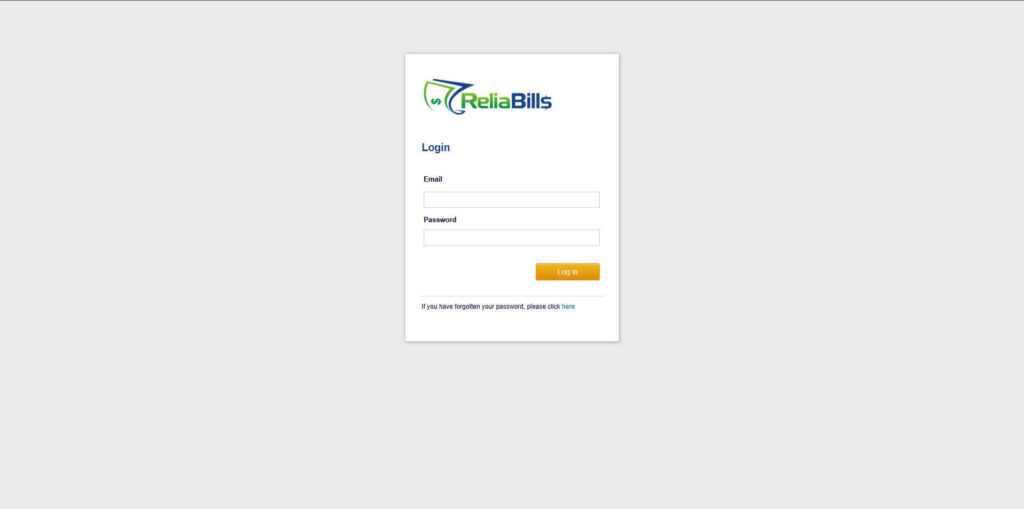
Step 1: Login to ReliaBills
- Access your ReliaBills Account using your login credentials. If you don’t have an account, sign up here.
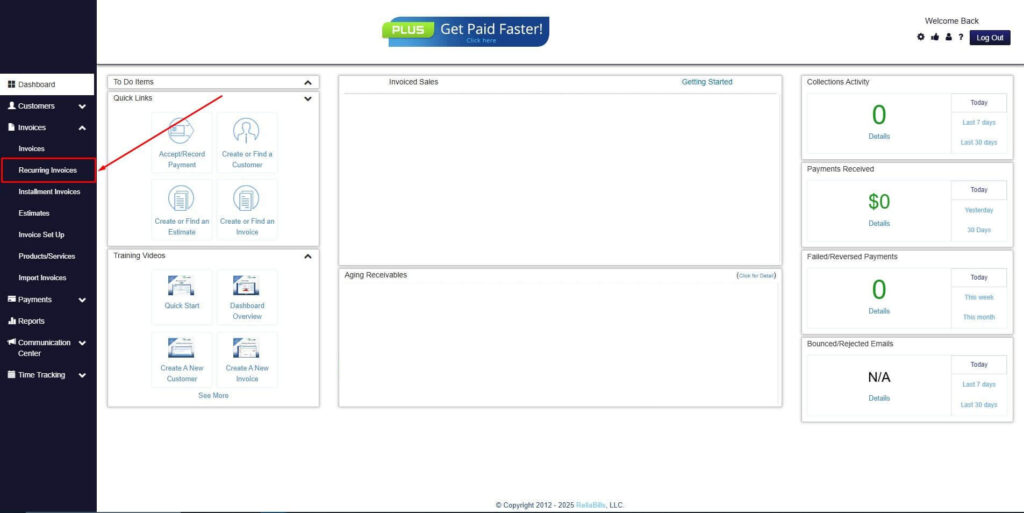
Step 2: Click on Recurring Invoices
- Navigate to the Invoices Dropdown and click on Recurring Invoices for an overview of the list of your existing customers.
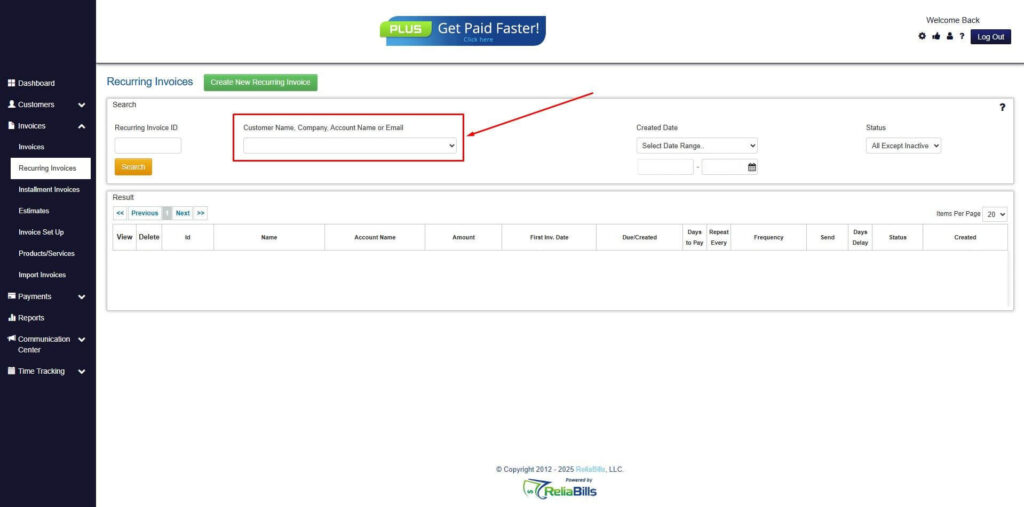
Step 3: Go to the Customers Tab
- If you have already created a customer, search for them in the Customers tab and make sure their status is “Active”.
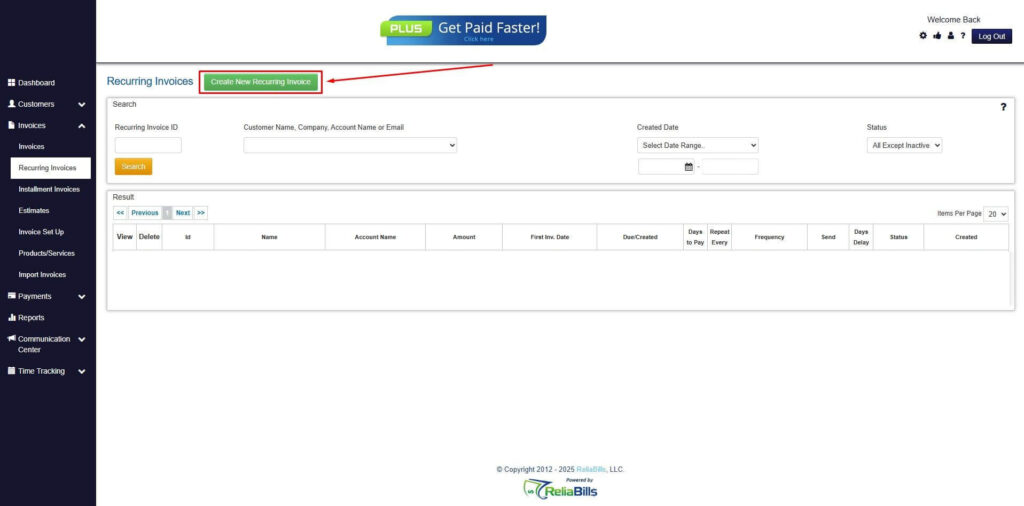
Step 4: Click the Create New Recurring Invoice
- If you haven’t created any customers yet, click the Create New Recurring Invoice to create a new customer.
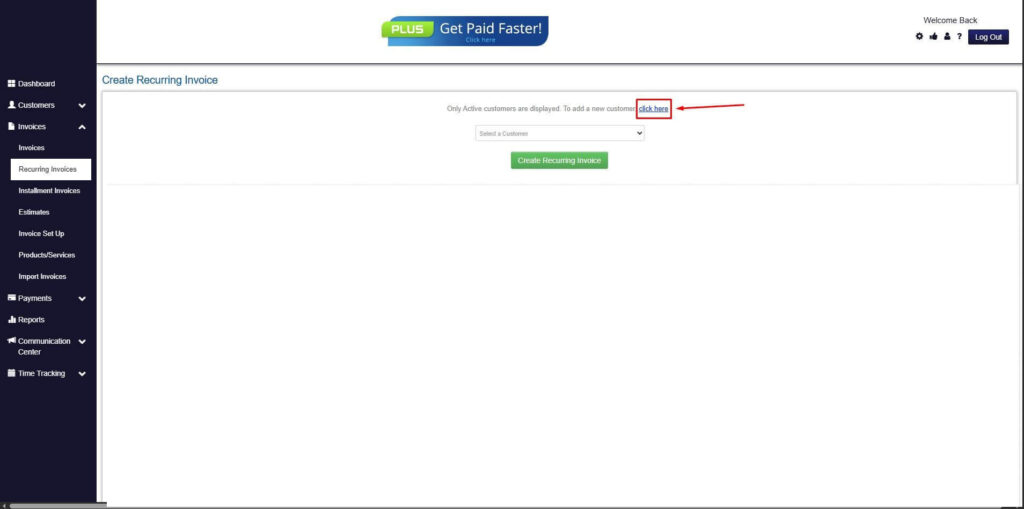
Step 5: Click on the “Click here” Button
- Click on the “Click here” button to proceed with the recurring invoice creation.
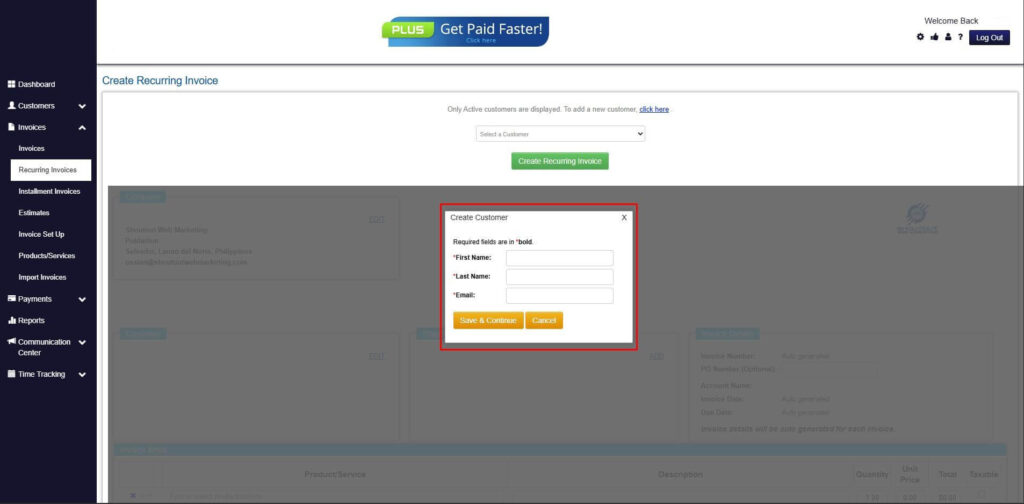
Step 6: Create Customer
- Provide your First Name, Last Name, and Email to proceed.
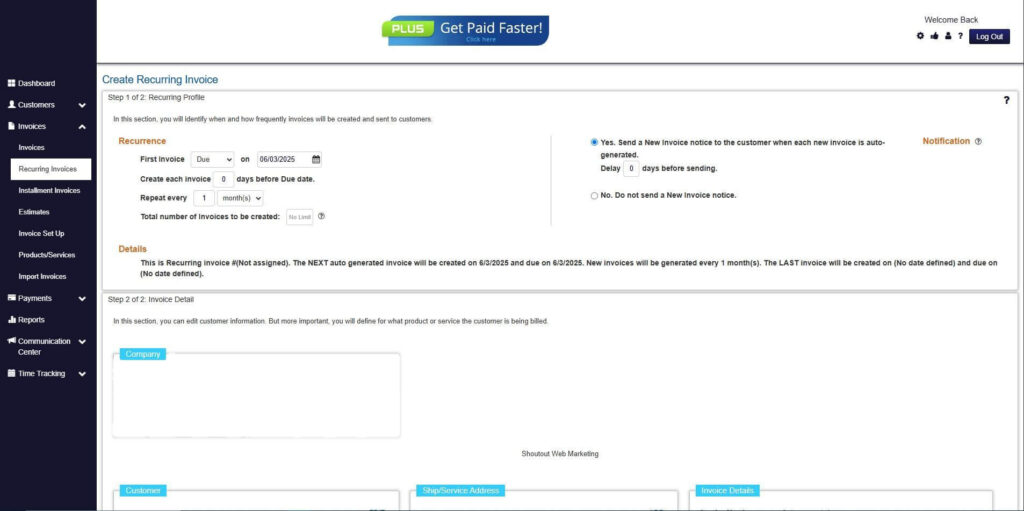
Step 7: Fill in the Create Recurring Invoice Form
- Fill in all the necessary fields.
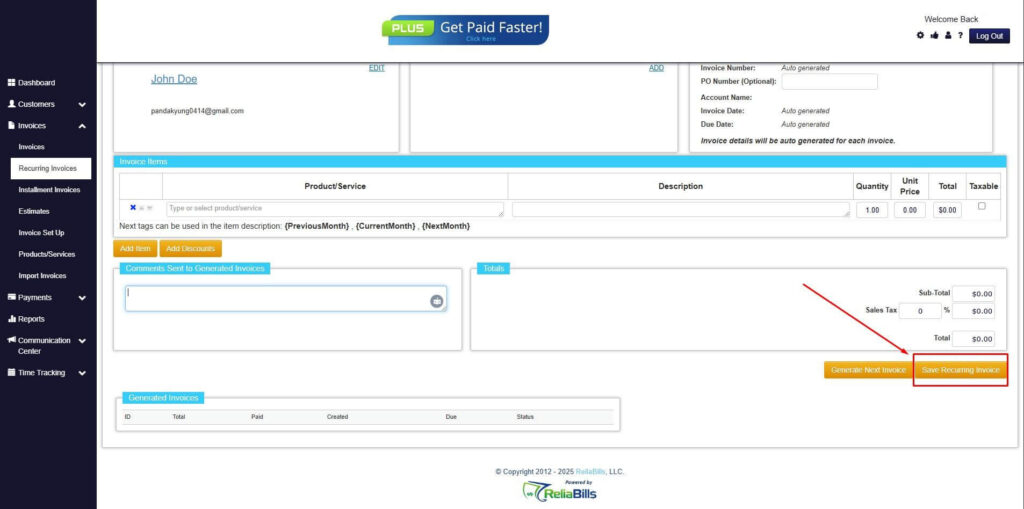
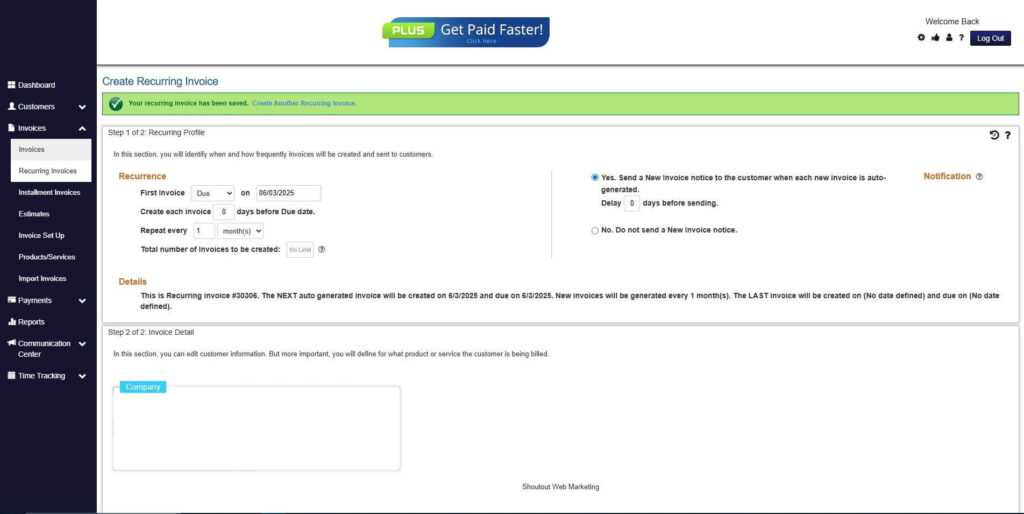
Step 8: Save Recurring Invoice
- After filling up the form, click “Save Recurring Invoice” to continue.
Step 9: Recurring Invoice Created
- Your Recurring Invoice has been created.
Frequently Asked Questions (FAQs)
1. What is a return invoice in SaaS?
A return invoice is a credit document used to adjust or reverse previous charges. It is typically issued for refunds or billing corrections. It ensures accurate financial records.
2. How does automated invoicing handle refunds?
Automated systems calculate refunds based on predefined rules. They generate return invoices automatically. This ensures accuracy and speed.
3. Can return invoices be generated automatically?
Yes, automated invoicing systems create return invoices when adjustments occur. This reduces manual effort. It also improves consistency.
4. How does recurring billing support adjustments?
Recurring billing tracks subscription changes in real time. It automatically applies billing adjustments. This ensures accurate invoicing.
5. Why is automation important for SaaS billing?
Automation reduces errors and improves efficiency. It ensures accurate handling of complex billing scenarios. It also supports scalable operations.
Conclusion
Managing return invoices in SaaS environments can be complex due to constant subscription changes and billing adjustments. Manual processes often lead to errors, delays, and inconsistent financial records.
By adopting saas return invoice automation, businesses can simplify billing, improve accuracy, and reduce administrative workload. Automated systems ensure that all adjustments are handled efficiently and transparently.
As SaaS companies continue to scale, automation becomes essential for maintaining financial control and delivering a seamless customer experience. Investing in modern billing solutions is a strategic step toward long-term growth and operational excellence.