

A pool service invoice template is not just a document that asks for money. It is the single most controllable factor in how fast you collect it. The difference between getting paid in 5 days and waiting 28 days almost always comes down to three things: whether the invoice has a clear pay-now link, whether recurring and one-time charges are separated into distinct line items, and whether it went out the same day the work was done. This guide covers every field your invoice needs, the fields most pool companies skip, and the setup changes that consistently move payment timelines earlier.
What Is a Pool Service Invoice Template?
A pool service invoice template is a preformatted billing document that pool technicians and service companies use to request payment from clients after completing cleaning, maintenance, chemical treatment, equipment repair, or seasonal work. It captures the essential information needed to identify the work performed, the parties involved, and the amount owed, while providing a consistent structure that reduces the time spent creating each invoice from scratch.
Unlike a generic invoice template, a pool service version needs to accommodate specific categories that standard business billing tools rarely include by default: chemical product quantities and costs per visit, equipment readings, route service periods, and the distinction between a fixed monthly maintenance fee and a variable charge for add-on work like filter cleaning or green pool treatment. When those distinctions are absent, clients get confused, payment slows, and disputes become far more common than they need to be.
The template connects directly to broader billing workflows, including recurring billing for regular maintenance accounts, installment billing for large seasonal packages, and customer management for tracking service history and payment behavior across a full route.
Every Field Your Pool Service Invoice Template Needs
Most guides on pool service invoicing give you a list of obvious fields and call it done. This one goes further. The fields below are divided into three tiers based on their function. Required fields are non-negotiable. Optional fields add value in most situations. Power fields are the ones that meaningfully accelerate payment, reduce disputes, and make your business look more credible, but most pool companies never include them.
Business name, license number, and contact details – Required
Your business name, phone number, email address, and any applicable contractor license or certification number. In many states, pool service companies are required to display their license number on customer-facing documents. Omitting it is a compliance issue, not just a formatting gap.
Client name and service address – Required
Match the service address to the pool being serviced, not the client’s mailing address. When billing a property manager or landlord for a rental property, list the service location separately from the billing contact. Mixing these up is the most common cause of “I never received this invoice” claims.
Invoice number and issue date – Required
Sequential invoice numbers are critical for your records, for tax filing, and for resolving disputes. A client who calls to ask about “the invoice from last month” becomes much easier to handle when you can say “that would be invoice 0247” and both parties are looking at the same document.
Service period or visit date(s) – Required
For recurring accounts, state the billing period clearly: “May 2025 Pool Maintenance Service.” For one-time jobs or repair visits, include the specific date. “Pool cleaning” with no date attached gives clients nothing to match against their memory of when you were there.
Itemized line items with descriptions – Required
Never combine multiple services into one line item. Weekly maintenance is one line. A filter clean is a separate line. Chemicals added are a separate line. The reason is simple: when a client questions a charge, you need to be able to point to a specific item. You cannot defend a number without breaking it down.
Subtotal, tax, and total due- Required
The total due should be the largest, most visually prominent number on the invoice. Clients should not have to scan the document to find what they owe. If applicable tax is included, show it as a separate line so the pre-tax amount is visible.
Payment terms and due date – Required
State your payment terms explicitly: “Due upon receipt,” “Net 14,” or “Net 30.” Include the specific calendar due date alongside the terms. “Payment due June 15, 2025” is clearer and more actionable than “Net 14” on its own.
Chemical log (type, quantity, unit cost) – Optional
If you charge for chemicals separately, this field is not optional in practice. List each chemical added, the amount, and the cost per unit. Clients who question chemical charges are almost always missing this detail. Show the work and the dispute disappears.
Equipment notes – Optional
A brief note on filter pressure, pump condition, or any equipment issue observed during the visit. This is not just good service documentation. It protects you if a client later claims something was broken before your visit, and it gives you a clear opening to recommend a repair, which is an upsell opportunity baked directly into the invoice.
Next service date – Optional
For recurring accounts, include the scheduled next service date. It reinforces the value of ongoing service, reduces cancellation conversations, and makes the recurring charge feel expected rather than surprising.
Online payment link or button – Power Field
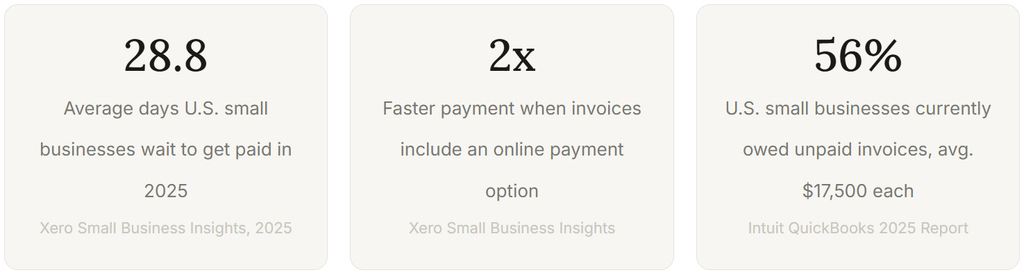
This is the single field with the highest impact on payment speed. Xero’s research across small businesses found that clients who receive invoices with an online payment option get paid up to twice as fast as those who do not. A client who has to write a check, find an envelope, and mail it will take two to three weeks. A client who can tap “Pay Now” on their phone will often pay within hours.
Service photos or before/after documentation – Power Field
Attaching a photo of the cleaned pool or a before/after pair for a green-to-clean job does two things: it proves the work was done, and it makes the invoice feel earned rather than automatic. Clients who see the result are far less likely to dispute the charge. This is especially effective for one-time jobs billed at a higher rate.
Late fee policy – Power Field
State your late fee policy on the invoice itself, not just in your service agreement. Something as simple as “A 1.5% monthly late fee applies to invoices unpaid after 30 days” reduces slow payment by creating a concrete consequence. The policy rarely needs to be enforced because its presence changes behavior before payment is due.
What a Complete Pool Service Invoice Looks Like
Below is an annotated sample invoice that incorporates all required and power fields. This is the structure that consistently produces the fastest payment timelines across pool service accounts.
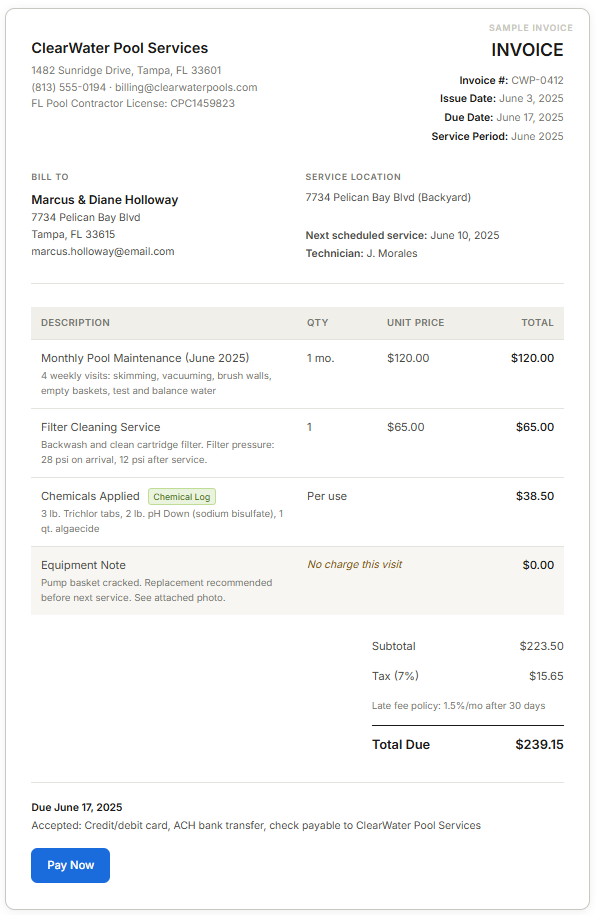
Every element in this sample has a job. The license number removes friction for clients who verify credentials before paying. The separate chemical log line eliminates the most common billing question pool companies receive. The equipment note creates a documented service record and a natural upsell. The “Pay Now” button removes every step between reading the invoice and completing payment.
How the Pool Service Billing Process Works
The invoice is one step in a larger billing cycle. Understanding where it sits in the process clarifies why timing and content decisions at the invoice stage affect payment timing so significantly.
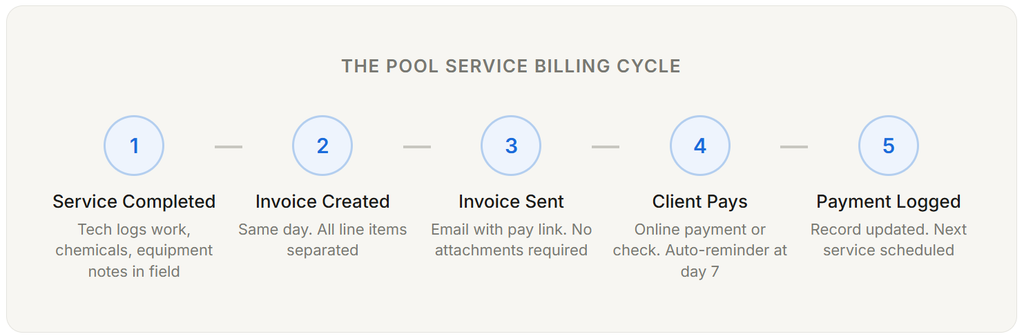
The timing of step two is where most pool companies lose days of payment time without realizing it. Sending an invoice two or three days after completing the work adds two or three days to when you get paid, consistently, across every account on your route. A technician who logs the visit in a mobile app and triggers the invoice on the way to the next stop has structurally moved payment timelines earlier for the entire month.
For recurring accounts, many pool service businesses eventually move to recurring billing, where the maintenance fee is charged automatically on a set date each month without generating a manual invoice per visit. This works well for the fixed monthly fee. Variable charges such as chemicals, equipment work, or one-time treatments still require a separate invoice, and the discipline to send that invoice promptly is what separates clean billing records from messy ones.
Real-World Use Cases: Billing Scenarios Pool Techs Actually Face
Generic invoice guides cover routine maintenance. The more useful material is how to structure invoices for the edge cases that come up constantly on real routes.
Green Pool Cleanup Over Multiple Visits
A green-to-clean job rarely resolves in a single visit. The billing challenge is that you are charging multiple visit fees plus chemicals over a span of days, and the client often does not understand why the bill is higher than a routine maintenance charge. The fix is a simple structure: create a line item called “Green Pool Treatment Package” that states the expected number of return visits and the package rate, then list chemicals separately below it. When the client sees both components, the total makes sense.
Emergency or After-Hours Service Calls
An after-hours call warrants a premium, but the invoice needs to justify it. Include a line labeled “After-Hours Emergency Service” with the specific date and arrival time, a note on what was found and what was done, and the premium rate stated clearly. A vague “emergency labor” line item is the fastest way to generate a payment dispute for work that was genuinely urgent and valuable.
Seasonal Opening or Closing
Pool openings and closings are large single-visit charges that clients do not experience repeatedly. This makes them more likely to question the amount. An itemized breakdown: cover removal and storage, equipment inspection, initial chemical treatment, system startup, and labor time all as separate lines rather than a single “opening fee” give the client a clear picture of what they received and reduce the likelihood of a follow-up call.
Equipment Repair with Parts and Labor
Repair invoices need to separate parts costs from labor explicitly. Clients who see a single number for a pump motor replacement will often assume the whole amount is labor, which reads as high. When parts and labor are broken out, the math becomes transparent, and the total feels earned. Include the part number or description for any major component replaced, and note whether a warranty applies.
Key Benefits of a Properly Structured Pool Service Invoice
Faster Average Payment Time
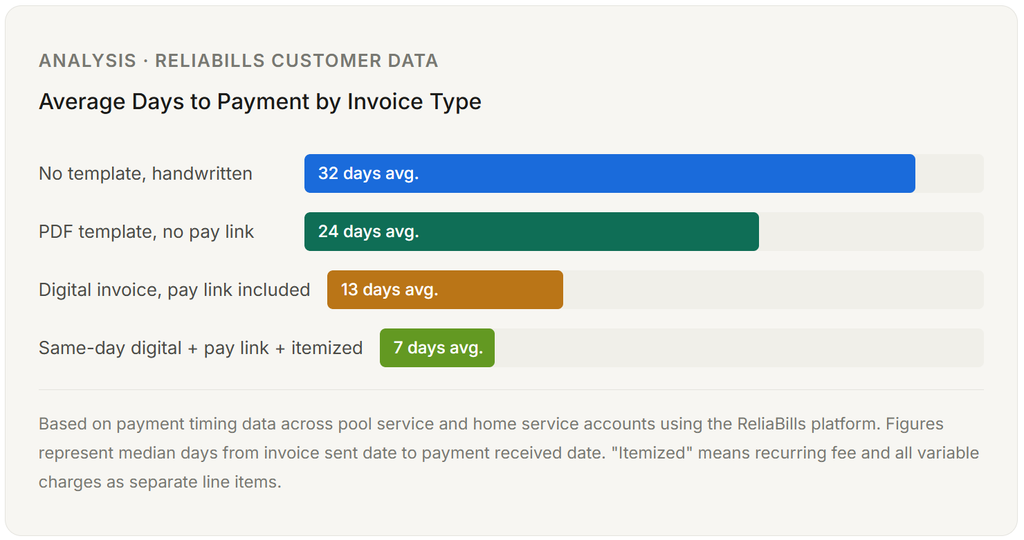
The data on this is consistent across multiple sources: invoices that go out the same day as the work, include an online payment option, and clearly state the due date get paid materially faster than invoices that do not. The mechanism is straightforward. Friction delays payment. A client who receives an invoice with a clickable payment link, sees the exact amount, and understands the due date has no practical reason to wait.
Fewer Disputes and Follow-Up Calls
The most common driver of payment disputes in pool service is not the amount. It is confusion about what the amount covers. When a client calls to ask why their bill is $50 higher than last month, the answer is almost always a chemical charge or a filter service that was lumped into the total rather than itemized. Separating those charges eliminates the call before it happens.
Cleaner Records for Tax Season
A well-structured invoice template makes year-end accounting significantly faster. When every invoice uses consistent line item categories and sequential numbering, your accountant or bookkeeping software can categorize and reconcile your income without requiring manual interpretation of ambiguous descriptions. This is a recurring benefit that compounds across every billing cycle.
Professional Credibility That Justifies Your Rates
An itemized, branded invoice signals professionalism in the same way that a clean truck and a uniform do. Clients who receive a polished invoice with a company logo, license number, chemical log, and equipment notes are more likely to view the service as worth the rate and less likely to shop around at renewal time. The invoice is the last touchpoint of every service visit. It should reflect the quality of the work.
Invoice vs. Statement vs. Work Order: Which One Do You Need?
Pool service businesses frequently use these three documents interchangeably, which creates confusion for both the business and the client. They have different purposes, and using the wrong one at the wrong moment slows down payment or creates record-keeping problems.
| Document | Primary Purpose | Best Used For | Requests Payment? |
|---|---|---|---|
| Invoice | Requests payment for a specific service or period | One-time jobs, monthly maintenance billing, add-on charges | Yes, for specific amount with due date |
| Statement | Shows the running balance of all charges, payments, and credits over time | Monthly summary for accounts that accumulate multiple charges across a period | Shows balance owed, not a single invoice request |
| Work Order | Authorizes work before it is performed; captures scope, materials, and client approval | Equipment repairs, installations, green pool cleanups with uncertain scope | No, precedes the invoice |
| Estimate / Quote | Proposes pricing for work not yet approved or performed | New client proposals, large repair jobs, seasonal service packages | No, precedes both work order and the invoice. |
The practical distinction for most pool companies is between an invoice and a statement. An invoice is appropriate when you are billing for a specific event or period and want the client to pay a defined amount. A statement is more appropriate for accounts that carry a running balance with multiple charges added over time, which is a common model for route businesses that add chemical costs and service items throughout the month. Many pool service companies benefit from using both: a monthly statement that shows the account history, alongside individual invoices for one-time or add-on charges.
ReliaBills supports both models through its invoicing software, which means you can use recurring billing for your fixed monthly fee and generate individual invoices for variable work without managing two separate systems.
Common Mistakes Pool Techs Make with Invoices
Sending invoices days after completing the work
The research is consistent: the longer the gap between completing a service and sending the invoice, the longer you wait to get paid. A two-day delay in invoicing typically translates to a five-to-seven-day delay in payment because the client’s attention has moved on and the invoice now competes with everything else in their inbox. Same-day invoicing is not perfectionism; it is the single most impactful operational change for payment speed.
Lumping recurring fees and variable charges into one line item
A single line that reads “Monthly Pool Service – $185.00” when the client pays $120 for maintenance looks like an unexplained $65 increase. When the $65 filter clean or chemical charge is on its own line, the client understands exactly what happened. The first version generates phone calls. The second does not. This mistake is the most preventable source of payment delays in pool service billing.
No online payment option
A PDF invoice that requires a check or a phone call to pay is a friction machine. Clients who have to find their checkbook, write a check, and mail it will take two to three weeks on average. Clients who can tap a link and enter a card take two to three days. The difference is not motivation. It is the effort required. If your invoice does not have a payment link, you are adding weeks to your average payment cycle across the entire year.
Using the wrong service address
Property managers, landlords, and commercial clients often have a billing address that differs from the service location. Sending an invoice to the service address when the payment comes from a corporate office, or vice versa, is a consistent source of “I never received this” conversations. Maintain separate fields for service address and billing contact from the moment you onboard the client.
No late fee policy on the invoice itself
Late fee policies that exist only in the service agreement, signed months ago at onboarding, are effectively invisible by the time payment is overdue. Printing the policy on every invoice keeps it present in the client’s awareness and changes payment behavior without requiring enforcement. Most clients who see “1.5% monthly late fee applies after 30 days” pay before day 30 even if they had no intention of being difficult.
No invoice numbering system
A client who calls to ask a question about “a recent invoice” requires a way for both parties to identify the same document quickly. Without sequential invoice numbers, that conversation involves dates, amounts, and guesswork. With invoice numbers, it takes ten seconds. This also matters for your records: year-end reconciliation with unnumbered invoices is a manual, error-prone process that costs time and occasionally money.
How to Set Up Your Pool Service Invoice Template
Building the template is a one-time setup. The recurring benefit is every invoice that goes out afterward, faster and with less effort. Here is the sequence that works in practice.
Step 1: Choose Your Billing Tool Before You Design the Template
Your invoice template is only as good as the system that generates and delivers it. A Word document template or a PDF form can work at low volume, but it does not send automatically, does not track whether invoices have been paid, and does not connect to a payment processor. For most pool service businesses beyond 15 to 20 recurring accounts, the time spent managing manual invoices exceeds the cost of billing software by a significant margin.
Look for a system that can handle both recurring billing for your fixed maintenance fees and individual invoices for variable charges, keep a customer record that logs service history alongside billing history, and support online payment. ReliaBills was built to handle exactly this combination without requiring two separate tools.
Step 2: Build One Template Per Service Type
You do not need a different template for every client, but you do need different base templates for meaningfully different service types. A routine monthly maintenance invoice has different default line items than a repair invoice or a seasonal opening. Creating three to four base templates with the correct fields pre-populated means each specific invoice only requires filling in the client-specific details, not rebuilding the structure from scratch.
Step 3: Configure Your Recurring Billing for Fixed Fees
For accounts paying a fixed monthly maintenance fee, set up recurring billing so the charge runs automatically on the same date each month. This eliminates the manual step of creating and sending a maintenance invoice for every recurring account every month, which at 50 accounts adds up to a significant administrative load. Variable charges such as chemicals and one-time services continue to flow through individual invoices.
Step 4: Connect Your Field Notes to Your Billing
The most efficient pool service billing operations are the ones where the technician’s mobile notes in the field automatically populate the invoice fields in the office. When the tech logs the chemicals added during a visit, that information flows directly into the invoice without being re-entered. This removes a manual step, eliminates transcription errors, and makes same-day invoicing operationally realistic rather than aspirational.
Step 5: Test the Payment Experience Before Sending to Clients
Send a test invoice to yourself and complete the payment process as a client would. Check that the payment link works, that the invoice displays correctly on mobile (the majority of clients will read it on a phone), and that the amount shown matches your expected total. Small rendering issues in email invoices can make a professional template look amateurish and, more importantly, can break the payment flow.
Frequently Asked Questions
1. What is the best format for a pool service invoice: PDF, email, or paper?
Digital invoices sent via email with an embedded payment link consistently outperform both PDF attachments and paper invoices in payment speed. A PDF attachment requires the client to open a file, which adds a step and can fail on mobile. A paper invoice sent by mail adds days to the delivery timeline before the payment clock even starts. An inline email invoice with a visible pay button removes every unnecessary step. If a client specifically requests paper invoices, provide them, but make the digital option clearly available as an alternative for the payment itself.
2. When should I send a pool service invoice?
The same day the work is completed, or the same day for each visit if you batch monthly. For recurring monthly accounts, the most common practice is to send the invoice on the first of the month covering that month’s service so clients can budget for and pay it before the month’s visits begin. For one-time jobs, repairs, and seasonal services, send the invoice within a few hours of completing the work. Every day you wait to send adds to the time you wait to get paid.
3. Should I charge for chemicals on a separate line or include them in the monthly fee?
Either model can work, but the most transparent approach is to include a base maintenance fee that covers labor and routine service, then charge chemicals as a separate line item at cost plus a markup. This gives you flexibility when chemical costs fluctuate, which they do seasonally and with supply conditions. A flat monthly fee that includes chemicals requires you to price conservatively to cover high-use periods, which means undercharging yourself when usage is low. A separate chemical line reflects actual costs and is easier to explain to clients when prices change.
4. What payment terms should I use on a pool service invoice?
For recurring residential accounts, “Due upon receipt” or “Net 7” is standard and appropriate. Most residential clients pay within a week when the invoice is clear and payment is easy. For commercial accounts or property managers who have internal accounts payable processes, “Net 14” or “Net 30” may be necessary to match their payment cycles. Whatever terms you set, state them on the invoice with a specific calendar due date alongside the term. “Net 14 – Due June 17, 2025” is clearer than “Net 14” alone.
5. Do I need a different invoice template for residential versus commercial pool accounts?
Not necessarily a different template, but you may need different fields populated. Commercial accounts often require a purchase order number, a specific billing contact name separate from the property contact, and formal payment terms that match their accounts payable cycle. HOA and property management billing sometimes requires invoices addressed to a management company with the property address listed separately. If you serve both residential and commercial clients, build a single template flexible enough to accommodate both, with optional fields for commercial-specific requirements like PO numbers and billing department contact.
6. How do I handle a client who disputes a charge on their pool service invoice?
The ability to resolve disputes quickly depends almost entirely on how well your invoice and service records document the work. If your invoice has specific line items, dates, chemical quantities, and equipment notes, you can point to the exact entry that answers the client’s question. If it does not, you are left reconstructing what happened from memory. For disputes that escalate, your service notes, photos, and signed work orders are your documentation. An invoice that functions as a service record, not just a payment request, is your best protection. Keep copies of every invoice and related service documentation for at least three years.
Recent Articles:
- Installment Billing for Annual Membership Fees: A Guide for Club Managers
- Property Management Invoice Template: What to Include for Rent, Fees, and Deposits

Brant Pallazza is the Founder and President of ReliaBills, an invoicing and recurring billing platform built to help small businesses secure predictable cash flow. With over 20 years of experience in direct response marketing and e-commerce leadership, including a 13-year tenure managing over $500 million in gross sales at Digital River. Brant writes actionable guides on automated billing, payment processing, and scaling SMBs.