
A property management invoice template is not a generic billing document with a logo added. It needs to carry specific property identifiers, a properly labeled security deposit line, and a clearly itemized breakdown of every fee, or it loses its value as a legal record and creates the exact disputes it was meant to prevent. The difference between a template that protects you and one that merely requests payment comes down to about a dozen fields most free templates leave out.
What is a Property Management Invoice Template?
A property management invoice template is a structured billing document used by landlords and property managers to request payment from tenants or bill property owners for management services. Unlike a standard invoice, it includes property-specific fields: unit identifiers, lease reference numbers, rental period dates, security deposit status, and itemized fee categories specific to the landlord-tenant relationship. When marked as paid, it also serves as a legal rent receipt. Property managers typically maintain two versions of this document: a tenant-facing invoice for rent and charges and an owner-facing statement showing collected rent, deducted management fees, and the net disbursement. Both are part of sound client account management in a property management operation.
What the Top Guides on This Topic Miss
Search for “property management invoice template” and the first five results will give you a downloadable PDF, a list of twelve generic fields, and an explanation of what rent is. None of them explain the three things that actually determine whether a property management invoice holds up when a tenant disputes a charge, an owner audits your records, or a state agency comes asking questions.
Those three things are how you label the security deposit on the invoice, whether your template distinguishes trust money from earned income, and what happens when you need to prorate. Get any one of these wrong and you have a billing document that looks professional but creates legal exposure instead of eliminating it.
This guide covers the full field structure, the two invoice types property managers actually use, the specific mistakes that generate disputes, and how to move from a static template to a recurring billing system that handles a growing portfolio without proportionally growing your administrative workload.
The Two Invoice Types Property Managers Use (and Why They Need Different Templates)
Most guides treat property management invoicing as if it is a single activity. It is not. There are two fundamentally different billing relationships in property management, and conflating them in your template system is a primary source of confusion and error.
The tenant-facing invoice
This is what tenants receive. It bills for the amounts tied to their occupancy: base rent, utilities they are responsible for, any maintenance charges they owe as chargebacks under their lease, late fees, and any adjustments for the period. The tenant invoice should also show the security deposit status, which we will cover in detail below.
The owner-facing statement
This goes to the property owner. It shows the rent that was collected in their name, the management fees you deducted as your compensation, any maintenance costs incurred and paid through the owner’s maintenance reserve, the current reserve balance, and the net amount being disbursed to the owner. In some cases, if the owner owes you more than you collected that period (because of a large repair or a vacancy), the owner-facing document is literally an invoice rather than a disbursement statement.
These two documents cover the same property and the same time period, but they serve entirely different parties with different information needs. Using one template for both, or using a generic invoice template for either, is where most template problems originate.
What a Compliant Property Management Invoice Looks Like
The mockup below shows a tenant-facing monthly invoice with every required field in place. Each section is deliberate. The annotations explain why specific fields are structured the way they are.
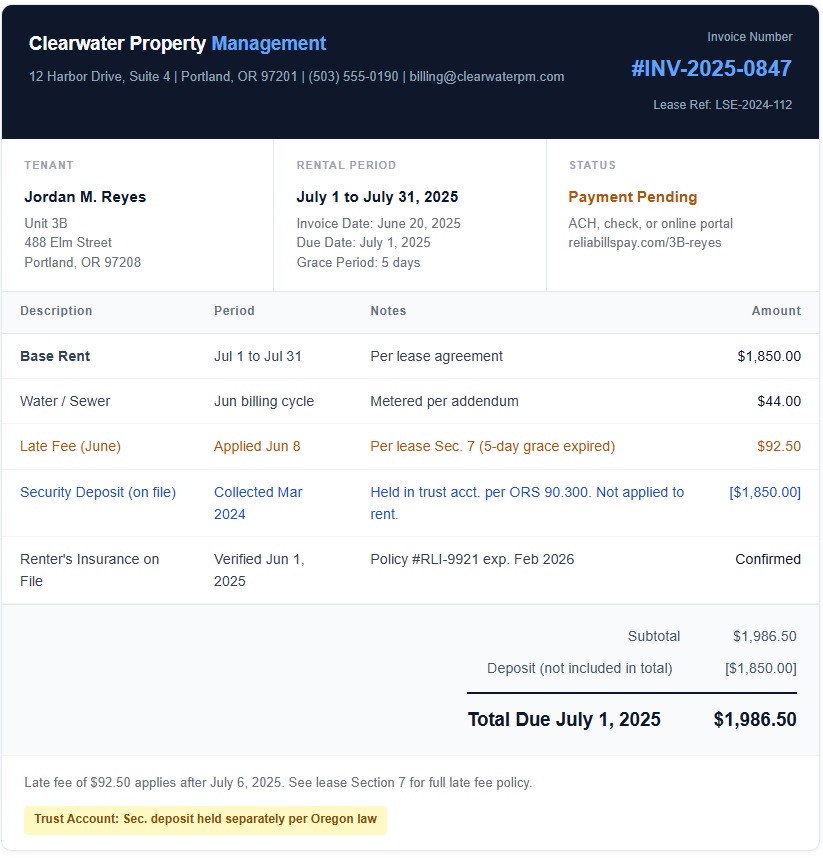
A few things in the mockup above are worth explaining because they differ from how most free templates handle these situations.
The security deposit appears in brackets to signal clearly that it is not part of the amount due. It is shown for transparency and record accuracy, not as a charge. In Oregon and many other states, commingling security deposit funds with rent even at the invoicing level can cause compliance problems. The bracket convention, combined with the trust account note at the footer, makes the legal status of those funds unambiguous.
The lease section reference in the late fee line is not decoration. When a tenant disputes a late fee, the dispute almost always comes down to whether the fee was disclosed in the lease and whether the grace period was honored. Having the lease section cited on the invoice shuts that conversation down before it starts.
Every Field in a Property Management Invoice Template
This table covers the complete field set for both tenant-facing and owner-facing documents, with the compliance status for each field. “Required” means the field is either legally required or so foundational that omitting it creates automatic ambiguity. “Critical” means the field carries legal weight specific to property management that a standard invoice template will not prompt you to include.
| Field | Tenant Invoice | Owner Statement | Why It Matters |
|---|---|---|---|
| Management company name, address, license number | Required | Required | Establishes identity and, in licensed jurisdictions, satisfies disclosure requirements |
| Unique invoice number | Required | Required | Enables tracing in your accounting system and prevents duplicate payment disputes |
| Invoice date and payment due date | Required | Required | Due date anchors your late fee calculation. Without it, the grace period is undefined. |
| Rental period covered (start and end dates) | Critical | Critical | Required for prorated rent calculations and for matching payments to periods during audits |
| Property address and unit identifier | Critical | Critical | Necessary when managing multiple units; distinguishes this invoice in legal proceedings |
| Lease or agreement reference number | Critical | Critical | Links the invoice to the governing document for any charge that is disputed |
| Base rent line item | Required | Required | Must match the amount in the signed lease exactly |
| Late fee line item with lease section reference | Critical | Optional | Citing the lease section removes the “I wasn’t notified” defense from any dispute |
| Utility charges with meter period | Optional | Optional | Required only if lease requires tenant to pay utilities via invoice. Include the billing cycle dates. |
| Security deposit status (bracketed, not summed) | Critical | Required | Showing deposit as non-payable prevents it being applied to rent. Prevents trust fund violations. |
| Maintenance reserve balance and draws | Not included | Critical | Owners need to see the running float to authorize repairs and understand fund status |
| Management fee with percentage basis shown | Not included | Required | Showing the calculation (e.g., 10% of $1,850 collected) prevents fee disputes with owners |
| Prorated rent calculation (if applicable) | Critical | Critical | Show the daily rate and number of days. Unexplained partial amounts generate more questions than anything else. |
| Payment methods and portal link | Required | Required | Every barrier between receipt and payment increases average days to pay |
| Late fee policy with grace period and amount | Required | Not included | Must match lease terms. Stating it on every invoice removes ambiguity and reduces disputes. |
| Trust account statement (security deposits) | Critical | Critical | Required by law in most jurisdictions to confirm deposits are held separately from operating funds |
Handling Security Deposits on an Invoice: The Part Most Templates Get Wrong
The security deposit is the most legally sensitive line item in property management billing. It is also the one most templates handle incorrectly, usually in one of two ways: either by omitting it entirely, which leaves no documented record of the deposit on file, or by treating it as a regular charge that gets summed into the total amount due, which risks it being treated as additional rent.
The correct approach is to show the security deposit in its own section of the invoice, clearly labeled as a deposit rather than a charge, formatted to exclude it from the payable total (hence the bracket convention in the mockup above), and annotated with the account type where it is held. Many jurisdictions, including California, New York, and Illinois, require security deposits to be held in separate trust or escrow accounts and prohibit commingling with management operating funds. Your invoice should make the trust account status explicit.
At move-out, the security deposit shifts from a passive informational line on monthly invoices to the central subject of a separate document: the security deposit disposition statement. This is a distinct document from the regular invoice and has its own required structure.
Security deposit deduction rules on an itemized statement
Every deduction on a disposition statement needs a specific description, an attributed cost with receipt or estimate, and a determination that the damage falls outside normal wear and tear. Courts and tenants reject vague entries. An entry that reads “cleaning, $300” will be challenged. An entry that reads “Professional cleaning of bedroom carpet to remove pet staining, per ABC Cleaning invoice #8821 attached: $300” will not.
Useful life also matters in ways that most template guides skip entirely. If a carpet was already six years old at move-in and typically lasts seven years, a stain at move-out may warrant a cleaning cost but not a full replacement charge. Showing the proration calculation on the deduction statement, reflecting the item’s remaining useful life, is both legally defensible and signals professional credibility to tenants who might otherwise escalate.
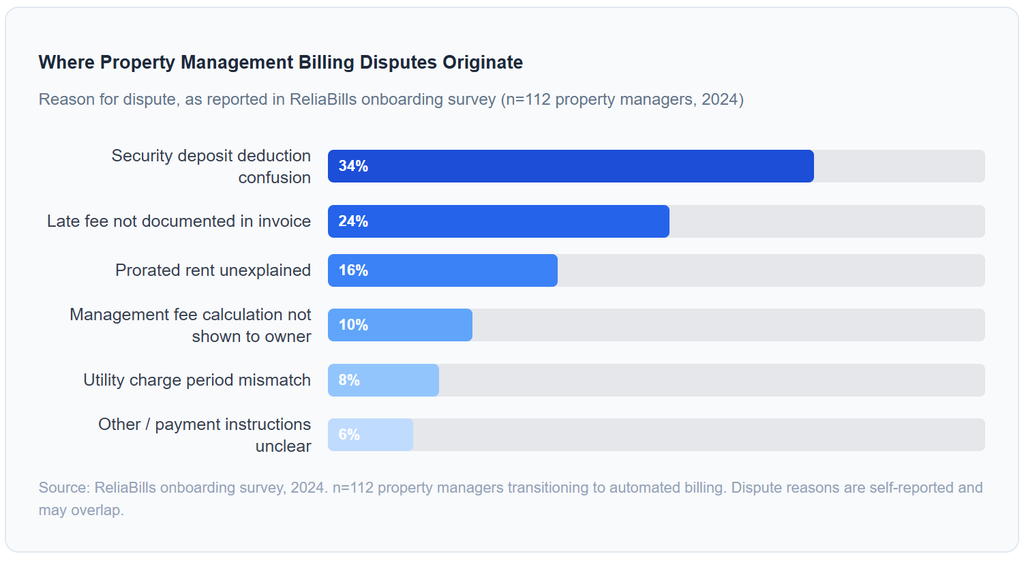
Over a third of billing disputes in property management trace back to security deposit handling. That number held consistent across both independent landlords with two or three units and management companies running portfolios of 80 or more. The template issue is universal regardless of portfolio size.
How to Handle Prorated Rent on an Invoice
Prorated rent is the second most common source of unexplained partial payments and tenant questions. The calculation is straightforward but needs to be shown in full on the invoice because “partial month rent: $618.33” without context reads as an error to most tenants.
The standard proration method divides the monthly rent by the number of days in the month, then multiplies by the number of days occupied. For a tenant moving in on June 15 paying $1,850 per month, the calculation is $1,850 divided by 30 days in June, multiplied by 16 days occupied (June 15 through June 30): $986.67. That calculation belongs on the invoice, not just the result.
For mid-month move-outs, proration works the same way in reverse but with one additional complication: the tenant may have already paid a full month’s rent, in which case the invoice becomes a credit memo showing the refund amount due for the unused days. Make that document structure explicit. A credit memo and an invoice are different documents with different obligations attached.
Property Management Invoice vs. Related Documents
Property managers work with several overlapping billing documents. Understanding where each one begins and ends prevents you from using one document to do a job it was not designed for.
| Document | Who It Goes To | What It Covers | Legal Weight | When Generated |
|---|---|---|---|---|
| Tenant invoice | Tenant | Rent, fees, utilities, deposit status | Rent receipt when marked paid | Monthly, or per billing cycle |
| Owner statement | Property owner | Collected rent, management fees, maintenance, net disbursement, reserve balance | Accounting record; may trigger owner payment | Monthly after collections close |
| Security deposit receipt | Tenant | Deposit amount, account where held, terms of return | Required at move-in in many states | At lease signing / deposit collection |
| Security deposit disposition statement | Tenant | Itemized deductions, refund amount, receipts | Legally required within state deadline at move-out | Within 14 to 60 days of move-out |
| Maintenance invoice | Owner or tenant (per lease) | Specific repair or maintenance charge | Supporting document for deposit deductions or owner billing | After repair completion |
| Generic invoice | Any party | General billing; no property-specific fields | Weak; missing fields needed for dispute resolution | N/A for property management use |
Common Mistakes and What I Got Wrong at First
Using one template for both tenants and owners
Early on, it is tempting to adapt a single invoice layout for every billing situation. The problem is that tenant invoices and owner statements need fundamentally different fields, totals, and framing. A tenant does not need to see the management fee calculation. An owner does not need the late fee policy reminder. Building separate templates from the start removes this confusion and looks more professional to both parties.
Adding the security deposit to the total amount due
This one is common among landlords who use a standard invoicing tool not built for property management. The deposit appears as a line item, and the software sums it with rent, producing a total that includes the deposit. Tenants pay the total, the deposit gets mixed with rent income, and you have created a trust account violation without intending to. The deposit must always be excluded from the payable total and labeled clearly as held in trust.
Not showing the prorated rent calculation
Showing only the prorated result without the math generates questions every single time. A tenant who sees $986.67 without explanation assumes it is wrong. A tenant who sees “Daily rate $61.67 x 16 days occupied June 15 to June 30 = $986.67” does not ask. The three extra words on an invoice prevent a back-and-forth email chain that delays payment.
Sending late fees without citing the lease section
Late fees without a lease reference are the most commonly disputed charge in property management. “We applied a late fee” is an assertion. “Per lease Section 7, a late fee of 5% applies after the 5-day grace period expires on the 6th of the month” is a documented fact. The distinction matters enormously if the dispute escalates.
Treating the owner statement as optional at small scale
Managers with two or three properties often skip the formal owner statement and communicate informally. This works fine until a property is sold, an owner passes away and their estate needs records, or an owner questions a maintenance charge from six months ago. The owner statement is not just billing. It is your paper trail for every management decision you made on the owner’s behalf.
Moving From a Static Template to Automated Recurring Billing
A well-structured property management invoice template solves the formatting and compliance problem. It does not solve the production problem. Creating, customizing, and sending an invoice for each tenant each month is a manual task, and it scales linearly with your portfolio. At 10 units it is manageable. At 50 it becomes a significant administrative burden, and at 100 or more it is practically a full-time job.
The solution is recurring billing, where the platform generates and sends the monthly invoice automatically based on a defined schedule, charges the tenant’s stored payment method if ACH or card authorization is on file, and sends a reminder sequence for invoices that go unpaid past the due date. The property manager’s involvement in the monthly billing cycle drops to reviewing exceptions rather than processing every invoice.
For property managers who bill variable amounts month to month, because of maintenance chargebacks or utility fluctuations, it is worth verifying that your chosen platform supports variable recurring billing, not just fixed-amount subscriptions. The capability distinction matters: many invoicing tools can automate a fixed monthly rent invoice but require manual intervention whenever the amount changes. Platforms built for client account management in service industries typically handle variable amounts as part of the recurring billing logic.
ReliaBills was designed with this kind of service billing in mind, supporting both fixed recurring charges and variable line items within an automated billing cycle, which makes it a practical fit for property managers who need consistent output with flexible amounts. For managers who also need installment payment plans for move-in costs or large repair chargebacks, that capability is worth evaluating alongside the core recurring billing function.
How to Build a Property Management Invoice Template That Actually Protects You
1. Start with your most complex billing scenario, not your simplest one
The temptation is to build a template around a standard monthly rent invoice. Build it around a move-in invoice instead: the first month’s rent, the last month’s rent if applicable, prorated rent for a mid-month start, and the security deposit clearly labeled and excluded from the total. If the template handles move-in correctly, it handles everything else correctly by default.
2. Add every required field before worrying about visual design
Use the field table in this guide as a checklist. Do not move on to fonts and logo placement until every field in the “Required” and “Critical” columns is accounted for. A plain invoice with all the right fields protects you. A beautiful invoice missing the lease reference does not.
3. Build a separate template for owner-facing statements
Copy the tenant invoice template and rework it for the owner relationship. Remove tenant-specific fields and add management fee calculations, maintenance reserve balance, repair detail, and net disbursement. Both templates should share your branding but have distinct structures.
4. Have a local property attorney review your template before using it
State requirements for rental invoicing, security deposit disclosures, and late fee documentation vary significantly. Oregon is different from Texas, which is different from New York. Spending $200 on a one-hour attorney review of your template structure before you send 500 invoices is dramatically cheaper than defending one dispute that your template failed to prevent.
5. Configure recurring billing as soon as the template is approved
Once the template is correct, automate its production. Set up your monthly billing cycle so invoices generate automatically, go out on a defined schedule, and trigger a reminder sequence for unpaid amounts. The template does the compliance work. The automation does the production work. Both are necessary for a billing system that scales.
Frequently Asked Questions
1. What is a property management invoice template?
A property management invoice template is a structured billing document used by landlords and property managers to request payment from tenants or bill property owners for management services. Unlike a generic invoice, it includes property-specific fields such as unit identifiers, lease reference numbers, rental period dates, security deposit status, and itemized fee categories. When marked as paid, it also serves as a legal rent receipt in most jurisdictions.
2. What should a property management invoice include?
A complete property management invoice includes the management company name and contact details, tenant or owner name and address, unique invoice number, invoice date and payment due date, rental period covered, property address and unit number, lease or agreement reference number, itemized line items for each charge (base rent, management fee, late fees, utilities, maintenance), security deposit status clearly excluded from the payable total, payment methods accepted, and the late fee policy with grace period. Owner-facing statements should additionally show the management fee calculation basis and the maintenance reserve balance.
3. Is a security deposit shown as a line item on a rental invoice?
Yes, but carefully. The security deposit should appear as a separate, clearly labeled line item that is excluded from the total amount due. Showing it in brackets, as in [$1,850.00], signals that it is informational, not payable. Most jurisdictions require deposits to be held in a separate trust or escrow account, and your invoice should note that. At move-out, deposit deductions appear on a separate disposition statement, not on the regular invoice.
4. How do you calculate and show prorated rent on an invoice?
Prorated rent is calculated by dividing the monthly rent by the number of days in the month, then multiplying by the days occupied. Always show this calculation on the invoice: the daily rate, the number of days, and the total. For example: “Daily rate of $61.67 x 16 days (June 15 to June 30) = $986.67.” Without showing the math, partial-month amounts generate confusion and delayed payment almost every time. Check whether your lease specifies a calendar-day or banker’s month proration method, because they produce different figures.
5. What is the difference between a tenant invoice and an owner statement?
A tenant invoice bills the tenant for rent, utilities, maintenance chargebacks, and any fees tied to their lease. An owner statement bills or reports to the property owner, showing collected rent, management fees deducted, maintenance costs, the maintenance reserve balance, and the net disbursement. Both documents cover the same property and period but serve entirely different parties. Using one template for both results in the wrong information reaching each party and undermines the professionalism of both documents.
6. Can I automate property management invoicing?
Yes. Billing platforms that support recurring billing can automate monthly rent invoices, reminder sequences, and owner statements. The platform generates invoices on a defined schedule, charges stored payment methods for tenants who have authorized ACH or card payments, and handles the reminder cadence for unpaid invoices automatically. For variable charges like maintenance or utilities, verify that the platform supports variable recurring amounts rather than only fixed-amount subscriptions. Automating the production side of billing is what makes the compliance work of building a good template scalable across a growing portfolio.
Recent Articles:
- How to Choose the Right Billing Software for Your Service Business
- Digital Marketing Agency Invoice Template: What to Include for Professional Billing

Brant Pallazza is the Founder and President of ReliaBills, an invoicing and recurring billing platform built to help small businesses secure predictable cash flow. With over 20 years of experience in direct response marketing and e-commerce leadership, including a 13-year tenure managing over $500 million in gross sales at Digital River. Brant writes actionable guides on automated billing, payment processing, and scaling SMBs.