
Keeping track of customer payments manually can quickly become overwhelming, especially as your business grows and transactions increase. Missed payments, delayed follow-ups, and inconsistent records can directly impact cash flow and create unnecessary financial stress. Without a reliable system, it becomes difficult to maintain accuracy and stay on top of every transaction.
Billing software offers a more efficient and organized way to manage payments, invoices, and customer data in one place. Instead of relying on spreadsheets or manual logs, businesses can automate processes and gain real-time visibility into payment activity. This not only simplifies financial management but also reduces the risk of errors and delays.
Understanding how to track customer payments effectively is essential for maintaining healthy cash flow and long-term business stability. With automation and recurring billing, businesses can ensure consistent payment tracking, improve accuracy, and focus more on growth rather than administrative tasks.
What Is Billing Software?
Billing software is a digital solution designed to help businesses create invoices, track payments, and manage customer accounts efficiently. It automates many aspects of the billing process, including invoice generation, payment recording, and reporting. This allows businesses to reduce manual work and improve overall accuracy.
One of its core strengths is centralizing all billing-related data in a single platform. Customer information, invoice history, and payment records are easily accessible, making it simpler to monitor transactions and resolve issues quickly. This centralized approach eliminates the confusion that often comes with scattered data.
Unlike basic accounting tools or spreadsheets, billing software is specifically built for managing the billing lifecycle. It focuses on automation, real-time updates, and customer payment tracking, making it an essential tool for businesses looking to streamline their financial operations.
Why Tracking Customer Payments Is Important
Ensures accurate financial reporting and cash flow management
Tracking payments ensures that all incoming revenue is properly recorded and reflected in financial statements. This helps businesses maintain a clear and accurate picture of their financial health. It also supports better cash flow planning and day-to-day operations.
Reduces missed or overdue payments
Consistent tracking allows businesses to quickly identify unpaid or overdue invoices. This makes it easier to follow up with customers before issues escalate. As a result, businesses can improve collection rates and reduce revenue leakage.
Improves customer relationship management
Having accurate payment records helps businesses address customer inquiries and disputes efficiently. It ensures transparency and builds trust between the business and its clients. Strong relationships lead to better retention and long-term loyalty.
Supports better decision-making through financial insights
Payment tracking provides valuable data on customer behavior and payment trends. Businesses can use this information to optimize pricing, billing cycles, and credit policies. This leads to more informed and strategic decision-making.
Challenges of Manual Payment Tracking
Manual payment tracking often requires significant time and effort, especially when dealing with multiple customers and invoices. Employees must input data, update records, and verify payments manually, which can slow down operations. This increases the administrative burden on teams.
Human error is another major challenge in manual systems. Small mistakes in data entry or calculations can lead to discrepancies in financial records. Over time, these errors can accumulate and create larger issues.
Additionally, tracking payments across multiple channels can be difficult without a centralized system. Businesses may struggle to reconcile payments and gain real-time visibility into their financial status. This makes it harder to manage cash flow effectively.
How Billing Software Helps Track Customer Payments
Billing software simplifies how to track customer payments by automating key processes and reducing manual intervention. Payments are automatically recorded, and invoice statuses are updated in real time. This ensures that records are always accurate and up to date.
With built-in dashboards and reporting tools, businesses can monitor payment activity at a glance. These insights help identify overdue invoices and track overall financial performance. This level of visibility improves decision-making.
Automated reminders and notifications ensure that customers are prompted to pay on time. Integration with payment gateways also allows for seamless transactions, making it easier for customers to complete payments. This combination of features enhances efficiency and cash flow.
Key Features of Billing Software for Payment Tracking
Automated invoicing and payment recording
Billing software automatically generates invoices and logs payments as soon as they are received. This reduces manual data entry and ensures records remain accurate. It also helps maintain consistency across all transactions.
Real-time payment tracking and reporting
Businesses can access up-to-date information on payment statuses through dashboards and reports. This allows teams to monitor performance and identify overdue invoices quickly. It improves overall visibility and control.
Recurring billing and auto-pay capabilities
Recurring billing automates invoicing for repeat customers on a fixed schedule. Auto-pay ensures payments are collected automatically without customer intervention. This reduces missed payments and simplifies tracking.
Customer account and transaction history management
Each customer’s billing and payment history is stored in a centralized system. This makes it easy to review past transactions and resolve issues. It also enhances customer service and communication.
Payment reminders and notifications
Automated reminders notify customers of upcoming or overdue payments. These alerts encourage timely payments and reduce delays. They also minimize the need for manual follow-ups.
Integration with accounting and ERP systems
Billing software connects with financial systems to synchronize data across platforms. This eliminates duplicate entries and ensures consistency in records. It also streamlines overall financial operations.
The Role of Recurring Billing in Payment Tracking
Recurring billing plays a key role in simplifying how to track customer payments for businesses with repeat transactions. It ensures that invoices are generated automatically at scheduled intervals, reducing the need for manual input. This creates a consistent and predictable billing cycle.
By automating both invoicing and payments, recurring billing minimizes the complexity of tracking multiple transactions. Businesses no longer need to monitor each invoice individually, as the system handles it automatically. This reduces administrative workload and improves efficiency.
Additionally, recurring billing improves accuracy by standardizing the process. With fewer manual steps involved, the risk of errors is significantly reduced. This leads to more reliable financial records and smoother operations.
Best Practices for Tracking Customer Payments Effectively
Use centralized billing software for all transactions
Managing all payment data in one platform improves organization and accuracy. It eliminates confusion caused by scattered records across multiple tools. This ensures better control and easier access to information.
Enable auto-pay to reduce overdue payments
Auto-pay allows customers to pay automatically on scheduled due dates. This reduces the risk of missed or late payments. It also creates a more predictable cash flow.
Set up automated reminders and notifications
Automated reminders keep customers informed about upcoming and overdue invoices. This encourages timely payments and reduces delays. It also decreases the need for manual follow-ups.
Regularly reconcile accounts and review reports
Reviewing financial reports ensures that all transactions are recorded correctly. It helps identify discrepancies and resolve issues quickly. This maintains the accuracy of financial data.
Maintain accurate customer and invoice records
Keeping detailed and updated records prevents confusion and disputes. It ensures that all transactions are properly documented and traceable. This improves efficiency and strengthens customer trust.
How Billing Software Improves Cash Flow and Accuracy
Billing software accelerates payment collection by automating invoicing and reminders. Customers are more likely to pay on time when they receive consistent notifications and easy payment options. This leads to improved cash flow.
Automation also reduces errors in tracking and reconciliation. With fewer manual processes, the risk of discrepancies is minimized. This ensures that financial records remain accurate.
In addition, real-time data provides better financial visibility. Businesses can forecast revenue and make informed decisions based on current information. This improves overall financial planning.
Key Benefits of Using Billing Software for Payment Tracking
Improves accuracy and reduces errors
Automation minimizes human errors in data entry and calculations. This ensures that financial records are reliable and consistent. It also reduces the need for corrections and adjustments.
Saves time through automation
Routine tasks such as invoicing and payment tracking are handled automatically. This frees up time for employees to focus on higher-value activities. It also increases overall productivity.
Enhances cash flow management
Faster payment collection leads to more stable and predictable cash flow. Businesses can better manage expenses and investments. This supports long-term financial health.
Reduces overdue invoices
Automated reminders and auto-pay features help ensure timely payments. This decreases the number of unpaid invoices. It improves overall revenue collection.
Provides better financial insights
Reporting tools offer detailed insights into payment trends and customer behavior. Businesses can use this data to make informed decisions. This supports strategic planning and growth.
Common Use Cases
Subscription-based businesses
These businesses rely on recurring billing to manage ongoing customer payments. Billing software automates invoicing and tracking for each billing cycle. This ensures consistency and reduces manual work.
Service providers with recurring clients
Agencies, consultants, and maintenance providers benefit from automated billing systems. They can easily track payments for repeat services. This improves efficiency and accuracy.
Property and tenant billing
Property managers use billing software to track rent payments and additional fees. Automation ensures that invoices are sent and payments are recorded on time. It also simplifies record-keeping.
Utilities and energy providers
These organizations handle large volumes of recurring payments. Billing software helps manage and track these transactions efficiently. It ensures accuracy and timely billing.
Freelancers and small businesses
Independent professionals use billing software to manage invoices and payments بسهولة. It reduces administrative tasks and improves financial organization. This allows them to focus on growing their business.
How ReliaBills Helps Track Customer Payments Efficiently
Tracking customer payments manually can quickly become inefficient as your business scales and transaction volumes increase. ReliaBills simplifies this process by centralizing billing, automating invoice generation, and providing real-time visibility into payment activity. This allows businesses to reduce administrative workload while maintaining accurate and organized financial records.
A major advantage of ReliaBills is its recurring billing and auto-pay functionality, which helps streamline repeat transactions and ensure timely payments. By automating invoices and payment collection, businesses can significantly improve how to track customer payments without constant manual follow-ups. This creates a more consistent and predictable cash flow while reducing errors and missed payments.
For businesses that require more advanced capabilities, ReliaBills PLUS offers enhanced automation, detailed reporting, and powerful customer management tools. These features enable organizations to monitor payment trends, optimize billing workflows, and gain deeper financial insights. With ReliaBills PLUS, companies can scale efficiently while maintaining accuracy, control, and improved payment tracking performance.
How to Create a New Recurring Invoice Using ReliaBills
Creating a New Recurring Invoice using ReliaBills involves the following steps:
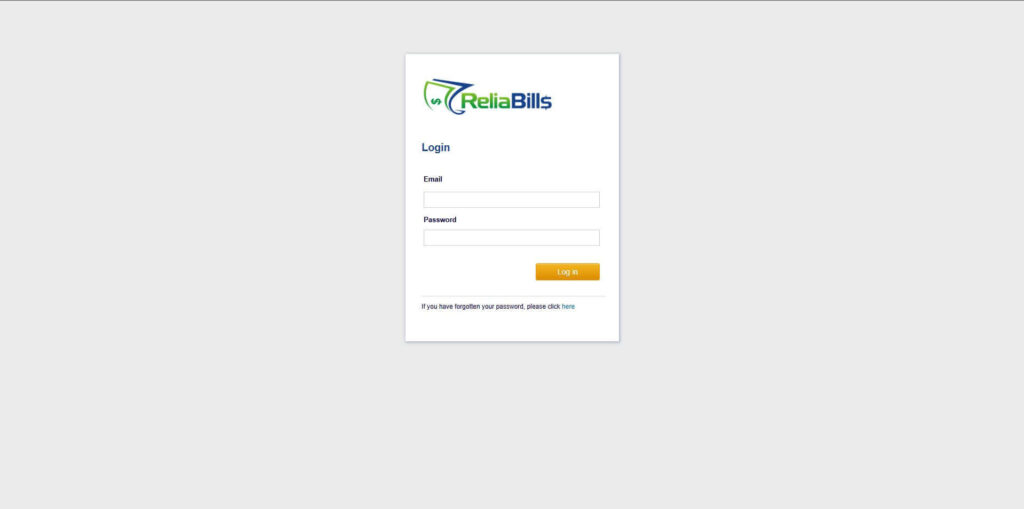
Step 1: Login to ReliaBills
- Access your ReliaBills Account using your login credentials. If you don’t have an account, sign up here.
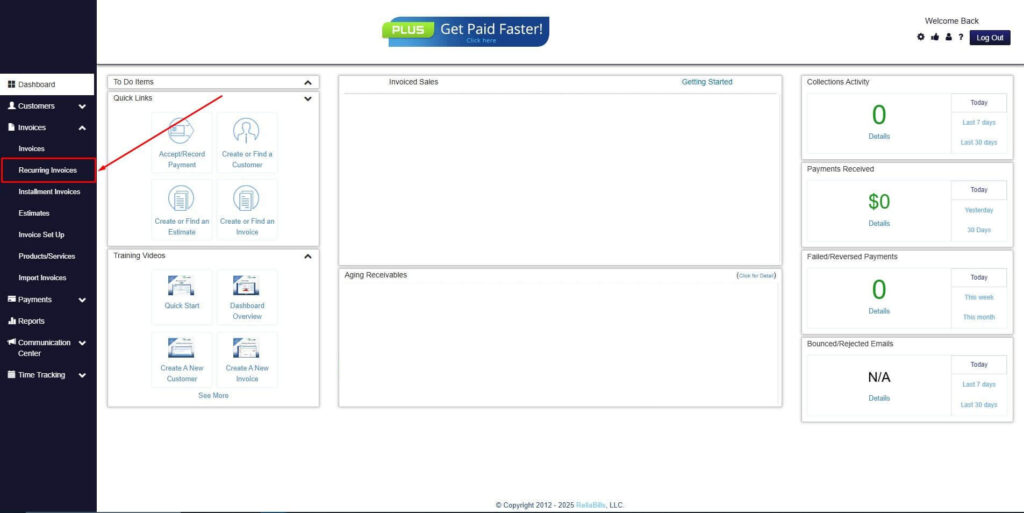
Step 2: Click on Recurring Invoices
- Navigate to the Invoices Dropdown and click on Recurring Invoices for an overview of the list of your existing customers.
Step 3: Go to the Customers Tab
- If you have already created a customer, search for them in the Customers tab and make sure their status is “Active”.
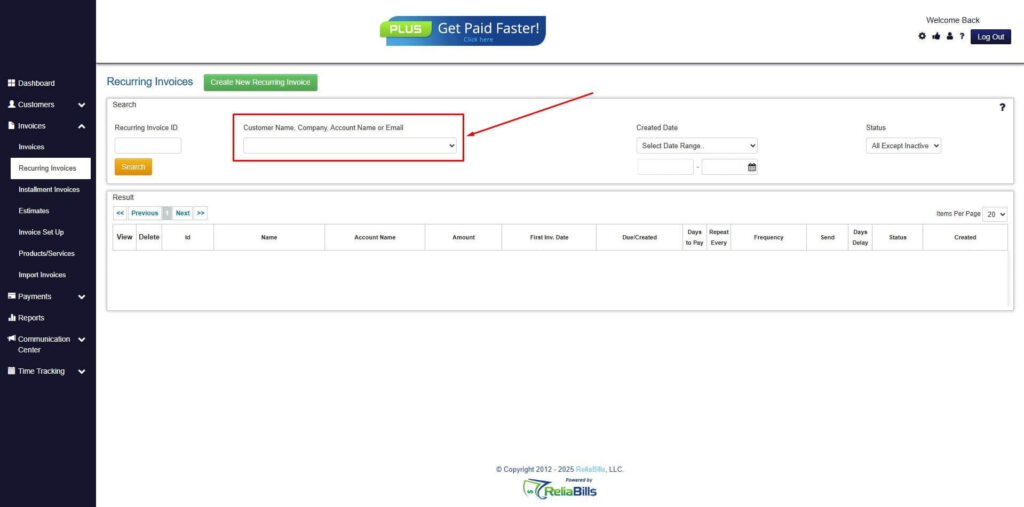
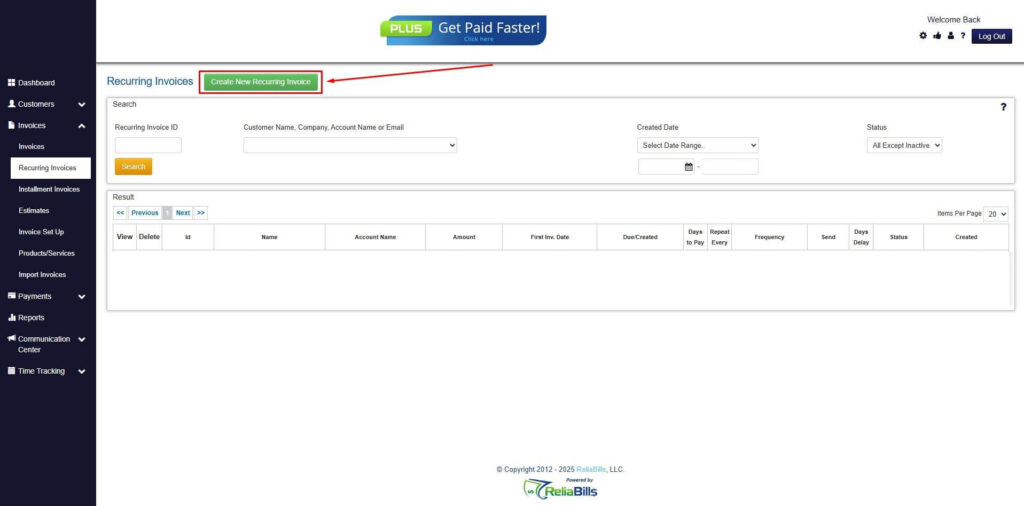
Step 4: Click the Create New Recurring Invoice
- If you haven’t created any customers yet, click the Create New Recurring Invoice to create a new customer.
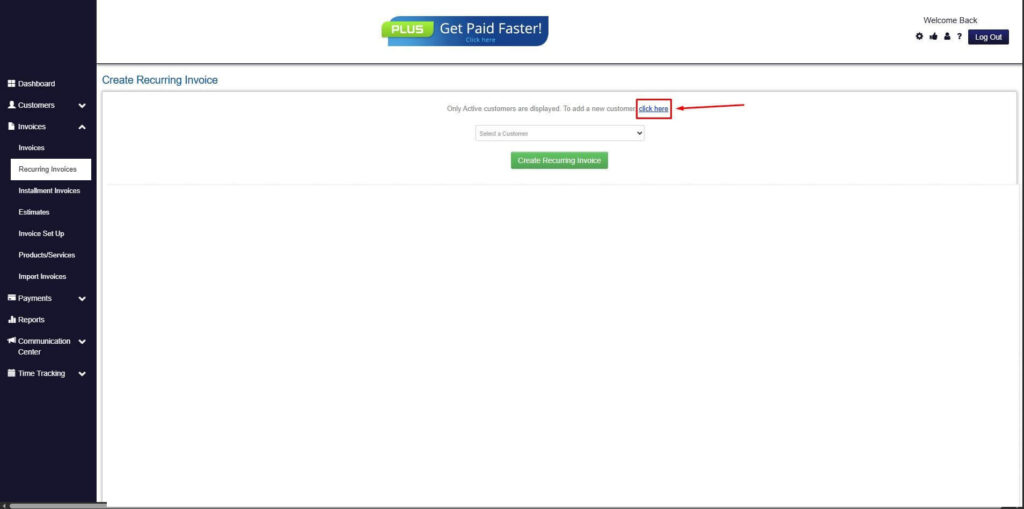
Step 5: Click on the “Click here” Button
- Click on the “Click here” button to proceed with the recurring invoice creation.
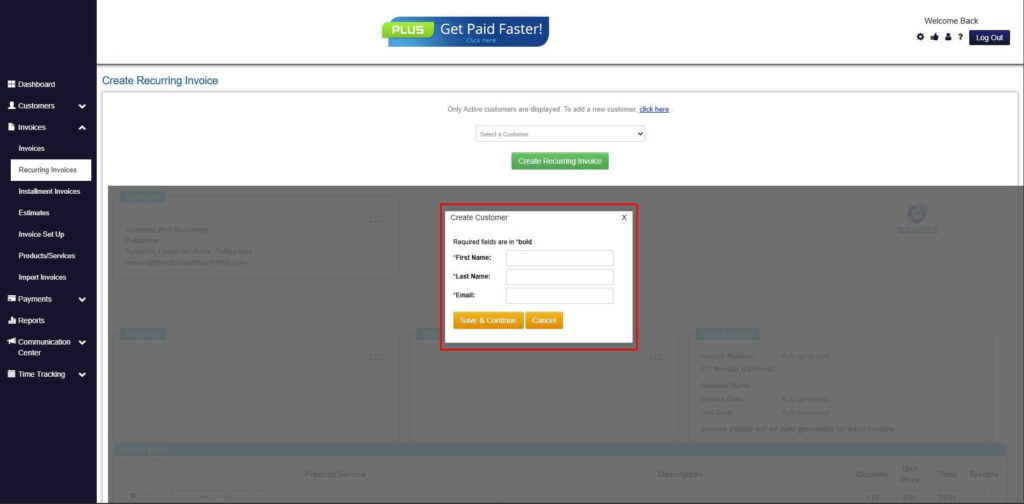
Step 6: Create Customer
- Provide your First Name, Last Name, and Email to proceed.
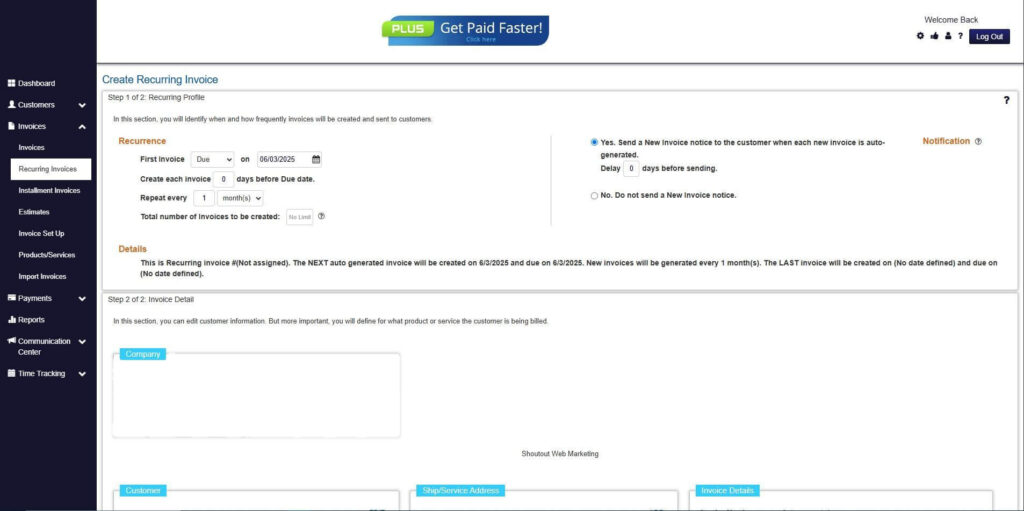
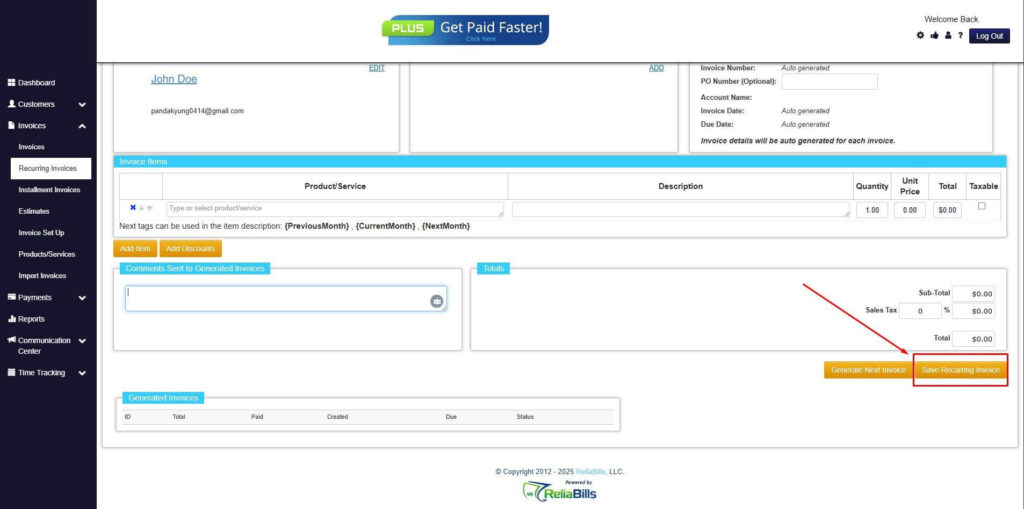
Step 7: Fill in the Create Recurring Invoice Form
- Fill in all the necessary fields.
Step 8: Save Recurring Invoice
- After filling up the form, click “Save Recurring Invoice” to continue.
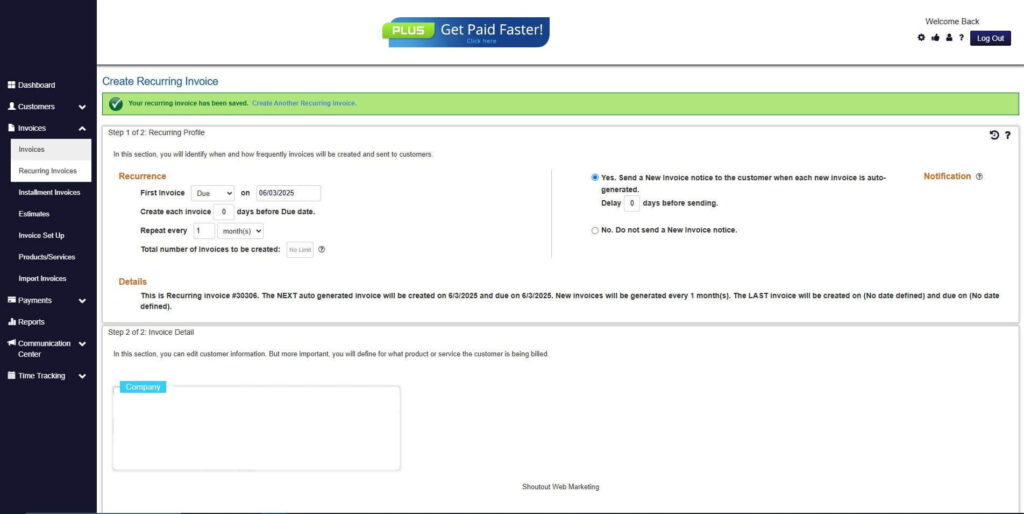
Step 9: Recurring Invoice Created
- Your Recurring Invoice has been created.
Frequently Asked Questions (FAQs)
1. How does billing software track customer payments?
It automatically records payments and updates invoice statuses in real time. This ensures accurate and up-to-date records. It also reduces manual work.
2. Can billing software automate payment reminders?
Yes, most systems send automated reminders for upcoming or overdue payments. This helps improve on-time payment rates. It also reduces manual follow-ups.
3. Is recurring billing necessary for tracking payments?
While not required, it greatly simplifies tracking for repeat transactions. It ensures consistent billing and payment schedules. This reduces administrative effort.
4. How secure is billing software for financial data?
Billing software typically includes encryption and access controls to protect data. These features ensure that sensitive information remains secure. They also support compliance.
5. Can small businesses benefit from billing software?
Yes, it helps small businesses save time and reduce errors. It also improves cash flow and financial visibility. This supports growth and efficiency.
Conclusion
Billing software has become an essential tool for businesses looking to improve how to track customer payments efficiently. By automating invoicing, payment tracking, and reporting, it eliminates many of the challenges associated with manual processes. This leads to more accurate records and smoother financial operations.
Automation and recurring billing play a crucial role in maintaining consistency and reducing administrative workload. They ensure that payments are tracked reliably and collected on time. This combination enhances both efficiency and financial stability.
As businesses continue to grow, adopting digital billing solutions is key to staying competitive. Investing in the right tools allows companies to streamline processes, improve cash flow, and focus on long-term success.