
Non-commercial invoices play a critical role in documenting internal transactions that don’t directly generate revenue but are essential for operational continuity. These may include product samples, internal cost allocations, warranty replacements, or intercompany transfers. While they don’t impact sales, they still require accurate tracking and formal approval to maintain financial integrity.
However, many organizations still rely on manual processes to review and approve these invoices. This often leads to bottlenecks, delays, and inconsistencies, especially when multiple departments are involved. Without a standardized system, invoices can get lost, approvals can stall, and errors can slip through unnoticed.
To address these challenges, businesses are increasingly choosing to automate non commercial invoice approvals. Automation streamlines workflows, reduces manual intervention, and ensures that every invoice follows a consistent and efficient approval path. As a result, organizations can significantly improve speed, accuracy, and overall operational efficiency.
What Are Non-Commercial Invoice Approvals?
Non-commercial invoice approvals refer to the structured process of reviewing, validating, and authorizing invoices that do not involve direct sales transactions. This process ensures that each invoice is legitimate, properly documented, and aligned with company policies before being recorded in financial systems. It typically involves multiple checkpoints, including verification of details, managerial approval, and final authorization.
Approvals are essential for maintaining compliance and enforcing internal controls. Even though these invoices are not tied to revenue, they still impact inventory, expenses, and financial reporting. A well-defined approval process helps prevent unauthorized transactions, ensures accurate accounting, and supports audit readiness.
Common examples of non-commercial invoices include internal transfers of goods, promotional samples distributed to customers, and warranty-related replacements. In each of these scenarios, approvals help validate the purpose and accuracy of the transaction, ensuring transparency across departments.
Challenges of Manual Approval Workflows
Manual approval workflows often introduce unnecessary complexity into non-commercial invoice management. When invoices must pass through multiple layers of approval, delays become inevitable, especially if approvers are unavailable or unclear about their responsibilities. This slows down operations and creates frustration across teams.
Another major issue is the lack of visibility into the approval process. Without a centralized system, it becomes difficult to track where an invoice is, who is responsible for the next step, or how long it has been pending. This lack of transparency can lead to missed deadlines and poor decision-making.
Additionally, manually routing invoices between departments increases the risk of errors and lost documents. Inconsistent approval criteria across teams further complicates the process, resulting in discrepancies and compliance risks. These inefficiencies highlight the need to automate non commercial invoice approvals for better control and consistency.
How Automation Streamlines Invoice Approvals
Automation transforms invoice approvals by introducing rule-based workflows that eliminate guesswork and manual handling. Instead of relying on emails or paper trails, invoices are automatically routed to the appropriate approvers based on predefined criteria such as department, value, or invoice type. This ensures that every invoice reaches the right person without delays.
By reducing repetitive tasks, automation frees up valuable time for finance and administrative teams. Employees no longer need to chase approvals or manually update records, allowing them to focus on higher-value activities. Digital workflows also enable faster approvals, as stakeholders can review and approve invoices from anywhere.
Moreover, automated systems provide real-time tracking and notifications, giving complete visibility into the approval process. Standardized workflows ensure consistency across the organization, making it easier to scale operations while maintaining control. Businesses that automate non commercial invoice approvals gain a significant advantage in efficiency and accuracy.
Key Features of Automated Approval Systems
Workflow automation and rule-based routing
This feature automatically directs invoices to the correct approvers based on predefined conditions such as department, value, or transaction type. It eliminates the need for manual forwarding and reduces delays caused by human intervention. As a result, businesses can ensure faster and more consistent approval workflows.
Role-based access controls and permissions
Access controls limit who can view, edit, or approve invoices based on their role within the organization. This prevents unauthorized actions and strengthens financial governance. It also ensures that sensitive information is only handled by qualified personnel.
Real-time approval tracking and status updates
A centralized dashboard allows users to monitor the status of each invoice throughout the approval process. Teams can easily identify bottlenecks and take action to resolve delays. This level of visibility improves accountability and operational efficiency.
Automated notifications and reminders
The system sends alerts to approvers when invoices require their attention. It also triggers reminders for pending or overdue approvals to keep workflows moving. This reduces the risk of delays caused by missed communications.
Audit trails and compliance reporting
Every action taken on an invoice is recorded with timestamps and user details. This creates a transparent and traceable history for auditing purposes. It also helps organizations meet regulatory and compliance requirements.
Integration with ERP and accounting systems
Automated systems connect seamlessly with existing financial platforms to synchronize data. This eliminates duplicate data entry and reduces the likelihood of errors. It also ensures that financial records remain accurate and up to date.
Customizable approval hierarchies
Businesses can design approval structures based on their specific operational needs. This allows for flexibility in handling different invoice types and approval levels. It ensures that complex workflows are managed efficiently without sacrificing control.
Mobile and remote accessibility
Approvers can review and approve invoices from any device with internet access. This supports remote work environments and accelerates decision-making. It also ensures that approvals are not delayed due to location constraints.
The Role of Recurring Billing in Approval Efficiency
Recurring billing plays a crucial role in reducing the complexity of invoice approvals, especially for repetitive non-commercial transactions. Instead of processing similar invoices from scratch each time, businesses can set up recurring templates with predefined rules and approval workflows. This minimizes redundancy and accelerates the approval cycle.
By leveraging recurring billing, organizations can eliminate the need for repeated approvals on routine transactions. Once a workflow is approved and standardized, it can be reused automatically, ensuring consistency and saving time. This is particularly beneficial for recurring internal allocations or scheduled non-revenue distributions.
When businesses combine recurring billing with automation, they create a highly efficient system that minimizes administrative workload. This approach not only improves speed but also enhances accuracy, making it easier to automate non commercial invoice approvals at scale.
Best Practices for Streamlining Non-Commercial Invoice Approvals
Define clear approval hierarchies and criteria
Establishing clear rules for approvals helps eliminate confusion and delays. Employees understand exactly who is responsible for each step in the process. This leads to faster and more consistent decision-making.
Automate routing based on invoice type and value
Automation ensures that invoices are sent to the correct approvers instantly. High-value or sensitive invoices can be routed to senior staff for additional review. This improves efficiency while maintaining proper oversight.
Standardize approval workflows across departments
Consistent workflows ensure that all teams follow the same approval procedures. This reduces discrepancies and improves overall process reliability. It also makes it easier to scale operations as the business grows.
Integrate approval workflows with financial systems
Connecting approval tools with accounting systems ensures seamless data flow. This eliminates manual data entry and reduces the risk of errors. It also keeps financial records accurate and synchronized.
Set up automated notifications and escalation rules
Notifications keep approvers informed about pending tasks. Escalation rules ensure that delayed approvals are addressed promptly. This helps maintain momentum and prevents workflow bottlenecks.
Regularly review and optimize approval processes
Continuous evaluation helps identify inefficiencies in the workflow. Businesses can refine rules and improve performance over time. This ensures that the approval process remains effective and adaptable.
Train employees on approval protocols and tools
Proper training ensures that all users understand how to use the system effectively. It reduces errors and improves overall workflow efficiency. Well-trained employees contribute to smoother and faster approvals.
How Automation Improves Accuracy and Compliance
Automation enhances accuracy by enforcing standardized workflows across all invoice approvals. Every invoice follows the same predefined rules, reducing the likelihood of inconsistencies and human errors. This ensures that all transactions are processed uniformly, regardless of who handles them.
In addition, automated systems maintain detailed documentation of every step in the approval process. This creates a comprehensive audit trail that can be easily accessed during internal reviews or external audits. Businesses gain better control over their financial data and can demonstrate compliance with regulatory requirements.
By minimizing the risk of unauthorized or incorrect approvals, automation strengthens internal controls. Organizations that automate non commercial invoice approvals are better equipped to maintain compliance while improving overall financial governance.
Key Benefits of Automating Invoice Approvals
Speeds up approval cycles
Automation removes manual steps that slow down the approval process. Invoices are routed instantly to the right stakeholders. This significantly reduces processing time.
Reduces administrative workload
Employees spend less time on repetitive tasks such as forwarding invoices and tracking approvals. This allows teams to focus on more strategic responsibilities. It also improves overall productivity.
Improves accuracy and consistency
Standardized workflows ensure that all invoices follow the same process. This minimizes human errors and inconsistencies. It leads to more reliable financial data.
Enhances visibility and tracking
Real-time tracking provides complete transparency into the approval process. Teams can quickly identify delays and take corrective action. This improves accountability across departments.
Strengthens compliance and audit readiness
Automated systems maintain detailed records of all approval activities. This simplifies audit preparation and ensures compliance with regulations. It also reduces the risk of penalties.
Minimizes risk of unauthorized approvals
Role-based permissions ensure that only authorized individuals can approve invoices. This reduces the likelihood of fraud or incorrect approvals. It strengthens internal controls.
Supports scalability and business growth
Automated systems can handle increasing volumes of invoices without additional resources. This makes it easier for businesses to grow without operational strain. It also ensures consistent performance at scale.
Common Use Cases
- Internal cost allocations: Businesses use approvals to distribute shared expenses across departments. This ensures that costs are accurately recorded and authorized. It also improves financial transparency.
- Sample or promotional product approvals: Marketing teams often require approvals for distributing free products. These transactions must be tracked even though they do not generate revenue. Automation ensures they are properly documented and approved.
- Warranty and service-related invoices: Companies process invoices for repairs or replacements under warranty. These require validation to ensure legitimacy. Automated approvals help speed up the process while maintaining accuracy.
- Intercompany transactions: Organizations with multiple entities must approve internal transfers of goods or services. These transactions require proper documentation and authorization. Automation ensures consistency and compliance across entities.
- Non-revenue distributions: Businesses may distribute items internally or externally without generating revenue. These transactions still need approval for tracking and accountability. Automation simplifies the process and ensures proper documentation.
- Inventory adjustments and write-offs: Adjustments for damaged or obsolete inventory require approval. This ensures that inventory records remain accurate. Automated workflows help validate and process these changes efficiently.
- Project-based internal billing: Costs associated with internal projects often need to be allocated and approved. This helps maintain accurate budgeting and reporting. Automation ensures that approvals are handled quickly and consistently.
How ReliaBills Simplifies Non-Commercial Invoice Approvals
Managing non-commercial invoice approvals can quickly become time-consuming when handled manually, especially as transaction volumes increase. ReliaBills simplifies this process by centralizing invoice workflows, automating approvals, and reducing administrative overhead across teams. With a more streamlined system in place, businesses can improve efficiency while maintaining full control and visibility over internal transactions.
A key advantage of ReliaBills is its recurring billing functionality, which helps businesses automate non commercial invoice approvals for repeat transactions. By using predefined rules and templates, similar invoices can follow consistent approval workflows without requiring manual intervention each time. This not only accelerates processing but also ensures accuracy and standardization across all recurring non-commercial activities.
For organizations seeking advanced capabilities, ReliaBills PLUS offers enhanced automation, deeper reporting insights, and more sophisticated workflow management tools. These features allow businesses to customize approval hierarchies, monitor performance, and continuously optimize their processes. As a result, companies can scale their operations more effectively while maintaining compliance and reducing approval bottlenecks.
How to Create a New Recurring Invoice Using ReliaBills
Creating a New Recurring Invoice using ReliaBills involves the following steps:
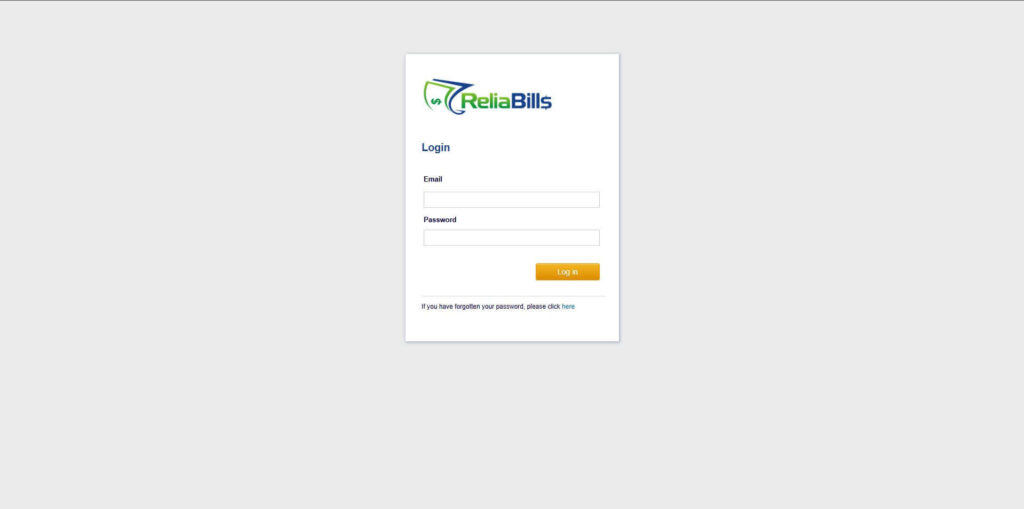
Step 1: Login to ReliaBills
- Access your ReliaBills Account using your login credentials. If you don’t have an account, sign up here.
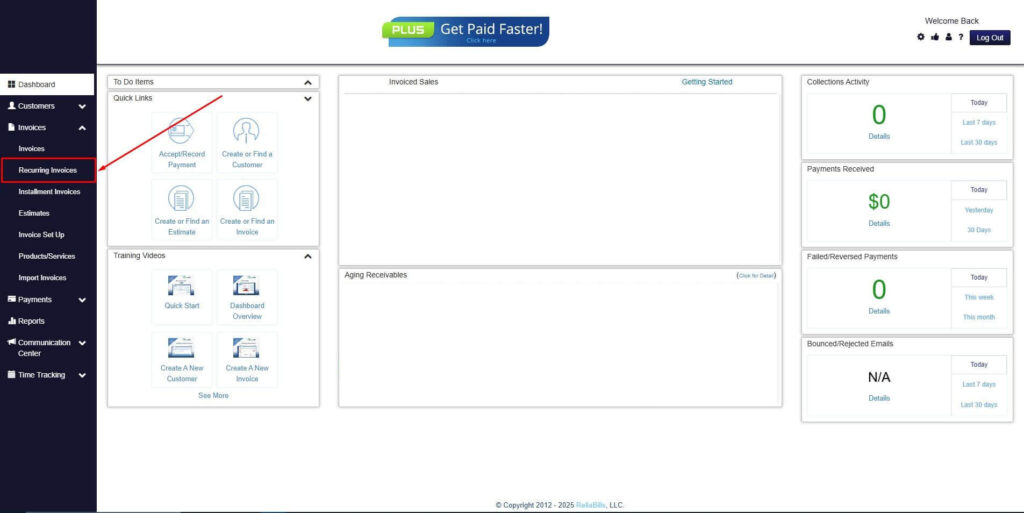
Step 2: Click on Recurring Invoices
- Navigate to the Invoices Dropdown and click on Recurring Invoices for an overview of the list of your existing customers.
Step 3: Go to the Customers Tab
- If you have already created a customer, search for them in the Customers tab and make sure their status is “Active”.
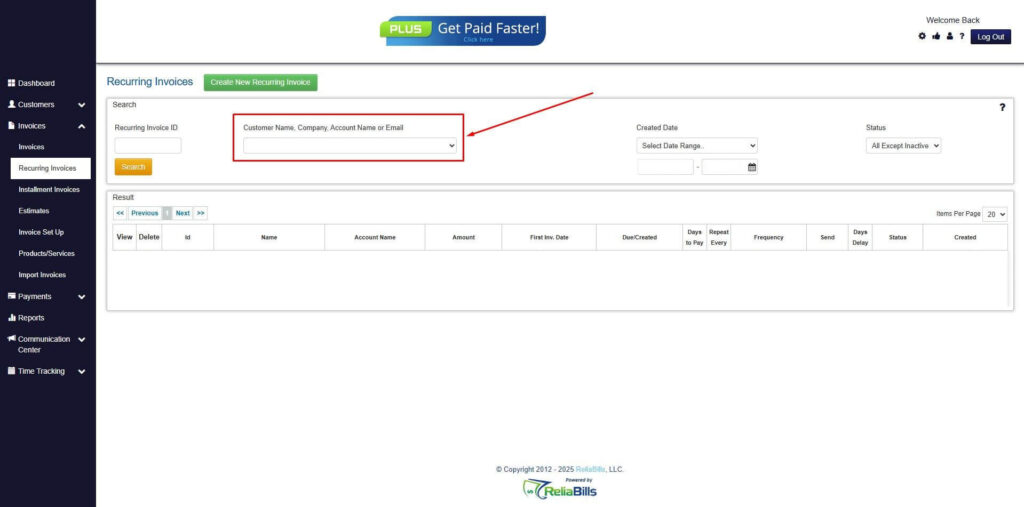
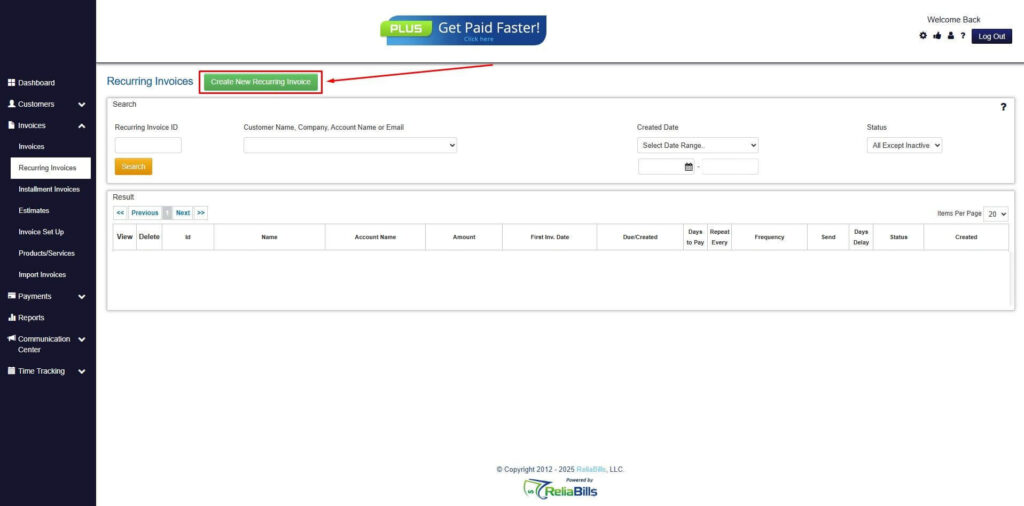
Step 4: Click the Create New Recurring Invoice
- If you haven’t created any customers yet, click the Create New Recurring Invoice to create a new customer.
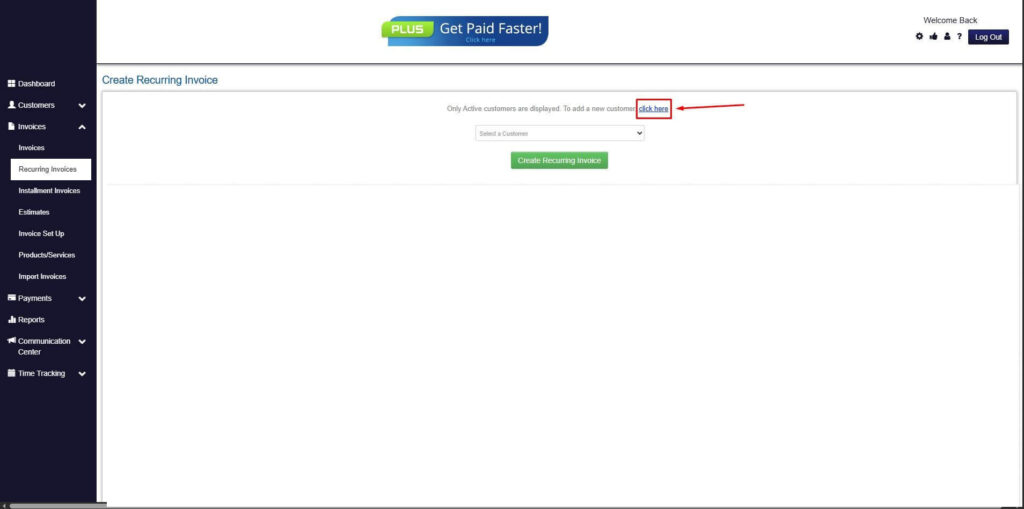
Step 5: Click on the “Click here” Button
- Click on the “Click here” button to proceed with the recurring invoice creation.
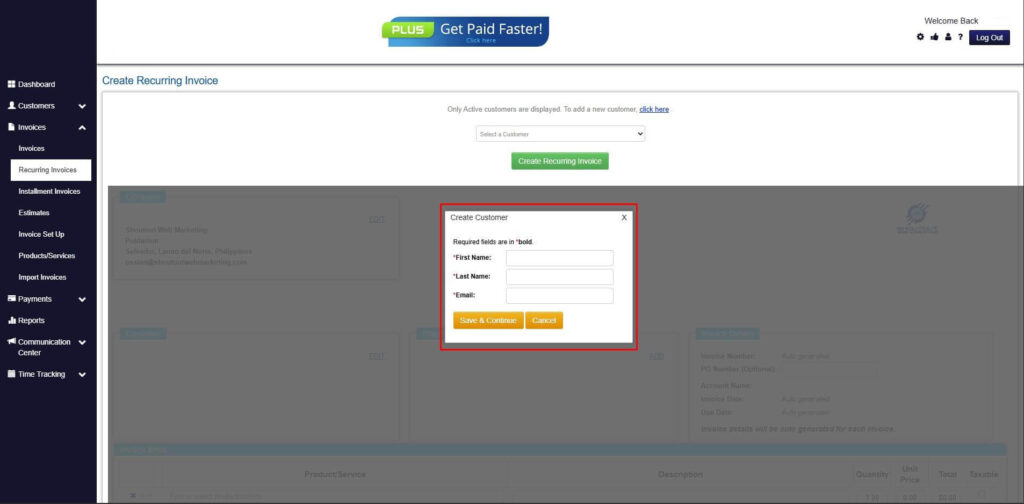
Step 6: Create Customer
- Provide your First Name, Last Name, and Email to proceed.
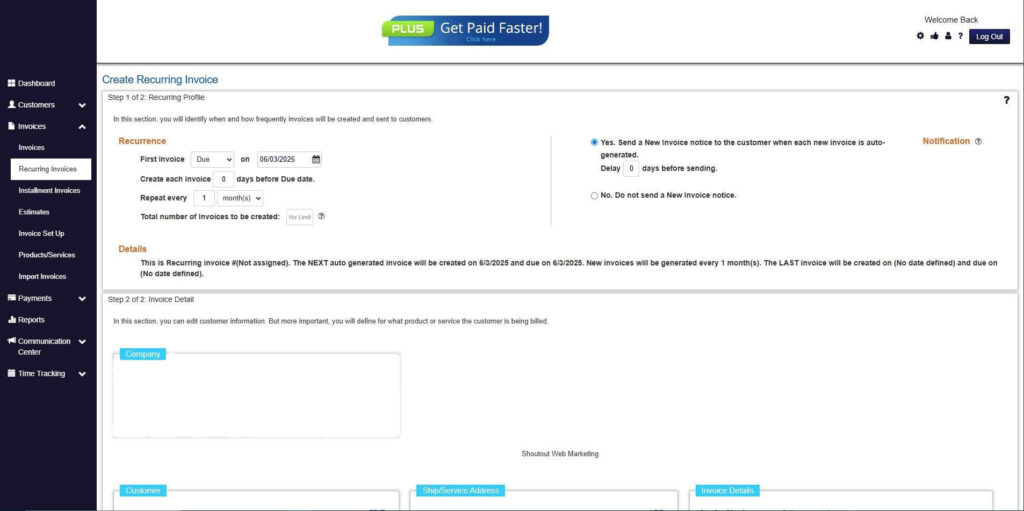
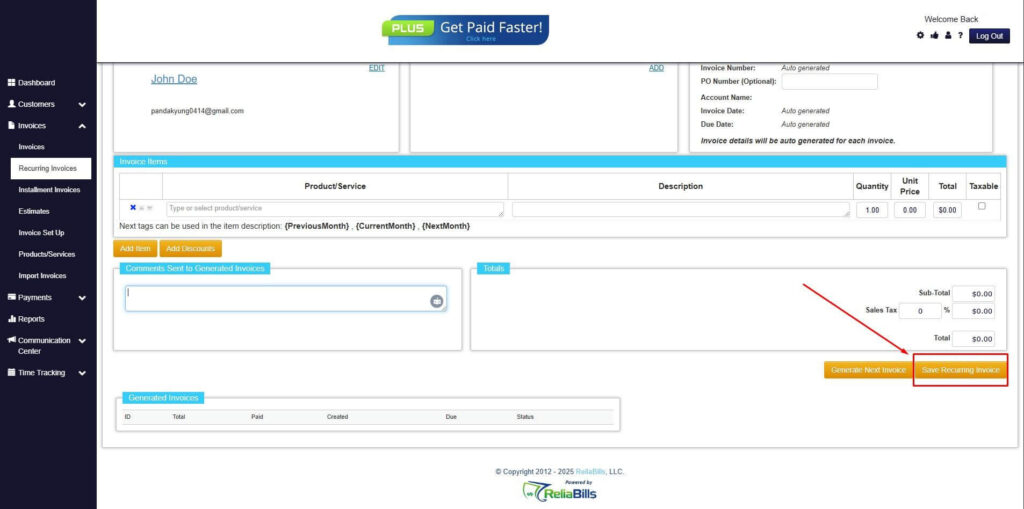
Step 7: Fill in the Create Recurring Invoice Form
- Fill in all the necessary fields.
Step 8: Save Recurring Invoice
- After filling up the form, click “Save Recurring Invoice” to continue.
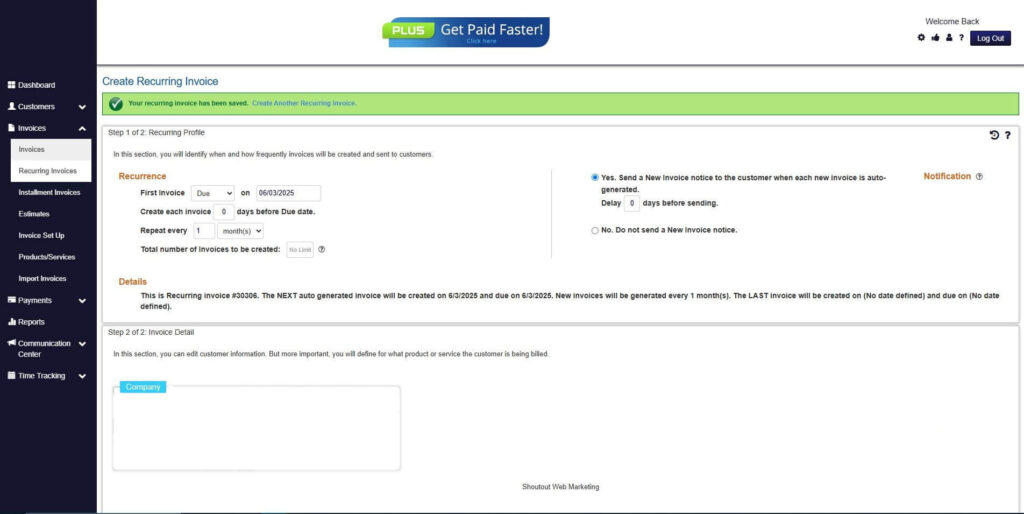
Step 9: Recurring Invoice Created
- Your Recurring Invoice has been created.
Frequently Asked Questions (FAQs)
1. What are non-commercial invoice approvals?
These are processes used to review and authorize invoices that do not involve direct revenue. They ensure that all internal transactions are accurate and properly documented. This helps maintain financial control and compliance.
2. Why is it important to automate non commercial invoice approvals?
Automation reduces delays and eliminates manual errors in the approval process. It ensures consistency and improves overall efficiency. This leads to faster and more reliable workflows.
3. How does automation improve approval workflows?
Automation uses predefined rules to route invoices automatically. It also provides real-time tracking and notifications for better visibility. This streamlines the entire approval process.
4. Can recurring billing reduce approval workload?
Recurring billing allows businesses to reuse predefined approval workflows. This reduces the need to manually process similar invoices repeatedly. It saves time and improves consistency.
5. Are automated approval systems secure?
Most systems include security features such as access controls and encryption. These measures protect sensitive financial data. They also ensure that only authorized users can approve invoices.
Conclusion
Automation is transforming how businesses handle internal financial processes, especially when it comes to non-commercial invoices. By replacing manual workflows with digital systems, organizations can significantly improve speed, accuracy, and visibility across their approval processes. This shift not only reduces inefficiencies but also strengthens internal controls.
Choosing to automate non commercial invoice approvals allows businesses to eliminate bottlenecks, standardize workflows, and maintain compliance with ease. Combined with recurring billing capabilities, automation creates a scalable framework that supports long-term growth and operational efficiency.
As businesses continue to evolve, adopting automated and recurring billing solutions will become essential for staying competitive. Organizations that invest in these technologies today are better positioned to handle increasing complexity while maintaining streamlined and reliable financial operations.