
SaaS businesses are built for rapid growth, but scaling operations often exposes weaknesses in billing processes. As customer bases expand and subscription models become more complex, managing invoices manually becomes increasingly difficult and error-prone. Many companies struggle with delayed invoices, inconsistent billing, and limited visibility into revenue, all of which can negatively impact cash flow. Adopting an automated invoicing system for SaaS becomes a critical step toward improving efficiency, ensuring accuracy, and maintaining consistent revenue streams.
What Are Automated Invoicing Systems in SaaS?
An automated invoicing system for SaaS is a software solution designed to handle billing processes with minimal manual input. It automates invoice generation, payment tracking, and subscription billing cycles, ensuring that customers are billed accurately and on time. These systems often include recurring billing features, allowing businesses to automatically charge customers based on subscription plans or usage.
Unlike manual or semi-automated invoicing methods, automated systems eliminate the need for spreadsheets and repetitive data entry. They integrate with payment gateways, CRM platforms, and accounting tools to provide a seamless billing experience. This level of automation not only reduces errors but also improves operational efficiency across finance and customer service teams.
Why Manual Invoicing Becomes Inefficient in SaaS
Manual invoicing quickly becomes unsustainable as SaaS businesses grow and manage larger customer bases. Each new subscription adds complexity, especially when customers frequently upgrade, downgrade, or cancel their plans. Keeping track of these changes manually increases the likelihood of billing errors and missed invoices.
Additionally, modern SaaS pricing models such as usage-based or tiered pricing require dynamic calculations that are difficult to manage without automation. Human error in these calculations can lead to incorrect charges, customer dissatisfaction, and revenue leakage. Over time, these inefficiencies can significantly impact both financial performance and operational scalability.
Key Signs It’s Time to Switch to Automated Invoicing
Growing number of subscription customers
As your SaaS business gains more subscribers, managing invoices manually becomes increasingly complex and time-consuming. Each new customer adds to the workload, especially when dealing with different billing cycles and pricing tiers. An automated invoicing system for SaaS helps handle this growth efficiently without overwhelming your team.
Frequent billing errors or discrepancies
Repeated mistakes in invoices, such as incorrect amounts or missed charges, are clear indicators that manual processes are failing. These errors can lead to disputes, delayed payments, and damage to customer trust. Automation ensures consistency and accuracy in every billing transaction.
Delays in invoice generation and payment collection
If invoices are not sent promptly, payment cycles are delayed, affecting cash flow. Manual processes often result in bottlenecks, especially during busy billing periods. Automated systems generate and send invoices instantly, speeding up the entire payment process.
Difficulty tracking recurring payments and renewals
Managing subscription renewals manually can lead to missed billing opportunities and inconsistent revenue. Automated systems track recurring payments and ensure that renewals are processed on time. This improves revenue predictability and reduces administrative effort.
Limited visibility into revenue and receivables
Without real-time insights, it becomes difficult to understand your financial position. Manual tracking methods often lack comprehensive reporting and analytics. Automated invoicing systems provide dashboards and reports that give clear visibility into revenue, outstanding payments, and trends.
How Automated Invoicing Systems Work in SaaS
Automated invoicing systems operate by linking billing processes directly to subscription data and customer activity. When a billing cycle is triggered, the system automatically generates invoices based on predefined pricing rules. This eliminates the need for manual input and ensures consistency across all transactions.
These systems also handle prorations for plan changes, ensuring accurate billing when customers upgrade or downgrade mid-cycle. Invoices are sent automatically, along with reminders for upcoming or overdue payments. Payment statuses are updated in real time, providing businesses with an accurate view of their financial health.
Key Features of Automated Invoicing Systems
Recurring billing and subscription management
Automated invoicing systems allow SaaS businesses to set up recurring billing cycles for subscriptions. This ensures customers are billed consistently without manual intervention. It also simplifies the management of renewals and ongoing service agreements.
Automated invoice generation and delivery
Invoices are created and sent automatically based on billing schedules or customer activity. This reduces delays and ensures timely communication with customers. It also eliminates repetitive administrative tasks for finance teams.
Real-time payment tracking and reporting
Businesses can monitor payments as they happen through centralized dashboards. This provides immediate insights into paid, pending, and overdue invoices. It helps improve financial planning and decision-making.
Auto-pay and multiple payment options
Customers can choose from various payment methods, including auto-pay for convenience. This reduces friction in the payment process and encourages timely payments. It also enhances the overall customer experience.
Integration with accounting and CRM systems
Automated invoicing systems connect with existing tools to streamline data flow. This eliminates duplicate data entry and reduces the risk of inconsistencies. It also ensures that all financial and customer information is synchronized.
Customer portals for billing and payment history
Self-service portals allow customers to view invoices, payment history, and account details. This reduces support requests and improves transparency. It also empowers customers to manage their billing independently.
The Role of Recurring Billing in SaaS Automation
Recurring billing is a fundamental component of any automated invoicing system for SaaS. It ensures that customers are billed at regular intervals without manual intervention, creating a consistent and reliable billing process. This automation reduces the risk of missed invoices and helps maintain steady cash flow.
Additionally, recurring billing systems automatically adjust to subscription changes such as upgrades, downgrades, or cancellations. This ensures that customers are charged accurately based on their current plans. Over time, this consistency improves customer trust and enhances overall billing efficiency.
Benefits of Switching to Automated Invoicing Systems
Reduces manual workload and administrative costs
Automation eliminates repetitive tasks such as invoice creation and payment tracking. This allows teams to focus on higher-value activities instead of manual processes. It also reduces the need for additional administrative staff.
Improves billing accuracy and consistency
Automated systems minimize human errors in calculations and data entry. This ensures that invoices are accurate and consistent across all customers. It also reduces disputes and improves customer satisfaction.
Speeds up payment collection and reduces overdue invoices
Faster invoice delivery and automated reminders encourage timely payments. This shortens the payment cycle and improves cash flow. It also reduces the burden of chasing overdue invoices.
Enhances customer experience with seamless billing
Customers benefit from clear, accurate, and timely invoices. Features like auto-pay and online payment options make transactions more convenient. This leads to higher customer satisfaction and retention.
Supports scalability as the business grows
Automated invoicing systems can handle increasing volumes without additional effort. This makes it easier for SaaS businesses to scale operations. It also ensures that billing processes remain efficient as the company expands.
Challenges of Delaying the Switch
Delaying the transition to an automated invoicing system for SaaS can lead to significant operational inefficiencies. Manual processes become increasingly difficult to manage as the business grows, resulting in slower billing cycles and higher administrative costs. These inefficiencies can limit a company’s ability to scale effectively.
There is also a higher risk of revenue leakage due to missed invoices, incorrect billing, or delayed payments. Customers may experience frustration بسبب billing errors, which can damage trust and increase churn rates. Over time, these challenges can negatively impact both financial performance and customer relationships.
Best Practices for Transitioning to Automated Invoicing
Assess current billing processes and pain points
Start by evaluating existing workflows to identify inefficiencies and areas for improvement. Understanding these challenges helps in selecting the right automated invoicing system for SaaS. It also ensures a smoother transition by addressing key issues upfront.
Choose a system that supports recurring billing and scalability
Select a solution that can handle your current needs while supporting future growth. Recurring billing features are essential for managing subscriptions effectively. Scalability ensures that the system remains effective as your business expands.
Migrate customer and billing data carefully
Accurate data migration is critical to maintaining billing continuity. Ensure that all customer information, subscription details, and payment records are transferred correctly. This prevents disruptions and ensures a seamless transition.
Communicate changes clearly to customers
Inform customers about the transition to automated invoicing and any changes they may experience. Clear communication builds trust and reduces confusion. It also helps customers adapt to new billing processes more easily.
Monitor performance and optimize workflows
After implementation, continuously evaluate the system’s performance. Use analytics and reports to identify areas for improvement. Ongoing optimization ensures that the system delivers maximum efficiency and value.
How Automation Improves SaaS Financial Management
Automation provides SaaS businesses with real-time visibility into revenue, receivables, and overall financial performance. This level of insight allows teams to make data-driven decisions and respond quickly to changes in the business environment. It also improves accuracy in financial reporting and forecasting.
Additionally, automated systems streamline reconciliation and accounting processes by ensuring that all transactions are recorded consistently. This reduces the time and effort required for financial audits and compliance. Ultimately, automation supports better financial management and long-term growth planning.
Key Benefits of Automated Invoicing in SaaS
- Ensures timely and consistent billing: Automated invoicing systems guarantee that invoices are generated and sent on schedule. This consistency helps maintain steady revenue streams. It also reduces the risk of missed billing cycles.
- Reduces errors and billing disputes: Automation minimizes mistakes caused by manual data entry and calculations. This leads to more accurate invoices and fewer customer complaints. It also improves trust and credibility.
- Improves cash flow predictability: With consistent billing and faster payments, businesses can better forecast revenue. This stability supports strategic planning and investment decisions. It also reduces financial uncertainty.
- Saves time on manual processes: By automating repetitive tasks, businesses can significantly reduce administrative workload. This allows teams to focus on growth and innovation. It also increases overall productivity.
- Enables scalable business growth: Automated systems can handle increasing transaction volumes without additional effort. This makes it easier to scale operations efficiently. It also ensures that billing processes remain reliable as the business grows.
Common Use Cases
- Subscription-based SaaS platforms: Businesses offering monthly or annual subscriptions rely on automated invoicing to manage recurring billing cycles. This ensures consistent revenue and reduces manual workload. It also improves customer retention through seamless billing experiences.
- Usage-based pricing models: SaaS companies that charge based on usage need automated systems to calculate and bill accurately. These systems handle complex pricing structures without errors. This ensures fairness and transparency in billing.
- Freemium to paid conversions: Automated invoicing helps manage the transition from free to paid plans. It ensures that customers are billed correctly once they upgrade. This simplifies onboarding and improves conversion rates.
- Enterprise SaaS billing with custom contracts: Large clients often require customized billing terms and pricing structures. Automated systems can handle these complexities efficiently. This ensures accurate billing and strong client relationships.
- Multi-tier subscription services: Businesses offering multiple pricing tiers benefit from automation to manage different billing levels. This ensures that customers are charged correctly based on their plans. It also simplifies subscription management.
How ReliaBills Helps SaaS Businesses Transition to Automated Invoicing
ReliaBills provides SaaS businesses with a streamlined way to transition from manual billing processes to a fully automated invoicing system. By centralizing invoice generation, payment tracking, and customer billing workflows, it eliminates inefficiencies and reduces administrative burden. Businesses can automate billing cycles and ensure invoices are delivered accurately and on time without manual intervention. This results in improved operational efficiency and a more consistent revenue flow.
A major advantage of ReliaBills is its robust recurring billing functionality, which is essential for subscription-based SaaS models. It allows businesses to automate subscription renewals, manage plan changes, and handle billing adjustments seamlessly. This ensures that customers are billed correctly regardless of upgrades, downgrades, or cancellations. As a result, SaaS companies can maintain predictable revenue while reducing the complexity of managing subscriptions manually.
ReliaBills PLUS enhances these capabilities with advanced automation, reporting, and customer management tools designed for scaling SaaS businesses. It offers detailed insights into revenue trends, outstanding invoices, and customer payment behavior through comprehensive dashboards. These features enable better financial decision-making and improved visibility across billing operations. With ReliaBills PLUS, SaaS businesses can confidently scale while maintaining accuracy, efficiency, and control over their invoicing processes.
How to Create a New Recurring Invoice Using ReliaBills
Creating a New Recurring Invoice using ReliaBills involves the following steps:
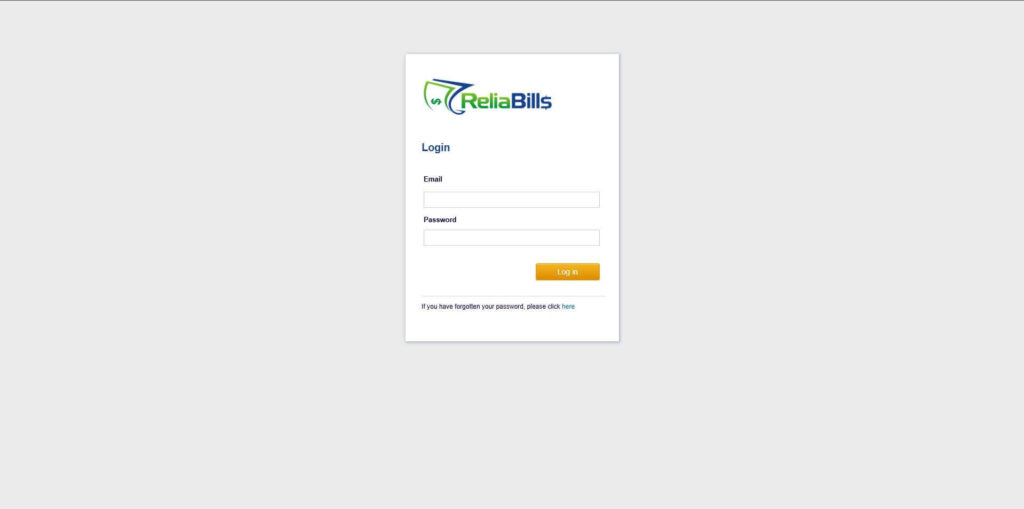
Step 1: Login to ReliaBills
- Access your ReliaBills Account using your login credentials. If you don’t have an account, sign up here.
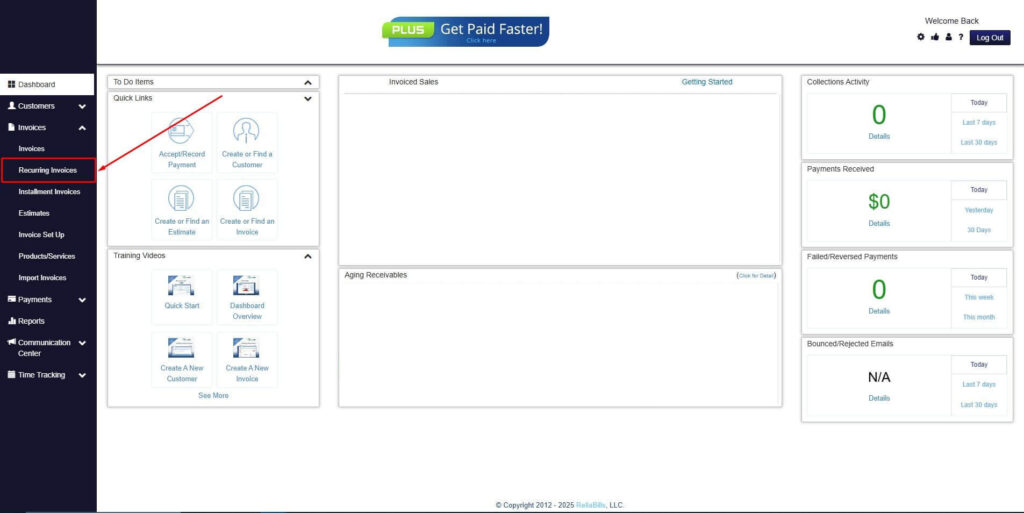
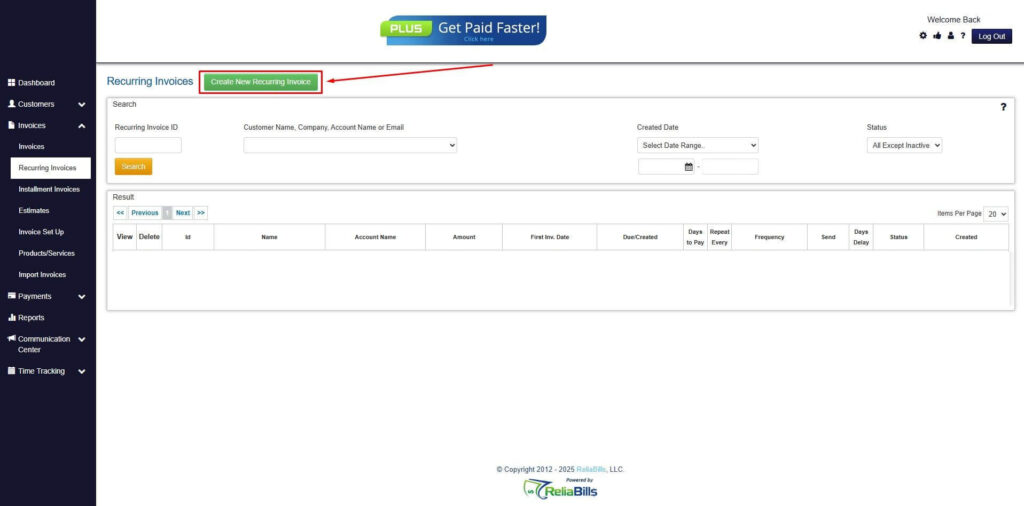
Step 2: Click on Recurring Invoices
- Navigate to the Invoices Dropdown and click on Recurring Invoices for an overview of the list of your existing customers.
Step 3: Go to the Customers Tab
- If you have already created a customer, search for them in the Customers tab and make sure their status is “Active”.
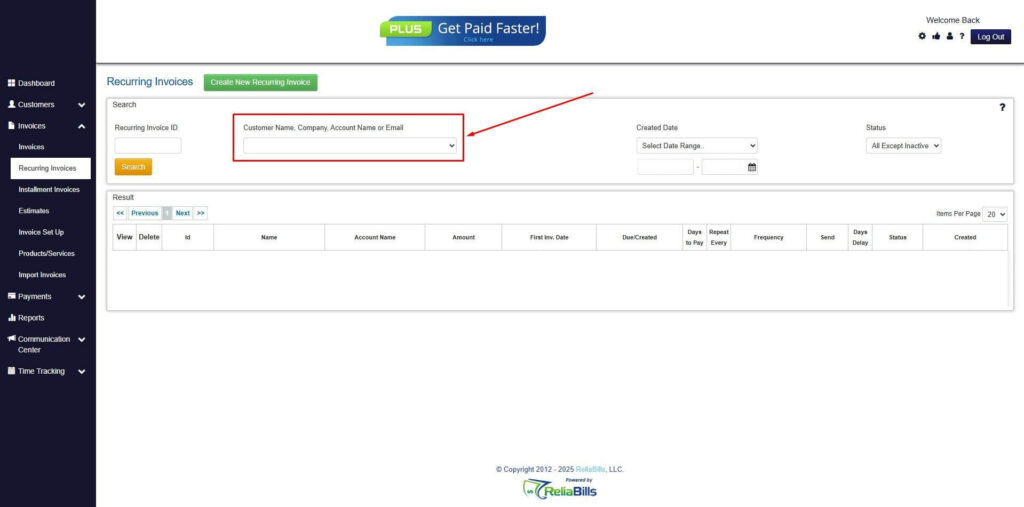
Step 4: Click the Create New Recurring Invoice
- If you haven’t created any customers yet, click the Create New Recurring Invoice to create a new customer.
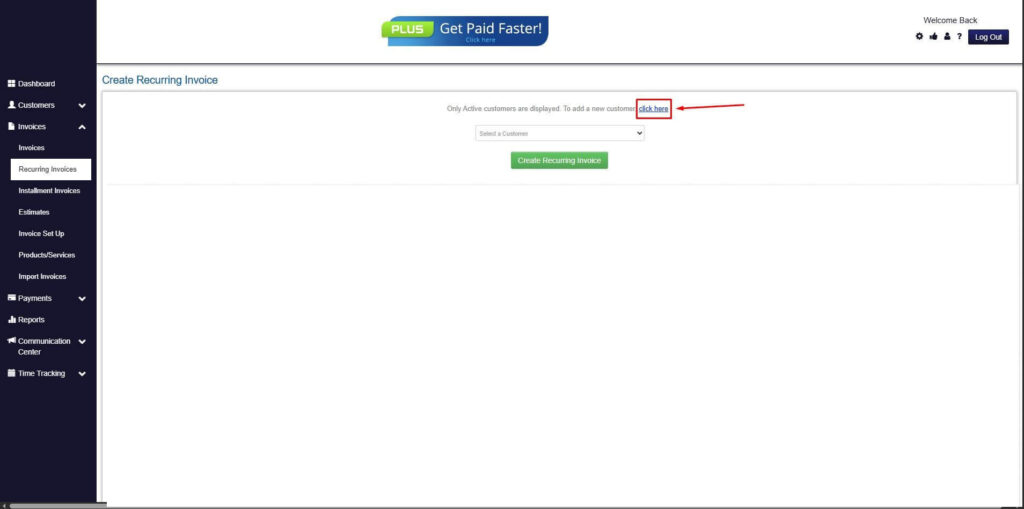
Step 5: Click on the “Click here” Button
- Click on the “Click here” button to proceed with the recurring invoice creation.
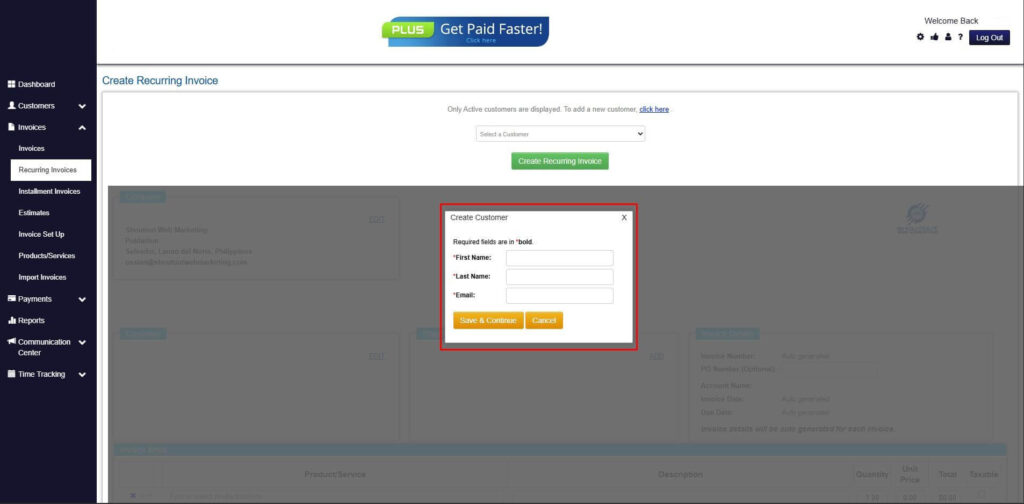
Step 6: Create Customer
- Provide your First Name, Last Name, and Email to proceed.
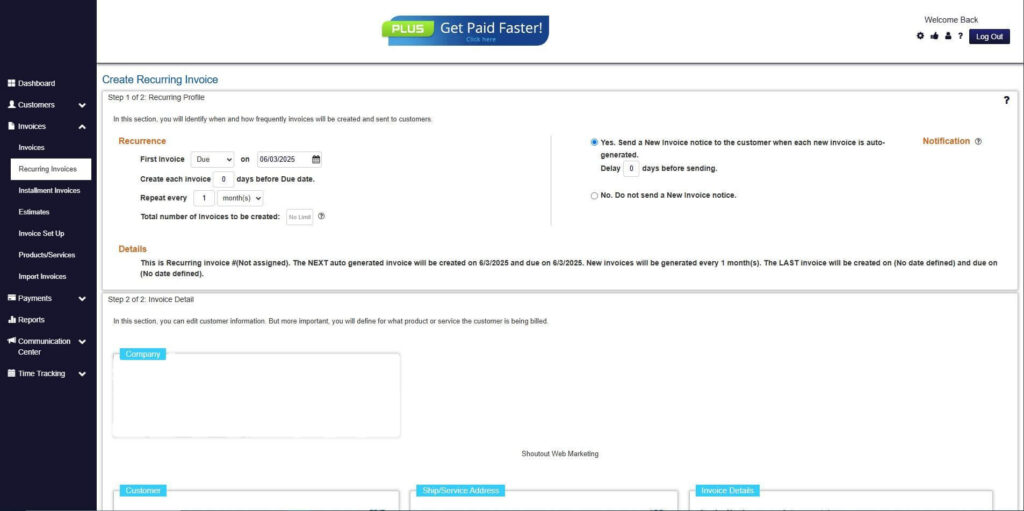
Step 7: Fill in the Create Recurring Invoice Form
- Fill in all the necessary fields.
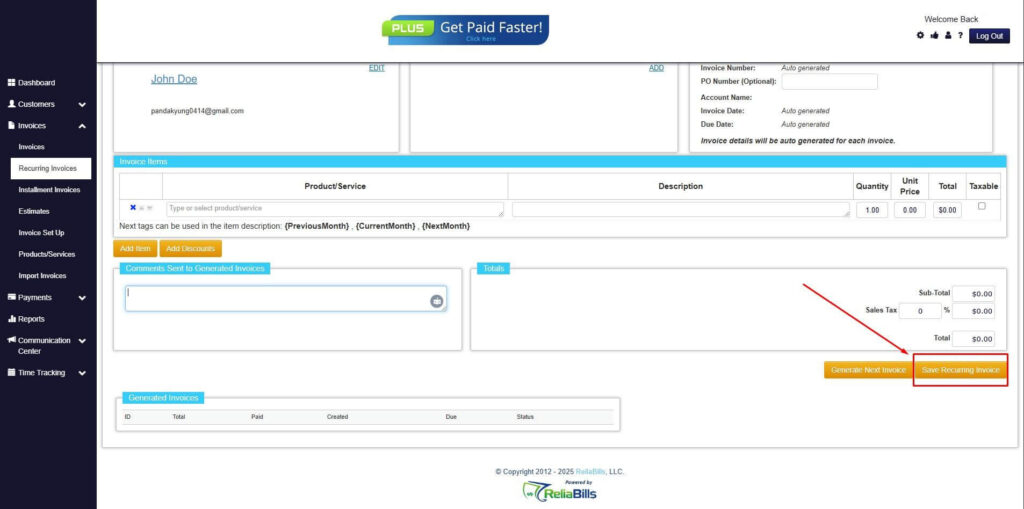
Step 8: Save Recurring Invoice
- After filling up the form, click “Save Recurring Invoice” to continue.
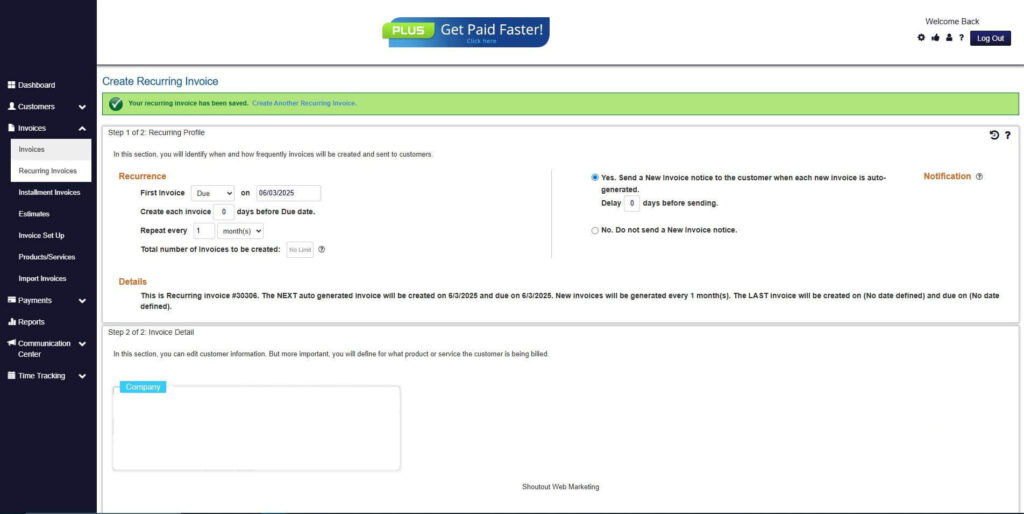
Step 9: Recurring Invoice Created
- Your Recurring Invoice has been created.
Frequently Asked Questions (FAQs)
1. When should SaaS businesses switch to automated invoicing?
SaaS businesses should consider switching when manual processes start causing delays, errors, or inefficiencies. Rapid growth, increasing subscriptions, and complex billing models are clear indicators. Early adoption helps prevent operational bottlenecks and supports scalability.
2. What are the benefits of automated invoicing systems?
Automated invoicing systems improve accuracy, reduce manual workload, and speed up payment collection. They also provide real-time financial insights and enhance customer experience. Overall, they support more efficient and scalable operations.
3. How does recurring billing support SaaS growth?
Recurring billing ensures consistent and predictable revenue streams. It automates subscription renewals and reduces the risk of missed payments. This stability allows businesses to plan and scale more effectively.
4. Is it difficult to transition from manual invoicing?
Transitioning can be straightforward with proper planning and the right tools. Most automated systems offer data migration and integration features to simplify the process. Clear communication and testing can ensure a smooth transition.
5. What features should SaaS companies look for in invoicing software?
Key features include recurring billing, automated invoice generation, real-time tracking, and system integrations. Customer portals and reporting tools are also important for transparency and insights. These features ensure efficient and scalable billing management.
Conclusion
SaaS businesses should transition to an automated invoicing system when manual processes begin to limit efficiency, accuracy, and scalability. As subscription models grow more complex, automation becomes essential for maintaining consistent billing and reliable cash flow. Recurring billing plays a critical role in ensuring predictable revenue and reducing administrative workload.
By adopting an automated invoicing system for SaaS, businesses can streamline operations, improve financial visibility, and enhance customer experience. The shift not only addresses current challenges but also prepares companies for long-term growth. Investing in modern invoicing solutions is a strategic move that enables SaaS businesses to scale with confidence and maintain a competitive edge.