

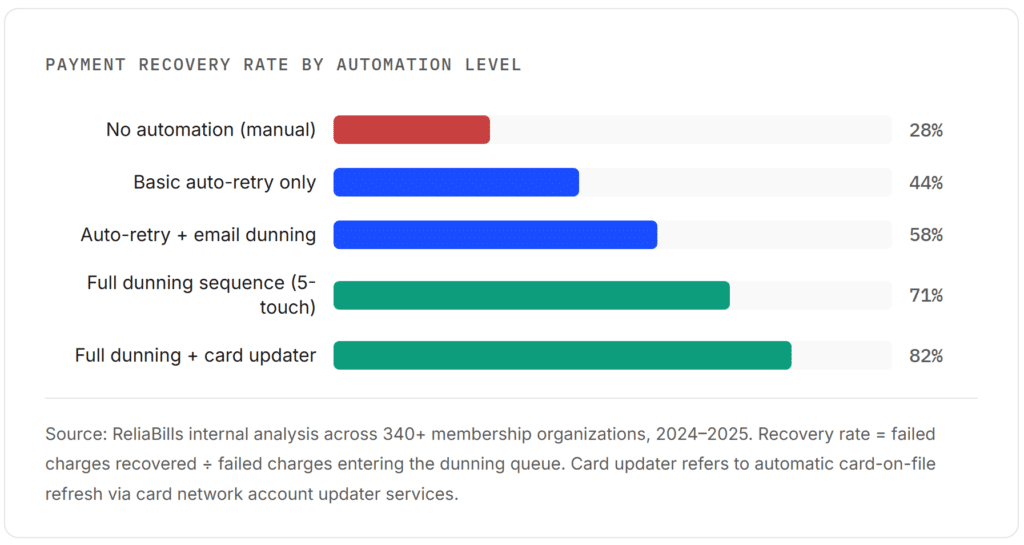
Manually chasing dues is a revenue leak, not a revenue strategy. Organizations that switch to automated membership dues collection, combining scheduled billing, smart retry logic, and structured dunning sequences, consistently recover 50–70% of failed payments that would otherwise be written off. The shift also removes the administrative drag that causes well-intentioned staff to let delinquent accounts slide for weeks before taking action. Automation does not replace the member relationship; it protects it.
What is Automated Membership Dues Collection?
Automated membership dues collection is the practice of using billing software to schedule, charge, and follow up on membership payment obligations without manual intervention at each step. It encompasses recurring charge scheduling, real-time payment processing, failed-payment retry logic (sometimes called dunning), automated reminder communications, and delinquency escalation workflows, all triggered by rules you configure once, rather than tasks your team must remember to execute each billing cycle.
Why Most Organizations Lose Money Before They Realize It
There is a widely shared misconception among membership organizations that delinquency is primarily a member engagement problem, that people who miss payments simply do not value the membership. In practice, a significant portion of late and missed dues are the result of something far more mundane: payment infrastructure that was never designed to recover from failure.
The global subscription industry, a useful analogy for any recurring-dues structure, is on track to reach $1.5 trillion in market value by 2025. Yet the same growth that makes recurring billing attractive also exposes a structural weakness: failed payments accumulate quietly. According to research from Recurly, failed payments could cost subscription businesses more than $129 billion in 2025 through involuntary churn alone, losses caused not by members choosing to leave but by payment errors that no system caught and corrected.
For membership organizations specifically, the problem has a compounding quality. A dues payment fails. Nobody notices for two weeks. By then, the member has moved on mentally, or the card they used has been replaced, and they have forgotten entirely. The organization then faces an awkward choice: send a formal past-due notice that embarrasses a loyal member over what was essentially a technical glitch, or quietly write off the revenue. Most organizations do neither well.
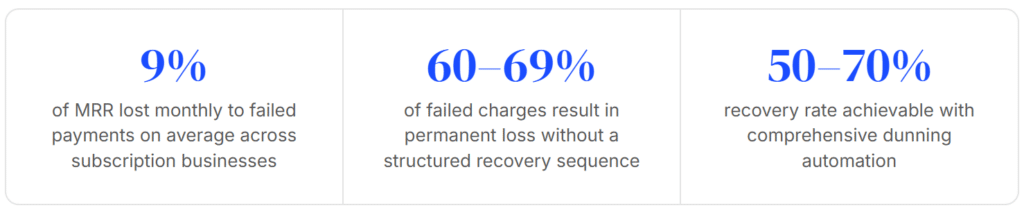
The good news, and it is substantial, is that the root cause is addressable. Automated dues collection turns a reactive, relationship-straining process into a quiet, systematic one that most members never even notice is running.
How Automated Membership Dues Collection Actually Works
Automation in this context is not a single feature. It is a stack of interlocking processes that collectively eliminate the manual steps that create delinquency risk. Understanding each layer helps you configure the system correctly from day one and diagnose it when something breaks.
1. Member enrollment & payment method capture
When a member joins, they provide a payment method, typically a credit card or ACH bank account, through a secure checkout form. That method is tokenized and stored in your billing system. This is the only step where a human touches the payment: everything after it runs on schedule.
2. Scheduled charge execution
On the billing date, the system submits the charge automatically. Whether dues are monthly, quarterly, or annual, the billing engine calculates the next charge date and triggers the transaction without staff involvement. A platform like recurring billing software handles this scheduling at scale, across hundreds or thousands of members simultaneously.
3. Real-time payment processing & response handling
The payment gateway processes the transaction and returns a result: success, soft decline, or hard decline. Each outcome triggers a different downstream path. A successful charge closes the loop automatically. A soft decline (insufficient funds, temporary bank hold) routes into the retry queue. A hard decline (card cancelled, fraud block) triggers an immediate card update request to the member.
4. Dunning sequence execution
For any failed charge, the dunning engine fires a pre-configured sequence: retry on day three, send a reminder email on day five, retry again on day eight, send an SMS alert on day ten, and so on. The sequence is calibrated to maximize recovery without harassing members. Well-structured dunning recovers the majority of soft declines within two weeks.
5. Escalation or write-off decision
Accounts that exhaust the automated sequence without resolving surface in a delinquency dashboard for human review. At this point, your team makes a judgment call, offer a payment plan, contact by phone, or suspend access. The automation has already done the recoverable work; what remains are genuinely difficult accounts, not administrative backlog.
Real-World Examples: What Automation Looks Like in Practice
Professional Association (1,200 Members, Annual Dues)
A mid-sized professional association billing annual dues of $275 per member had historically assigned dues follow-up to an administrative assistant who managed renewals alongside five other responsibilities. Renewal reminders went out once, 30 days before expiration. If payment failed on the billing date, the next contact often came six to eight weeks later, by which point the lapse felt permanent to the member.
After implementing automated dues collection with a 5-touch dunning sequence (retry on day 3, email day 5, retry day 8, email day 12, phone flag day 20), the organization’s annual delinquency rate dropped from 14% to under 4% within the first renewal cycle. The administrative assistant’s time on dues follow-up dropped from roughly 12 hours per week during renewal season to under two.
Regional Fitness Co-op (Monthly Dues, 600 Members)
A member-owned fitness facility operating on thin margins could not absorb even a 5% delinquency rate without affecting payroll. Monthly dues averaged $48, and failed payments were running at a rate that cost the co-op approximately $1,400 per month in unrecovered revenue. The accounting team was manually reviewing Stripe exports weekly.
After connecting their membership database to an automated billing platform, including smart retry logic that attempted charges at different times of day based on card type, monthly unrecovered revenue fell to under $200 within 90 days. The retry timing change alone (shifting from end-of-month batch retries to mid-week morning retries) accounted for roughly 60% of the improvement.
Key Benefits of Automating Dues Collection
The operational case for automation is straightforward. But there are several second-order benefits that do not show up in the immediate revenue recovery numbers, and they are often what convince reluctant boards or finance committees to make the switch.
Predictable cash flow.
When dues collection runs on a reliable automated schedule, your accounts receivable timeline compresses dramatically. Instead of revenue trickling in across a six-week renewal window, the vast majority of successful charges clear within the first 72 hours of the billing date. This changes what is possible for operational budgeting.
Reduced relationship strain.
The most uncomfortable part of manual dues collection is the human moment when a staff member has to contact a member about a missed payment. Automated systems handle first and second outreach impersonally, which means that by the time a person is involved, the member already understands the context and the conversation is more administrative than adversarial.
Compliance-ready audit trails.
Every charge attempt, retry, and communication is logged with a timestamp. For nonprofits and associations subject to financial review, this creates an audit trail that manual spreadsheet-based processes simply cannot match.
Staff time reallocation.
Hours previously spent on dues follow-up are among the most recoverable operational expenses in a membership organization. Redeploying that time toward member programming or engagement activities compounds the return on the automation investment.
Scalability without proportional cost growth.
Whether you go from 500 members to 5,000 members, the billing automation layer handles the increased volume without additional headcount. Organizations using platforms like ReliaBills for their Recurring Billing or Installment Billing needs have consistently reported that billing-related staff costs remain flat through 3x to 4x membership growth.
Key Risks and Things to Watch For
Automation is not a set-and-forget system. The organizations that get the most out of it are the ones that configure it thoughtfully and check the right metrics monthly.
Risk: Over-aggressive dunning
A dunning sequence that emails members every two days creates more unsubscribes and member complaints than it recovers in payments. The goal is persistence without harassment. Three to five touchpoints over a 21-day window is a reasonable baseline; adjust based on your organization’s member relationship norms.
Risk: Stale payment data
If your card-on-file data is not connected to a card account updater service, a significant portion of your member base will experience preventable failures as cards expire or are replaced. In organizations that have not run a card refresh in 18+ months, up to 20% of cards on file may be outdated, a problem automation magnifies because it processes all of them on the same billing date.
Risk: Miscategorizing hard vs. soft declines
Retrying a hard decline (fraudulent card, account closed) wastes retry attempts and can trigger card network penalties for excessive retries. Your billing system should differentiate decline types and route them accordingly, hard declines to immediate card-update requests and soft declines to the retry queue.
Automated Dues Collection vs. Related Approaches
| Approach | Who Does the Work | Scalability | Recovery Rate | Member Experience | Best For |
|---|---|---|---|---|---|
| Manual invoicing | Staff sends invoices, and the member pays manually | Low | Low (28–35%) | Friction-heavy | Very small orgs (<50 members) |
| Auto-billing, no dunning | System charges; failures handled manually | Medium | Medium (40–50%) | Mostly seamless | Orgs with low churn risk and stable cards |
| Automated dues collection (full) | System charges, retries, and communicates | High | High (65–82%) | Seamless, low-friction | Any org with 100+ members or recurring dues |
| Collection agency referral | External agency contacts delinquent members | Low | Variable | Relationship-damaging | Last resort for high-value long-term arrears |
| Member portal self-service | Member updates payment and manages their own account | High | Medium (depends on outreach) | High (member-controlled) | Best as a complement to automated dunning |
What I Got Wrong at First (Common Mistakes)
Mistake 1: Treating dunning emails as transactional
The first dunning emails I configured were blunt: “Your payment failed. Please update your card.” The click-through rate was under 3%. Rewriting them in the member’s context, acknowledging the value they get from the membership, making the card-update link prominent, and using a warm tone, pushed click-through to 18%. The message is the mechanism.
Mistake 2: Running all retries at the same time of day
Batch retries at 2:00 AM perform worse than retries timed to when a given card type typically has available funds. Consumer debit cards tied to weekly payroll clear best on Thursday or Friday mornings; business cards often clear at the start of the business day. Most billing platforms let you configure retry timing, use it.
Mistake 3: Never reviewing decline reason codes
Decline reason codes from your payment gateway are diagnostic gold. If 40% of your failures are “do not honor” from a single card network, that is a gateway routing problem, not a member problem. Reviewing reason codes monthly catches systemic issues before they become budget line items.
Mistake 4: Automating collection without automating member communication context
Members who receive a payment-failure notice with no record of their membership benefits, renewal date, or history feel targeted, not helped. The best dunning sequences include a brief membership status summary, what they have access to, and when they joined, which reframes the payment request as protection of something the member values.
How to Get Started: A Practical Setup Guide
Getting a dues automation system running is less technically complex than most organizations expect. The harder work is in defining your dunning logic and communication templates before you launch, because those decisions compound over time. Here is the sequence that consistently produces the smoothest rollout.
Step 1: Audit your current payment failure rate
Pull the last 12 months of dues collection data. Calculate: How many charge attempts were made? How many failed on first attempt? How many of those were eventually recovered, and in what timeframe? This baseline is your data from before. Without it, you cannot measure the improvement automation delivers. Most organizations find, at this stage, that they have been writing off 8–15% of expected dues annually without formally acknowledging it.
Step 2: Choose a billing platform that matches your member data structure
Your dues automation system is only as good as the member data feeding it. If your member records live in a spreadsheet or a disconnected CRM, step one is connecting that data to a billing engine. Look for a platform with a native customer management layer so dues status and member records stay in sync without manual reconciliation. Your invoicing software should also integrate cleanly so that members who prefer invoice-based payment can be accommodated within the same workflow.
Step 3: Design your dunning sequence before you launch
| Day | Action | Channel | Tone |
|---|---|---|---|
| 0 | Initial charge attempt fails | System event | — |
| 1 | Immediate card-update email (hard declines only) | Helpful, practical | |
| 3 | Automatic retry | Gateway | — |
| 5 | Payment reminder with self-service update link | Warm, membership-focused | |
| 8 | Automatic retry (different time of day) | Gateway | — |
| 10 | SMS reminder (if mobile on file) | SMS | Brief, clear call-to-action |
| 14 | Final retry | Gateway | — |
| 17 | Escalation email, access notice if relevant | Direct, factual | |
| 21 | Human review queue, payment plan offer or suspension | Staff action | Personal, relationship-aware |
Step 4: Enable card account updater
Card account updater is a service offered through Visa, Mastercard, and American Express that automatically refreshes stored card details when a card is reissued, renewed, or replaced. When your billing platform is connected to this service, a meaningful share of hard declines simply never happen, the card-on-file is updated before the charge is even attempted. This is the single highest-ROI configuration change for any organization with members who have been billing to the same card for more than 18 months.
Step 5: Set your reporting cadence and review metrics monthly
Once the system is live, the metrics that matter most are first-attempt success rate, dunning recovery rate, average days-to-recovery, and decline reason code distribution. Review these monthly for the first quarter, then quarterly once you understand your organization’s normal patterns. Most organizations find that the first 60 days of running automation surface one or two configuration adjustments, a retry timing tweak, and a dunning email rewrite that significantly improve recovery rates.
Before vs. After: What Changes When You Automate
| Area | Manual Process | Automated Process |
|---|---|---|
| Failed payment detection | Noticed days to weeks later, if at all | Detected in real-time; retry queue populated within minutes |
| First outreach after failure | 1–4 weeks (dependent on staff bandwidth) | 24–72 hours (configurable) |
| Recovery rate | 28–35% of failed charges recovered | 65–82% of failed charges recovered |
| Staff time on dues follow-up | 8–15 hours/week during renewal season | 1–2 hours/week (review and exception handling only) |
| Member experience | Inconsistent; sometimes embarrassing | Consistent, professional, low-friction |
| Audit trail | Email threads and spreadsheet notes | Timestamped system log for every transaction and communication |
| Scalability | Degrades as membership grows | Handles 10x volume growth without process changes |
Frequently Asked Questions
1. What is the difference between dunning and a payment reminder?
A payment reminder is a single notification sent before or after a payment is due. Dunning is a structured, multi-step sequence of automated retries and communications that fires after a payment has failed. A reminder is proactive; dunning is reactive. The two work best together, reminders reduce the number of failures that enter the dunning queue, while dunning recovers the failures that reminders could not prevent.
2. How many retry attempts should I configure for failed membership dues?
For most membership organizations, three to four retry attempts over a 14–21 day window is the right balance. The first retry should come two to three days after failure, most bank-side soft declines resolve within 72 hours. Beyond four attempts, recovery rates diminish sharply while the risk of card network retry penalties increases. Hard declines (closed accounts, fraud flags) should not enter a retry queue at all; they route directly to a card-update communication.
3. Will automating dues collection feel impersonal to our members?
Only if the automation is configured without care. Well-designed dunning emails that reference the member’s name, membership status, and the specific benefit they are protecting feel more attentive than a generic invoice, not less. The impersonal feeling comes from generic templates, not from automation itself. The goal is for members to feel supported through a technical issue, not targeted for non-payment.
4. What is the best payment method to offer members to reduce delinquencies?
ACH (bank-to-bank) payments have significantly lower failure rates than credit card payments for recurring dues, cards expire, get replaced, and hit credit limits at a rate that bank accounts do not. For organizations billing substantial annual dues, offering ACH as a primary option and credit cards as a convenience alternative can reduce first-attempt failure rates by 30–40%. The trade-off is that ACH has a longer settlement window (2–3 business days), so plan cash flow accordingly.
5. Should I suspend member access when dues go delinquent?
This depends on your organization’s member relationship and dues structure. For access-based memberships (facilities, software, gated content), a clear grace period of 7–14 days after the final dunning attempt, followed by access suspension, creates a compelling resolution incentive without feeling punitive for what is often a technical payment issue. For association memberships where the primary benefit is community or credentials, immediate suspension can feel aggressive and damage renewal intent. Configuring suspension as a late-dunning escalation, not an automatic day-one consequence, is the standard approach.
6. How do I handle members who genuinely cannot pay, as opposed to those with payment method issues?
Automation handles payment method issues well. Genuine financial hardship cases, members who reach out and explain their situation, should exit the automated sequence and move to a human conversation. Most organizations that configure a self-serve “I need help with my payment” link in their dunning emails find that a small percentage of delinquent members use it, and those conversations almost always result in a payment plan arrangement rather than a cancellation. Installment billing features can make payment plan offers easy to configure and execute within the same system.
Recent Articles:
- Recurring Billing vs. One-Time Invoicing: Which Is Right for Your Service Business?
- How to Set Up Recurring Billing for Digital Marketing Agency Retainers