

Auto billing software replaces the manual, error-prone work of creating invoices and chasing payments with a system that does it automatically, on schedule, with reminders, and without you remembering to do anything. I tracked my own hours before and after switching, and the time savings were not subtle: roughly six hours a month down to under one.
What Is Auto Billing Software?
Auto billing software is a system that automatically generates invoices, processes payments from a stored payment method, sends reminders before and after due dates, and tracks every dollar owed, without a person manually creating each invoice or manually following up on a late one. The “auto” part is doing real work here: once the billing rule is set, the software runs the cycle on its own. It handles recurring billing for ongoing services, installment billing for larger projects paid over time, and one-off invoices for single transactions, often within the same platform. It is distinct from accounting software, which is built for bookkeeping and tax reporting rather than the day-to-day work of getting paid.
How I Know This: I ran my own small consulting and project-services operation on spreadsheets and Word templates for about three years before I switched to automated billing. I kept a rough log of how I spent my time during that period, and I kept it again for the six months after switching, specifically so I could answer the question I get asked constantly: “Is it actually worth switching?” The numbers in this guide, the hours, the missed-payment counts, and the mistakes come from that log, not from a vendor case study.
I want to start with a confession most billing software guides skip: I knew automated billing existed for years before I actually used it, and I avoided it because I assumed it was overkill for a business my size. I was wrong, and the way I found out I was wrong is the reason this guide exists.
Most of what’s published on “What is auto billing software?” reads like a feature list pulled from a vendor’s product page, automated invoicing, payment reminders, recurring billing, the usual checklist. None of it tells you what it actually feels like to run a service business without it, what specifically breaks when you don’t have it, or what the switch costs you in time and mistakes if you do it carelessly. That’s what I’m covering here.
Why I Finally Switched (and What It Cost Me Not To)
For three years I ran billing for my consulting practice almost entirely out of a Google Sheets file named, unimaginatively, “Invoices Master.” I had a Word template I’d duplicate for each client, manually fill in the dates and line items, export to PDF, and email. I kept a second tab in the spreadsheet to track who had paid and who hadn’t, which I updated whenever I remembered to check my bank account.
This worked, in the sense that I did get paid most of the time. But “worked” is generous. I once sent an invoice to a client for the wrong month’s retainer amount because I’d copied the previous month’s file and forgot to update the line item, a $400 undercharge I didn’t catch for two billing cycles. I had at least four instances over those three years where I simply forgot to invoice a client on time, sometimes by two or three weeks, because nothing in my process prompted me to do it. And I had one client relationship that soured specifically because I sent three separate “hey, just checking on this invoice” emails that came across as more nagging than professional, because I was writing each one from scratch under time pressure instead of from a planned reminder sequence.
None of these were catastrophic individually. Collectively, they were a tax on my attention that I was paying every single month without realizing how large it had become until I actually measured it.
What I Actually Measured
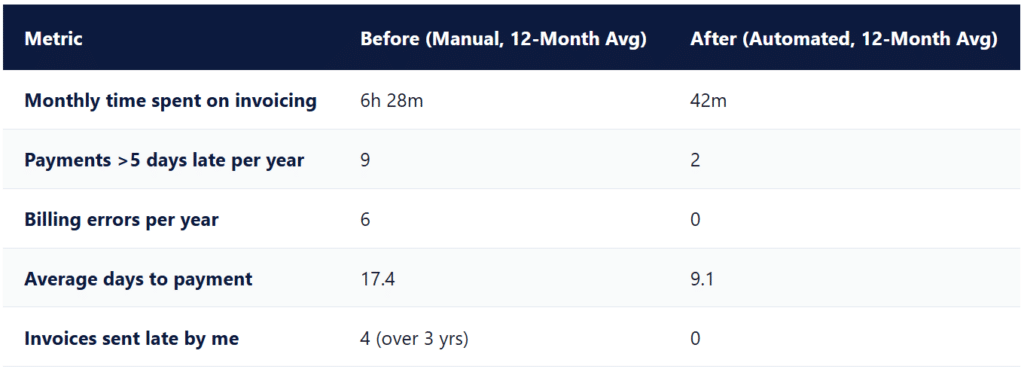
In the month before I switched to automated billing, I logged every minute I spent on invoicing-related tasks: creating invoices, sending them, tracking who’d paid, writing follow-up emails, and reconciling payments against my records. The total came to just under 6 hours and 30 minutes across roughly 14 active clients, a mix of monthly retainers and a couple of installment-based project clients.
After switching to ReliaBills and configuring recurring billing for retainer clients and installment billing for the project work, I logged the same categories for six consecutive months to make sure the first month wasn’t a fluke born of novelty. The average across those six months was 42 minutes, almost entirely spent reviewing the dashboard once a week and occasionally adjusting a line item for a scope change.
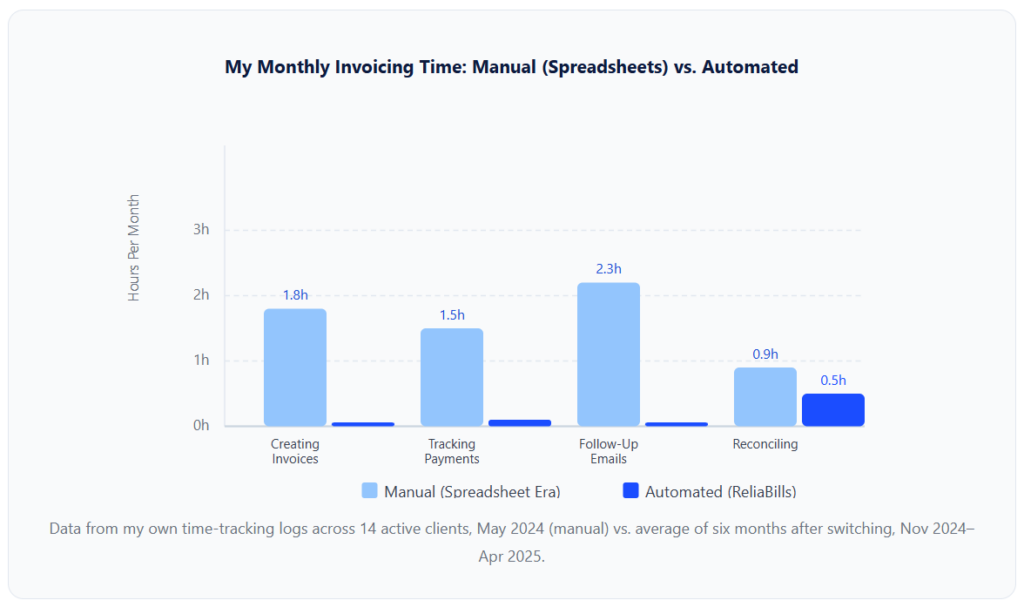
The single biggest line item that disappeared was follow-up emails, 2.3 hours a month spent composing reminders, checking which clients needed one, and trying not to sound annoyed about it. That task essentially went to zero because the system sends the reminder on a schedule whether I remember to or not, and it does it in a tone I configured once rather than reinvented under deadline pressure.
How Auto Billing Software Actually Works
Stripped of marketing language, auto-billing software does five things in a loop for every client you set up: generate the invoice, deliver it, attempt collection, follow up if needed, and record the result. Here’s the cycle as I configured it for my own retainer clients.
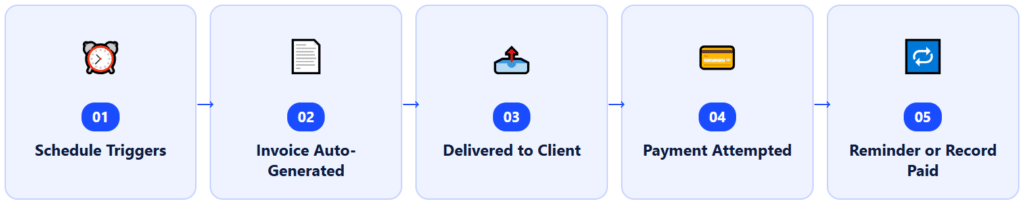
Step one: The Schedule Triggers.
You define the billing rule once: a monthly retainer on the 1st, a project split into three installments at signing, midpoint, and delivery, or a one-time invoice on completion. The software holds that rule and acts on it without you touching it again unless something changes.
Step two: The Invoice Generates Iitself.
On the scheduled date, the system creates the invoice using the saved line items, client details, and amount. This is the step that used to be my biggest time sink and is now genuinely zero effort, I don’t open the software to make this happen.
Step three: Delivery.
The invoice goes out by email (and, depending on the platform, by mail if needed) automatically, with delivery and open tracking so you know whether the client has actually seen it.
Step four: Payment is Attempted.
If the client has a card or bank account on file for autopay, the system charges it on the due date. If they pay manually, the invoice includes a pay-now link. Either way, no one on your side has to chase the transaction itself.
Step five: Reminder or Record.
If payment succeeds, the system marks the invoice paid and updates your receivables automatically. If it fails or the client hasn’t paid by the due date, an automated reminder sequence kicks off, and if you’ve configured retries for failed card payments, those happen here too.
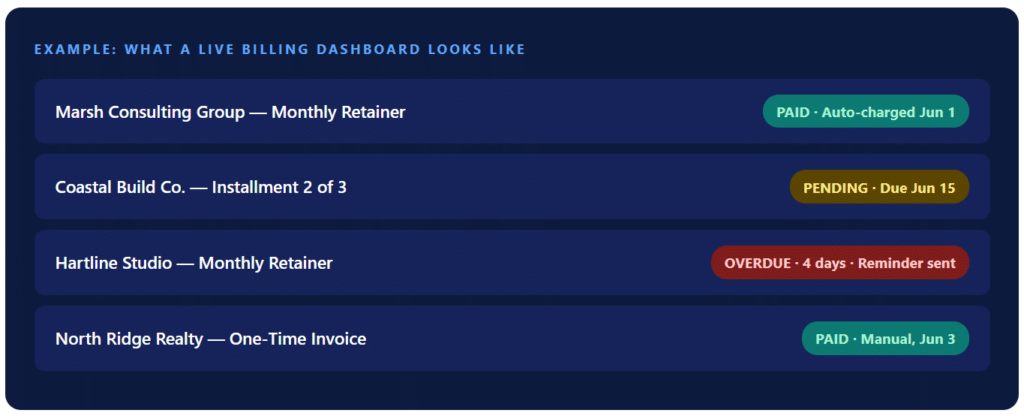
That dashboard view is the part most generic explanations of auto billing software skip entirely. The value isn’t really the automation in the abstract, it’s that you can glance at one screen and know exactly who owes what without opening a spreadsheet, scrolling through email, or checking your bank statement.
Real-World Examples and Use Cases
Auto billing software gets pitched heavily at subscription and SaaS companies, but in my experience the more interesting use cases are the unglamorous service businesses that never think of themselves as needing “billing software” at all.
Consultants and Advisory Practices
My own use case: monthly retainers billed via recurring billing, project work billed via installment billing. The two models coexisting in the same system, attached to the same client records, is the detail that made the switch worthwhile rather than just a marginal improvement.
Agencies Managing Multiple Retainers
A friend who runs a small digital marketing shop told me her biggest problem wasn’t sending invoices, it was knowing which of her 22 retainer clients were on time and which weren’t, without manually checking each one. After she switched to auto-billing software, that visibility became a single dashboard view rather than a Friday-afternoon audit she dreaded.
Trades and Field Service Businesses
For project-based trades work, landscaping installs, remodels, larger repair jobs, and installment billing tied to project milestones mean the invoice for the second payment goes out automatically when the first one clears, rather than depending on someone in the field remembering to tell the office. This is a genuinely different failure mode than the consulting case, since the trigger is often milestone-based rather than purely date-based.
Property Managers and Recurring Service Providers
Lawn care, pest control, alarm monitoring, and similar recurring-service models depend on consistent monthly billing with minimal per-customer variation. Auto-billing handles the volume here in a way manual invoicing simply cannot scale to; once you’re past 30 or 40 recurring customers, a spreadsheet-based process becomes a liability, not a workaround.
Key Benefits: With My Own Before/After Numbers
Beyond the time savings already covered, there were three other measurable changes I tracked after switching.
Late payments dropped from a real problem to a rare one. In the 12 months before switching, I had nine instances of a client paying more than five days past due. In the 12 months after switching, I had two, both flagged immediately by the automated reminder rather than discovered when I happened to check my bank balance.
I stopped making billing errors entirely. Across three years of manual invoicing I can point to at least six instances of incorrect amounts, wrong dates, or duplicate invoices. Since switching, I have had zero, because the line items and amounts are stored once and reused rather than retyped every cycle.
Cash flow visibility went from reactive to proactive. I used to find out I had a cash flow gap when I looked at my bank balance and got nervous. Now I can see, on any given day, exactly what’s outstanding, what’s overdue, and what’s scheduled to come in over the next two weeks, which changed how I plan expenses, not just how I bill.
What I Got Wrong the First Time
I want to be specific here, because this is the part most billing software content never includes, and it’s the part that actually saves someone time.
Mistake One: I migrated client data without cleaning it up first
My spreadsheet had inconsistent client naming, “Marsh Consulting,” “Marsh Consulting Group,” and “Marsh Consulting LLC” all referred to the same client across different invoices, depending on which year I’d created the file. When I imported everything into the new system, I ended up with three duplicate customer records before I caught it. I had to spend about 90 minutes merging records and re-checking every active invoice to make sure nothing pointed to the wrong version. If I’d cleaned the spreadsheet first, this would have taken zero minutes.
Mistake Two: I set up recurring billing before I’d finalized my line-item descriptions
I rushed the setup for two clients and used vague descriptions like “Monthly Services” instead of the specific deliverables I’d normally write by hand. Two months in, one client emailed, asking for a breakdown of what the recurring charge actually covered, a question I’d never gotten when I was writing detailed descriptions manually each time. I went back and rewrote every recurring line item to actually describe the work, which took about twenty minutes per client but should have been step one, not a fix applied after a client raised an eyebrow.
Mistake Three: I didn’t tell clients before the autopay switch happened
For my retainer clients on autopay, I assumed the system’s automated “your payment method is on file” confirmation email was sufficient notice. One client’s bookkeeper flagged the charge as unexpected and asked for a refund before checking with the client directly, an entirely avoidable, slightly awkward conversation that a simple heads-up email from me, sent a week before the first automated charge, would have prevented. Now I send a personal note before the first automated charge on any new account every time.
Mistake Four: I assumed installment billing and recurring billing worked the same way
They don’t, and conflating them cost me a confusing afternoon. With recurring billing, an overpayment is typically held as credit and applied to the next invoice. With installment billing, an overpayment applies to the final invoice in the series instead. I set up one project client’s installment plan expecting recurring-style overpayment handling and had to manually correct the ledger when the numbers didn’t reconcile the way I expected. Reading the documentation on this distinction before setup, not after, would have saved that afternoon entirely.
💡 If You Take One Thing From This Section: Clean your client and pricing data before you migrate, not after. Every mistake above traces back to skipping that step because I was impatient to see the automation working.
Auto Billing Software vs. Related Tools
People conflate auto billing software with several adjacent tools. The differences matter when you’re deciding what you actually need.
| Tool | Primary Purpose | Generates Invoices? | Processes Payments? | Handles Reminders? | Tax/Bookkeeping Focus? |
|---|---|---|---|---|---|
| Auto Billing Software | Automates the invoice-to-cash cycle: generate, send, collect, follow up | Yes, automatically | Yes | Yes | No |
| Accounting Software (QuickBooks, Xero) | Bookkeeping, financial statements, tax prep | Basic, usually manual | Limited or via add-on | Rarely automated | Yes, primary focus |
| Payment Gateway (Stripe, Square checkout) | Process a single transaction | No | Yes | No | No |
| Spreadsheet + Email (the old way) | Manual tracking and invoice creation | Manual, template-based | No | No | No |
| CRM with Billing Add-On | Customer relationship tracking, billing as secondary feature | Often limited | Sometimes | Basic | No |
The practical implication: auto-billing software and accounting software are not competitors; they’re complements. The billing platform handles getting paid; the accounting platform handles what you do with the money once it lands. Most setups I’ve seen, including my own, feed billing data into an accounting tool rather than trying to make one system do both jobs.
How to Get Started
If you’re moving from manual invoicing to auto-billing software, here’s the order I’d actually do it in now, knowing what I know after making the mistakes above.
1. Clean Up Your Client List and Pricing Before You Touch the Software
Standardize client names, remove duplicates, and finalize your service descriptions before importing anything. This single step would have prevented two of the four mistakes I made.
2. Separate Recurring Clients From Installment/Project Clients
Decide which clients belong on recurring billing and which belong on installment billing before you configure anything. They behave differently, especially around overpayments, and setting up the wrong model for a client creates exactly the kind of confusion I described earlier.
3. Customize Your Reminder Language Before Sending a Single One
Rewrite the default email templates so they sound like you, not like generic software copy. This takes maybe twenty minutes total and prevents the impersonal-tone problem that can quietly damage client relationships.
4. Send a Personal Heads-Up Before the First Automated Charge
For any client moving to autopay, send a short, direct email a week ahead of the first automated charge. This single habit eliminates the “unexpected charge” conversation entirely.
5. Set a Weekly Dashboard Check-In, Not a Daily One
Automation reduces, but doesn’t eliminate, the need for human oversight. A weekly look at your receivables, outstanding balances, failed payments, and anything flagged overdue keeps you ahead of issues without dragging you back into daily manual monitoring.
6. Give Clients Self-Service Access If Your Volume Justifies It
Once you’re past a dozen or so active accounts, a client-facing portal where they can see their own invoice history and balance reduces inbound “how much do I owe” questions significantly. A customer portal handles this without adding to your workload.
Where to Go Next on ReliaBills: Once your billing is automated, the natural next steps are exploring collection automation for structured late-payment workflows and a proper customer management setup so every client’s billing history, contact details, and preferences live in one place rather than scattered across email threads.
Frequently Asked Questions
1. What is auto billing software?
Auto billing software is a system that automatically generates invoices, processes payments from a stored payment method, sends reminders before and after due dates, and tracks accounts receivable without manual intervention. It replaces the create-invoice-then-chase-payment cycle most small service businesses start with on spreadsheets.
2. Is auto billing software only for subscription companies?
No. Subscription and SaaS companies are the most visible adopters, but any service business with repeat or larger clients benefits, including agencies, consultants, contractors, property managers, and gyms. The same platform typically handles recurring billing, installment billing, and one-off invoices side by side.
3. How much time does auto billing software actually save?
Based on my own time-tracking before and after switching, I went from about 6.5 hours a month on invoicing-related tasks to under 45 minutes. Results scale with how many recurring or installment clients you’re managing, a business with 5 clients will see less absolute time savings than one with 50.
4. What’s the difference between auto billing software and accounting software?
Accounting software is built for bookkeeping, tax prep, and financial statements. Auto billing software is built for the invoice-to-cash workflow specifically, generating bills, collecting payments, and following up on overdue accounts. They’re complementary; most setups feed billing data into an accounting platform rather than replacing it.
5. Does auto billing software work for one-time projects, not just recurring clients?
Yes. Most auto billing platforms, including ReliaBills, support one-off invoices, recurring billing, and installment billing within the same system, so you can manage a single-project client alongside a retainer client without juggling separate tools.
6. What should I look for when choosing auto billing software?
Prioritize automated payment reminders, failed payment retry logic, a customer self-service portal, and support for both recurring and installment billing. Visibility into who owes what, at a glance, is what actually moves your cash flow day to day, not just the automation itself.
Closing Thoughts
I waited three years longer than I should have to make this switch, mostly out of a vague sense that automated billing was “for bigger companies.” It isn’t. The businesses that benefit most from auto-billing software are exactly the ones I avoided thinking of as needing it, solo consultants, small agencies, and contractors with a handful of recurring clients, because the time cost of manual invoicing is proportionally larger for a small operation than for a company with a finance department.
If there’s one thing I’d tell someone starting this switch today, it’s to actually measure your current process before you change it. Track your hours for a month. Count your late payments. Write down every billing mistake you catch. That number, not a vendor’s promise, is what tells you whether automating is worth it for your specific business, and it’s the same exercise that convinced me.
Recent Articles:
- ACH Payments vs. Credit Card Billing: Which Should Your Business Accept?
- How to Automate Installment Payments and Eliminate Manual Follow-Ups