

Offering a payment plan is the easy part, most clients say yes the moment you mention it. The part that quietly drains your week is everything that happens after: remembering which installment is due when, noticing a charge failed, and writing yet another “just following up” email. Automating payment plans is not about the offer itself. It’s about removing the second half of that equation entirely, so the schedule runs whether or not anyone on your team thought about it that day.
Main Takeaway
Automating a payment plan means the scheduled charge, the retry after a decline, and the reminder email all run on their own, triggered by a date or a decline code, not by someone remembering to act. The hard part isn’t scheduling the charge; almost any platform does that. The hard part, and the part most setups get wrong, is automating what happens when a payment fails, since that’s exactly the moment manual follow-up was solving for in the first place.
What Does It Mean to Automate Payment Plans?
To automate a payment plan is to configure a billing system so that every scheduled installment in an agreement, the charge, the retry if it fails, and the reminder communication execute without a person manually creating an invoice, running a card, or sending a follow-up message. The client’s payment method is stored once and authorized for the full schedule upfront; from that point forward, the system itself decides when to charge, when to retry a decline, and when to notify the client, based on rules set in advance rather than someone checking a spreadsheet.
How Automated Payment Plans Actually Work
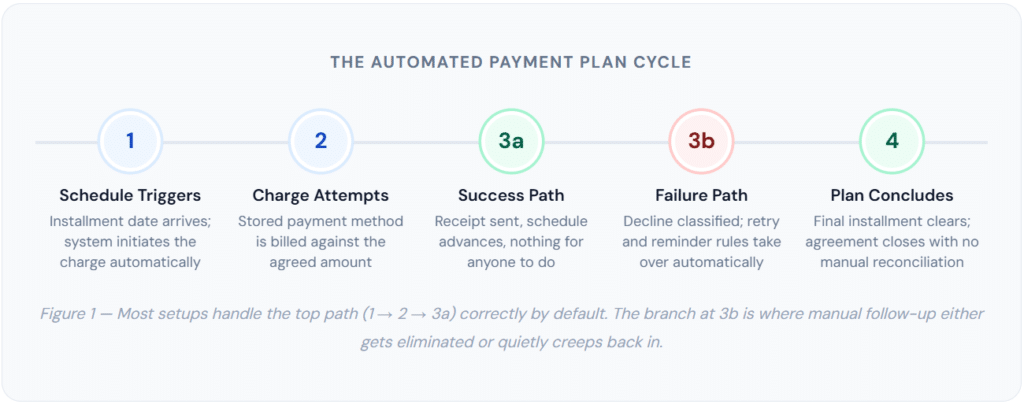
Strip away the marketing language, and an automated payment plan is really just three connected systems running in sequence: a schedule, a retry rule, and a notification rule. Most platforms get the first one right by default. Fewer get the second and third right without extra configuration, which is where the actual value of automation either shows up or quietly disappears.
The Schedule Is the Easy 80%
Setting up the recurring or installment schedule itself is genuinely simple in almost every modern billing tool, you set a total, a number of payments, a frequency, and a start date, and the charges fire on their own. This part of “automation” gets all the attention in product marketing because it’s the easiest to demo. It’s also the part that was never really the source of manual work in the first place; nobody was manually re-typing the same invoice every month for a plan that was going smoothly.
The Retry Logic Is Where It Gets Real
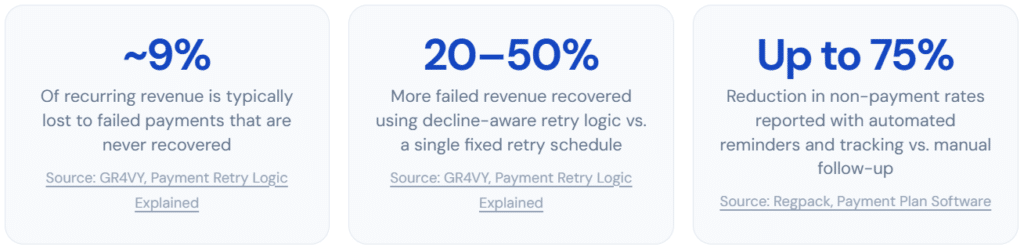
The actual labor in manual installment tracking comes from handling exceptions, a card that’s expired, a charge that bounced for insufficient funds, or a payment that needs a second attempt. According to GR4VY’s analysis of subscription billing data, subscription businesses lose roughly 9% of recurring revenue to failed payments that are never successfully recovered. Automating the retry means the system classifies the decline reason and responds differently depending on what actually went wrong, a card that’s out of funds gets retried in a few days, while an expired card triggers an update request instead of a pointless repeat attempt on the same dead card number.
The Reminder Is What Clients Actually Notice
The notification layer is the part clients experience directly, and it’s also the part most likely to be skipped or done badly. A well-built reminder sequence tells the client, in advance, that a payment is coming or that one failed and needs attention, without anyone on your side lifting a finger. This is the layer that determines whether automation feels invisible (the good outcome) or feels like the business stopped paying attention (the bad outcome, and a common one when retry logic exists but notification logic doesn’t).
What Changes Operationally: Before vs. After
It’s easier to see what automation actually removes by laying the two workflows side by side for a typical four-installment plan. Nothing here is exotic, this is the standard week-to-week reality of running payment plans manually versus running them through a configured system.
| ⚠ Manual Tracking | ✓ Automated System |
| 📋 Someone checks a spreadsheet or calendar to see which installments are due this week | 📅 The schedule is configured once; every future date is already accounted for |
| 💳 Each charge is run manually through a card terminal or payment link | ⚙️ Charges run against the stored payment method without anyone initiating them |
| ❓ A failed charge is discovered days later, usually when someone happens to check | 🔔 A decline triggers an immediate, system-generated alert, the same day, not “whenever someone checks.” |
| ✉️ A person drafts and sends a follow-up email, often inconsistent in tone and timing | 📨 A consistent, pre-written reminder sends automatically, with the same tone every time |
| 🔁 The same manual steps repeat for every installment, for every client, every cycle | 📊 A dashboard view shows the status of every plan at a glance, no spreadsheet required |
The shift that matters most isn’t speed, it’s consistency. A person managing fifteen active payment plans by hand will, eventually, miss one. Not from carelessness, just from volume. A configured system doesn’t get busy, doesn’t forget, and doesn’t have an off week. That reliability is the actual product being purchased when a business adopts payment plan automation, more so than the time saved on any individual transaction.
Real-World Use Cases for Automated Payment Plans
Installment automation shows up most often in businesses where the total amount is large enough that a single missed or delayed payment matters, but the number of active plans is too high to track individually by memory.
🏗️ Contractors & Renovation
Deposit plus milestone payments tied to project phases, automatically charged as each phase completes.
⚖️ Legal & Advisory Retainers
Flat-fee engagements split into monthly payments, automatically billed without paralegal time spent chasing balances.
🎓 Course & Coaching Programs
A premium program billed across 3–6 payments instead of one upfront charge, with automated dunning on declines.
🩺 Elective Healthcare
Cosmetic, dental, and wellness procedures billed in monthly installments, automatically reconciled against treatment dates.
💻 Agency & Freelance Projects
Fixed-scope work billed in deposit-plus-milestone installments, with automated reminders replacing manual chase emails.
🐾 Veterinary & Pet Services
Larger procedures or boarding packages split into manageable payments without staff manually tracking each balance.
💡 A pattern worth noticing: businesses offering automated payment plans tend to lean on milestone-aligned schedules more than fixed calendar dates wherever the work itself has natural phases. Tying the third installment to “drywall complete” rather than “the 1st of next month” gives both sides a shared, observable trigger, which also tends to reduce disputes, since the payment is clearly tied to something that visibly happened.
Key Benefits of Automating Payment Plans
The case for automating installment payments rests on a handful of measurable effects, each tied to a specific point of failure in the manual process.
Time Returns to the Business, Not the Spreadsheet
The most immediate benefit is the obvious one, hours that previously went into checking due dates, running charges manually, and writing follow-up emails go back into actual client work. For a business running even a dozen active plans, that’s a meaningful chunk of a week, every week, indefinitely, until the moment automation is in place.
Failed Payments Get Caught the Same Day, Not Three Weeks Later
This is the benefit that matters most and gets talked about least. A manual process discovers a failed payment whenever someone happens to notice, which in practice is often weeks after the fact, by which point the balance has grown and the conversation with the client has gotten more awkward. Expired or reissued cards alone account for roughly 10 to 15 percent of recurring payment failures, and nearly all of those are fully recoverable if caught and addressed quickly, the problem is almost always the delay in noticing, not the underlying payment issue itself.
Consistency Replaces Personality
A human-written follow-up email varies by who wrote it, what mood they were in, and how busy the week was. An automated sequence sends the same message, in the same tone, on the same schedule, every time. Clients generally respond better to this than to inconsistent personal outreach, a predictable, professional process reads as routine, while an irregular one reads as the business being disorganized or, worse, as someone being singled out.
Forward Visibility Into Revenue That Hasn’t Arrived Yet
Once payment plans are running through a system rather than a notebook, you get a real answer to “How much is scheduled to come in next month”, across every active plan, not just the ones someone remembers. This forward visibility is one of the more underrated benefits, since it turns installment revenue from a vague sense of “we should be getting paid soon” into an actual number you can plan around.
Common Setup Mistakes
Most of the failure points in payment plan automation aren’t about the software being inadequate, they’re about the setup being incomplete in ways that aren’t obvious until a payment actually fails. These are the mistakes that show up most often once a business moves from “we offer payment plans” to “we automated payment plans.”
1. Automating the charge, not the failure
The schedule gets configured correctly, and the recurring charge fires every cycle, and then the moment a card declines, the process falls straight back to a manual spreadsheet because nobody set up what should happen next. This is the single most common gap, because it’s invisible right up until the first decline happens.
→ Fix: configure retry rules and a notification trigger before the first installment ever runs, not after the first failure.
2. One retry schedule for every decline reason
Applying the same fixed 1-day/3-day/7-day retry pattern to every failure regardless of cause wastes retry attempts on declines that will never succeed (a closed account) while sometimes retrying too early on the ones that would (insufficient funds, where waiting a few extra days toward a payday matters).
→ Fix: separate retryable “soft” declines from non-retryable “hard” declines, and time the retry to the decline reason.
3. No grace period before consequences kick in
Pausing service or escalating to a stern notice on the same day a payment fails, before any retry has even had a chance to succeed, turns what might have been a one-day banking hiccup into an unnecessarily tense client conversation.
→ Fix: build in a short grace window (commonly 5–10 days) before anything beyond a polite reminder happens.
4. Reminder copy that reads as a collections letter
Templates borrowed from a generic “overdue invoice” library tend to sound punitive even for a routine first-attempt decline that the client almost certainly doesn’t know about yet. That tone mismatch creates client friction that a five-minute card update never should have caused.
→ Fix: write the first reminder as a helpful notice, not a demand, and only escalate tone on later attempts if needed.
5. No deposit, full exposure from day one
Automating the billing schedule doesn’t reduce the financial risk of starting a project with zero money down, it just makes the eventual non-payment more efficiently discovered. Automation is a collection tool, not a substitute for sound deal structure.
→ Fix: pair automated billing with a meaningful upfront deposit, especially on new or larger client relationships.
Risks and Things to Watch For
Beyond the setup mistakes above, there are a few structural risks worth understanding before fully relying on an automated system.
| ✅ What Reduces Risk | ⚠️ What Increases Risk |
| → Decline-reason-aware retry logic instead of one fixed schedule for every failure | → Retrying the same hard decline repeatedly, which can trigger card network monitoring penalties |
| → Card network token updates (Account Updater) to catch reissued cards before they fail | → Treating automation as “set and forget” with no periodic check of the dashboard |
| → A written agreement specifying every payment date and amount before automation starts | → No escalation path for a plan that’s failed every retry attempt |
| → A human review step for high-value or first-time-client plans before going fully automatic | → Stale client contact details, so reminders go to an email address nobody checks |
⚠ Retry limits are real, not theoretical. Card networks cap how many times a merchant can retry a single declined transaction, up to 15 attempts within a 120-day window, with recovery odds dropping sharply after the first few tries. Configuring unlimited or overly frequent retries doesn’t just waste effort on a charge that won’t succeed, it can also flag the merchant account for review. Three to four well-timed attempts, not fifteen rapid ones, is the practical target.
The other risk worth naming plainly: automation removes friction from collecting payment, but it doesn’t remove the underlying judgment calls. A plan that’s failed three retries and two reminders still needs a human decision about what happens next, pause the work, renegotiate the schedule, or escalate. Good automation handles the repetitive 90% so that decision-making energy goes toward the 10% of cases that genuinely need it, rather than being spent equally across every plan regardless of how much attention it actually needs.
Automated Payment Plans vs. Related Approaches
“Automate payment plans” gets used loosely to describe a few different setups. It’s worth being precise about how they differ before choosing one.
| Approach | Charge Automated? | Failure Handling | Manual Effort Required | Best For |
|---|---|---|---|---|
| Fully Automated Payment Plan | Yes | Automated retry + reminders | Minimal: exceptions only | Any business running multiple concurrent plans |
| Scheduled Charge, Manual Follow-Up | Yes | Manual: someone checks for failures | High on any decline | One or two plans, low volume |
| Manual Invoicing Per Installment | No | Fully manual | High, every cycle | Single, irregular project payments |
| Recurring Billing (Open-Ended) | Yes | Automated, same mechanism | Minimal | Subscriptions with no fixed end date |
| Third-Party BNPL | Yes, by the lender | Handled by the BNPL provider | Minimal, but merchant fee applies | Consumer retail, willing to pay 4–6% fees |
The distinction that trips people up most is between a fully automated plan and a “scheduled charge, manual follow-up” setup, they look identical until the first payment fails. Both will happily run the charge every month. The difference only becomes visible at the exact moment something goes wrong, which is also the exact moment the value of automation is supposed to show up. If you can’t say what happens automatically when a charge declines, the plan probably isn’t actually automated yet, regardless of what the schedule looks like on a calendar.
Recovery Rate by Retry Attempt
The chart below illustrates a pattern documented across payment recovery research: most of the recoverable revenue comes from the first two retry attempts, with diminishing returns after that. This shapes how retry schedules should actually be designed, frontloaded, and decline-aware, rather than evenly spaced and indefinite.
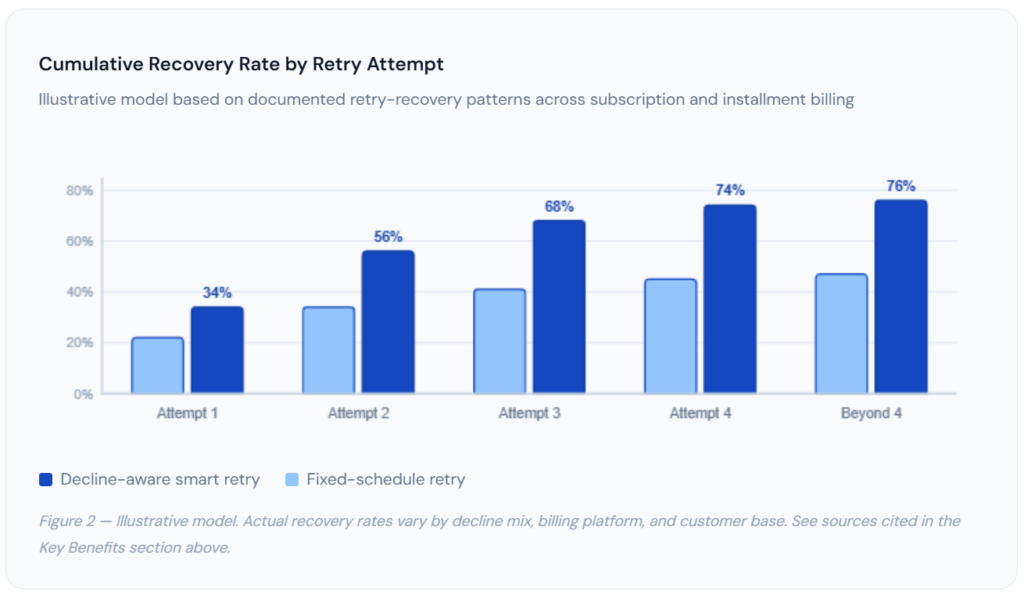
The gap between the two lines is the practical argument for decline-aware logic over a one-size-fits-all retry schedule: by the fourth attempt, the smart approach has recovered roughly 30 percentage points more of the failed revenue than the fixed schedule, and almost all of that gap was earned in the first two attempts. Past attempt four, both curves flatten, which is the chart’s way of confirming what the card network retry limits already imply: there’s a point where additional retries stop being worth the risk.
How to Get Started Automating Your Payment Plans
None of this requires a rebuild of how you currently quote or structure projects. It requires reconfiguring how the billing and follow-up portion runs underneath the agreements you’re already making.
1. Audit Your Current Manual Steps
Write down exactly what currently happens for one payment plan, end to end, who checks the date, who runs the charge, what happens on a decline, and who sends the follow-up. This list becomes your automation checklist; whatever step doesn’t show up in your new platform’s settings is the step that will quietly stay manual.
2. Choose a Platform With Configurable Retry Logic
Confirm specifically that the platform supports decline-reason-based retry timing and automated reminder sequences, not just scheduled charges. Most invoicing software markets “recurring billing” prominently; fewer make their retry and dunning configuration equally visible, so this is worth checking directly rather than assuming.
3. Build the Agreement and Reminder Templates First
Write your written installment agreement and your reminder email copy before configuring the live schedule. This forces the payment dates, amounts, and consequences for a missed payment to be decided deliberately, instead of defaulting to whatever the software’s generic template happens to say.
4. Configure the Failure Path, Not Just the Schedule
Set the retry attempts, the grace period, and the escalation sequence explicitly. This is the step most setups skip, and it’s the one that determines whether automation actually eliminates manual follow-up or just delays the moment someone has to step in manually.
5. Run One Plan Live, Then Scale
Put one real plan through the full system before migrating everything over. Watch what happens on the first successful charge and, ideally, force a test decline to confirm the retry and reminder sequence actually fires the way you configured it. Once confirmed, expand to your full client base with confidence rather than hope.
✓ Getting started with ReliaBills: ReliaBills lets you configure installment schedules, decline-aware retry rules, and reminder sequences in one place, so the failure path is automated from day one instead of being an afterthought. Start your free trial →
Frequently Asked Questions
1. What does it actually mean to automate a payment plan?
It means the scheduled charge, the retry attempt if it fails, and the reminder email all happen on their own, triggered by the calendar or a decline code, rather than by a person remembering to act. The agreement, the schedule, and the payment method are set up once; after that, the system carries out each installment without anyone manually creating an invoice or sending a follow-up message. The part people often miss is that scheduling the charge alone isn’t full automation, the failure-handling layer is what actually determines whether manual follow-up disappears.
2. Will customers feel nagged by automated payment reminders?
Less than they feel nagged by a person, in most cases. A consistent, predictable, politely worded automated reminder reads as a routine business process. An inconsistent human follow-up, sometimes prompt, sometimes two weeks late, sometimes with a frustrated tone creeping in, reads as personal and is far more likely to actually feel like nagging. The complaints that do come up are almost always about poorly worded templates that sound like collections letters, not about the fact that the message was automated at all.
3. Can I automate payment plans without a developer?
Yes. Dedicated billing platforms, including ReliaBills, let you configure installment schedules, retry rules, and reminder sequences through settings screens and forms. No API integration or custom code is required for the standard use case of splitting a fixed total into scheduled, automatically charged payments with automated failure handling. Custom development becomes relevant only if you need to connect installment billing to a fully bespoke internal system that has no existing integration.
4. How many retry attempts should an automated payment plan include?
Three to four attempts, spaced according to the decline reason rather than a single fixed interval, capture most of the realistically recoverable revenue, the recovery rate gain flattens out noticeably after the fourth attempt. Card networks also cap how many times a merchant can retry a single declined transaction (commonly up to 15 attempts within a 120-day window), so retry logic needs to respect those limits rather than attempting indefinitely. More attempts past the point of diminishing returns mainly add the risk of processor scrutiny without meaningfully improving recovery.
5. What’s the biggest mistake businesses make when automating installment payments?
Automating the charge but not the response to a failed charge. A lot of setups correctly schedule the recurring debit and then fall back to a manual spreadsheet the moment something declines, which defeats most of the purpose, since failed payments are exactly the moments that created the most follow-up work in the first place. The fix is to configure retry rules, a grace period, and a reminder sequence before the first installment ever runs, rather than improvising a response after the first decline already happened.
Recent Articles:
- How to Automate Rent Collection and Save Hours Every Month
- Buy Now Pay Later for B2B: Is Installment Billing Right for You?