
Manual billing is not free. Processing a single invoice by hand costs an average of $22.75 in staff time and error overhead, compared to $2 to $4 with automated billing software. The ten signs in this guide are not warnings to eventually get around to. They are active revenue losses happening right now, each with a specific cost benchmark attached. If three or more of these signs describe your business today, the decision to automate has already paid for itself. The only question is how long you wait before making it.
What Is Billing Automation?
Billing automation is the use of software to handle invoice creation, delivery, payment collection, payment tracking, failure recovery, and reporting without requiring manual action for each cycle or transaction. In a fully automated billing workflow, a customer is invoiced on the correct date, reminded if the invoice remains unpaid, charged automatically if a payment method is stored, and notified of the outcome, all without a person opening a spreadsheet, writing an email, or placing a call.
The term covers several distinct capabilities that are often conflated but are genuinely different in function. Recurring billing handles charges that repeat on a fixed schedule. Installment billing manages fixed-term payment plans against a committed total. Automated dunning handles failed payment recovery without manual follow-up. Reporting generates accounts receivable visibility in real time rather than requiring a manual reconciliation exercise at month end. Together, these constitute what most businesses mean when they say they need “automated billing software,” and each component removes a specific category of manual work from the billing process.
The invoicing software layer is what most businesses encounter first, but the highest-value automation is in the collection and recovery layer, which is where most manual billing time and most revenue loss actually accumulate.
The Real Cost of Manual Billing: A Baseline
Before evaluating the signs, it is worth establishing what manual billing actually costs at a base level, before any errors, disputes, or late payments enter the picture. Most business owners underestimate this number because billing time is distributed across multiple people and multiple tasks that each individually seem small.
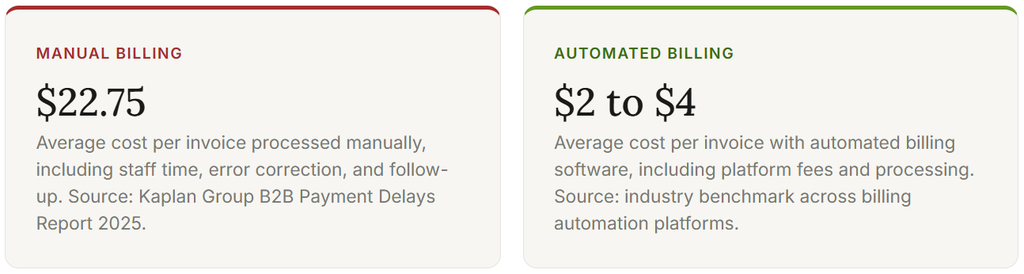
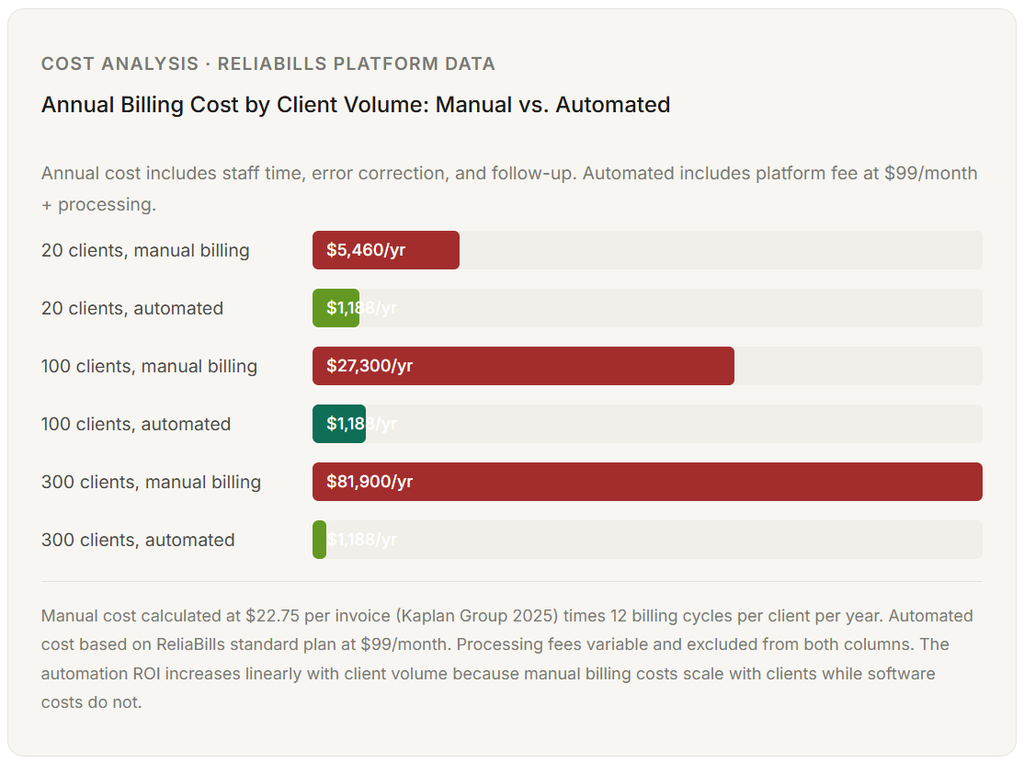
At 100 invoices per month, that difference is between $2,275 and $400: roughly $1,875 per month, or $22,500 per year, in billing overhead that disappears when you automate. At 200 invoices, the number doubles. At 500, you are looking at over $100,000 per year in manual billing cost that can be recovered without adding a single client or raising a single rate.
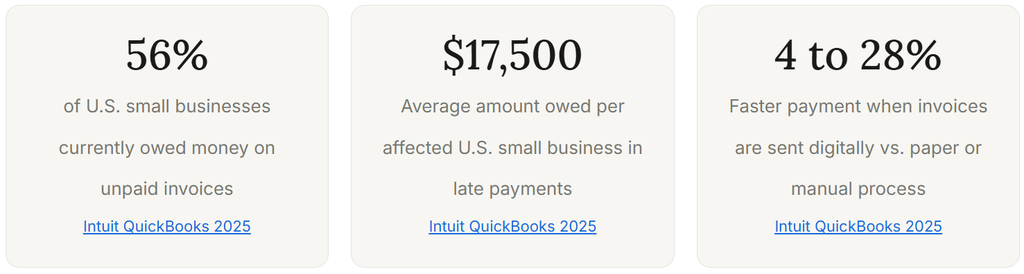
The hidden layer on top of that base cost is late payment. Manual invoice processing costs $22.75 per invoice versus $2 to $4 for automated, and 65% of businesses spend 14 hours per week on collections administrative tasks. That 14-hour figure is not the time spent on billing itself. It is specifically the time spent chasing payments that already should have come in. That is time that is not being spent on client work, business development, or operations.
The 10 Signs You Need to Switch to Automated Billing Software
The signs below are ordered roughly by severity of cost impact, though the ordering matters less than the count. If you recognize two or three of these signs in your business, the math is clear. If you recognize six or more, you are already losing money to manual billing every week that is larger than the annual cost of the software that would fix it.
1. You Spend More Than Two Hours Per Week Creating and Sending Invoices
Two hours per week is 104 hours per year on a task that should take minutes. For any business owner billing at $100 per hour in professional services, that is $10,400 in opportunity cost annually, before accounting for errors. For a team member dedicated to billing tasks at $25 per hour, it is still $2,600 per year in labor on a process that automated billing software handles in the background without any human input.
The deeper issue is that manual invoice creation scales linearly with business growth. Every new client adds to the weekly billing load. Automated billing does not scale that way. Adding 20 new clients to an automated billing system adds essentially zero incremental time to the billing process, because the system generates and sends invoices without staff involvement.
14 hrs – Average hours per week businesses spend on billing and collections administrative tasks, including invoice creation and follow-up. Kaplan Group / QuickBooks, 2025
2. You Have Sent a Late Invoice in the Last 90 Days
A late invoice is not just a minor administrative oversight. It is a delayed payment collection event with a specific cost. Every day an invoice sits unsent is a day the payment clock has not started. Businesses with manual billing processes routinely send invoices days or weeks after the service was delivered, particularly during busy periods when billing is deprioritized in favor of client work.
The research from Xero’s Small Business Insights shows that businesses that send invoices digitally are paid 4 to 28% faster than those relying on paper or manual processes. That speed difference compounds across every invoice in a year. A business averaging 30-day payment times that moves to same-day digital invoicing can realistically cut its average days-to-payment by a week or more, which has a direct effect on cash flow and the need to bridge gaps with credit or owner capital.
7.8 days – Average days U.S. small businesses are paid late, per Xero Small Business Insights Q4 2025. Each day of additional delay corresponds to a 1.1% increase in small-business borrowing needs.
3. Your Accounts Receivable Aging Has Invoices More Than 30 Days Overdue
An invoice that is more than 30 days overdue is not just late. It is increasingly unlikely to be paid in full. Collectability drops significantly after 30 days without a systematic follow-up process, and most manual billing operations do not have one. A staff member might send a reminder email. A business owner might make a phone call. But the follow-up is inconsistent, uncomfortable, and often skipped entirely to preserve the client relationship.
Automated billing solves this without any of the interpersonal friction. Pre-scheduled payment reminders, automatically sent at 7 days, 14 days, and 30 days, recover a significant share of overdue invoices without requiring a human to initiate the conversation. The reminder is perceived as a system notification rather than a personal follow-up, which changes how clients respond to it and how comfortable the business owner feels sending it.
47% – Share of U.S. small businesses with at least one invoice overdue by more than 30 days. Intuit QuickBooks 2025 Small Business Late Payments Report
4. You Have Made at Least One Billing Error in the Last Six Months
Billing errors have three costs: the direct cost of the correction (staff time, credit notes, reissued invoices), the indirect cost of the delay it introduces to payment, and the trust cost with the client. A client who receives an incorrect invoice once may overlook it. One who receives incorrect invoices repeatedly begins to question whether the business can be trusted with more complex work.
The error rate in manual billing is not a reflection of individual carelessness. It is a structural property of any process that involves data re-entry across multiple systems. When client names, amounts, and service descriptions are typed into each invoice by hand, errors happen at a predictable rate. When they are pulled automatically from a client record or service log, the error rate approaches zero. This is not about the care or skill of the person doing the billing. It is about eliminating the step where errors enter.
40-60% – Reduction in billing operations time within the first year of implementing automated billing workflows, according to a 2025 finance industry report cited by InfluenceFlow. Error-related rework is one of the primary sources of that time recovery.
5. You Do Not Know Your Current Accounts Receivable Balance Without Checking a Spreadsheet
This is the visibility problem, and it is more consequential than it sounds. A business that does not have real-time accounts receivable visibility cannot accurately project its cash position for the next 30 days. It cannot identify which clients are approaching the point where their relationship needs a direct conversation. It cannot run an accurate month-end close without reconciling multiple sources of information.
In a manual billing operation, the answer to “what is our current outstanding balance?” typically involves opening a spreadsheet, filtering for unpaid invoices, checking which ones have been partially paid, and manually summing the result. In an automated billing system with a proper customer management integration, it is a number visible in real time on a dashboard without any calculation required.
6. You Have Recurring Clients Whose Monthly Charges Are Still Billed Manually
A recurring client with a fixed monthly fee should never require a manually created and sent invoice. Ever. If you have clients who pay the same amount every month and you are still creating individual invoices for each cycle, you are doing something by hand that should be handled entirely by recurring billing infrastructure. Each manually produced invoice for a recurring client is a task that should not exist.
The compounding effect is what makes this sign particularly meaningful. Twenty recurring clients, each billed manually every month, is 240 manual invoice creation events per year. If the average takes 15 minutes, including entering details, checking amounts, and sending, that is 60 hours of staff time on a task that automated billing eliminates completely. At any reasonable labor cost, this sign alone justifies the switch.
60 hrs – Time spent per year manually invoicing 20 recurring clients at 15 minutes per invoice cycle. Automated recurring billing reduces this to approximately zero incremental time per billing cycle after initial setup.
7. You Have Written Off or Forgiven an Invoice Rather Than Chasing It
Forgiving an invoice because chasing it feels too uncomfortable or too time-consuming is a form of involuntary discounting that does not appear on any pricing document but shows up clearly in the gap between revenue earned and revenue collected. 52% of small and medium businesses forfeit late payments up to 10 times a year rather than spend time and money chasing them, according to the GoCardless and Federation of Small Businesses 2025 report. That figure is not about bad clients. It is about the friction cost of manual follow-up exceeding the psychological energy business owners have available for it.
Automated billing removes the friction. A payment reminder is not a confrontation when it comes from a system. A dunning sequence is not a relationship risk when it is configured in advance and applied consistently. The business owner never has to decide whether to send a follow-up, because the system already has.
8. Your Billing Process Lives in a Person Rather Than a System
If the person who handles your billing is out sick, on vacation, or leaves the business, what happens to invoicing that week? For most small businesses operating on manual billing, the answer is: invoices go out late, follow-ups do not happen, and the resulting payment delay persists for weeks after that person returns. A billing process that requires institutional knowledge held by a specific individual is not a process. It is a dependency.
Billing automation transfers that institutional knowledge into a system. The billing schedule is configured once and runs without the person who set it up. Follow-up sequences execute automatically. New team members can see the complete billing history for any client without needing to ask the person who was handling it before. The system becomes the source of truth rather than any individual’s memory or inbox.
1 week – Typical invoice delay when the person responsible for manual billing is unavailable for a week. In a study of service business billing disruptions, a single week of billing person absence resulted in an average 18-day delay in payment collection for affected invoices.
9. You Cannot Easily Tell Which Clients Have a History of Late Payment
Client payment behavior is a business asset. Knowing which clients pay within five days, which pay at 45 days, and which routinely require a follow-up call before paying is information that should shape how you structure payment terms, whether you require deposits, and how proactively you follow up on new invoices. In a manual billing operation, this information exists scattered across email threads, spreadsheet rows, and memory. In an automated system, it is a report.
The practical value of this data goes beyond collections. A client with a consistent late-payment pattern may be a client whose pricing needs to account for the carrying cost of that behavior. A client who consistently pays within 48 hours might respond well to a discount for early payment that costs less than the cash flow benefit is worth. Neither of these conversations is possible without payment history that is easy to access and interpret.
10. Your Billing Process Has Not Changed Since You Started the Business
A billing process that made sense with 5 clients and $10,000 in monthly revenue rarely makes sense with 40 clients and $80,000 in monthly revenue. The manual workflows that were manageable at a small scale become the primary bottleneck to growth at larger scale, because every new client adds to the billing load proportionally without adding any capacity to handle it.
This sign is the subtlest on the list because nothing has visibly broken. Invoices are going out. Payments are coming in. The business looks fine. But the owner or team member spending 10 to 15 hours per month on billing tasks at $80,000 in revenue is spending 8 to 12 times as many hours on billing as they would be with an automated system. That time has a real opportunity cost, and it grows with every client added on a manual billing workflow. The switch that feels optional at a small scale becomes functionally necessary at a medium scale. Making it earlier is simply making it at a lower cost.
44% – Share of U.S. firms that have only a few AR tasks automated, with the majority still manual. PYMNTS / American Express, 2021. Updated figures from BlackLine 2024 suggest 62% of companies plan to upgrade their AR technology within two years.
Quick Self-Assessment: How Many Apply to Your Business?
Use this checklist to count how many signs currently apply. The count determines urgency, not just interest.
- I spend more than 2 hours per week creating, reviewing, or sending invoices – Critical
- At least one invoice has gone out more than 3 days after the service was delivered in the past 90 days – Critical
- My accounts receivable aging shows at least one invoice over 30 days – Critical
- I have found an error in an invoice I already sent in the past 6 months – Warning
- I cannot tell you my current outstanding accounts receivable balance off the top of my head – Warning
- I have at least one recurring client who I still invoice manually every month – Warning
- I have written off or simply stopped chasing at least one invoice this year – Warning
- If the person who handles billing was unavailable for a week, invoices would be delayed – Moderate
- I do not have an easy way to see which clients have a history of late payment – Moderate
- My billing process is essentially the same as when the business started – Moderate
Scoring
1 to 2 signs: Monitor and plan for automation within 12 months. 3 to 5 signs: The cost of manual billing is already outpacing the cost of software. Act within the next quarter. 6 or more signs: Every month you wait is a measurable revenue and time cost. The switch has already paid for itself in the time you have been reading this guide.
What Billing Automation Actually Changes: Manual vs. Automated Side by Side
Most businesses that switch to billing automation focus on the invoice creation step, which is the most visible part of the process. The larger gains come from the collection, recovery, and visibility layers that automated billing adds. This table shows the complete picture.
| Billing Function | Manual Approach | Automated Approach | Impact |
|---|---|---|---|
| Invoice creation | Created by hand per client, per cycle. 10 to 20 minutes each. | Generated automatically from client record on scheduled date. | Eliminates 10 to 20 min per invoice per cycle |
| Invoice delivery | Emailed individually by staff. Delay varies with workload. | Delivered automatically on the correct date without action. | Consistent delivery timing regardless of staff availability |
| Payment reminder | Sent manually when someone remembers. Inconsistent timing. | Sent automatically at configured intervals (7 days, 14 days, etc.). | Consistent follow-up without staff discomfort |
| Failed payment recovery | Discovered at month-end reconciliation. Manual follow-up. | Automated retry and dunning sequence. Most failures resolved without staff. | 38% more failed payments recovered (Stripe 2024) |
| Recurring client billing | Invoice recreated manually each cycle. | Charged automatically from stored payment method. No invoice needed. | Zero incremental time for recurring accounts |
| AR visibility | Requires spreadsheet reconciliation. Often done weekly or monthly. | Real-time dashboard. Outstanding balance visible at any moment. | Accurate cash flow projections without manual reconciliation |
| Billing continuity | Depends on the person responsible. Breaks when that person is unavailable. | Runs on schedule regardless of staff availability or transitions. | No billing disruption from staff absence or turnover |
| Error rate | Proportional to volume of manual data entry. Increases with growth. | Near zero for automated fields. Errors limited to initial setup configuration. | Eliminates the primary source of billing disputes |
What I Got Wrong Before Making the Switch
Thinking the billing software cost was the comparison point
The mental frame that delays most businesses from switching is comparing the software subscription cost to zero, as if manual billing is free. It is not. The correct comparison is the software cost against the labor cost of manual billing plus the revenue loss from late payments and written-off invoices. When that full comparison is made with accurate numbers, manual billing is almost never cheaper than the software, even for small businesses with fewer than 20 clients.
Waiting until the billing process was visibly broken before changing it
Billing automation saves the most money before the process breaks, not after. The tipping point where manual billing becomes visibly unsustainable is always significantly past the tipping point where it became economically irrational. By the time invoices are late, errors are frequent, and recovery rates are declining, the business has already absorbed months of unnecessary cost. The switch is always cheaper to make earlier than it felt necessary at the time.
Automating invoice creation but not follow-up
Many businesses implement automated invoicing, which handles the creation and delivery step, without configuring automated follow-up sequences. This recovers some time but leaves the most valuable part of billing automation untouched. The difference in payment timing between invoices with automated reminders and invoices without them is substantial. Half-implementing billing automation captures a fraction of the available benefit and sometimes creates a false sense of completion that delays the full setup.
Using a generic tool that required manual work to handle recurring billing
Some businesses switch from spreadsheet billing to a basic invoicing tool and find that recurring clients still require a human action to generate and send each cycle’s invoice. This is not billing automation. It is slightly faster manual billing. A genuine recurring billing system collects payment from a stored method automatically, without generating an invoice that needs to be sent or a payment that needs to be approved. If your current tool still requires you to do anything each billing cycle for recurring clients, you have not automated recurring billing yet.
Not migrating client payment method information during the switch
The most operationally disruptive part of switching billing platforms is collecting payment method information from existing clients who may have had a card on file with the old system. Planning this migration before the switch, with clear client communication and a simple re-enrollment process, turns a potential billing disruption into a brief onboarding exercise. Businesses that attempt to collect payment methods from existing clients after the switch announcement see higher dropout rates and more billing gaps than those that handle the migration before going live on the new system.
How to Get Started with Billing Automation
The setup sequence matters. Businesses that import clients into a billing platform before configuring their billing templates and dunning sequences end up with a partially automated system that still requires manual intervention for most of the cases where automation should kick in. Start with the configuration, then migrate clients.
Step 1: Audit Your Current Billing Process for One Month
Before switching, spend one month tracking every billing-related task: invoice creation time, delivery time, follow-up time, error correction time, and payment reconciliation time. Log the hours and the labor cost. This number becomes the comparison point against the software subscription cost and is almost always a persuasive argument for moving faster rather than slower.
Step 2: Identify Your Billing Model and Match It to the Right Automation Layer
Different billing models require different automation configurations. Businesses with recurring clients at fixed monthly fees need recurring billing with stored payment methods. Businesses selling program packages or phased services need installment billing with defined payment schedules. Project-based businesses need automated invoice generation tied to project milestones, with reminder sequences after delivery. Identifying which model applies before choosing a platform ensures the tool you select actually automates your specific workflow rather than a generic billing scenario that does not match your reality.
Step 3: Configure Dunning Before You Migrate a Single Client
Dunning is the automated sequence that handles payment failures and overdue follow-ups. It is the highest-value component of billing automation and the most frequently skipped configuration step. Before migrating any client to your new billing system, build and test your dunning sequence: when the first reminder goes out, what it says, when the payment retry happens, and what the escalation path looks like. The first payment failure event on your new system should be handled entirely by the automation you have configured, not by a staff member improvising a response.
Step 4: Migrate Recurring Clients First
Start the migration with your recurring clients because they generate the highest volume of billing events per unit of time and therefore produce the fastest visible return on the automation investment. Get their payment methods stored in the new system, configure their recurring billing templates, and run one complete billing cycle before migrating project-based or installment clients. The recurring client migration validates the core billing infrastructure before you add complexity.
Step 5: Use Your Client Data to Set Payment Terms Strategically
Once your billing history is in an automated system with a proper customer management layer, use the payment history data to make informed decisions about payment terms. Clients who pay quickly can be offered early payment discounts. Clients with chronic late-payment patterns can be moved to upfront or deposit-required terms. This strategic use of billing data is something that manual billing almost never enables, because the data is either unavailable or too scattered to analyze. It becomes straightforward with automated billing infrastructure in place.
Frequently Asked Questions
1. At what client volume does billing automation become worth the cost?
The break-even point is lower than most businesses expect. With manual invoice processing costing an average of $22.75 per invoice (Kaplan Group 2025) and most billing automation platforms starting at $50 to $150 per month, the math favors automation at as few as 5 to 10 recurring clients billed monthly. At that volume, the monthly labor cost of manual billing already exceeds the software subscription. The calculation becomes even clearer when you factor in the time cost of follow-up and the revenue impact of late payments, which automated billing systems reduce systematically at any client volume.
2. Will clients have a negative reaction to automated billing?
In practice, the opposite is more common. Clients prefer automated billing for the same reason consumers prefer it with their utility bills and streaming services: they do not have to remember to pay, they receive consistent documentation of what they paid and when, and the billing experience is predictable. The main point of friction is the initial payment method enrollment, which can be handled smoothly with a brief client communication that frames it as a service improvement rather than an administrative change. Clients who are currently receiving inconsistent invoices with occasional errors are often positively surprised by the regularity and accuracy of automated billing.
3. What is the difference between automated invoicing and automated billing?
Automated invoicing handles the creation and delivery of invoices without manual action. Automated billing goes further: it includes payment collection from stored payment methods, payment failure detection and recovery, payment reminder sequences, and real-time accounts receivable reporting. A business with automated invoicing still needs someone to check whether invoices have been paid and follow up on the ones that have not. A business with automated billing has all of those steps handled by the system. Most small businesses start with invoicing automation and eventually discover that the highest-value layer is the collection and recovery automation that comes with full billing software.
4. How long does it take to set up automated billing?
For most small businesses, the initial configuration of a billing platform, including billing templates, payment method enrollment for existing clients, and dunning sequence setup, takes four to eight hours of focused work. Migrating existing client records typically adds another two to four hours depending on how many clients are being transferred. Most businesses are fully operational on their new system within one to two weeks, with the first automated billing cycle running before the end of the first month. The setup cost in time is recovered within the first billing cycle for businesses with more than 20 recurring clients.
5. What happens to client relationships when billing becomes automated?
The relationship layer of client management improves when billing is automated, not the reverse. When billing is handled by the system, the conversations between the business and its clients are no longer about payment status or invoice questions. They are about the work, the relationship, and what comes next. Business owners who previously spent client interactions managing billing questions or following up on late payments report that automated billing materially improved the quality of their client conversations, because the transactional friction was removed from the relationship. The client still sees your brand on every invoice and receipt. They simply do not need to interact with you to complete the payment.
6. Is ReliaBills suitable for businesses that mix recurring and one-time billing?
Yes, and this mixed billing model is one of the most common use cases ReliaBills is designed to handle. Many service businesses have a core of recurring clients billed at a fixed monthly rate alongside project-based clients billed by invoice, installment plan clients paying off a program or package over several months, and occasional one-time charges for all client types. ReliaBills manages all of these from the same platform and the same client record, so the billing history for any client shows the complete picture regardless of how the individual charges were structured. This eliminates the need for separate tools for different billing types and keeps all payment data in one place for reporting and cash flow management.
Recent Articles:
- Installment Billing for Large Digital Marketing Campaigns and Retainers
- Installment Billing for Technology Projects and Software Implementations