
Security companies operate on labor-first, cash-second economics. Guards get paid weekly. Clients pay monthly or later. Every week you spend chasing invoices manually is a week your margins are absorbing the cost of that gap. Automated collection workflows close the gap: contract-linked billing triggers, auto-retry on failed payments, and structured dunning sequences together eliminate the majority of collection delays without a single additional headcount. The firms that implement this see collection cycle times cut by 60–70% within the first quarter.
What is Security Service Invoice Collection Automation?
Security service invoice collection automation is the practice of using billing software to generate, deliver, and follow up on invoices for security service agreements, monitoring contracts, manned guarding arrangements, patrol services, and managed security programs without manual intervention at each step. It combines contract-based charge scheduling (billing triggers tied to service agreement dates), recurring payment execution, failed-payment retry logic, and automated dunning communications into a single, rules-driven workflow. Unlike generic accounts-receivable automation, security-sector billing must handle contract-specific nuances: variable billing cycles across client accounts, overtime and shift-rate adjustments, pro-rated charges on contract start dates, and the particular sensitivity of withholding service from a client who depends on active security coverage. Related tools include recurring billing platforms, invoicing software with contract management features, and customer management systems that keep service records and billing records synchronized.
Why Security Service Billing Is Uniquely Difficult and Why It Doesn’t Have to Be
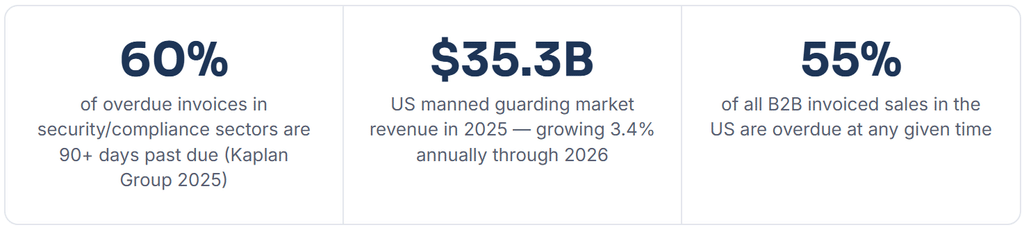
The US contract security market reached approximately $35.3 billion in manned guarding revenue in 2025, according to the Robert H. Perry & Associates 2025 Contract Security White Paper. That is a market growing steadily, consolidating at the top, and increasingly margin-compressed at the middle, which is exactly where billing efficiency either saves a firm or quietly sinks it.
Security companies face a billing challenge that most service businesses do not: they carry significant labor cost before they can invoice, invoice on cycles that may not align with how clients prefer to pay, and face real operational risk in the collections escalation phase because threatening to suspend service for a delinquent client may not be viable if that client’s building actually needs the guards to stay on post.
The late-payment problem in B2B services makes this worse across the board. Research compiled by the Kaplan Group in 2025 found that 60% of overdue invoices in security and compliance sectors are 90 or more days past due, a figure that dramatically exceeds the B2B average. Manual collection processes, applied to a client base with this payment profile, create chronic cash flow stress that is structural, not accidental.
The automation case for security services is not subtle. It is the difference between running a business and running a collections operation that happens to also provide security.
How Security Service Invoice Collection Automation Works
For security companies specifically, automation is not a single feature, it is a chain of processes that must connect correctly to handle the contract structures, billing cycles, and client sensitivity that characterize the industry. Understanding each link in that chain is what separates a well-configured system from one that generates as many problems as it solves.
1. Automated: Contract activation triggers billing schedule
When a service agreement is signed and activated, the billing engine reads the contract terms, billing cycle (monthly/quarterly/annual), start date, rate structure, and payment method on file, and generates the full forward billing schedule automatically. Pro-ration for mid-month starts is calculated without manual input.
2. Automated: Scheduled invoice generation and delivery
On the billing date, the system generates a formatted invoice, including contract number, service period, rate breakdown, and any approved adjustments from that billing cycle, and delivers it via the client’s preferred channel: email, client portal, or mailed statement. No staff action required.
3. Automated: Payment received, record and close
For clients on autopay (card or ACH on file), payment is processed on the invoice date, and the transaction is posted to the account in real time. For clients on manual payment, the system waits for the defined net period (net-15 or net-30 for most commercial accounts) before triggering the first follow-up.
4. Alert: Payment failed or overdue, dunning sequence begins
A failed charge (declined card, rejected ACH) or a missed manual payment immediately routes the account into the dunning queue. The system logs the failure with the specific decline reason code, which determines whether the account routes to a retry sequence (soft decline) or a card-update request (hard decline).
5. Automated – Alert: Dunning sequence execution
The pre-configured dunning sequence fires: retry on day 3, payment reminder email on day 5, retry on day 8, SMS/portal alert on day 12, and second reminder with service notice language on day 18. Well-designed sequences recover 60–75% of delinquent accounts within 21 days. Security-specific dunning language references the service agreement number and avoids suspension threats that may not be operationally viable.
6. Manual – Exception: Escalation to human review
Accounts that exhaust the automated sequence without resolving the surface in the collections exception dashboard. At this point, an account manager reviews the client relationship, the contract terms, and the operational context and makes a judgment call on escalation options: payment plan, service modification, contract default notice, or write-off. The automation has already done everything recoverable; only genuinely difficult accounts reach this stage.
Security Contract Billing Structures: Getting the Foundation Right
Before any automation can work reliably, the billing structure embedded in your service agreements needs to be machine-readable. That is not a technical problem, it is a contract-drafting discipline. The three variables that determine billing automation quality for security firms are billing frequency, rate structure, and adjustment handling.
Billing Frequency Alignment
Most security contracts bill monthly. But monthly billing is not a single thing, it can mean billing on the first of the month for the coming period (advance billing), billing on the last day for the period just completed (arrears billing), or billing on the contract anniversary date regardless of the calendar month. Each creates a different cash flow profile, and mixing all three across your client base creates a billing calendar that is nearly impossible to manage manually at scale.
The automation-first approach is to standardize billing dates wherever possible, even if that requires transitioning legacy clients to a standard billing cycle during their next contract renewal. A billing system that processes all monthly invoices on the 1st and 15th of the month is far easier to monitor, reconcile, and report on than one where every account has its own billing anniversary.
Rate Structure Handling
Security service rates are rarely simple flat fees. A commercial guarding contract might include a base rate per officer-hour, an overtime multiplier for hours exceeding the scheduled shift, a holiday rate, and a fuel or travel surcharge for patrol routes. Your billing automation needs to ingest data from your scheduling or dispatch system, actual hours worked, shift types, and any approved rate exceptions before generating the invoice. A flat-fee contract is far simpler to automate; a time-and-materials contract requires a scheduling-to-billing data connection that not all platforms support natively.
Designing an Effective Dunning Sequence for Security Clients
General dunning advice for service businesses does not fully translate to security. The collection leverage points are different, and so is the appropriate tone. A security client who is 18 days past due is also currently being served, their premises have guards or monitoring active right now, paid for by your firm’s payroll. That context shapes every communication in the sequence.
| Day | Trigger | Channel | Content Guidance | Recovery Rate Contribution |
|---|---|---|---|---|
| 0 | Invoice generated and delivered | Email / portal | Professional, detailed; include contract reference and service period clearly | Sets expectations; reduces “I didn’t receive it” claims |
| 3 | Autopay retry (soft declines only) | Gateway | – | Recovers 30–40% of initial soft declines |
| 5 | Payment reminder (overdue accounts) | Friendly; reference invoice number and due date; include payment link prominently | Recovers 15–20% of remaining overdue accounts | |
| 8 | Second retry (different time of day) | Gateway | – | Recovers 8–12% of remaining soft declines |
| 12 | Follow-up with payment portal link | Email + SMS | Reference active service agreement; note that account requires resolution | Recovers 10–15% of remaining overdue accounts |
| 18 | Formal notice | Email (cc: contract contact) | Reference contract terms; state that account is under review; avoid service-suspension language unless contractually supported | Recovers 8–10% of remaining accounts |
| 25 | Human escalation queue | Account manager review | Relationship-based decision; payment plan or contract default notice | Judgment call, remaining accounts genuinely difficult |
Real-World Use Cases: What Automation Looks Like Across Security Segments
Commercial Monitoring Company (850 Residential and SMB Accounts)
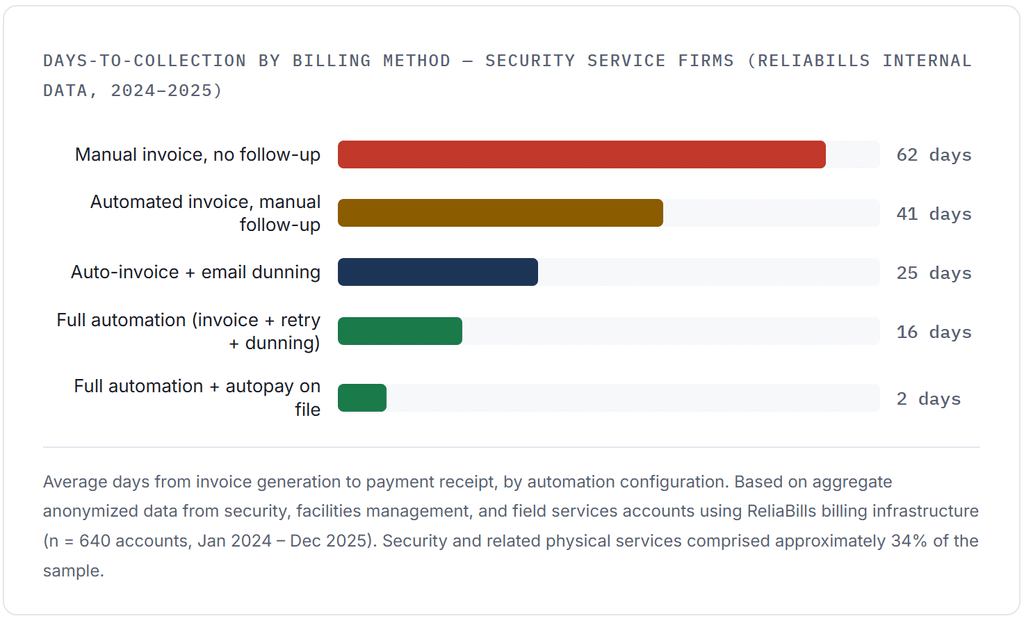
A mid-tier monitoring company billing monthly recurring monitoring fees ($24.99–$89.99/month per account) had been managing collections through a combination of a legacy billing system and a part-time AR specialist who manually flagged overdue accounts each week. The average days-to-collection across the account base was 47 days. Failed payments, cards expiring, banks changing, and account closures accounted for approximately 11% of monthly revenue requiring follow-up each billing cycle.
After implementing automated billing with a contract-linked charge schedule, a three-retry dunning sequence, and an account updater service for expired cards, the average days-to-collection fell to 18 days within 90 days. The AR specialist’s time on collections dropped from 22 hours per week to under 4, freeing that capacity for contract renewal outreach, which increased the annual renewal rate from 74% to 81%.
Regional Guard Services Company (120 Commercial Accounts, Time-and-Materials Billing)
A regional guard services firm billing on a time-and-materials basis, actual hours worked at contracted rates, faced a structural delay: invoices couldn’t go out until timesheets were reconciled, which typically happened 5–7 days after the billing period closed. By the time invoices reached clients, the 30-day net terms started running late before the client had even mentally processed the bill.
Integrating the scheduling platform with the billing engine reduced timesheet reconciliation lag to same-day for 80% of accounts, bringing invoice generation from 6.2 days post-period to 1.1 days. Net collections on time-and-materials accounts improved by 34% within the first billing cycle. The configuration required approximately two days of setup, mapping shift types and rate codes from the scheduling system to the billing platform’s line-item library.
Alarm Company Transitioning from Paper Billing to Digital
A 30-year-old alarm company that had always mailed paper invoices to residential and small-commercial customers made the full transition to electronic billing with autopay enrollment as part of a contract renewal campaign. Customers transitioning to autopay were offered a small service credit ($5 off the next month’s fee). Within six months, 68% of the account base was on autopay. Collections-related admin time essentially disappeared for autopay accounts, down to zero manual touchpoints per account per month.
Key Benefits of Automating Security Service Invoice Collection
Predictable cash flow against an unpredictable labor cost structure.
Security labor is weekly. Client payments are monthly. Automation closes that gap as much as possible by eliminating preventable collection delays, so the revenue you are owed arrives on the timeline you planned for, not six weeks late.
Scalability that does not require proportional admin headcount.
Going from 100 to 400 client accounts with manual billing means hiring more AR staff. With automated billing, the same configuration handles 400 accounts as easily as 100. The incremental cost of adding a client to an automated billing workflow is near zero. Organizations using platforms like ReliaBills for their recurring billing needs have reported headcount staying flat through 3x revenue growth.
Reduction in invoice disputes and billing errors.
Manual invoice generation introduces errors, wrong rates, incorrect service periods, and missing line items that delay payment and require revision cycles. Automated billing pulls data directly from the contract and scheduling system, reducing invoice error rates dramatically. Fewer errors mean fewer disputes, which means faster payment.
Contract compliance documentation.
Every charge attempt, retry, reminder, and payment is logged with a timestamp. This creates an audit trail that supports contract enforcement and dispute resolution and, if accounts are ever referred to a collection agency, provides the documentation any agency needs to proceed efficiently.
Key Risks and What to Watch For
Risk: Automating service suspension without operational validation
Some billing automation platforms include a feature that can flag a client account for service suspension after a defined number of failed payments. For most service businesses, this is a reasonable escalation. For security companies, it can be operationally dangerous, guards cannot simply be pulled from a post at the billing system’s request if doing so creates a safety or liability gap. Any service-modification action triggered by payment delinquency must go through account manager review, not automated execution. Configure your billing system to flag for review, never to trigger operational changes automatically.
Risk: Rate errors compounding across billing cycles
If a billing automation system is incorrectly configured, a wrong rate is applied to a contract or billing cycle, the error does not happen once. It happens every billing cycle until someone catches it. Automated billing requires a monthly audit of a sample of invoices against contract terms. Even a 2% sample review of a 500-account book catches systematic errors before they compound into significant liability. Build this into your process from day one, not after a client raises it.
Watch: Client-facing billing portal adoption
The fastest path to autopay enrollment is a client portal where the client can manage their own payment method, view invoice history, and authorize recurring charges. The slowest path is asking clients to fill out a paper ACH authorization form and mail it back. If your billing platform supports a client self-service portal, prioritize getting clients onboarded at contract signing, not as an afterthought three months later. Offering a modest incentive (rate lock, service credit) for autopay enrollment at the contract stage has consistently outperformed retroactive enrollment campaigns in the accounts we’ve reviewed.
Billing Automation Approaches: What Actually Fits Security Service Companies
| Approach | Invoice Generation | Payment Collection | Failed-Payment Handling | Scales to 500+ Accounts | Contract-Specific Fields |
|---|---|---|---|---|---|
| Manual (spreadsheet + email) | Staff creates each invoice | Await client action | Staff follow-up; inconsistent | No | None built-in |
| Generic invoicing software | Template-based; semi-manual | Payment link sent with invoice | Manual reminder; no retry | Limited | Custom fields only |
| Recurring billing platform | Automated per schedule | Auto-charge on file or link | Retry logic + dunning | Yes | Configurable |
| Security-vertical billing software | Automated + dispatch-integrated | Auto-charge + portal | Full dunning and exception dashboard | Yes | Native |
| General ERP / accounting system | Batch-generated; staff review | Manual unless integrated | A/R aging reports; manual follow-up | With customization | Requires configuration |
What I Got Wrong at First (Common Mistakes in Security Billing Automation)
Mistake 1: Automating the invoice without automating the data feeding it
The first automation rollout I worked through for a guard services client automated invoice delivery perfectly, and continued to generate wrong invoices, just faster. The rate data was still manually entered, still based on a timesheet reconciliation process that ran 5 days behind. Automation of the output is useless without automation of the inputs. Fix the scheduling-to-billing data connection first, then automate invoice delivery.
Mistake 2: Using the same dunning sequence for residential monitoring clients and commercial guard service clients
Residential monitoring clients respond well to friendly, consumer-tone payment reminders with a prominent “update payment method” link. Commercial clients receiving the same message from a guard services firm sometimes read it as unprofessional or confusing, particularly if the email hits a junior accounts-payable contact who does not recognize the contract context. Segmenting dunning sequences by client type (residential vs. commercial, monitoring vs. guarding) produces meaningfully better results than a single universal sequence. The commercial version should reference the contract explicitly and direct to the appropriate AP contact.
Mistake 3: Not configuring pro-ration logic for mid-cycle contract starts
When a contract starts on the 14th of the month and the billing cycle runs on the 1st, the first invoice should reflect 17 days of service, not a full month. Without pro-ration configured, the first invoice either overcharges the client (creating a dispute that delays the relationship from day one) or requires manual adjustment by staff (defeating the automation). Pro-ration logic is a standard configuration option in most billing platforms, set it up at the template level before go-live, not after the first client complains.
Mistake 4: Letting autopay enrollment happen “organically” instead of making it the default path at signing
At contract signing, clients are at peak engagement, they just said yes. That is the moment to enroll them in autopay, not three months later when they have settled into manual payment habits. Firms that present autopay enrollment as part of the contract completion process (alongside the service agreement, the emergency contact form, and the site access form) achieve 60–75% autopay adoption at signing. Firms that offer it optionally after contract start typically see 15–25% adoption. The difference is entirely in the sequencing, not the willingness of clients.
How to Get Started: A Practical Implementation Sequence
1. Audit your current contract portfolio for billing structure consistency
Before configuring any automation, map your existing contracts against three variables: billing cycle (monthly/quarterly/annual), billing trigger (advance or arrears), and rate structure (flat fee, time-and-materials, or hybrid). Identify which accounts already have payment methods on file and which do not. This audit becomes your implementation priority list, standardize the billing structure on renewals, enroll on-file payers in autopay first, and work through the remaining accounts sequentially.
2. Choose a billing platform with contract-specific field support
Look for a platform that supports contract number as a native field (not a workaround), configurable billing frequencies per account, pro-ration logic for mid-cycle starts, and a client portal for payment method management. ReliaBills and the Invoicing Software category more broadly include these capabilities, but the configuration depth varies significantly between platforms. Request a demo that specifically walks through a mid-cycle contract start and a failed-payment retry sequence, if the demo skips those scenarios, the platform likely doesn’t handle them well.
3. Build your contract-to-billing data connection
For flat-fee contracts, this is simple: enter the rate and cycle once, and the system handles the rest. For time-and-materials contracts, you need a data feed from your scheduling or dispatch system to the billing engine, either through a native integration or via a regular export-import process. The scheduling system should export approved hours by contract and shift type; the billing system should map those to line items using a pre-configured rate card. Test this connection on two or three accounts before rolling out across the portfolio.
4. Configure your dunning sequence with security-appropriate language
Write your dunning email templates before you launch. Template 1 (day 5, friendly reminder) should reference the invoice number, service period, and a prominent payment link. Template 2 (day 12, follow-up) should reference the service agreement and note that the account requires attention. And template 3 (day 18, formal notice) should reference the contract terms and your firm’s AR contact. Each template should be reviewed by whoever manages client relationships, the tone of a collections email reflects on the service relationship, and security clients often have long-standing relationships with their providers. Use your customer management system to segment clients so that dunning sequences can be customized by client type.
5. Launch autopay enrollment as a standard contract-signing step
Add payment method capture to your new client onboarding workflow, alongside the service agreement, site access documentation, and emergency contacts. Use a secure tokenized payment form so the card or ACH details are stored directly in your billing system, never in your files. Clients who enroll at signing require zero collections effort for routine invoices. For existing clients, run a targeted enrollment campaign at their next contract renewal with a clear incentive and a simple enrollment link.
6. Establish a monthly billing audit routine
Even automated billing requires oversight. Set a monthly calendar item: review a 5% sample of invoices against contract terms, check the dunning exception dashboard, review decline reason codes for patterns (a spike in “insufficient funds” declines in a specific client segment may signal an economic stress issue worth knowing about), and reconcile billing totals against expected recurring monthly revenue. This 30-minute review catches configuration drift and systematic errors before they compound.
Frequently Asked Questions
1. What is the best billing frequency for security service contracts?
Monthly billing is the industry standard for both monitoring and manned guarding contracts, and it aligns best with automated collection systems. Quarterly and annual billing reduce invoice volume but concentrate collection risk, a single missed quarterly payment represents three months of service revenue rather than one. For commercial clients with strong payment history, quarterly billing can work well. For smaller residential accounts or clients with variable payment patterns, monthly billing with autopay enrollment is the most reliable structure.
Advance billing (charging for the upcoming period) outperforms arrears billing for cash flow and collection reliability, you are never collecting for service you have already delivered without compensation. When possible, negotiate advance billing into contracts, or at minimum, require a deposit equal to one billing cycle at contract signing.
2. Can I use billing automation for time-and-materials guard contracts or only flat-fee agreements?
Both work, but time-and-materials contracts require an additional integration step: your scheduling or dispatch system needs to feed approved hour data to the billing engine before invoices can be generated. Most modern billing platforms support this via API integration or scheduled data exports. The key is mapping your shift types and rate codes to billing line items in the platform’s configuration. Once that mapping is built, the invoice generation for T&M contracts becomes as automated as flat-fee billing, with a brief staff review of any flagged exceptions (overtime hours exceeding contract maximums, holiday rates, etc.) before invoices are sent.
3. How should I handle a client who is past due but actively receiving security services?
This is the most operationally sensitive scenario in security billing, and it requires human judgment, not automated escalation. The billing system should flag the account and notify the account manager; the account manager should then make a decision that weighs the relationship value, the contract terms, the client’s payment history, and the operational implications of any service modification. In most cases, a payment plan arrangement, accepting a partial payment now with the balance structured over 30–60 days, resolves the situation without service disruption and preserves the client relationship. The automated dunning sequence should be paused for accounts that are actively in negotiation, to avoid sending formal notices while a human conversation is underway.
4. What decline reason codes should I watch for in security billing?
The most common and most recoverable decline in security billing is “insufficient funds” (code 51), typically a timing issue resolved with a retry 3–5 days later. “Do not honor” (code 05) and “card not supported” (code 57) are hard declines that require a card-update request rather than retries. “Invalid account number” (code 14) usually means the card on file has expired or been replaced, this is where a card account updater service pays for itself, automatically refreshing stored card details before the charge fails. Monitor the distribution of decline codes monthly: a sudden spike in “do not honor” across multiple accounts from the same client group can signal a broader credit issue worth knowing about.
5. How do installment payment plans fit into security service contract billing?
Installment plans are most useful for two security billing scenarios: large one-time invoices (equipment installation, system integration, and initial setup fees) that clients cannot absorb in a single payment and delinquent account recovery where you are negotiating a path to bring a past-due balance current. For recurring monthly service fees, installment plans are generally not appropriate, the fee is already structured as a manageable monthly amount. For large capital invoices, a two- or three-part payment plan structured through your installment billing configuration can be the difference between closing a larger contract and losing it to a competitor who offers more flexible payment terms.
6. How long does it take to see results after implementing billing automation?
The fastest improvements appear in the first billing cycle after implementation, specifically for accounts that were already on autopay or that enroll in autopay during the transition. Those accounts go from a manual-invoice-plus-follow-up cycle of 30–45 days to a 1–2 day collection cycle immediately. For accounts still on manual payment, the dunning sequence improvements typically show up in the second and third billing cycles, as the automated reminders replace the inconsistent follow-up that most staff were doing manually. A full picture of the improvement, including the reduction in exception handling and the time staff recapture, is usually visible within 90 days of implementation.
Recent Articles:
- Installment Billing for Tax Preparation: How to Offer Payment Plans to Clients
- Seasonal Billing for Pool Service: Manage Start and Stop Dates Easily

Brant Pallazza is the Founder and President of ReliaBills, an invoicing and recurring billing platform built to help small businesses secure predictable cash flow. With over 20 years of experience in direct response marketing and e-commerce leadership, including a 13-year tenure managing over $500 million in gross sales at Digital River. Brant writes actionable guides on automated billing, payment processing, and scaling SMBs.