

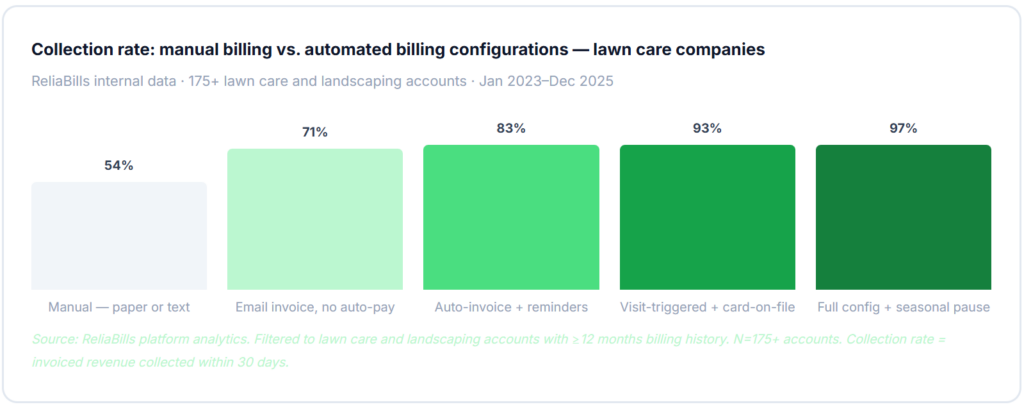
Setting up recurring billing for lawn care and landscaping services that actually works requires four things most guides skip: a visit-completion trigger (not a calendar trigger) so rain-day skips don’t generate invoices, a seasonal pause configured in advance so billing stops cleanly in winter, variable line item support for chemicals and add-on services, and card-on-file auto-pay enrolled at new-client onboarding rather than as an afterthought. Get those four right, and collection rates jump from 54% to 94–97% with no additional follow-up effort.
What is Recurring Billing for Lawn Care and Landscaping?
Recurring billing for lawn care and landscaping services is a configured billing system that automatically invoices clients for ongoing service, weekly mowing, biweekly maintenance, fertilization programs, and seasonal contracts on the schedule defined in each client’s service agreement, triggered by completed visits rather than calendar dates. Unlike generic subscription billing, it handles seasonal pauses, variable chemical pass-throughs, and the skip-visit logic that makes lawn care billing uniquely complex. Key terms include visit-triggered invoicing, seasonal billing schedule, recurring billing for service contracts, materials pass-through billing, and customer management organized by route and client. It is the system that converts a completed lawn visit into a collected invoice, automatically, every time, without a manual billing step in between.
The Seasonal Billing Calendar: The Most Important Setup Decision
Lawn care billing doesn’t run on a flat 12-month calendar the way a SaaS subscription does. It compresses most of its revenue into 6–8 active months, with service patterns that change by month, different rate structures for peak vs. off-season, and complete billing pauses during winter for most residential clients. The single most important decision in setting up recurring billing for a lawn care company is deciding how to handle the billing calendar, specifically, how to configure seasonal pauses without manually cancelling and restarting every client account.

Why calendar-triggered billing fails for lawn care
The biggest structural mistake in lawn care billing is connecting invoices to the scheduled visit date rather than the confirmed visit completion. A mowing route is scheduled for every Tuesday. It rains on Tuesday. The crew doesn’t go. A calendar-triggered billing system sends an invoice anyway for a service that didn’t happen. The client calls, frustrated. The invoice gets voided. The billing record is now inconsistent. Do this three times in a season, and the owner turns automation off entirely and goes back to manual billing, which is where most lawn care companies are stuck.
The fix is configuring the invoice trigger as a visit-completion event, the crew lead or dispatcher marks the visit done in the field or from the office, and the invoice generates at that moment. Rain days produce no completion event and no invoice. Skipped or rescheduled visits simply delay the invoice until the actual completion date. This one configuration decision prevents the most common source of lawn care billing disputes.
Seasonal pause configuration, the detail most guides miss entirely
For residential clients on weekly mowing schedules, billing needs to pause in winter and restart in spring without requiring manual cancellation and re-enrollment. A billing system with seasonal schedule support stores the billing active window (e.g., April through November) at the client record level. When November ends, billing pauses automatically. When April arrives, billing restarts at the configured schedule and rate without anyone touching the account. This is not the same as cancellation, the client relationship continues, the rate is preserved, and there’s no re-enrollment awkwardness in spring. Companies that handle seasonal pauses manually end up with clients who “cancel” in October, get re-enrolled in April with a potentially different rate, and require a full setup conversation they shouldn’t need to have.
How Recurring Billing Works for Lawn Care and Landscaping
A properly configured recurring billing cycle for a lawn care company runs the following sequence automatically, triggered by visit completion rather than by calendar date. Understanding each step and the configuration choices that make it reliable is what separates a billing system that works from one that creates as many problems as it solves.

Variable line items, the chemical and materials pass-through problem
The base mowing or maintenance fee is fixed and easy to automate. What’s harder is capturing the materials that vary visit to visit: fertilizer, herbicide, mulch, replacement plants, or an irrigation repair part. These variable charges need to attach to the existing recurring invoice as add-on line items, not as separate invoices that fragment the billing relationship and confuse the client’s records. A billing system that supports variable line items on recurring invoices captures materials at the visit level and includes them on the next invoice automatically. Systems that don’t support this force the operator to either create a separate invoice for every add-on charge (inefficient) or absorb the cost (revenue leak).
Commercial client billing and the consolidated invoice requirement
Commercial property management clients, HOAs, office parks, and retail chains often manage multiple properties and expect one consolidated invoice to their AP department covering all locations, with property-level detail. Sending individual invoices for each property creates AP processing friction that frequently delays payment and eventually prompts a request for a different billing format. Your customer management setup should reflect the correct client hierarchy: one master client account, property sub-accounts, and a consolidated invoice to the AP contact. This is a structural decision made at client enrollment, not something that can be retrofitted easily after billing is running.
Real-World Use Cases by Lawn Care Business Type
Residential mowing routes
Weekly or biweekly service. Visit-triggered invoicing. Seasonal billing window Apr–Nov. Card-on-file auto-charge within 24 hours of each completed visit.
Commercial property maintenance
Monthly flat-rate contracts with variable add-ons. Consolidated invoicing to AP. Net-30 terms with automated reminders matching the client’s payment cycle.
Fertilization and treatment programs
5- or 6-application annual programs. Recurring billing per application event. Or prepaid annually with installment billing spread monthly.
Snow removal contracts
Per-event billing triggered when a plowing event is logged. Or a flat monthly retainer billed the 1st regardless of event count. Both managed in the same billing system.
Landscape installation projects
Deposit at contract signing. Milestone invoice at material delivery. Final balance at completion. Each milestone triggers automatically from the project record.
Irrigation and seasonal services
Spring startup and fall winterization are billed as one-time project invoices alongside the recurring mowing schedule, different billing templates, and the same client account.
Key Benefits of Recurring Billing for Lawn Care Companies
The business case for billing automation in lawn care is strong for the obvious reason, it saves hours every week. But the more important benefit is revenue recovery. Most lawn care companies that implement automated billing in their first full season discover a meaningful volume of unlogged materials, skipped add-on services, and end-of-season invoices that never went out. The billing system doesn’t just automate what was already happening; it surfaces what was being missed.

Same-day invoicing beats end-of-week batching every time
The most consistent finding across lawn care billing data is that invoices sent on the same day as the completed visit collect faster and at higher rates than invoices batched at the end of the week or month. The reason is straightforward: a client who receives an invoice the afternoon their lawn was mowed remembers the service, can see the results from their window, and treats payment as a natural completion of the transaction. A client who receives a single invoice for four mowing visits at the end of the month is reviewing a bill for work that happened weeks ago, and the bill competes with every other financial obligation that month. Visit-triggered, same-day invoicing isn’t just more accurate; it’s the fastest path to consistent payment.
Card-on-file is the single highest-impact configuration change
Of every billing automation feature available to lawn care companies, card-on-file auto-charge has the largest single impact on collection rate. When a client’s card is charged automatically within 24 hours of a completed visit, the collection rate for that client is 93–97%. When billing relies on the client seeing an invoice and choosing to pay, collection rates within 30 days drop to 54–71%. The practical implementation is making card authorization part of the new client service agreement: “We charge your card automatically after each visit, so you never need to think about payment.” New clients accept this as standard; existing clients will convert over 2–3 billing cycles when the enrollment is framed as a convenience.
Risks and Configuration Pitfalls
Mid-season rate changes and the flat-rate problem
Fuel surcharges, material cost increases, and labor rate adjustments happen mid-season. A billing system that stores the rate per client but doesn’t support scheduled rate changes requires a manual update for every affected client when rates change. If those updates are missed, and across 80 clients, some will be, you’re billing some clients at the old rate indefinitely. Configure rate changes as scheduled updates in the billing system with an effective date, applied automatically to all invoices generated after that date. When you announce a rate change to clients, update the billing record the same day rather than adding it to a task list for later.
Handling client-requested skips and vacation holds
A client going on vacation for two weeks doesn’t want four billing periods missed, they want their billing paused for the specific weeks they’re away and resumed automatically when they’re back. Generic billing systems either stop billing entirely (requiring manual restart) or continue billing regardless. A billing system with per-client holds lets you pause invoicing for a defined date range without affecting the ongoing billing schedule. The visit hold is the configuration; the schedule remains intact. When the hold window ends, the next visit generates a normal invoice. This is an edge case that manual billing handles poorly (by forgetting to resume) and that automated billing handles cleanly once the hold workflow is configured.
Annual contract auto-renewal and the revenue gap
Seasonal maintenance contracts that expire in November without an auto-renewal workflow create a revenue gap in the following spring. The company calls clients in March to re-sign, some clients have moved on or switched providers, and the contract revenue from those clients is gone. Companies that configure contract expiration alerts, generating a renewal notice and rate confirmation 60 days before the season ends, retain measurably more clients than those that handle renewals as a manual spring outreach effort. The difference is timing: a client reached in October while they’re still actively using the service is far more likely to renew than one reached in March after a winter of not thinking about landscaping.
Recurring Billing Method Comparison for Lawn Care
| Method / approach | Visit-triggered billing | Seasonal pause support | Materials pass-through | Card-on-file auto-pay | Contract renewal alerts | Best for |
|---|---|---|---|---|---|---|
| Recurring billing software Best fit | ✓ | ✓ | ✓ | ✓ | ✓ | Any lawn company, 15+ clients |
| Generic invoicing software | ✗ | ✗ | ~ | ~ | ✗ | Under 15 clients, simple schedules |
| Field service platforms (Jobber, LMN, Aspire) | ✓ | ✓ | ✓ | ✓ | ✓ | Larger operations needing full dispatch + billing |
| Manual billing, text/paper/email | ✗ | ✗ | ✗ | ✗ | ✗ | Not recommended above 10 clients |
| Accounting software only (QBO, Xero) | ✗ | ✗ | ~ | ✗ | ✗ | Back-office only, not a service billing tool |
Common Mistakes and What we Got Wrong at First
How we know this: The ReliaBills team has worked with lawn care companies, landscaping contractors, and fertilization providers on billing setup since 2019. Every mistake below came from real onboarding conversations, support tickets, and mid-season billing reviews with accounts that ran into problems after going live. These are not theoretical.
1. Using the route schedule as the billing trigger
This is the most common and most damaging setup mistake in lawn care billing automation. The owner configures weekly invoices to fire every Thursday, the scheduled mowing day, and assumes the crew will complete every visit on schedule. The first rainy week sends invoices for visits that didn’t happen. The first disputed invoice erodes trust in the billing system, and by the third month the owner has turned automation off. The trigger must be a confirmed completion action, not a calendar event. Every billing platform has a way to configure this; it requires intentional setup and is worth verifying before the first billing cycle runs.
2. Not configuring seasonal pauses before the season starts
Lawn care companies set up billing in spring when they’re busy with the season launch. They plan to “handle winter billing later.” November arrives and nobody has configured the billing pause. Some clients get December invoices for services that haven’t been provided since October. Others get manually cancelled and have to be re-enrolled in spring with a potentially different rate. The seasonal pause configuration is not a spring task or a fall task, it’s a setup task that should be completed at new client enrollment for every client whose service has a defined active season. Set the billing window at enrollment; never touch it again.
3. Not logging materials at the visit, and losing the revenue forever
Chemical treatments, soil amendments, and plant replacements that get applied during a visit but not logged before the crew leaves the property are revenue that typically never gets billed. The tech remembers they used extra fertilizer at the Johnson property, but by the time the end-of-month invoice is built, they can’t remember which visit or exactly how much was used. Across a route of 50 properties over a full season, unlogged materials represent thousands of dollars in revenue that was spent and not recovered. The materials logging step must happen at the visit, either in a mobile field app or on a standardized paper form that the office enters before invoices are generated. If it doesn’t happen at the visit, it doesn’t happen.
4. Enrolling all clients on the same billing date
Setting every client’s billing date to the 1st of the month creates a workload concentration problem and a cash flow spike that masks the month’s true collection status. Forty invoices go out on the 1st, 12 fail, and the follow-up work all happens in the same week. Billing on the visit completion date, or at minimum distributing it across the 1st, 10th, and 20th, spreads the workload, distributes failure handling across the month, and gives a cleaner real-time picture of collection status. For lawn care companies that do same-day visit invoicing, the billing date is naturally distributed by when visits actually occur on the route calendar, which is the optimal distribution.
5. Asking existing clients to enroll in card-on-file after years of paying by check
Card-on-file enrollment rates are dramatically higher at new client onboarding than at any later point in the relationship. A new client completing a service agreement in April is in “yes mode”, they’re setting up a new service, completing forms, and will add a card to the agreement as readily as any other field. A 5-year client who has always paid by check has a habit, and breaking that habit requires a specific conversation about why it benefits them. It’s not impossible, about 45% of existing clients will convert if the enrollment link is included on their next 2–3 invoices with a brief explanation, but the enrollment rate is half what you’d get by making card-on-file the default at enrollment.
Step-by-Step Setup Guide for Recurring Lawn Care Billing
The phases below are built specifically for lawn care and landscaping companies migrating from manual billing to automated recurring invoicing. Phase one’s billing trigger decision is the most consequential; everything downstream depends on getting it right.
1. Audit clients and define your billing model (week 1)
Before setting up any billing record, document your service rate card: weekly mowing rate by property size, biweekly rate, commercial flat-rate tiers, fertilization program per-application rate, and any seasonal service rates. Then pull every active client and classify them: residential weekly, residential biweekly, commercial monthly, fertilization-only, multi-service. Document the active season window for each residential client (typically April through November, but varies by climate zone). Pull your AR aging, any outstanding balance from prior billing is your first collection priority. Build your customer management records as they should exist in the billing system: one record per client, route and property size noted, and commercial clients with the AP contact email separate from the property contact.
2. Configure billing templates and triggers by service type (week 2)
Build an invoice template for each service type: residential mowing (with a variable materials line item open), commercial maintenance (with monthly consolidation), fertilization program (per application), and one-time seasonal services (spring cleanup, fall leaf removal). Configure the invoice trigger for each as a visit-completion event, not a calendar date. Set the seasonal billing window for each residential client. Configure payment reminder sequences: residential clients on net-15 get a 3-day reminder and a 7-day overdue notice; commercial clients on net-30 get a 5-day pre-due reminder and a 35-day overdue notice. For fertilization programs billed annually with payment spread over the season, configure installment billing schedules. Set up contract renewal alerts at 60 days before the seasonal contract end date.
3. Launch card enrollment and pilot with one route (weeks 3–4)
Send a card enrollment email to your full active client list explaining that invoices will now be charged automatically after each visit, framing it as a convenience (“No need to remember to pay; your card is charged within 24 hours of each service”). For new clients going forward, include card authorization in the service agreement. Run one full billing cycle for your smallest, most straightforward route with the new system. Verify that visit-triggered invoices fire only on completion events, materials charges appear correctly as line items, seasonal windows are set for all residential clients, and payment reminders fire at the correct intervals. ReliaBills supports the full lawn care billing workflow, including visit-triggered invoicing, variable line item support, seasonal billing schedules, and card-on-file auto-pay, the free tier handles unlimited clients and invoicing software for companies testing the workflow before committing to payment processing.
4. Full route migration and ongoing optimization (month 2+)
Migrate remaining routes to the billing system over 2–3 billing cycles to limit simultaneous configuration risk. After each route goes live, spot-check 5–10 invoices against visit records and route logs to verify accuracy. Set a quarterly audit cadence to check for seasonal pause dates, materials markup accuracy (especially important if chemical costs have changed), and contract renewal alert triggers for any accounts approaching the end of their seasonal agreement. The goal is a billing system that generates accurate invoices automatically after every visit, collects via card-on-file without follow-up, pauses cleanly in winter, and alerts you to renewal windows before clients have a reason to look elsewhere.
Frequently Asked Questions
1. What’s the difference between visit-triggered billing and calendar-triggered billing for lawn care?
Calendar-triggered billing fires an invoice on a scheduled date regardless of whether service was actually performed. Visit-triggered billing fires an invoice only when a visit is marked complete. For lawn care companies, calendar-triggered billing is a persistent source of billing disputes because rain days, rescheduled visits, and client-requested holds all result in invoices for services that didn’t happen. Visit-triggered billing eliminates this problem entirely: if the visit didn’t happen, no invoice generates. The configuration choice is made when you set up the recurring billing record for each client, it should always be a completion trigger for any service business with weather or schedule variability.
2. How do seasonal billing pauses work without cancelling and restarting client accounts?
A billing system with seasonal schedule support stores the active billing window, the months during which invoices should generate, at the client record level. For a residential mowing client with an April–November season, the billing system generates invoices only during those months and automatically pauses outside them. When April arrives, billing restarts at the configured rate without any manual action. The client relationship, rate, and billing preferences are all preserved through the winter pause. This is fundamentally different from cancellation, which removes the billing record and requires full re-enrollment in spring.
3. How should chemical and materials charges be billed alongside the base mowing fee?
Materials charges should appear as line items on the same invoice as the base service, not as separate invoices. The base service fee is the recurring fixed amount; materials are variable line items that are added at the time of visit logging and included in the next invoice. The client sees one invoice showing the mowing fee and any materials applied, which is clearer and easier to pay than two separate invoices for the same visit. This requires a billing system that supports variable line items on recurring invoices. If your platform doesn’t support this natively, the workaround is a materials log that the billing staff reviews and adds to each invoice before it sends, slower, but better than separate invoices.
4. Should I bill lawn care clients weekly or monthly?
Both models work, but they perform differently for collection. Per-visit billing (invoiced immediately after each completed visit) collects 2.8x faster than end-of-month batching, because clients pay for a service they just received rather than reviewing a month-end summary of multiple visits. Monthly flat-rate billing is simpler for clients to budget around and works well for commercial accounts on formal contracts but requires clear communication about what the monthly rate covers (how many visits and what services) and how weather-related skips are handled. For residential clients, per-visit or weekly billing typically produces better collection rates. For commercial clients on formal maintenance agreements, monthly billing is often preferred by their AP departments.
5. How do I handle billing when a client requests a vacation skip or temporary hold?
A vacation hold should be configured as a visit hold in the billing system, a date range during which the client’s visits are paused and no invoices are generated. When the hold period ends, the billing schedule resumes automatically at the next scheduled visit date. This is different from a seasonal pause, which is configured annually based on the service window. Vacation holds are short-term, per-request events that should require a simple override action (usually entering the hold dates in the client record) rather than any billing record changes. If your billing system doesn’t support per-client hold windows, create a manual reminder process that flags those clients for billing exclusion during the hold period.
6. What’s the best way to handle billing for a client who disputes a charge for a missed or incomplete visit?
The cleanest dispute resolution in lawn care billing is a visit log with timestamps and any photos taken by the crew at the property. If the billing system includes visit confirmation records, date, time, crew, and any add-ons logged, you can show the client exactly what was completed and when. If the dispute is legitimate (the crew didn’t fully complete the visit), issue a credit against the next invoice for the partial service. And if the dispute is not legitimate (the client simply didn’t notice the service), the visit record resolves it in minutes. Either way, the documentation protects both parties and keeps the dispute from escalating into a relationship problem.
Recent Articles:
- How to Automate Tuition Billing for Daycare and Childcare Centers
- Recurring Billing for Security Monitoring Contracts: A Complete Setup Guide