
The right tuition billing automation for daycare and childcare centers eliminates the three billing problems that cost centers the most time and money: manually tracking the difference between what a subsidy agency pays and what the parent owes, invoicing part-time families at different rates than full-time families without creating separate manual workflows, and following up on late payments without making the parent feel like their relationship with the center is transactional. Set up correctly, billing runs on its own, and the parent relationship stays warm.
What is Automated Tuition Billing for Daycare?
Automated tuition billing for daycare and childcare centers is a billing system configured around the specific payment structures of early childhood education, weekly or monthly tuition, subsidy agency payments, sibling discounts, part-time and drop-in rate variants, registration and materials fees, and late payment policies that must be enforced without damaging family relationships. Unlike generic invoicing tools, it handles the split between what a government subsidy program pays and what the family owes as a separate, tracked amount, so families only receive invoices for their true co-pay. Key terms include co-pay billing, subsidy-split invoicing, recurring billing for weekly or monthly tuition, sibling discount automation, and customer management organized by family unit rather than individual child. It is the system that converts enrolled children and their care schedules into collected tuition, without a manual step in between.
The Subsidy Billing Problem Most Guides Don’t Cover
If you’ve worked in childcare billing for more than a week, you know that the hardest part isn’t invoicing full-pay families. It’s managing the families where part of the tuition comes from a government subsidy program, CCAP (Child Care Assistance Program), TANF, or a state voucher system, and the rest comes from the parent. The subsidy agency pays on its own schedule. The parent owes the co-pay, which changes when the subsidy authorization changes. And neither payment always matches the full tuition rate, because subsidy reimbursement rates are often lower than the center’s private-pay rate.

The manual process for handling subsidy families typically involves a spreadsheet, a separate agency billing log, and a lot of mental arithmetic. Automation handles this by storing the subsidy amount per child at the family record level, so the invoice sent to the parent automatically reflects only their co-pay, and the agency billing is tracked separately. When the subsidy authorization changes (which happens frequently), updating one field in the billing system recalculates the parent co-pay automatically across all future invoices.
Why part-time billing breaks most invoicing tools
A full-time infant slot billed at $350/week is straightforward. A family who needs Monday, Wednesday, and Friday care billed at $210/week has the same child, the same classroom, and the same teacher, but a completely different billing record. Generic invoicing tools require creating a manually customized invoice for every part-time family rather than selecting a schedule type from a configured rate card. Across a center with 60 children where 20–30% are on non-standard schedules, that manual customization multiplies quickly into hours of billing work every week.
The sibling discount calculation that nobody gets right manually
Almost every childcare center offers a sibling discount, typically 5–10% off the second child’s tuition, sometimes extending to a third child at a larger discount. In a manual billing process, the sibling discount depends entirely on whoever is building the invoice remembering to apply it. When that person changes, or when a new sibling enrolls mid-month, the discount gets missed, and parents notice, creating trust issues that are disproportionately damaging in a relationship-sensitive business. Automated billing stores the sibling relationship at the family record level and applies the discount automatically whenever a qualifying second or third child is enrolled.
How Automated Tuition Billing Works for Childcare Centers
The tuition billing cycle in a childcare center is deceptively complex: it looks like a simple weekly or monthly charge, but underneath it involves family-level billing (not child-level), variable rate structures across schedules, subsidy split tracking, sibling discounts, attendance adjustments, and a late fee policy that needs to be enforced consistently without making parents feel penalized for a relationship they’ve invested emotionally in. Here is what a properly configured automated billing cycle looks like:

The family-level billing unit, the most important structural decision
Childcare billing should be organized around the family, not the child. A family with two enrolled children has one tuition ledger, one invoice, one payment method on file, and one AR balance. If the billing system creates separate accounts per child, the family receives two invoices, two payment requests, and two collections conversations, and the sibling discount calculation becomes a cross-account problem rather than a line item on a single invoice. Set up your customer management records with the family as the billing unit and children as enrollment records within that family from day one.
Attendance-based billing adjustments
Some childcare centers charge for scheduled days regardless of attendance. Others adjust billing when a child is absent for an extended illness or family event. If your policy includes attendance adjustments, the billing system needs to support variable credits or deductions against the base tuition, not a complete invoice rebuild. Most centers that try to implement attendance-based billing manually end up applying it inconsistently, which creates billing disputes and perceived unfairness among families. Configure the policy in the billing system and apply it uniformly; consistency is what makes it fair.
Real-World Use Cases by Childcare Center Type
Full-time infant and toddler centers
Weekly tuition on recurring billing. Subsidy co-pay invoiced separately to parent. Card-on-file auto-charge at the start of each week before care is provided.
Preschool and Pre-K programs
Monthly tuition tied to the school calendar, 9 or 10 months per year. Billing pauses in summer without requiring cancellation and restart. Annual materials fee billed in August.
After-school and summer care
Program billing that changes between the school year and summer session. Different weekly rates, different start dates. Two rate cards active simultaneously for different enrollment types.
Home daycare providers
6–12 families, simple weekly billing. Invoicing software with professional templates makes the billing experience feel as organized as a large center, important for parent confidence.
Multi-site childcare groups
Same billing templates, different locations. Corporate billing to employers who sponsor employee childcare. Installment billing for families paying registration and deposit fees in stages.
Head Start and subsidized centers
Primarily agency billing with family co-pay tracking. Compliance documentation generated alongside billing records for state licensing audits.
Key Benefits for Daycare and Childcare Centers
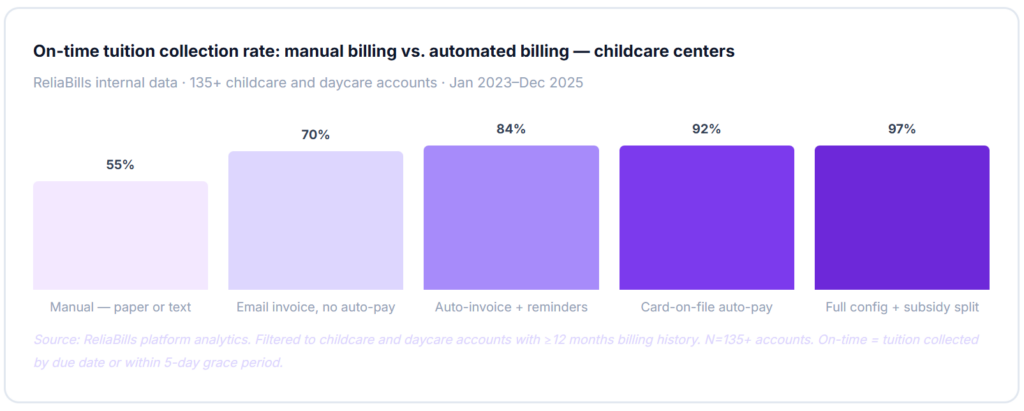
The business case for billing automation in childcare is stronger than in most industries because the billing complexity is high and the staff bandwidth is low. Most childcare directors are also teachers, administrators, and family relationship managers simultaneously. Automating billing doesn’t just save hours, it removes an ongoing source of anxiety from people who are already stretched across multiple roles.

The late fee sensitivity problem in childcare
Late fees in childcare are more emotionally charged than in almost any other industry. A parent who receives a late fee notice is not just a slow-paying client, they’re a person entrusting you with their child. The tone and timing of late fee enforcement matter enormously. The good news is that automated late fee application is actually less awkward than manual enforcement because it removes the personal dynamic. When a fee appears automatically on the invoice according to policy, not because someone at the center decided to charge the parent, it feels institutional rather than punitive. Centers that enforce late fees consistently via automation see faster payment without relationship damage; centers that apply them inconsistently create both slower payment and the perception of unfairness.
Pre-payment collection and enrollment security
The most financially protective billing practice for childcare centers is collecting tuition in advance, billing for the coming week or month rather than the completed period. When tuition is collected at the start of the care period, the center is never providing uncompensated care. When tuition is collected after the fact, every family with a late payment is receiving care they haven’t paid for. Pre-payment collection, combined with card-on-file auto-charge, is the single configuration change that most dramatically improves childcare center cash flow, and it’s the change that most centers resist because it requires a conversation with existing families.
Risks and What to Configure Correctly
Subsidy authorization changes and mid-month rate adjustments
Subsidy authorizations change without warning, a parent’s income changes, their work status changes, or the state program is recertified at a different level. When this happens mid-month, the parent’s co-pay changes for part of the month at the old rate and part at the new rate. Prorating these changes manually is error-prone and time-consuming. A billing system that supports mid-cycle rate adjustments, applying the old co-pay rate through the change date and the new rate from that date forward, handles this correctly without requiring a manual calculation. Without this capability, you’ll typically either over-invoice or under-invoice the family for the transition month.
The CCAP and voucher timing mismatch
Government childcare subsidy payments (CCAP, state vouchers, and Tribal CCAP) are typically paid 30–45 days after the care period, in arrears. The childcare center has already provided the care, already billed the agency, and is waiting for reimbursement that arrives on the agency’s schedule, not the center’s. This creates a cash flow gap that manual billing makes worse by not clearly separating what the agency owes from what the parent owes. Centers that use split billing, where agency receivables are tracked separately from parent co-pay, have a much cleaner picture of their actual AR and can manage cash flow accordingly.
Handling the parent who removes a child without notice
Enrollment withdrawal without the required notice period is a consistent source of unpaid tuition in childcare. If the enrollment agreement requires two weeks’ notice but a family simply stops attending without notice, the center is owed two weeks of tuition. The billing system needs to support a manual withdrawal hold, keeping the billing record active for the notice period and generating final invoices for any outstanding balance, rather than automatically closing the account when attendance stops. This is an edge case that manual billing handles poorly (usually by the director chasing the family by text) and that automated billing handles cleanly when the withdrawal workflow is configured correctly.
Billing Method Comparison for Childcare Centers
| Method / tool | Subsidy split billing | Sibling discount automation | Part-time rate support | Tax receipt generation | Card-on-file auto-pay | Best for |
|---|---|---|---|---|---|---|
| Childcare billing software Best fit | ✓ | ✓ | ✓ | ✓ | ✓ | Any childcare center, 10+ families |
| Generic invoicing software | ✗ | ✗ | ~ | ~ | ~ | Home providers under 10 families only |
| Childcare management platforms (Procare, Brightwheel, Kangarootime) | ✓ | ✓ | ✓ | ✓ | ✓ | Centers needing full enrollment + billing |
| Paper or text-based billing | ✗ | ✗ | ✗ | ✗ | ✗ | Not recommended, no audit trail |
| Accounting software only (QBO, Xero) | ✗ | ✗ | ~ | ~ | ✗ | Back-office only, not a family billing tool |
Common Mistakes and What We Got Wrong at First
1. Setting up child-level accounts instead of family-level accounts
This is the structural mistake that causes the most persistent billing problems. A center enrolls a family with two children, creates a separate billing account for each child, and immediately loses the sibling discount calculation, the consolidated family invoice, and the unified payment history. When the family asks why they received two invoices, the answer is “That’s how our system works,” which is not the impression a center wants to make. Set up one billing account per family unit at enrollment. The children are enrollment records within that account. This single structural decision prevents dozens of downstream billing errors and eliminates the entire manual sibling discount calculation problem.
2. Invoicing subsidy families for the full tuition rate
One of the most common first-month errors: a center sets up automated billing using the full tuition rate for every family, planning to “adjust the subsidy families later.” The first automated billing run sends full-rate invoices to 15 families who have subsidized care. Some parents pay without realizing the error. Others call them confused and upset. The correction requires voiding invoices, recalculating co-pays, and issuing credits, a process that takes hours and undermines confidence in the billing system before it’s had a chance to prove itself. Subsidy co-pay configuration must be complete before the first automated billing cycle runs, not after.
3. Using the same billing template for weekly and monthly families
A family billed weekly at $250/week and a family billed monthly at $1,000/month are paying the same effective rate, but they need different invoice formats, different due dates, and different reminder cadences. Sending a monthly family a “weekly tuition due” invoice causes confusion; sending a weekly family a “monthly tuition” invoice causes them to question whether they’re being overcharged. Configure separate invoice templates for each billing frequency from the start, and route families to the correct template during enrollment setup rather than manually customizing each invoice.
4. Applying late fees inconsistently because of the relationship sensitivity
This is the most common billing policy failure in childcare, and it’s understandable. A director knows the family whose tuition is late. They know the parent is going through a hard time. They waive the late fee as a kindness. The next month the same family is late again, and the late fee is waived again, because waiving it last month set the precedent. Meanwhile, another family who pays reliably but once forgot to submit payment on time sees a late fee on their invoice and feels it’s unfair that others are getting a pass. The only solution is consistent, automatic enforcement via the billing system, combined with a clear and accessible waiver request process for genuine hardships. Automation applies the fee; the director reviews waiver requests and applies them with full visibility and documentation.
5. Not collecting tax receipts documentation until February
Every January and February, childcare centers receive a surge of requests from parents for annual tuition receipts for their childcare tax credit. In a manual billing system, generating these receipts for 80 families takes days. In a properly configured billing system, the annual receipt is a report that generates automatically from the billing history, total paid, center name, address, and EIN, formatted for IRS Form 2441. Centers that don’t set up their billing system to generate these receipts correctly end up producing them manually, often making errors in the EIN or total amounts that cause parents problems with their tax returns. Configure this at billing setup, not in January when you’re fielding 40 parent emails about it.
Step-by-Step Setup Guide for Childcare Tuition Billing Automation
The phases below are built for daycare centers and childcare providers specifically, not a generic billing software setup. Phase one’s subsidy documentation step is the most critical and the one most centers skip in their rush to get billing running quickly.
1. Document all rate structures and subsidy authorizations (week 1)
Before setting up any billing record, create a complete rate card for your center: full-time weekly rate by age group, part-time rate options, sibling discount percentages, late pick-up fees, registration fees, and any other standard charges. Then pull every active subsidy authorization, CCAP, voucher, and employer-sponsored care, and document the authorized amount per child and the co-pay amount the family owes. Also verify your state’s requirements for invoice content (especially EIN inclusion for tax receipt purposes). Build your customer management records as family units at this stage, not as individual children. Any existing AR balance is your first collection priority once automation is live.
2. Configure family billing records and rate templates (week 2)
Enter each family with the correct billing frequency (weekly or monthly), rate (from your verified rate card), subsidy amount (if applicable), sibling discount (if applicable), and late fee terms. Set up recurring billing schedules for every enrolled family. Configure pre-due reminders (2–3 days before tuition is due). Set the late fee trigger date and amount per your written policy. For families on installment billing for registration or deposit fees, configure those separately from the tuition recurring schedule. Verify that subsidy families show only the co-pay amount on their invoice, not the full tuition rate.
3. Collect card authorizations and pilot with 10–15 families (week 3)
Add card-on-file authorization to your enrollment agreement as a standard item, framing it as a convenience for families, not a requirement (“Families may authorize automatic tuition collection via card or ACH, eliminating the need to remember weekly payments”). Run one full tuition billing cycle with a pilot group of 10–15 families representing different enrollment types: full-time, part-time, subsidized, and multi-child. Verify that invoices reflect the correct amounts, subsidy co-pays are correct, sibling discounts appear as line items, and payment reminders fire on the right dates. Fix any discrepancies before running the full enrollment billing.
4. Full enrollment migration and ongoing subsidy management (month 2+)
Migrate all remaining families to the billing system. For families not yet enrolled in card auto-pay, include an enrollment link in the next tuition invoice with a brief explanation of the convenience. ReliaBills supports the full childcare tuition billing workflow, including family-level account management, subsidy co-pay split tracking, sibling discounts, weekly and monthly billing schedules, and professional invoicing software with tax receipt generation. The free tier handles unlimited families and invoice creation so centers can test the full workflow, including subsidy split configuration, before committing to payment processing. Set a monthly review to check for subsidy authorization changes and update affected family co-pays before the next billing cycle runs.
Frequently Asked Questions
1. How does billing automation handle families with government childcare subsidies?
The billing system stores the subsidy amount per child at the family record level. When a tuition invoice is generated, the system subtracts the subsidy amount from the full tuition rate and invoices the family only for their co-pay. The agency billing is tracked separately as a receivable. When a subsidy authorization changes, updating the subsidy amount in the family record automatically recalculates the co-pay for all future invoices. Mid-month authorization changes should be handled with a prorated adjustment for the transition month, which requires a billing system that supports mid-cycle rate changes.
2. What should a childcare tuition invoice include for parents to claim the childcare tax credit?
For parents claiming the Child and Dependent Care Tax Credit (Form 2441), the annual tuition receipt must include: the center’s legal name, address, and employer identification number (EIN), the child’s name, the total amount paid during the tax year, and the dates of care. Invoices that don’t include the EIN are the most common reason parents can’t claim the credit, and the most common reason centers receive a wave of calls in January and February. Configure your invoice template to include all required fields from day one.
3. Should tuition be collected weekly or monthly, and does the billing system handle both?
Both billing frequencies are common in childcare, and the right choice depends on your center’s cash flow needs and what’s standard in your market. Weekly billing provides more frequent cash inflow but more invoicing touchpoints. Monthly billing simplifies accounting but concentrates cash collection into a single date. A proper childcare billing system supports both within the same account, some families can be billed weekly and others monthly, with different invoice templates and reminder cadences for each frequency. What you should not do is mix the two for the same family without clearly communicating which applies to their account.
4. How do I handle billing when a child is absent for a week or extended illness?
This depends on your enrollment agreement’s attendance policy. Most childcare contracts charge for scheduled days regardless of attendance (the “hold the spot” model), in which case billing continues unchanged during absences. If your policy includes credits for extended illness or absences over a defined threshold, the billing system should support a manual credit against the next invoice rather than a full invoice void and rebuild. Document your absence policy clearly in the enrollment agreement and configure the billing system to match it, inconsistent application of absence credits is one of the most common sources of family billing disputes.
5. What happens to billing when a family disenrolls without the required notice period?
When a family withdraws without giving the notice required in their enrollment agreement (typically two weeks), their billing record should remain active for the notice period and continue generating invoices for that time, even if the child is no longer attending. The billing system should not automatically close the account when attendance stops, it should require an explicit withdrawal action that generates a final settlement invoice covering any outstanding tuition and the notice period balance. This is a configuration decision that needs to be made at setup; billing systems default to different behaviors, and the default is often not what a childcare center needs.
6. How should late fees be structured in childcare to avoid damaging parent relationships?
Late fees in childcare work best when they’re small, clearly disclosed in the enrollment agreement, and applied automatically without a personal conversation. A $15–$25 late fee that applies automatically on day 5 of non-payment, with a clear notification to the parent, is far less relationship-damaging than a director calling or texting a parent about an overdue bill. The automation depersonalizes the enforcement; the director can then choose to waive the fee for a family in genuine hardship as a visible act of goodwill, rather than inconsistently applying fees across families based on relationship proximity.
Recent Articles:
- Recurring Billing for Security Monitoring Contracts: A Complete Setup Guide
- How to Set Up Recurring Billing for Dog Walking and Pet Sitting Services