

Recurring billing lets dog walking and pet sitting businesses charge clients automatically on a set schedule, weekly or monthly, instead of manually invoicing after every visit. Set it up right and you get predictable cash flow and far less time spent chasing payments; set it up wrong and you get client disputes over prorating, no-shows, and holiday rates.
What “Recurring Billing” Actually Means for a Pet Care Business
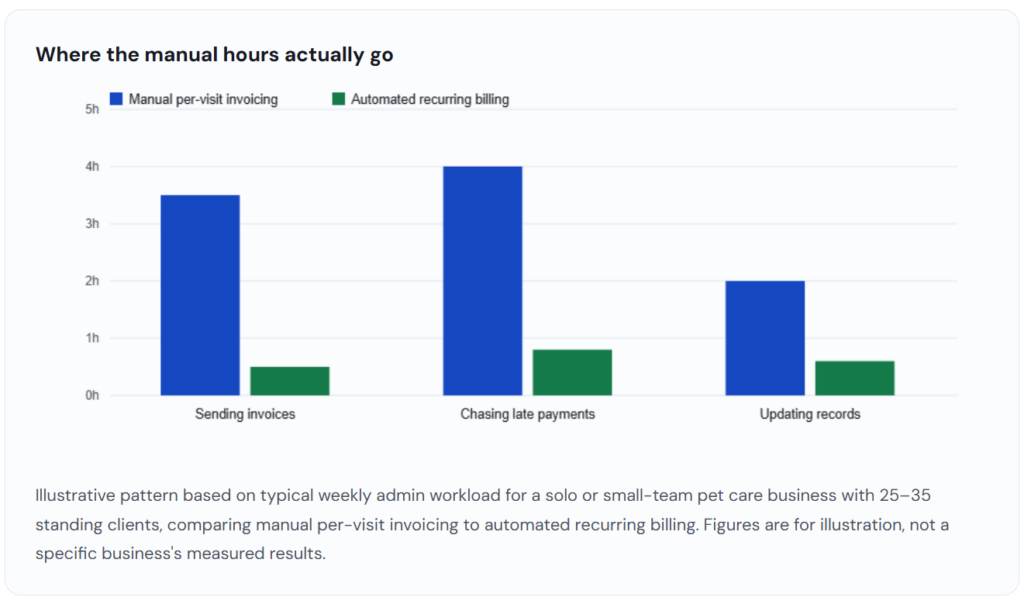
Most dog walkers and pet sitters start out invoicing the way any service business does: finish the job, send a bill, wait to get paid, follow up if the client forgets. That works fine for the first few clients. It stops working once you have thirty standing weekly walks and a handful of overnight sitting clients on rotating schedules, because now you’re generating and chasing thirty-plus invoices a week by hand.
Recurring billing replaces that cycle with a stored payment method and a schedule. The client authorizes the charge once, during onboarding, and after that the software takes care of billing itself on the agreed cadence, whether that’s every Friday, the first of the month, or a custom interval tied to their walking package. The service itself doesn’t change; what changes is who has to remember to send the bill.
It’s worth distinguishing this from two related billing structures you’ll also see referenced in pet care business forums and software comparisons. Installment billing splits a single, fixed total into scheduled payments, useful for something like a prepaid ten-visit package billed over five weeks, but not the same as an open-ended weekly walk arrangement. Straight invoicing software, meanwhile, is built around generating and sending individual bills; it can support recurring invoices as a feature, but the billing relationship still tends to be per-document rather than per-schedule. Recurring billing is the layer built specifically around the subscription-like relationship most standing dog walking and pet sitting clients actually have with you.
The reason this distinction matters in practice: a pet sitting business with 40 recurring clients and a handful of one-off holiday bookings usually needs both. Recurring billing handles the standing clients on autopilot, while ad hoc invoicing covers the occasional drop-in visit or emergency overnight stay that doesn’t fit a fixed schedule.
Pricing the recurring plan itself is a separate decision from the billing mechanics, but the two interact more than most new operators expect. A flat monthly rate is easiest to bill and easiest for a client to budget around, but it only works if the visit count behind it is genuinely stable; if you routinely add or drop a visit for a given client, a flat rate either underpays you or overcharges them within a month or two. A per-visit rate billed on a recurring cycle keeps the math honest but requires the billing software to track actual visit counts against the schedule, not just fire a fixed charge on a date. Neither approach is inherently better, the right choice depends on how consistent your actual service delivery is from week to week.
How Recurring Billing Works, Step by Step
The mechanics are the same regardless of which platform you use, though the interface will differ. Here’s the sequence from first client conversation to ongoing automated payments.
Define the plan structure before you price anything
Decide whether you’re billing per visit at a fixed recurring price (e.g., three 30-minute walks a week), or a flat monthly rate that bundles a set number of visits with some flexibility built in. This decision drives everything downstream, including how you’ll handle a client who wants to skip a week.
Collect and store a payment method securely
During onboarding, the client enters a card or bank account into the billing platform, which tokenizes and stores it through a connected payment processor. You never see or store the raw card number yourself, which matters for both liability and PCI compliance.
Set the billing cycle and trigger
Choose whether the charge fires on a fixed calendar date (the 1st of each month), a rolling interval from signup date, or ahead of the service period so you’re paid before the walks happen rather than after. Billing in advance is standard practice in pet care because it removes the collections risk that comes with billing after service delivery.
Build in proration and pause rules
Clients will go on vacation, put a hold on service, or add an extra visit mid-cycle. Configure how the system handles a partial month before you need it for the first time, not while a client is asking you about it.
Turn on automatic retries for failed payments
Cards expire and accounts run low on funds. Most platforms include dunning management, which retries a failed charge on a schedule and emails the client automatically, rather than putting the burden on you to notice and follow up.
Confirm the client sees a clear receipt every cycle
Even with billing automated, clients still expect a record of what they were charged and for what. An automatic receipt after each successful charge heads off the “what is this charge from ReliaBills on my card” support message before it happens.
Real-World Examples and Use Cases
Solo dog walker: Fixed weekly route, billed monthly in advance
A single walker running three weekday routes sets every standing client to a flat monthly rate covering 12–13 walks (accounting for the different number of weekdays each month), billed automatically on the 25th for the following month. This is the simplest recurring structure to run because there’s one plan type and one billing date across the whole client list, which keeps reconciliation quick.
Small pet-sitting team: Tiered plans by visit frequency
A team of three sitters offers three standing plans, once daily, twice daily, and overnight, each with its own recurring price. Clients pick a plan at signup, and the plan determines both the billing amount and the scheduling template the office staff use to assign visits. Recurring billing here does double duty: it’s the payment mechanism and, indirectly, the source of truth for what service level each client is paying for.
Boarding and overnight care: Recurring deposit plus per-stay balance
A boarding operator uses recurring billing for a modest monthly retainer that holds a client’s priority booking slot, then invoices the balance of each specific stay separately since overnight lengths vary. This hybrid model is common where the underlying service isn’t a fixed weekly cadence but the business still wants predictable baseline revenue.
Key Benefits
The case for recurring billing in pet care isn’t really about the software; it’s about what happens to your week when invoicing stops being a task. Businesses that move standing clients onto a recurring plan generally report the biggest change in the small, recurring administrative work that never shows up as a single big line item but adds up: the Sunday night spent building invoices for Monday’s routes, the mid-week message asking a client to pay an overdue balance, the manual reconciliation between what the calendar says happened and what actually got billed.
| What it solves | What to watch for |
| Removes the manual step of creating and sending an invoice for every single visit | Clients can feel blindsided by an automatic charge if the policy wasn’t explained clearly at signup |
| Shifts cash flow to predictable, front-loaded revenue rather than trailing collections | Rigid recurring amounts don’t automatically account for holidays, no-shows, or last-minute cancellations |
| Cuts down on late payments, since the charge doesn’t depend on the client remembering to pay | Failed payments still need a follow-up process, even with automatic retries in place |
| Gives a clearer, standardized record for tracking client value and plan mix over time via customer management tools | A poorly chosen billing date can put the charge before or after a client’s own payday, increasing decline rates |
| Reduces the awkward, relationship-straining task of asking a client in person for money they owe | Overly complex plan tiers make the billing setup harder to explain and harder to support |
Recurring Billing vs. Related Billing Models
| Model | How it charges | Best fit | Main drawback |
|---|---|---|---|
| Recurring billing | Automatic charge on a fixed schedule, stored payment method | Standing clients with a regular weekly or monthly cadence | Needs clear proration rules for schedule changes |
| Installment billing | A fixed total split into scheduled partial payments | Prepaid visit packages or one-time larger purchases | Not designed for open-ended, ongoing service |
| Per-visit invoicing | A new invoice sent and paid after each visit | Irregular bookings, drop-ins, one-off sitting requests | High manual workload as client count grows |
| Pay-in-app on booking | Client pays at the moment they book each visit | Marketplace-style, on-demand pet care apps | No baseline revenue predictability between bookings |
Common Mistakes Pet Care Businesses Make With Recurring Billing
Billing the exact same amount every month regardless of visit count
Months don’t have the same number of weekdays, and clients notice when a “weekly” plan charges identically in a 4-visit month and a 5-visit month without explanation. Either average the rate explicitly and say so up front, or bill per actual visit count, but pick one and state it in the service agreement.
No written policy on holds, holidays, and cancellations
Most billing disputes in pet care come from ambiguity, not bad faith. A client who assumed a two-week vacation hold was automatic, when the plan actually requires 5 business days’ notice, is going to dispute the charge. Put the notice period and the proration method in writing before the first automatic charge runs.
Treating a declined card as the end of the conversation
A single failed charge is common and rarely means a client is trying to avoid paying. Businesses that pause service immediately on the first decline, without a retry and a friendly reminder first, tend to lose otherwise good clients over what’s usually an expired card.
Overcomplicating the plan menu
Five or six overlapping plan tiers sound flexible on paper but make it hard for both the client and whoever handles billing support to know what’s actually being charged and why. A short, clearly differentiated set of plans is easier to bill accurately and easier to explain.
Moving an existing client base from manual invoicing to recurring billing is usually easier handled as a staged rollout than an overnight switch. Start with new clients on the recurring model from day one, since there’s no habit to change. For existing clients, send a short, direct explanation of what’s changing and why, ideally paired with something in it for them, a small discount for switching to autopay, for instance, or simply the promise of never getting a manual invoice again. Give existing clients one full billing cycle of notice before the first automatic charge runs, and confirm the switch in writing so there’s no dispute about consent later.
How to Get Started
The fastest path is to separate the business decision from the software setup. First, decide your plan structure and cancellation policy on paper before you touch any software. Know what you’re going to bill, how often, and what happens on a hold or cancellation. Second, choose a billing platform that supports the specific cadence you landed on, whether that’s simple monthly recurring charges or a mix of recurring plus per-visit invoicing for occasional clients.
ReliaBills is built around exactly this mixed use case: standing recurring billing plans for regular clients, ad hoc invoicing for one-off visits, and a customer management view that keeps plan details, payment history, and contact notes in one place instead of scattered across a spreadsheet and a separate payments app.
Frequently Asked Questions
1. Can I charge clients automatically for weekly dog walks?
Yes. Recurring billing software stores a client’s card or bank details on file and charges them automatically on a set schedule, such as weekly or monthly, without you having to send a new invoice or request payment for each visit.
2. What is the best billing cycle for pet sitting services?
Monthly billing in advance is the most common cycle for ongoing dog walking and pet sitting arrangements because it matches how most clients budget for recurring services and reduces the number of transactions you have to manage. Weekly billing suits clients on inconsistent schedules, and per-visit billing with a saved card suits occasional or drop-in sitting.
3. How do I handle cancellations or schedule changes with recurring billing?
Set a clear cancellation and change policy before onboarding a client, such as requiring 48 hours’ notice for schedule changes and a set number of days’ notice to cancel a recurring plan. Most billing platforms let you pause, prorate, or adjust a subscription rather than canceling and rebuilding it from scratch.
4. Is recurring billing better than invoicing per visit for pet care businesses?
For clients with a standing schedule, such as three walks a week, recurring billing is usually better because it removes the manual work of invoicing and chasing payment for every visit. Per-visit invoicing still makes sense for irregular or one-off bookings where a fixed recurring amount would not reflect the actual service provided.
5. What happens if a client’s card is declined on a recurring payment?
Most recurring billing platforms include dunning management, which automatically retries the charge on a schedule and sends the client a payment reminder. You can typically set the service to pause automatically after a certain number of failed attempts so you are not left providing services that have not been paid for.
6. Do I need a merchant account to bill dog walking clients on a recurring basis?
You need a way to accept and store card or bank payments securely, which is typically handled through a payment processor connected to your billing software rather than a separate merchant account you manage yourself. Most recurring billing platforms include this connection as part of the setup.
Recent Articles:
- How CPAs Can Automate Client Billing and Invoicing for Tax Season
- How Pool Maintenance Companies Can Automate Monthly Service Billing