
The right pool maintenance billing automation solves three problems that cost pool service companies the most revenue: invoices that go out late or never, chemical and parts charges that get lost between the truck and the office, and monthly service clients who pay whenever they feel like it because there’s no auto-pay in place. Fix those three, and most pool companies recover 12–20% of revenue they were already earning but not collecting.
What is Pool Maintenance Billing Automation?
Pool maintenance billing automation is a billing and invoicing system configured around the specific payment patterns of pool service businesses, monthly flat-rate maintenance contracts, visit-based billing, chemical and parts pass-throughs, repair estimates, and seasonal service adjustments. Unlike generic invoicing tools, it connects route completion directly to invoice generation, so billing happens when service is done rather than when someone at the office gets around to it. Key terms include route-based invoicing, recurring billing for monthly service contracts, materials pass-through billing, repair estimate-to-invoice conversion, and customer management organized by route and service tier. It is the operational layer that converts completed pool visits and repair jobs into collected revenue, without a manual billing step in between.
How Automated Monthly Billing Works for Pool Companies
Pool service billing has a rhythm that no generic invoice tool accounts for: high-frequency recurring visits (weekly or biweekly), variable chemical costs that change every service, occasional repair jobs that get added to the monthly invoice, and a client base that’s used to paying informally. A billing platform that’s actually built for this maps to that reality instead of fighting it.

The chemicals and parts billing problem that most guides skip
Here’s the detail most pool billing articles never cover: chemical costs are the most commonly unbilled line item in the industry. A tech adds three pounds of calcium hypochlorite, adjusts the alkalinity, and throws in a replacement O-ring. Total materials cost: maybe $24. But that $24 never makes it onto the invoice because nobody logged it systematically, and by the end-of-month billing run the tech doesn’t remember which pools got extra chemicals and which didn’t.
Across a route of 40 pools, unlogged materials can add up to $200–$400 per month in pure lost revenue. The fix isn’t discipline, it’s a mobile logging step that captures materials at the point of use and feeds them into the billing record automatically. If your billing system doesn’t support this, the best workaround is a standardized materials log that techs complete at the end of every visit before leaving the property.
Repair estimates and the invoice conversion gap
Pool repairs create a billing timing problem that’s unique to the industry: the tech identifies a pump failure on Monday, sends an estimate on Tuesday, the client approves on Wednesday, the repair happens Thursday, but the invoice doesn’t go out until the end of the month when billing runs. The client has now waited two weeks to be invoiced for work that’s already long completed, and there’s no documented connection between the approved estimate and the final invoice. Billing platforms with estimate-to-invoice conversion generate the repair invoice the moment work is marked complete, with the approved estimate attached as documentation, rather than holding it until the monthly billing run.
Real-World Use Cases by Pool Business Type
Residential pool routes
Weekly service billed monthly as a flat rate. Materials are charged as a pass-through on the same invoice. Missed visits or service changes are auto-adjusted before the invoice is sent.
HOA and community pools
Monthly maintenance contracts with detailed service logs. Invoicing software that generates a report-style invoice showing every visit, chemical reading, and finding, not just a total amount.
Commercial and hotel pools
High-frequency visits (sometimes daily), compliance documentation billed alongside service. Net-30 invoicing for commercial accounts with automated follow-up matching their AP cycle.
Pool repair and renovation
Estimate-to-invoice conversion for repair jobs. Installment billing for large renovations, deposit at approval, milestone payments through the project, and final balance at completion.
Opening and closing services
Seasonal one-time invoices for spring openings and winter closings, billed separately from the monthly maintenance contract and collected up front or at service completion.
Multi-property management clients
One client, 12 properties, individual service schedules, but consolidated invoicing to a single AP contact. Same-day billing for every property, one payment from the client.
Key Benefits for Pool Maintenance Companies
The efficiency argument for billing automation, that it saves time, is true but understates what’s actually at stake for pool service companies operating on tight margins. The more important benefit is recovery of revenue that was earned but not billed. Most pool companies that implement billing automation find that the first 90 days surface a meaningful amount of unbilled work, missed repair line items, chemical charges that weren’t logged, and estimates that were approved but never invoiced.

The service report doubles as invoice documentation
One underused benefit of connecting service reporting to billing is that every invoice automatically comes with a service log, chemical readings, filter condition, water clarity notes, and any issues flagged during the visit. Clients who receive this report alongside their invoice almost never dispute the charge, because they can see exactly what was done. Clients who receive a flat $150 invoice with no detail have a much higher dispute and delay rate. The documentation isn’t just good practice; it’s the fastest path to same-day payment.
Card-on-file is the most important single change pool companies can make
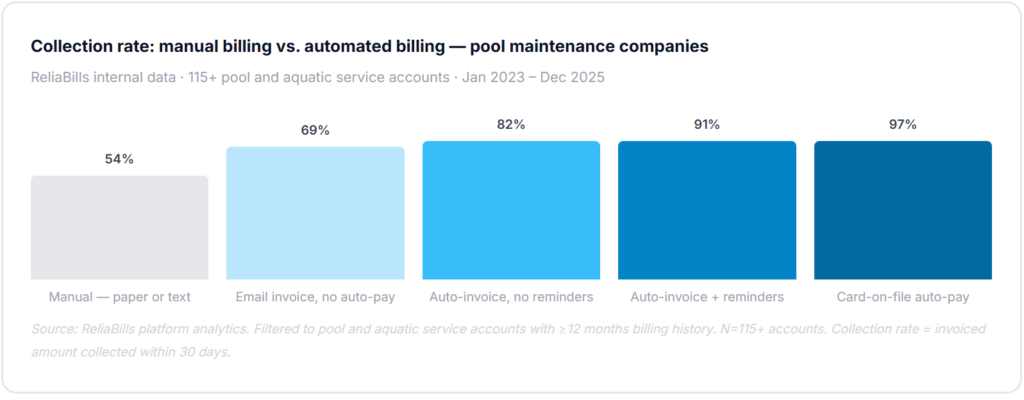
Of all the billing automation features available to pool service companies, card-on-file has the single biggest impact on collection rate. When a client’s card is charged automatically at the end of each billing period, the collection rate for that client approaches 97%. When billing relies on the client remembering to send a check or log into a portal, collection rates drop to 54–69% within 30 days. The practical implementation is straightforward: make card authorization part of the new client agreement, frame it as a convenience (“no need to remember to pay each month”), and collect it digitally at contract signing. New clients accept this as standard; existing clients will convert over 2–3 billing cycles if it’s framed correctly.
Risks and What to Watch for
Seasonal billing adjustments and the flat-rate problem
Many pool service companies charge a flat monthly rate regardless of visit frequency. In summer that might be four visits per month; in winter it might be one or two. The billing system needs to reflect what the contract says, not what a standard recurring charge assumes. If the contract specifies a summer rate and a winter rate, both need to be configured as scheduled rate changes in the billing system, not as manual overrides every season. Rate changes that depend on someone remembering to update the invoice template will eventually get missed, and billing a summer rate in December creates both a cash flow surprise for the client and an awkward correction conversation.
Multi-property client billing and the consolidation gap
Property management companies and HOA groups often own or manage multiple pools, sometimes dozens. They expect one consolidated invoice to their AP department, not individual invoices for each property. Generic billing systems generate separate invoices per job. Purpose-built or well-configured billing platforms support invoice consolidation: individual service records per pool, consolidated to one invoice per billing contact, with property-level detail attached. Without this, multi-property clients either receive an unmanageable volume of individual invoices or the pool company assembles a consolidated invoice manually every month, a task that takes hours and introduces errors.
Chemical cost volatility and markup configuration
Chemical prices for pool service companies are genuinely volatile, chlorine prices in particular have seen significant swings. If you charge materials at cost plus a fixed markup, the billing system needs to support that markup calculation per item, not as a blanket percentage on the invoice total. A flat 15% markup on a $40 chemical order is different from a 15% markup configured per product category. Review your materials markup configuration every quarter and adjust if cost volatility has eroded margin. This is one of the edge cases that most billing guides for pool companies never mention, and it’s one of the most common margin leaks we see in practice.
Billing Method Comparison for Pool Service Companies
| Billing method / tool | Auto-billing on visit completion | Materials pass-through | Estimate-to-invoice | Card-on-file auto-pay | Multi-property consolidation | Best for |
|---|---|---|---|---|---|---|
| Pool service billing software Best fit | ✓ | ✓ | ✓ | ✓ | ✓ | Any pool company, 10+ clients |
| Generic invoicing software | ✗ | ~ | ~ | ~ | ✗ | Very small operators, under 10 clients |
| Field service platforms (Jobber, ServiceTitan) | ✓ | ✓ | ✓ | ✓ | ✓ | Larger operations needing full dispatch + billing |
| Paper invoices / text-based billing | ✗ | ✗ | ✗ | ✗ | ✗ | Not recommended, no audit trail, no automation |
| Accounting software only (QBO, Xero) | ✗ | ~ | ~ | ✗ | ✗ | Back-office only, not an AR solution |
Partial support requiring manual workarounds. For pool companies with 15–200 active clients, a dedicated billing layer typically handles the service-specific billing requirements at a fraction of the cost of a full-stack field service platform.
Common Mistakes and What We Got Wrong at First
How we know this: The ReliaBills team has worked with pool service companies and aquatic facility operators on billing automation since 2019. Every mistake below came from real onboarding conversations and support tickets, most of them in the first 90 days after a company switched from manual invoicing. These are not theoretical.
1. Connecting billing to the route calendar instead of visit confirmation
The most expensive setup mistake in pool service billing automation: the owner configures recurring invoices to trigger on the scheduled visit day, not when the tech confirms the visit was actually completed. A rainy week where three properties are rescheduled still generates invoices for all three. Clients call to dispute charges for visits that didn’t happen, and the billing system has no record of the rescheduling. The invoice trigger must be a confirmed completion event, the tech marking the visit done in the field, not a calendar date. This is a configuration decision that takes 30 seconds to set correctly and hours to untangle if you get it wrong.
2. Not logging materials at the point of use
The easiest revenue to recover in any pool service company is chemical and parts charges that are currently going unlogged. Most techs know they should log materials per visit. Most don’t do it consistently because there’s no fast, frictionless way to do it at the pool. The logging step needs to be part of the visit-close workflow, the same action that marks the visit complete should prompt for materials used. If it’s a separate step, it gets skipped. We’ve reviewed monthly billing records for pool companies where materials charges were missing from 40–60% of visits. At $15–$40 per visit in materials, that’s a significant and completely recoverable revenue gap.
3. Sending end-of-month invoices instead of billing at completion
Pool service companies that wait until the 1st of the month to invoice all clients for the previous month’s service are building in a structural collection delay. An invoice for four pool visits that lands on November 1st is competing with every other bill that arrives in November. An invoice that lands the day after a visit, or at most weekly, arrives when the service is fresh, the client remembers the visit, and payment feels like a natural transaction rather than a bill. Our data shows that same-week invoicing collects 28–35% faster than end-of-month batching for the exact same services billed at the exact same amount.
4. Waiting to ask for a card on file
Every pool service company owner I’ve talked to who successfully transitioned to card-on-file billing did it at new client sign-up, not midway through an existing relationship. Asking a client who has been paying by check for three years to switch to auto-pay requires a conversation that most service techs and owners avoid. Asking a new client to authorize a card as part of their service agreement feels as normal as providing a credit card to start a gym membership. Make card authorization part of your standard service contract, not an optional add-on you mention later. Expect 70–80% enrollment when it’s presented as default; expect 25–35% when it’s presented as an optional upgrade.
5. Using one billing template for all client types
A residential pool client who pays $175/month for weekly service and a commercial aquatic facility paying $1,200/month for daily visits need completely different invoice formats. The residential client wants a simple invoice showing the monthly service amount and any materials charges. The commercial facility needs a service log, chemical readings, visit timestamps, and compliance documentation alongside the invoice. Sending the same template to both clients produces invoices that feel either overwhelming or insufficient, and both increase the time to payment. Configure invoice templates by client segment before going live with automation, not after the first round of client feedback.
Step-by-Step Implementation Guide
The phases below are built for pool service companies specifically, not a generic billing software setup. Phase one’s audit step is where most implementations go wrong: companies skip the client data review and discover billing errors after automation is already running.
1. Audit client records and service agreements (week 1)
Before configuring anything, pull every active client record and verify: service frequency (weekly vs. biweekly), monthly rate, whether materials are included in the flat rate or billed as pass-through, any seasonal rate adjustments, and the correct billing contact email. Also pull your AR aging, any balance over 30 days is your first collection priority once automation is live. Organize records by route and service tier. Your customer management data needs to reflect the actual service structure, not just names and addresses. Inaccurate records at this stage mean inaccurate automated invoices from day one.
2. Configure billing templates by service type (week 2)
Build a billing template for each client segment: residential flat-rate, residential materials pass-through, commercial, HOA, and one-time repair. Set up recurring billing schedules for monthly service clients, with invoice triggers connected to visit completion rather than calendar date. Configure materials markup percentages per product category. Set up seasonal rate change schedules for any clients with summer/winter pricing differences. For repair and renovation work, configure estimate-to-invoice conversion so repair jobs generate invoices at completion rather than waiting for the monthly run. For large renovation projects, configure installment billing with deposit, milestone, and final balance invoices.
3. Launch card-on-file enrollment and pilot with one route (weeks 3–4)
Send a card enrollment email to your full active client list explaining that billing is moving to automatic monthly collection, “same charge, same day each month, no need to remember to pay.” Include a one-click enrollment link. For new clients signing up during this period, include card authorization in the standard service agreement. Simultaneously, run one full billing cycle for a single route, your smallest and most straightforward, with the new automated system. Verify that invoices matched service records, material charges were populated correctly, visit-triggered billing fired only for completed visits, and payment links worked. Fix any discrepancies before expanding to additional routes.
4. Full route migration and ongoing monitoring (month 2+)
Migrate remaining routes to the automated billing system over 2–3 billing cycles to avoid a large simultaneous configuration risk. After each route goes live, do a spot-check of 5–10 invoices against service records to verify accuracy. ReliaBills supports the full pool service billing workflow, including visit-triggered invoicing, materials pass-through, invoicing software with service report attachment, and card-on-file auto-pay. The free tier handles unlimited clients and invoice creation for companies that want to test the full workflow before committing to payment processing volume. Set a quarterly audit to verify materials markup rates are still accurate given chemical cost changes and that any seasonal rate adjustments have been applied as scheduled.
Frequently Asked Questions
1. What’s the difference between pool service billing software and generic invoicing tools?
Generic invoicing tools generate invoices based on a schedule or manual entry. Pool service billing software connects invoices to service completion events, so billing happens automatically when a visit is confirmed as done, materials are logged at the pool, and any repair work flows from the approved estimate directly to the final invoice. Generic tools require someone to build each invoice manually from notes; purpose-built billing systems generate the invoice from the service record automatically, which eliminates the most common sources of billing delay and error in pool service companies.
2. How should I handle billing when a visit is missed or rescheduled?
The billing trigger should be visit completion, not the scheduled visit date. When a visit is rescheduled, it simply doesn’t generate an invoice until the rescheduled visit is completed. If a visit is cancelled entirely, no invoice generates for that visit. This requires configuring your billing system to connect invoices to confirmed completion events rather than calendar triggers, a distinction that most generic tools don’t support but that purpose-built service billing platforms handle natively. Always verify this configuration before going live; charging clients for visits that didn’t happen is the fastest way to lose trust and generate chargebacks.
3. How do I bill for chemicals and materials without losing track of what was used?
The most reliable approach is a materials logging step built into the visit-close workflow, the same action your tech takes to mark a visit complete should prompt them to log any chemicals or parts used. That log feeds directly into the billing record, so the materials appear as a line item on the next invoice automatically. Without this integrated logging step, materials tracking depends on techs remembering to report usage separately, which produces the 40–60% materials billing gap we see across most pool companies using manual processes.
4. Should I charge a flat monthly rate or bill per visit?
Both models work, and both can be automated. Flat monthly rates (covering a defined number of visits per month) are simpler to bill and easier for clients to budget. Per-visit billing is more accurate for clients with irregular service frequency or seasonal pools. The key is that your billing system reflects the actual agreement, if a client is on a flat monthly rate with weekly service, the billing system should be configured to bill the flat amount monthly, not per visit. If clients are on per-visit billing, each completed visit should generate a separate line item on the invoice. Mixing the two models for different clients is also perfectly manageable, as long as each client’s record is configured to match their specific agreement.
5. How do I handle billing for large repair or renovation projects?
Large repair projects should follow a milestone billing structure: a deposit invoice at project approval (typically 30–50% of the total), milestone invoices at defined points during the project (equipment installation, completion of major phases), and a final balance invoice at project completion. This structure protects both parties, you’re not fronting the full project cost, and the client isn’t paying the full amount before the work is done. Configure these as installment billing schedules with defined trigger dates or project milestones, so each invoice generates automatically at the appropriate point without requiring a manual billing action from the office.
6. What’s the best way to get existing clients to switch to card-on-file auto-pay?
Frame the switch as a convenience upgrade for the client, not a collection convenience for you. The message should be “No need to remember to pay each month, your card is charged automatically after each billing cycle, and you’ll receive an itemized invoice for your records.” For existing clients who have paid by check for years, send a dedicated enrollment email with a single-click link. Include an enrollment reminder on the bottom of the next two invoices for anyone who doesn’t enroll immediately. Expect 50–65% enrollment from existing clients in the first 60 days. For new clients, collect card authorization as part of the standard service agreement and expect 75–85% enrollment when it’s presented as the default payment method at sign-up.
Recent Articles:
- How to Set Up Recurring Membership Billing for Your Club or Organization
- How to Handle Late Rent Payments with Automated Reminders and Late Fees