

MSPs typically lose between 5 and 15% of annual revenue to billing errors, unbilled tickets, and missed service charges, not because of bad service delivery, but because the billing process can’t keep up with the complexity of what gets delivered. The right IT company billing software closes that gap by connecting service delivery data directly to the invoice, automatically and accurately, every billing cycle.
What is IT Company Billing Software for Managed Services?
IT company billing software for managed services is a category of financial automation technology built around the unique billing complexity of MSPs: multiple pricing models running simultaneously across a client base, usage-based charges that fluctuate month to month, per-device and per-user seat counts that shift with client headcount, time entries from support tickets, and one-time project fees layered on top of recurring retainers. Unlike generic invoicing tools, purpose-built MSP billing software integrates with PSA platforms, RMM tools, and accounting systems to automate the complete quote-to-cash cycle.
How IT Company Billing Software Works
The core problem with MSP billing isn’t that it’s complicated to invoice, it’s that the data required to build an accurate invoice lives in multiple systems simultaneously. Time entries are in the PSA. Device counts are in the RMM. License counts are in Microsoft 365 or the vendor portal. Project hours are tracked separately. And someone has to pull all of that together into one accurate invoice each month, without missing anything, without duplicating anything, and without getting the seat count wrong for a client whose headcount changed mid-month.
A well-integrated IT billing system automates the data aggregation step and connects each source system to a single billing output. Here’s what that looks like in practice:
1. Service Delivery Data Flows Into the Billing System
Time entries from closed tickets, device counts from the RMM, license counts from the vendor portal, and project time logs all feed into the billing engine through integrations. No manual data collection, no end-of-month spreadsheet assembly. The billing system is consuming live service data continuously.
2. Billing Rules Apply Automatically
The system applies each client’s pricing rules to the collected data: their per-user rate, their device tier pricing, their block hour balance, and their contracted monthly retainer. Variable charges (overages and out-of-scope work) are calculated and flagged for review. Discounts and rate escalations apply per contract terms.
3. Draft Invoices Queue for Review
Before delivery, draft invoices enter a review queue. This is not a manual creation step, the invoice is already built from live data but is a verification step where an account manager can catch anomalies, flag unusual charges for client discussion, or approve the invoice for automatic delivery. Well-run MSPs spend 30–45 minutes on this review for their entire client base, not hours per client.
4. Invoices Deliver and Payment Collects Automatically
Approved invoices go to clients via email with an embedded payment link. Clients enrolled in auto-pay (ACH or card on file) are charged on the billing date. For clients on recurring billing contracts, this happens without any manual step, the same payment runs on the same date every month.
5. Late Payment Handling Runs Automatically
Unpaid invoices trigger a dunning sequence: automated reminders at 3, 14, and 30 days past due, with late fees applied per contract terms. The account manager sees an aging AR dashboard rather than managing a manual follow-up list. Payment failures on auto-pay trigger a retry sequence and immediate notification to the client.
6. Revenue Posts to Accounting Without Re-Entry
Collections sync to QuickBooks, Xero, or your GL of choice without manual data entry. Revenue by client, by service line, and by pricing model is available in real time. This is where EBITDA visibility actually comes from, not from an accountant building a report at month-end but from a live system that reflects what was delivered and what was paid.
The Revenue Leakage Problem Most MSP Articles Don’t Quantify
Every article about MSP billing mentions “revenue leakage.” Very few of them tell you what’s actually causing it at the line-item level, which makes it hard to fix. Here’s what I’ve seen in practice.
Research published by DeskDay in 2025 found that 81% of MSPs experience payment delays averaging 60 days, and 70% struggle with cash flow issues directly tied to billing inefficiencies. The same analysis estimates MSPs typically leak approximately 10% of revenue to billing errors alone. For an MSP generating $1.2 million annually, that’s $120,000 per year, enough to fund a senior technician’s fully loaded compensation.
But the aggregate number is less useful than understanding the sources. Rev.io’s analysis of MSP billing gaps breaks them into five specific categories, each of which requires a different automation fix:
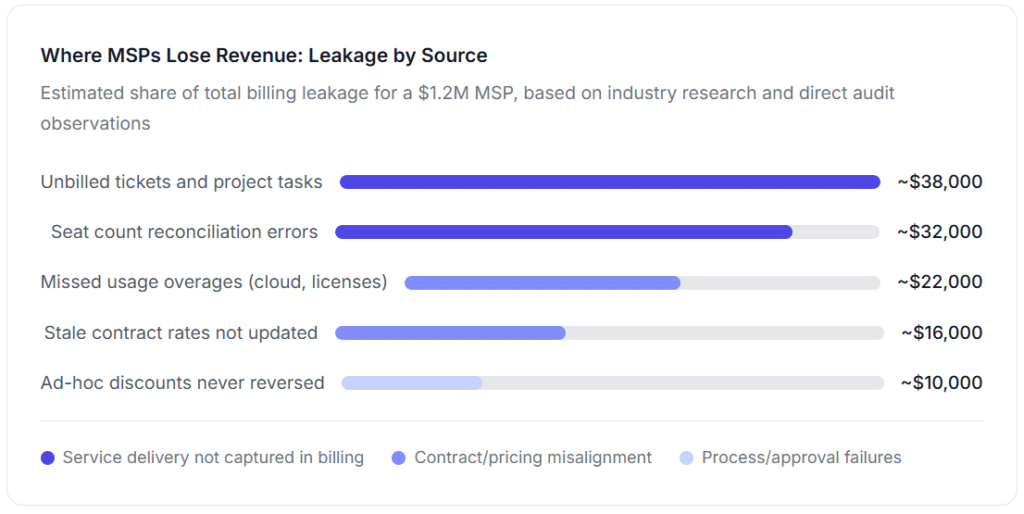
The specific insight that most MSP billing articles miss: the largest source of leakage (unbilled tickets) isn’t a software problem in isolation, it’s a workflow problem that software solves only when the ticket-close-to-billing trigger is actually configured. Many MSPs implement billing software but don’t connect ticket closure to billing status. Tickets close in the PSA, but the billable time entry never reaches the invoice because nobody configured the integration to make it happen automatically. The software exists; the configuration doesn’t.
MSP Pricing Models and How They Affect Billing Complexity
One thing almost no billing software guide addresses: the choice of pricing model has a direct effect on billing complexity and the type of billing automation you need. Here’s a practical breakdown.
| Pricing Model | How It’s Billed | Billing Complexity | Automation Priority | Status |
|---|---|---|---|---|
| Per-User Most Popular | Fixed monthly fee × active user count | Medium, seat counts change | Automated seat reconciliation against HR/directory | Standard for SMB clients |
| Per-Device | Fixed monthly fee × managed endpoints | Medium, device counts change | RMM integration to pull live device counts | Common for device-heavy environments |
| Tiered / Bundle | Flat monthly per tier (Bronze/Silver/Gold) | Low, fixed price per tier | Recurring billing template per client tier | Simplest for new MSPs to operate |
| Flat-Rate All-In | Single monthly invoice, unlimited support | Low, fixed amount | Basic recurring billing with auto-pay | High-trust client relationships |
| Block Hours | Pre-purchased hours, tracked against usage | High, requires real-time hour tracking | PSA-integrated hour depletion tracking + alerts | Fading for new contracts |
| Break-Fix Hourly Legacy | Hourly rate × time spent per incident | High, every invoice is unique | Time-entry-to-invoice automation from PSA | Declining; poor incentive alignment |
| Value-Based / Outcome Emerging | Price tied to uptime SLA, security posture | Very High, requires outcome measurement | SLA-tracking integration with billing trigger | Growing for vCIO and premium engagements |
The practical implication: an MSP running per-user billing across 40 clients needs different billing automation than one running block-hour agreements. Per-user billing needs automated seat count reconciliation. Block-hour billing needs real-time hour depletion tracking with alerts before the block runs out. Most billing software does both, but only if configured correctly for the pricing model you’re actually running.
Real-World Use Cases: How MSPs Apply Billing Automation
The growing MSP losing $68K per quarter to unbilled tickets
A regional MSP with 18 technicians and 55 clients was billing monthly on a mix of per-user managed contracts and hourly break-fix work. The break-fix invoicing ran through a manual process: technicians submitted time entries in the PSA, an office administrator pulled them weekly, built invoices in QuickBooks, and emailed them out. The gap was in the pull: technicians sometimes closed tickets without marking time as billable, some tickets were never flagged as break-fix at all, and the weekly pull consistently missed entries from the previous cycle’s final two days.
After a billing audit comparing PSA ticket time against invoiced amounts, we found $68,000 in unbilled break-fix hours over one quarter. The fix wasn’t expensive software, it was configuring the PSA so that ticket closure required a billable/non-billable designation before closure and connecting the PSA’s billable time entries directly to the invoicing queue rather than routing them through a manual pull. The configuration took about 4 hours. The revenue recovery was immediate.
The multi-client MSP with seat count drift
An MSP running per-user pricing across 30 SMB clients had a recurring problem: client headcount changed continuously through hiring and termination, but the invoice seat count was only reconciled quarterly when the account manager remembered to check. Some clients were being billed for 22 seats when they had 27 active users. Others were billed for 15 when they were actually down to 11. The under-billing was far larger than the over-billing, over-billing tends to get caught when clients complain, but under-billing doesn’t get caught at all.
Connecting the billing system to each client’s Active Directory (or Microsoft Entra) for automated monthly user count reconciliation eliminated the manual check entirely. The seat count on each invoice reflected the actual active user count on the billing date. The first automated reconciliation cycle added $4,300 in monthly revenue that had been consistently under-billed for over a year.
The IT firm converting time-and-materials clients to managed retainers
A 6-person IT firm had built its business on break-fix hourly billing but recognized the model’s limitations: revenue was unpredictable, cash flow was uneven, and clients were unpleasant to deal with because every invoice was a negotiation. The transition to monthly managed service retainers required client-by-client account management, new contracts, new pricing, and new billing schedules. The billing software made the transition operationally possible: recurring invoices went out automatically on the 1st of each month, auto-pay enrollment was embedded in the new service agreements, and the firm’s MRR grew from $11,000 to $38,000 over 14 months. Break-fix work didn’t disappear, but it moved to a separate invoice line, handled through the same system, rather than a separate manual process.
Key Benefits of Automating MSP Billing
Eliminating the gap between service delivery and invoicing
The most financially meaningful benefit of billing automation for MSPs is closing the time gap between when a service is delivered and when it appears on an invoice. Every day that gap exists, there’s a risk that the service doesn’t make it to the invoice at all due to missed time entries, unclosed tickets, or a manual aggregation step that drops a line item. Automation closes the gap by connecting the service delivery event to the billing event directly, without a human intermediary who can be overloaded, distracted, or simply forget.
MRR growth without headcount growth
Manual billing processes scale with client count in the worst possible way: more clients mean more invoices, which mean more admin hours, which mean more billing staff. Automated billing scales differently, the billing cycle for 80 clients takes roughly the same time as it does for 30 because the invoices are generated automatically and only exceptions require attention. This is why 2025 Service Leadership data shows MSPs with optimized billing workflows achieving 22% higher EBITDA margins than those running manual or semi-automated processes. The margin advantage isn’t because they’re charging more, it’s because they’re spending less to bill for the same work.
Faster payment cycles through online payment options
Commercial IT clients often default to payment by check, mailed to a billing address, arriving two to three weeks after the due date. Research published by FlexPoint found that including detailed payment instructions improves payment times for 70% of businesses. Adding online payment options, ACH or card, directly from the invoice email consistently cuts average days-to-payment from 30–45 days down to 7–14 days for clients who adopt it. For MSPs with $100,000+ in monthly MRR, that timing improvement has a direct and meaningful impact on working capital.
✓ ReliaBills in practice: IT service businesses and managed service providers using ReliaBills have reduced average payment collection time from 38 days to under 10 days by combining recurring billing automation, embedded online payment links, and automated dunning sequences. The platform integrates with QuickBooks for real-time revenue reconciliation.
Key Risks and What to Watch For
Integration gaps that recreate the manual step you were trying to eliminate
The most common implementation failure in MSP billing automation: the PSA and the billing system are both in place, but they’re not actually integrated. The technician closes a ticket in the PSA; the time entry never reaches the billing system because the integration wasn’t configured or broke silently after an update. The result is the same as manual billing, every billing cycle requires a manual check of PSA data against the billing draft. Integration maintenance needs to be on someone’s monthly checklist, not assumed to be running correctly.
Seat count lag in per-user billing
Per-user pricing is only accurate if the seat count reflects reality. Without an automated source-of-truth connection (Active Directory, Azure AD, or the HR system), seat counts drift. Clients get under-billed for new hires added mid-month or over-billed for terminated users who haven’t been removed from the count. Both create relationship problems, over-billing generates disputes, and under-billing generates revenue loss. Automated reconciliation from the directory source is not optional for MSPs running per-user pricing at scale.
Over-reliance on block-hour billing without depletion alerts
Block-hour agreements require clients to prepurchase a set number of support hours. When a block is nearly depleted, the MSP needs to notify the client before they’re in overage, both to manage client expectations and to ensure the additional work gets billed correctly rather than absorbed silently. Without automated depletion alerts, MSPs routinely deliver services against empty block-hour balances and discover it at the end of the month when reconciliation happens. By then, the client has consumed the hours and may push back on the overage invoice.
Client-facing invoice clarity that affects collection speed
MSP invoices are notoriously hard to read. A single invoice might contain per-user charges, device management fees, backup service charges, an overage for hours beyond the block, and a one-time project line item, all described with internal naming conventions that mean nothing to the client’s accounts payable team. Invoices that are confusing get questioned; questioned invoices get delayed. Billing software that generates client-readable invoice descriptions, with line-item clarity that doesn’t require a managed services contract to decode, pays for itself in faster collection alone.
IT Billing Software vs. Related Tools: What’s the Difference?
The market has several overlapping product categories that sound similar but solve different problems. Understanding the distinctions saves significant time in the evaluation process.
| Tool Type | Recurring Invoicing | PSA Integration | Seat Reconciliation | Usage-Based Billing | Best For |
|---|---|---|---|---|---|
| MSP Billing Software | ✓ | ✓ | ✓ | ✓ | MSPs needing full billing automation across multiple pricing models |
| PSA with Built-In Billing | ✓ | Native | Partial | Partial | MSPs wanting one platform for operations + billing; accept billing flexibility trade-offs |
| Recurring Billing Platform | ✓ | Via integration | Manual or API | Configurable | MSPs with flat-rate or per-user contracts needing reliable MRR collection + dunning |
| General Invoicing Software | Limited | ✗ | ✗ | ✗ | Very small IT consultants with simple, low-volume project billing |
| Accounting Software (QuickBooks) | Manual setup | ✗ | ✗ | ✗ | GL and reporting, integration target for billing system, not billing tool itself |
The practical guidance: MSPs running primarily flat-rate or per-user managed contracts without complex usage-based pricing don’t necessarily need the most expensive MSP-specific billing platform. A strong recurring billing platform with PSA integration, configurable seat-count templates, and automated dunning covers the billing workflow for most small- to mid-sized MSPs at significantly lower cost. The full-featured MSP billing platforms pay off at higher client counts and billing model complexity, particularly when cloud usage tracking and multi-vendor license reconciliation are in scope.
What I Got Wrong at First: Common MSP Billing Mistakes
How I know this: These are from direct billing audit work with MSPs, not recycled content from platform marketing pages. Every mistake below I have found in at least one real billing operation, some in several.
1. Treating PSA implementation and billing automation as the same project
Getting a PSA live is a significant project on its own. Getting billing automation working correctly requires a separate configuration effort on top of it, connecting ticket billing statuses to the invoice queue, mapping service catalog items to billing line items, and setting up the approval workflow. MSPs that try to do both at once consistently underconfigure the billing side and spend the next 6 months doing manual work they thought the PSA would handle. Treat billing automation as Phase 2, not as a feature that comes automatically with PSA implementation.
2. Setting up per-user pricing without a seat reconciliation process
This was the most common mistake I found in billing audits. The MSP signs a per-user contract, sets up the billing template at the onboarding seat count, and never updates it unless the client calls to complain about an incorrect invoice. Seat count drift compounds month over month. The fix is not complicated, it’s a monthly comparison of the billing system’s seat count against the Active Directory or Microsoft 365 user count, but it needs to be either automated or explicitly on someone’s first-of-month checklist.
3. Not billing for out-of-scope work because “it was a quick fix”
Scope creep is the single most cited challenge for MSPs in 2025, per industry surveys. The most common form isn’t large project overruns, it’s the accumulation of “quick fixes” that each feel too small to invoice. A misconfigured printer. A password reset outside the agreed SLA window. A Teams call to help a user with a non-managed application. Individually, each is trivial. Across a 55-client book of business over 12 months, they add up to tens of thousands of unbilled hours. Every ticket needs a billable designation. No exceptions based on perceived effort size.
4. Invoicing commercial clients via email without online payment options
The default payment behavior of SMB accounts payable teams is check-by-mail, which means invoices received on the 1st of the month get processed on the 15th, checks are mailed on the 20th, and received (and deposited) around the 25th if nothing goes wrong. Adding an ACH payment link directly to the invoice email changes this dynamic without requiring the client to change their process; they just click instead of writing a check. The uptake rate when the link is embedded and prominent is consistently higher than when it’s mentioned in fine print.
5. Using net-30 terms because “that’s what B2B businesses do”
Net-30 is a convention, not a requirement. MSPs commonly extend net-30 terms to every client because it seems professional, without calculating what it costs them in working capital. A $500,000 MRR MSP running net-30 terms is carrying approximately $500,000 in receivables at any given time. Switching to net-15 or net-7 terms for auto-pay clients, with a small discount incentive for on-time payment, recovers two to three weeks of working capital that is currently sitting in clients’ accounts instead of the MSP’s bank account. Most clients accept shortened payment terms when asked as part of a service agreement update.
How to Get Started With MSP Billing Automation
A full MSP billing automation implementation is a 4–8 week project depending on client count and pricing model complexity. The configuration work is rarely the bottleneck. The bottleneck is almost always the audit and cleanup that has to happen first.
1. Audit your current billing process before selecting software
Pull your last three months of PSA ticket data and compare it against what was invoiced. The gap between these two numbers is your current revenue leakage, and it’s the number your billing automation needs to close. Without this audit, you’re configuring a billing system to automate a process you don’t fully understand, and you won’t be able to measure whether automation actually improved it.
2. Document every pricing model across your client base
Create a client billing registry: list every active client, their pricing model (per-user, per-device, flat-rate, block hours, hybrid), their current contracted rate, their billing frequency, and their current seat/device count. This document is the source of truth for billing configuration and the basis for annual rate review conversations. Most MSPs have never had this in a single place before. See our customer management guide for how to structure this.
3. Select and configure your billing platform
Choose based on your pricing model complexity and your PSA. Flat-rate and per-user MSPs benefit from a strong recurring billing platform with good dunning and online payment options. Complex multi-model MSPs benefit from a purpose-built MSP billing platform with native PSA integration and usage tracking. Configure billing templates per client, not per pricing model category.
4. Configure ticket-to-billing triggers in your PSA
This is the step most MSPs skip and then wonder why billing automation didn’t eliminate their unbilled tickets. In your PSA, configure ticket closure to require a billable/non-billable designation. Map billable ticket types to the correct billing category and rate. Test the end-to-end flow from ticket open to invoice draft before going live with any client.
5. Run a pilot billing cycle with 5–10 clients
Select clients representing your most common billing model types. Run one complete billing cycle, from data aggregation through invoice delivery and payment collection, before migrating your full client base. Configuration errors caught in the pilot affect a handful of invoices. Errors caught after full migration affect every client at once.
6. Communicate changes to clients before they see a new invoice
A new invoice format, a new payment portal, or a new auto-pay enrollment request arriving without advance notice is the most common cause of billing friction during automation rollout. A brief email to clients explaining the change, what they’ll see, how to pay, and who to contact if they have questions prevents the majority of first-cycle complaints. Frame it as an improvement to client experience, not as a change to how you operate.
Frequently Asked Questions
1. What is the best billing software for a small MSP?
For small MSPs, under 20 clients, primarily flat-rate or per-user billing, the priority features are automated recurring invoicing, embedded online payment, and automated payment reminders. Full-featured MSP billing platforms carry costs that aren’t justified at low client counts. A purpose-built recurring billing platform with good dunning and QuickBooks integration covers the core workflow at a significantly lower price point. As client count and pricing model complexity grow, migrating to a platform with native PSA integration and usage-based billing capabilities becomes worthwhile.
2. How do I prevent revenue leakage in MSP billing?
The three highest-impact steps are: (1) Connect ticket closure in your PSA to your billing queue so unbilled tickets can’t fall through; (2) Automate seat count reconciliation for per-user billing clients by connecting to their Active Directory or Microsoft 365 user count monthly; (3) Require billable/non-billable designation on every ticket before closure. These three changes address the majority of revenue leakage for most MSPs before investing in more sophisticated automation.
3. What’s the difference between PSA billing and dedicated MSP billing software?
A PSA with billing is a single platform that handles operations and invoicing together, the integration is native, but billing flexibility may be limited by the platform’s design. Dedicated MSP billing software is built specifically to handle complex pricing models, multi-vendor usage reconciliation, and direct payment collection with advanced dunning. Most growing MSPs start with PSA billing and supplement with a dedicated billing tool as their pricing models become more complex.
4. How does per-user billing reconciliation work in an automated system?
In a properly configured per-user billing system, the billing platform pulls the active user count from each client’s directory (Active Directory, Azure AD, or Microsoft 365) on a scheduled basis, typically monthly, one to two days before the billing date. The seat count in the invoice draft updates automatically to reflect the current count. Any material change from the previous month is flagged for account manager review before the invoice is sent. No manual check of each client’s user count is required.
5. What payment terms should MSPs offer commercial clients?
Net-15 or net-10 for managed service retainers, with auto-pay as the default option and a small discount (1–2%) for clients who enroll. Net-30 is conventional but costly in working capital terms. For project billing, a 50% deposit at contract signature with the balance due on project completion is standard. Including an online payment link directly in the invoice email consistently reduces average collection time by 2–3 weeks compared to check-only billing, regardless of the stated payment terms.
6. How do I handle block-hour billing in an automated billing system?
Block-hour billing requires three automated functions: (1) Real-time hour depletion tracking against the client’s block balance; (2) Automated alerts to both the account manager and the client when the block reaches 20–25% remaining; (3) A defined overage rate and billing trigger when the block is exhausted mid-month. Without depletion alerts, MSPs routinely deliver services against empty blocks and face disputes on the overage invoice. The block-hour model is declining for new contracts, but for existing clients on this structure, proper automation is essential to profitability.
7. Can billing software handle both recurring managed service billing and one-time project invoices?
Yes, this is a standard requirement for MSP billing and well-supported by most platforms in this category. Recurring managed service retainers run on an automated monthly schedule. One-time project invoices are generated on project milestone completion and sent separately. Installment billing for larger projects, where the project fee is split into payments tied to milestone delivery, is also supported by platforms built for professional services billing. The key is configuring each invoice type correctly at the contract level so the billing system knows what triggers each.
8. How does IT billing software integrate with QuickBooks?
Most MSP billing platforms and dedicated billing tools offer a native QuickBooks Online integration that syncs invoices, payments, and client data bidirectionally. Invoice amounts post to the correct QuickBooks revenue accounts on creation; payment collections update the AR balance when received. This eliminates the manual re-entry of billing data into QuickBooks that most MSPs are currently doing, either themselves or through a bookkeeper who has to reconcile two systems against each other monthly.
Recent Articles:
- Fitness Studio Billing Software: Complete Guide for Gyms and Health Clubs
- Restaurant Catering Billing Software: How to Invoice Events and Get Paid Faster