
The right restaurant catering billing software solves the three cash flow problems that are unique to event-based food service: collecting a deposit that protects you if the client cancels, invoicing accurately when headcount shifts at the last minute, and getting the final balance paid before or immediately after the event, not weeks later when your leverage is gone. All three are fixable with the right billing setup, and none require a full-time billing staff member to manage.
What is Restaurant Catering Billing Software?
Restaurant catering billing software is a payment and invoicing platform built around the billing patterns specific to catering and food service events, deposits at booking, variable per-head pricing that shifts when the guest count changes, itemized food and beverage line items, service fees and gratuities, and final balance collection tied to event delivery. Unlike generic invoicing tools, it manages the full financial lifecycle of an event: from the initial quote through deposit collection, headcount-adjusted repricing, and post-event balance settlement. Key terms include event deposit billing, per-head variable invoicing, recurring billing for corporate catering clients, installment payment schedules, and gratuity and service charge management. It is the financial infrastructure that converts a booked event into collected revenue before and after the food is served.
How Restaurant Catering Billing Software Works
Catering billing is more complex than most service invoicing because a single event generates multiple financial transactions across a timeline that can span weeks or months. A quote becomes a contract, a contract triggers a deposit, the deposit is followed by an adjusted estimate when headcount changes, and then the final invoice goes out after the event with any post-event additions, additional beverages consumed, extra staff hours, and cake-cutting fees. A billing platform built for catering handles all of those transitions from a single event record without manual intervention at each step.

The headcount problem that breaks generic billing tools
No catering event ends exactly at the original guest count. The bride confirms 120 guests in March, drops to 115 in June, then confirms 118 three days before the wedding. Each change affects per-head food costs, staffing ratios, rental quantities, and the final invoice amount. Generic invoicing tools require manual editing at every step, and most caterers handle these adjustments by creating entirely new invoice versions, which creates version confusion and audit problems. Purpose-built catering billing software ties the invoice to the event record, so headcount updates flow through to pricing automatically. Your customer management data for each event needs to capture this history clearly.
The deposit collection timing problem
The deposit is the single most important financial transaction in catering, it covers your food ordering commitment if the client cancels and it signals genuine commitment from the client. Yet most caterers send deposit requests by email, wait for a check, and follow up multiple times before it arrives. A billing platform with automated deposit collection sends the deposit invoice the moment the contract is signed, with a payment link, and follows up automatically until it’s paid. The time between contract signing and deposit collection drops from an average of 11 days to under 48 hours on platforms that automate this step.
Real-world Use Cases by Catering Business Type
Wedding and social catering
Multi-stage billing: deposit at contract, mid-event estimate at final headcount confirmation, and balance due 7 days before the event. All three triggered automatically from the event record.
Corporate event catering
Recurring billing for companies that hold monthly all-hands lunches or quarterly board dinners. One client record, auto-invoiced per event, consolidated to AP.
Institutional food service
Schools, hospitals, and government clients on net-30 or net-60 terms. Automated reminders that match the procurement cycle. Installment billing for large annual contracts.
Drop-off and delivery catering
Invoice at order confirmation, charged on delivery. Card-on-file auto-pay means the transaction clears the moment the driver marks the order delivered.
Festival and large-format events
Multiple billing milestones across a long lead time. Deposit at booking, second payment 90 days out, and final balance 30 days before. Each milestone was triggered and tracked automatically.
Restaurant private dining rooms
Minimum spend guarantees, room fees, and food/beverage split billing. Post-event invoicing for anything over the minimum, with gratuity and service charges calculated automatically.
Key Benefits for Catering Businesses
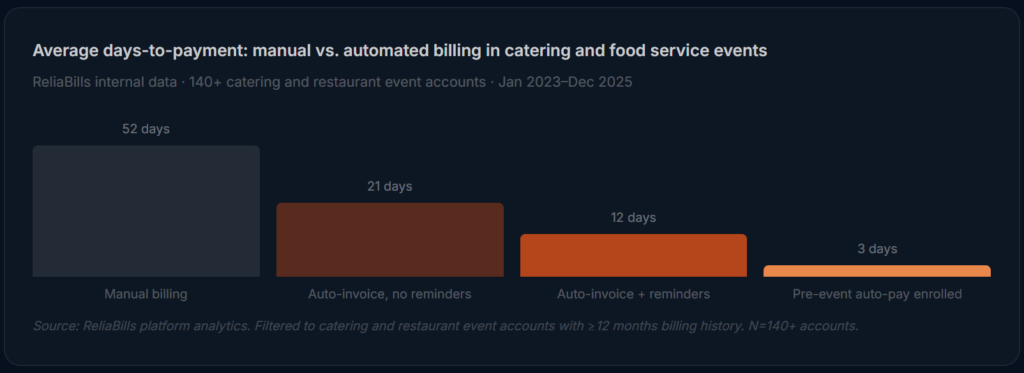
The standard argument for billing automation, that it saves administrative time, is true but understates what’s at stake in catering specifically. Because caterers purchase food, hire staff, and rent equipment before any money comes in, the timing of collections is not just a cash flow convenience. It’s the difference between a healthy working capital position and a line of credit that covers the gap between your food order and your client’s check. Shortening the collection cycle from 52 days to 12 days changes the financial structure of the business, not just the administrative load.

Pre-event card authorization: the most underused collection tool in catering
The most powerful billing practice in catering is one that almost no caterer uses consistently: getting a card authorization before the event for the estimated final balance. The client authorizes the card for up to $X at headcount confirmation, the card isn’t charged, just authorized. After the event, you charge the final amount against the authorization. If the event ran over (additional courses, extra beverages, extended service), you charge the actual amount up to the authorization ceiling. Collection rate on authorized balances is effectively 100%. No follow-up, no invoice, no check waiting in the mail.
Gratuity and service charge transparency
Service charges and gratuity are a consistent source of client disputes in catering, not because clients object to them in principle, but because they’re sometimes added to the final invoice without being clearly disclosed in the original contract. A billing platform that carries gratuity and service charge terms from the quote through every invoice version eliminates this entirely. The client sees the same line items from day one, and the final invoice matches what they agreed to at contract signing.
Risks and What to Watch for
The cancellation and refund policy gap
The most expensive billing failure in catering isn’t a missed invoice, it’s an undefined cancellation policy that leads to deposit disputes. If your contract and billing system don’t clearly state what portion of the deposit is non-refundable at each cancellation milestone, clients who cancel will expect a full refund, and you’ll have already committed to food orders and staff scheduling. The billing platform needs to reflect the same cancellation terms as the contract so that when a client cancels 30 days out, the system applies the correct forfeiture automatically and documents it.
Minimum spend guarantee enforcement
Private dining rooms and exclusive venue buyouts often come with a minimum spend guarantee, the client commits to spending at least $X on food and beverage or pays the difference as a room fee. Generic invoicing tools can’t track a running food and beverage total against a guarantee threshold during service. If you’re running a minimum spend guarantee, you need a billing platform that can capture the actual spend, compare it to the guarantee, and generate the correct shortfall charge if needed, not a manual calculation done the next morning.
Late changes to dietary requirements
A client who adds three gluten-free meals and two vegan plates 48 hours before a 200-person event creates a pricing change that probably won’t make it onto the final invoice without a system that flags it. Dietary accommodation add-ons are one of the most common sources of uncompensated work in catering. If your billing software connects to your event management notes, those last-minute changes can generate a line item automatically rather than relying on someone remembering to add them.
Billing Software Comparison: Catering vs. Adjacent Tools
| Tool type | Deposit billing | Per-head variable pricing | Multi-milestone payments | Gratuity and service charges | Cancellation policy enforcement | Best for |
|---|---|---|---|---|---|---|
| Catering billing software Best fit | ✓ | ✓ | ✓ | ✓ | ✓ | Full-service and event caterers |
| Generic invoicing software | ~ | ✗ | ✗ | ✗ | ✗ | Freelancers, product businesses |
| POS / restaurant software | ✗ | ✗ | ✗ | ✓ | ✗ | In-restaurant dining, not events |
| Event management platforms (Tripleseat, Caterease) | ✓ | ✓ | ✓ | ✓ | ✓ | Large operations needing full event PM |
| Accounting software (QBO, Xero) | ~ | ✗ | ~ | ~ | ✗ | Back-office only, not AR management |
Feature Checklist: What Catering Businesses Actually Need
| Feature | Why it matters for catering | Priority |
|---|---|---|
| Deposit invoice automation | Deposit request is sends automatically at contract signing; payment link included; reminders fire until paid | Essential |
| Per-head variable pricing | Headcount changes update invoice totals automatically, no manual recalculation or new invoice version | Essential |
| Multi-milestone payment schedules | Deposit, mid-event estimate, and final balance triggered at defined milestones from a single event record | Essential |
| Pre-event card authorization | Authorize the estimated final balance before the event; charge actuals after. Eliminates post-event collection | Essential |
| Gratuity and service charge fields | Carries the same line items from quote through final invoice so clients never see a surprise charge | Essential |
| Cancellation policy enforcement | Applies the correct forfeiture percentage automatically when a client cancels, with documented terms | High |
| Installment billing support | Large institutional or corporate clients who need to spread payments across multiple billing periods | High |
| ACH and card payment processing | Corporate and institutional clients pay by ACH; individuals pay by card, both in the same system | High |
| Automated payment reminders | Removes the awkward follow-up call; configurable per milestone and per client type | High |
Common Mistakes and What We Got Wrong at First
1. Sending the final invoice days after the event instead of the same day
The most consistent pattern we see in catering billing problems is timing. A caterer executes a flawless 200-person wedding on Saturday. The final invoice goes out the following Wednesday. By then, the couple is on their honeymoon, the family members who were handling logistics have scattered, and the invoice sits unread for two weeks. The correct approach is to send the final invoice or execute the pre-authorized card charge within 12 hours of event close. The event is fresh, the experience was positive (hopefully), and payment feels like a natural conclusion to the relationship. Waiting makes it feel like an afterthought, and afterthoughts get deprioritized.
2. Not getting a signed change order for every headcount or menu update
This is the most expensive mistake in catering, and it happens constantly. A client calls to drop their headcount from 150 to 140 two weeks before the event. The event coordinator notes it in their spreadsheet. The final invoice reflects 140 guests. The client calls to dispute it, they say they only changed to 145, not 140, and the food quality reflected the reduced order. Without a documented, client-signed change order for every headcount or menu update, every adjustment becomes a negotiation after the fact. Every change needs a confirmation email at minimum, and the best billing platforms generate a revised estimate that requires client acknowledgment before the change is applied.
3. Treating the deposit as revenue before the event happens
We’ve seen catering companies build their cash flow projections on deposit revenue that hasn’t been secured yet, and worse, treat collected deposits as operating revenue before the event is delivered. Deposits are liabilities until the service is rendered. If a client cancels and your contract entitles you to 50% of the deposit, the other 50% needs to go back. Billing software that properly tracks deposits as pre-event liabilities (not revenue) gives you a more accurate picture of your actual financial position and makes the reconciliation process far cleaner at year-end.
4. Using the same reminder cadence for wedding clients and corporate AP departments
A “your invoice is overdue” reminder sent to the mother of the bride three weeks after her daughter’s wedding is a customer relationship problem, not just a billing one. Corporate clients on net-30 terms, by contrast, expect and respond well to systematic follow-up. Any billing platform worth using for catering lets you configure reminder cadences per client type, gentle, relationship-sensitive follow-ups for individual event clients, and professional AP-style reminders for corporate accounts. Applying the same automated sequence to both groups will eventually cost you a referral.
5. Quoting food and labor together instead of separately
When food and staffing are bundled into a single per-head price, any change in the event scope triggers a renegotiation of the entire quote. A client who wants to add a late-night snack station at the 11th hour should be able to get a simple add-on price, not a revised per-head calculation. Billing software that supports itemized quotes, food per head, staffing by role and hours, rental pass-throughs, and service charges gives you much more flexibility to handle scope changes cleanly. It also makes the final invoice far easier for the client to understand and approve.
How to Get Started: Implementation Roadmap
The phases below are built for catering and restaurant event businesses specifically, not a generic software setup guide. The order matters: setting up billing templates before you have clean event records produces the same invoicing problems you were trying to fix.
1. Audit your active events and client records (week 1)
Pull every active event booking and verify: do you have a confirmed headcount, a signed contract, a clear deposit status, and an accurate food and beverage estimate? Also pull your AR aging, any balance from a past event that’s over 30 days is your first collection priority once the system is live. Clean your customer management data so that corporate clients have proper AP contacts and individual event clients have the correct email for invoicing, these are often different from the event planning contact.
2. Build billing templates for each event type (week 2)
Map each event category to a billing template and milestone schedule. Wedding and social events get a three-stage billing structure: deposit at contract, revised estimate at final headcount confirmation, and final balance due 7 days before the event (or immediately post-event if you’re using card authorization). Corporate catering gets monthly invoicing on recurring billing for repeat clients, and net-30 individual invoices for one-time events. Institutional clients get customized net terms with installment billing options for large annual contracts. Build the gratuity and service charge fields into every template so they carry from quote to final invoice automatically.
3. Pilot with 3–5 upcoming events (weeks 3–4)
Select a cross-section of upcoming bookings, at least one wedding-style event, one corporate event, and one delivery/drop-off order. Run the full billing cycle for each through the new system while monitoring every step. Verify that deposit invoices go out correctly at contract signing, that headcount changes update the estimate automatically, that payment links work, and that reminders fire on the correct schedule. Test the post-event final invoice timing specifically, this is where most catering billing systems have their worst performance.
4. Full migration and pre-event authorization rollout (month 2)
Move all active events onto the platform and introduce pre-event card authorization to your new event sales process, frame it as standard industry practice (“we hold a card on file, similar to a hotel check-in”) and build it into the contract language. For corporate clients, launch an ACH enrollment campaign targeting your highest-volume accounts. ReliaBills supports both card authorization and ACH auto-pay, with invoicing software that handles the full event billing lifecycle, including deposit tracking, milestone invoicing, and final balance collection. The free tier lets you test the complete workflow before committing to payment processing volume.
Frequently Asked Questions
1. What makes catering billing software different from generic invoicing tools?
Generic invoicing tools are built for one-time or product-based transactions. Catering billing involves deposits, variable per-head pricing that changes when headcount shifts, multi-milestone payment schedules across a months-long timeline, gratuity and service charge management, and cancellation policy enforcement. None of these exist in standard invoicing software without substantial manual workarounds, and those workarounds are exactly where billing errors and disputes happen.
2. How should I handle deposit collection for a catering event?
The deposit invoice should go out automatically the moment the contract is signed, not at the end of the day, and not when someone remembers to send it. The invoice should clearly state the deposit amount, the due date (typically 7–14 days from contract signing), and the cancellation policy terms that govern how much is refundable at each cancellation milestone. Automated reminders should follow every 3–5 days until the deposit clears. Deposits collected within 48 hours of contract signing are the strongest predictor of timely final balance payment.
3. What happens to the billing when a client changes their headcount?
The correct process is to update the headcount in the event record, generate a revised estimate with the new per-head total and any changed line items, get client acknowledgment (digital signature or confirmed email reply), and then have the billing platform apply the updated amounts to the final invoice automatically. Without a documented change order and a billing system that carries the updated amounts forward, headcount disputes are extremely common and difficult to resolve in your favor.
4. How do I bill for gratuity and service charges without creating disputes?
The single most effective practice is making gratuity and service charge line items visible in the original quote, carrying them through every revised estimate, and having them appear on the final invoice with the same language and amounts the client agreed to. If a 20% service charge is in the original quote, it should be a named line item on every document that follows, not a surprise addition to the final invoice. Billing software that carries quote terms through the full billing lifecycle eliminates this category of dispute entirely.
5. What is pre-event card authorization, and how does it work for catering?
A pre-event card authorization is a hold placed on the client’s card for the estimated final event balance, typically at the headcount confirmation stage, 7–14 days before the event. The card is not charged, just authorized. After the event, you charge the actual final amount against the authorization. If the event ran over the estimate, you charge up to the authorization ceiling. Collection rate on authorized amounts is effectively 100%, and there’s no post-event invoice chase. This is standard practice in hotels and event venues, caterers who adopt it report it as one of the most impactful billing changes they’ve made.
6. How should billing differ for corporate catering clients vs. individual event clients?
Corporate clients typically have an accounts payable process that prefers net-30 invoicing, requires a PO number on each invoice, and responds well to systematic automated reminders. Individual event clients, especially for personal milestone events, need a more relationship-sensitive billing approach: clear milestone invoices, gentle follow-ups that don’t feel transactional, and a strong upfront explanation of the deposit and cancellation terms. Any billing platform that only supports one reminder cadence for all client types will eventually create friction with one group or the other.
Recent Articles:
- Lawn and Landscape Billing Software: Automate Your Landscaping Business
- Childcare Billing Software: The Complete Guide for Daycares and After-School Programs