

A professional service invoice is more than a payment request; it’s a legal document, a brand touchpoint, and a cash flow management tool. To write one correctly, you need your business and client details, a unique invoice number, an itemized breakdown of services, clear payment terms, and your accepted payment methods. Get those elements right every time, and late payments become the exception rather than the rule.
What Is a Service Invoice?
A service invoice is a formal billing document issued by a service provider to a client, requesting payment for work that has been completed or is ongoing. Unlike a product invoice, it describes intangible deliverables, consulting hours, design work, legal advice, maintenance visits, and so on, along with the agreed price, payment due date, and terms. It functions simultaneously as a payment request, a record of transaction for tax and accounting purposes, and a legally admissible business document.
The term “invoice” itself traces back to the French word “envois,” a dispatch or shipment notice. In the modern context, it has evolved into the backbone of business-to-business and business-to-client financial exchange. Whether you are a freelance graphic designer billing a startup, a consulting firm invoicing a corporate client, or a home services company closing out a repair job, the underlying document structure remains largely the same.
Key terms you will encounter when learning how to write an invoice:
| Term | What It Means |
|---|---|
| Invoice Number | A unique identifier assigned to each invoice for tracking and record-keeping. |
| Invoice Date | The date the invoice was issued to the client. |
| Due Date | The deadline by which the client must submit payment. |
| Net Terms | The number of days a client has to pay (e.g., Net 30 = payment due in 30 days). |
| Line Item | A single row in the invoice detailing one service, its quantity, rate, and total cost. |
| Subtotal | The sum of all line items before tax or discounts are applied. |
| Tax | Applicable sales tax, VAT, or GST added to the invoice as required by jurisdiction. |
| Payment Terms | Conditions governing when and how payment is expected. |
| ACH Transfer | Electronic bank-to-bank payment, a common, low-cost option for B2B invoices. |
Understanding these terms is foundational to writing invoices that clients take seriously and pay promptly. For businesses that bill on a repeating schedule, it also helps to understand the difference between recurring billing and standard one-time invoicing, a distinction covered later in this guide.
Anatomy of a Service Invoice
Before diving into the step-by-step process, it helps to see what a complete service invoice looks like as a whole. The visual below maps out each section of a properly structured invoice. Think of it as a blueprint; every field has a purpose, and none are optional.
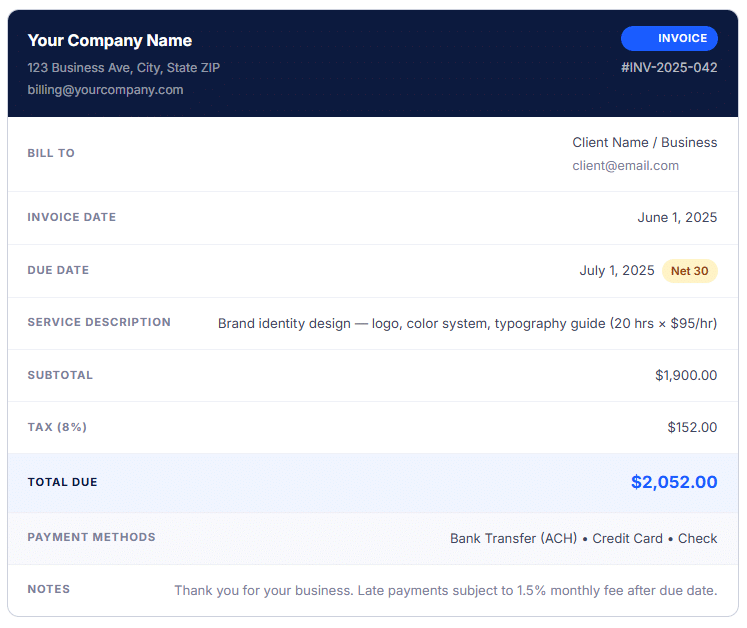
Each labeled section corresponds to a step in the process below. Notice how nothing is left to interpretation: the client knows exactly what was delivered, how much is owed, when it must be paid, and how to pay it. That clarity is what separates invoices that get paid quickly from those that generate follow-up emails and awkward phone calls.
Step-by-Step: How to Write an Invoice for Services
Writing a service invoice is a structured process. Follow these nine steps in order and you will produce a document that is professional, legally sound, and built to minimize payment delays.
1. Choose Your Format and Template
Decide whether you are using a word processor template, a spreadsheet, or dedicated invoicing software. Whatever you choose, the format should be consistent across every invoice you send. A consistent layout trains clients to find payment information quickly and signals that your business is organized and reliable. Include your logo, brand colors, and a clean typeface, the invoice is a brand touchpoint as much as it is a billing document.
Pro tip: Software-generated invoices automatically number invoices sequentially and populate recurring client details, saving significant time per billing cycle.
2. Add Your Business Information
At the top of the invoice, clearly display your full business name (or your name as a sole proprietor), your business address, phone number, email address, and your website if applicable. If you are VAT-registered or have a business tax ID, include that number as well, many larger clients require it for their own accounts-payable processing.
3. Add Client (Bill-To) Information
Include the client’s full name, company name, billing address, and a contact email. When invoicing a larger organization, find out in advance who the accounts-payable contact is, sending to the wrong person is one of the most common, and most preventable, causes of delayed payment. If the client provided a purchase order (PO) number, include that reference here as well.
4. Assign a Unique Invoice Number
Every invoice needs a unique identifier. Use a sequential system (001, 002, 003…) or incorporate a date prefix (2025-001) and optionally a client code (ABC-2025-001). This number is critical for tracking, referencing in follow-up communications, and reconciling payments in your accounting software. Never reuse or duplicate invoice numbers.
Pro tip: Most invoicing platforms auto-increment invoice numbers and flag if you accidentally skip one.
5. Enter the Invoice Date and Due Date
The invoice date is the day you are issuing the invoice, not the day the work was completed. The due date is calculated from the invoice date based on your payment terms. If your terms are Net 30 and you invoice on June 1, the due date is July 1. State both dates explicitly rather than relying on the client to calculate the deadline themselves.
6. Itemize Your Services
This is the core of any service invoice. List each service as its own line item with a clear description, the quantity (hours, units, sessions), the rate, and the line total. Avoid vague descriptions like “Consulting” or “Work completed.” Instead, write something like “Website UX audit, review of 12 pages, delivery of annotated wireframes and written recommendations (8 hrs × $125/hr).” That level of specificity eliminates client confusion and removes a common reason for delayed payment approval.
If you engaged subcontractors or incurred reimbursable expenses as part of the engagement, list those as separate line items rather than folding them into the service fee.
7. Calculate the Subtotal, Taxes, and Total
Sum all line items to arrive at the subtotal. Then apply any applicable taxes, sales tax, VAT, or GST, based on your jurisdiction and the nature of the service. Not all services are taxable in every region, so consult a local tax advisor if you are unsure. Apply any agreed discounts to the subtotal before calculating tax. Present the breakdown clearly: subtotal → discount (if any) → tax → total due. Do not combine these into a single number without explanation.
8. State Your Payment Terms and Methods
Payment terms should be explicit: “Payment due within 30 days of invoice date (Net 30)” leaves no ambiguity. Also list every accepted payment method, bank transfer (ACH), credit card, check, or payment platform. The more payment options you offer, the fewer barriers exist between your client and actually paying you. If your agreement includes a late fee, state it clearly: “Invoices unpaid after the due date are subject to a 1.5% monthly finance charge.”
9. Add a Notes Section and Send Promptly
A brief notes section is the right place for a thank-you message, any special instructions for payment (bank details, or a payment portal link), or a project reference that helps the client match the invoice to their own records. Once the invoice is complete, send it immediately, the same day the work is delivered or the billing period closes. Studies consistently show that the faster an invoice is sent, the faster it is paid. For clients on an ongoing service arrangement, consider setting up recurring billing to automate the process entirely.
Pro tip: Send invoices by email and request a read receipt or delivery confirmation so you have a record of when the client received it.
Managing Multiple Clients?
If you work with several clients simultaneously, a centralized customer management system lets you store billing profiles, payment histories, and contact records for every account in one place, eliminating the manual look-up work that slows down billing cycles.
Real-World Examples & Use Cases
Service invoicing is not one-size-fits-all. The line items, rates, and even the payment terms vary significantly depending on the industry and engagement model. Here are four common scenarios and what their invoices typically emphasize:
Freelance Creative Services
A freelance copywriter invoicing a marketing agency for three blog posts would list each article as a separate line item with the agreed per-article rate. If the engagement included revision rounds beyond the contracted limit, those are also billed as separate line items with a note referencing the original agreement. Payment terms are typically Net 15 or Due on Receipt given the shorter project cycle.
Professional Consulting
A management consultant billing a corporate client typically invoices by the hour or by the day (day rate). The invoice should reference the specific engagement, the period covered (e.g., “May 1–31, 2025”), and any project code the client’s finance team needs for internal allocation. Net 30 is standard; Net 45 or Net 60 may be negotiated by larger clients, though many consultants charge a premium for extended terms.
Home and Field Services
A plumber or HVAC technician invoices immediately upon job completion, ideally on a mobile device at the client’s location. The invoice distinguishes between labor (hours at an hourly rate) and parts or materials (listed at cost plus a handling margin). Many field service providers now send the invoice by text message or email before leaving the site and accept credit card payment on the spot.
Subscription and Retainer Services
Businesses on retainer, agencies, IT support providers, and fractional CFOs bill a fixed monthly fee. Rather than itemizing every task performed during the month, the invoice references the retainer agreement and states the period covered. For these arrangements, setting up automated recurring invoicing is best practice: the invoice generates and sends itself at the same time each billing cycle, and the client can be enrolled in auto-pay to eliminate manual payment friction entirely.
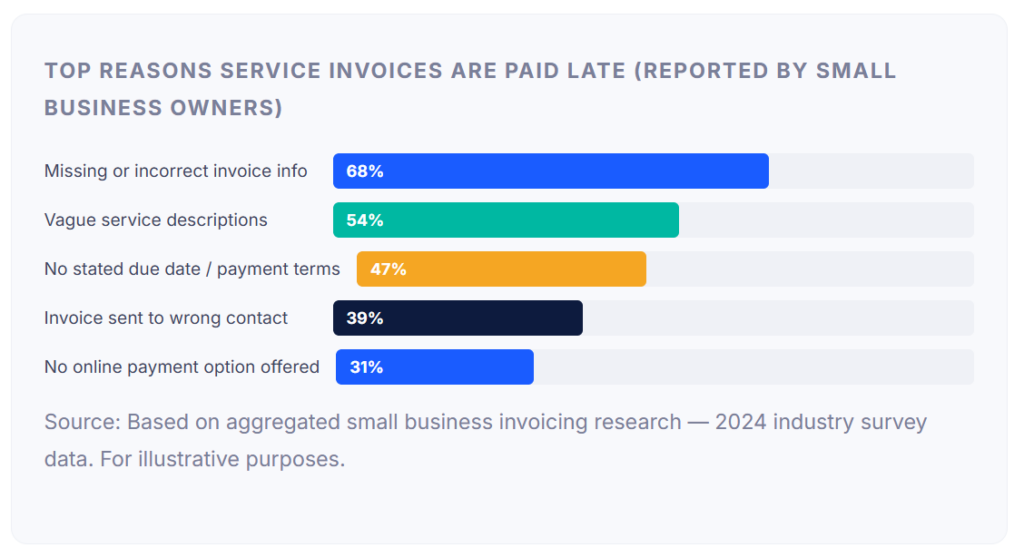
The chart above makes the underlying pattern clear: the vast majority of late-payment issues stem from preventable invoice errors, not from clients who genuinely cannot pay. Getting the information right the first time is the single highest-leverage action you can take to improve cash flow.
Key Benefits of Getting Your Invoice Right
A professionally written service invoice does far more than request payment. When done well, it delivers compounding advantages across multiple dimensions of your business:
Faster Payment Cycles
Clear, complete invoices are processed faster by accounts-payable departments. When all required information is present, PO numbers, tax IDs, itemized descriptions, and correct contact details, there are no grounds for the client to delay approval pending clarification. Businesses that invoice the same day work is completed consistently report shorter average payment times than those who batch invoice weekly or monthly.
Stronger Client Relationships
Transparent billing is a trust signal. When clients can see exactly what they were charged for and why, they feel confident in the relationship. Conversely, vague or inconsistent invoices erode trust and are one of the top sources of client friction in service-based businesses. An invoice that is easy to read and easy to pay reinforces your professionalism on every billing cycle.
Better Tax and Accounting Records
Every invoice you send is a financial record. Well-structured invoices make bookkeeping faster, simplify tax filing, and provide the paper trail your accountant needs. If you are ever audited, a complete invoice history is far easier to navigate than a collection of emails, spreadsheets, and handwritten notes. Paired with robust customer management, your invoicing history becomes a searchable, organized financial archive.
Legal Protection
A signed or acknowledged invoice serves as evidence of a contractual agreement. Should a payment dispute arise, your invoice, timestamped, itemized, and delivered to the client, is a key exhibit. For large engagements, pair the invoice with a signed statement of work or contract for maximum legal protection.
Common Mistakes to Watch For
Even experienced service providers make invoicing errors that slow payment or damage client relationships. These are the most frequent and the most fixable:
⚠️ Skipping the Invoice Number
An invoice without a unique number cannot be easily tracked, referenced in dispute resolution, or matched to a payment by your accounting system. Always assign a number before sending.
⚠️ Generic or Vague Service Descriptions
Entries like “Services rendered” or “Consulting, March” give the client’s finance team nothing to approve against. Specificity prevents disputes and speeds up sign-off.
⚠️ Missing Payment Terms or Due Dates
Without a stated due date, the client has no deadline and no urgency. Always state the due date explicitly, not just “Net 30” but the actual calendar date (e.g., “Due: July 1, 2025”).
⚠️ Invoicing Too Late
Many businesses batch their invoicing for the end of the week or month. While this may feel efficient, it extends your payment cycle unnecessarily. Send invoices as soon as work is complete.
⚠️ Offering Only One Payment Method
If you only accept checks and your client’s company processes everything through ACH or credit card, you have introduced an avoidable barrier. Offer multiple payment options wherever possible.
⚠️ No Follow-Up System
Sending the invoice is not the end of the process. Automate payment reminders so overdue invoices don’t fall through the cracks. A well-timed reminder, sent 3 days before the due date and again on the due date itself, dramatically reduces the need for manual collection calls.
Invoice vs. Quote vs. Receipt: Key Differences
These three documents are often confused, especially by newer business owners, but they serve distinct purposes at different points in the client engagement lifecycle.
| Document | When Issued | Purpose | Payment Status | Legally Binding? |
|---|---|---|---|---|
| Quote / Estimate | Before work begins | Proposes price for services to be rendered | No payment yet | Not binding unless signed as a contract |
| Purchase Order (PO) | Before work begins | Client’s formal authorization to proceed | No payment yet | Yes, creates a contractual obligation |
| Invoice | After service is delivered (or per billing schedule) | Requests payment for services rendered | Payment requested | Yes, serves as evidence of the transaction |
| Receipt | After payment is received | Confirms that payment has been made | Payment received | Yes, proof of payment |
| Credit Note | After invoice, when a refund or credit is applied | Reduces the outstanding balance on an invoice | Reduces balance | Yes, adjusts the financial record |
For businesses that offer structured payment plans over time, such as breaking a large project fee into monthly installments, it is worth understanding installment billing, which differs from both standard invoicing and recurring billing in how payments are pre-scheduled and tracked against a total balance.
Understanding Payment Terms: Which Should You Use?
Payment terms define the window in which a client is expected to pay after receiving an invoice. Your choice of terms affects cash flow, client relationships, and how often you have to chase late payments.
| Term | Meaning | Best For | Cash Flow Impact |
|---|---|---|---|
| Due on Receipt | Payment expected immediately | One-time clients, small amounts, first engagements | Fastest |
| Net 7 | Payment due in 7 days | Short-turnaround projects, trusted ongoing clients | Fast |
| Net 15 | Payment due in 15 days | Freelancers, small businesses, retail services | Moderate |
| Net 30 | Payment due in 30 days | Standard B2B, professional services, consulting | Standard |
| Net 60 / Net 90 | Payment due in 60 or 90 days | Large enterprise clients; typically negotiated | Slowest |
| 2/10 Net 30 | 2% discount if paid within 10 days; full amount due at 30 | Incentivizing early payment from corporate clients | Fast if taken |
If you are starting a new client relationship, it is entirely reasonable to request Net 15 or even payment upfront for a portion of the project fee, particularly for larger engagements. As the relationship and trust develop, you can extend more favorable terms. Regardless of what terms you choose, the most important thing is that they are clearly stated on every invoice and agreed to in your client contract before work begins.
How to Get Started with Invoicing Software
Writing invoices manually in a word processor or spreadsheet is workable at low volume, but the limitations become apparent quickly: there is no automatic numbering, no payment tracking, no automated reminders, and no audit trail. Most service businesses find that once they are billing more than five or six clients regularly, purpose-built invoicing software pays for itself in time savings alone within the first month.
What to Look for in an Invoicing Platform
The right invoicing platform for a service business should handle professional invoice creation with branded templates, automated payment reminders, online payment acceptance (ACH and credit card), recurring invoice scheduling for retainer clients, and a clear dashboard showing which invoices are outstanding, overdue, or paid.
ReliaBills is designed specifically for this workflow. The platform lets you create and send branded invoices, automate recurring billing schedules, and manage payment follow-up without manual intervention. For businesses working with clients on large project fees, the installment billing feature pre-generates a full schedule of invoices tied to a single total, so both you and the client always know how much has been paid and what remains outstanding.
Getting Started Checklist: Before you send your first invoice through any platform, upload your logo and set your brand colors, enter your default payment terms (Net 30 is a safe starting point), add your first client’s billing details, set up at least one online payment method, and create an invoice template you can reuse. These five steps take under 20 minutes and form the foundation of a professional billing system.
Frequently Asked Questions
These are the questions service-based businesses most often ask when learning how to write an invoice.
1. What should be included in a service invoice?
A complete service invoice includes your business name and contact information, the client’s name and contact details, a unique invoice number, the invoice date, a payment due date, an itemized list of services with descriptions and prices, applicable taxes, the total amount due, your accepted payment methods, and your payment terms. A brief notes section for special instructions or a thank-you message is optional but professionally recommended.
2. How do I number my invoices?
Use a sequential numbering system, start with 001 and increment by one with each new invoice. You can also include a prefix such as the year (2025-001) or client initials (ABC-001) to make records easier to organize and search. Never reuse or skip numbers. Invoicing software handles this automatically, which eliminates human error entirely.
3. What payment terms should I use on a service invoice?
The most common standard is Net 30, meaning the client has 30 days from the invoice date to pay. For new clients or smaller projects, Due on Receipt or Net 15 improves your cash flow without being unreasonable. For large, trusted enterprise clients, Net 45 or Net 60 may be expected. Whatever terms you choose, state both the term and the explicit calendar due date on the invoice itself.
4. Is a handwritten invoice legally valid?
Yes. A handwritten invoice is legally valid as long as it contains all required information, service details, amounts, dates, parties involved, and payment terms. That said, digital invoices are far more practical: they are easier to track, harder to lose, provide a delivery timestamp, and can include a payment link that the client can click directly from their inbox.
5. How quickly should I send an invoice after completing a service?
Best practice is to send the invoice the same day the service is completed, or within 24 hours at most. The faster you invoice, the faster you get paid, and the fresher the work is in the client’s mind, making disputes less likely. For retainer and subscription arrangements, set invoices to generate and send automatically at the start of each billing period.
Recent Articles:
- What Should Every Professional Invoice Include? (Checklist + Template)
- The Ultimate Guide to Subscription Management for Service Businesses