

Main Takeaway
Failed payments are one of the most preventable causes of lost subscription revenue, yet most businesses still handle them manually. By building an automated failed payment recovery system (also known as dunning), you can recapture the majority of declined transactions before they quietly become permanent cancellations.
Failed payment recovery is the process of automatically detecting a declined recurring charge, diagnosing the reason it failed, and executing a structured sequence of retries, customer notifications, and account-update requests to collect the outstanding balance, all without manual intervention. A well-configured recovery workflow typically combines smart retry logic, multi-channel outreach (email, SMS, in-app), and self-service payment update pages to resolve the decline and preserve the customer relationship. Key terms include dunning (the formal name for this collection process), involuntary churn (customer loss caused by payment failure rather than a decision to cancel), and decline codes (the standardized reason codes returned by card networks when a charge is rejected).
Every subscription business understands that customers cancel. What many underestimate is how many customers disappear without ever deciding to leave. A credit card expires. A bank flags a perfectly legitimate charge as suspicious. A checking account runs low on the wrong day of the month. The charge declines, the account goes dark, and a paying customer is gone, not because they wanted to go but because a billing system gave up after one attempt.
This article explains why recurring payments fail, how recovery automation works step by step, and what separates businesses that recapture most of that revenue from those that write it off as an unfortunate cost of doing business. We have also included data benchmarks, a comparison of recovery approaches, and practical guidance on getting started, whether you are billing a handful of retainer clients or processing thousands of subscriptions each month.

Why Recurring Payments Fail
Not all payment failures are equal, and that distinction matters enormously for how you respond to them. Treating a card expiry the same way you treat an insufficient-funds decline is one of the most common mistakes in dunning design, and it wastes retry attempts that could have been used more effectively.
Card issuers communicate failure reasons through decline codes. The most common categories break down roughly as follows:
| Failure Type | Approx. Share of Failures | Recoverable? | Best Response |
|---|---|---|---|
| Insufficient funds (soft decline) | ~26–30% | Yes, time-sensitive | Retry after 3–5 days; notify customer |
| Expired card | ~15–18% | Yes, requires an update. | Account Updater + self-service link |
| Generic decline / do not honor | ~20–25% | Partial | One retry, then notify customer |
| Issuer fraud flag (hard decline) | ~10–15% | Limited | Do not retry; contact customer directly |
| Lost or stolen card | ~5–8% | No (card invalid) | Request new payment method immediately |
| Technical / gateway errors | ~5–10% | Yes, automatic | Retry within hours; no customer action needed |
The practical implication: roughly half of all failed recurring payments are soft declines caused by temporary cash flow issues and can be recovered simply by retrying at a smarter time. Another substantial portion requires the customer to update their payment method. Only a smaller fraction, hard declines from fraud flags or lost cards, are genuinely unrecoverable without direct intervention.
Key Term: Involuntary Churn
Involuntary churn happens when a customer is lost due to a payment failure rather than a decision to cancel. Because the customer never intended to leave, the vast majority of this churn is preventable, which is what makes failed payment recovery one of the highest-ROI operational investments a subscription business can make.
How Failed Payment Recovery Works: The Automated Dunning Process
The term “dunning” has centuries-old roots in debt collection, but in a modern subscription context it describes something far less adversarial: a structured, automated workflow designed to resolve a payment failure quickly, preserve the customer relationship, and keep the service running. Think of it less as chasing down a debtor and more as a helpful nudge from a product the customer already likes.
A complete dunning system operates on two fronts simultaneously. On the back-end, it applies retry logic to attempt the charge again at the most favorable moment. On the customer-facing side, it sends timely, empathetic communications that make it easy for the customer to act. The interplay between these two tracks, retries in the gaps, emails, and messages in between, is what separates high-performing recovery from a simple “try again tomorrow” loop.
For businesses using a platform like recurring billing software, much of this workflow can be configured once and run without manual supervision.
The Step-by-Step Recovery Workflow
1. Payment decline detected
Your billing system receives a decline code from the card network. The failure type is logged as soft decline, hard decline, expired card, or technical error, which determines the recovery path.
2. Immediate customer notification (Day 0)
An automated email is sent to the customer explaining that their payment did not go through. Research shows Day 0 emails achieve the highest open rates, around 41%, so acting fast matters. The tone should be helpful, not accusatory.
3. Smart retry logic executes
Rather than retrying at a fixed interval, a smart retry system uses signals from the decline type, the customer’s payment history, and time-of-day data to identify the window where a successful charge is most likely. Soft declines are typically retried after 3–5 days.
4. Account Updater runs (card-on-file issues)
For expired or replaced cards, Account Updater services, provided by Visa and Mastercard, can automatically refresh stored card credentials without requiring the customer to do anything. This resolves a significant portion of card-expiry failures silently.
5. Escalating multi-channel outreach (Days 3–28)
If the initial retry fails, the system sends a series of follow-up messages across email, SMS, and in-app channels. Each message includes a direct link to a self-service payment update page. A typical effective sequence spans 6–7 touchpoints over 27–30 days.
6. Payment collected, service restored
Once a retry succeeds or the customer updates their payment method, the billing system marks the invoice as paid, the account is restored to good standing, and the dunning sequence is automatically cancelled.
7. Graceful service suspension (if unresolved)
If the balance remains unpaid after the full recovery window, the system can automatically downgrade or pause the account while keeping the door open for reactivation, rather than deleting customer data, which makes win-back nearly impossible.
Real-World Examples and Use Cases
SaaS companies: the quiet revenue leak
A typical B2B SaaS company charging $150 per month with 2,000 active subscribers and a 7.9% monthly failure rate is looking at roughly 158 payment failures every billing cycle. Without automated recovery, a significant portion of those customers quietly churn. With a dunning system in place that recovers even 60% of failures, that same business retains around 95 customers per month who would otherwise have been lost, a difference of roughly $170,000 in annual recurring revenue that never required a single sales call or marketing dollar to regenerate.
Professional services and agencies
Agencies billing clients on monthly retainers often face a different problem: the relationship is personal, so chasing a declined payment by phone feels awkward, and sending a generic debt-collection email feels wrong. Automated recurring billing with built-in recovery workflows handles this gracefully; the system sends a professionally worded notification on the agency’s behalf, and the client can update their card details through a branded portal, all without requiring the account manager to have an uncomfortable conversation.
E-commerce memberships and subscriptions
Retail subscription boxes and membership programs tend to see higher failure rates than B2B SaaS, partly because consumer credit cards churn faster and balances fluctuate more. These businesses benefit particularly from proactive dunning: sending a “your card on file is about to expire” reminder before the billing date prevents the failure from occurring in the first place, rather than waiting to react after it happens.
Recovery Rate: What the Data Shows
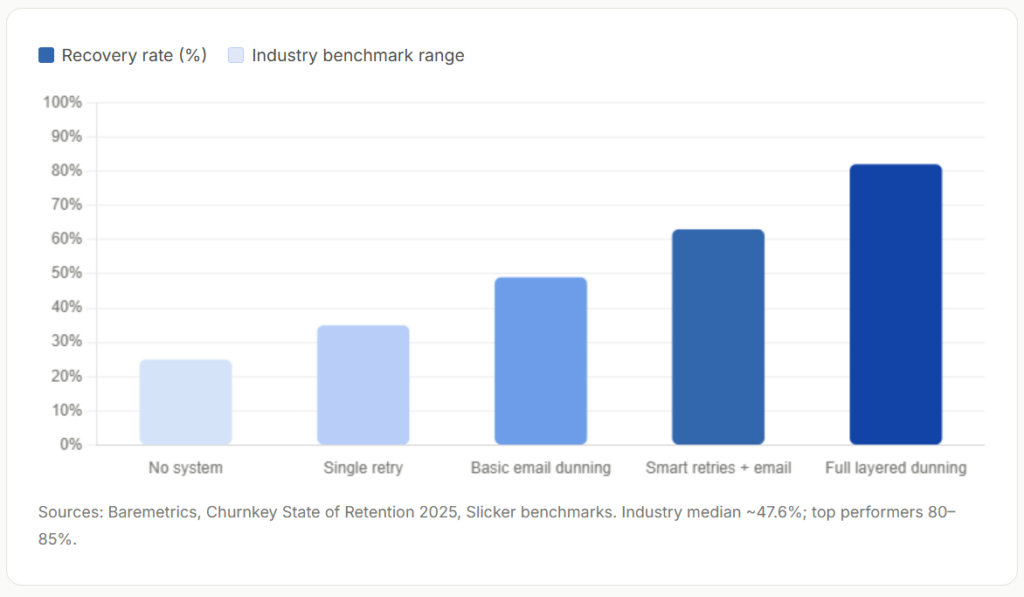
The gap between businesses that do nothing and those with a mature dunning system is substantial. The chart below illustrates how recovery rates typically improve as more recovery layers are added, from simple single-retry logic through to layered programs that combine smart retries, email sequences, SMS, and in-app messaging.
Key Benefits of Automated Failed Payment Recovery
The case for automating this process goes beyond simply recouping a few declined transactions. Done well, failed payment recovery affects revenue predictability, customer lifetime value, and operational efficiency simultaneously.
Protects Monthly Recurring Revenue
Every recovered payment is revenue that required no marketing spend or new customer acquisition, it was already earned. A 50% LTV improvement is achievable purely by reducing monthly churn from 3% to 2% through better dunning.
Reduces Manual Workload
Automated retries and templated outreach sequences eliminate the need for billing staff to manually chase failed payments, freeing teams to focus on higher-value customer interactions.
Preserves Customer Relationships
Most customers whose cards decline are not trying to avoid paying. Empathetic, automated communications maintain goodwill and make it easy to resolve the issue before frustration sets in.
Improves Revenue Predictability
When you know that a structured recovery process will resolve most failures, you can forecast cash flow with greater confidence, a meaningful advantage for businesses managing tight margins or growth investments.
Works Silently in the Background
Account Updater integrations and smart retry logic often resolve card-related failures entirely without the customer needing to take any action, creating a frictionless experience that strengthens retention.
Generates Recoverable Data
A mature dunning system surfaces insights about failure patterns by customer segment, billing period, and payment method, data that can inform product and pricing decisions beyond billing alone.
Key Risks and Things to Watch For
Automated dunning is powerful, but poorly configured systems create problems of their own. A few common failure modes are worth understanding before you set up a workflow.
Over-retrying Hard Declines
Retrying a hard decline (fraud flag, lost card) burns network attempts and can damage your merchant account standing. Always check the decline code before scheduling a retry.
Aggressive Communication Tone
Emails that read like debt-collection notices can permanently damage the customer relationship and increase voluntary cancellations among customers who were already uncertain about the product.
No Graceful Suspension Plan
Deleting customer accounts after failed payment recovery exhausts all options makes win-back campaigns impossible. Suspension with preserved data is almost always the right approach.
Set-and-Forget Sequences
Recovery rates change over time as your customer mix evolves. Dunning sequences that are never reviewed or updated become less effective without anyone noticing, monitor recovery metrics monthly.
One-Size Communication
Long-term, high-value customers who miss a payment deserve different messaging than brand-new subscribers on a first billing cycle. Segmenting your dunning sequence by customer value significantly improves outcomes.
Ignoring Pre-Failure Prevention
The most effective “recovery” is the failure that never happens. Card expiry reminders sent 7–14 days before billing can prevent a meaningful portion of failures from occurring at all.
Comparison: Failed Payment Recovery vs. Related Concepts
It’s worth clarifying how failed payment recovery sits alongside terms you will encounter in billing and invoicing software discussions. These concepts are related but serve different purposes.
| Concept | What it addresses | When it applies | Automation level |
|---|---|---|---|
| Failed Payment Recovery (Dunning) | Declined charges on existing recurring billing cycles | After a charge is declined by the card network | Fully automatable |
| Recurring Billing | Scheduling and issuing repeat charges on a defined cycle | Ongoing – every billing period | Fully automatable |
| Installment Billing | Splitting a larger invoice into multiple scheduled payments | Large or one-time projects billed over time | Partially automatable |
| Voluntary Churn Management | Customers who actively choose to cancel | At or after cancellation request | Partially automatable (cancellation flows) |
| Accounts Receivable (AR) Follow-up | Unpaid invoices issued to customers on net terms | After invoice due date passes | Low-to-medium automation |
| Account Updater | Expired or replaced card credentials | Before or at the point of a card-expiry failure | Fully automatic (card network service) |
Worth Noting
Failed payment recovery is specifically about payment failures on billing attempts already in flight. It is distinct from chasing customers who received an invoice but have not yet paid, that falls under accounts receivable management, which requires a different workflow and often different tooling. If you are dealing with both, they are worth configuring separately.
How to Get Started with Automated Failed Payment Recovery
Setting up a reliable failed payment recovery system does not require a major technical overhaul. Most modern billing platforms provide the building blocks; the work is in configuring them thoughtfully.
Step 1: Audit your current failure rate
Before building a dunning workflow, understand where you stand. Pull the last 90 days of billing data and calculate how many charges failed, what the most common decline codes were, and how many of those customers churned within 30 days. If you are using customer management tools that track payment history, this data is usually accessible from a single report. This baseline will let you measure improvement after you implement changes.
Step 2: Map failure types to recovery paths
Segment your failures into at minimum three buckets: soft declines (retry-able), card credential issues (require Account Updater or customer action), and hard declines (require direct customer contact and no retry). Build a different response for each. A billing system that treats all three identically is leaving recoverable revenue on the table.
Step 3: Configure smart retry timing
Avoid fixed retry intervals like “retry every 72 hours.” For soft declines, research consistently shows that retrying 3–5 days after the initial failure, when funds are more likely to be available, outperforms same-day retries. Configure between two and four retry attempts for soft declines before escalating to customer communication.
Step 4: Build your email and notification sequence
Write at least three outreach templates: a day 0 notification, a mid-window follow-up (around day 7–10), and a final notice (day 21–25). Each should include a clear, single call to action and a link to update their payment method and should be written in the tone your brand uses for product communications, not for billing disputes. A recovery email that sounds like the product sent it performs significantly better than one that sounds like it’s from an accounts department.
ReliaBills handles this sequence automatically for businesses using its recurring billing platform: when a payment fails, it identifies the exact reason for the decline and launches a scheduled sequence of notifications and payment retries, so you are not managing each failure manually.
Step 5: Enable a self-service payment update page
The single most effective action in any dunning sequence is making it easy for the customer to act. A hosted, mobile-friendly page where customers can update their card details, accessible via a direct link in every notification, removes friction at the most critical moment. Without it, customers who want to resolve the issue have to navigate your app or contact support, and many simply do not bother.
Step 6: Set a clear end-of-sequence policy
Define what happens if the full recovery window expires without resolution. The default should be account suspension, not deletion; preserving the customer record and all associated data makes reactivation campaigns possible and maintains the relationship for a future win-back. For businesses managing clients across multiple billing models, linking this to your invoicing software and customer management system ensures that account status is consistent everywhere.
Quick-Start Checklist
To launch a basic but effective recovery system: enable decline code logging → configure 2–3 smart retries for soft declines → set up a Day 0 and Day 7 email notification → activate Account Updater if your payment processor supports it → create a self-service card update page → define a suspension policy for unresolved balances. For businesses using installment billing in addition to recurring subscriptions, apply the same workflow to each installment due date independently.
Frequently Asked Questions
1. What is the difference between a soft decline and a hard decline?
A soft decline is a temporary rejection; the card account is valid, but the transaction cannot be processed right now, typically due to insufficient funds, a daily limit, or a temporary issuer flag. It is usually worth retrying after a few days. A hard decline means the card cannot be charged again without the customer taking action; examples include lost or stolen cards, closed accounts, and fraud blocks. Retrying hard declines without resolving the underlying issue wastes network attempts and can worsen your processing standing.
2. How many times should I retry a failed payment before giving up?
Industry best practice is 2–4 retry attempts for soft declines over a 14–28 day window. The exact count depends on your billing cycle and customer segment, but retrying more than four times rarely improves recovery rates and increases the risk of card network penalties. For hard declines, retrying at all is generally counterproductive; the priority should shift immediately to prompting the customer to update their payment method.
3. What is Account Updater and do I need it?
Account Updater is a service offered by Visa and Mastercard that automatically refreshes stored card credentials when a card expires, is replaced, or is reissued. When your billing processor has Account Updater enabled, card-expiry failures can be resolved silently before the customer is ever notified. For businesses with a large base of recurring subscribers, Account Updater typically resolves 10–15% of would-be failures without any manual effort, making it one of the highest-leverage tools in a recovery toolkit.
4. How long should a dunning sequence last?
Research on dunning email performance converges on a 27–30 day window as the optimal length for most subscription businesses. Sequences shorter than two weeks miss customers who could have been reached with a little more time; sequences longer than 30 days show sharply diminishing returns. Within that window, 6–7 touchpoints across email, SMS (from around Day 8), and in-app messaging, where the product supports it, produces the best recovery outcomes.
5. Will automated dunning emails damage customer relationships?
Only if they are written poorly. Recovery communications written in a brand-consistent, empathetic tone produce significantly higher open rates and recovery rates than transactional or aggressive messaging. The goal is to help the customer fix a problem they may not even be aware of; most customers whose payments fail genuinely did not intend for the charge to decline, and a helpful nudge is almost always received better than a demand.
6. What recovery rate should I expect?
The industry median is approximately 47–50% without optimization. Businesses that implement smart retry logic, multi-channel outreach, and Account Updater together typically reach 60–70%. Best-in-class programs report recovery rates of 80–85%. Starting from zero automation, even a basic dunning setup with two or three email notifications and a self-service payment update page will produce a measurable improvement within the first billing cycle.
Related Articles:
- Recurring Billing Mistakes Small Businesses Must Avoid
- How to Set Up Recurring Billing in 5 Simple Steps