

Late payments and inconsistent cash flow are ongoing challenges for many small businesses. When customers forget due dates or encounter friction during the payment process, it can delay revenue collection and disrupt operations. Over time, these inefficiencies can impact financial stability and limit growth opportunities.
Payment friction, such as limited payment options or manual invoicing, often creates unnecessary barriers for customers. Even willing customers may delay payments if the process is inconvenient or time-consuming. This is where automation becomes essential for improving the overall billing experience.
Auto-pay offers a reliable solution by automating payments and reducing dependency on manual actions. By implementing auto-pay, businesses can improve payment consistency, enhance customer convenience, and unlock the full benefits of auto pay for businesses.
What Is Auto Pay in Billing Systems?
Auto-pay is a feature within modern billing software that allows businesses to automatically collect payments from customers on scheduled dates. It eliminates the need for customers to manually initiate payments each billing cycle. This ensures timely transactions and reduces the likelihood of missed payments.
Customers authorize auto-pay by securely storing their payment details, such as credit cards or bank accounts, within the system. Once authorized, payments are processed automatically based on predefined schedules. This creates a seamless and reliable payment experience.
Unlike manual or one-time payments, auto-pay operates in the background without requiring repeated customer action. This makes it especially useful for recurring charges such as subscriptions, rent, or service fees. As a result, businesses can maintain consistent revenue streams with minimal effort.
Why Payment Delays Affect Small Businesses
Disrupts cash flow and financial planning
Late payments create uncertainty in expected revenue, making it harder to cover operational costs like payroll or inventory. Businesses may struggle to invest in growth opportunities without a predictable cash flow. Consistent, on-time payments are critical for stability and informed financial planning.
Increases time spent on collections and follow-ups
Small business owners often have to manually chase overdue payments, taking time away from strategic initiatives. Each missed payment can trigger multiple follow-ups, emails, or phone calls. Automation reduces this administrative burden and frees teams to focus on growth.
Impacts operational efficiency and growth
Delayed payments can slow down daily operations, such as purchasing supplies or scheduling services. Restricted funds may prevent businesses from scaling or pursuing opportunities. Reliable payments allow owners to focus on expanding the business confidently.
Creates administrative burdens for small teams
Small businesses usually operate with lean staff managing multiple roles. Tracking, reminding, and reconciling payments manually adds significant workload. Streamlining collections through automation reduces stress and improves team productivity.
How Auto Pay Works for Businesses and Customers
Auto-pay simplifies the payment process by securely storing customer payment details within the billing system. Customers authorize the system to charge their preferred payment method on scheduled due dates. This eliminates the need for manual payment actions each cycle.
Once the payment date arrives, the system automatically processes the transaction without requiring business intervention. Funds are transferred directly to the business, ensuring timely collection. This reduces delays and improves cash flow consistency.
Customers receive instant confirmations and digital receipts after each transaction. This provides transparency and builds trust in the billing process. Both businesses and customers benefit from a seamless and reliable payment experience.
Key Features of Auto Pay Systems
Automated recurring payment scheduling
Payments are processed automatically based on predefined billing cycles, such as weekly, monthly, or quarterly. This ensures businesses consistently receive funds without relying on manual follow-ups. It eliminates the risk of missed or late payments.
Secure storage of customer payment information
Payment details are encrypted and stored safely within the billing system. Sensitive data is protected from fraud, ensuring compliance with industry regulations. Secure storage also builds trust with customers who know their information is safe.
Integration with invoicing and billing systems
Auto-pay systems connect seamlessly with invoicing software, ensuring that invoices and payments are automatically synced. This reduces errors caused by manual entry and prevents duplicate invoices. Businesses get a unified view of all customer payments.
Payment notifications and digital receipts
Customers receive automated alerts before and after payments are processed. Notifications improve transparency and reduce disputes. Digital receipts create a record for both the business and the customer, enhancing trust.
Flexible billing cycles and payment options
Businesses can tailor billing schedules to suit different customer needs or service types. Multiple payment methods, including credit cards, bank transfers, and digital wallets, improve convenience. Flexibility encourages customers to stay on schedule with payments.
Real-time payment tracking and reporting
Payments are tracked as soon as they are processed, giving businesses instant visibility into financial status. Reporting dashboards help monitor overdue payments, recurring patterns, and trends. Real-time insights allow proactive financial planning and better decision-making.
The Role of Recurring Billing in Auto Pay Success
Recurring billing is the foundation that enables auto-pay to function effectively. It ensures that invoices are generated consistently and aligned with payment schedules. This creates a seamless connection between billing and payment collection.
With predictable billing cycles, customers know exactly when payments will be processed. This reduces confusion and helps them plan their finances accordingly. Over time, it encourages reliable payment behavior.
By combining recurring billing with auto-pay, businesses can eliminate repetitive invoicing tasks and manual tracking. This significantly reduces administrative workload. It also enhances the overall efficiency of billing operations.
Benefits of Offering Auto Pay to Customers
Reduces late and missed payments
Auto-pay ensures payments are collected automatically on the due date without requiring manual intervention. This greatly reduces the risk of missed or delayed payments. Businesses experience more consistent and reliable revenue streams.
Improves cash flow predictability
Regular automated payments create a predictable income stream that supports accurate financial forecasting. This enables businesses to manage expenses, plan growth strategies, and allocate resources more efficiently. Predictable cash flow reduces financial stress.
Saves time on collections and follow-ups
Automation eliminates the need to manually chase overdue payments. Teams can focus on higher-value business activities instead of repetitive collection tasks. Operational efficiency improves, giving staff more time to focus on customer service or expansion.
Enhances customer convenience and satisfaction
Customers benefit from a hassle-free, seamless payment experience. They no longer need to remember due dates or manually process payments each billing cycle. Convenience and transparency improve customer satisfaction and loyalty.
Minimizes administrative workload
Automated systems handle invoicing, reminders, and payment tracking. Staff spend less time on routine billing processes. Businesses can redirect resources toward revenue-generating activities.
Best Practices for Implementing Auto Pay
Clearly communicate payment terms and schedules
Inform customers about how and when payments will be processed through auto-pay. Transparency reduces confusion and prevents disputes. Clear communication also increases enrollment and compliance with scheduled payments.
Provide easy enrollment for customers
Make signing up for auto-pay quick and straightforward. Complicated processes may discourage adoption and reduce participation. Streamlined enrollment improves both customer experience and payment consistency.
Offer multiple payment methods
Supporting a variety of options such as credit cards, bank transfers, and digital wallets gives customers flexibility. Customers can choose their preferred method for convenience. Accessibility encourages on-time payments and reduces friction.
Ensure strong data security and compliance
Protecting customer information is critical for building trust and maintaining compliance. Encryption and secure storage prevent unauthorized access and reduce fraud risk. A secure system reassures customers and strengthens the business’s reputation.
Send reminders before scheduled payments
Notifications alert customers about upcoming charges and keep them informed. Pre-payment reminders reduce surprises and potential disputes. This also encourages timely payments and reinforces transparency.
How Auto Pay Improves Customer Experience
Auto-pay eliminates the need for customers to manually process payments every billing cycle. This convenience reduces effort and ensures payments are never missed. It creates a smoother and more efficient experience.
The seamless nature of automated payments enhances customer satisfaction. Customers appreciate the reliability and simplicity of the process. This leads to stronger relationships and loyalty.
Consistent billing and transparent transactions build trust over time. Customers feel more confident in the business when payments are predictable and clear. This reduces disputes and service interruptions.
Key Benefits of Auto Pay for Small Businesses
Ensures timely and consistent payments
Payments are automatically processed on schedule, reducing delays and missed transactions. This consistency improves revenue reliability and planning. Predictable payments allow better budgeting and forecasting.
Reduces administrative overhead
Automation takes care of billing, reminders, and collections. Manual tasks are minimized, freeing up staff time. Businesses gain operational efficiency and reduce errors.
Improves financial forecasting
Stable revenue streams make it easier to predict future cash flow. Businesses can allocate resources with confidence. Planning becomes more precise and less stressful.
Enhances operational efficiency
Streamlined payment processes reduce bottlenecks and delays in day-to-day operations. Staff can focus on customer service or growth strategies. Overall productivity increases significantly.
Strengthens customer relationships
Convenient, transparent billing builds trust and reliability. Customers feel confident that payments are handled accurately and securely. This improves retention and encourages long-term loyalty.
Common Use Cases
- Subscription-based services: Automated recurring payments ensure consistent collection from subscribers. Businesses can focus on service delivery rather than collections. Revenue streams remain predictable and stable.
- Utility and energy billing: Monthly bills are processed automatically, reducing missed payments. Businesses can ensure steady cash flow and reduce collection disputes. Customers enjoy hassle-free payments.
- Property and rent collection: Tenants’ rent is collected automatically each month. Late payments and administrative follow-ups are minimized. Property managers save time and maintain consistent cash flow.
- Membership and service fees: Recurring service fees are billed automatically without manual intervention. This ensures reliable income for the business. Staff can focus on member engagement and growth activities.
- Professional and consulting services: Automated payments help service providers collect retainers or ongoing client fees reliably. Timely compensation ensures steady cash flow. Follow-up efforts are significantly reduced.
How ReliaBills Helps Small Businesses Implement Auto Pay
Automating payments with ReliaBills allows small business owners to reduce administrative work and save valuable time. The platform manages recurring billing, payment reminders, and transaction tracking all in one place. This means owners spend less time chasing overdue payments and more time focusing on growth and customer service.
ReliaBills’ recurring billing features make it easy to schedule automatic payments for repeat customers. Businesses can set up predefined cycles, enabling consistent and timely revenue collection without manual intervention. This not only ensures predictable cash flow but also improves customer satisfaction by offering a seamless and reliable payment experience.
For businesses looking for advanced functionality, ReliaBills PLUS provides enhanced automation, detailed reporting, and robust customer management tools. Users can track payments in real time, customize notifications, and analyze trends for better financial decision-making. These features empower small business owners to streamline billing operations and maximize the benefits of auto pay for businesses efficiently.
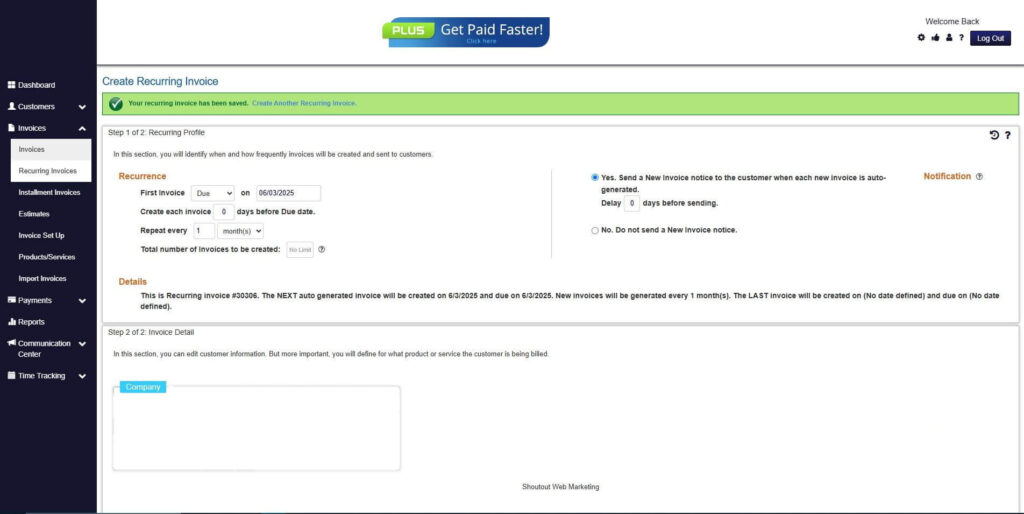
How to Create a New Recurring Invoice Using ReliaBills
Creating a New Recurring Invoice using ReliaBills involves the following steps:
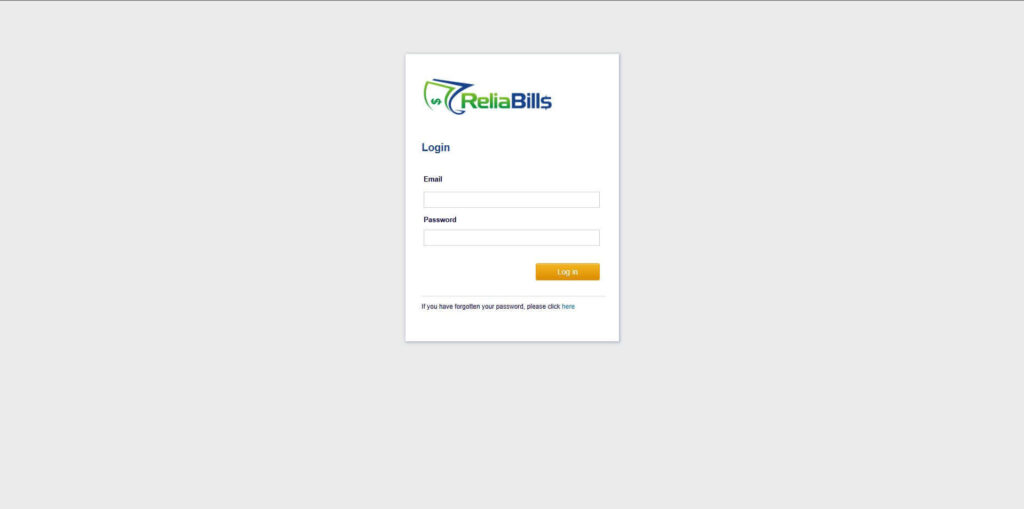
Step 1: Login to ReliaBills
- Access your ReliaBills Account using your login credentials. If you don’t have an account, sign up here.
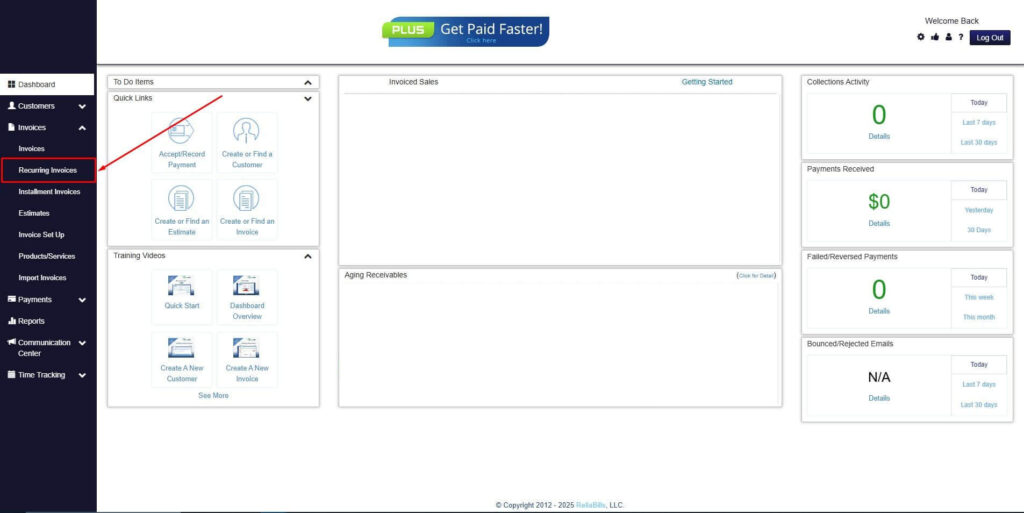
Step 2: Click on Recurring Invoices
- Navigate to the Invoices Dropdown and click on Recurring Invoices for an overview of the list of your existing customers.
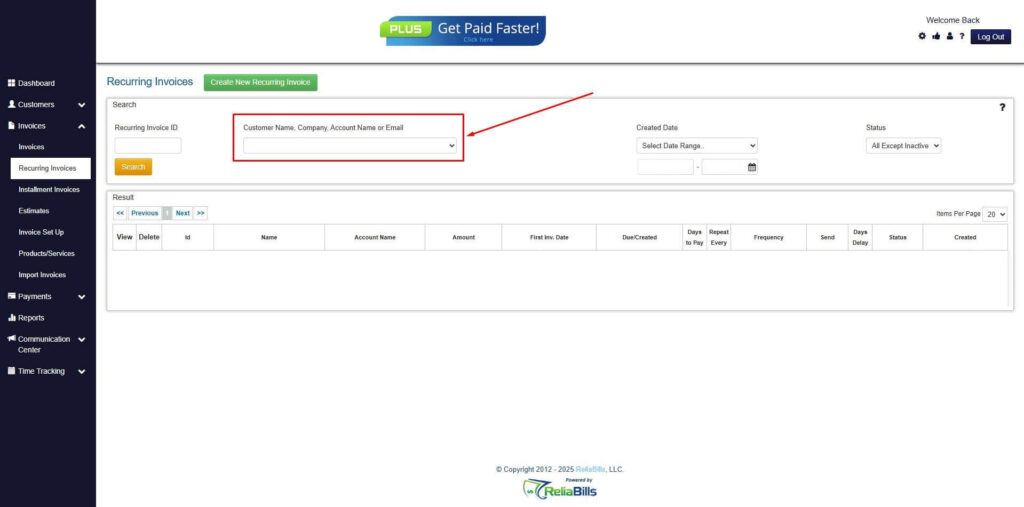
Step 3: Go to the Customers Tab
- If you have already created a customer, search for them in the Customers tab and make sure their status is “Active”.
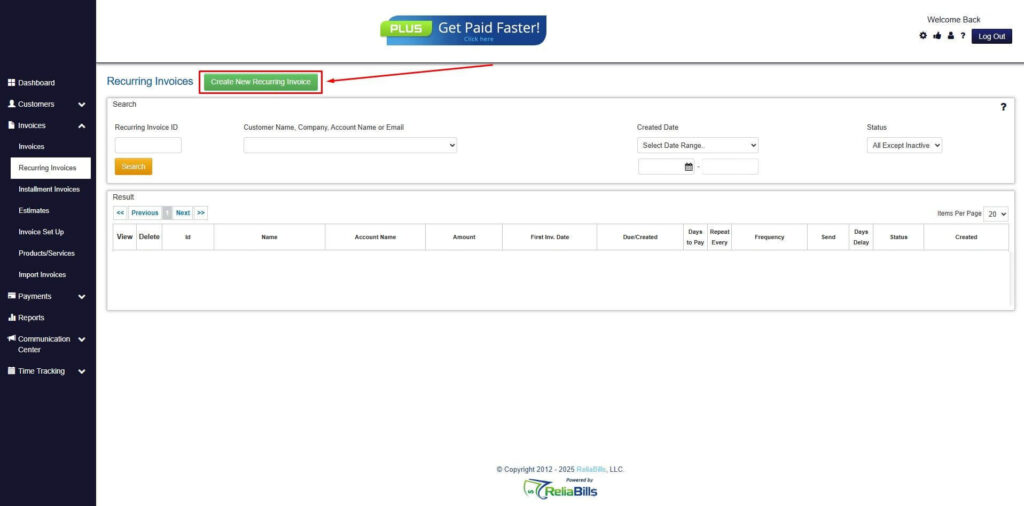
Step 4: Click the Create New Recurring Invoice
- If you haven’t created any customers yet, click the Create New Recurring Invoice to create a new customer.
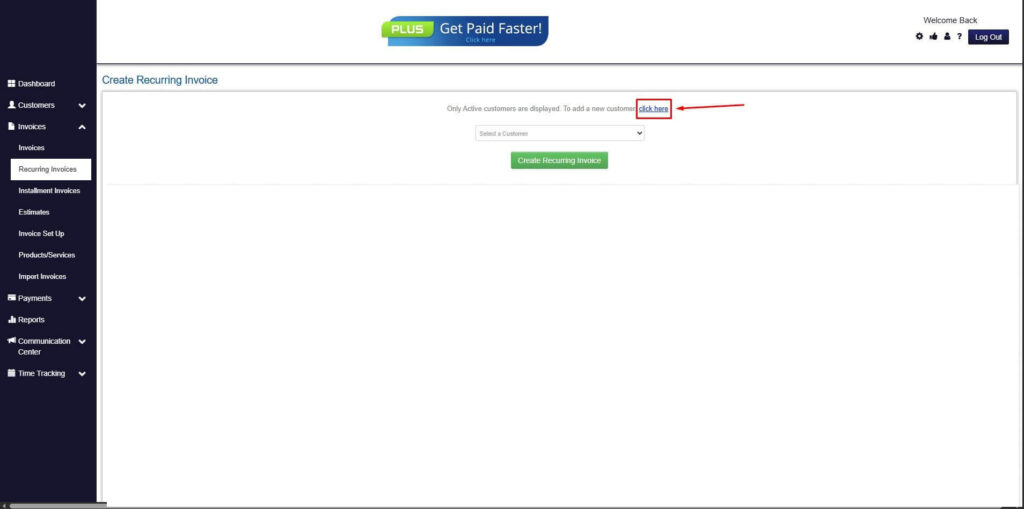
Step 5: Click on the “Click here” Button
- Click on the “Click here” button to proceed with the recurring invoice creation.
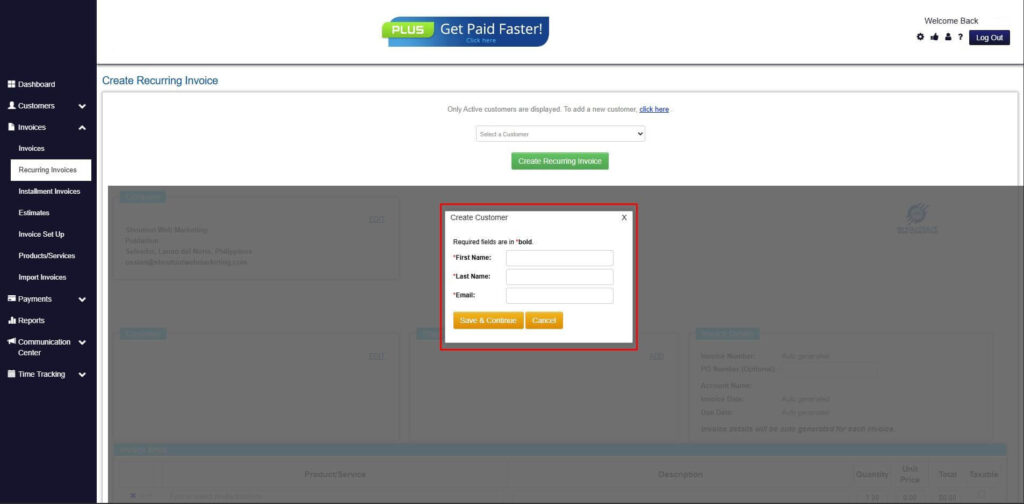
Step 6: Create Customer
- Provide your First Name, Last Name, and Email to proceed.
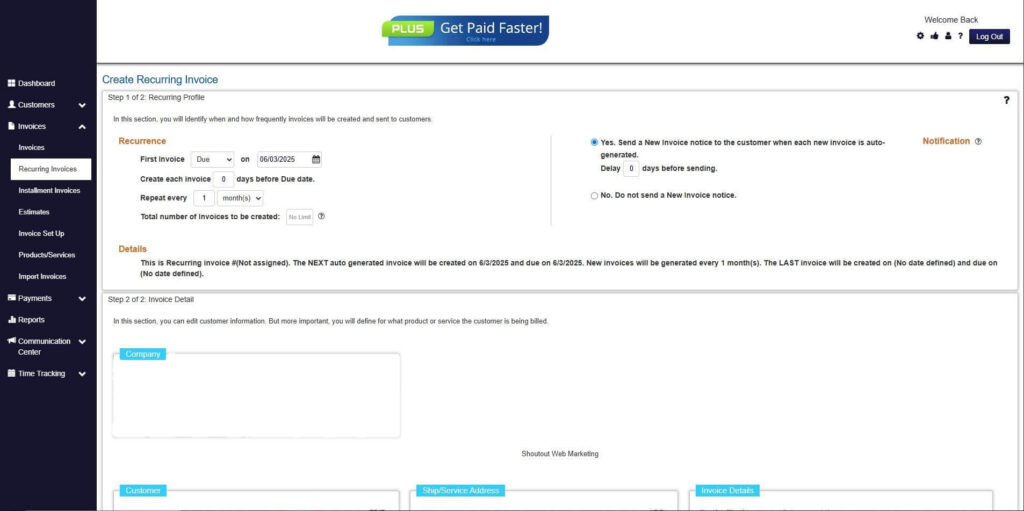
Step 7: Fill in the Create Recurring Invoice Form
- Fill in all the necessary fields.
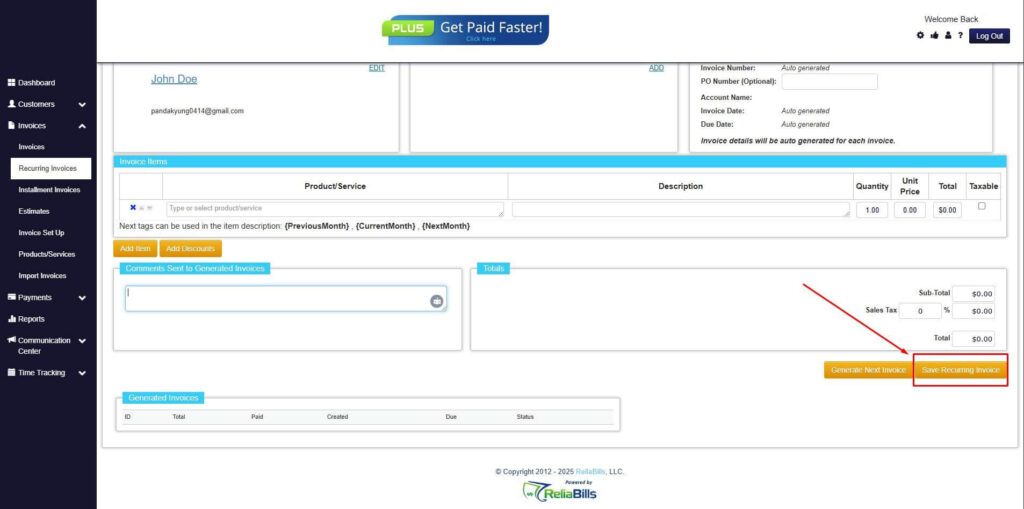
Step 8: Save Recurring Invoice
- After filling up the form, click “Save Recurring Invoice” to continue.
Step 9: Recurring Invoice Created
- Your Recurring Invoice has been created.
Frequently Asked Questions (FAQs)
1. What is auto-pay in billing systems?
Auto-pay is a feature that automatically processes payments on scheduled dates. Customers authorize payments in advance. This eliminates manual payment steps.
2. Is auto-pay secure for customers?
Yes, most systems use encryption and secure payment gateways. This protects sensitive financial information. Security is a top priority.
3. Can customers cancel or modify auto-pay?
Customers can usually update or cancel their settings anytime. This provides flexibility and control. It ensures a positive user experience.
4. How does auto-pay reduce late payments?
Payments are processed automatically on due dates. This eliminates forgetfulness and delays. It ensures consistency.
5. Is auto-pay suitable for small businesses?
Yes, it is highly beneficial for small businesses. It reduces workload and improves cash flow. It also enhances customer convenience.
Conclusion
Late payments and inconsistent cash flow can significantly impact small business operations. By implementing auto-pay, businesses can streamline billing, improve efficiency, and ensure timely revenue collection.
Automation and recurring billing are essential tools for modern financial management. They reduce manual tasks, improve accuracy, and enhance customer experience. Together, they unlock the full benefits of auto pay for businesses.
As digital solutions continue to evolve, adopting auto-pay is no longer optional but a strategic advantage. Small businesses that embrace automation will be better positioned for growth, stability, and long-term success.