
Getting clients onto autopay is not a technical problem, it is a communication and timing problem. The businesses with the highest autopay enrollment rates are not the ones with the best billing software; they are the ones who ask at the right moment, frame the request around the client’s convenience (not their own), and have a simple one-click enrollment flow waiting when the client says yes. This guide covers all three, with email templates you can adapt and send today.
What Is Autopay Enrollment?
Autopay enrollment is the process by which a client formally authorizes a business to charge their stored payment method, credit card, debit card, or bank account via ACH, automatically on a defined schedule, without requiring manual payment action for each billing cycle. Enrollment is the transition point: the moment a client goes from “I’ll pay your invoice when it arrives” to “my payment processes automatically on the first of every month.” Getting clients through that transition is what this guide is about.
Most businesses treat autopay enrollment as a technical step, send the client a link, they click it, and done. In practice, the click rate on those links without the right context and framing can be well below 30 percent. The enrollment rate is not a product feature problem; it is a communication design problem. And it is almost entirely solvable with better messaging, smarter timing, and understanding what actually holds clients back.
Key terms in the autopay enrollment space:
| Term | What It Means |
| Enrollment Rate | The percentage of eligible clients currently enrolled in autopay. A key metric for billing health. |
| Enrollment Link | A secure, one-time URL generated by your billing platform that allows a client to enter and authorize their payment method. |
| Authorization Form | The document (digital or paper) in which the client formally consents to recurring charges. Required for legal compliance. |
| Enrollment Friction | Any obstacle between the client’s intent to enroll and successfully completing the process, including confusing flows, too many steps, or unclear expectations. |
| Involuntary Churn | When an enrolled client’s autopay lapses due to an expired card or failed charge, rather than a deliberate decision to cancel. |
| Re-enrollment | The process of getting a previously enrolled client back onto autopay after an involuntary lapse or deliberate cancellation. |
For context: once a client is enrolled, the billing relationship largely runs itself, charges process, receipts go out, and accounts receivable management drops to near zero for that account. The enrollment conversation is a one-time investment that pays dividends across the entire lifetime of the client relationship. For businesses managing more than a handful of recurring clients, building an enrollment system that consistently converts is one of the highest-ROI improvements available to the billing operation. It pairs directly with a solid recurring billing setup, enrollment is the front door to a system that, once running, requires almost no ongoing intervention.
The Psychology of Enrollment: Why Clients Say No
Before writing a single email template, it helps to understand what is actually happening when a client declines autopay enrollment. In my experience, “no” almost never means “I will never enroll.” It almost always means one of four things:
Control anxiety
The client wants to feel in control of when money leaves their account. This is especially common with small business owners and sole proprietors who manage cash flow carefully. They are not saying they do not trust you, they are saying they do not want a surprise debit when their own receivables are late. The fix is demonstrating that they will receive advance notice before every charge and can update or cancel at any time.
Process constraints
The client’s company has an internal accounts-payable process that requires invoice approval before payment. An automatic charge bypasses that process, which can create internal friction for them. The fix is framing the advance notification email as the approval trigger, the AP team reviews it, and the payment fires automatically. Most clients find this preferable to the manual process once they understand it.
Cash flow timing
65% of people say they would be more likely to enroll in autopay if it offered more scheduling flexibility, according to PayNearMe’s internal research. The client wants to pay, but they want to control when. Offering a choice of billing date, first of the month, fifteenth, or a date they specify addresses this objection directly and converts a significant portion of previously reluctant clients.
Trust gap
With newer client relationships, some clients are simply not yet confident enough in the billing process to authorize recurring charges. This is most common in the first one or two billing cycles. The fix is not to push enrollment immediately, it is to build trust through two or three smooth, well-communicated manual billing cycles, then ask again.
When to Ask: The Enrollment Timing Framework
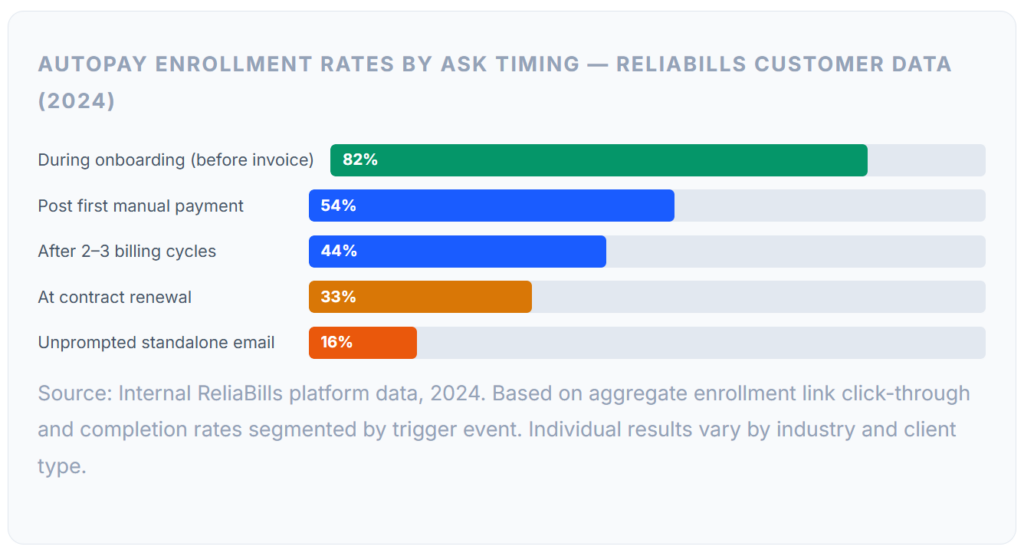
The single biggest driver of autopay enrollment rates, more than the wording of the email, more than the incentive offered, more than the number of follow-ups, is timing. Asking at the right moment converts clients who would otherwise decline or simply never get around to it. Asking at the wrong moment creates friction and sometimes resistance that takes months to overcome.
During Onboarding → Highest Conversion – Ask Before the First Invoice
When a client has just signed the contract and is in the “getting set up” mindset, framing autopay as part of the onboarding checklist converts at the highest rate. It is not a special request, it is just how you work. Most clients complete enrollment alongside their contract signing without hesitation. Typical enrollment rate: 70–85%
After First Payment → Strong Conversion – Immediately Post-Payment
The moment a client completes their first manual payment is a high-motivation window. They have just experienced the friction of the process. A short email saying, “You’ve paid your first invoice, here’s how to make future payments automatic,” lands well and converts reliably. Typical enrollment rate: 45–60%
Month 2–3 → Good Conversion – After Trust Is Established
For clients who declined initially due to a trust gap, returning to the autopay conversation after two or three smooth billing cycles is highly effective. You have demonstrated that invoices are accurate and that the billing relationship works. The risk perception is lower. Typical enrollment rate: 35–50%
Contract Renewal → Moderate Conversion – Decision Mindset Window
Contract renewals put clients in an active decision-making mode. Including autopay as part of the renewal package, alongside updated terms and pricing, is a natural moment to re-introduce the option. Framing it as a benefit of the renewed agreement works well. Typical enrollment rate: 25–40%
Unprompted / Mid-Cycle → Lower Conversion – No Natural Context
Sending an autopay enrollment request in the middle of a billing cycle, without any natural trigger or context, converts at the lowest rate. These requests feel arbitrary to the client and are easily ignored or deprioritized. Reserve standalone enrollment campaigns for clients with a history of late payment. Typical enrollment rate: 10–20%
💡 The Most Underused Enrollment Window: The moment immediately after a client makes a manual payment is consistently underutilized. Most billing systems send a payment confirmation and stop there. Adding a single line, “Want to skip the manual process next month? Enroll in autopay here,” with a direct link in the payment confirmation email, converts a meaningful percentage of clients with zero additional effort on your part.
Email Templates for Every Enrollment Scenario
Below are four word-for-word email templates covering the highest-value enrollment windows. Each is written from a client-benefit perspective, the emphasis is on what autopay does for them, not what it does for your billing workflow. Customize the variables (shown in [brackets]) before sending.
Template 1 – Onboarding Enrollment (Highest Converting)
📧 Email – Onboarding / Pre-First-Invoice
Subject: One quick setup before your first invoice – [Client Name]
Hi [First Name],
Welcome aboard. I’m looking forward to getting started.
Before your first invoice goes out on [Date], I wanted to set up autopay so you don’t have to think about billing each month. Here’s what that looks like on your end:
You’ll receive a heads-up email 5 days before each charge with the exact amount and your scheduled billing date. The payment processes automatically, no login required, no due dates to track. You’ll get a confirmation receipt the same day it goes through.
It takes about two minutes to set up here: [Enrollment Link].
If you’d prefer a different billing date (beginning of month, 15th, or another date that works for your schedule), just let me know when you enroll.
Questions? Reply to this email, I’m happy to walk through it.
[Your Name]
[Your Business]
Template 2 – Post-First-Payment Enrollment
✅ Email – Post First Manual Payment
Subject: Payment received – skip this step next month
Hi [First Name],
Thanks, I’ve received your payment for invoice [#INV-XXX]. Your receipt is attached.
If you’d like to skip the manual process going forward, you can enroll in autopay here: [Enrollment Link].
It stores your payment details securely and charges your preferred method automatically on your billing date each month. You’ll receive advance notice before every charge, and you can update or cancel at any time, no contract is required.
Most of my clients find it easier once it’s running. But if you’d prefer to continue paying manually, no problem at all, your next invoice will arrive on
[Date]
[Your Name]
Template 3 – Re-enrollment After Lapsed Autopay
🔄 Email – Re-enrollment / Lapsed Autopay
Subject: Quick heads-up – your autopay needs an update
Hi [First Name],
Your automatic payment for [Month] wasn’t able to process, this usually happens when a card has been renewed or replaced.
No worries at all. You can update your payment details and re-enroll in autopay here in about 60 seconds: [Re-enrollment Link].
If you’d rather process this month’s payment manually, I can send over a one-time payment link instead, just let me know.
Either way, please don’t hesitate to reach out if you have any questions.
[Your Name]
[Your Business]
P.S. If you prefer to switch to manual billing going forward, I can remove the autopay from your account, just reply, and I’ll take care of it.
Template 4 – Enrollment Campaign for Existing Manual-Pay Clients
📩 Email – Existing Clients / Enrollment Campaign
Subject: A billing update from [Your Business]
Hi [First Name],
We’re rolling out autopay for clients on ongoing arrangements, and I wanted to give you the option to switch over.
Here’s what changes for you: instead of receiving an invoice to pay manually each month, your billing date gets set once, your payment method is stored securely, and the charge processes automatically. You’ll still get an advance heads-up before each charge and a confirmation receipt after, you’ll just never have to log in to pay.
To set it up: [Enrollment Link]
The whole process takes under two minutes. If you’d prefer to keep receiving monthly invoices to pay manually, nothing changes on your end, I’ll continue sending them as usual.
Let me know if you have any questions.
[Your Name]
[Your Business]
✅ Subject Line Principles That Work: The subject lines above share a common structure: they are specific (reference an action or event), not generic (“A quick note about billing”). They do not use pressure words (“urgent” or “action required”) for a routine enrollment request, that framing creates anxiety, not motivation. And they are short enough to read completely in a mobile inbox preview.
Handling Objections: Scripts for Every Pushback
Even well-timed, well-framed enrollment requests generate pushback from some clients. Here are the most common objections and the exact language that addresses each one without being defensive or pushy:
I like to review my invoice before it gets charged.
This is the most common objection, and it is entirely reasonable. The client is not saying no to autopay; they are saying they want visibility and control before money moves. Give them that.
“Totally understand, and autopay doesn’t take that away. You’ll receive your invoice by email five days before the charge processes, with the full line-item breakdown. If anything looks off, just let me know and I’ll pause the charge before it runs. The payment only fires automatically if everything looks fine and you don’t flag anything.”
Our AP team needs to approve payments before they go out.
This objection is about internal process, not trust in you. The workaround: position the advance notification email as the approval trigger for their AP team.
“That makes sense, most of our B2B clients have a similar process. What tends to work is forwarding the advance notice email to your AP contact a week before the billing date so they have time to review and approve it internally before the charge fires. The autopay still processes automatically, but your team has the window to flag anything first. Would that workflow fit your approval process?”
I don’t want to give out my card details.
This is a trust and security objection. Address it by explaining exactly what happens to their data, most clients have much more comfort once they understand tokenization.
“Completely understandable, card security is important. The enrollment link goes to a PCI-compliant payment page (similar to what you’d see on a major e-commerce site). Your actual card number is never stored anywhere on my end, the system stores a secure token that can only be used to charge your account through our processor. If it would help, I can send over our payment processor’s security documentation.”
Can I just keep paying by invoice? It’s easier for me.
Sometimes a client genuinely prefers manual payment, either because their own systems require it or because they have a workflow that depends on invoice-triggered payments. Accept this gracefully and ensure the manual process is as streamlined as possible.
“Of course, no problem at all. I’ll continue sending invoices as usual. If you find at any point that you’d like to switch to autopay, the option is always there. In the meantime, I’ll make sure your invoices include a one-click payment link so the manual process is as quick as possible.”
🔗 Still Getting Paid Late After All This?
If a client consistently declines autopay and also pays their manual invoices late, you have a different problem. The companion guide on invoicing late-paying clients covers the escalation sequence, scripts, and systemic fixes for that situation specifically.
What I Got Wrong at First
The enrollment mistakes I made before building a systematic process, all of which showed up in lower enrollment rates and more time spent on follow-up:
Mistake 01: Leading with “It’s easier for me” as the Reason
My first enrollment emails were honest but wrong: I explained that autopay would help me manage billing more efficiently. That framing made clients feel like they were doing me a favor, and optional favors have low completion rates. The moment I shifted to explaining what autopay does for the client (no due dates, no manual payment, automatic confirmation), enrollment rates nearly doubled. The benefit to my business did not disappear, I just stopped making it the headline.
Mistake 02: Sending the Enrollment Link Without Context
Early on, I sent autopay setup links cold, just a link and “You can set up autopay here if you’d like.” The click-through rate was dismal. A link without context looks like a phishing attempt or at best an afterthought. The framing that goes around the link does most of the enrollment work. The link is just the mechanism; the email is the conversion.
Mistake 03: Asking Too Many Times Without Changing the Approach
If a client declines twice, sending the same email a third time does not increase conversion, it creates annoyance. After two declines, I learned to either address the specific objection directly (“I noticed you prefer to review invoices first, here’s how that works with autopay”) or accept the preference and focus on making the manual process as frictionless as possible. Persistence without adaptation is just spam.
Mistake 04: Not Having a Re-enrollment Flow Ready
The first time a client’s card expired and their autopay lapsed, I handled it manually, sent a hand-typed email, and generated a new link on the spot and followed up a few days later when I noticed payment had not come through. By then it had been 10 days since the charge was supposed to process. Now the re-enrollment email is automated: the moment a charge fails, a pre-written email with a fresh re-enrollment link goes out within four hours. Most clients re-enroll within 24 hours. The ones who do not get a follow-up at day three.
Mistake 05: Treating All Clients the Same in Enrollment Campaigns
When I first ran an enrollment campaign for existing manual-pay clients, I sent the same email to everyone. Clients who had been paying on time for a year received the same message as clients who had been paying late. The on-time clients mostly enrolled. The late-paying clients mostly did not, and some of the late-payers I most needed on autopay required a completely different conversation that acknowledged the payment history directly. Segment your enrollment campaigns: separate the reliable manual-payers from the inconsistent ones and tailor the message accordingly.
Risks and What to Watch For
Autopay enrollment generates significant operational benefits, but it also introduces risks that are worth managing proactively:
Unauthorized Charge Disputes
The most serious risk in autopay enrollment is a client disputing a charge as unauthorized, even when you have a signed authorization on file. This typically happens when the enrollment documentation is incomplete, the client forgot they enrolled, or the billing description on their bank statement is not recognizable. Mitigate this by collecting signed authorization for every enrollment, sending a clear enrollment confirmation email immediately after setup, sending advance notifications before every charge, and using a billing descriptor that clearly identifies your business name.
Enrollment Link Security
Enrollment links that allow clients to store payment methods must be single-use and time-limited. A link that remains valid indefinitely, or that can be shared with a third party, is a security risk. Ensure your billing platform generates enrollment links that expire after a defined period (typically 7 to 30 days) and are invalidated once used. Never send enrollment links over unencrypted channels like SMS without confirming the recipient’s identity first.
⚠️ Compliance Tightening Around Recurring Payments
The FTC and other government agencies pay special attention to recurring payment practices because repeat credit card authorizations pose greater risks than one-time charges. Several states have auto-renewal laws, including California, Colorado, Connecticut, Massachusetts, Minnesota, New York, and Utah. Make sure your enrollment confirmation includes cancellation instructions, and make cancellation accessible through the same channel the client used to enroll.
Involuntary Lapse Without Detection
One of the subtler operational risks is an enrolled client whose autopay lapses without anyone noticing, particularly if your billing system does not surface failed charges prominently. A client can be “enrolled” in your system while their autopay is actually inactive, creating an invisible gap in receivables. Build a weekly review of active autopay status into your billing routine, or configure your platform to alert you immediately when any enrolled client’s payment fails or when a card is updated manually outside the normal card-updater flow. Good customer management dashboards surface this at a glance.
How to Build an Enrollment System That Runs Itself
The goal is not to send better enrollment emails, it is to build a system where autopay enrollment happens automatically as part of how every new client relationship starts. Here is how to get there:
Step 1: Add Autopay to Your Onboarding Checklist
Every new client engagement should have a defined onboarding sequence. If yours does not already include an autopay enrollment step, add it now, specifically as a step that happens before the first invoice is issued. The enrollment email (Template 1 above) should be sent within 24 hours of contract signing, alongside other onboarding materials. The closer it is to the signing moment, the higher the completion rate.
Step 2: Add a Re-enrollment Trigger to Your Billing Platform
Configure your billing platform to automatically generate and send a re-enrollment email, pre-written and ready to go, the moment a recurring charge fails. You should not have to do anything manually. The email goes out, the client gets a fresh enrollment link, and most situations resolve themselves within 24 to 48 hours without you touching them. This is where a purpose-built platform like ReliaBills creates the most operational leverage, the dunning and re-enrollment sequence is a configuration you set up once.
Step 3: Build a Quarterly Enrollment Health Review
Once a quarter, pull a report showing your autopay enrollment rate across your active client base. Flag any clients who are not enrolled, identify which segment they are in (never enrolled, lapsed, or declined), and plan the appropriate re-engagement. For clients who have never enrolled, use the post-first-payment template. For clients who lapsed, use the re-enrollment template. And for clients who explicitly declined, note the reason and respect it, unless the relationship has evolved enough to revisit the conversation.
Step 4: Add the Enrollment Link to Every Manual Invoice
For clients who are currently paying manual invoices, include a consistent footer line on every invoice: “Prefer not to manage due dates? Set up autopay here: [link].” This passive enrollment prompt converts a small but consistent percentage of manual-pay clients over time, without requiring any targeted campaign. It takes two minutes to add to your invoice template and runs indefinitely.
For a deeper look at how the underlying billing setup works once clients are enrolled, the companion guide on setting up automatic payments for recurring clients covers the technical configuration, authorization forms, dunning sequences, variable billing, and compliance requirements that make the enrolled billing cycle actually function.
And for clients who are being invoiced on structured payment plans across a larger project, the installment billing workflow pairs well with autopay enrollment, clients authorize their payment method once, and each milestone payment processes automatically on schedule.
Frequently Asked Questions
The questions that come up most often when businesses are building their autopay enrollment strategy:
1. What is the best way to ask a client to enroll in AutoPay?
The most effective approach is to ask during client onboarding, before the first invoice is issued, and frame autopay entirely around the client’s convenience, no due dates to track, automatic confirmation receipts, and easy to update or cancel. A short, specific email with a single one-click enrollment link converts far better than a vague “please sign up” request embedded in an invoice. The timing matters as much as the wording: clients asked during onboarding convert at 70 to 85 percent versus 15 to 25 percent for clients asked unprompted mid-cycle.
2. When is the best time to ask clients to enroll in AutoPay?
The highest-conversion moment is during the initial onboarding process, before the first invoice is sent. The second-best moment is immediately after a client makes their first manual payment, when the friction of the manual process is fresh. Asking at contract renewal is also effective. Unprompted mid-cycle requests convert at the lowest rate and are best reserved for clients with a history of late manual payment.
3. Can I require clients to enroll in AutoPay?
Yes, you can make autopay a condition of service, and many subscription or retainer-based businesses do, achieving 90 to 100 percent enrollment rates as a result. The requirement must be clearly stated in your contract before the client signs. If you do require autopay, your enrollment confirmation should include clear cancellation instructions, since clients retain the legal right to stop automatic payments at any time regardless of what your contract says.
4. What should I do if a client refuses to enroll in AutoPay?
First, understand the specific reason, control anxiety, internal AP process requirements, cash flow timing concerns, or a trust gap with a new relationship. Then address the specific concern directly: offer a choice of billing date for cash flow concerns, explain the advance notification process for control concerns, and position the notification email as an AP approval trigger for process concerns. If the client declines after you have addressed the concern, accept the preference graciously and apply a structured manual payment process with clear due dates and automated reminders.
5. What is an AutoPay enrollment rate, and what is a good one?
Autopay enrollment rate is the percentage of your eligible recurring clients currently enrolled in automatic billing. For service businesses with primarily retainer or subscription clients, 60 to 80 percent is a healthy target. Businesses that make autopay a standard condition of service typically hit 90 to 100 percent. Rates below 40 percent usually signal a timing or framing issue in the enrollment request or an enrollment flow with too many steps that clients abandon partway through.
Recent Articles:
- How to Set Up Automatic Payments for Recurring Clients
- The Hidden Costs of Late Payments (And How Automation Fixes Them)