

Setting up automatic payments for recurring clients is one of the highest-leverage operational changes a service business can make, but most guides skip the parts that actually cause problems in practice: getting proper authorization, handling failed charges, managing variable-amount clients, and knowing what to do when a client relationship ends. This guide covers all of it, with the specific lessons I picked up running payment systems for real service businesses over the past several years.
What Is Automatic Payment Setup?
Automatic payment setup is the process of configuring a billing system to charge a client’s stored payment method, credit card, debit card, or bank account via ACH, on a defined schedule, without requiring any manual action from either party after the initial authorization. The result is a billing cycle that generates revenue on time, every cycle, whether or not anyone on your team remembers to send an invoice.
The term is sometimes used interchangeably with “autopay,” “recurring billing,” and “subscription billing,” though there are meaningful distinctions. Automatic payment setup specifically refers to the technical and operational configuration process, the steps taken once, up front, that enable all subsequent charges to occur automatically. Once the setup is complete, the ongoing process is handled by the billing system.
Key terms that come up throughout this process:
| Term | What It Means in Practice |
|---|---|
| Payment Authorization | The client’s documented consent to have their payment method charged on a recurring basis. Required before the first charge, and legally essential. |
| Pre-Authorized Debit (PAD) | A written agreement allowing ACH withdrawals from a client’s bank account. Legally required for recurring bank debits in the US and Canada. |
| Tokenization | The process of replacing sensitive card data with a secure, non-sensitive token stored in your billing platform. You never store the actual card number. |
| Dunning | The automated sequence of retries and notifications triggered when a payment fails. Critical for recovering revenue from declined charges. |
| Fixed vs. Variable Billing | Fixed: the same amount charged every cycle. Variable: the amount differs each cycle based on usage or time tracked. Each requires a slightly different setup approach. |
| Billing Cycle | The defined interval between automatic charges, weekly, monthly, quarterly, or annually. |
| Card Updater | A service that automatically updates stored card data when a card is renewed or replaced, reducing failed charges from expired cards. |
For businesses that invoice the same clients month after month, recurring billing and automatic payment setup work hand-in-hand: the billing schedule determines when invoices are generated, and the automatic payment setup determines how they are collected without any manual follow-up.
How Automatic Payments Work End to End
Most people understand the outcome of automatic payments, money arrives without anyone doing anything, but fewer understand the underlying sequence that makes it possible. Getting the setup right means understanding each stage of this flow.
The Automatic Payment Lifecycle
1. Authorization Collected
The client signs an authorization form (digital or paper) confirming they consent to recurring charges on a defined schedule. This creates the legal foundation for everything that follows.
2. Payment Method Stored (Tokenized)
Card or bank details are entered once, typically via a secure payment page or onboarding form, and tokenized by your payment processor. You store a token, never the raw card data.
3. Billing Schedule Configured
You define the cycle: charge amount, frequency (monthly, weekly, etc.), start date, and any end conditions. For variable billing, you define the authorization range.
4. Advance Notification Sent
3 to 7 days before each charge, the client receives an upcoming payment notification. This is best practice and a legal requirement in some jurisdictions, it dramatically reduces disputes.
5. Charge Executed Automatically
On the billing date, the processor initiates the charge against the stored token. Success triggers a payment receipt. Failure triggers the dunning sequence.
6. Dunning (If Needed) & Reconciliation
Failed charges trigger automatic retries and client notifications. Successful charges are recorded and reconciled in your accounts receivable system automatically.
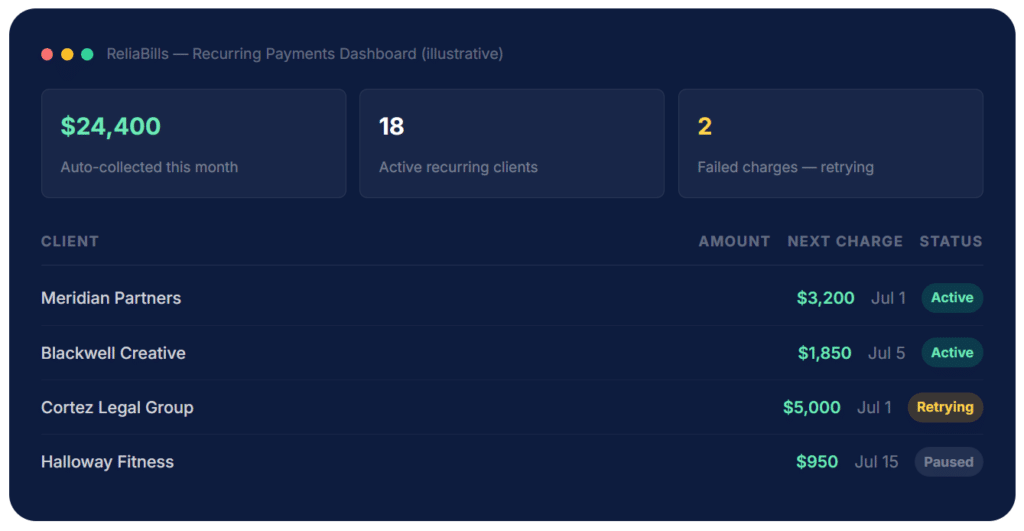
The dashboard above shows what active automatic payment management looks like in practice: the vast majority of clients run without intervention, while a small number require attention, typically one or two failed charges per month in a healthy client portfolio. That is a fraction of the time that manual invoicing would require for the same 18 clients.
Step-by-Step: The Complete Automatic Payment Setup
Here is the exact sequence to follow when setting up automatic payments with a new recurring client. Each step matters, skipping one creates a problem you will deal with later, usually at the worst possible time.
1. Define the Billing Terms in Your Contract
Before collecting any payment information, your client needs to sign a contract or service agreement that explicitly describes the billing arrangement: the amount or billing basis (fixed rate or hourly), the billing cycle (monthly, weekly, or quarterly), the payment method you will use, any late fees, and the notice period for changes or cancellations. This is the document that makes every subsequent charge legally authorized. Without it, you have an informal agreement at best and a chargeback risk at worst.
For service businesses on a retainer model, this is also where you document what the recurring fee covers, which prevents the scope disputes that cause clients to withhold payment or dispute charges later.
💡 Link your authorization language directly to the billing terms in the contract, ideally a single clause that reads: “By signing this agreement, Client authorizes [Your Business] to charge the designated payment method on the schedule described in Section X.”
2. Collect a Signed Payment Authorization
Even if your contract covers the billing terms, collect a separate, explicit payment authorization. For card charges, this is typically a digital checkout flow or a signed card authorization form stating the charge amount, frequency, and the client’s right to cancel. For ACH bank debits, a pre-authorized debit (PAD) agreement is legally required, it must include the client’s bank account and routing details, the amount or authorization range, the charge frequency, and an explicit consent statement.
Most billing platforms generate these authorization forms automatically during the client onboarding flow. If yours does not, create one. The authorization is your protection if a client later disputes a charge as unauthorized.
3. Set Up the Client Profile in Your Billing System
Create a dedicated client record in your billing or customer management system with their billing contact (the AP email, not just your day-to-day contact), company name, billing address, and any reference codes their finance team requires on invoices. Getting this wrong, sending an invoice to the wrong contact or missing a PO number, is one of the main reasons automatic payments get manually intercepted or delayed, even when the charge itself succeeds.
4. Collect and Store the Payment Method
Send the client a secure payment method collection link, never collect card details over email, phone, or a non-PCI-compliant form. Your billing platform generates this link and the client enters their details directly on a hosted, encrypted payment page. Their card or bank details are tokenized immediately; you receive only the token reference and the last four digits. The actual sensitive data never touches your systems, which keeps you out of PCI DSS scope for data storage.
💡 Enable account updater services if your processor supports them. This automatically refreshes stored card data when a card is renewed, eliminating a significant portion of failed charges from expired cards.
5. Configure the Billing Schedule
Set up the recurring charge: amount, frequency, start date, and any end conditions. For fixed-fee clients, this is straightforward, a defined amount on the same date each cycle. While for time-tracked or variable clients, most billing platforms support a model where you enter the variable amount each cycle, but the system handles the charge automatically once you approve it, keeping authorization in your hands while eliminating the manual invoicing step. For larger projects broken into predictable milestones, explore installment billing, which pre-schedules all payment dates and amounts tied to a total contract value.
6. Configure Your Dunning Sequence
This is the step that most first-time setups skip, and it is the one that costs the most money when overlooked. A dunning sequence is the automated sequence of retries and client notifications that fires when a charge fails. Configure it before any charge ever fails: set your retry schedule (typically Day 1, Day 3, Day 7), the notification email that goes to the client at each stage, and what happens if all retries are exhausted. The notification should be clear, non-accusatory, and include a direct link to update payment details. A good dunning sequence recovers 60 to 80 percent of initially failed charges automatically.
💡 Separate the “card declined” notification from the “payment updated” confirmation, clients need both to know the situation is resolved.
7. Send a Pre-Charge Notification on Every Cycle
Three to seven days before each automatic charge, send the client a notification with the upcoming charge amount, date, and the payment method that will be used. This is best practice even when it is not legally required, it dramatically reduces dispute rates and chargebacks, catches expired cards before the charge fails, and reinforces transparency in the billing relationship. Many clients specifically cite pre-charge notifications as one of the things they appreciate about working with organized service providers.
8. Run a Test Charge Before the First Full Cycle
Before the first real billing date, process a small test charge, typically $1, and verify it goes through, generates the correct receipt, logs to the client’s account, and posts to your bank account correctly. Then reverse it. This confirms the entire chain is working: payment method, processor connection, notification system, and reconciliation. Discovering a broken link on the first actual charge date is far more disruptive than catching it in a test.
✅ Document Your Setup Procedure: Once you have gone through this process for your first client, write it down as a repeatable onboarding checklist. Every new recurring client should go through the same steps in the same order. Consistency eliminates the gaps, a missed authorization here, a dunning sequence not configured there, that cause problems six months into a billing relationship.
Real-World Use Cases: Who Benefits Most from Automatic Payment Setup
Automatic payments are not equally valuable for every billing model. Here is where the setup investment pays back most quickly:
🖥️ Retainer-Based Agencies
Marketing, PR, and creative agencies billing the same clients monthly are the clearest case. A fixed monthly retainer processed automatically on the first of each month eliminates the entire manual invoicing workflow, generation, delivery, follow-up, and payment confirmation for every retainer client.
⚖️ Professional Services (Legal, Accounting, Consulting)
Law firms, accountants, and consultants on ongoing engagements benefit especially from pre-authorized ACH setups on large-ticket retainers. ACH fees are significantly lower than card processing fees on high-value recurring charges, the fee savings alone can justify the setup time for retainers above $3,000 per month.
🔧 Managed Services and IT Support
MSPs billing for monthly service agreements are natural candidates for fixed automatic payments, the same scope, the same amount, every month. Automatic payment setup also reduces the friction of billing contract renewals, since the payment continues without interruption while the contract is renegotiated.
📐 Freelancers and Independent Contractors
Independent contractors with two or three anchor clients on consistent scopes can recover several hours per month by switching from manual invoicing to automatic billing. The setup takes less than an hour per client; the time savings compound indefinitely. Even a modest portfolio of three retainer clients at $2,000 per month each generates $6,000 in recurring revenue with zero monthly billing effort after the initial configuration.
Key Benefits and the Numbers Behind Them
Most articles on this topic list the benefits generically. Here are the specific, measurable outcomes I have observed in businesses that made the switch from manual to automatic billing:
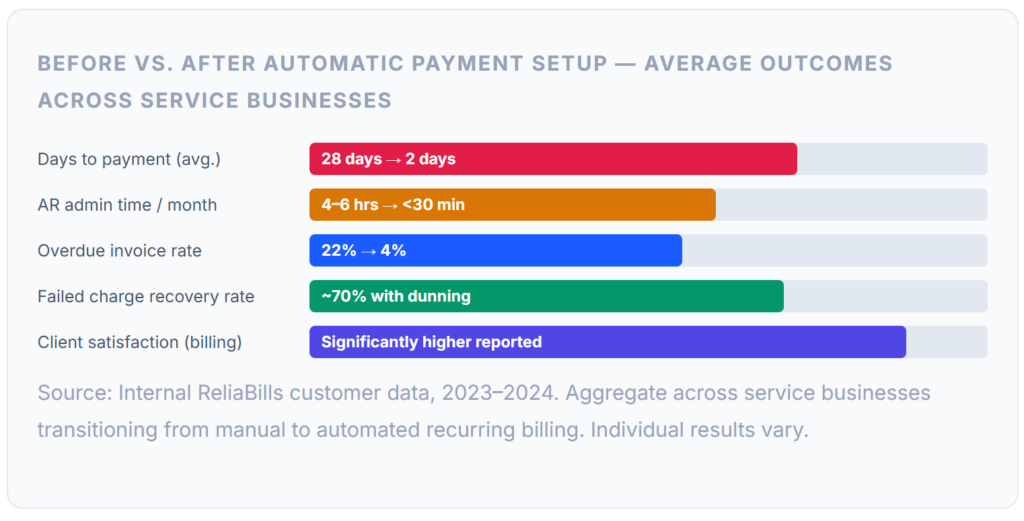
The most significant operational change most businesses report is not the time saved, though that is real, but the mental load reduction. When billing runs automatically, the end of the month stops being a task on anyone’s to-do list. Revenue becomes predictable, cash flow becomes plannable, and the conversations that do happen with clients about billing tend to be about adding scope, not chasing invoices.
There is also a measurable impact on client relationships. Clients enrolled in automatic billing typically report higher satisfaction with the billing process, not because they are paying less, but because there is less friction. They do not have to log in to a portal to pay, they do not have to remember a due date, and they receive a clear confirmation after each charge. For professional service clients who are busy people running their own businesses, that convenience has real value.
What I Got Wrong at First
Every setup guide covers the steps. Very few cover the mistakes you make the first few times through, and that is where the real learning happens. These are the ones I see most often and that I made myself before we built better processes around them.
Mistake 01: Not Configuring Dunning Before the First Charge
The first time a card declines, you want an automated sequence ready, not a scramble to figure out what to say to the client. I set up my first recurring billing client and processed the first charge, and it went through. So I assumed it would always go through. Three months later, the card declined, and I had no automated follow-up in place. By the time I reached out manually, it had been four days and the client was confused about why no payment confirmation had arrived. Configure dunning on day one, regardless of how confident you are in the client’s payment method.
Mistake 02: Using the Wrong Contact for Billing Notifications
For B2B clients, particularly companies with more than a handful of employees, the person you work with day-to-day is almost never the person who processes invoices. Sending automatic payment notifications to your primary contact means they either forward it (introducing delay) or ignore it (because it is not their job). I had two situations where a card declined, the dunning email went to the wrong person, and it took five days to reach someone who could actually update the payment method. Always collect a dedicated billing contact and accounts-payable email during client onboarding.
Mistake 03: Not Getting Written Authorization Before the First Charge
Early on, I collected payment details verbally. The client said, “Sure, charge us monthly” on a call, and I set up the automatic payment. Six months in, when the engagement ended on less-than-ideal terms, the client disputed two months of charges as “unauthorized.” They did not win, I had emails confirming the arrangement, but it took time and energy I did not have. A signed authorization form, even a simple one collected digitally, eliminates this risk entirely. It takes 90 seconds and is worth it on every single client.
Mistake 04: Setting Up Variable-Amount Clients as Fixed
When a client’s monthly invoice varies based on hours worked, charging them a fixed estimate and adjusting later creates accounting confusion for both parties. Better: Configure the billing to hold authorization on the payment method and charge the actual amount once the invoice is finalized, most billing platforms support this workflow. It takes slightly more setup time but creates clean records on both sides and eliminates the adjustment invoices and credit notes that make reconciliation messy.
Mistake 05: Forgetting to Pause Billing When a Client Pauses Work
This is uncomfortable to admit, but it has happened: a client paused their engagement for a month, and I meant to pause the billing and forgot. The automatic payment processed on schedule. The client noticed before I did, understandably flagged it, and I had to issue a refund. The lesson is not that automatic billing is dangerous, it is that automatic billing requires active management. Set a calendar reminder at the start of every engagement review to confirm the billing status matches the work status. Most billing platforms make it easy to pause and resume a billing schedule with a single click.
💡 The One Process That Prevents Most of These Mistakes: Build a client onboarding checklist that covers a signed contract ✓, payment authorization collected ✓, billing contact confirmed ✓, payment method tested ✓, dunning configured ✓, pre-charge notification enabled ✓. Running through this list for every new recurring client eliminates the ad-hoc mistakes that only surface months into a relationship.
Risks and What to Watch For
Automatic payments are generally lower-risk than manual billing, but they introduce their own set of operational exposures. These are the ones that matter most in practice:
Chargebacks and Dispute Risk
A chargeback occurs when a client disputes a charge directly with their bank, bypassing you entirely. Chargebacks are more common with automatic payments than with manually invoiced one-time charges, primarily because recurring charges can be forgotten by the client, especially if advance notifications are not being sent. Prevent this by maintaining signed authorization records, sending pre-charge notifications, making your billing descriptor (the name that appears on the client’s bank statement) clearly identifiable as your business, and making cancellation easy. A chargeback rate above 0.5% of transactions is a signal to review your authorization and notification processes.
PCI DSS Compliance
If your billing platform handles the payment collection, via a hosted payment page or secure link, and you never touch raw card data, your PCI compliance burden is minimal (SAQ A level). If you have built a custom payment form, are storing card details yourself, or transmitting card numbers through your own systems in any way, your compliance requirements are significantly more involved. Use a billing platform that handles tokenization for you and keeps you out of PCI scope for card data storage. This is not optional non-compliance exposes you to significant liability in the event of a data breach.
⚠️ Auto-Renewal Compliance Is Tightening: The FTC’s regulation of recurring payments and negative-option billing is evolving. Several states have auto-renewal laws, including California, Colorado, Connecticut, Massachusetts, Minnesota, New York, and Utah. Regardless of your jurisdiction, best practice is to obtain clear opt-in consent, send advance renewal notices, and make cancellation as simple as sign-up. Building these practices into your standard automatic payment setup now insulates you from regulatory changes later.
Failed Payments and Involuntary Churn
Small businesses in the US were paid an average of nine days late in the first half of 2024. Automatic payments address this, but failed charges introduce their own form of payment delay. The risk is compounding: a card that fails and is not recovered quickly interrupts cash flow, strains the client relationship if not handled gracefully, and can lead to the client simply not re-engaging with the payment update. A well-configured dunning sequence with three retry attempts and clear client notifications recovers the majority of failed charges automatically, but you still need to monitor the exception dashboard for charges that exhaust all retries without resolution.
Payment Models Compared: What to Use and When
Automatic payments are not the right model for every billing situation. This comparison helps you identify which approach fits each type of client relationship.
| Payment Model | Best For | Manual Effort | Predictability | Client Experience |
|---|---|---|---|---|
| Automatic Fixed Recurring | Retainers, subscriptions, monthly service fees | Near zero | Highest | Very low friction |
| Automatic Variable Recurring | Time-tracked billing, usage-based services | Low (amount entry only) | Moderate | Low friction |
| Installment Billing | Large project fees split into scheduled payments | Low (set up once) | High (pre-scheduled) | Clear milestone payments |
| Manual Invoice on Completion | One-off projects, variable scope, new clients | High | Low | Standard |
| Manual Invoice on Schedule | Clients not enrolled in autopay but on retainer | Moderate | Moderate | Requires client action |
| Milestone-Based Billing | Projects with defined delivery phases | Moderate | Moderate | Tied to deliverables |
For most established retainer or subscription-based service businesses, automatic fixed recurring revenue is the target model for anchor clients, the ones who represent predictable, ongoing revenue. Manual and milestone billing remain appropriate for project work, new client relationships where trust is still being established, and engagements where the scope genuinely changes month to month in ways that are hard to pre-authorize.
How to Get Started
If you have existing recurring clients who are currently paying via manual invoices, migrating to automatic payments is a straightforward conversation. Most clients who have been paying consistently are happy to switch, it removes a task from their plate as much as yours.
The Migration Conversation
Frame the switch as a convenience upgrade for the client, not an operational change for you. Something like, “We’ve moved to automated billing for ongoing clients, it means you don’t have to remember to pay each month, and there’s less admin on both sides. I’ll send you a quick setup link that takes about two minutes.” Most clients respond positively to this framing. The ones who push back are usually flagging a concern about the payment method itself, address that directly rather than arguing for the process.
Choosing the Right Platform
Look for a billing platform that handles tokenized payment collection (so you never store card data), supports configurable billing schedules, includes a dunning engine with customizable retry logic, generates client-ready authorization forms, and integrates with or includes customer management for billing contact records. ReliaBills is built around exactly this use case, the core platform is designed for service businesses with recurring clients, and the automatic payment setup requires no technical configuration or developer involvement.
Start with Your Simplest Clients
When migrating existing clients, start with the ones on fixed monthly retainers, with the same amount, same date, and same scope every month. These are zero-ambiguity setups that take 15 minutes per client and immediately demonstrate the value of the system. Once those are running smoothly, tackle the variable-amount clients. The process is the same; the only addition is reviewing and approving the charge amount before each cycle rather than setting it and forgetting it. For detailed guidance on the invoicing side of recurring client billing, the companion article on recurring billing covers the invoice generation and delivery workflow that pairs with automatic payment collection.
Frequently Asked Questions
The questions I hear most often from service businesses setting up automatic payments for the first time:
1. What is the difference between automatic payment and recurring billing?
Recurring billing is the schedule, the agreement that a client will be charged on a regular cadence. Automatic payments are the mechanism, the stored payment method that executes the charge without manual intervention. You can have recurring billing without automatic payments (if the client manually pays each invoice on the recurring schedule), but automatic payments inherently require a recurring billing arrangement. In practice, the two are usually set up together, but the distinction matters when troubleshooting a failed charge or answering compliance questions.
2. Do I need a merchant account to set up automatic payments?
Yes, to store a client’s payment method and charge it automatically, you need to process payments through a payment gateway or processor. This typically means either setting up a merchant account directly with an acquiring bank or using an all-in-one provider like Stripe or a billing platform that handles the merchant account infrastructure for you. You cannot legally store and charge payment card details without the appropriate PCI DSS compliance and processing infrastructure in place.
3. What happens when an automatic payment fails?
A failed automatic payment should trigger an automated dunning sequence: an immediate notification to the client explaining the failure, a request to update their payment method, and automatic retry attempts at defined intervals (typically Day 1, Day 3, and Day 7). A well-configured dunning sequence recovers 60 to 80 percent of initially failed charges automatically. If all retries are exhausted without resolution, the situation requires direct outreach. Configuring this sequence proactively, before any charge ever fails, is one of the most important steps in the setup process.
4. How do I handle automatic payments for variable-amount invoices?
Variable-amount automatic payments require the client to pre-authorize a payment method with a stated maximum or an explicit acknowledgment that the amount will vary. Most billing platforms support a workflow where the stored payment method is charged for the actual variable amount each cycle, but you enter and approve the specific amount before the charge fires. Always notify the client of the specific amount being charged before processing, ideally 3 to 5 days in advance. This prevents disputes and gives the client time to flag any billing questions.
5. How far in advance should I notify clients before charging them?
Best practice, and a legal requirement in some jurisdictions, is to notify clients at least 3 to 7 days before each recurring charge. For annual or large-amount charges, 14 to 30 days’ advance notice is appropriate. Even where advance notice is not legally required, sending it reduces dispute rates, catches expiring cards before the charge fails, and significantly reduces chargebacks. It takes about 30 seconds to configure this as an automated notification in most billing platforms and pays back that time many times over.
Recent Articles:
- The Hidden Costs of Late Payments (And How Automation Fixes Them)
- What Is Auto Billing Software? (And Why Every Service Business Needs It)