

Automated late fees do not damage client relationships. Poorly communicated, inconsistently enforced, or surprise late fees do. The difference is a system: a clear policy agreed to before work starts, a notification sequence that gives clients every reasonable opportunity to pay before a fee applies, and a principled waiver logic that treats good clients with appropriate flexibility. Build that system once and the enforcement becomes impersonal, which is exactly what makes it sustainable.
What Are Automated Late Fees?
Automated late fees are penalty charges applied to overdue invoices automatically by a billing system, without requiring manual intervention from the business owner or billing team. When configured correctly, the system monitors invoice due dates, identifies overdue balances, applies the agreed-upon fee after any specified grace period, issues an updated invoice or credit note reflecting the added charge, and sends a notification to the client, all without a person having to initiate any of those steps. The automation removes the human discomfort from enforcement while ensuring it happens consistently every time.
The phrase “automated late fees” is often used loosely. For the purposes of this guide and for compliance purposes, it means the fee is triggered automatically by the billing system based on defined rules (days overdue, fee amount, grace period) that the client agreed to in their contract. It does not mean the fee is applied without any advance warning to the client. In a well-designed system, the automation handles enforcement, but transparent communication ensures the client is never genuinely surprised.
Key terms that govern how automated late fees work in practice:
| Term | What It Means |
|---|---|
| Grace Period | A defined number of days after the due date during which no late fee is applied. Typically 3 to 7 days. Must be stated in the contract. |
| Late Fee Rate | The amount charged for an overdue invoice, either a flat dollar amount or a percentage of the outstanding balance (e.g., 1.5% per month). |
| Finance Charge | Interest-based charge that compounds on the outstanding balance over time. Legally distinct from a late fee, it requires separate contract authorization. |
| Fee Waiver | A business decision to forgo a valid late fee, typically for long-term clients with strong payment histories experiencing a one-off situation. |
| Dunning Sequence | The automated series of payment reminders and overdue notifications are sent before and after a late fee is applied. |
| State Maximum Rate | The legally permitted ceiling on late fee rates in specific jurisdictions, particularly relevant for consumer billing. |
Late fees are most effective when they are part of a broader billing system that includes clear payment terms, automated reminders, and professional invoicing infrastructure. A late fee policy on a disorganized billing process does not improve cash flow; it creates friction without the underlying system to support it.
Building a Late Fee Policy That Holds Up
Every aspect of automated late fee enforcement rests on one foundational requirement: the policy must be agreed to in writing before any work begins. A late fee you cannot enforce legally is just a threat, and clients learn quickly which threats are credible. Here is what a defensible, client-friendly late fee policy actually looks like in practice.
📋 Late Fee Policy Builder: Key Parameters
| Contract clause | Explicitly state: fee amount or rate, grace period length, when the fee applies (e.g., “after 5 calendar days past the due date”), and whether fees compound. Required for enforceability. |
| Invoice disclosure | Repeat the late fee policy on every invoice, a brief footer line is sufficient: “Invoices unpaid after [Due Date + grace period] are subject to a [rate] monthly finance charge.” |
| Rate structure | Recommended: 1.5% per month or $25, whichever is greater. Simple interest only, compounding creates legal complexity and client hostility disproportionate to the benefit. |
| Grace period | Recommended: 5 calendar days after the due date. Long enough to account for legitimate processing delays; short enough to remain meaningful. |
| B2B vs consumer | B2B contracts in most US states have no fee ceiling, the agreed rate governs. Consumer billing is subject to state usury laws. Verify your state’s rules before setting rates for consumer clients. |
| Waiver policy | State your discretion to waive: “[Business Name] reserves the right to waive late fees at its sole discretion on a case-by-case basis.” This protects you legally when you choose flexibility. |
The Contract Clause That Does the Work
The specific language matters. A vague clause, “late payments may incur additional charges,” is harder to enforce than a precise one. Here is a contract clause that is clear, complete, and has held up in the situations where we have needed it:
📄 Sample Contract Late Fee Clause
“Invoices not paid in full within [payment term, e.g., 30] days of the invoice date are subject to a late payment fee of [1.5%] of the outstanding balance per month (or partial month), or $[25], whichever is greater, beginning on the [6th] calendar day after the due date. [Business Name] reserves the right to waive late fees at its sole discretion. Client’s continued engagement constitutes acceptance of these terms.”
For clients on installment payment schedules, the late fee clause should specify that it applies per installment, not just to the final balance; otherwise, a client who misses the second of four installment payments may believe the policy does not apply until the project is fully complete.
The Notification Sequence: Communication Before Enforcement
The most common reason automated late fees damage client relationships is not the fee itself, it is the absence of communication before it arrives. A client who receives a late fee notice as the first indication that their payment is overdue feels ambushed. A client who received a pre-due reminder, a day-one nudge, and a seven-day overdue notice before the fee was applied feels the system is fair, even if they are frustrated about the fee itself.
Here is the notification sequence I use and recommend for automated late fee enforcement:
| 3 Days Before Due | Upcoming Payment Reminder Friendly, no urgency. Invoice number, amount, due date, and payment link. Purpose: eliminate “I forgot” as a reason for late payment. |
| Due Date | Payment Due Notification The invoice is due today. Brief, professional. Direct payment link. No mention of late fees at this stage, this is a prompt, not a threat. |
| Day +1 | Polite Check-In (Automated) First overdue notice. Assumes good faith, “just checking in on invoice #XXX.” References the late fee policy as a reminder, not a warning: “A late fee applies after [date] per our agreement.” |
| Day +5 (Grace End) | Grace Period Ending Notice This is the critical notification: “Your invoice is now 5 days overdue. A late fee of [X] will be added automatically tomorrow if payment has not been received.” This is the last chance, and most clients who intend to pay will do so at this stage. |
| Day +6 | Late Fee Applied, Notification Sent Fee is added automatically. Client receives an updated invoice showing the original balance, the late fee, and the new total. Tone is factual, not punitive. Payment link included. Reference to contact you directly with questions. |
| Day +14 | Second Follow-Up (with Fee) The invoice is now 14 days overdue, including the applied fee. More direct in tone. References the original due date, the fee, and any additional fees that may accrue if payment is not received. |
The sequence above is what makes automation feel fair rather than mechanical. The client has received five communications, including one explicit “fee applies tomorrow” warning, before the fee is charged. That paper trail also matters if a dispute ever escalates: you can demonstrate that the client had every reasonable opportunity to pay before enforcement.
✅ Configure Your Billing Platform to Handle This Automatically
Every step in the sequence above, reminder, due date, day-one nudge, grace-end warning, fee application, and post-fee follow-up, can be configured as automated triggers in ReliaBills and most purpose-built invoicing platforms. Set it up once for a client type, and it applies consistently across every invoice, every cycle, without anyone on your team having to initiate anything.
Late Fee Notification Email Templates
Two of the most important notifications in the sequence above are the grace-period warning and the fee-applied notice. Here are word-for-word templates for both, written to be professional and clear without being aggressive:
Template 1: Grace Period Ending Warning
📧 Email: Day +5: Grace Period Ending
Subject: Invoice [#INV-XXX]: late fee applies tomorrow if unpaid
Hi [First Name],
I wanted to give you a heads-up that invoice [#INV-XXX] for [$AMOUNT], which was due on [Due Date], remains outstanding.
Per our agreement, a late fee of [1.5% / $25, whichever is greater] will be added automatically tomorrow, [Date], if payment has not been received.
To avoid the fee, you can pay now via the link below: [Payment Link]
If you’ve already sent payment, please disregard this message, and thank you. If you have a question about this invoice or need to discuss the billing, please reply and I’ll get back to you promptly.
[Your Name]
[Your Business]
Template 2: Late Fee Applied Notification
⚠️ Email: Day +6: Late Fee Applied
Subject: Updated invoice: late fee added to [#INV-XXX]
Hi [First Name],
Invoice [#INV-XXX] is now [X] days past due. As outlined in our agreement and in the original invoice, a late fee of [$FEE AMOUNT] has been added to the outstanding balance.
Updated balance summary:
Original invoice amount: [$ORIGINAL]
Late fee (per contract terms): [$FEE]
New total due: [$NEW TOTAL]
Please use the link below to pay the updated total: [Payment Link]
If you’d like to discuss this invoice or have questions about the late fee, I’m happy to talk, please reply to this email or call me at [Phone].
Thank you,
[Your Name]
[Your Business]
Notice that neither template uses emotional language (“I’m disappointed,” “this is unacceptable”) or threats (“I will be forced to take action”). The tone is matter-of-fact. The fee is presented as a natural consequence of the agreed policy, not as a punishment the business is inflicting. That distinction is what allows the client to process the fee professionally rather than personally.
The Waiver Framework: When to Enforce and When to Let It Go
The most common failure mode in automated late fee systems is not inconsistent automation, it is inconsistent waiver decisions. Businesses that waive fees randomly, without criteria, teach clients that the policy is negotiable on demand. Businesses that never waive anything regardless of context damage relationships that were worth more than the fee recovered.
The answer is a principled waiver framework: a set of criteria you apply consistently, documented in the client account, so that decisions are transparent and defensible rather than arbitrary.
🔴 Enforce: Chronic Late Payers
Clients who are late on more than two invoices in a 12-month period. Waiving reinforces the pattern. Apply the fee and have a direct conversation about payment expectations.
🔴 Enforce: New Clients (Under 6 Months)
Waiving fees for new clients before the relationship is established sets a precedent that the policy is optional. Apply the fee, a professional, fair response will not damage a new relationship.
🟡 Use Judgment: First-Time Lapse, Mid-Tenure
A client who has paid consistently for 12+ months and is late for the first time. Consider waiving once with a clear note that it is a one-time courtesy. Document the decision.
🟡 Use Judgment: Documented Hardship
Client proactively contacts you about a temporary financial difficulty before or soon after the due date. Consider a payment plan instead of a fee, this preserves the relationship and the revenue.
🟢 Waive: Your Admin Error
If the invoice was late, went to the wrong contact, or contained an error that delayed the client’s ability to approve it, the fee is not appropriate. Waive immediately and fix the root cause.
🟢 Waive: Bank / Transfer Delay
ACH transfers can take 2–3 business days. If a client initiated payment before the grace period ended but it cleared late due to processing time, waive the fee, the policy intended to catch non-payment, not processing lag.
Key Benefits, and What the Numbers Show
Businesses that implement automated late fees with a clear policy and communication sequence consistently outperform those that either never charge fees or enforce them inconsistently. Here is what the data from ReliaBills customers shows:
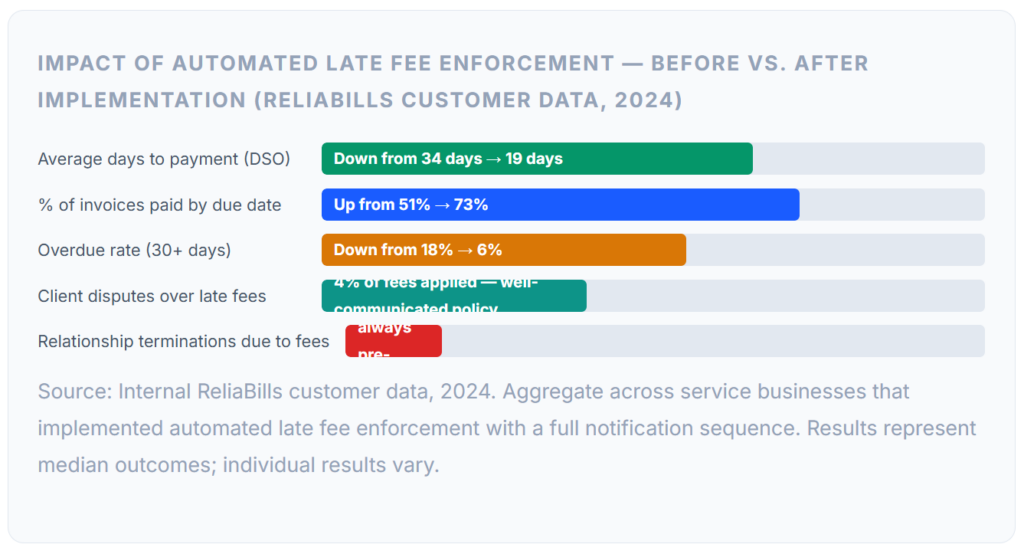
The last two rows in the chart carry the most weight for businesses worried about relationship damage. Disputes arose on fewer than 4% of fees applied, and in most of those cases, the dispute was resolved quickly because the notification paper trail was clear. Relationship terminations attributable to late fees were below 1%, and in every case I am aware of, the relationship was already strained before the fee policy was introduced. A late fee does not end a healthy relationship; it occasionally surfaces that a relationship was not as healthy as it appeared.
The practical benefit that surprises most businesses is the behavioral change. According to research from PYMNTS Intelligence, nearly 60% of invoices are paid late across the B2B landscape. In the ReliaBills cohort above, 73% were paid on time after implementing a structured late fee policy with automated notifications, a 22-percentage-point improvement in on-time payment that happened not because clients could not afford to pay but because they now had a concrete reason to prioritize it.
What I Got Wrong at First
Mistake 01: Enabling Late Fees Before Adding Them to the Contract
The first time I turned on automated late fees in our billing system, I had not yet updated client contracts to include the policy. When a client received a late fee notice, they pushed back, reasonably, that they had never agreed to it. I had to waive the fee and had an awkward conversation about why I had applied a charge I had no right to enforce. The fix: update contracts for all active clients before activating any automation, and include the policy in all new contracts as standard. Non-negotiable first step.
Mistake 02: Skipping the Grace Period Ending Notification
In the first version of our notification sequence, I had the pre-due reminder and the fee-applied notice but nothing between them. When the fee triggered, clients who had missed the pre-due reminder (which happens) felt blindsided. Adding the Day +5 “grace period ending” email and the explicit “fee applies tomorrow” warning reduced disputes by more than half. That single email is the most relationship-protective step in the entire sequence, and I almost did not include it because it felt redundant.
Mistake 03: Setting the Fee Rate Too High
My initial rate was 3% per month, which I had seen cited as common in some industries. Two clients pushed back hard, one threatened to terminate the engagement over what they called a “punitive” rate. After research, I found that 1.5% per month is the widely accepted standard for B2B service billing and is close to or below the maximum allowable rate in most US states. I lowered the rate and reissued contracts. The behavioral effect on payment timeliness was identical at 1.5%, the deterrent function does not require a high rate, just consistent enforcement.
Mistake 04: Applying Fees to My Own Billing Errors
Twice in the early months, I had late fees auto-apply to invoices where the delay was at least partially my fault, one invoice had been sent to the wrong billing contact, and one had a line item error that the client was waiting for me to correct. In both cases, applying the fee was wrong, and I had to waive it and apologize. This is why the waiver framework matters and why you need a human review step for any invoice where there was pre-existing communication about a dispute or error, so the automation does not apply a fee the client legitimately did not owe.
Mistake 05: Using Aggressive Language in the Fee Notice Email
My first draft of the fee-applied email included language like “failure to remit payment” and “further action may be required.” A client forwarded it to their CEO, who called me directly to ask what was going on. The language read as a collections escalation when the invoice was only eight days overdue. I rewrote every template to be matter-of-fact rather than adversarial. The goal of the notification is to prompt payment, not to signal that the relationship is in jeopardy.
Risks and Legal Considerations
State-Level Rate Limits
While most US states allow B2B parties to set their own late fee rates by contract, some states impose maximum allowable rates, particularly for consumer billing or certain regulated industries. California, for example, caps late fees for consumer contracts at 10% annually under certain circumstances. Before setting your rate, verify your state’s rules. The maximum invoice late fee rates by state vary significantly, and operating above them can make your fee clause unenforceable even if the client signed the contract. When in doubt, 1.5% per month (18% annually) is defensible in nearly every US jurisdiction.
⚠️ Late Fees vs. Finance Charges: A Legal Distinction That Matters
A late fee is a fixed penalty applied when payment is overdue. A finance charge is an interest-based, compounding charge on the outstanding balance. They are legally distinct, and a judge will not allow interest if only late fees are authorized in governing documents and vice versa. Most service businesses use flat late fees, they are simpler to communicate, simpler to enforce, and less likely to generate client disputes. If you want to charge compound interest on long-overdue balances, your contract must specifically authorize interest charges, not just late fees.
The Risk of Inconsistent Enforcement
Enforcing late fees on some clients but not others, without documented criteria, creates two problems. First, clients who were charged may learn that others were not and feel they were treated unfairly. Second, inconsistent enforcement weakens your legal position if a client ever challenges the fee in court. Automation solves the enforcement consistency problem for routine cases. The waiver framework solves it for exceptions. Together, they produce a system that is defensible precisely because it is principled.
ACH and Transfer Processing Timing
ACH bank transfers typically clear in 2 to 3 business days. If your due date is a Friday and the client initiates an ACH payment on Thursday, the transfer may not settle until the following Tuesday, after your grace period has expired. This is one of the clearest cases for a waiver: the client made a good-faith effort to pay on time, and a processing delay created an apparent violation. Configure your billing system to flag ACH-initiated payments and hold fee automation pending settlement confirmation, or explicitly extend the grace period by 2 business days for bank transfer clients.
For businesses managing clients with complex billing arrangements, multiple payment methods, split invoices, or installment schedules, this kind of edge-case management is where client-level billing records become essential. Knowing a client’s payment method and typical transfer timing before a late fee fires is the difference between a fair process and an unnecessary conflict.
Late Fee Models Compared
Not all late fee structures work equally well for all billing models. The table below maps the main options against the factors that matter most in practice:
| Model | Structure | Best For | Client Clarity | Enforceability | Relationship Risk |
|---|---|---|---|---|---|
| Flat Fee (fixed $) | $25–$50 per overdue invoice | Small invoices, predictable billing | High | High | Low |
| Percentage (simple) | 1–2% of balance per month | Large invoices, B2B retainers | Moderate | High | Low–moderate |
| Hybrid (% or flat, greater of) | 1.5% or $25, whichever is greater | Mixed invoice sizes | Moderate | High | Low |
| Compound interest | % applied to growing balance monthly | Long-overdue large balances | Low | Moderate | High |
| Tiered escalation | Larger % for longer overdue periods | 90+ day overdue collections | Moderate | Moderate | Moderate |
| No late fees (manual follow-up) | None, rely on reminders only | Very high-trust, high-value accounts | N/A | N/A | Lowest |
For most service businesses, the hybrid model, a percentage floor with a minimum flat amount, provides the right balance of clarity, enforceability, and proportionality. A $2,000 invoice with a 1.5% late fee generates a $30 charge: meaningful but not disproportionate. A $150 invoice with the same percentage generates $2.25, too small to be a deterrent, which is why the minimum floor matters.
How to Get Started
For New Clients: Build It Into Onboarding
The cleanest implementation is with new clients: include the late fee clause in your standard contract, reference the policy on every invoice, and configure your billing automation before the first invoice goes out. Clients who agree to the terms upfront almost never dispute fees that apply under those terms, the policy is part of the relationship they signed up for.
For Existing Clients: Communicate Before Activating
If you are adding a late fee policy to existing client relationships, communicate it before it applies to anyone. Send a brief policy update email explaining the change, the effective date, and the rate, giving clients at least 30 days notice before the first fee could apply. Include the updated policy in any contract renewals. Do not activate automated fee enforcement for existing clients on invoices that are already overdue at the time of the policy change, that is retroactive application and is not enforceable.
Configure Your Billing Platform
Set up your notification sequence, pre-due, due date, day-one overdue, grace-end warning, fee-applied notice, and post-fee follow-up before you activate fee automation. Most billing platforms allow you to configure this as a template that applies to all invoices matching a set of criteria (overdue by X days, client type Y, payment method Z). For clients on recurring billing schedules, configure the late fee rules per billing schedule so that the automation applies consistently without requiring per-invoice setup.
Build Your Waiver Log
From the first day you apply a late fee, keep a log in the client’s account record: date, invoice number, fee amount, whether it was collected or waived, and the reason. This log is what turns ad-hoc decisions into a principled history, it protects you legally, helps you identify chronically late clients, and ensures that waiver decisions are transparent and consistent over time. Most customer management systems have a notes or activity log field on the client record, use it for every fee-related decision.
Frequently Asked Questions
The questions that come up most often when businesses are building or refining their automated late fee policy:
1. How much should I charge for automated late fees?
The most common and defensible structure for B2B service businesses is 1% to 2% of the outstanding balance per month, with a minimum flat fee of $25 to $50. A hybrid formula, “1.5% of outstanding balance or $25, whichever is greater,” works well across different invoice sizes. Always verify your state’s maximum allowable rate, particularly for consumer billing, before finalizing your policy. Rates above 2% per month risk being seen as punitive and generate more disputes than they deter.
2. Should I include a grace period before automated late fees apply?
Yes, a grace period of 3 to 7 calendar days is standard practice and significantly reduces relationship friction without materially reducing the deterrent effect of the fee. The grace period should be stated explicitly in your contract and referenced in your notification emails, so clients know exactly when enforcement applies. A 5-day grace period has proven most effective in our customer data: long enough to account for legitimate processing delays, short enough to maintain urgency.
3. Should I waive late fees for good long-term clients?
Strategic, occasional waiving is appropriate and good relationship management, but only with documented criteria. Waive once for a client with a strong payment history who is late for the first time, communicate that you are doing so as a one-time courtesy, and note it in the client’s account. If the same client requires a second waiver within 12 months, enforce the fee and have a direct conversation about payment expectations. Consistent waiving without criteria teaches clients the policy is negotiable, which is what actually damages future payment behavior.
4. What should the automated late fee notification email say?
The fee-applied notification should include the invoice number, the original due date, the number of days elapsed, the fee amount being added, and the new total due. It should reference the contract clause or policy that authorizes the fee, include a direct payment link, and invite the client to contact you with questions. The tone should be matter-of-fact and professional, not accusatory or threatening. The goal is to inform and prompt payment, not to signal that the relationship is in jeopardy.
5. What happens if a client refuses to pay a late fee?
If the fee was properly disclosed in the original contract, you have a legal right to collect it. In practice, most disputes resolve with a direct conversation, the client often did not remember the policy or had a one-off explanation worth hearing. Listen, apply your waiver framework to decide whether the situation qualifies for an exception, and document the outcome either way. If a client consistently refuses to acknowledge valid, properly disclosed late fees without justification, that is useful information about whether the relationship is worth continuing.
Related Articles:
- ACH Payment Processing Explained: A Guide for Small Business Owners
- How to Get Customers to Enroll in Autopay (Email Templates Included)