
The biggest administrative drain in most dog boarding and kennel businesses is not the animal care. It is the billing cycle: tracking deposits, chasing pickup balances, re-invoicing recurring daycare clients by hand, and reconciling scattered payment methods at the end of a busy weekend. Automating those workflows does not just save time. It stabilizes cash flow, reduces no-shows, and removes payment follow-up from your staff’s plate entirely.
What Is Payment Automation for Dog Boarding and Kennel Services?
Payment automation for dog boarding and kennel services is the use of billing software to handle payment collection tasks without requiring staff to initiate each transaction manually. Instead of calling clients for deposits, processing cards at pickup, and sending follow-up emails when accounts go overdue, the system handles those steps automatically based on rules you configure once.
In a kennel environment, this typically covers three distinct billing models running at the same time. Transactional boarding charges tied to specific stay dates. Recurring billing for regular daycare clients billed weekly or monthly. And deposit-and-balance workflows for boarding reservations, where a percentage is collected at booking and the remainder settled at checkout.
Managing all three by hand is a significant administrative undertaking. Managing them through a properly configured billing platform is not. Key terms worth understanding before diving in:
- Recurring billing: The automated collection of a fixed or variable amount from a client on a scheduled basis, without manual input per cycle.
- Invoicing software: The tool used to generate, send, and track client payment requests, from deposit invoices to final checkout balances.
- Customer management: The system that stores client profiles, saved payment methods, pet details, and billing history in one searchable place.
- Installment billing: A billing structure where a total service fee is divided across multiple scheduled payments, commonly used for training packages and long-term boarding agreements.
Why Manual Payment Collection Holds Kennel Businesses Back
Running a dog boarding facility means managing unpredictable occupancy, seasonal demand spikes, and a client base with varying payment habits. The administrative overhead is already high before you add billing to the equation. When payment collection stays manual, it compounds that overhead in ways that are easy to underestimate from the inside.
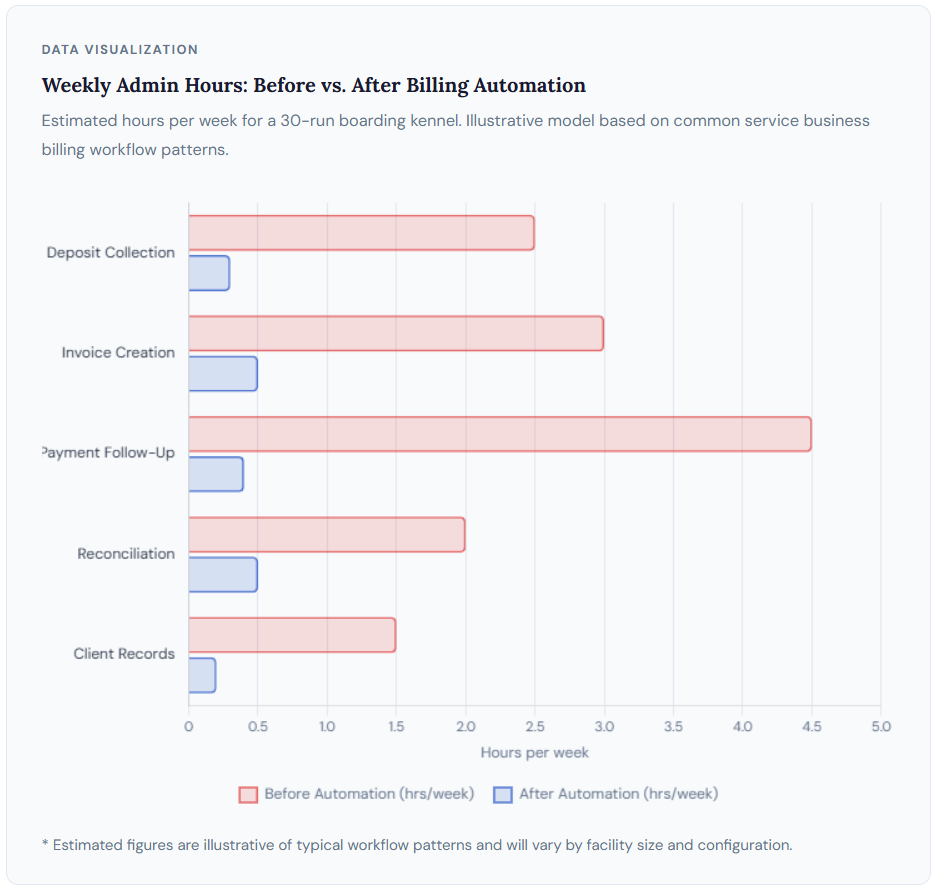
Picture a mid-sized kennel running 30 dogs over a holiday weekend. Each of those dogs belongs to a client with a different check-in date, length of stay, and list of add-on services. Some clients have standing accounts. Others are first-timers who need to be onboarded at the desk. Some prepay in full when they book; others expect to settle at pickup. A handful will walk out distracted and need to be invoiced after the fact.
Managing that across a whiteboard, a spreadsheet, and a front-desk card reader is not a billing system. It is a manually operated process with a predictable failure rate as volume increases. Staff time spent re-sending invoices, reconciling mismatched records, and calling clients about unpaid balances is time that is not going toward animal care, client relationships, or business development.
The broader pet services market continues to grow steadily, with boarding and daycare representing one of its largest segments according to the American Pet Products Association’s ongoing industry tracking. Yet most independent kennels have not invested proportionally in back-office systems. The billing setup at a 40-run kennel today often looks very similar to what it was when that business opened.
The structural problem is that manual billing scales linearly with client volume. Every new dog added to the roster adds a corresponding billing event, follow-up task, and reconciliation step. Payment automation breaks that relationship. The administrative workload stays roughly flat while your active client count grows, because the billing platform handles the repetitive transaction layer without additional staff effort.
How Payment Automation Works for Kennel Services
At the operational level, payment automation for a boarding facility follows a consistent sequence. The specific platforms and configurations vary, but the underlying logic is the same across most well-designed service-business billing setups.
1. Client Profile Creation
A client account is created in your billing platform with contact information, pet details, and a payment method saved on file. This setup happens once and becomes the foundation for every automated transaction that follows.
2. Booking Confirmed and Deposit Collected
When a boarding reservation is confirmed, the system automatically sends a deposit request by email or triggers a stored-card charge depending on your configuration. No staff action is required beyond confirming the booking in your scheduling tool.
3. Add-Ons Logged During the Stay
Grooming appointments, special feeding, medical administration, and other extras are added to the client’s account as they occur. They appear automatically on the final invoice at checkout without requiring staff to manually tabulate the total.
4. Checkout Invoice or Auto-Charge
At checkout, the system either charges the card on file automatically or sends a final invoice with an online payment link, depending on the client’s preference. Either way, the balance is settled without a staff member standing at a card reader.
5. Recurring Billing Cycles (for Daycare Clients)
For regular daycare clients, the system bills on a set schedule without any manual input per cycle. The client receives a receipt automatically. The kennel receives funds without staff intervention. This cycle repeats until a schedule change is made.
What to Automate First: Billing Workflows by Priority
Not every kennel has identical billing needs, and trying to automate every process at once tends to introduce more confusion than it resolves. A more effective approach is identifying the two or three workflows that consume the most staff time per week and starting there.
Deposit Collection at Booking
The single highest-impact change most boarding facilities make when they move to automated billing is requiring online deposits at the time of reservation. Before automation, many kennels collected deposits by phone or in person or skipped them entirely for established clients. The practical outcome of skipping deposits is runs that sit unconfirmed, last-minute cancellations with no financial recourse, and staff collecting payment for services they have already partially delivered.
Automating deposit collection means setting a deposit percentage, typically somewhere between 30 and 50 percent of the estimated stay total, and having the platform collect it the moment a booking is confirmed. The client gets a payment confirmation immediately. The kennel has funds in hand before the dog arrives. That one change, properly implemented, eliminates a meaningful portion of the payment follow-up work that most kennel staff deal with weekly.
Recurring Billing for Regular Daycare Clients
Regular daycare clients are one of the clearest automation opportunities in any boarding business. They visit on consistent days, pay roughly the same amount each period, and have a well-established relationship with your facility. Generating and sending their invoice manually every week or month is unnecessary work that adds up fast.
Setting up recurring billing for this client segment means the charge runs automatically on schedule, the client receives a receipt, and no staff action is needed unless the charge fails. For a kennel with 15 or more regular daycare clients, this single automation can recover several hours of admin time per month and reduce the invoice-related emails your front desk fields each billing cycle.
Checkout Invoicing and Balance Collection
The “forgot to pay at pickup” problem is one of the most consistent pain points kennel operators report. A client is in a hurry, staff are occupied with another dog, and the balance goes uncollected until someone follows up days later. Automating checkout invoicing means the final invoice is generated when the stay is closed out and sent to the client automatically with a payment link. Most clients pay before they finish driving home. No follow-up required.
Automated Payment Reminder Sequences
For accounts that do go overdue, a configured reminder sequence removes both the awkwardness and the time cost of manual outreach. A typical sequence sends a polite reminder at one day past due, a firmer notice at three days, and an escalation at seven days, all without staff involvement. The sequence stops the moment payment is made.
Real-World Use Cases: How Kennel Operators Apply This
Small Boarding Kennel with 25 to 35 Runs
A small boarding facility operated by one or two people is typically where admin and animal care compete most directly for time. At this scale, a billing system that demands active management every cycle creates a genuine capacity problem. The most common automation setup for this type of operation is a three-part configuration: online deposit at booking confirmation, auto-charge at checkout for clients with a card on file, and an emailed invoice with a payment link for those who prefer to settle after the fact.
That configuration covers the majority of billing events without requiring any staff action per transaction. The front desk is no longer a payment processing station; it is a client greeting station. The financial follow-up happens in the background.
Multi-Service Kennel with Grooming and Training Add-Ons
A kennel that bundles boarding with grooming, training sessions, or specialized care has a more complex billing scenario. The base boarding rate is predictable. The add-ons are variable, often confirmed mid-stay, and easily undercharged or forgotten in a busy manual system.
An invoicing platform that supports line-item charges and multi-service invoices handles this naturally. Each add-on is logged as it occurs and appears automatically on the final invoice without manual tallying. Checkout becomes accurate and fast rather than a point of potential error.
For facilities offering multi-week training packages or extended boarding agreements, installment billing is worth exploring. Rather than collecting a large lump-sum payment upfront, the total is spread across scheduled installments, improving the client’s experience without creating manual tracking work for staff.
Dog Daycare with a Regular Client Base
A daycare-focused operation with 20 or more regular clients is the strongest case for full recurring billing automation. The billing is highly repetitive, the amounts are consistent, and the client relationships are established. There is no logical reason for any of it to require manual input each cycle.
With recurring billing configured for each regular client, that entire revenue segment runs on autopilot. Staff handle care. The billing platform handles money collection. The only active billing work is exception handling: a client who adds a new dog, changes their schedule, or has a card that fails.
Manual Billing vs. Automated Billing: A Side-by-Side View
The difference between manual and automated billing is not just speed. It is reliability. Automated systems do not forget, skip reminders when things get busy, or undercharge because a grooming add-on did not make it onto the handwritten invoice. Here is how the two approaches compare across the billing tasks that matter most for a boarding operation.
| Billing Task | Manual Approach | Automated Approach | Time Saved |
|---|---|---|---|
| Deposit collection | Phone call, in-person card, or skipped entirely | Auto-collected via payment link at booking confirmation | High |
| Checkout balance | Staff processes card at desk; manual invoice if client leaves | Auto-charge on file or checkout link sent before pickup | High |
| Regular daycare billing | Monthly manual invoices, re-entered each cycle | Auto-billed on a fixed schedule with no input per cycle | Very High |
| Add-on charges | Handwritten notes, often missed or undercharged | Logged per occurrence, auto-added to final invoice | Moderate |
| Late payment follow-up | Staff calls or emails each overdue client individually | Automated timed reminder sequence; no staff input needed | Very High |
| Payment records | Manual entry to spreadsheet or POS after each transaction | Auto-logged with client history; searchable and exportable | Moderate |
| Failed payment recovery | Staff identifies failure and contacts client; often delayed | Automatic retry logic and client notification on card failure | High |
Key Benefits of Automating Dog Boarding Payments
The operational gains from payment automation are concrete and measurable within the first billing cycle. Here is what changes and why it matters beyond the surface-level time savings.
⏱ Time Savings That Compound
Manual billing scales linearly with client count. Automated billing does not. Each new recurring client adds minutes of setup once, then generates zero additional admin work per billing cycle going forward.
💰 More Predictable Cash Flow
Deposit automation means confirmed revenue before a dog arrives. Automated checkout invoicing means balances close faster. Together, they shorten the gap between service delivery and payment receipt.
📱 A Better Client Experience
Most clients prefer online payment with an emailed receipt. A clean payment portal and automatic invoicing feels more professional than a manual card reader at the front desk. That matters for referrals and retention.
📈 Scalability Without Extra Headcount
A growing kennel needs its billing system to scale with it. Payment automation lets you double your active client base without proportionally increasing the admin burden on existing staff.
🔁 Fewer Missed or Undercharged Invoices
When add-ons are logged in real time and auto-added to the checkout invoice, the manual tallying step disappears. That means fewer accidental undercharges and fewer awkward corrections after the fact.
🛡 Systematic Recovery on Failed Payments
Cards fail. Automated dunning management handles retries and client notifications without staff involvement, recovering a meaningful portion of would-be lost revenue each billing cycle.
What to Watch Out For
Clients Who Prefer Cash or Check
Not every client will adapt immediately to digital payment, particularly in rural markets or with older client demographics. A billing automation setup needs to accommodate cash and check payers rather than treating them as exceptions. Most service-business billing platforms include a manual payment recording option that allows you to log offline payments without breaking the automated workflow for everyone else.
Payment Failures on Stored Cards
Cards expire. Banks flag transactions. ACH pulls bounce. Any automated billing system needs a reliable dunning process for handling payment failures. Without it, automation creates a different manual problem: identifying clients whose auto-charges did not go through and reaching out individually. Look for a billing platform with configurable retry logic and automatic client notification on failed charges before you go live.
Deposit Refund Policy Gaps
Automating deposit collection is straightforward. Managing deposit refunds is not. Cancellation windows, refund timelines, and partial refunds for shortened stays all need to be defined clearly in your billing platform and communicated to clients before automation goes live. The system enforces whatever policies have been configured. Policy ambiguity does not disappear when billing becomes automated; it surfaces as client disputes.
Common Mistakes When Automating Kennel Billing
Most of the problems kennel operators run into with billing automation are not software problems. They are setup and sequencing problems that could be avoided with a clearer implementation plan. Here are the five that come up most consistently.
Going live without a written payment policy
Automating payment collection before defining your policies clearly is a setup error with predictable consequences. What percentage is the deposit? Is it refundable, and under what conditions? What happens when a card fails? What is the late fee structure? The billing platform can only enforce policies that have been configured. Running automation without clear policy documentation creates exceptions faster than it resolves them and puts staff in the position of making judgment calls that should have been decided in advance.
Not requiring deposits at booking
Many kennel operators skip deposits to avoid putting clients off. The practical effect is higher no-show rates, last-minute cancellations that leave runs empty, and more unpaid balances to chase after checkout. Operators who implement a consistent deposit requirement almost universally report fewer problems with unpaid accounts, not more friction with clients. The concern about client pushback tends not to match reality once the process is clear and professional.
Treating recurring daycare clients as one-time billing events
Billing a regular daycare client manually every month is an entirely unnecessary process that introduces more opportunities for errors, delays, and missed invoices than an automated setup would. These clients are the clearest use case for recurring billing configuration, and yet they are often the last segment a kennel operator thinks to automate. The result is that the client base with the most predictable revenue requires the most manual billing work.
Choosing a generic invoicing tool instead of a service-business billing platform
Basic invoicing apps handle one-time invoice creation reasonably well. They typically do not handle recurring billing, deposit and balance workflows, automated dunning, or client payment portals. A kennel that outgrows a basic tool but has not budgeted for a full billing platform often ends up running a hybrid of manual and semi-automated processes that is harder to manage than either approach alone. Match the platform to your actual billing model before committing.
Switching to automated billing without communicating the change to clients
Existing clients who have been paying by check at pickup for two years will not know what to do with an automated deposit request unless you tell them the change is coming. A short email explaining the new process, why it is being introduced, and what clients need to do to set up their payment method is not optional. It is the difference between a smooth transition and three weeks of confused phone calls to the front desk.
How to Get Started with Payment Automation
The most effective starting point is not choosing software. It is mapping your current billing workflows before touching any platform. Write down every payment scenario your business handles in a typical month: deposit collection at booking, boarding balance at checkout, weekly daycare billing, grooming add-ons, training package payments, late account follow-up, and refunds. That list becomes your requirements checklist, and it should guide every platform evaluation decision that follows.
From there, shortlist two or three billing platforms and run a free trial on each. Configure one test client, set up your billing rules, and process a test invoice end to end. Note where the setup takes longer than expected, where you get stuck, and how the experience looks from the client’s side. The platform that feels operationally natural in a trial will feel natural for your clients too.
Run the numbers on pricing before signing up. Take your average monthly transaction volume and calculate what each pricing model costs at that volume. Some platforms charge a flat monthly fee; others charge a percentage of processed revenue or a per-transaction rate. At moderate transaction volumes, a percentage-based model can easily exceed what a flat-fee alternative would cost.
Check integrations. Confirm that the billing platform connects to your scheduling software or practice management tool before committing. The depth of that integration matters: does it sync automatically, or does it require a manual data export each cycle?
ReliaBills is purpose-built for service businesses running recurring and mixed-model billing. The platform handles deposit collection, recurring billing, automated payment reminders, and customer management in one place. For a kennel operator managing transactional boarding, regular daycare clients, and add-on services simultaneously, that unified approach has a real operational advantage over patching together multiple tools.
Once you have selected a platform, start with one billing segment rather than migrating everything at once. Recurring daycare clients are usually the cleanest starting point: the billing is repetitive, predictable, and carries low risk of client confusion. After that segment runs cleanly for one full billing cycle, move to deposit automation, then checkout invoicing. That sequenced rollout gives your staff time to adapt and your clients time to get comfortable with the new process before it covers every transaction in your system.
Frequently Asked Questions
1. What is the best way to automate payments for a dog boarding business?
Start with the two workflows that consume the most admin time: deposit collection at booking and recurring billing for regular daycare clients. Once those run automatically through one complete billing cycle, add automated checkout invoicing and payment reminders. A billing platform built for service businesses handles all three inside one system without requiring a separate tool for each.
2. Do clients need to create an account to pay online?
Most billing platforms allow clients to pay through a payment link without creating an account. For clients who prefer autopay, storing a payment method requires a one-time setup. This can be handled via an emailed onboarding link rather than a manual in-person process, which keeps the setup low-friction for both clients and staff.
3. How do I handle deposits when automating dog boarding payments?
Set a deposit percentage in your billing platform, typically 30 to 50 percent of the estimated stay total, and configure the system to collect it automatically when a reservation is confirmed. Both you and the client receive an automatic confirmation. The key step before going live is defining your refund and cancellation policies clearly so the system can enforce them consistently from day one.
4. What happens when an automated payment fails?
A properly configured billing platform retries the charge automatically after a set interval and notifies the client by email. This process is called dunning management. Configure your retry schedule and notification sequence before going live so that failed payments are handled systematically rather than landing on a staff member’s to-do list. Platforms vary significantly in how configurable this is, so it is worth evaluating specifically during your trial.
5. Can I run automated billing for one-time boarding clients and recurring daycare clients at the same time?
Yes. Service-business billing platforms support multiple billing models within the same account. One-time boarding clients are handled through deposit and balance workflows tied to specific stay dates. Regular daycare clients are configured with recurring billing on a fixed schedule. Both operate simultaneously, billed against separate client profiles and rule sets, without requiring separate software for each model.
6. Is billing automation software worth the cost for a small kennel?
For a kennel handling 20 or more client transactions per month, the admin time recovered through automation typically exceeds the software cost comfortably. Most service-business billing platforms run between $25 and $75 per month at the small-business tier. If automation saves two to three hours of staff time per week at any reasonable hourly rate, the math is straightforward. The break-even point for most small kennels is within the first billing cycle.
Bottom Line
Automating payment collection for a dog boarding or kennel business is not a technology project. It is an operational decision about where your staff’s time should go and how reliably your business collects revenue. The best starting point is matching a billing platform to how you actually charge clients: deposits at booking, balances at checkout, and recurring cycles for regular daycare clients. Get those three workflows configured correctly, and the rest of the billing admin largely takes care of itself.
Recent Articles:
- How to Set Up Recurring Billing for Monthly Accounting Retainers
- Pool Service Invoice Template: What to Include to Get Paid Faster

Brant Pallazza is the Founder and President of ReliaBills, an invoicing and recurring billing platform built to help small businesses secure predictable cash flow. With over 20 years of experience in direct response marketing and e-commerce leadership, including a 13-year tenure managing over $500 million in gross sales at Digital River. Brant writes actionable guides on automated billing, payment processing, and scaling SMBs.