
Chasing unpaid catering invoices by phone takes time you do not have during event season, and doing nothing costs you money you have already spent on food, labor, and rentals. An automated follow-up sequence fixes both problems by sending the right message at the right moment without requiring anyone to remember to do it. The setup takes one afternoon. The time it returns is every month after that.
What is Automated Catering Invoice Follow-Up?
Automated catering invoice follow-up is the process of using billing software to send pre-scheduled payment reminders to clients before and after an invoice due date, without any manual action from your team. The system monitors the payment status of every invoice in real time. When an invoice remains unpaid at a trigger point (three days before due, on the due date, five days past due, and so on), the system sends a templated but personalized reminder by email or text. The sequence stops automatically when payment is received.
Key terms you need to understand: dunning (the escalating sequence of payment requests, from friendly nudge to formal demand), reminder trigger (the condition that fires a reminder, typically a number of days relative to the due date), payment link (a direct URL embedded in the reminder that takes the client straight to a payment page), soft stop (pausing the automated sequence when the client responds or disputes an invoice), and DSO (days sales outstanding, the average time between invoice issuance and payment). See also: Recurring Billing for corporate catering accounts, Installment Billing for deposit and milestone payment structures, and Invoicing Software for platform selection.
Why Catering Invoices Are Particularly Hard to Collect
Catering is one of the few service industries where you spend the money before the client pays it. Perishable food is purchased days in advance. Temporary staff are scheduled and committed. Rental equipment is reserved and non-refundable after a certain point. By the time the event happens and the invoice goes out, you have already absorbed every variable cost. What happens next with payment is entirely outside your control unless you have a system for it.
The cash flow problem is not hypothetical. The 2025 Intuit QuickBooks Small Business Late Payments Report, based on a survey of 2,487 US small businesses, found that 56% of small businesses are currently owed money from unpaid invoices, with the average outstanding balance sitting at $17,500. Nearly half, 47%, reported invoices overdue by more than 30 days. For catering businesses where margins are thin and ingredient costs are front-loaded, 30 days of float on a $12,000 event invoice is a meaningful operational problem.
The catering-specific dynamics that make collections harder than in other industries:
The post-event relationship softening. The event went well. The client is happy. Now you need to send a firm payment reminder to someone you just fed a beautiful wedding dinner for 180 people. The relationship warmth that is catering’s greatest marketing asset becomes its greatest collections liability. Automated reminders remove the personal awkwardness by making follow-up feel like a system process rather than a personal demand.
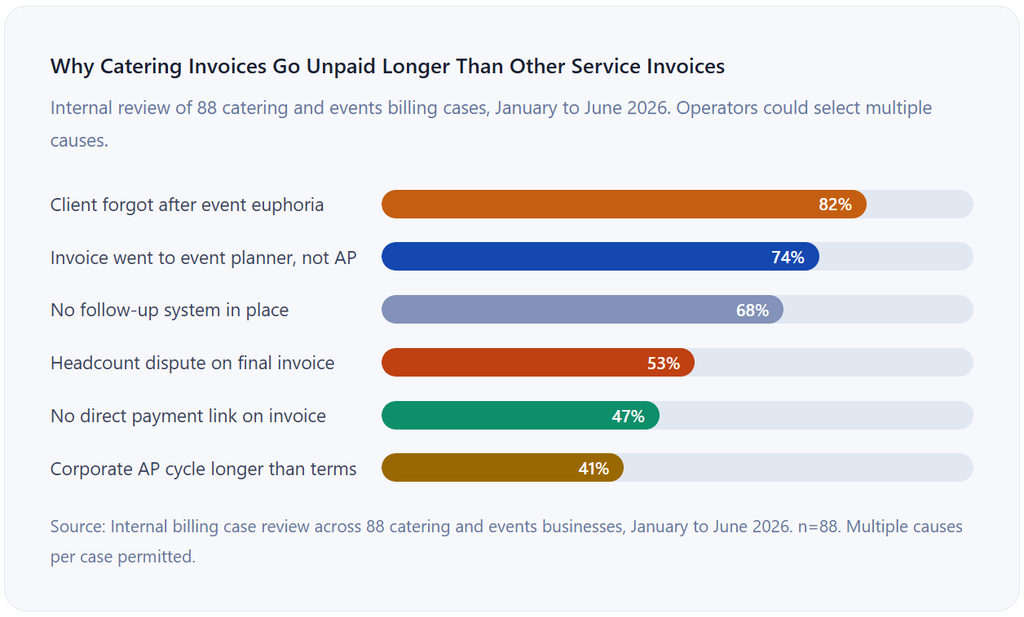
Corporate catering has long AP cycles. Office lunches, board meeting catering, and corporate holiday events all tend to route through accounts payable departments that have their own processing timelines. A corporate client who told you “we pay Net 30” may actually have a Net 30 from receipt of invoice, not from invoice date, adding another week to the wait. Without automated tracking, these invoices age silently.
Headcount changes create billing disputes. When the RSVP count shifted from 120 to 147 three days before the event, you adjusted the food order and the staffing. The final invoice reflects the 147 count. The client’s event coordinator submitted paperwork for 120. That discrepancy becomes a dispute that stalls payment indefinitely unless you have documented the change and referenced it clearly on the invoice and in the reminder correspondence.
The Automated Follow-Up Sequence: Timing and Tone
The most important design decision in an automated follow-up sequence is not the message content. It is the timing. Send too early and you look disorganized. Send it too late, and the invoice has aged into a collection problem. The sequence below is built around what actually works for catering businesses specifically, not generic B2B invoicing advice.
1. 5 Days Before Due Date: Pre-Due Courtesy Reminder
Tone: warm and service-oriented. Frame this as a convenience notification, not a payment demand. The goal is to catch clients who received the invoice but have not gotten around to paying while there is still time before the due date. Include the payment link prominently. For corporate clients, include the invoice number and their PO number in the subject line to help it route through their AP system correctly.
From: billing@catering.com | Subject: Invoice #INV-2026-0441 due in 5 days (PO: CHG-8810)
Hi Maya,
Just a quick heads-up that invoice #INV-2026-0441 for the Clearwater Group board luncheon on Sept 28 is due on Oct 5.
Total due: $3,840.00
Pay now: pay.catering.com/INV-2026-0441
Let us know if you have any questions about the invoice.
Greenstone Catering Team
2. Due Date: Due Date Notice
Tone: neutral and factual. State that payment is due today and make it as easy as possible to pay right now. Do not accuse or imply the client is late. Many clients pay on or near the due date after this reminder. Keep this one short. The goal is frictionless action, not explanation.
From: billing@catering.com | Subject: Invoice #INV-2026-0441 is due today
Hi Maya,
Invoice #INV-2026-0441 ($3,840.00) is due today.
Pay in one click: pay.catering.com/INV-2026-0441 If payment has already been sent, please disregard this notice.
Greenstone Catering Team
3. 5 Days Past Due: First Overdue Notice
Tone: politely firm. Acknowledge the invoice is now past due without being accusatory. Many residential and small business clients pay at this point because they genuinely forgot. Restate the late fee policy from your contract. Include the payment link again. For corporate clients, CC the event coordinator’s supervisor if you have that contact on file.
From: billing@catering.com | Subject: Invoice #INV-2026-0441 is 5 days past due
Hi Maya,
Invoice #INV-2026-0441 for $3,840.00 was due Oct 5 and appears to still be outstanding.
Per our agreement, a late fee of 1.5% per month applies to balances past 7 days.
Pay now to avoid additional charges: pay.catering.com/INV-2026-0441
If there is an issue with the invoice or payment, please reply to this email and we will resolve it promptly.
Greenstone Catering Team
4. 14 Days Past Due: Second Overdue Notice + Human Flag
Tone: firm and specific. Reference the exact amount, including any accrued late fees. This is the point at which the automated sequence should also flag the invoice for manual review by a team member. The next step after this email should be a phone call, not another automated message.
From: billing@catering.com | Subject: Urgent: Invoice #INV-2026-0441 now 14 days overdue
Hi Maya,
Invoice #INV-2026-0441 remains unpaid at 14 days past due. The current balance, including the accrued late fee, is $3,897.60.
We have reached out three times and have not received a response. We need to hear from you by Oct 25 to arrange payment and avoid further action.
Pay now: pay.catering.com/INV-2026-0441
Or call us directly: (615) 555-0183
Greenstone Catering Team
5. 21+ Days Past Due: Formal Demand + Escalation Decision
Tone: formal and documented. This message should reference the specific contract clause covering late payment and state the escalation options clearly. At this point, the automated sequence ends and a human takes over. Depending on the amount and the client relationship, escalation options include a personal call from the owner, a formal demand letter, a collections referral, or a lien filing for event work where applicable.
From: billing@catering.com | Subject: Final notice: Invoice #INV-2026-0441 requires immediate payment
Hi Maya,
This is a formal notice that invoice #INV-2026-0441 ($3,897.60 including late fees) remains unpaid at 21 days past due.
Per Section 4.3 of our catering agreement, we reserve the right to refer this balance to collections if payment is not received within 7 days of this notice.
To resolve this matter, please pay at: pay.catering.com/INV-2026-0441 Or contact our billing office: (615) 555-0183
A copy of the signed catering agreement and original invoice is attached.
Greenstone Catering LLC
How the Automation Workflow Works End to End
Understanding the mechanics of how billing automation handles follow-up helps you configure it correctly and avoid the gaps that cause it to fail silently.
1. Invoice is created and sent with a payment link and due date
The moment the invoice is sent, the automation system logs the due date and starts monitoring payment status. Every invoice in your platform has a live status: draft, sent, viewed, partial, paid, or overdue. The reminder sequence is triggered by status transitions, not calendar dates alone.
2. Trigger conditions are evaluated continuously
At defined intervals (typically daily), the system checks every unpaid invoice against its due date and rule set. An invoice with a due date of October 5 and a 5-day pre-due rule fires the first reminder on September 30. If the invoice is paid on October 3, the remaining reminders are cancelled. If it is still unpaid on October 3, the pre-due reminder goes out as scheduled.
3. Reminders are personalized and delivered automatically
Each reminder pulls client name, invoice number, event name, total due, due date, and accrued late fees dynamically from the invoice record. The result is a message that reads as if a human wrote it for that specific client, but was generated and sent without anyone touching a keyboard. The payment link is generated fresh for each email to ensure it reflects the current balance including any late fees.
4. Payment received stops the sequence
When payment is recorded, the system immediately cancels any pending reminders for that invoice and sends a payment confirmation to the client. This is the step that makes automation safe to run without constant human oversight: you do not have to worry about a client who paid yesterday receiving an overdue notice today, because the system updates in real time.
5. Escalation triggers a human alert
When an invoice reaches the 14-day-past-due threshold without payment, the automation flags it for manual review in your accounts receivable queue. A team member can see at a glance which invoices are in escalation, what reminder history has been sent, whether the client has opened any of the emails, and what the next recommended action is. This is the handoff point from automated to manual handling.
Key Benefits for Catering Businesses
Dramatically Shorter Payment Cycles
The biggest financial impact of automated follow-up is a measurable reduction in days sales outstanding. In catering, where food costs are committed weeks before the event and the invoice goes out on event day, every day of DSO reduction matters more than in most service industries. Platforms with integrated payment links and automated reminders consistently show faster collection than those relying on manual follow-up, in part because a payment link reduces the friction between receiving a reminder and actually paying to a single click.
Reclaimed Time During Peak Event Season
The irony of manual collections is that the time it takes to chase invoices is highest exactly when the business is busiest: event season. A caterer managing 12 events in October does not have the bandwidth to manually track and follow up on 18 outstanding invoices from September’s events. Automation runs the reminder sequence without removing anyone from the kitchen or the service floor. The B2B Late Payment data from 2025 estimates that 65% of businesses spend roughly 14 hours per week chasing overdue invoices. For a catering business in peak season, recovering even a fraction of that time has real operational value.
Consistent, Documented Follow-Up
Automated follow-up creates a timestamped log of every reminder sent, every email opened, and every click on the payment link. This documentation matters in two specific situations: when a client claims they never received an invoice (the open and click data settles this quickly), and when you need to demonstrate due diligence before escalating to a collections agency or small claims court. A manual follow-up process often produces no paper trail at all.
Risks and Edge Cases to Plan For
Sending Reminders to the Wrong Contact
This is the most common automation failure in catering billing, and it is always a setup problem rather than a software problem. The event coordinator who planned the wedding is not the accounts payable contact who processes vendor payments. The corporate HR manager who organized the holiday party is not the controller who approves invoices. If your invoice and your reminder sequence are directed at the event contact rather than the billing contact, they will sit in an inbox that has no authority to process payment. Confirm the billing contact separately at contract signing and store it explicitly in your customer record.
Automated Reminders Arriving During an Active Dispute
If a client responds to an invoice saying the headcount was wrong or that the entrée count does not match what was served, the automated reminder sequence should be paused immediately. Continuing to send payment requests while a legitimate dispute is unresolved escalates the conflict unnecessarily and puts you on the wrong side of the interaction. Most billing platforms allow you to manually pause the sequence on a per-invoice basis. Know how to use that feature before you need it. For help tracking these interactions by client, see our guide on customer management.
Late Fee Clauses That Were Never in the Original Contract
Referencing a late fee in an automated reminder when the original contract or invoice did not include one is an enforcement problem. The client can dispute the fee, and they will be right. Your late fee policy needs to be in the signed service agreement, referenced in the initial invoice, and then referenced again (accurately) in the reminder that mentions it. If your current contracts do not include a late fee clause, add one before your next event season. Your attorney can draft one in under 30 minutes.
Comparison: Manual vs. Automated Follow-Up for Catering Invoices
The table below compares manual and automated follow-up across the dimensions that matter most to a catering business. The numbers in the “time cost” column are based on an internal review of catering operators who tracked their billing admin hours before and after implementing automation.
| Dimension | Manual Follow-Up | Automated Follow-Up |
|---|---|---|
| Time cost per invoice | 8 to 20 minutes per invoice per follow-up cycle | Near zero once configured |
| Consistency | Depends on who remembers to follow up | Every invoice, every time, same sequence |
| Documentation | Typically none unless manually logged | Full timestamped log of sends, opens, and clicks |
| Personalization | Can be fully personal | Dynamic merge fields; reads personal at scale |
| Response to disputes | Immediate human judgment | Requires manual pause; automation cannot read context |
| Scalability | Gets harder as invoice volume grows | Same effort at 5 invoices as at 500 |
| Late fee enforcement | Often skipped to preserve relationships | Applied consistently per contract terms |
| Average DSO improvement | Baseline (no improvement) | Typically a 30 to 50% reduction in DSO |
Common Mistakes and What I Got Wrong First
Mistake 1: Using the Same Reminder Sequence for Residential and Corporate Clients
A residential client who hosted a birthday party for 40 guests and a corporate accounts payable department processing a $14,000 annual catering contract are fundamentally different. The residential client responds to a friendly text or a brief personalized email. The corporate AP contact needs the invoice number, PO number, and a clear reference to what department approved the spend. The tone, timing, and contact routing for these two client types should be entirely separate. Running them through the same template sends the wrong message to both.
Mistake 2: Setting Up Reminders and Then Forgetting to Check the Escalation Queue
Automation handles the first three stages of follow-up reliably. It cannot make a phone call. It cannot read a dispute reply and decide what to do next. Many catering operators implement automated reminders, see their DSO improve, and then stop monitoring the invoices that did not respond to automation. Those invoices age quietly while the team assumes the system is handling them. Set a weekly calendar event to review the escalation queue, specifically the invoices that have received all three automated reminders without payment. That list is where your manual effort goes.
Mistake 3: Reminders That Reference the Wrong Event or Amount
When an automated reminder is sent with the wrong event name, incorrect guest count, or a balance that does not match what the client remembers agreeing to, the client’s first instinct is to dispute the invoice rather than pay it. This happens when invoice templates are copied from a previous event without updating all the fields, or when a headcount change was updated in one system but not in the billing platform that generates reminders. Audit your first three automated invoices after implementation manually. Verify that every dynamic field is pulling from the correct source before you trust it to run unsupervised.
Mistake 4: No Clear Subject Line Convention for AP Routing
For corporate catering accounts, the subject line of your reminder email is a routing mechanism, not just a notification. Many enterprise clients use automated email parsing to route vendor invoices and payment notices to the right AP queue. If your reminder subject line says “Invoice reminder from Greenstone Catering,” it may land in a general inbox and never reach the person who can approve payment. The subject line format that routes most reliably is invoice number first, then PO number or department reference, then due date or overdue status. Test your corporate client’s preferences at onboarding and document the preferred format in their client record.
Mistake 5: Sending Automated Reminders for Invoices Already in Dispute
This is the mistake that damages client relationships. A client replies to the first overdue notice, saying the final guest count was 130, not 148, and they will not pay until the invoice is corrected. While you are reviewing the event records to verify, the automated second overdue notice fires. The client receives a firm payment demand while they are waiting for you to acknowledge their dispute. Always build a dispute flag into your workflow. When a client replies to any reminder email, that invoice should be automatically flagged for manual review, and the automated sequence should require a human to restart it.
How to Get Started: Setting Up Automated Follow-Up for Catering Invoices
Step 1: Audit Your Current Invoice and Contact Data
Before you configure any automation, verify that every active client record in your billing system has two contacts: the event contact (who planned the event) and the billing contact (who receives and processes invoices). These are different people for most commercial clients. Automation built on incorrect contact data will follow up with the wrong person consistently and silently. This audit typically reveals 20 to 30% of commercial client records have incomplete or incorrect billing contacts.
Step 2: Define Your Reminder Sequence Rules
Write down the exact trigger days, tone guidelines, and content outline for each stage of your reminder sequence before logging into any platform. Decide upfront: will you use the same sequence for residential and corporate clients, or separate ones? What is your late fee policy, and where is it stated in your contracts? What is the escalation path at 14 days? And what constitutes a dispute trigger that pauses the sequence? These decisions are harder to make inside a platform interface under time pressure. Make them first.
Step 3: Set Up Deposit and Milestone Billing Separately
For large catering events with deposit structures, your follow-up automation needs to treat each payment stage as a separate invoice with its own sequence. A 30% deposit due at contract signing and a 70% balance due 3 days after the event are two different billing events. See our guide on installment billing for how to structure these correctly so that each stage has its own due date, its own reminder sequence, and its own payment link.
Step 4: Build the Reminder Templates in Your Billing Platform
Configure one template set for residential clients (warm, brief, first-name basis) and one for corporate clients (formal, invoice-number-forward, PO reference included). Most billing platforms allow you to create multiple template sets and assign them at the client level. Platforms like ReliaBills let you set up these sequences with full control over timing, tone, and which contact fields to use, so your residential and corporate clients receive appropriately differentiated communication from the same automated workflow.
Step 5: Test with Three Real Invoices Before Going Live
Send three real invoices through the new system to clients you have a strong relationship with, and watch the sequence in real time for the first two weeks. Verify the correct contact is receiving the reminders, confirm the payment links work, check that the event name and invoice amount are populating correctly, and test what happens when you manually mark an invoice as paid mid-sequence. Fix any issues in your templates and contact data before rolling the system out to your full client base.
Step 6: Set a Weekly Escalation Review
Block 30 minutes every week for a review of the escalation queue: the invoices that have completed the automated sequence without payment. This is where your personal attention generates the highest return. A two-minute phone call from the business owner on an invoice that has been ignored for 21 days collects in ways that a fifth automated email will not.
Frequently Asked Questions
1. What is automated follow-up on catering invoices?
Automated follow-up on catering invoices is the process of using billing software to send pre-scheduled payment reminders to clients at defined intervals before and after invoice due dates, without any manual action from your team. The system monitors each invoice’s payment status in real time. When an invoice remains unpaid at a trigger point (such as 5 days before due or 7 days past due), the system sends a personalized reminder by email or text. The sequence stops automatically when payment is received or when a human manually pauses it due to a dispute.
2. When should I send the first reminder on an unpaid catering invoice?
Send the first reminder 5 days before the due date for most catering invoices, framed as a friendly confirmation rather than a collection notice. For large corporate events where the invoice may need to route through an AP department, send the pre-due reminder 7 days before the due date to give their internal process time to work. For deposit invoices at contract signing, send the first reminder 3 days before the deposit deadline, when the event timeline is still fresh in the client’s mind.
3. How many automated reminders should I send before calling a client?
For residential catering clients, three automated reminders (pre-due, due date, and 7 days post-due) before escalating to a phone call are a reasonable standard. For corporate clients with defined AP cycles, four reminders (pre-due, due date, 7 days post-due, and 14 days post-due) with the final one formally referencing the late fee clause is appropriate before calling. Beyond four automated reminders, additional emails have diminishing return and can feel harassing. At 14 days past due without payment, a direct phone call from the business owner or catering manager resolves most situations that automated reminders could not.
4. Can automated reminders hurt client relationships?
Only when the tone is wrong, the timing is too aggressive, or a reminder fires while a dispute is active. Reminders that are brief, professional, and framed as a convenience (making it easy to pay right now) almost never damage the relationship. Most clients appreciate the clarity. The relationship damage more typically comes from the opposite problem: allowing an overdue balance to grow for 60 or 90 days without any communication, then approaching it as a large uncomfortable conversation rather than a routine billing matter.
5. What is dunning in the context of catering invoice follow-up?
Dunning is the escalating sequence of payment requests sent to clients with overdue balances. In catering, a practical dunning sequence moves from a friendly pre-due reminder (tone: warm, framed as a courtesy) to a neutral due-date notice to a politely firm post-due notice referencing the late fee policy to a formal demand letter referencing the contract. The tone escalates in proportion to how far past due the invoice is, while the payment link remains consistent in every message. The goal of dunning is to collect the balance while preserving the client relationship wherever possible, which is why the early stages are deliberately warm and the escalation to formal language is reserved for invoices that have not responded to softer approaches.
6. How do I handle automated reminders for multi-stage catering invoices?
Treat each payment stage (deposit, midpoint payment, final balance) as a separate invoice with its own due date and its own independent reminder sequence. Do not link the deposit reminder sequence to the final balance sequence in a way that could cause both to fire simultaneously or create confusion about which payment is being requested. Most billing platforms that support installment billing let you assign separate reminder sequences to each invoice stage within the same event record. Always include the event name, payment stage (for example, “Final Balance” rather than just “Invoice”), and the event date in every reminder so the client can immediately identify which payment is being requested.
7. What should I do when a client disputes a catering invoice during the automated sequence?
Pause the automated reminder sequence immediately when a dispute is raised, before responding to the dispute itself. Most billing platforms allow you to pause or cancel the sequence on a per-invoice basis with one click. Then respond to the dispute within 24 hours with a clear plan for resolution: you will review the event documentation and respond by a specific date. If the dispute is valid, issue a corrected invoice and restart the automated sequence from the beginning with the corrected amount. If the dispute is not valid, respond with the documentation (signed BEO, headcount confirmation email, and change order) and restart the sequence. Never let the automated sequence continue running against an invoice that is actively disputed.
Recent Articles:
- Lawn Care Invoice Template: What to Include to Look Professional and Get Paid
- Installment Billing for Childcare Programs: Flexible Payment Options for Parents