

AR automation is not just for enterprise finance teams. Any service business where getting paid depends on someone remembering to send an invoice, write a follow-up email, or reconcile a payment against a spreadsheet is already paying the DSO tax. Automating those steps compresses the gap between earning and receiving, and the results show up in your bank account within weeks, not quarters.
What Is AR Automation (Accounts Receivable Automation)?
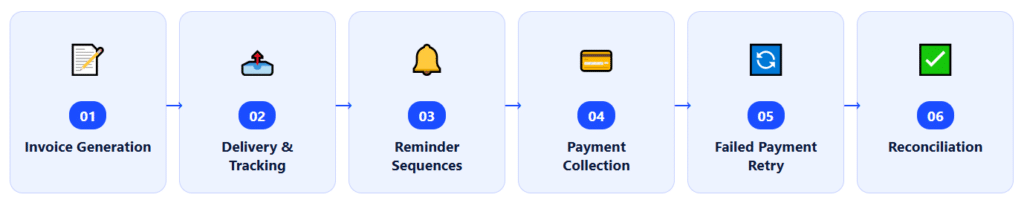
AR automation is the use of software to execute the accounts receivable cycle, invoice generation, delivery, payment collection, follow-up reminders, and reconciliation without manual intervention at each step. The goal is to compress the time between completing work and receiving payment, reduce errors that trigger disputes, and give the business real-time visibility into what every client owes at any given moment.
The term “accounts receivable” refers to money owed to a business by its customers for services already rendered or goods already delivered. DSO (Days Sales Outstanding), the average number of days between invoicing and getting paid, is the key metric AR automation is designed to reduce. A lower DSO means faster cash, less reliance on credit lines, and fewer uncomfortable follow-up conversations with clients. AR automation achieves this by replacing the tasks that inflate DSO (late invoicing, inconsistent reminders, delayed reconciliation) with reliable, scheduled workflows that run without anyone remembering to trigger them. It connects directly to recurring billing, installment billing, and collection automation, the combination of which forms a complete receivables system.
Every guide to AR automation published in 2026 is written for a CFO at a company processing thousands of invoices a month. They quote DSO benchmarks for mid-market manufacturers. They diagram ERP integration architectures. They discuss AI-driven payment prediction models and deduction resolution workflows. None of it speaks to the 10-person agency whose biggest AR problem is that the owner keeps forgetting to send the third reminder email, or the consultant whose average DSO is 28 days not because of system complexity but because invoices are going out four days late every single month.
That gap is what this guide fills. The principles of AR automation are exactly the same at every scale, you want a shorter time between earning and receiving, but the implementation, the failure modes, and the things worth paying attention to look completely different for a service business than for a corporate finance department.
The DSO Problem Nobody Talks About for Small Service Businesses
Let me start with the math, because it’s more compelling than most people expect until they actually see it applied to their own numbers.
DSO is calculated with a formula most finance textbooks express as DSO = (Accounts Receivable ÷ Total Revenue) × Number of Days. For a service business with $400,000 in annual revenue and an average of $31,000 outstanding at any given time, that’s a DSO of roughly 28 days. If AR automation cuts that to 14 days, a realistic target, not an ambitious one, the receivables balance drops from $31,000 to $15,500. That $15,500 difference is real working capital you now have in hand instead of waiting for it to arrive.
For a larger service business earning $1.2 million annually, the same DSO reduction from 28 to 14 days releases more than $46,000 in cash. No new clients, no new services, no pricing changes, just getting paid faster.
The reason these numbers are rarely discussed for small service businesses is that most published AR automation content is written to sell enterprise software to companies with dedicated finance teams. But the mechanics that inflate DSO are identical regardless of company size: invoices sent late, reminders triggered by memory rather than schedule, and reconciliation done when someone has time rather than when payment arrives. AR automation fixes all three, and it does it at a cost that makes sense for a business with 15 clients, not just one with 15,000.
My own pre-automation DSO was 23.4 days across 14 active clients, which sounds like it might be fine until you calculate that for my then-$480,000 in annual revenue, it meant roughly $30,700 permanently in flight. After automating the invoicing, reminder sequences, and reconciliation workflow, my 6-month average DSO dropped to 12.1 days. That released approximately $15,300 in working capital that had previously been sitting in the float between “work done” and “invoice paid.”
How AR Automation Works: The Full Cycle
AR automation does not replace every step in the receivables process, it replaces the manual execution of each step with a rule-driven, scheduled alternative. Understanding which steps benefit most from automation is more useful than a generic “automation does everything” description.
Step 1: Invoice Generation
Automated invoice generation means invoices go out on schedule, not when someone remembers to create them. For recurring billing clients, the system generates and sends the invoice on the defined date without any user action. For installment billing clients, it triggers the next invoice in the sequence automatically once the prior one clears. For one-time project clients, the invoice is created from a stored template the moment you mark the work complete. In all three cases, the four-day lag I used to build into my own DSO by creating invoices manually disappears entirely.
Step 2: Delivery and Open Tracking
Modern AR automation tracks whether a client has opened the invoice email. This single feature surfaces a failure mode that manual invoicing misses entirely: the invoice that was sent but never opened. In my first month using an automated system, I discovered two clients who had never opened three consecutive monthly invoices, they were bouncing to a secondary email address the client’s bookkeeper no longer checked. I found out from a delivery report, not from a late-payment notice. I fixed the contact record. Both invoices were paid within 48 hours of resending to the correct address.
Step 3: Reminder Sequences
This is where the biggest DSO gains come from for small service businesses. A structured reminder sequence, a pre-due notice three to five days before the deadline, an on-due-date confirmation, and a series of increasingly direct follow-ups at 3, 7, and 14 days post-due perform dramatically better than reminders sent when you remember to send them. The consistency is what matters. A client who knows your reminders arrive on a schedule is more likely to have payment ready than one who experiences them as random interruptions.
Steps 4 and 5: Payment Collection and Failed Payment Retry
For clients on autopay, the system charges the stored payment method on the due date and, critically, retries automatically if the transaction fails. Failed payments in manual AR typically sit unresolved until someone notices the account is overdue and investigates. In an automated system, a failed card triggers an immediate client notification and a retry on a defined schedule, usually within 24 to 72 hours. Most failed payments are accidental, expired cards, temporary holds, or insufficient funds that clear within days. Automated retry catches the majority of these before they become overdue accounts.
Step 6: Reconciliation
When a payment comes in, automated reconciliation matches it to the correct open invoice and updates the receivables ledger immediately, no manual entry, no end-of-week reconciliation session, and no missed matches sitting in “unapplied cash” until someone investigates. This sounds like a back-office efficiency gain, but it directly affects DSO measurement: an invoice that’s paid but not yet reconciled still appears as outstanding in manual systems, artificially inflating your reported receivables balance.
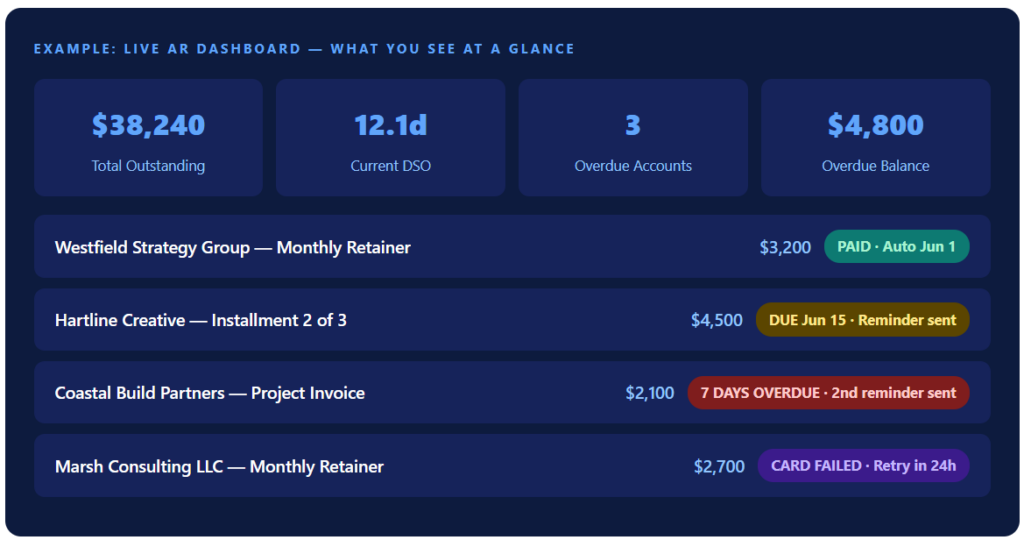
That dashboard view is, in my experience, the single most valuable output of an AR automation system. Not because the metrics themselves are sophisticated, but because before automation, I didn’t know which clients were overdue until I thought to check my bank statement, which meant the information was always days behind reality.
Real-World Use Cases by Business Type
One of the consistent blind spots in every competitor guide I researched for this piece is that they describe AR automation for enterprise or SaaS contexts, then claim the same advice applies to service businesses without explaining how. The use cases below are specific to the kinds of companies actually reading this.
Consulting Practices and Solo Operators
The primary AR failure mode here is lateness, invoices that go out three to five days after the month ends because the consultant is busy doing client work and billing is always the last thing to handle. Automation eliminates this by generating and sending the invoice on the first of the month whether the consultant has time to think about it or not. The second failure mode is follow-up, reminder emails written reactively under the pressure of a cash flow gap, which inevitably feel urgent and sometimes awkward. A pre-configured reminder sequence solves this before the invoice is ever overdue.
Small Agencies Managing Multiple Retainers
Agencies with 10 to 25 retainer clients often have a patchwork of billing histories, with some clients on standard Net 15 terms, others who negotiated Net 30 years ago, and and one or two on custom payment cycles nobody remembers setting up. AR automation forces this clarity: every client has a defined payment term in the system, the invoice goes out on schedule, and the reminder sequence reflects those terms automatically. The visibility gained from a single aging dashboard replaces what used to be a Friday afternoon exercise in checking which client emails have been answered.
Trades and Project-Based Service Businesses
For contractors and trades businesses, the relevant billing structure is usually milestone-based, a deposit upfront, progress payments at defined project phases, and a final invoice on completion. Installment billing automation manages this without requiring anyone to manually trigger each phase invoice. The bigger win for trades businesses is the failed payment workflow, a client whose card declines at the second installment is surfaced immediately rather than discovered at week three when the job is already half done.
Recurring Service Providers (Property Management, Maintenance, Subscriptions)
For any business billing the same client the same amount every month, property management fees, maintenance contracts, software subscription resellers, manual invoicing is almost entirely unnecessary overhead. Automated recurring billing handles the full cycle: generate, send, collect, reconcile, and repeat. The human role at scale becomes exception management rather than invoice production.
Key Benefits: With Real Before/After Numbers
I want to be specific here, because generalities about “improved cash flow” and “reduced manual effort” don’t give you anything to make a decision with.
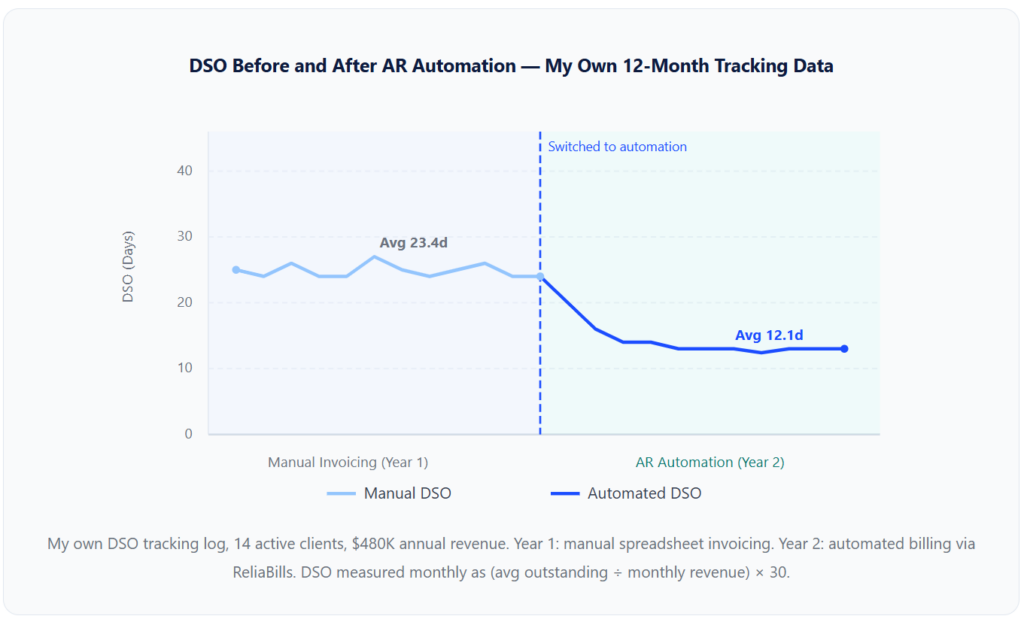
Beyond my own numbers, the patterns are consistent across the businesses I’ve spoken with.
Late payments become the exception, not the baseline.
A consulting firm owner I know told me that in the year before automating, roughly one in four invoices required more than one follow-up to collect. In the six months after setting up automated reminders, that rate dropped below one in ten, not because clients became more reliable, but because the reminders arrived before the invoice had a chance to get buried in an inbox.
Billing errors drop to near zero.
Manual invoice creation means re-entering the same client data, service descriptions, and amounts every billing cycle. Each re-entry is an opportunity for an error. Automated systems store the template and apply it consistently, the only errors that occur are the ones you make configuring the template in the first place, not errors introduced by repetition.
Cash flow visibility becomes proactive rather than reactive.
The shift from “I check my bank account and then figure out what’s outstanding” to “I check a dashboard and I know exactly what’s coming in and when” changes how you make spending decisions. Not dramatically, not all at once, but meaningfully over time.
Key Risks and Things to Watch For
⚠ The Dirty Data Problem:
AR automation faithfully executes whatever instructions you give it. If your client records contain duplicate entries, outdated email addresses, wrong payment terms, or vague invoice descriptions, automation amplifies those problems rather than correcting them. Every guide on AR automation mentions this risk, and every implementation that goes badly does so for this exact reason. Data cleanup is not a pre-step you can skip.
⚠ Reminder Fatigue and Tone Calibration:
Automated reminder sequences can feel impersonal or relentless if they are not written carefully. The volume and timing that works for a large B2B collections team can damage a personal relationship with a client you’ve worked with for three years. Customizing reminder language and frequency by client type, new vs. established, large retainer vs. small project, prevents the “you sound like a bot” response that quietly erodes client trust.
⚠ Over-Automation of Human Judgment Moments:
Not every overdue invoice is a collections problem. Some are relationship conversations, scope disputes, or signals of a client going through difficulty. An automated system that escalates reminder frequency without any human checkpoint can turn a fixable situation into an adversarial one. Build in a manual review trigger, I use a rule that any account 14+ days overdue gets a personal email from me before any further automated contact goes out.
⚠ Payment Credential Storage and PCI Compliance:
If you are storing client card or bank account details for autopay, your platform must be PCI-DSS compliant and must tokenize credentials rather than storing raw card data. This is non-negotiable and should be confirmed with any vendor before you store a single client’s payment method. The liability for a breach is real and not proportional to your business size.
⚠ Treating “Set and Forget” as Fully Literal:
Automation reduces the time you spend on AR; it does not eliminate the need for periodic human review. A card that expired six months ago, a client contact record that went stale, a billing rule that no longer matches a renegotiated scope, these are all things automation cannot catch on your behalf. A weekly 10-minute dashboard review is the minimum viable oversight for an automated AR system.
What I Got Wrong at First
I want to be direct here, because the honest version of this section is more useful than a polished retrospective that makes the transition sound seamless.
I didn’t calculate my baseline DSO before switching
I knew, in a vague way, that I sometimes waited a while to get paid. I didn’t know the specific number until I went back and calculated it after the fact. This meant I had no clean baseline to measure improvement against, I had to reconstruct it from my banking records, which took time and produced estimates rather than precise figures. If you are considering an AR automation switch, calculate your current DSO before you change anything. It takes 20 minutes and gives you a number that makes every subsequent improvement concrete rather than impressionistic.
I configured the reminder sequences too aggressively for small clients
My initial setup used the same reminder cadence for every client, a reminder three days before due, one on the due date, and a follow-up at day seven. For my larger retainer clients with professional accounts payable processes, this was fine. For two small clients who paid manually and treated my invoices as a personal financial obligation, the day-three pre-reminder felt like nagging before anything was even overdue. One of them told me so. I now segment reminder frequency by client type: aggressive cadences for automated accounts where no human reads the reminder anyway and lighter-touch cadences for clients who process invoices personally.
I imported 14 clients before standardizing my service descriptions
I was impatient to see the system running and started setting up client billing before I’d cleaned up my standard service line items. I ended up with three different descriptions for the same monthly retainer service across different client records, “Monthly Strategy Retainer,” “Monthly Advisory Services,” and just “Retainer”, which created inconsistency in invoice appearance and once confused a client’s bookkeeper who was matching invoices against a contract that used yet a fourth description. Standardizing line items before importing clients would have taken 30 minutes and prevented several hours of cleanup.
I assumed outstanding invoices and accounts receivable meant the same thing in my billing software
They do not, and the distinction matters for your DSO calculation. “Outstanding invoices” in most platforms means invoices that have been sent but not yet paid, this includes invoices that are current and not yet due. “Accounts receivable” in the accounting sense means the total balance clients owe you, which is the number you use in your DSO formula. Using “outstanding invoices” in a DSO calculation produced a number that looked worse than reality and confused my quarterly cash flow estimates for about two months before I caught the error.
💡 One Thing That Saved Me Significant Time: Before setting up any automation, I spent two hours writing out exactly what a good reminder email sounds like for three client types: a long-term retainer client, a new project client, and a client I’ve never met in person. Those three templates have been running for over a year with zero rewrites. The one-time investment in thinking through tone before automating it is the highest-ROI hour I spent in the entire implementation.
AR Automation vs. Related Concepts
People use “AR automation,” “invoicing software,” “billing software,” and “accounting software” somewhat interchangeably in conversation. The distinctions matter when you are deciding what your business actually needs.
| Concept | Primary Function | Generates Invoices? | Automates Reminders? | Handles Payment Collection? | Reconciles Payments? | Accounting / Tax Focus? |
|---|---|---|---|---|---|---|
| AR Automation | Full invoice-to-cash cycle automation | Yes | Yes, on schedule | Yes, with retry logic | Yes, automatic | No |
| Invoicing Software | Invoice creation and delivery | Yes | Basic / manual | Sometimes (payment link) | Manual | No |
| Accounting Software (QuickBooks, Xero) | Bookkeeping, tax prep, financial statements | Basic, manually triggered | Rarely | Via add-on | Partial, manual review | Primary focus |
| Payment Gateway (Stripe, Square) | Process a single transaction | No | No | Yes | No | No |
| Collections Software | Manage overdue accounts and escalations. | No | Yes, dunning-focused | Sometimes | No | No |
| Spreadsheet + Email | Manual tracking and ad hoc invoicing | Manual template only | No (memory-dependent) | No | Manual | No |
For most service businesses, the practical configuration is AR automation software feeding transaction data into an accounting platform, the billing tool handles the receivables cycle, and and the accounting tool handles what happens to the money once it lands. What you want to avoid is trying to make one tool do both jobs, or using three separate tools with no integration between them, which recreates the manual reconciliation problem you were trying to eliminate.
How to Get Started With AR Automation
Based on the implementation I went through and conversations with a dozen other service business owners who made the same switch, here is the sequence that actually works, as opposed to the vendor-recommended sequence, which typically begins with “schedule a demo” and ends with “we’ll handle the rest.”
1. Measure Your Current DSO First
Pull your last three months of invoicing records and calculate the total average outstanding balance divided by monthly revenue, multiplied by 30. That number is your baseline. Write it down before you change anything, because without it, you will never know precisely how much the automation improved your cash flow.
2. Standardize Your Client Data Before Any Import
Create a consistent naming convention for every client, verify billing email addresses, document the payment terms each client is on, and write clean, specific service descriptions for every recurring line item. This is the step most people skip and then regret. A clean customer management setup before you import is worth hours of cleanup after.
3. Segment Clients by Billing Model
Separate your clients into three groups: recurring (same amount, same schedule every period), installment-based (fixed project total split into defined payments), and one-time project clients. Each group gets configured differently, recurring billing for the first group, installment billing for the second, and standard invoice templates with automated reminders for the third.
4. Write Your Reminder Templates Before You Turn On Automation
Draft at least two reminder voices: one for established clients who know you personally, and one for newer or more formal client relationships. Both should sound like you, not like software. Configure these before the first automated invoice goes out, changing the reminder tone after clients have already received it is harder than setting it right the first time.
5. Notify Clients Before the First Automated Charge
For any client moving to autopay, send a personal note one week before the first automated charge. This single step prevents the “unexpected charge” conversation and signals to the client that your billing is becoming more systematic, which most clients interpret positively as a sign of operational maturity.
6. Build in a Human Override Rule for Late Accounts
Define the threshold at which you personally intervene rather than letting automation continue. My rule: any account 14+ days overdue gets a direct email from me before any further automated contact. This prevents the automation from escalating a relationship problem that needs a human conversation, and it keeps you informed of which accounts need attention rather than discovering them during a cash flow gap.
7. Recalculate Your DSO at 60 and 90 Days Post-Switch
At 60 days, you should see measurable movement, primarily from the reminder sequence eliminating late follow-up. At 90 days, the full impact of consistent invoicing cadence and payment retry logic should be visible. Compare against your baseline number and you’ll have a concrete ROI figure to justify the switch and identify any remaining gaps in the workflow.
Where to Go Next on ReliaBills: Once your core AR cycle is automated, the natural next layer is structured collection automation for escalating overdue accounts systematically and a client-facing payment portal where clients can view their invoice history and outstanding balance without emailing you to ask. Together, these reduce inbound billing inquiries to near zero and give clients the self-service experience that larger companies offer as standard. For a practical guide to managing the overdue accounts that AR automation flags for your review, see our article on how to handle outstanding invoices. If you want to add a late fee policy to strengthen your payment terms, the guide on how much interest to charge on overdue invoices covers the mechanics and legal considerations.
Frequently Asked Questions
1. What is AR automation?
AR automation (accounts receivable automation) is the use of software to run the invoicing, payment collection, reminder, and reconciliation cycle without manual execution at each step. The system generates invoices on schedule, sends reminders automatically, processes payments, retries failed transactions, and reconciles payments against open invoices, reducing both the time required and the DSO that inflates when any of those steps happen inconsistently.
2. What does DSO mean, and why does it matter for small service businesses?
DSO, Days Sales Outstanding, is the average number of days between sending an invoice and receiving payment. For a service business with $500,000 in annual revenue, each additional day of DSO ties up roughly $1,370 in cash. Cutting DSO from 28 days to 14 days frees up close to $19,000 in working capital, with no new clients and no price increases, just faster collection of money already earned.
3. Is AR automation only for large companies?
No. The failure modes that inflate DSO, late invoicing, inconsistent reminders, and and slow reconciliation exist at every scale. A solo consultant and a 500-person agency have the same problem: someone must remember to do each step, and that dependency on memory is what automation eliminates. The tools that make sense for small service businesses look different from enterprise AR platforms, but the principle and the benefit are identical.
4. What is the difference between AR automation and invoicing software?
Invoicing software creates and sends invoices. AR automation covers the full cycle after delivery: whether the invoice was opened, what happens when it isn’t paid on time, how failed payments are retried, and how payments are matched to the correct open invoices when they arrive. AR automation typically includes invoicing as one component of a broader receivables workflow.
5. How quickly can AR automation reduce my DSO?
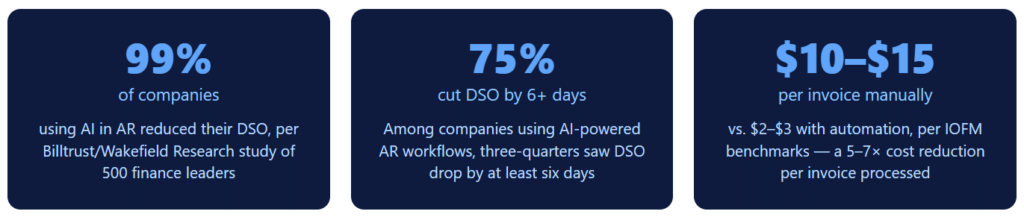
Most businesses see measurable improvement within the first 60 days, primarily from automated reminders replacing inconsistent manual follow-up. A Billtrust/Wakefield Research study of 500 finance leaders found 99% of companies using AI in AR reduced their DSO, with 75% cutting it by at least six days. My own DSO dropped from 23.4 days to 12.1 days over the first six months after switching.
6. What’s the biggest mistake businesses make when setting up AR automation?
Automating before cleaning the underlying data. If your client records have duplicate names, outdated billing contacts, or inconsistent payment terms, the automation will execute those problems on a reliable schedule. The fix is simple: standardize client data and payment terms before configuring a single workflow. This step takes a few hours and prevents days of cleanup after the fact.
The Bottom Line
Every competitor guide to AR automation in 2026 is written as though the reader is a CFO at a mid-market enterprise, shopping for an ERP integration that takes six months to deploy. The reality for most service businesses is simpler and more immediate: you have clients who owe you money, you sometimes wait longer than you should to get it, and the gap between those two facts is closing when someone remembers to follow up and stays open when they don’t.
AR automation fixes that dependency. It doesn’t require an ERP. It doesn’t require a finance team. And it requires clean client data, a configured billing platform, and about two hours of careful setup, after which the system runs the invoice-to-cash cycle on your behalf, consistently, whether you are thinking about billing or not.
The DSO improvement is real and measurable. The time savings are real. The reduction in billing errors and awkward follow-up conversations is real. None of that requires a scale that most of the published guides on this topic would lead you to believe is necessary before the investment is justified.
Recent Articles:
- How to Apply Late Fees Automatically Without Damaging Client Relationships
- ACH Payment Processing Explained: A Guide for Small Business Owners