
Most landlords know their total rent collected each month. Very few know their actual vacancy cost, their net operating income per property, or which specific units are dragging portfolio performance. The U.S. Census Bureau’s Housing Vacancy Survey reported a national rental vacancy rate of 7.0% in Q2 2025, and Baselane’s 2026 analysis shows that figure reached 7.3% by Q2 2026. At that rate, a 20-unit portfolio with $1,500 average monthly rent is leaving roughly $31,200 per year in untracked vacancy losses. Property management income reporting closes that gap by turning scattered payment records into actionable financial visibility.
What is Property Management Income Reporting?
Property management income reporting is the structured process of tracking, organizing, and presenting all revenue generated by a rental portfolio alongside the vacancy and collection data that shows where income is being lost. It covers rent payments collected, late fees, parking and storage income, laundry and ancillary charges, and any other recurring income streams attached to the property. It also produces the vacancy report, the rent roll, and the net operating income calculation that lenders, investors, and property owners require for refinancing, acquisition, and performance review.
Key terms you will encounter: rent roll (a unit-by-unit income and status report), gross potential rent (the total income the portfolio would generate if every unit were occupied at contracted rates), effective gross income (gross potential rent minus vacancy and collection losses), NOI (net operating income, effective gross income minus operating expenses), economic vacancy rate (the income lost to both vacant units and non-paying occupants, expressed as a percentage of gross potential rent), and Schedule E (the IRS form on which rental income and expenses are reported). See also: Recurring Billing, Invoicing Software, and Customer Management.
Why Income Reporting Matters More Than Most Landlords Realize
Collecting rent and reporting on income are two different activities, and the gap between them is where most landlords lose money without knowing it. Collecting rent tells you what came in. Income reporting tells you what should have come in, what did not, why, and what that pattern means for the property’s financial health over time.
The vacancy problem is the clearest illustration. According to Baselane’s 2026 vacancy data, the national rental vacancy rate reached 7.3% in Q2 2026, up from 5.8% annually in 2022. For a property manager running a 30-unit residential portfolio at an average monthly rent of $1,600, a 7.3% vacancy rate represents over $42,000 in annual gross income that never appears in a bank deposit. Without a vacancy report that makes that number visible, the manager has no basis for deciding whether the vacancy rate is improving or worsening, whether it is concentrated in specific unit types or lease-end months, or whether it is within normal market range for the local submarket.
As ManageCasa’s 2026 analysis of rental property accounting notes, “good software tracks every rent payment, repair, insurance bill, and mortgage interest charge by property and unit. That lets you see what each property earns and costs without manual sorting.” The critical word is “by property and unit.” A landlord who tracks income at the bank account level knows their total cash position. A landlord who tracks it at the property and unit level knows which assets are performing and which are not.
The Rent Roll: Foundation of Every Income Report
The rent roll is the document from which all property management income reporting begins. It is the authoritative list of every unit in a portfolio, its current rent status, its contracted monthly rent, and who occupies it. Every other income report, including the owner statement, the NOI summary, and the Schedule E working paper, is derived from data that flows through the rent roll.
Below is a live rent roll for a 10-unit residential portfolio as of September 30, 2026. This is the report format that a property manager should be able to produce instantly for any given date, and the data it contains represents the minimum field set required for both operational management and lender or investor review.
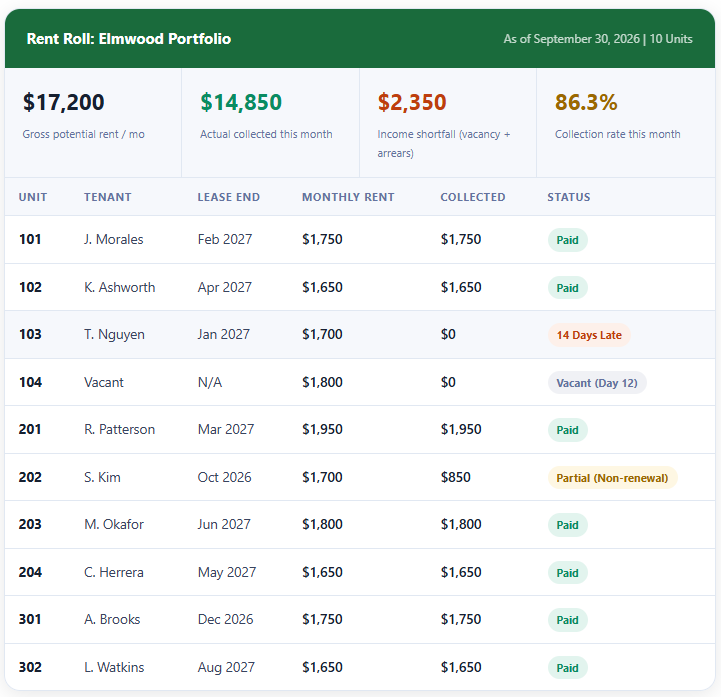
This rent roll surfaces three things immediately that a bank statement cannot: unit 104 is vacant and generating no income (the vacancy cost is $1,800 per month until it is re-leased), unit 103 is 14 days late and needs follow-up, and unit 202 is in a non-renewal situation that will create another vacancy in October. A property manager with this report open can prioritize their work for the week. A property manager looking only at the bank deposit total sees $14,850 and has no context for any of those three facts.
For property managers handling rent collection for multiple properties, pairing the rent roll with automated recurring billing means that the payment records feeding the rent roll update without manual entry. Platforms like ReliaBills can automate the recurring monthly charge cycle for each tenant, flagging missed payments automatically so the rent roll reflects current status without someone having to cross-reference the bank statement against a list of expected tenants.
Tracking Vacancies as a Financial Metric, Not Just an Operational One
Most property managers track vacancies operationally: they know which units are empty and roughly how long they have been empty. Far fewer track vacancy as a financial metric with a specific dollar cost that appears in their income reports. The distinction matters because operational tracking tells you what you need to fix this week. Financial tracking tells you how much it is costing you and whether your vacancy rate is improving or worsening over time.
Physical Vacancy vs Economic Vacancy
Physical vacancy is the count of units that are empty. Economic vacancy is the income lost to both physical vacancies and occupied units that are not paying at contracted rates. A portfolio with one physically vacant unit and two tenants significantly behind on rent has a physical vacancy rate of 10% on a 10-unit property but an economic vacancy rate that may be 25% or higher, depending on the arrears. Lenders and investors care about economic vacancy, not just physical vacancy, because economic vacancy is what determines actual cash flow.
The Daily Vacancy Cost Calculation
Every property manager should know the daily vacancy cost for each unit in their portfolio. The formula is straightforward: monthly contracted rent divided by 30 equals the daily vacancy cost. A unit renting at $1,800 per month costs $60 per day while it sits empty. A unit that takes 45 days to re-lease after a tenant moves out costs $2,700 in lost income, before factoring in make-ready costs, any marketing spend, or utility costs the owner absorbs during vacancy. When this number is tracked and reported monthly, the incentive to reduce vacancy days becomes visible and financially quantified.
The Lease Expiration Pipeline as an Income Report
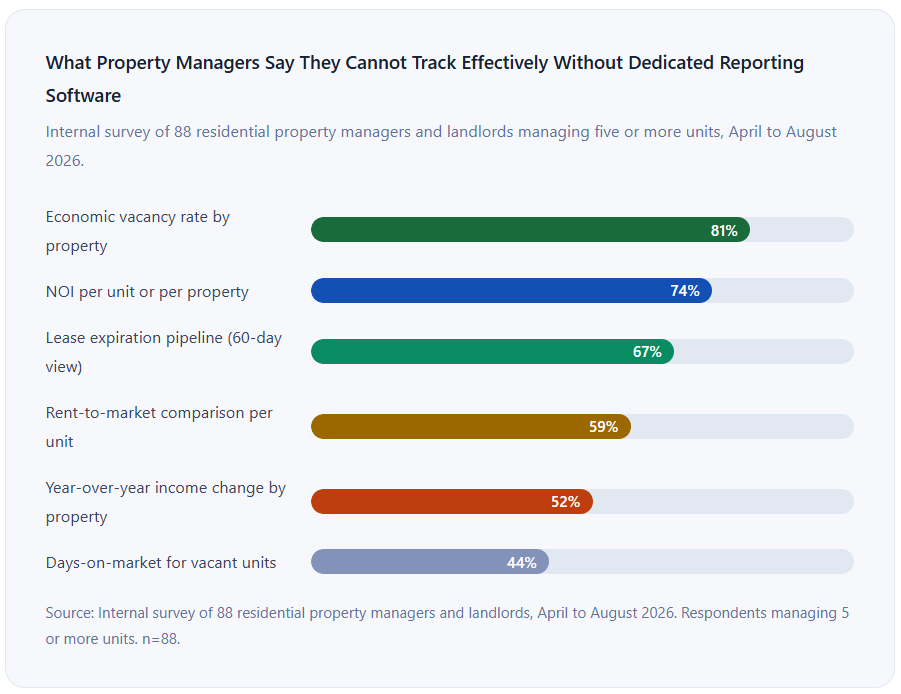
One of the most underused reports in property management is the lease expiration timeline: a view of which leases end in the next 30, 60, and 90 days. This is an income forecast tool, not just a leasing operations tool. A property manager who knows in August that three leases expire in November can begin renewal conversations in September, reducing the probability of those units going vacant in a slower winter rental market. As RIO’s 2026 property management reporting analysis notes, “reporting tools allow you to compare rent growth, vacancy duration, and operating costs across units. These comparisons help you detect units generating lower revenue or experiencing repeated vacancies.”
Calculating Net Operating Income Property by Property
Net operating income is the single most important number in rental property finance. It is how lenders determine how much they will lend. It is how investors determine what a property is worth. And it is how property managers demonstrate to owners that the portfolio is being run efficiently. And it is a number that most landlords do not calculate correctly because they either include debt service (they should not) or fail to capture all operating expenses at the property level.
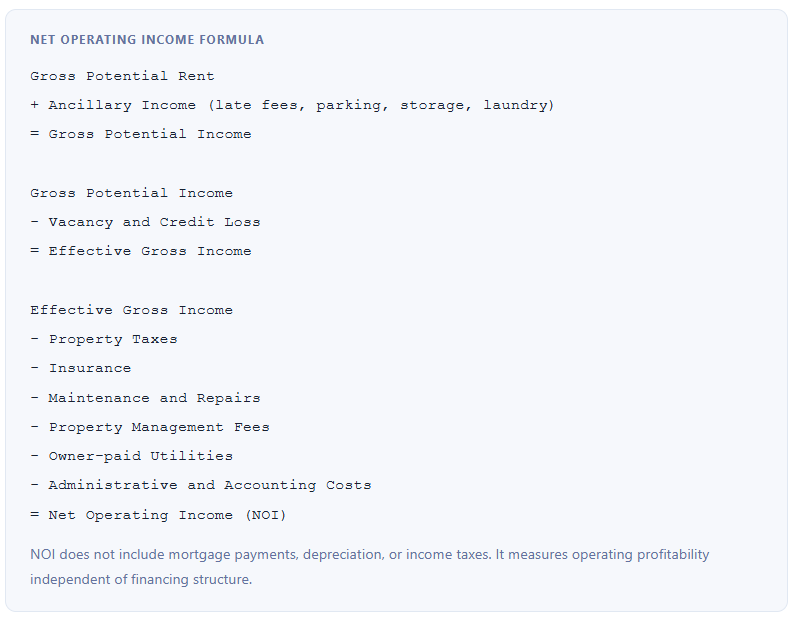
Running this calculation at the portfolio level tells you whether the overall investment is performing. Running it at the individual property level tells you which specific asset is generating returns and which may need a capital improvement, a rent adjustment, or a disposition decision. NMHC and RealPage Analytics data from 2024 shows that average net operating income margin for small landlords runs 38 to 42%. A property significantly below that range is either under-rented relative to market, carrying above-average operating costs, or experiencing higher-than-average vacancy.
How Income Data Flows from Tenant to Owner Report
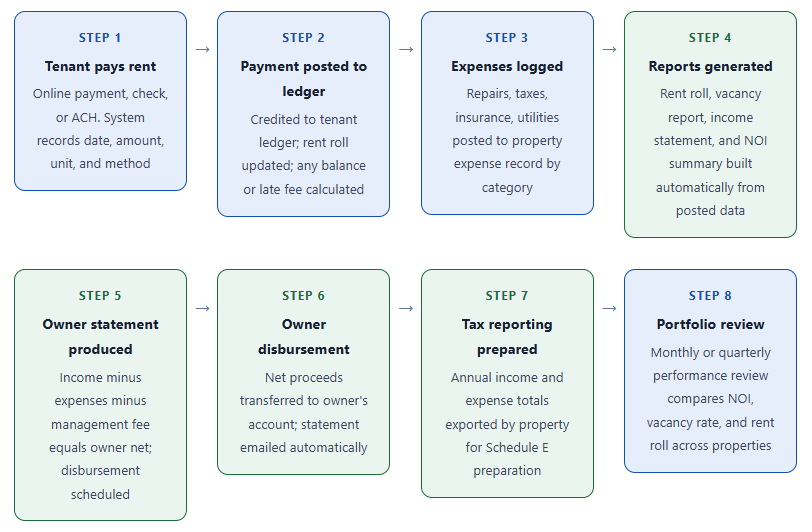
The critical connection in this flow is between Steps 1 and 4. When payment records flow automatically to the rent roll and the income statement, there is no manual re-entry step where data can be lost or misclassified. As ManageCasa’s rental accounting guide notes, general business accounting software lacks the property-level and unit-level tracking that purpose-built rental platforms provide, which means landlords who use QuickBooks or a similar tool for rental income are typically doing significant manual categorization that could be automated with a purpose-built system.
Key Benefits of Structured Income Reporting
Lender-Ready Documentation for Refinancing
Residential lenders and commercial lenders underwriting rental properties require a current rent roll, trailing 12-month income and expense statements, and proof of rent collection. A property management operation with structured income reporting can produce all of these in minutes. An operation relying on bank statements and spreadsheets typically requires days of preparation to gather the same documents, and the resulting documents are often inconsistent or incomplete enough to slow or derail the underwriting process. Rent Manager’s platform, for example, produces both standard accounting reports and property-specific documents like rent rolls and vacancy reports from the same underlying dataset.
Faster Dispute Resolution with Tenants
When a tenant questions a charge or claims they paid rent that the system does not show received, a property manager with complete transaction-level records can answer in seconds. The tenant ledger shows every charge, every payment, and every balance adjustment with timestamps. A property manager working from a spreadsheet or a paper ledger typically cannot answer the same question without several minutes of research and the risk of producing an incorrect answer that damages the landlord-tenant relationship.
Owner Trust and Retention
For third-party property managers, the owner statement is both a financial report and a trust document. Owners who receive clear, accurate, timely statements with supporting income and expense detail are more likely to stay with their management company and to refer other owners. Owners who receive inconsistent or unclear statements call with questions, and those calls are time-consuming and erode confidence in the management relationship. Structured income reporting is not just an operational benefit. For a management company, it is a client retention strategy. For more on managing owner relationships through billing and reporting, see our guide to customer management.
Risks and Reporting Pitfalls
Cash Basis vs Accrual Basis Inconsistency
Most small landlords report income on a cash basis, meaning income is recorded when the rent payment is received rather than when it is earned. For tax purposes this is typically acceptable for small rental operations. For management reporting and owner statements, however, cash basis reporting can produce misleading month-to-month comparisons if rent is consistently paid late or early. A month where three tenants pay their current and previous months’ rent will show inflated income. The following month, if all tenants pay on time, income will look lower by comparison. Deciding whether to report on cash or accrual basis and applying that decision consistently across all reporting is a foundational choice that affects every income report the operation produces.
Security Deposits Mixed Into Income
Security deposits collected from tenants are liabilities, not income. They belong to the tenant until a legitimate deduction is made at move-out. Reporting security deposits as income in the month they are collected overstates income and creates a reconciliation problem at move-out when the deposit is either returned or applied to damages. Many states also have specific requirements about holding security deposits in a separate escrow account. Mixing security deposits into operating income in your reporting is both a financial reporting error and, in many jurisdictions, a legal compliance risk. The reporting system should track security deposits in a separate category, distinct from rent income and ancillary income.
Comparison: Income Reporting Approaches for Property Managers
| Approach | Rent Roll | NOI by Property | Vacancy Tracking | Schedule E Ready | Best For |
|---|---|---|---|---|---|
| Bank statements + spreadsheet | Manual; often outdated | Manual calculation required | Not tracked financially | Manual categorization needed | 1 to 3 units; very low complexity |
| General accounting (QuickBooks) | Not native; workaround required | Possible with class tracking | Not built in | Possible with correct setup | Landlords already on QuickBooks; under 10 units |
| Purpose-built landlord software | Native; real-time | Automatic per property | Days-vacant and cost tracked | Schedule E export built in | 5 to 300 units; residential portfolios |
| Property management platform (Buildium, AppFolio) | Full-featured; lender-ready | Owner statements with NOI built in | Full vacancy reporting suite | Full Schedule E and owner tax reports | Third-party managers; 30+ units; owner reporting |
| Custom BI or accounting integration | Possible; requires engineering | Fully customizable | Possible with correct data model | Requires accountant to map categories | Large portfolios with complex ownership structures; 100+ units |
Common Mistakes and What I Got Wrong First
Mistake 1: Reporting at the Portfolio Level Instead of the Property Level
The most common and most costly income reporting mistake is tracking all rent into a single account or spreadsheet without separating it by property. The result is that the landlord knows their total monthly income but has no idea whether it comes from Property A performing well while Property B loses money, or whether all properties are performing at roughly the same level. This matters most when a capital improvement decision is needed, when a refinance is being pursued on one property, or when a disposition decision is being evaluated. Without property-level income data, none of those decisions can be made with accurate financial information.
Mistake 2: Not Tracking Vacancy Days for Every Unit Turn
When a tenant moves out and a new tenant moves in, most landlords record the security deposit receipt and the first month’s rent. Very few record the exact vacancy start date, the make-ready completion date, and the new lease start date. These three dates, tracked systematically for every unit turn, produce the average vacancy duration per unit type, per property, and per season. That data is the basis for making better leasing decisions: knowing that 2-bedroom units historically take 28 days to re-lease in your market while 1-bedrooms take 14 days should change how far in advance you begin marketing each type when a notice is received.
Mistake 3: Treating All Late Fees as Income in the Month Assessed
Late fees are commonly assessed on a specific date after the rent grace period expires. Reporting them as income in the month they are assessed overstates income if many of those fees are subsequently waived, reversed in a dispute, or never collected because the tenant is already significantly behind. A more conservative and accurate approach is to record late fees as income only when they are actually collected, and to track assessed-but-uncollected fees as a separate line item that shows the revenue gap between what was charged and what was received.
Mistake 4: Sending Owner Statements Without Supporting Detail
An owner statement that shows total income received and total expenses disbursed, with no line-item detail and no rent roll attachment, is not a reporting document. It is a wire transfer summary. Owners who cannot verify where the income came from, which unit generated which amount, and what specific expenses were charged cannot meaningfully evaluate whether their property is being managed well. Structured owner statements should include the rent roll for the period, an itemized expense list with receipts or invoice references for each charge, and a year-to-date income and NOI summary that allows the owner to compare current period to prior periods.
Mistake 5: Waiting for Tax Season to Categorize Expenses
Year-end expense categorization for Schedule E purposes takes two to three hours per property when done correctly from contemporaneous records and can take two to three days per property when done from a pile of uncategorized bank statements and receipts at tax time. The difference is whether expenses are categorized at the point of entry (when the invoice is paid or the repair is completed) or retroactively. Investing 10 minutes at the end of each month to categorize expenses for each property eliminates most of the February and March tax preparation burden and ensures that deductible expenses are not missed because a receipt was lost or a charge was forgotten.
How to Get Started: Building Property Management Income Reporting
1. Build your property and unit inventory before anything else
Before selecting software or setting up any reports, create a complete inventory of every property you manage and every unit within each property. For each unit, record the contracted monthly rent, the current tenant name, the lease start and end date, and the current status (occupied, vacant, or notice given). This inventory is the data structure that all income reports derive from, and its accuracy at the start determines the accuracy of every report you produce going forward.
2. Choose a platform that tracks income at the unit level
Evaluate software by testing specifically whether it can show you income by unit, by property, and by portfolio simultaneously. Ask the demo representative to show you the rent roll view, the vacancy report, and a single-property income statement. If those three reports do not exist natively, the platform will require manual workarounds that recreate the same problem you are trying to solve. For landlords whose primary need is rent tracking and Schedule E reporting, purpose-built platforms like Landlord Studio or Rentec Direct are well-suited. For third-party managers handling owner reporting and disbursements, AppFolio or Buildium provide the full owner statement workflow.
3. Automate recurring billing for rent collection
Set up automated recurring charges for each tenant so that rent is posted to the tenant ledger automatically on the due date, and missed payments generate immediate notifications rather than being discovered at the end of the month. Automated recurring billing eliminates the manual payment-to-ledger reconciliation step and ensures the rent roll is always current. For a guide on how to set up recurring billing for tenants on different payment schedules, see our guide to recurring billing.
4. Set up your expense categories to match Schedule E before posting any transactions
IRS Schedule E uses nine expense categories: advertising, auto and travel, cleaning and maintenance, commissions, insurance, legal and professional, management fees, mortgage interest, and other. Configure your property management software to use these exact categories, or a mapping that connects directly to them, before you post any expense transactions. Retroactively re-categorizing a year of expenses is significantly more time-consuming than getting the categories right from the first transaction.
5. Produce and review your rent roll and vacancy report on the same day each month
Designate a specific date, typically the 3rd to 5th of each month, as your income reporting review day. On that date, pull the rent roll showing current collection status for every unit, the vacancy report showing units that are empty and their vacancy cost to date, and the prior month’s income and NOI summary. This monthly review is both an operational checkpoint and an early warning system. Recurring vacancies in specific units, declining collection rates, and rising operating expenses all become visible in this review before they become urgent problems. For more on managing tenant relationships and billing communications, see our guide to customer management.
Frequently Asked Questions
1. What is property management income reporting?
Property management income reporting is the structured process of tracking and presenting all revenue generated by a rental portfolio alongside the vacancy and collection data that shows where income is being lost. It covers rent payments, late fees, ancillary income, and other recurring charges, and produces documents like the rent roll, vacancy report, net operating income summary, and owner statement. Unlike general bookkeeping, it tracks income at the property and unit level, making it possible to see financial performance for individual assets rather than just the portfolio as a whole.
2. What is a rent roll and why does it matter?
A rent roll is a property-level report listing every unit, its current tenant, the lease dates, the contracted monthly rent, the amount collected in the current period, and the payment status. It is the foundational document for income reporting in property management, and it is required by lenders for refinancing, by buyers during acquisition due diligence, and by property owners evaluating management performance. A rent roll that is always current and accurate eliminates the need for last-minute document gathering when a lender request arrives, because the document already exists in the correct format.
3. How do you calculate the cost of vacancy in a rental property?
The daily vacancy cost for a unit is its monthly contracted rent divided by 30. A unit at $1,800 per month costs $60 per day while empty. Multiply by the number of vacant days to get the total vacancy cost for that unit in any period. At the portfolio level, vacancy loss is gross potential rent (all units at contracted rates) minus actual rent collected. Expressing this difference as a percentage of gross potential rent gives you the economic vacancy rate, which accounts for both physically empty units and units where tenants are in arrears.
4. What is net operating income (NOI) for rental properties?
Net operating income is effective gross income (rent collected plus ancillary income minus vacancy losses) minus all operating expenses: property taxes, insurance, maintenance, management fees, owner-paid utilities, and administrative costs. NOI does not include mortgage debt service, depreciation, or income taxes. It is the measure of a property’s operating profitability independent of its financing structure, and it is the basis for property valuation via cap rate (NOI divided by cap rate equals property value). Two properties with the same purchase price but different NOIs have different actual values to a buyer or lender.
5. What income reporting does a property manager need for a landlord owner statement?
A complete owner statement should include: the rent roll for the reporting period showing each unit’s rent collected and status, an itemized list of all expenses charged to the property with invoice references, the management fee calculation, the net amount due to the owner after expenses and management fee, the year-to-date income and NOI summary for comparison to prior periods, and any vacancy or maintenance items that require the owner’s decision. A statement that shows only a total disbursement amount without supporting detail is not a reporting document. It is a wire transfer notification, and it gives the owner no basis for evaluating whether the property is being managed effectively.
6. What is the difference between physical vacancy and economic vacancy?
Physical vacancy is the count of units that are empty: no tenant is in residence. Economic vacancy is the income lost to both physically vacant units and occupied units where tenants are not paying at contracted rates, expressed as a percentage of gross potential rent. A portfolio with 9 occupied units and 1 vacant unit has a 10% physical vacancy rate. If two of the 9 occupied tenants are significantly in arrears, the economic vacancy rate may be 20% or higher, because the income shortfall includes both the empty unit and the uncollected portion of the occupied units. Lenders use economic vacancy to evaluate cash flow risk because it captures the true income gap, not just the unit count gap.
7. Does property management income reporting software handle Schedule E tax preparation?
Purpose-built property management platforms typically include Schedule E reporting and installment billing features as standard capabilities. They categorize income and expenses into the IRS Schedule E categories (advertising, insurance, repairs, management fees, mortgage interest, and others) as transactions are posted, while installment billing helps property managers schedule and track payments that are collected over time. These platforms can also produce a Schedule E summary report at year-end that can be given directly to an accountant or used to complete the tax form. General accounting software like QuickBooks can produce the same information, but requires additional setup to map rental expense categories to Schedule E categories, and does not produce the property-level breakdowns that Schedule E requires without class tracking or location tracking being configured correctly.
Recent Articles:
- How to Track Agency Revenue and Client Profitability with Reporting Software
- How to Track MRR and ARR for Tech Companies with Reporting Software