

Automating seasonal billing for landscaping companies isn’t about saving time on invoices, it’s about restructuring how and when revenue arrives so your business doesn’t hemorrhage cash every winter. The landscaping companies that solve the seasonal cash flow problem aren’t working harder in peak months; they’ve changed their billing model from a weather-dependent per-visit structure to a year-round contract that decouples payment from service delivery.
What Is “Automated Seasonal Billing for Landscaping”?
Automated seasonal billing for landscaping companies is the practice of structuring client contracts and invoicing systems so that billing runs on a predetermined schedule, weekly, monthly, or annually, without requiring manual invoice creation, payment reminders, or billing restarts at each season transition. The system manages the full cycle: generating invoices, charging stored payment methods, sending receipts, handling failed payments, and pausing or resuming billing at season boundaries.
The “seasonal” dimension is what makes landscaping billing uniquely complex. Unlike a software subscription or a gym membership, landscaping service delivery doesn’t happen at a consistent rate year-round. A client gets 28 lawn visits from April through October and zero from November through March. Automated seasonal billing handles the gap between the service calendar and the financial calendar, so cash keeps flowing even when the mowers are in storage.
Why Landscaping Billing Is Uniquely Hard and Why Most Advice Gets It Wrong
Most billing guides treat landscaping like any other service business. Invoice after the visit, collect payment within 30 days, repeat. That advice works reasonably well for a plumber or an electrician whose workload doesn’t stop for five months every year. For landscaping, it’s a blueprint for a February cash crisis.
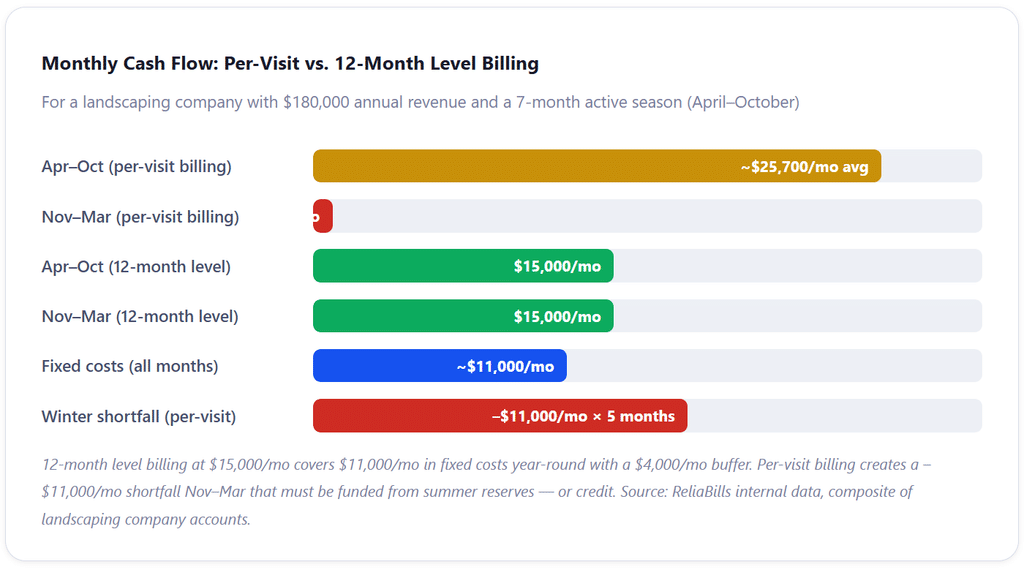
As Westport Financial’s accounting guide for landscaping companies puts it directly: “Cash flow is the top reason landscaping companies fail. Not because they are unprofitable. Because they run out of cash in February, and the books never warned them.” The business is profitable on paper across the full year; the problem is that the profit arrives in a seven-month window while the expenses, insurance, equipment loans, storage, administrative salaries, vehicle payments, keep running on a twelve-month clock.
The seasonal billing problem compounds further because landscaping businesses are actually running four distinct service programs simultaneously: spring cleanups, summer maintenance, fall leaf removal, and (in northern markets) winter snow management. Each program has different pricing, different crew configurations, and different billing logic. Per-visit invoicing across all four programs creates an administrative workload that grows with every client added to the route, and that breaks down completely when weather disrupts the schedule.
The Three Seasonal Billing Models: Honest Assessment of Each
There are three fundamentally different ways to structure billing for a landscaping company, and each produces dramatically different cash flow, administrative burden, and client experience outcomes. Most guides describe all three without telling you which one to actually build toward. Here’s the honest version.
📋 Per-Visit Billing
Invoice after each service visit. Bill exactly what was delivered when it was delivered. Revenue follows the service calendar precisely.
Most Common → Worst for Cash Flow
📅 Flat Monthly (Active Season)
Charge a flat monthly amount during the service season. Same bill every month from April through October regardless of visit count.
Good Start → Doesn’t Solve Winter
🗓️ 12-Month Level Billing
Annual contract total divided into 12 equal monthly payments. Billing continues through winter. Decouples payment from service delivery completely.
Best for Cash Flow → The Target Model
Why 12-Month Level Billing Changes Everything
The math is straightforward. A residential client whose annual lawn care package is priced at $2,400, covering 28 mowing visits, spring cleanup, fall cleanup, and bed edging, pays $200 per month from January through December rather than $300–$400 per month from April through October and nothing in winter. For the client, the monthly amount is lower and more predictable. For your company, revenue arrives every month of the year.
Data from the National Association of Landscape Professionals (NALP) suggests that companies using annual contracts with level billing retain 10–20% more customers than those using seasonal billing. The behavioral reason is clear: a client on a 12-month billing cycle can’t quietly stop service by just not calling to renew. Canceling requires an active decision, which most satisfied clients don’t make.
The key selling point for clients is easy to articulate: “Our annual program costs $2,400. You can pay that in full upfront at a 5% discount, or we spread it across 12 equal monthly payments of $200. Either way, there’s nothing to track or approve month to month, it’s handled automatically.” Most clients prefer the monthly option. Many specifically prefer it because it fits the mental model of how they already pay for every other recurring service in their life.
What Automated Billing Looks Like Across the Full Year
🌱 Spring: March – May
Reactivate paused accounts. Spring cleanup billed as one-time add-on. Collect authorization for new annual contracts. 12-month billing runs continuously.
Season Start
☀️ Summer: June – August
Peak service delivery. Monthly billing running. Add-on services (mulch, irrigation, pest) billed as one-time charges alongside recurring invoices.
Peak Revenue
🍂 Fall: September – November
Fall cleanup billed as add-on. Renew or upsell annual contracts for next year. Collect pre-season deposits for spring installation projects.
Season Wind-Down
❄️ Winter: December – February
12-month billing continues unchanged. Snow removal billed per event. Card expiry alerts sent. Spring renewal communications begin in February.
Level Billing Active
How Automated Seasonal Billing Works: The Complete Workflow
Setting this up correctly is a one-time configuration exercise. The workflow below describes what a properly automated seasonal billing system does across a full contract year, and what your billing software needs to handle at each step.
1. Annual Contract Scoping and Pricing
Before any billing setup, price the full annual service package as a single total. Calculate all active-season visits, seasonal cleanups, and any included services. Price that package as an annual total, then present it to the client as either a lump-sum option (with a 5–10% prepay discount) or 12 equal monthly installments. This is the moment where billing structure becomes a sales tool: the $200/month option closes more clients than a $300-in-season quote because the upfront cost feels lower, even though the annual total may be the same or higher. Get this number documented in a signed service agreement before any billing begins.
2. Client Profile Setup and Payment Authorization
Enter each client into your billing system with their service address, contract total, billing frequency, start date, and payment method. Collect digital authorization to charge the stored card or bank account automatically on each due date, this authorization is what enables true Auto Pay rather than a portal that requires client action each month. For ACH bank debit, Nacha rules require documented written or electronic authorization. For card-on-file charging, card network rules require explicit consent. Get both in the service agreement. For installation and hardscape projects, configure a deposit invoice (40–50% of total) that generates immediately upon contract signing, separate from the recurring maintenance billing profile.
3. Recurring Invoice Configuration
Set up the monthly recurring invoice in your billing system: amount, billing date, payment method, and notification settings. For 12-month level billing, this invoice runs every month of the year without interruption, no pause in winter, no rebuild in spring. For seasonal-only billing (Model 2), configure the start month and end month, with the understanding that you’ll need a spring reactivation process. Add-on services, spring cleanup, mulch delivery, aeration, are configured as separate one-time invoices that can be issued alongside the recurring invoice in the same billing cycle without disrupting it. Recurring billing software that supports both recurring and one-time charges in the same client profile handles this cleanly; platforms that separate them require manual tracking.
4. Automatic Charge Processing and Receipt Delivery
On the billing date, the system charges the stored payment method automatically and delivers a receipt to the client. No staff action is required. ACH debits typically settle in 1–2 business days; card payments settle next day. The payment posts to the client’s account in the billing dashboard in real time. At any point, you can see which clients have paid, which are processing, and which need attention, without manual reconciliation. For weather-disrupted weeks where a mowing visit was skipped or delayed, the monthly charge processes unchanged, because the billing model is tied to the service program, not the individual visit. This is the key operational relief that flat monthly billing provides.
5. Failed Payment Handling and Dunning Sequences
When a payment fails, expired card, insufficient funds, account change, the system catches it immediately, retries on a defined schedule (typically at 3 and 7 days after failure), and notifies the client to update their payment information through the customer portal. A dunning sequence handles escalating reminders professionally, without requiring you to make uncomfortable calls. Most failed payments resolve through the retry cycle without any staff involvement. The small percentage that don’t surface clearly in the billing dashboard for follow-up.
6. Spring Reactivation (for Paused or Seasonal Billing)
If you’re using seasonal-only billing rather than 12-month level billing, spring reactivation is the highest-risk step in the annual billing cycle. Companies that manually rebuild client billing each spring lose accounts, miss billing dates, and spend 2–3 weeks in March that should be going toward route planning and equipment prep. Proper billing software allows bulk reactivation, resuming paused subscriptions with stored payment methods intact, updated start dates, and automated renewal notifications to clients, in a single operation rather than account-by-account rebuilds. Client history, payment methods, and billing profiles carry over from the prior season without re-entry.
7. Annual Contract Renewal and Price Adjustment
Each fall, before the contract year ends, send renewal notices to clients with updated pricing for the coming season. Annual price increases of 3–8% are standard and expected in the industry, clients who receive advance notice and a clear explanation accept them far more readily than clients who discover a price change on their first invoice of the new season. Configure the updated amount in the billing profile effective with the next contract year. Clients who don’t renew should be closed out cleanly in the billing system before the new season starts, not discovered missing in April when you’re trying to fill the spring schedule.
Real-World Use Cases: What Automated Billing Looks Like in Practice
Residential Lawn Care Routes
The core residential lawn care use case, weekly or bi-weekly mowing plus seasonal services, maps almost perfectly to the 12-month level billing model. A company running 80 residential accounts at an average contract value of $2,000/year generates $160,000 in annual revenue. Under per-visit billing, that revenue lands in a 7-month window and the company is managing $12,000–$15,000 in outstanding receivables at any given time during peak season. Under 12-month level billing with Auto Pay, the same $160,000 arrives as $13,333/month across all 12 months, with outstanding receivables near zero because payments process automatically before the service month begins.
The administrative impact is equally significant. The 2025 NALP benchmark report found that landscape companies with automated recurring billing collected invoices an average of 11 days faster than those using manual QuickBooks invoicing, and on $160,000 in annual revenue, that 11-day difference represents roughly $4,800 in working capital freed up at any given time.
Commercial Maintenance Contracts
Commercial accounts, office parks, HOAs, retail centers, apartment communities, almost universally expect monthly billing with net-30 payment terms. The billing automation challenge here isn’t persuading clients to accept level billing (they prefer it) but rather managing the invoice generation, approval routing, and payment follow-up across dozens of accounts simultaneously. Installment billing logic works especially well for commercial contracts where the annual value is high and the relationship is long-term: a $24,000/year commercial maintenance contract billed as 12 monthly installments of $2,000 is easier to manage, easier to collect, and easier to renew than a variable monthly invoice that the client’s accounts payable department has to approve differently each month.
Snow and Winter Services
Snow removal introduces a billing wrinkle that most seasonal billing guides skip entirely: per-event versus seasonal contract billing. Per-event billing (charge after each snow removal service) preserves flexibility but creates unpredictable revenue and high administrative volume in bad winters. Seasonal flat-rate contracts (charge a fixed monthly amount from October through March regardless of event count) smooth revenue but create risk exposure if snowfall significantly exceeds the priced amount. The cleanest hybrid is a seasonal contract with a per-inch or per-event cap: flat monthly rate covers the first X events, additional events billed as add-ons. Billing systems that handle both recurring base charges and one-time add-ons in the same client profile make this hybrid approach manageable at scale.
Key Benefits of Automating Seasonal Billing
💵 Year-Round Cash Flow Stability
Level billing converts a 7-month revenue cycle into 12 equal deposits. Fixed costs get covered without drawing on credit lines or depleting summer reserves.
🔄 No Manual Billing Restarts Each Spring
Billing profiles, payment methods, and history persist across seasons. Spring reactivation is a dashboard action, not a weeks-long rebuild of client invoicing from scratch.
⛈️ Weather-Proof Revenue
Flat monthly billing decouples payment from individual visit count. A rained-out week or a drought-pause doesn’t generate billing disputes or revenue gaps.
📉 Lower Accounts Receivable Balance
Auto Pay with stored payment methods consistently pushes outstanding A/R to near zero. The 2025 NALP benchmark found automated recurring billing collected invoices 11 days faster than manual processes.
👥 Better Client Retention
Clients on annual contracts cancel less. NALP data shows 10–20% higher retention for level-billed clients because canceling requires an active decision rather than simply not calling to renew.
⏱ Hours Recovered Every Month
Automated invoicing eliminates weekly or per-visit invoice creation, manual payment follow-up, and the reconciliation headaches that come from weather-adjusted billing.
Key Risks and Things to Watch For
⚠️ Client Pushback on Winter Payments
Some clients resist paying in January for service they won’t receive until April. This isn’t primarily a pricing objection, it’s a framing problem. Present the annual contract as a 12-month membership program priced at $X/month, not as “paying for winter when there’s no service.” The framing shift matters more than the contract terms.
⚠️ Card Expiry Between Seasons
A card enrolled in October may expire in February. Without proactive expiry alerts (ideally 30 days before expiration), the winter billing cycle fails silently and you discover it in March when a client calls about missing spring scheduling, not about an overdue payment. Configure card expiry notifications in your billing platform.
⚠️ Missing Authorization for Auto Pay
Charging a client’s card or bank account without explicit written authorization creates chargeback exposure and potential liability. Your service agreement must include Auto Pay authorization language for every client enrolled in recurring automatic charging. Paper or digital signature; verbal consent is not sufficient.
⚠️ Scope Changes That Don’t Trigger Billing Updates
A client who adds irrigation maintenance mid-season or scales back to bi-weekly mowing needs their billing profile updated before the next cycle runs, not after. Build a standing policy that any scope or schedule change requires a billing update confirmation before the work changes. Verbal scope changes that don’t make it into the billing system are a common source of end-of-season disputes.
⚠️ Not Separating One-Time and Recurring Charges
Spring cleanup, mulch delivery, and irrigation blowouts are one-time charges, not part of the monthly recurring amount. Folding them into the monthly invoice without clear line-item labeling causes clients to assume the monthly amount has increased permanently. Bill add-ons as separate line items on the same invoice or as separate one-time invoices issued alongside the regular billing cycle.
⚠️ Inconsistent Contract Start Dates Across the Route
If 40 clients have annual contracts that start and end in April and 40 more start in January, you’re managing two distinct renewal cycles simultaneously, doubling your administrative effort at renewal time. Standardize contract start dates for new clients so the annual renewal workflow runs once, not twice or more throughout the year.
Comparison: Billing Structures for Landscaping Companies
| Billing Structure | Winter Cash Flow | Weather Sensitivity | Admin Burden | Client Retention | Best For |
|---|---|---|---|---|---|
| Per-Visit Invoicing | Zero revenue | High, every delay creates billing confusion | Highest, invoice per visit | Lowest, easy to not renew | Solo operators with fewer than 10 clients |
| Monthly (Active Season Only) | Zero revenue | Low, flat amount regardless of visits | Moderate, must restart each spring | Moderate | Companies starting to modernize billing |
| 12-Month Level Billing | Full monthly revenue year-round | None, payment tied to contract, not visits | Lowest, billing never stops or restarts | Highest, annual commitment structure | Most landscape maintenance operations |
| Annual Prepay | Best, full year upfront | None | Lowest | High | Premium clients who prefer lump-sum simplicity |
| Per-Event (Snow) | Variable, depends on weather | Highest, revenue swings with snowfall | High during active periods | Moderate | Snow-only operations or as add-on billing |
What I Got Wrong at First: Common Mistakes in Landscaping Billing Automation
These mistakes appear in the first or second season of implementing automated billing. They’re predictable, avoidable, and worth knowing before you launch.
Mistake #1: Trying to automate per-visit billing instead of restructuring the model
The most common first attempt at automation is setting up software to generate invoices automatically after each service visit. The billing becomes faster and more consistent, but the underlying problem, revenue tied to individual visits, winter cash gap, weather-driven billing confusion, doesn’t improve. Automation works on top of a billing structure; if the structure is wrong, automation just delivers the wrong thing more efficiently. The first decision has to be the billing model, not the software.
Mistake #2: Pausing recurring billing in winter instead of running level billing year-round
The intermediate move most companies make when they discover flat monthly billing: they set up a recurring invoice for April through October and pause it in November. This feels like automation but still creates the winter revenue gap, it just requires fewer manual steps to restart in spring. The actual solution is configuring the contract as a 12-month level billing profile that never pauses. The service pauses; the billing does not. This requires a clear explanation at contract signing, but it’s the only structure that actually solves the winter cash problem.
Mistake #3: Not getting written Auto Pay authorization before the first charge
Running flat monthly billing requires storing a client’s payment method and charging it automatically each month. Clients who receive an automatic charge they didn’t explicitly authorize respond with chargebacks, even if they owe the money and even if the charge amount is correct. The authorization language must be in the service agreement, signed before the first automatic charge runs. “They agreed verbally” or “they knew we would charge them” does not satisfy card network or Nacha requirements. This is the most expensive compliance mistake to fix after the fact.
Mistake #4: Mixing add-on charges into the monthly recurring invoice amount
When a spring cleanup is included in April’s monthly invoice as a higher-than-usual amount, without a clear line item, clients frequently assume the monthly rate has permanently increased. This generates calls, disputes, and eroded trust in the billing relationship. Keep the recurring monthly amount constant throughout the contract year. Issue add-on services as separate line items on the same invoice or as separate one-time invoices that are clearly labeled as non-recurring charges. Predictability is the entire value proposition of level billing; surprising clients with variable amounts destroys it.
Mistake #5: Rebuilding client billing from scratch each spring
Companies that cancel their recurring invoices in November and recreate them in March are doing 2–3 weeks of preventable administrative work each spring, at exactly the moment when route planning, equipment prep, and crew hiring demand the most attention. Billing software that supports pause-and-resume on subscriptions (rather than cancel-and-rebuild) preserves client history, payment methods, and profile data intact across the seasonal gap. If your current software requires rebuilding each spring, that’s the reason to evaluate alternatives, not a feature of seasonal billing that you have to accept.
How to Get Started: Setting Up Automated Seasonal Billing
Decide on your billing model before touching any software
Write down which billing model you’re moving to, flat monthly (active season), 12-month level billing, or annual prepay, before evaluating any software. The model determines what features you need, which clients require a new service agreement, and what the transition communication looks like. For most maintenance companies with an established client base, 12-month level billing is the right target. For newer operations still building the route, flat monthly seasonal billing is a reasonable first step that moves you off per-visit invoicing.
Update your service agreement with contract language and Auto Pay authorization
Your standard service agreement needs three things: the annual contract total, the monthly payment amount and billing date, and explicit written authorization to charge the stored payment method automatically. For existing clients you’re transitioning to level billing, send an updated agreement in October or November with the new contract structure for the coming year. Frame it as a pricing simplification: same annual value, same services, predictable monthly payment. Most established clients accept this without friction when given enough lead time and a clear explanation.
Choose billing software that handles recurring billing, Auto Pay, and seasonal pause/resume
Your billing platform needs to generate recurring invoices on schedule, process Auto Pay charges from stored payment methods, send automated reminders and receipts, handle failed payment retry logic, and support both pause/resume (for seasonal models) and continuous 12-month billing (for level billing models). ReliaBills supports all of these workflows for service businesses, with recurring billing configured at the client profile level and Auto Pay enrollment built into the onboarding flow. Review the full features overview for payment method support and configuration options.
Migrate clients in batches, starting with your most reliable payers
Don’t try to convert your entire client roster to the new billing model in a single week. Start with your 20–30 most reliable, long-standing clients, the ones whose relationships are strong enough to absorb a billing structure conversation. Use their feedback to refine the contract language and the client communication approach before rolling it out to the full route. Clients who are already accustomed to paying on time almost always accept level billing readily; they often prefer the predictability of a fixed monthly amount.
Set up card expiry alerts and failed payment workflows before the first cycle runs
Configure your billing system to send card expiry notifications 30 days before expiration and to auto-retry failed payments at 3 and 7 days after the initial failure. Set the client notification for failed payments to direct them to your customer portal to update their payment information themselves, so the resolution happens without a phone call to your office. These two configurations prevent the majority of collection issues before they become problems.
Communicate the change to clients before the first automated charge
Send every client an email at least 7–10 days before the first automatic charge under the new billing structure. Explain what will be charged, when, from which account or card, and where they can view their account or update their payment information. Even clients who signed the new agreement benefit from the reminder; the email reduces inbound calls and prevents surprise chargebacks. After the first cycle runs cleanly, your monthly billing involvement drops to reviewing the exception report and handling occasional payment updates, usually under an hour per week.
Frequently Asked Questions
1. What is automated seasonal billing for landscaping companies?
Automated seasonal billing is the practice of structuring contracts and billing systems so invoices generate and payments collect automatically on schedule, without manual creation, seasonal restarts, or weather-driven adjustments. The most effective version is 12-month level billing: annual contract total divided into 12 equal monthly payments running continuously year-round.
2. How do I get clients to accept paying for landscaping in winter?
Frame the annual contract as a membership program at a flat monthly rate, not as “paying for winter.” The client is paying for the full-year service program at a predictable monthly amount, like internet or insurance. Offer a 5–10% prepay discount for annual upfront payment. Most long-standing clients accept level billing readily when given adequate lead time and a clear explanation of the total annual value.
3. How do I handle weather-related service delays in an automated billing system?
Move away from per-visit billing entirely. Under flat monthly or 12-month level billing, weather delays don’t create billing complications, payment is tied to the monthly program, not individual visits. A rained-out mowing day gets rescheduled; the bill doesn’t change. This is the primary operational relief flat billing provides over per-visit invoicing.
4. Do I need separate billing for add-on services like spring cleanup?
Yes. Keep add-on charges clearly separate from the recurring monthly amount. The value of level billing is a predictable monthly total; mixing add-ons in without labeling generates client confusion and calls. Issue add-ons as distinct line items on the same invoice (labeled as one-time charges) or as separate invoices alongside the regular billing cycle. Good billing software handles both recurring and one-time charges in the same client profile without disrupting the recurring schedule.
5. What authorization do I need from clients before charging automatically?
Explicit written authorization in the service agreement or a separate payment authorization form, signed before the first charge. For ACH, Nacha rules require written or verifiable electronic authorization. For card charges, card network rules require explicit cardholder consent. Verbal authorization is insufficient for either method. This is the most critical compliance step in setting up recurring Auto Pay billing.
6. What’s the best billing frequency for landscaping maintenance contracts?
Monthly billing is the standard for maintenance contracts, predictable for both parties, aligned with monthly expense cycles, and dramatically simpler than per-visit invoicing. For high-value commercial accounts or loyal residential clients, annual prepay with a discount eliminates collection risk entirely. For snow or event-based services, a seasonal flat-rate contract with per-event caps for heavy-snowfall seasons provides the best balance of predictability and fairness.
7. How much does billing automation actually improve landscaping company cash flow?
The improvement comes primarily from the billing model change, not just automation. Switching from per-visit to 12-month level billing eliminates the winter revenue gap entirely. For a company with $180,000 annual revenue and $11,000/month fixed costs, that’s the difference between drawing on credit lines in winter and covering fixed expenses from recurring billing revenue with a surplus. The 2025 NALP benchmark found automated recurring billing collected invoices 11 days faster than manual processes, translating to roughly $5,400 in freed working capital year-round on $180K in revenue.
The Bottom Line
The landscaping companies that solve the winter cash flow problem aren’t the ones with the best crews or the most efficient routes. They’re the ones that restructured their billing first. Moving from per-visit invoicing to flat monthly billing removes the weather dependency. Moving from seasonal billing to 12-month level billing removes the winter gap entirely. Automating the collection side, Auto Pay, stored payment methods, retry logic, card expiry alerts, keeps the revenue arriving reliably without requiring any manual intervention between seasons.
None of this requires expensive software or a complete business overhaul. It requires one policy decision on billing model, a service agreement update, one configuration afternoon in your billing platform, and a clear communication to clients before the first automated charge runs. The business that emerges from that setup runs with less financial stress in February, less administrative overhead in March, and a crew retention profile that compounds every year.
Recent Articles:
- Recurring Billing for Childcare: Set Up Weekly and Monthly Tuition Payments
- How to Automate Collections for Security Service Agreements and Contracts

Brant Pallazza is the Founder and President of ReliaBills, an invoicing and recurring billing platform built to help small businesses secure predictable cash flow. With over 20 years of experience in direct response marketing and e-commerce leadership, including a 13-year tenure managing over $500 million in gross sales at Digital River. Brant writes actionable guides on automated billing, payment processing, and scaling SMBs.