
Modern businesses are rapidly shifting toward automated payment systems as they look for ways to improve efficiency, reduce manual administrative work, and maintain stable cash flow. As digital transactions become standard across industries, automation is now a core part of how companies manage billing and payments. This shift is driven by customer expectations for convenience and faster payment experiences. It also helps businesses reduce operational friction and human error in financial processes.
Despite their widespread use, the terms Auto Pay and recurring billing are often confused or treated as if they mean the same thing. In reality, they represent two different layers of the billing process. One focuses on payment collection, while the other focuses on invoice generation and billing structure. Understanding this distinction is essential for setting up an efficient financial workflow.
Understanding the difference between auto pay vs recurring billing is important for businesses that want to avoid payment delays, reduce billing errors, and choose the right automation setup. Many companies unknowingly mix the two concepts, which can lead to confusion in accounting and customer communication. This guide breaks down both systems in detail and explains how they function individually and together. The goal is to help businesses make more informed decisions about their billing infrastructure.
What Is Auto Pay?
Auto Pay is a payment feature that allows customers to authorize a business to automatically charge their preferred payment method. Once enabled, payments are deducted without requiring any action from the customer each billing cycle. This creates a seamless payment experience that removes the need for manual intervention. It is commonly used in services that require consistent monthly or periodic payments.
This system is commonly used for subscriptions, memberships, utilities, and other repeat services. Customers typically enter their credit card, debit card, or bank account details and approve automatic deductions based on agreed terms. The authorization process is usually done during sign up or checkout. Once approved, the system takes over the payment execution process.
The main purpose of Auto Pay is to ensure payments are made on time without relying on manual effort. This reduces the risk of missed payments, late fees, and service interruptions. For businesses, it improves cash flow stability and reduces time spent on payment follow ups. It also minimizes the need for collection reminders.
Auto Pay also improves customer experience because it removes the need to remember due dates or manually process payments each time. It creates a predictable and convenient payment flow for both businesses and customers. Many users prefer it because it reduces stress related to billing deadlines. Overall, it supports a frictionless financial experience.
What Is Recurring Billing?
Recurring billing is a billing system that automatically generates invoices at scheduled intervals. These intervals can be weekly, monthly, quarterly, or annually depending on the business model. It is designed to support predictable and repeatable billing cycles. This makes it especially useful for subscription-based businesses.
This system is widely used in subscription-based industries where services are delivered continuously over time. Instead of manually creating invoices for each billing cycle, the system handles invoice generation automatically. Businesses define the pricing, schedule, and billing rules in advance. The system then follows these rules consistently.
Recurring billing focuses primarily on the invoicing side of the process. It ensures that customers receive accurate invoices on time, reflecting their subscription plan, usage, or agreed pricing structure. These invoices serve as official billing documents for each cycle. They also help businesses maintain clear financial records.
However, recurring billing does not always include automatic payment collection. In many cases, customers still need to pay the invoice manually unless Auto Pay or another automated payment method is connected. This is where confusion often arises in discussions about auto pay vs recurring billing. One handles billing creation, while the other handles payment execution.
Key Differences Between Auto Pay and Recurring Billing
- Auto Pay is focused on automatic payment collection, while recurring billing is focused on invoice generation and scheduling: Auto Pay ensures that money is deducted from the customer’s account without manual action once authorization is given. Recurring billing, on the other hand, ensures invoices are created and sent at the correct time based on a billing schedule. These two systems operate at different stages of the billing process but are often used together in modern businesses.
- Auto Pay requires explicit customer authorization, while recurring billing can operate without automatic payment approval: In Auto Pay, customers must actively agree to allow automatic deductions from their chosen payment method. Recurring billing does not require payment authorization because it only generates invoices, leaving payment completion optional or manual. This difference makes Auto Pay more payment-driven and recurring billing more invoice-driven.
- Auto Pay handles payment timing, while recurring billing manages billing cycles and invoice timing: Auto Pay determines when money is collected from customers based on due dates or scheduled triggers. Recurring billing determines when invoices are issued based on subscription terms or service agreements. This separation helps businesses structure both revenue collection and billing communication more effectively.
- Auto Pay reduces customer involvement in payments, while recurring billing reduces business involvement in invoicing: With Auto Pay, customers do not need to take action each billing cycle, which improves convenience and reduces missed payments. With recurring billing, businesses do not need to manually create invoices for every cycle, which saves time and reduces workload. Together, they streamline both sides of the billing process.
- Auto Pay directly reduces overdue payments, while recurring billing ensures consistent invoice delivery: Auto Pay minimizes late payments by automatically charging customers on time. Recurring billing ensures invoices are always generated and delivered without delay or human error. Both systems improve financial reliability but in different ways.
How Auto Pay Works
Auto Pay begins when a customer provides authorization to a business to charge their payment method automatically. This authorization usually includes agreeing to terms and selecting a payment source. Once activated, the system stores the payment details securely for future transactions. This setup ensures smooth processing in each billing cycle.
Once activated, the system processes payments on scheduled due dates without requiring customer input. The timing is based on the billing agreement, such as monthly subscription renewals or service fees. Payments are executed automatically in the background. Customers typically receive notifications after the transaction is completed.
Payments are automatically deducted from the selected method, such as credit cards, debit cards, or bank transfers. The system then updates transaction records and confirms payment status in real time. This helps maintain accurate financial records for both parties. It also reduces the risk of human error in payment handling.
This process helps businesses reduce payment delays and eliminates the need for manual reminders or collections. It also improves predictability in revenue tracking and financial planning. Businesses can forecast income more accurately. Customers benefit from uninterrupted service without worrying about deadlines.
How Recurring Billing Works
Recurring billing starts with businesses defining a billing schedule for their services. This includes selecting billing frequency, pricing structure, and invoice rules. The setup is usually done within a billing or accounting system. Once configured, it runs automatically in the background.
Once configured, the system automatically generates invoices based on the defined schedule. These invoices are then sent to customers through email or billing portals without manual intervention. Each invoice reflects the correct billing period and service details. This ensures consistency in customer communication.
Customers receive detailed invoices outlining charges, service periods, and payment instructions. Depending on the setup, they may need to complete the payment manually or through an integrated payment method. This step depends on whether Auto Pay is enabled. Without it, the customer initiates payment.
Recurring billing ensures consistency in invoicing and reduces errors caused by manual invoice creation. It is especially useful for businesses with large customer bases or subscription models. It also improves operational efficiency for finance teams. This makes scaling easier as the business grows.
Can Auto Pay and Recurring Billing Work Together?
Yes, Auto Pay and recurring billing are designed to complement each other and are often most powerful when used together. They address two separate parts of the billing process. One focuses on generating invoices, while the other focuses on collecting payments. This creates a complete automation cycle.
Recurring billing ensures that invoices are generated accurately and on time, while Auto Pay ensures that those invoices are paid automatically without customer action. This creates a fully automated billing cycle from start to finish. Businesses do not need to manually intervene in either step. This reduces workload significantly.
When both systems are combined, businesses reduce the risk of late payments, improve cash flow consistency, and significantly lower administrative workload. Customers also benefit from a smooth experience where both billing and payment are handled automatically. This improves trust and satisfaction. It also reduces support requests related to payments.
Benefits of Auto Pay
Eliminates late or missed payments by automating transactions.
Auto Pay ensures payments are processed on time without requiring customer action. This reduces the risk of forgotten payments or delayed transactions. It is especially useful for subscription-based services where consistency is critical.
Improves cash flow predictability for businesses.
Since payments are collected automatically, businesses can better forecast revenue. This stability helps with budgeting, planning, and operational decisions. Predictable cash flow also reduces financial uncertainty.
Reduces administrative workload for finance teams.
Businesses do not need to manually follow up on unpaid invoices or send reminders. This saves time and allows staff to focus on higher-value tasks. It also reduces operational costs related to payment collection.
Enhances customer convenience and experience.
Customers do not need to remember due dates or manually process payments. This creates a smoother and more seamless experience. It also reduces friction between the business and its customers.
Benefits of Recurring Billing
Automates invoice generation on a fixed schedule.
Recurring billing ensures invoices are created consistently without manual effort. This helps businesses maintain organized billing cycles. It also reduces the chance of missed billing periods.
Ensures consistent and predictable billing cycles.
Customers receive invoices at regular intervals, which improves transparency. This consistency helps both businesses and customers manage expectations. It also strengthens trust in the billing process.
Reduces manual invoicing errors and inconsistencies.
Automated systems reduce the risk of human mistakes such as incorrect amounts or missing invoices. This improves accounting accuracy and financial reporting. It also reduces time spent correcting billing issues.
Supports subscription-based and service-driven business models.
Recurring billing is ideal for businesses with ongoing services or memberships. It allows them to scale without increasing manual billing workload. This makes it essential for SaaS and subscription companies.
When Should Businesses Use Auto Pay vs Recurring Billing?
Use Auto Pay when you want automatic payment collection from customers.
This is ideal for businesses that want to reduce late payments and improve cash flow stability. It works best for subscription services and recurring charges. It ensures customers are billed without manual intervention.
Use recurring billing when you need structured invoice generation.
This is useful when businesses want to maintain formal billing records for each cycle. It works even if customers pay manually after receiving invoices. It is commonly used in service-based industries.
Use both systems together for full billing automation.
Combining Auto Pay and recurring billing creates an end-to-end automated system. Invoices are generated automatically and payments are collected automatically. This reduces administrative workload significantly.
Use manual invoicing for one-time or custom transactions.
Some businesses still need manual invoicing for unique projects or irregular services. This allows flexibility where automation is not suitable. It ensures accuracy for customized billing situations.
Common Mistakes When Using Auto Pay and Recurring Billing
Assuming Auto Pay and recurring billing are the same system.
Many businesses confuse the two, which leads to poor system setup. This misunderstanding can result in missed payments or missing invoices. Each system serves a different purpose in the billing process.
Not obtaining proper customer authorization for Auto Pay.
Businesses must always secure explicit consent before enabling automatic payments. Without authorization, payments may be disputed or reversed. This can also create legal and compliance issues.
Failing to set clear and consistent billing schedules.
Inconsistent schedules can confuse customers and disrupt cash flow. It may also lead to incorrect invoice timing or missed billing cycles. Clear scheduling is essential for both systems.
Poor communication about payment terms and expectations.
Customers need to understand when and how they will be billed. Lack of communication can lead to disputes or dissatisfaction. Transparency improves trust and reduces support issues.
Not integrating billing and payment systems properly.
When systems are disconnected, errors are more likely to occur. This can result in mismatched invoices and payments. Integration ensures smoother financial operations.
How Automation Enhances Both Systems
Automation improves both Auto Pay and recurring billing by connecting invoicing and payment workflows into a unified system. This reduces the need for manual input and improves accuracy across financial operations. It also helps eliminate delays caused by human intervention. Businesses can operate more efficiently at scale.
It also enables real time tracking of invoices and payments, helping businesses maintain up to date financial records. This reduces the risk of missed payments or accounting discrepancies. Teams can quickly identify outstanding balances. It also simplifies reconciliation processes.
Additionally, automation improves reporting and forecasting by providing consistent financial data. This helps businesses make better decisions regarding pricing, cash flow, and customer management. It also supports long term financial planning. Overall, it strengthens operational control.
Key Benefits of Understanding the Difference
- Improved billing strategy decisions for businesses: Understanding both systems helps businesses choose the right setup for their needs. This leads to better financial planning and operational efficiency. It also reduces costly mistakes in billing structure.
- Better cash flow management and forecasting: Knowing how payments and invoices are handled improves revenue predictability. Businesses can plan expenses and investments more accurately. This strengthens overall financial health.
- Reduced risk of overdue or missing invoices: Proper system setup ensures invoices are always generated and payments are collected on time. This reduces delays and improves financial stability. It also improves customer satisfaction.
- Enhanced customer billing experience:Customers benefit from smoother, more predictable billing processes. They experience fewer disruptions and less confusion. This improves long-term customer retention.
Common Use Cases
- Subscription-based SaaS businesses: These companies rely heavily on recurring billing and Auto Pay for predictable revenue. Automation helps them scale efficiently. It also reduces manual billing workload.
- Membership and service-based companies: Gyms, clubs, and online memberships often use both systems. This ensures members are billed consistently and payments are collected on time. It improves operational efficiency.
- Utilities and telecom providers: These industries depend on recurring billing cycles and automatic payments. Customers expect consistent monthly billing. Automation ensures accuracy and reliability.
- Freelancers and consultants with repeat clients: Recurring billing helps manage ongoing client relationships. It simplifies invoicing for long-term projects. Auto Pay can also reduce payment delays.
- Small businesses scaling their operations: As businesses grow, manual billing becomes inefficient. Automation helps them handle more customers without increasing workload. It supports long-term scalability.
How ReliaBills Supports Auto Pay and Recurring Billing
ReliaBills provides a complete billing and invoicing platform that helps businesses manage both invoicing and payment collection in one streamlined system. It is designed to reduce manual administrative work by automating key financial processes such as invoice creation, payment tracking, and customer billing management. This allows businesses to operate more efficiently while maintaining accurate and organized financial records. By centralizing billing functions, ReliaBills helps reduce errors and improve overall workflow consistency.
On the recurring billing side, ReliaBills enables businesses to automatically generate and send invoices based on predefined schedules such as weekly, monthly, quarterly, or annually. This ensures that customers are billed consistently and on time without requiring manual intervention from the business. It is especially useful for subscription-based models, service agreements, and repeat client billing. By automating invoice generation, businesses can maintain predictable revenue cycles and reduce the risk of missed or delayed billing.
With ReliaBills PLUS, businesses can take automation even further by enabling Auto Pay functionality along with advanced reporting and customer management tools. Auto Pay allows businesses to securely collect payments automatically, reducing late payments and improving cash flow stability. In addition, ReliaBills PLUS provides enhanced visibility into financial performance through detailed reporting and tracking features. This combination of recurring billing, Auto Pay, and automation tools helps businesses achieve greater efficiency, stronger financial control, and improved customer experience.
How to Create a New Recurring Invoice Using ReliaBills
Creating a New Recurring Invoice using ReliaBills involves the following steps:
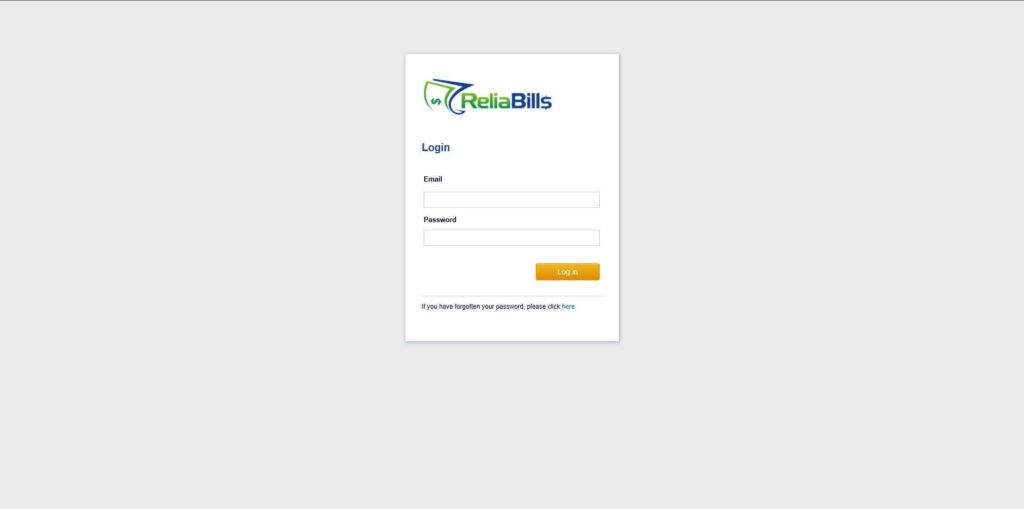
Step 1: Login to ReliaBills
- Access your ReliaBills Account using your login credentials. If you don’t have an account, sign up here.
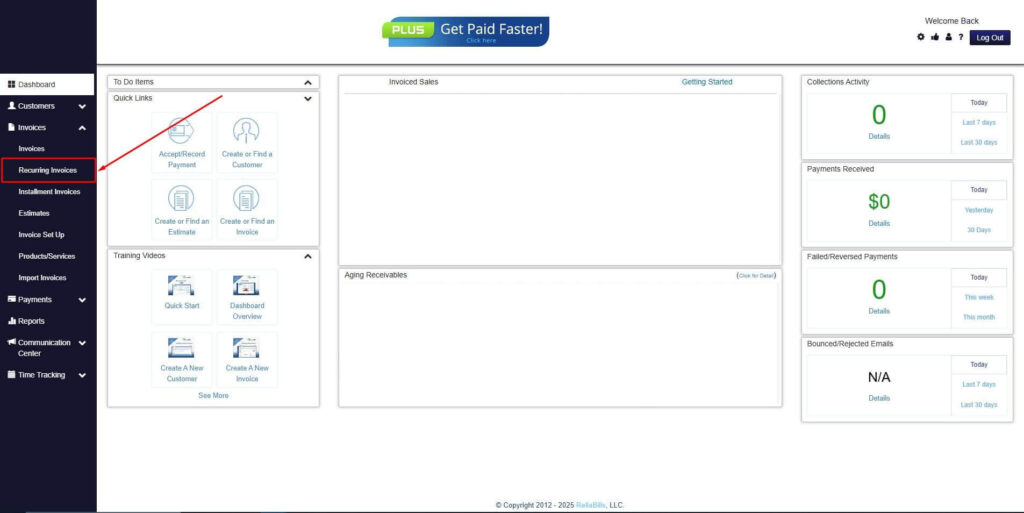
Step 2: Click on Recurring Invoices
- Navigate to the Invoices Dropdown and click on Recurring Invoices for an overview of the list of your existing customers.
Step 3: Go to the Customers Tab
- If you have already created a customer, search for them in the Customers tab and make sure their status is “Active”.
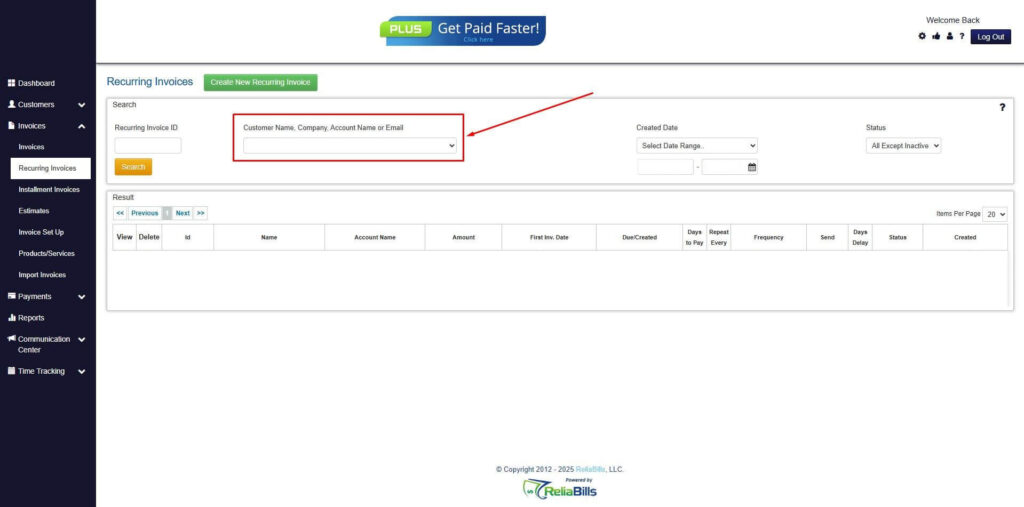
Step 4: Click the Create New Recurring Invoice
- If you haven’t created any customers yet, click the Create New Recurring Invoice to create a new customer.
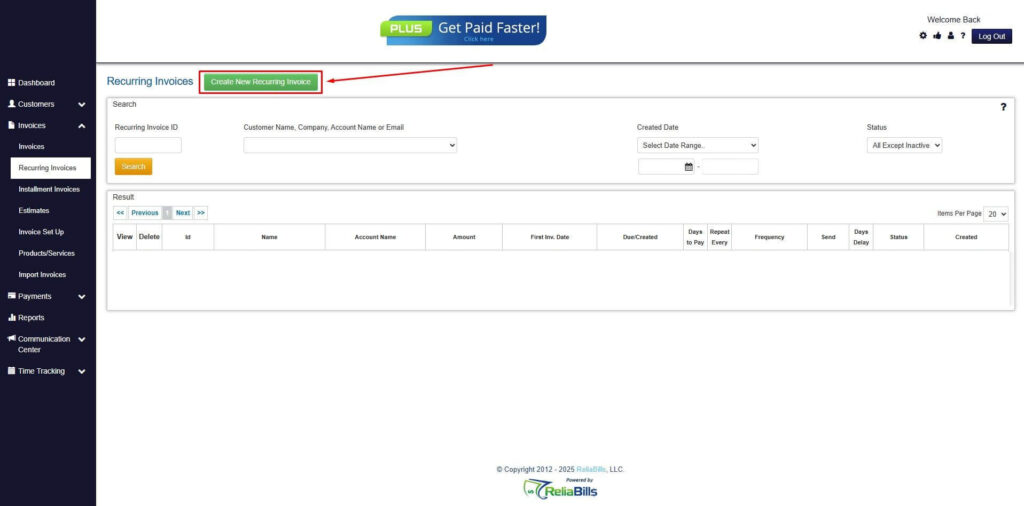
Step 5: Click on the “Click here” Button
- Click on the “Click here” button to proceed with the recurring invoice creation.
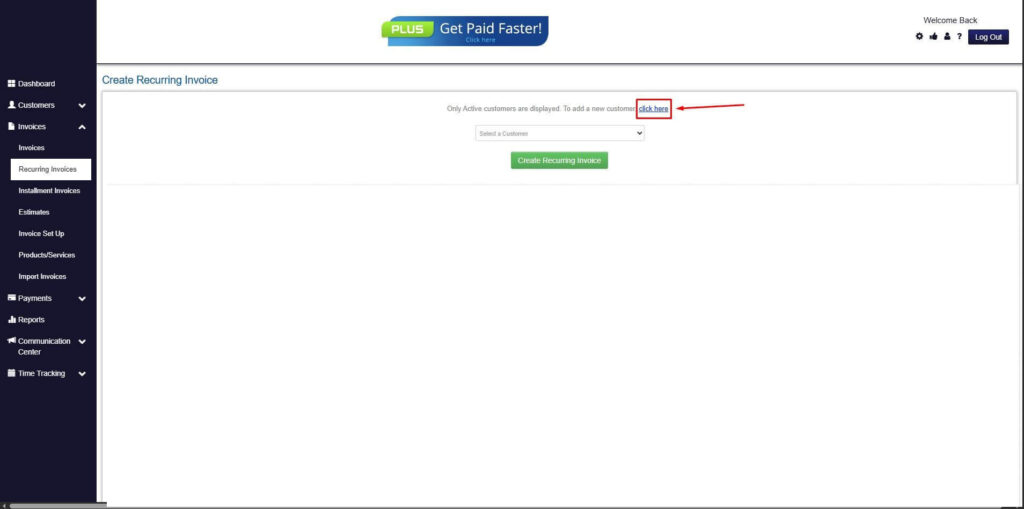
Step 6: Create Customer
- Provide your First Name, Last Name, and Email to proceed.
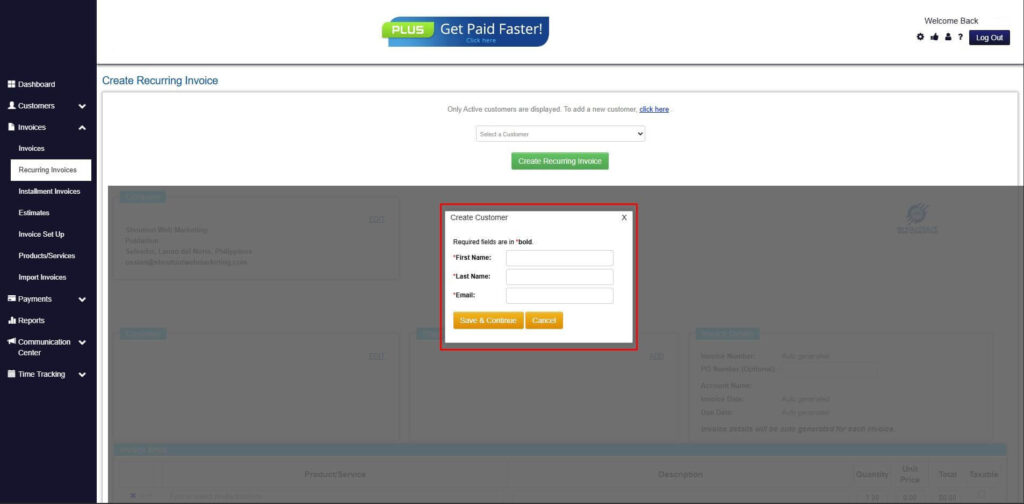
Step 7: Fill in the Create Recurring Invoice Form
- Fill in all the necessary fields.
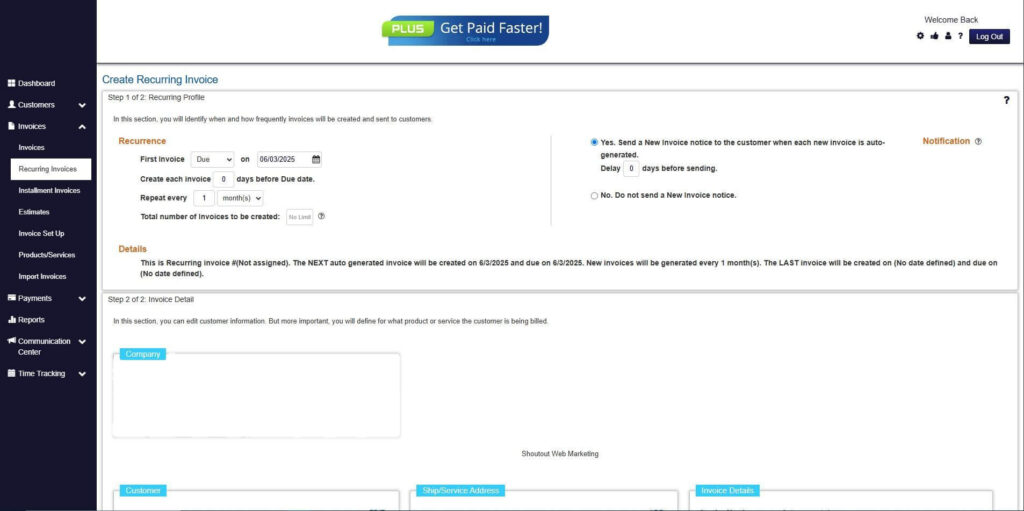
Step 8: Save Recurring Invoice
- After filling up the form, click “Save Recurring Invoice” to continue.
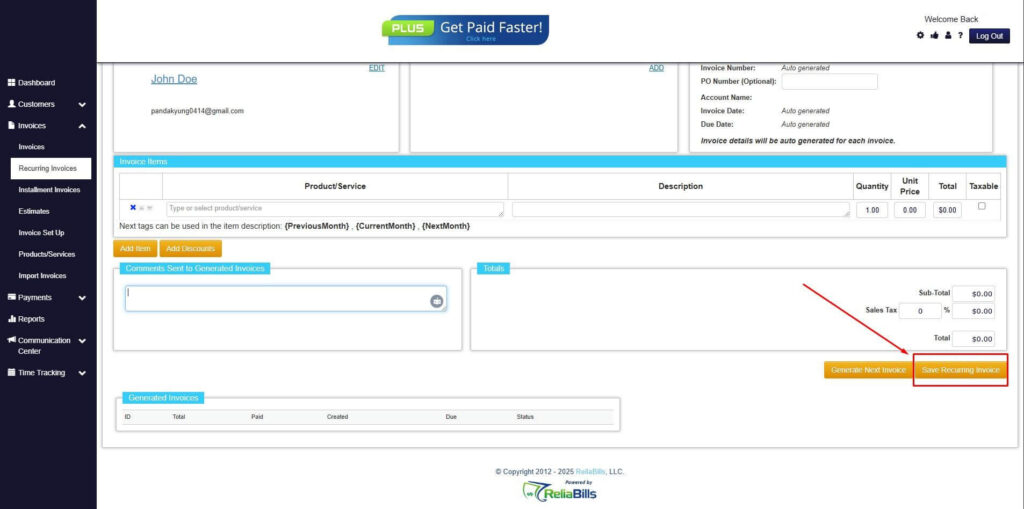
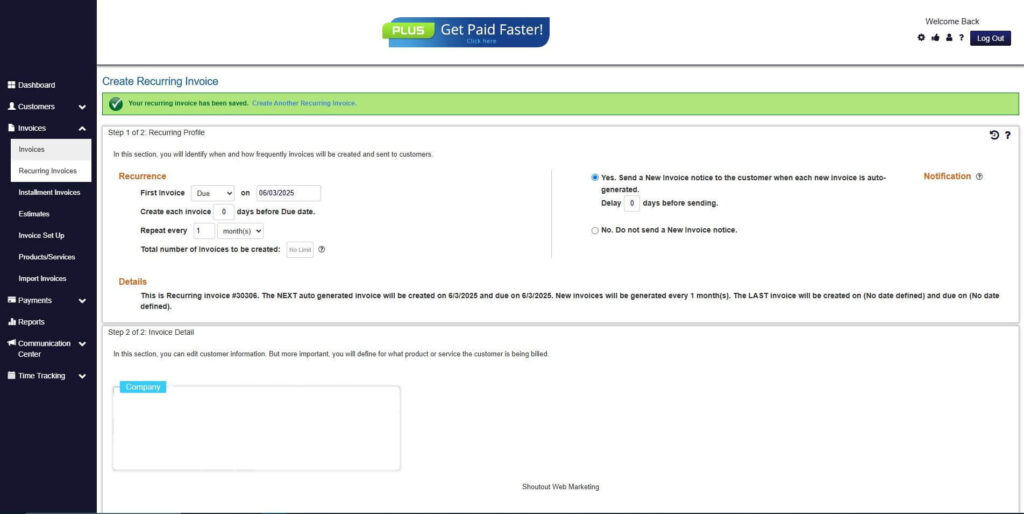
Step 9: Recurring Invoice Created
- Your Recurring Invoice has been created.
Frequently Asked Questions (FAQs)
1. What is the difference between Auto Pay and recurring billing?
Auto Pay is a payment method that automatically charges customers on a schedule. Recurring billing is a system that generates invoices on a schedule. One focuses on payment collection, while the other focuses on invoice creation. Both can work together but serve different functions.
2. Can Auto Pay and recurring billing be used together?
Yes, they are often used together for full automation. Recurring billing generates invoices, while Auto Pay ensures those invoices are paid automatically. This combination reduces manual work and late payments. It is commonly used in subscription businesses.
3. Which is better for reducing late payments?
Auto Pay is more effective for reducing late payments because it automates payment collection. Customers do not need to take action for each billing cycle. This minimizes delays caused by manual payment processing. It also improves cash flow consistency.
4. Does recurring billing include automatic payments?
Not necessarily, because recurring billing focuses on invoice generation. Payments may still need to be made manually unless Auto Pay is enabled. Some systems integrate both features together. However, they are technically separate functions.
5. How do businesses implement Auto Pay systems?
Businesses typically integrate payment gateways that support automatic deductions. Customers must first authorize the payment method. Once set up, the system processes payments automatically on scheduled dates. It requires secure handling of customer payment information.
Conclusion
Understanding the difference between auto pay vs recurring billing is essential for building an effective and scalable billing system. Auto Pay focuses on collecting payments automatically, while recurring billing focuses on generating invoices at scheduled intervals. Both systems solve different problems within the billing lifecycle.
Although they serve different purposes, they work best when combined to create a seamless end to end billing process. Businesses that use both systems benefit from fewer payment delays, reduced administrative workload, and improved financial predictability. Customers also experience a more convenient and reliable payment journey.
As more companies move toward automation, adopting the right mix of billing and payment tools is becoming a key factor in operational efficiency and long term business growth.