

Small business owners often wear multiple hats, managing everything from operations to customer service and finances. One of the most time-consuming responsibilities is handling invoicing manually, which includes creating invoices, sending them, and tracking payments. These administrative tasks can quickly eat into valuable time that could be spent growing the business.
Manual billing and payment tracking not only reduce productivity but also increase the chances of delays and errors. When invoices are not sent on time or payments are not properly tracked, it can disrupt cash flow and create unnecessary stress. Over time, these inefficiencies can limit a business’s ability to scale effectively.
This is where invoice automation for small business becomes a game-changer. By automating repetitive billing tasks, business owners can save time, reduce errors, and focus on more strategic activities. Automation streamlines the entire invoicing process, making operations more efficient and manageable.
What Is Invoice Automation?
Invoice automation refers to the use of software to handle the creation, delivery, and tracking of invoices without manual intervention. It leverages predefined rules and templates to generate invoices automatically, ensuring consistency and accuracy. This eliminates the need for repetitive data entry and manual processing.
With automated systems, invoices can be scheduled and sent to customers instantly. Payments are tracked in real time, and invoice statuses are updated automatically as transactions occur. This provides businesses with a clear and up-to-date view of their financial activity.
Unlike manual or semi-automated processes, invoice automation minimizes human involvement in routine tasks. It ensures that billing operations run smoothly and efficiently, making it an essential tool for modern small businesses.
Why Time Management Is Critical for Small Business Owners
Limited resources and staff compared to larger organizations
Small businesses typically operate with fewer employees and tighter budgets. This means owners often handle multiple roles, from operations to finance. Efficient time management is essential to keep everything running smoothly without burnout.
Need to focus on revenue-generating activities
Business growth depends on activities like sales, marketing, and customer engagement. Spending too much time on administrative tasks takes away from these priorities. Automation helps shift focus back to revenue-driving efforts.
Impact of administrative inefficiencies on business growth
Inefficient processes can slow down operations and create unnecessary delays. This can lead to missed opportunities and reduced productivity. Streamlining workflows is key to maintaining steady growth.
Importance of streamlining repetitive tasks
Repetitive tasks such as invoicing and follow-ups consume valuable time. Automating these processes improves efficiency and consistency. It allows business owners to focus on strategic decision-making.
Challenges of Manual Invoicing
Manual invoicing requires significant time and effort, especially when managing multiple clients and transactions. Creating invoices from scratch and entering data manually can slow down operations. This becomes increasingly difficult as the business grows.
Human error is another major concern in manual processes. Mistakes in calculations, incorrect details, or missed invoices can lead to payment delays and customer dissatisfaction. Over time, these issues can impact the business’s reputation.
Tracking invoices and payments manually also lacks real-time visibility. Business owners may struggle to monitor which invoices are paid or overdue. This makes it harder to manage cash flow effectively.
How Invoice Automation Saves Time
Invoice automation simplifies invoice automation for small business by handling repetitive tasks automatically. Invoices are generated using predefined templates and schedules, eliminating the need for manual creation. This ensures consistency and saves valuable time.
Automated systems send invoices instantly to customers, reducing delays and improving efficiency. Payments are tracked in real time, and invoice statuses are updated automatically. This eliminates the need for manual monitoring and follow-ups.
Additionally, automation streamlines the entire billing workflow by integrating multiple processes into one system. From invoicing to payment tracking, everything is managed seamlessly. This allows business owners to focus on growth rather than administrative tasks.
Key Features of Invoice Automation Tools
Automated invoice generation and scheduling
Invoices are created automatically using predefined templates and schedules. This ensures consistency and eliminates manual data entry. It also helps maintain timely billing cycles.
Recurring billing for repeat customers
Recurring billing automates invoices for customers with ongoing services or subscriptions. This removes the need to create invoices repeatedly. It ensures consistent and predictable billing.
Auto-pay and integrated payment processing
Customers can pay invoices automatically through secure payment gateways. This speeds up payment collection and reduces delays. It also enhances customer convenience.
Payment reminders and notifications
Automated reminders notify customers about upcoming or overdue payments. This reduces the need for manual follow-ups. It improves on-time payment rates and cash flow.
Real-time tracking and reporting
Businesses can monitor invoice statuses and payment activity through dashboards. This provides instant visibility into financial performance. It supports better decision-making.
Integration with accounting and CRM systems
Invoice automation tools connect with other systems to synchronize data. This eliminates duplicate entries and reduces errors. It streamlines overall business operations.
The Role of Recurring Billing in Time Savings
Recurring billing plays a significant role in saving time for small businesses by eliminating repetitive invoicing tasks. Instead of creating invoices manually for each billing cycle, businesses can automate the process using predefined schedules. This ensures consistency and reduces workload.
Automated billing cycles are particularly useful for subscription-based or repeat customers. Invoices are generated and sent automatically, and payments can be collected without manual intervention. This simplifies payment tracking and reduces administrative effort.
In addition, recurring billing ensures a steady and predictable cash flow. With fewer manual steps involved, the risk of errors is minimized. This allows business owners to focus on strategic growth rather than routine billing tasks.
Best Practices for Implementing Invoice Automation
Standardize invoice templates and billing processes
Using consistent templates ensures accuracy and professionalism in invoicing. It also simplifies automation by creating uniform workflows. This reduces errors and improves efficiency.
Set up recurring billing for repeat transactions
Automating repeat invoices saves time and ensures consistency. It eliminates the need for manual intervention. This is especially beneficial for subscription-based businesses.
Enable auto-pay to reduce follow-ups
Auto-pay allows customers to pay automatically on due dates. This reduces the need for reminders and manual follow-ups. It also improves cash flow reliability.
Integrate invoicing with accounting systems
Connecting invoicing tools with accounting software ensures seamless data flow. This eliminates duplicate entries and reduces errors. It keeps financial records accurate and up to date.
Regularly review automation settings for accuracy
Periodic reviews help ensure that automation rules remain effective. This allows businesses to identify and fix any issues quickly. It ensures optimal system performance.
How Automation Improves Accuracy and Productivity
Automation significantly reduces human error in invoicing by standardizing processes. With fewer manual steps, the likelihood of mistakes decreases. This ensures more accurate financial records.
It also improves efficiency by handling repetitive tasks automatically. Business owners and employees can focus on more valuable activities. This increases overall productivity.
By freeing up time, automation allows businesses to allocate resources more effectively. Owners can focus on growth strategies and customer engagement. This leads to better business outcomes.
Key Benefits of Invoice Automation
- Saves time on administrative tasks: Automation handles repetitive invoicing processes without manual input. This significantly reduces the time spent on billing tasks. It allows business owners to focus on growth.
- Reduces billing errors and inconsistencies: Standardized workflows minimize mistakes in invoice creation and tracking. This ensures accuracy and reliability in financial records. It also improves customer trust.
- Speeds up invoice delivery and payment collection: Automated systems send invoices instantly and enable faster payments. This reduces delays in receiving revenue. It improves overall cash flow.
- Improves cash flow management: Timely invoicing and payments create a more predictable cash flow. Businesses can better plan expenses and investments. This supports financial stability.
- Enhances overall business efficiency: Streamlined processes improve operational performance across the organization. This makes it easier to scale as the business grows. It also reduces administrative burden.
Common Use Cases
- Freelancers and service-based businesses: Freelancers use invoice automation to bill clients quickly and accurately. It ensures timely invoicing and payment tracking. This reduces administrative workload.
- Subscription-based companies: These businesses rely on recurring billing to manage ongoing payments. Automation ensures invoices are sent consistently without manual effort. It simplifies payment tracking.
- Small retail and eCommerce businesses: Businesses with high transaction volumes benefit from automated invoicing. It ensures accurate billing and faster payment processing. This improves operational efficiency.
- Property and tenant billing: Property managers use automation to handle rent and recurring charges. This ensures timely invoicing and reduces manual work. It also improves record-keeping.
- Professional services (consulting, agencies): Service providers can automate invoicing for ongoing projects or retainers. This ensures consistent billing and accurate tracking. It also improves cash flow management.
How ReliaBills Helps Small Business Owners Save Time with Invoice Automation
Small business owners often spend hours each week managing invoices, tracking payments, and sending reminders manually. ReliaBills simplifies this process by automating invoice creation, delivery, and payment tracking in one centralized platform. This reduces administrative workload, saves time, and allows owners to focus on growing their business instead of managing repetitive tasks.
Recurring billing is a key feature that further streamlines operations by automatically generating invoices for repeat customers. With automated billing cycles and auto-pay options, businesses can ensure timely payments without constant oversight. This consistency not only saves time but also supports predictable cash flow and fewer missed payments.
For businesses that need advanced capabilities, ReliaBills PLUS offers enhanced automation, detailed reporting, and robust customer management tools. These features provide deeper insights into billing performance, optimize workflows, and help business owners manage multiple clients efficiently. With ReliaBills PLUS, small businesses can scale their operations while maintaining accuracy, productivity, and efficiency.
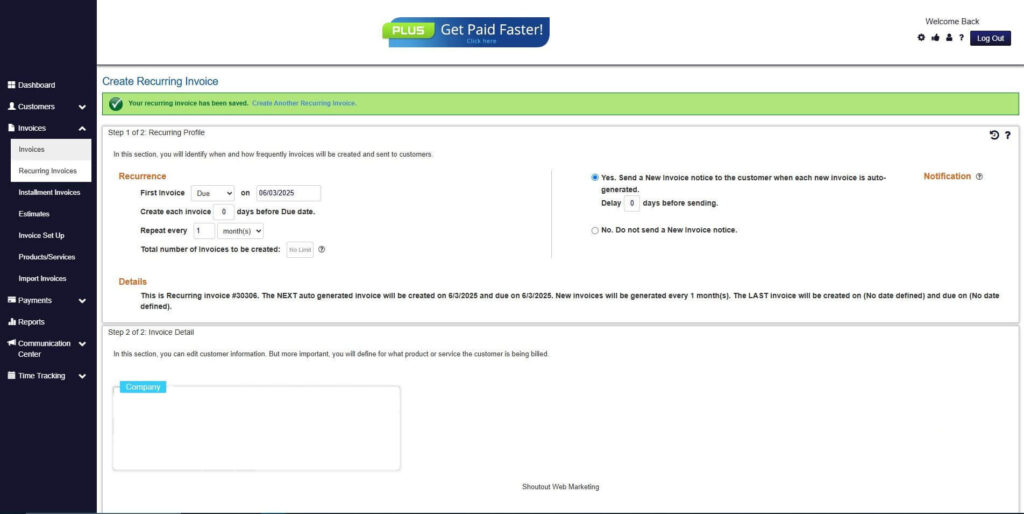
How to Create a New Recurring Invoice Using ReliaBills
Creating a New Recurring Invoice using ReliaBills involves the following steps:
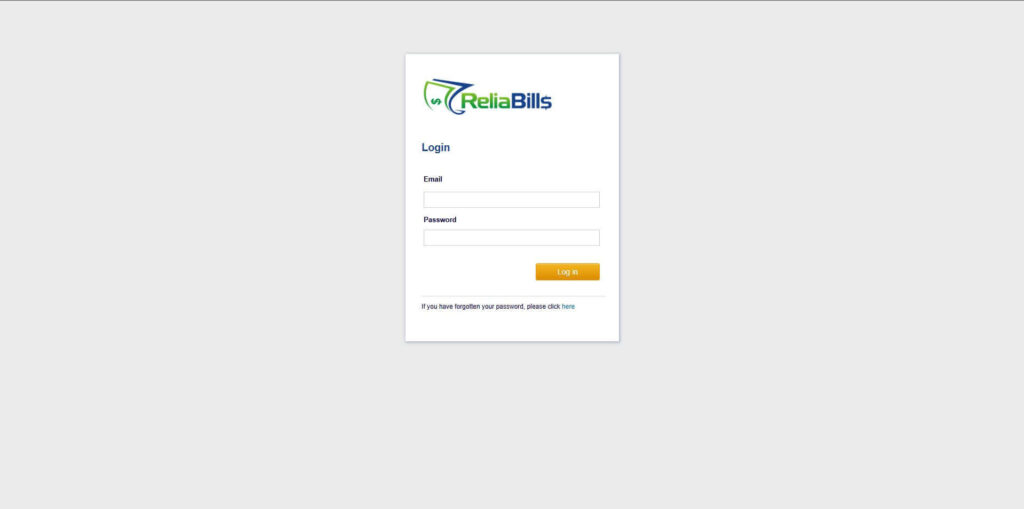
Step 1: Login to ReliaBills
- Access your ReliaBills Account using your login credentials. If you don’t have an account, sign up here.
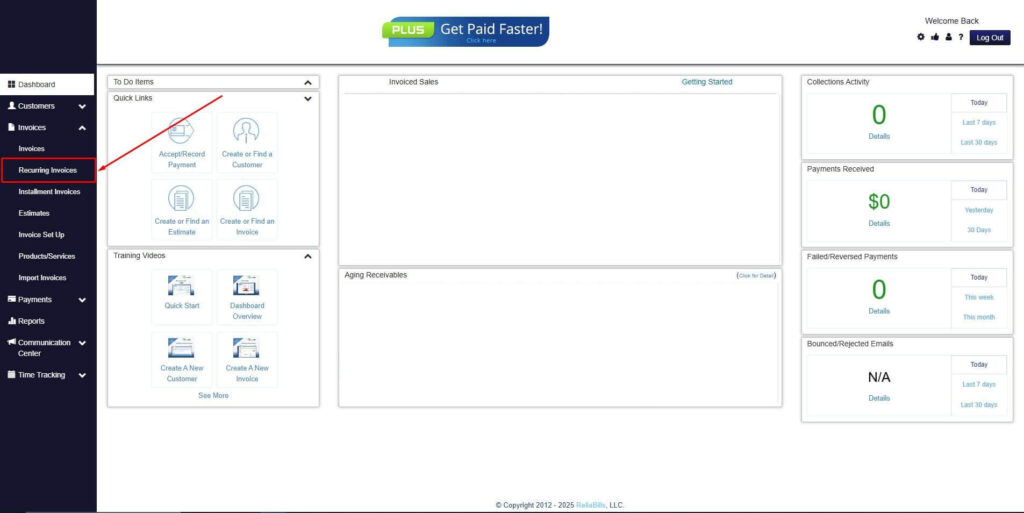
Step 2: Click on Recurring Invoices
- Navigate to the Invoices Dropdown and click on Recurring Invoices for an overview of the list of your existing customers.
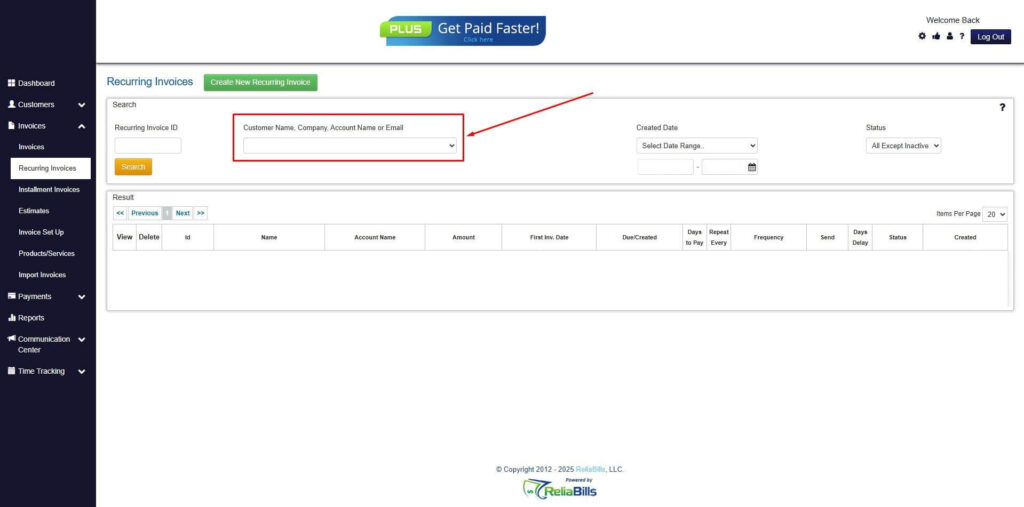
Step 3: Go to the Customers Tab
- If you have already created a customer, search for them in the Customers tab and make sure their status is “Active”.
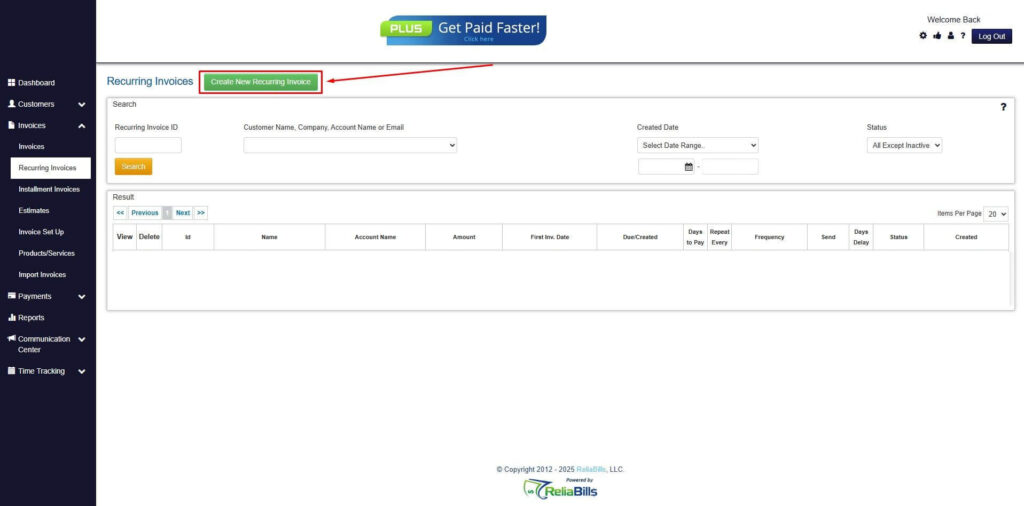
Step 4: Click the Create New Recurring Invoice
- If you haven’t created any customers yet, click the Create New Recurring Invoice to create a new customer.
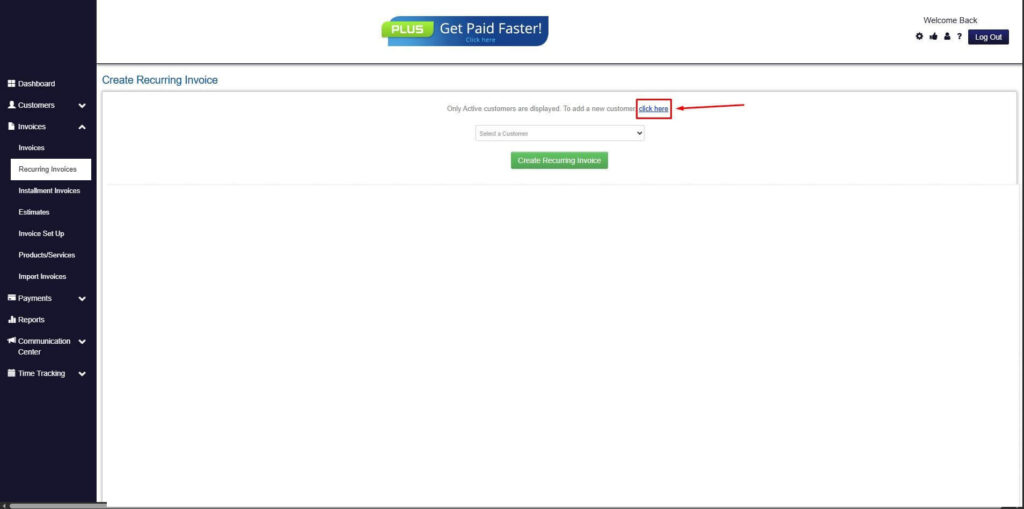
Step 5: Click on the “Click here” Button
- Click on the “Click here” button to proceed with the recurring invoice creation.
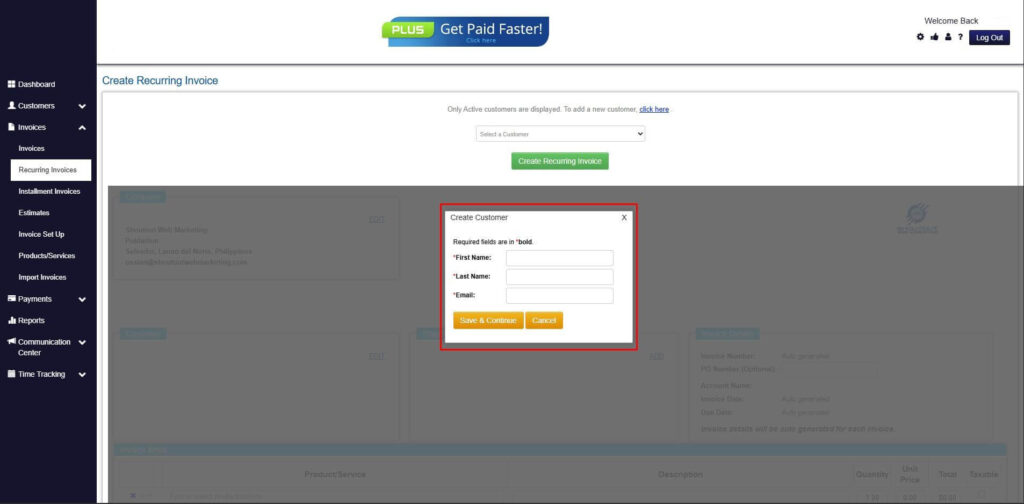
Step 6: Create Customer
- Provide your First Name, Last Name, and Email to proceed.
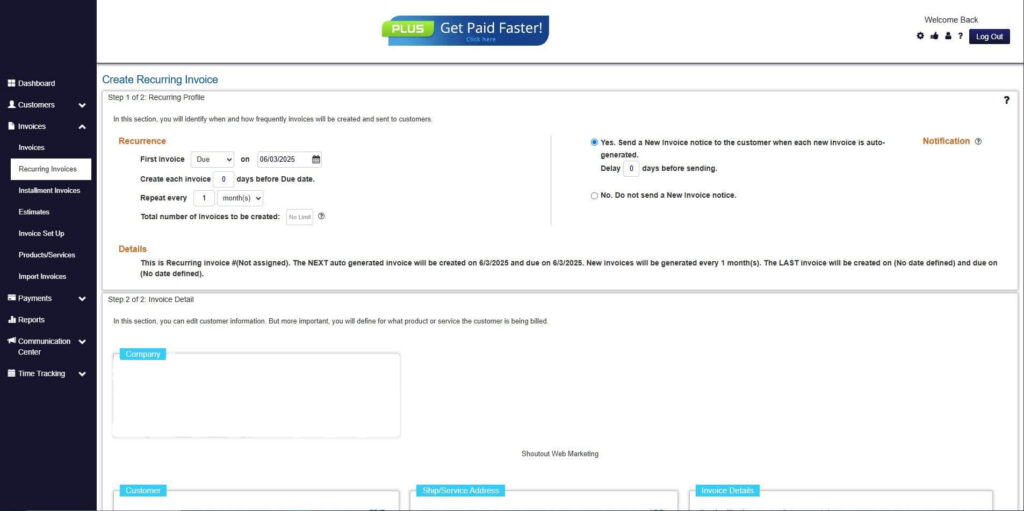
Step 7: Fill in the Create Recurring Invoice Form
- Fill in all the necessary fields.
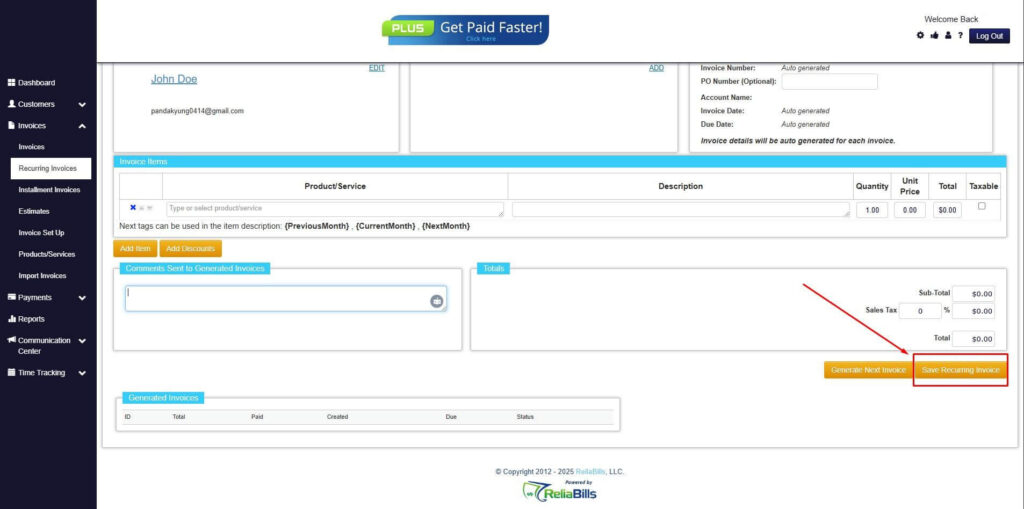
Step 8: Save Recurring Invoice
- After filling up the form, click “Save Recurring Invoice” to continue.
Step 9: Recurring Invoice Created
- Your Recurring Invoice has been created.
Frequently Asked Questions (FAQs)
1. How does invoice automation save time?
It automates repetitive tasks such as invoice creation, sending, and tracking. This reduces manual effort and speeds up processes. It allows business owners to focus on growth.
2. Is invoice automation suitable for small businesses?
Yes, it is designed to help small businesses improve efficiency and reduce workload. It simplifies billing operations. It also supports scalability.
3. Can recurring billing be automated?
Yes, recurring billing is a key feature of invoice automation tools. It allows businesses to automate repeat invoices and payments. This ensures consistency and saves time.
4. How secure are automated invoicing systems?
Most systems include encryption and access controls to protect data. This ensures financial information is secure. It also supports compliance requirements.
5. What tasks can be fully automated in invoicing?
Tasks such as invoice generation, delivery, payment tracking, and reminders can be automated. This reduces manual intervention. It improves efficiency and accuracy.
Conclusion
Invoice automation has become an essential tool for improving efficiency and saving time in small businesses. By eliminating manual processes, it allows business owners to streamline invoicing and focus on more strategic activities. This leads to better productivity and smoother operations.
Adopting invoice automation for small business helps reduce errors, improve cash flow, and maintain consistent billing processes. Combined with recurring billing, it creates a reliable and scalable system for managing finances. This ensures long-term efficiency and growth.
As businesses continue to evolve, automation will play a key role in staying competitive. Investing in automated billing solutions enables small business owners to optimize operations and achieve sustainable success.