
If you sell products or services in regions where Value Added Tax is required, understanding how VAT works is essential. Many businesses are legally required to issue VAT invoices, and failing to follow the rules can lead to compliance issues or delayed payments. This guide explains what VAT invoices are, how to charge VAT correctly, and how to manage your billing more efficiently.
What Is a VAT Invoice?
VAT invoices are official documents that include all the details needed to charge and record Value Added Tax on a sale. They usually contain your business information, client details, invoice number, a list of goods or services, pricing, VAT rate, and the VAT amount. These invoices are required for businesses registered for VAT because they allow clients to claim VAT back and help ensure proper tax reporting. Without a proper VAT invoice, both you and your client may face compliance problems.
How to Charge VAT on Invoices
Charging VAT correctly means applying the right tax rate and showing it clearly on your invoice. Here is the basic process:
- Confirm that your business is VAT registered.
- Identify the correct VAT rate for your goods or services.
- Apply the VAT rate to the net amount.
- Show the VAT rate, VAT amount, and total price including VAT.
- Keep copies of all VAT invoices for your records.
Charging the correct VAT ensures transparency and helps your clients reclaim tax where applicable.
What’s the Purpose of Value Added Tax?
Value Added Tax is imposed on goods and services at different stages of production and distribution. The purpose is to generate government revenue in a structured and traceable way. Because VAT is collected in steps across the supply chain, it promotes clearer financial documentation. VAT invoices play a key role in this process because they verify the amount of tax charged and collected.
Where Does VAT Apply?
VAT is used in many regions, including the European Union, the United Kingdom, and various countries in Asia, Africa, and the Middle East. The rates and rules vary depending on local tax laws. In places where VAT is required, businesses must issue VAT invoices for taxable sales. Always check the regulations in your country to understand registration thresholds and documentation requirements.
What’s the Difference Between VAT and Sales Tax?
While both VAT and sales tax are consumer-based taxes, they work differently. Sales tax is applied only at the point of sale, while VAT is charged at each stage of production and distribution. This means VAT invoices are essential for tracking the tax paid throughout the supply chain. VAT also tends to be more detailed, requiring accurate records for each taxable transaction.
How ReliaBills Can Help You with Invoices
Managing vat invoices manually can quickly become overwhelming, especially when you need to calculate tax, apply the correct rate, and keep records organized. ReliaBills simplifies this entire process by letting you create professional invoices that include VAT automatically. Once you set your VAT rate, the system calculates everything for you.
ReliaBills also tracks which invoices are sent, viewed, paid, or overdue, giving you a clear picture of your cash flow. You can enable automated reminders, making it easier to stay compliant and get paid on time. For businesses that work with ongoing services or subscription-based billing, ReliaBills supports recurring billing so VAT is applied consistently each cycle. This removes the stress of manual calculations and helps ensure accurate records for tax season.
How to Create a New Recurring Invoice Using ReliaBills
Creating a New Recurring Invoice using ReliaBills involves the following steps:
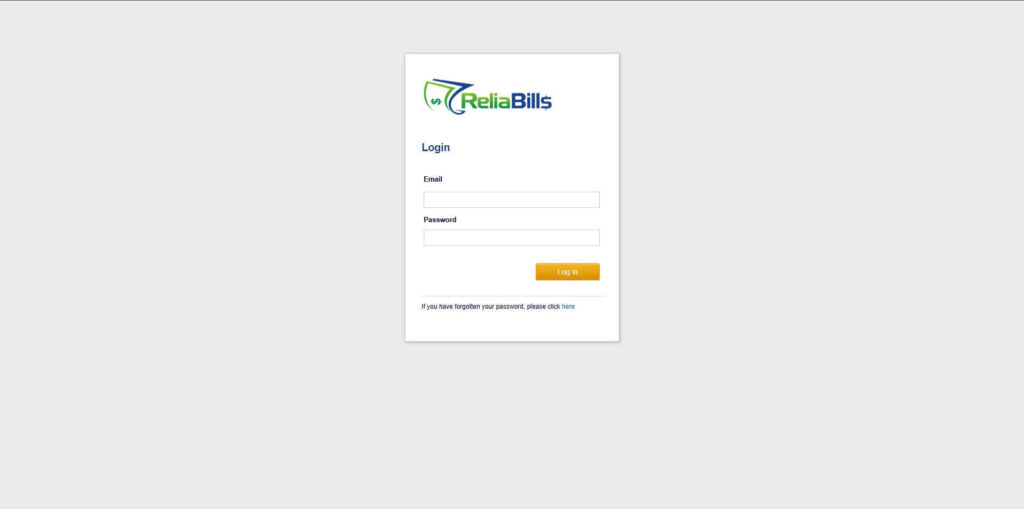
Step 1: Login to ReliaBills
- Access your ReliaBills Account using your login credentials. If you don’t have an account, sign up here.
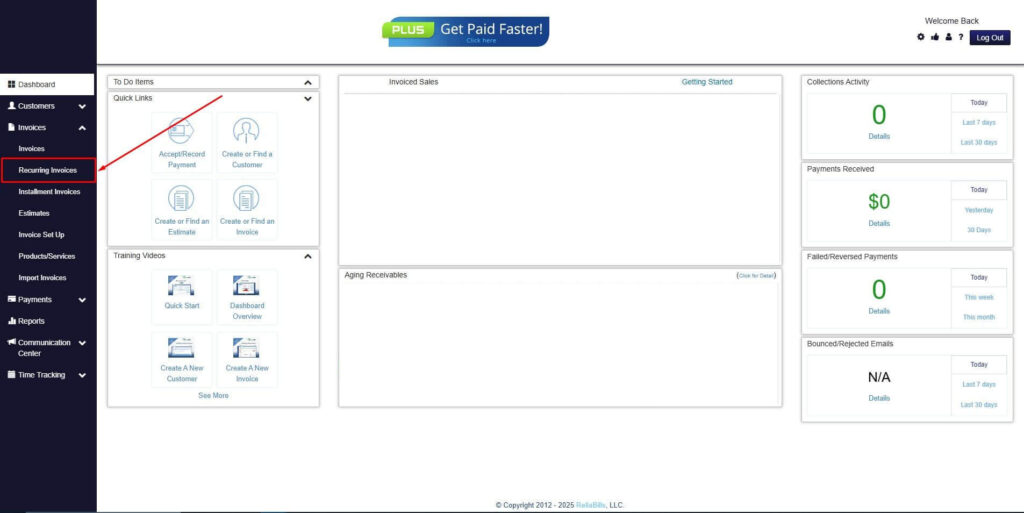
Step 2: Click on Recurring Invoices
- Navigate to the Invoices Dropdown and click on Recurring Invoices for an overview of the list of your existing customers.
Step 3: Go to the Customers Tab
- If you have already created a customer, search for them in the Customers tab and make sure their status is “Active”.
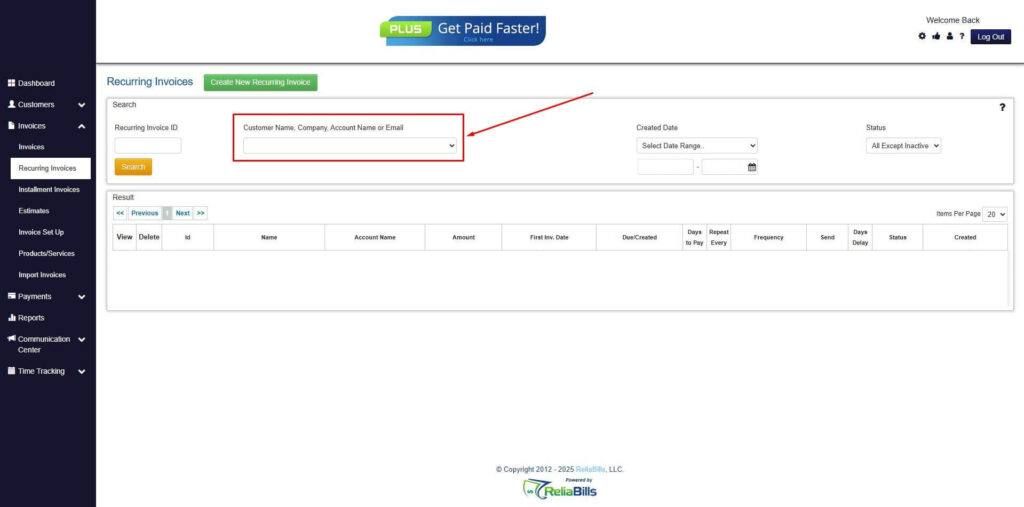
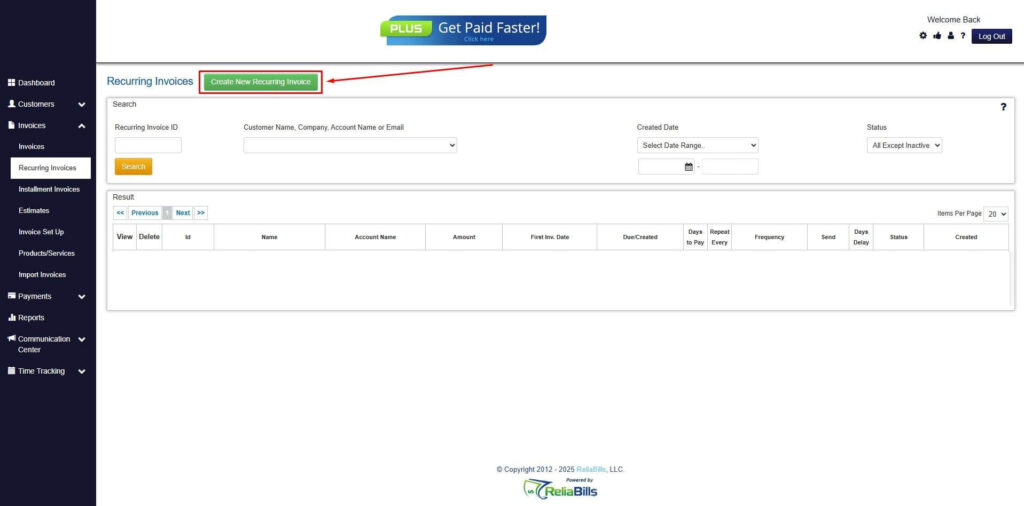
Step 4: Click the Create New Recurring Invoice
- If you haven’t created any customers yet, click the Create New Recurring Invoice to create a new customer.
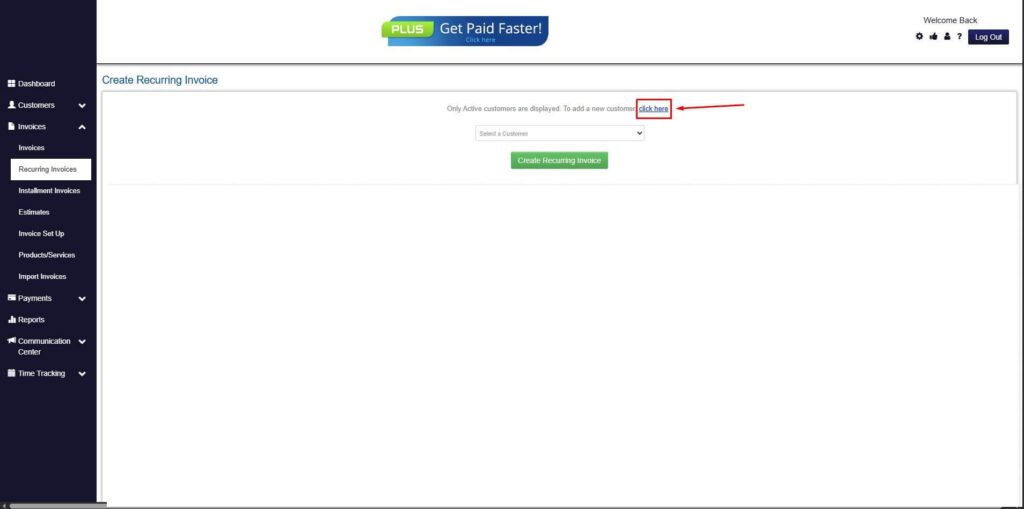
Step 5: Click on the “Click here” Button
- Click on the “Click here” button to proceed with the recurring invoice creation.
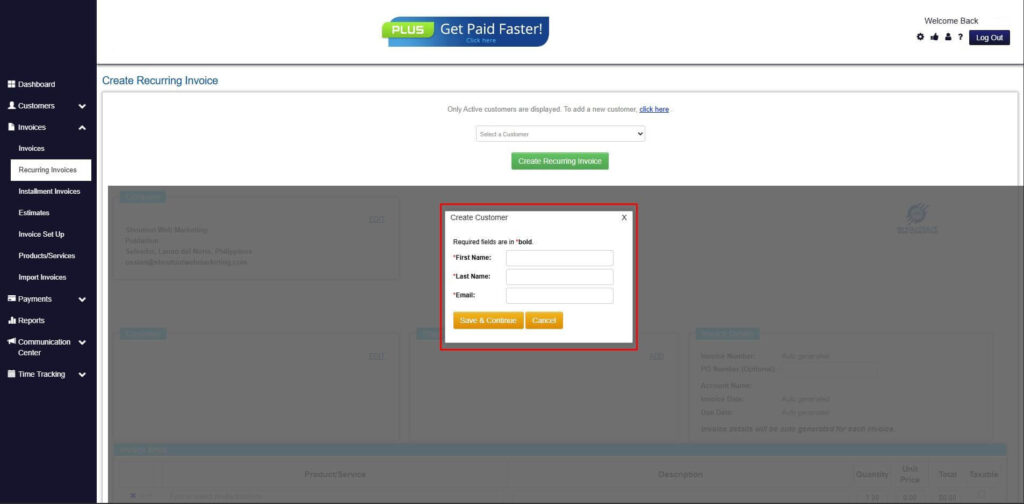
Step 6: Create Customer
- Provide your First Name, Last Name, and Email to proceed.
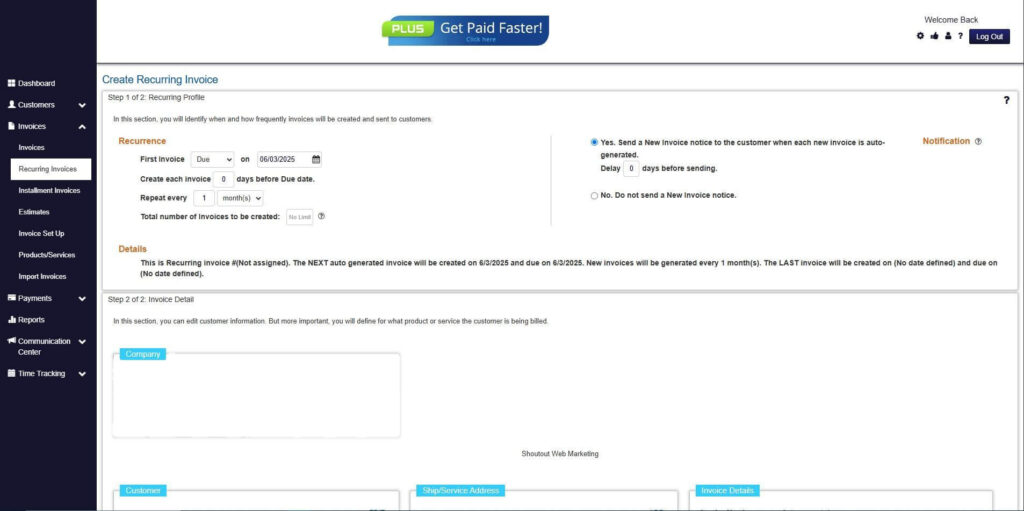
Step 7: Fill in the Create Recurring Invoice Form
- Fill in all the necessary fields.
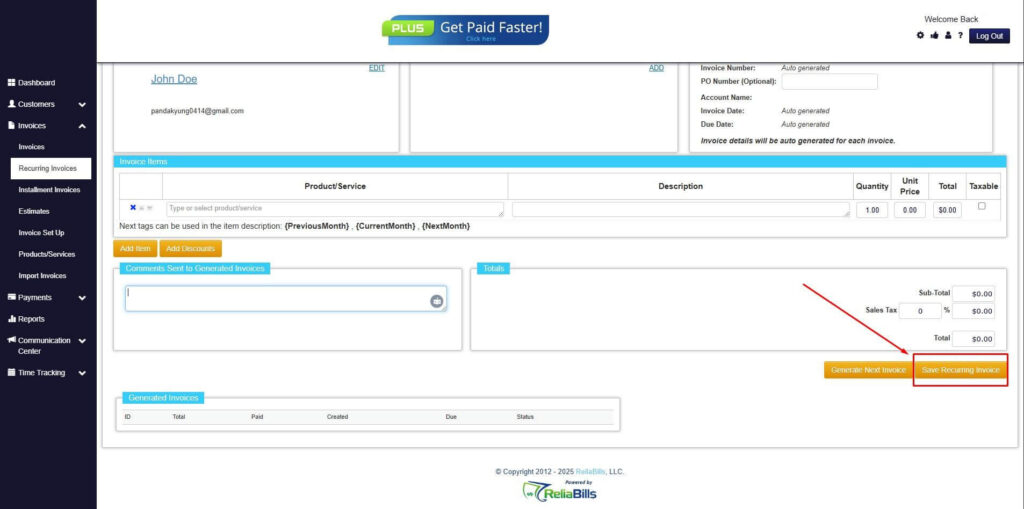
Step 8: Save Recurring Invoice
- After filling up the form, click “Save Recurring Invoice” to continue.
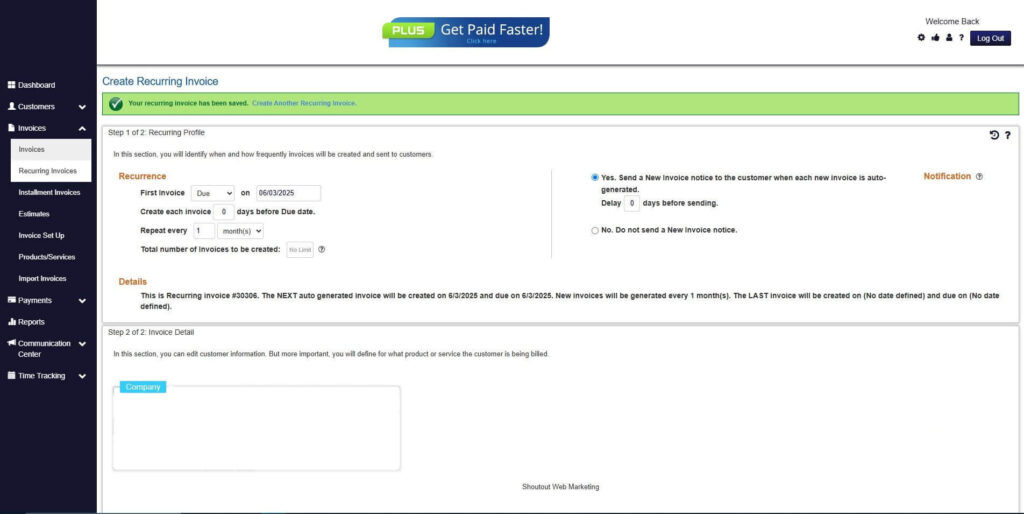
Step 9: Recurring Invoice Created
- Your Recurring Invoice has been created.
Frequently Asked Questions
1. Do all businesses need to issue VAT invoices?
No. Only VAT-registered businesses are required to issue VAT invoices.
2. Can clients claim VAT back without a proper VAT invoice?
They usually cannot. A valid VAT invoice is required for reclaiming tax.
3. Can I issue digital VAT invoices?
Yes. Many regions accept digital invoices as long as they contain all required information.
4. Are VAT rates the same everywhere?
No. VAT rates vary by country and sometimes by product category.
Conclusion
VAT invoices are essential for businesses that handle Value Added Tax. They ensure legal compliance, help clients reclaim VAT, and keep your bookkeeping accurate. While creating VAT invoices manually can be time-consuming, tools like ReliaBills make the process smooth by automating VAT calculations, reminders, and recurring billing. With the right system in place, staying compliant becomes much easier, allowing you to focus on running your business.