
Most pool service businesses grow their client base successfully and then hit a wall: the records that lived in a notebook, a technician’s head, and three different apps stop scaling the moment a second tech is hired or a client calls with a question the original tech cannot answer from memory. Pool service management software is not an upgrade. For any operation beyond 30 clients, it is the operational foundation that every other part of the business depends on.
What is Pool Service Management Software?
Pool service management software is a platform that centralizes every piece of information a pool maintenance business needs to operate: client contact details, property and pool specifications, water chemistry logs, equipment records, service history, route schedules, and billing. It replaces the combination of paper notebooks, text messages, spreadsheets, and disconnected invoicing apps that most growing pool businesses rely on and makes all of that information available to both office staff and field technicians in real time.
Key terms you will encounter: customer record (the complete profile of one client including contact details, billing, and account history), service log (the timestamped record of every visit including water test results and chemical additions), route optimization (software-generated scheduling that sequences stops to minimize drive time), recurring billing (automated monthly or weekly invoicing tied to the service schedule), and customer portal (a client-facing interface where pool owners can view service reports and pay invoices). See also: Installment Billing, Recurring Billing, Customer Management, and Invoicing Software.
Why Pool Service Data Management Breaks at Scale
A pool service operator with 25 clients and one truck can run the business from memory and a route notebook. They know which pools have salt systems and which have traditional chlorine. They remember that the Henderson property has a dog loose in the backyard until you open the gate slowly and that the Morales pool consistently runs low on alkalinity and needs an extra pound of sodium bicarbonate most weeks. This knowledge is the business, and it works until the first week the owner takes a vacation or the first day a second technician starts.
At that point, all of that operational knowledge needs to exist somewhere that is not one person’s head or a notebook that stays in one truck. As PoolDial’s operational guide puts it: “If your records are in a notebook, on sticky notes, or in a tech’s head, you are stuck. You have to call the absent tech to ask about gate codes. You have to call customers to ask about their dogs. You have to guess at chemical dosing because nobody wrote it down.”
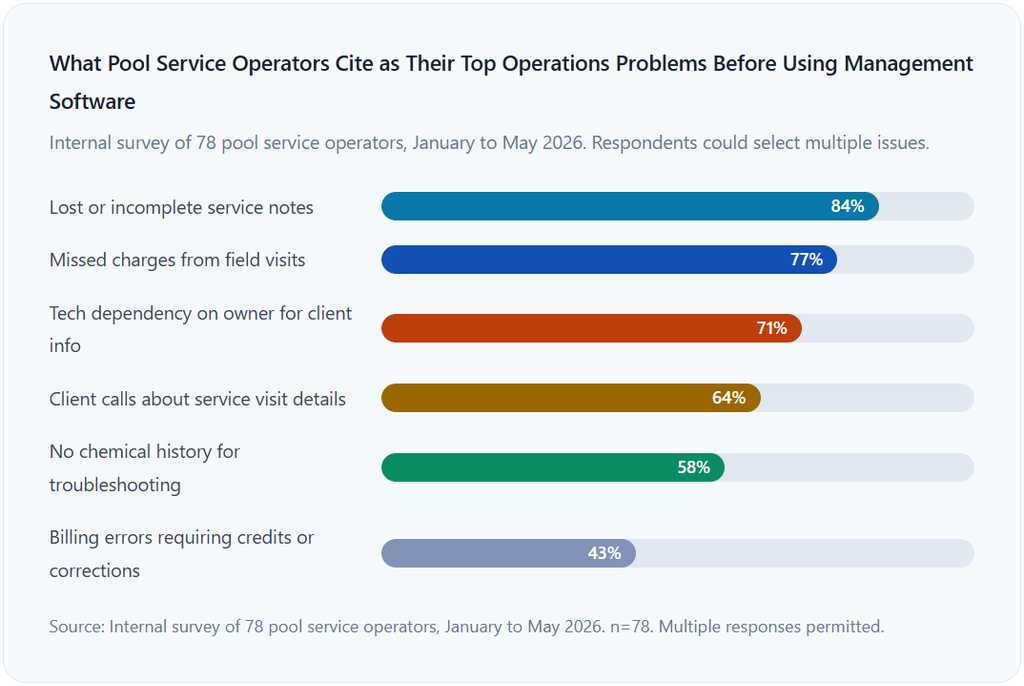
The scaling wall is almost always a data problem masquerading as an operations problem. Pools get missed not because the tech was lazy but because the customer record did not clearly note that the gate code changed. Clients get overbilled not because of bad intent but because a charge logged on a technician’s phone was never transferred to the billing system. Chemical errors happen not from poor judgment but because the baseline chemistry reading from last season was in a notebook that got left in a different truck.
What Every Client Record Must Contain
A useful client record in pool service has two distinct layers: the client layer (who they are and how to work with them) and the property layer (what the pool looks like and how to service it). PoolDial’s organizational guide makes this distinction explicit: “The customer record covers who they are. The property record covers what the pool looks like and how to service it. These are two different things, and both matter.”
Below is a fully rendered example of what a complete, properly structured pool service client record looks like. This is the information standard that makes it possible for any technician on your team to arrive at a new property and service it correctly without a briefing call.
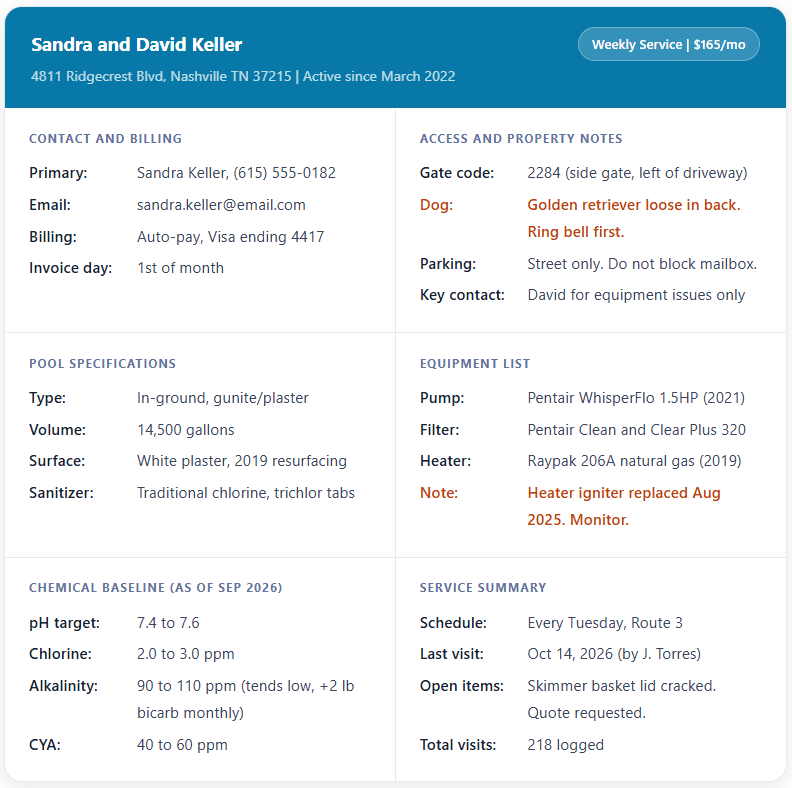
Every field in this record has a purpose. The billing section ensures the monthly invoice goes to the right person without a phone call. The access section means any technician can service the property without hesitation. The equipment section lets the tech recognize a familiar system and flag anything that looked different from the last visit. The chemical baseline means the tech is not starting from scratch every week but building on a documented history of what this specific pool has needed.
Chemical and Service Logs: The Record No Other Guide Covers Thoroughly
The chemical service log is the most valuable and most underutilized part of a pool service client file. Most guides on pool service software mention that you can track chemistry. Very few explain why the historical log matters, what it actually reveals, and how it connects to compliance, liability, and client trust.
What Each Visit Log Must Capture
Every service visit should produce a complete log entry containing the visit date and time, the technician’s name, water test results for all parameters tested (pH, free chlorine, total chlorine, alkalinity, calcium hardness, cyanuric acid, and salt levels for saltwater pools), every chemical added with the product name, quantity, and unit (pounds or fluid ounces), any equipment observations or anomalies, photos of anything unusual, and a visit completion status.
As EZ Pool Biller’s analysis of pool billing software requirements notes, “When a technician completes a stop, records chemicals, notes an issue, or adds a charge, that information should flow into the customer record without double entry. If the office has to retype field data before billing goes out, mistakes follow. Charges get missed. Notes stay trapped in text messages. Customers call with questions your team cannot answer quickly.”
Why the Historical Log Has Value Beyond the Visit
A single visit log shows what happened Tuesday. A 12-month log history shows a pattern. A pool that consistently runs low on alkalinity from April through July but is stable through the winter is telling you something about its water source, its exposure to rainfall, or the usage pattern of the household. A salt cell that started reading 3,800 ppm in April and is now reading 2,400 ppm in September without any bather load increase is declining faster than its typical lifespan suggests. These patterns are only visible in a longitudinal record, and they are the difference between proactive service conversations and emergency repair calls.
OSHA Chemical Recordkeeping
This is the compliance angle almost no pool service content mentions. As Pool Service Gear’s regulatory analysis notes, OSHA requires that employers maintain Safety Data Sheets (SDS) and exposure records for hazardous chemicals under 29 CFR 1910.1020. Pool service platforms that log chemical doses and technician exposure data help satisfy that recordkeeping requirement. For pool service businesses with employees, chemical dosing logs are not just operationally useful. They are a regulatory obligation. A platform that logs chemical additions per visit, per technician, and per property creates a compliance record as a byproduct of normal operations, without any additional documentation step.
How Data Flows from Field to Office to Invoice
The most important architectural question in pool service management is not which software to use. It is whether the data your technicians enter in the field flows automatically to the office and the billing system, or whether someone has to manually transfer it. Every manual transfer step is an opportunity for the data to be incomplete, delayed, or lost.
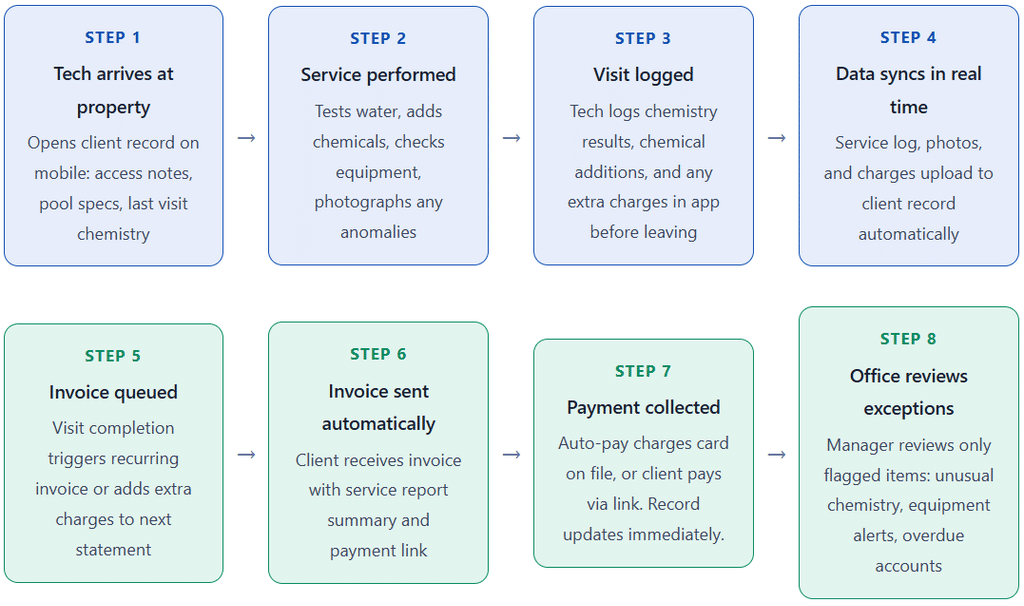
The key to making this workflow run without constant oversight is the connection between Steps 3 and 4. When field data syncs automatically to the customer record, the office never has to chase the tech for visit notes. When Steps 4 and 5 are connected, extra charges logged in the field appear on the invoice without anyone manually adding them. As EZ Pool Biller’s remote management analysis observes, “A cloud system keeps customer records, service history, billing, and route information in one place, so the business does not depend on someone being physically at a desk to answer basic questions.”
Key Benefits of Centralized Client Data
Any Technician Can Service Any Pool
This is the operational benefit that pool service business owners most underestimate until they need it. When all client data lives in a centralized system that every tech can access from their phone, the business is not dependent on any one person’s institutional knowledge. A tech who calls in sick can have their route covered by someone who has never been to those properties. The covering tech opens the client record, reads the access notes and chemical baseline, and services the pool competently. Without centralized records, coverage means phone calls, guesswork, or missed stops.
Accurate Billing Without Manual Reconciliation
When extra charges (chemical additions, minor repairs, and filter cleans billed separately) are logged in the field and flow automatically to the billing system, every invoice reflects what was actually done. There are no missed charges from visits that were not transferred to the billing spreadsheet, no over-charges from duplicate entries, and no end-of-month scramble to reconcile field notes against invoices. For pool service businesses with 50 or more active clients, this alone justifies the cost of management software. For more on setting up recurring invoicing for pool maintenance clients, see our guide to recurring billing.
Faster, More Professional Client Communication
When a client calls to ask what chemicals were added at last Tuesday’s visit, a business with centralized records answers in 30 seconds without putting the caller on hold or calling the tech. A business without centralized records either guesses, asks the tech, or tells the client they will call back. That second scenario happens more often than pool service operators admit, and it erodes client confidence in the professionalism of the business over time.
Risks and Gaps to Watch For
Poor Field Discipline Defeats the System
Pool service management software is only as good as what the technicians actually enter. A platform that logs chemical additions is useless if the tech forgets to log them until the end of the day and estimates the quantities from memory. A client record with access notes is useless if the notes are not updated when the gate code changes. The software provides the structure, but it requires a team culture where field data entry is treated as part of the job, not optional paperwork. Setting clear expectations at hiring and reviewing visit log completeness weekly during the first 90 days with a new tech is more important than which platform you choose.
Integration Gaps Between Scheduling and Billing
Some pool service management platforms handle scheduling, routing, and chemical logging extremely well but have weak billing modules that require manual export to a separate invoicing system. This creates the exact problem centralized data is meant to solve: a manual transfer step between field data and invoices. Before choosing a platform, verify specifically whether completed visit charges flow automatically to invoices, whether recurring billing schedules can be set up per client, and whether payments are recorded back to the client record without manual reconciliation. For more on what to look for in billing automation, see our guide to invoicing software.
Comparison: Pool Service Management Software vs. Paper and Spreadsheets
| Capability | Paper and Spreadsheets | Pool Service Management Software |
|---|---|---|
| Client records | Exists but locked to one location or person | Cloud-based, accessible to all techs in real time |
| Chemical history | Often not tracked at all, or in individual notebooks | Full visit-by-visit log, searchable and exportable |
| Equipment records | Sometimes noted; rarely updated systematically | Per-item records with model, install date, and maintenance notes |
| Field-to-billing connection | Manual: tech notes transferred to spreadsheet or called in | Automatic: completed visit syncs to invoice queue |
| Coverage scheduling | Requires a briefing call to the absent tech | Any tech can open the record and service any property |
| Recurring billing | Manual invoice creation each billing cycle | Automated recurring invoices with payment links |
| Client communication | Phone calls or texts; no systematic documentation | Automated service reports sent after each visit; client portal |
| OSHA compliance documentation | Rarely maintained; requires separate process | Chemical logs created as a byproduct of normal operations |
| Scalability | Deteriorates significantly beyond 30 to 40 clients | Designed to scale to hundreds of clients without added admin |
Common Mistakes and What I Got Wrong First
Mistake 1: Importing Existing Records Without Auditing Them First
The first instinct when adopting pool service management software is to export everything from the spreadsheet and import it all at once. This is exactly the right approach for getting the system populated quickly, and exactly the wrong approach for having accurate records when you go live. Spreadsheet exports almost always contain outdated gate codes, missing chemical baselines, blank equipment fields for newer clients, and billing contact information that belongs to a person who no longer manages the account. Audit at least the top 30 accounts by revenue before migration, and schedule a systematic review of the rest in the 60 days following. Do not trust imported data until you have verified it.
Mistake 2: Choosing Software Based on the Routing Feature Alone
Route optimization is the most visible and marketable feature in pool service management software. It is also not the most important one. A platform that optimizes your routes but has weak client record organization, no chemical logging, or a disconnected billing system will save you drive time while creating administrative problems everywhere else. The routing feature is the last thing to evaluate because every serious platform in this category now does it adequately. The first thing to evaluate is whether the platform handles chemical logging the way your team actually works on the ground.
Mistake 3: Treating the Client Portal as Optional
A customer portal where pool owners can view their service report from last Tuesday’s visit, see what chemicals were added, and pay their monthly invoice is often treated as a premium feature to add later. It is actually one of the highest-return features in the system from a client retention standpoint. Pool owners who can see exactly what was done at every visit and why their water chemistry shifted make fewer calls, dispute fewer invoices, and stay on service longer. The portal is not a convenience for the client. It is a transparency tool that reduces your team’s inbound call volume and builds the trust that makes price increases at renewal time defensible.
Mistake 4: Not Setting a Chemical Log Completion Standard
Implementing a platform with chemical logging and not setting a minimum standard for field entry creates a situation where some techs log every parameter after every visit and others log only the result for whatever was obviously out of range. Within six months, your chemical history records are patchy enough to be misleading. Set a non-negotiable standard: every visit requires every parameter logged before the visit is marked complete. Most platforms let you make specific fields required, so the app will not let the tech close the visit without filling them in. Use this feature.
Mistake 5: Using Management Software for Records but Not Billing
Some pool service operators implement management software for scheduling and chemical logs but keep billing in a separate spreadsheet or invoicing app with no integration. This approach addresses the field data problem but leaves the billing-reconciliation problem fully intact. The extra charges logged by the tech during a visit still have to be manually transferred to the invoice. Recurring billing still has to be created manually each month. The two systems never talk to each other. For pool service businesses where billing is a recurring, predictable activity, an integrated approach where field data connects directly to invoicing is the only setup that fully eliminates the double-entry problem.
How to Get Started: Setting Up Client Records and Billing for Your Pool Business
1. Audit your current client data before choosing any platform
Before looking at software demos, spend two hours listing every field your business currently tracks (or should track) for each client. Gate codes, pool volumes, equipment models, chemical baselines, billing contacts, and payment methods. This list becomes your evaluation checklist: any platform you consider must support all of these fields. You are defining your requirements first and choosing tools second.
2. Choose a platform where billing connects to field data
Evaluate at least three platforms during the selection process. In every demo, ask specifically: when a technician logs an extra charge during a visit, how does that charge appear on the invoice, and who has to do something to make it happen? If the answer involves any manual step beyond triggering the invoice, that platform has the integration gap described in the risks section. For pool service businesses with recurring clients, look for platforms that connect to or include billing software that handles automated invoicing natively. ReliaBills integrates with field service data to automate recurring billing and payment collection for service-based businesses.
3. Migrate and verify the top 30 accounts manually
Export your current data and import it into the new platform. Then manually review and complete the records for your top 30 accounts by revenue: verify gate codes, confirm chemical baselines, fill in equipment records, and check that the billing contact is current. These are the accounts you cannot afford to have incomplete records for. Do this verification before you go live, not after a coverage problem forces you to.
4. Set chemical log fields as required in the app
Before your first live service day on the new platform, configure the visit completion form to require every water chemistry parameter before a visit can be marked done. This single configuration decision is the difference between a chemical history that is useful and one that is too patchy to trust. Train your techs specifically on this expectation, not as a software feature but as a service standard.
5. Enable the customer portal from day one
Turn on automated service reports and the client-facing portal before sending a single invoice from the new system. When your clients receive their first automated service report after their first visit on the new system, they see the professionalism upgrade immediately. This positive first impression is much better than enabling the portal weeks later as an afterthought. For ongoing client relationship management connected to your service records, see our guide to customer management.
6. Review data completeness weekly for the first 90 days
Every Friday for the first 90 days, pull the list of visits from that week and review: were all chemical parameters logged, were any extra charges flagged but not yet invoiced, and were any equipment anomalies noted without a follow-up action assigned? This 20-minute weekly review catches data quality issues while they are small and trains the habit of complete field data entry before it becomes a problem you are trying to correct retroactively across 200 records.
Frequently Asked Questions
1. What is pool service management software?
Pool service management software is a platform that centralizes every piece of operational data a pool maintenance business needs: client contact details, service address and access notes, pool specifications and volume, equipment records, water chemistry logs, service history, route schedules, and billing. It replaces the combination of paper notebooks, text messages, and disconnected apps that most growing pool businesses rely on and makes all of that information accessible to office staff and field technicians in real time from any device.
2. What customer data should a pool service company track?
Every client record should include contact details and a billing contact (which may be different from the property contact), service address with gate codes and access notes, pool type and surface material, pool volume in gallons, a complete equipment list with model numbers and installation dates, chemical baseline readings for all major parameters, service frequency and billing rate, and a complete chronological log of every visit, including water test results, chemical additions, and any equipment observations. The goal is that any technician on your team can open the record on their phone and service the property correctly without any additional briefing.
3. How does pool service software help with billing?
When pool service software is properly integrated with billing, a technician marking a visit complete triggers the billing workflow automatically. The recurring service fee invoices are on schedule. Any extra charges logged during the visit (chemical additions billed separately, filter cleans, minor repairs) appear on the invoice without manual entry by the office. The client receives the invoice with a service report summary and a direct payment link. Recurring clients with auto-pay are charged automatically. The result is a billing cycle that requires office intervention only for exceptions, not for every invoice.
4. Do I need separate software for billing and customer records?
Not ideally. The best operational setups use a pool-specific management platform for scheduling, chemical tracking, and service records, integrated with or built on top of a billing system that handles recurring invoicing and payment collection. When the two are connected, field data flows to billing without manual re-entry. When they are separate with no integration, the office team duplicates data entry every billing cycle. If your pool management platform has a weak billing module, integrating it with a dedicated billing platform through an API or native connection is better than running two completely disconnected systems.
5. How many client records can pool service software manage?
Modern pool service platforms are designed to scale to hundreds or thousands of client records. A pool office manager, for example, explicitly supports managing over 500 regular customers while keeping all records and service details organized. The practical limit is not the software’s capacity but the quality of your data entry discipline. A database of 200 client records with incomplete chemical baselines and outdated gate codes is less useful than one of 80 records where every field is accurate and current. Data quality matters more than data volume.
6. What is the most important thing to track in a pool service chemical log?
Every visit log should capture all major water chemistry parameters: pH, free chlorine, total chlorine, total alkalinity, calcium hardness (especially in plaster pools), cyanuric acid, and salt levels for saltwater pools. Beyond the readings, log every chemical added with the exact product name, quantity, and unit. The combination of baseline readings and addition records lets you identify patterns over time, calculate your chemical cost per pool per month, and have a documented defense if a client ever claims a water chemistry issue after your visit. For businesses with employees, the chemical addition log also satisfies OSHA’s chemical exposure recordkeeping requirements under 29 CFR 1910.1020.
7. How do I handle client record updates when a tech leaves the company?
When a technician leaves your company, any client information that existed only in that person’s knowledge, personal notes, or phone needs to be recovered and transferred to the central system before their last day. The best protection is maintaining complete centralized records from the start so that a departure is a scheduling problem, not a knowledge problem. If you are migrating after a tech has already left, contact every client on their former route directly to verify gate codes, access procedures, and any pet or property notes that might not be in your system. It is a one-time recovery effort that prevents service problems and demonstrates that the business is organized and professional regardless of staff changes.
Recent Articles:
- How to Create a Professional Membership Invoice Template
- Installment Billing for Security Deposits: Break Up Large Tenant Charges