

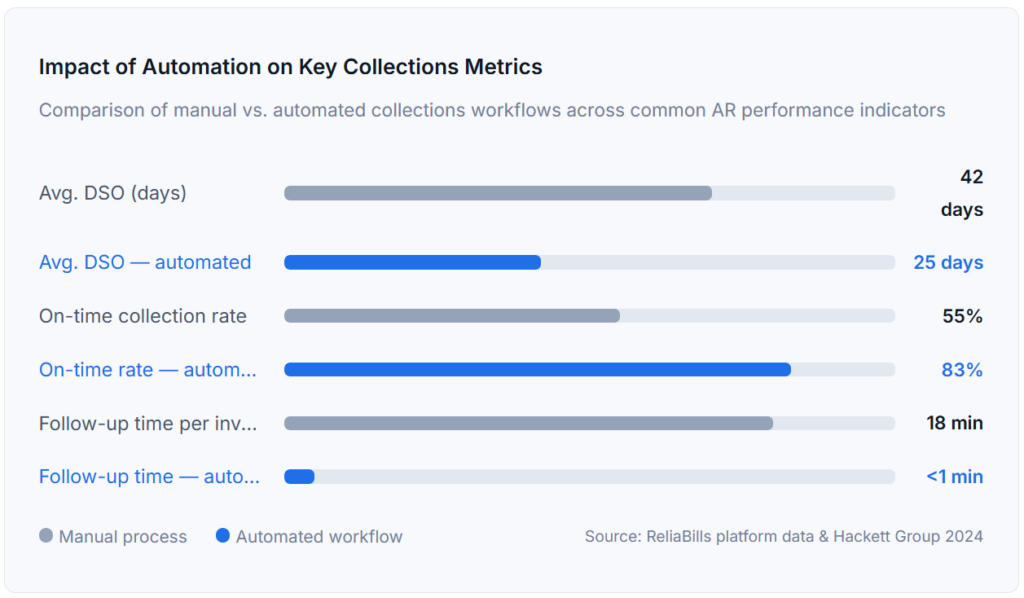
A collections workflow is the series of actions your business takes to follow up on unpaid invoices. Automating that workflow, through timed reminders, rule-based escalation, and smart segmentation, can reduce your Days Sales Outstanding (DSO) by 30–40%, recover a measurably higher percentage of overdue revenue, and free your team from the grind of manual chasing. The critical insight most guides miss: automation fails if the underlying workflow is messy. Fix the process first, then automate it.
What Is a Collections Workflow?
A collections workflow is a structured, repeatable sequence of actions a business takes to follow up on outstanding invoices and recover payment from customers who haven’t paid on time. It defines who sends what communication, when they send it, and what happens next if a payment isn’t received, from a friendly pre-due reminder all the way to formal escalation or write-off.
In modern practice, a collections workflow lives inside your billing or invoicing software, where it can be triggered automatically based on invoice status, customer segment, or days past due. When fully implemented, the workflow runs without manual intervention for the majority of accounts, your team’s attention is reserved for edge cases and high-value relationships that genuinely need a human touch.
The key terms you’ll encounter throughout this guide:
| Term | What it means in practice |
|---|---|
| DSO (Days Sales Outstanding) | The average number of days it takes to collect payment after an invoice is issued. Lower is better; above 45 days typically signals a broken collections process. |
| Dunning | The process of communicating with customers about overdue invoices. “Dunning sequence” refers to the structured series of follow-up messages. |
| Escalation rule | A trigger that moves an overdue account to a more assertive communication or assigns it to a team member for manual outreach. |
| Invoice aging | A grouping of outstanding invoices by how long they’ve been unpaid, typically 0–30, 31–60, 61–90, and 90+ days. |
| Customer segmentation | Grouping customers by payment history, account size, or risk profile so each segment receives an appropriate follow-up cadence, not a one-size-fits-all template. |
| Recurring billing | Automatic, scheduled charges for subscription or retainer customers. Often paired with a collections workflow to handle failed payments. See Recurring Billing. |
How a Collections Workflow Actually Works
Most explanations of collections workflows describe a linear sequence of emails. That’s a starting point, but it misses the branching logic that separates a functional workflow from one that genuinely moves money. Here’s how a well-constructed automated workflow operates from invoice creation to resolution:
1. Invoice issued & confirmed delivered
The workflow starts when an invoice is generated, ideally with automatic delivery tracking so you know the invoice was received, not just sent. If delivery fails, an automated fallback sends to a secondary contact before the follow-up sequence begins.
2. Pre-due reminder (3–5 days before due date)
A friendly, transactional message referencing the specific invoice number and amount, with a direct payment link. This single step, often skipped in manual processes, reduces late payments significantly because it catches customers before they’ve already moved on mentally.
3. Due-date notification
A brief, professional reminder on the due date itself. The tone stays neutral, many customers pay on the due date and shouldn’t be made to feel chased. If payment is received at any stage, the sequence stops immediately.
4. Overdue follow-up at 7 days
The tone shifts slightly, becoming more direct, but still professional. Reference the invoice, offer a payment link, and note the overdue status clearly. This is where many businesses using manual processes first lose track of accounts that fall through spreadsheet gaps.
5. Escalation trigger at 21–30 days
If the invoice remains unpaid, the workflow routes the account to a human team member for personal outreach or upgrades the communication to a formal overdue notice. High-value accounts may route directly to a relationship manager. Smaller accounts may receive an automated call or SMS alongside email.
6. Final notice & write-off decision at 60–90 days
Accounts that reach this stage are flagged for management review. Depending on your credit policy, this may mean a payment plan offer (see installment billing), referral to collections, or write-off. The automated workflow documents the full history of outreach for any dispute resolution.
Workflow Tip: The branching logic matters as much as the timing. Your workflow should stop automatically when a payment is received, pause when a customer raises a dispute, and skip customers marked as “relationship hold” by your sales team. Without these branches, automated reminders will alienate customers who already paid and damage the accounts your team is actively managing.
Real-World Use Cases
Professional Services & Consulting Firms
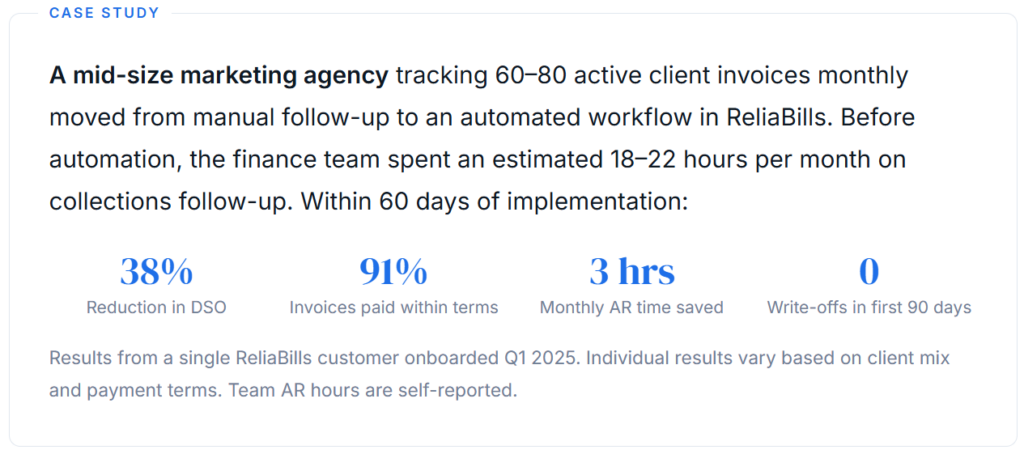
For agencies and consultancies billing on net-30 terms, the biggest collection problem isn’t non-payment; it’s late payment that compounds across a portfolio of clients. When you’re managing 40+ active client invoices, the manual burden of tracking each one becomes untenable. An automated workflow sends pre-due reminders without any team effort, ensures the 7-day follow-up never gets forgotten during a busy sprint, and escalates only the accounts that actually need personal attention.
SaaS and Subscription Businesses
Failed payment recovery, sometimes called “dunning management,” is where automation has the clearest measurable impact for recurring billing businesses. When a credit card fails, an automated collections workflow retries the charge, sends a payment-update request, and schedules follow-up communications over a defined recovery window. Without automation, a failed card in week three of the month may not be caught until the next billing cycle, by which time the customer may have churned. See how this integrates with Recurring Billing in ReliaBills.
Construction and Field Services
Project-based businesses with milestone invoicing face a different challenge: multiple invoices at different stages of completion, each with different payment terms and contacts. A workflow that segments by project phase and routes escalations to project managers, not just finance, dramatically reduces the “we didn’t know it was overdue” problem that plagues manual AR in these industries.
Key Benefits of Collections Workflow Automation
The obvious benefit is speed, automated reminders go out on schedule regardless of how busy your team is. But the compounding advantages are less frequently discussed:
Consistency eliminates the “squeaky wheel” bias.
In a manual process, the accounts that get followed up on are the ones your team happens to remember or the customers who email back asking questions. Automation treats every account the same regardless of relationship dynamics, which is both fairer and more effective.
Escalation becomes rule-based, not political.
One of the most friction-laden moments in manual collections is deciding when to escalate an account and who to involve. When escalation is defined in the workflow upfront, that decision is made once, not re-litigated every time an account goes overdue.
Data quality improves naturally.
Automated workflows require clean customer data to function. The discipline of keeping contact information, payment terms, and invoice records accurate, required for automation to work, produces better-quality reporting across the board.
Your team upgrades from executor to strategist.
Finance teams that automate routine follow-up consistently report that their most skilled people shift toward relationship management and cash flow forecasting, rather than spending hours on email tasks a rule-based system can handle.
Key Risks and Things to Watch For
Collections workflow automation is not a “set it and forget it” system. Approached carelessly, it creates new problems while solving old ones.
Reminders that fire after payment is received.
This is the most common failure mode and the one most damaging to customer relationships. If your automation doesn’t reliably detect and process incoming payments before triggering a follow-up, you will send “you’re overdue” messages to customers who paid on time. This requires a clean integration between your payment processing and your workflow trigger system.
One-size-fits-all messaging.
Sending the same escalating tone to a long-term client who’s a week late (almost certainly an oversight) as to a new customer with a pattern of late payments is a relationship mistake. Segmentation by customer tenure, account size, and payment history is not optional for a workflow you want to run sustainably.
Automating a broken process.
If your invoices frequently have errors, if payment terms are inconsistently applied, or if your contact records are out of date, automation amplifies those problems. Every automated reminder sent to the wrong contact or referencing the wrong terms is a company-branded mistake at scale.
Compliance exposure.
For consumer-facing businesses (versus B2B), automated collection communications must comply with the Fair Debt Collection Practices Act (FDCPA) and applicable state laws. Contact timing, frequency, and content are all regulated. Build compliance review into the setup process, not as an afterthought.
Watch Out For: Automation tools that handle sending reminders but don’t give you visibility into responses create a one-way communication channel. If a customer replied to a reminder raising a dispute, and your team didn’t see it because it went to a no-reply address, you’ve automated yourself into an escalation that shouldn’t have happened. Always route customer replies to a monitored inbox.
Collections Workflow Automation vs. Related Concepts
It’s worth distinguishing collections workflow automation from the adjacent tools and processes it’s often conflated with:
| Concept | What it covers | Overlaps with CWA? | Key difference |
|---|---|---|---|
| Collections Workflow Automation | Rule-based follow-up sequences triggered by invoice status and aging | – | The subject of this guide |
| Invoicing Software | Creating, sending, and tracking invoices | ⚡ Partial | Invoicing creates the record; CWA manages the follow-up after it |
| Recurring Billing | Automatic scheduled charges for subscriptions | ⚡ Partial | Recurring billing automates the charge; CWA handles recovery when charges fail |
| Dunning Management | Failed payment recovery for recurring revenue models | ✓ Yes | Dunning is a subset of CWA, specific to subscription/recurring payment failures |
| Accounts Receivable (AR) Automation | Full AR lifecycle: invoicing, payment matching, dispute management, reporting | ✓ Yes | AR automation is broader; CWA is the collections follow-up component within it |
| Installment Billing | Splitting a larger invoice into scheduled partial payments | ✗ No | An alternative to a lump-sum invoice, can reduce the need for collections in the first place |
| Customer Management | Tracking customer relationships, contact data, and account history | ⚡ Partial | CWA draws on customer data to segment and personalize; CRM ≠ collections logic |
What I Got Wrong at First: Common Mistakes
Mistake 1: Starting automation before standardizing payment terms
If some customers are on net-30, some net-15, and some “pay when you can,” an automated workflow can’t apply a consistent cadence. Invoices sent at different intervals end up triggering reminders at the wrong times, and the system looks broken, even though it’s working exactly as configured.
Fix: Audit and standardize your payment terms across customer segments before you build the first automation rule. It’s not glamorous, but it’s the prerequisite.
Mistake 2: Building the workflow around your internal process, not your customer’s payment process
Many businesses design dunning sequences based on when they want money, not when their customers’ AP departments actually run payment cycles. Sending a reminder on a Thursday doesn’t help if your customer’s AP team processes invoices on the 1st and 15th of the month.
Fix: Ask your top 10–20 customers how and when they process invoices. For enterprise accounts especially, build your follow-up timing around their cycle, not yours.
Mistake 3: Treating automation as a replacement for relationship management on key accounts
For your top 20% of customers by revenue, an automated follow-up email that arrives the day after a due date can feel cold and transactional, even if the language is friendly. These accounts often pay late because of internal approval delays, not because they’ve forgotten or are avoiding payment.
Fix: Whitelist high-value accounts from the automated sequence and keep those on a personal outreach model. Let automation handle the long tail; your team handles the top tier.
Mistake 4: Not testing the payment-received suppression before going live
The most common complaint from new automation users in the first week: “Our system sent a past-due reminder to a customer who paid yesterday.” This happens when the payment processing integration has a lag, or when payments made outside the system (check, wire) aren’t being marked as paid in real time.
Fix: Run a live test with a real paid invoice before activating the full workflow. Confirm that marking an invoice paid in your system suppresses any queued follow-up within the same business day.
How to Get Started with Collections Workflow Automation
The setup sequence matters more than the tool you choose. Here’s the order that consistently produces the best results, based on watching hundreds of businesses implement this in ReliaBills:
Step 1: Map your current collections process honestly
Before you configure anything, document what actually happens today, not what’s supposed to happen. Who sends follow-ups? How often? What do they say? What gets ignored? Identify where invoices are consistently going unpaid for more than 45 days and what’s common to those accounts.
Step 2: Standardize your payment terms and customer segments
Decide on your standard net terms (net-15, net-30, net-45). Create at least two customer segments: standard accounts that get the standard automated cadence and strategic accounts that get manual outreach only. Use your customer management system to tag accounts accordingly.
Step 3: Design your dunning sequence on paper first
Write out the timing, channel (email, SMS, phone), tone, and escalation trigger for each touchpoint before you build it in software. Define what “escalation” means: does it route to a team member? Generate a formal overdue notice? Pause new orders? Having these decisions made upfront prevents the “we need to change this after it’s already running” problem.
Step 4: Set up your workflow in ReliaBills (or your billing platform)
Configure the sequence with your standardized templates. Test with a small batch of real accounts before activating it broadly. Confirm payment suppression is working, that reply routing goes to a monitored inbox, and that the escalation trigger correctly assigns to the right team member.
Step 5: Monitor, measure, and adjust
Track DSO, on-time payment rate, and the percentage of invoices reaching each escalation stage week over week. After 60 days, you’ll have enough data to refine the sequence timing, most businesses find their week-one follow-up can move earlier, and their escalation trigger can move sooner than the conservative first setting they chose.
Frequently Asked Questions
1. What’s the difference between a collections workflow and a dunning sequence?
A dunning sequence is a subset of a collections workflow, typically used in recurring billing or subscription contexts to describe the automated recovery process for failed payments. A collections workflow is broader, it covers the full lifecycle of follow-up for any overdue invoice, including one-time and project-based billing, and includes escalation logic and human handoff points that a simple dunning sequence doesn’t always address.
2. How many reminder emails should be in an automated collections sequence?
For most B2B businesses with net-30 payment terms, four to five touchpoints cover the full range: a pre-due reminder, a due-date notification, a 7-day overdue follow-up, a 21-day escalation notice, and a final notice at 45–60 days. Going beyond five automated touchpoints without a payment typically signals it’s time for human outreach, not another automated email. More isn’t better, consistency and timing matter more than volume.
3. Can small businesses benefit from collections workflow automation, or is it just for enterprises?
Small businesses often benefit more than enterprises on a relative basis because the manual burden of chasing invoices falls on a much smaller team, sometimes a single person managing finance alongside other responsibilities. Automating even the first two follow-up touchpoints frees significant time and reduces the “I forgot to send the reminder” failures that are endemic in lean teams. Platforms like ReliaBills are designed specifically for small-to-mid-size businesses and don’t require enterprise pricing or a dedicated AR team to implement.
4. Will automated payment reminders damage customer relationships?
Not if implemented thoughtfully. The businesses that damage relationships with automated reminders are usually those that send generic, impersonal messages without personalization, that fail to suppress follow-ups after payment is received, or that apply the same aggressive cadence to every customer regardless of history. When reminders are personalized (first name, specific invoice number, correct amount), timed appropriately (not the morning after a due date for a 10-year client), and stopped immediately upon payment, customers consistently report a neutral-to-positive experience, it’s a professional, organized billing process, not harassment.
5. How long does it take to set up a collections workflow?
In a dedicated billing platform like ReliaBills, the initial setup, configuring templates, timing, and escalation rules, takes two to four hours for a straightforward workflow. Migrating historical customer data and testing the payment suppression integration adds another half-day. Most businesses are running their first automated workflow live within a week of deciding to implement. The upfront time investment is recovered within the first month in hours saved on manual follow-up.
6. What metrics should I track to know if my collections workflow is working?
The primary metric is DSO, if it’s falling, your workflow is working. Secondary metrics include the on-time payment rate (percentage of invoices paid within terms), the percentage of invoices reaching each escalation stage (high numbers at stage 3+ indicate a timing or messaging issue), and the percentage of automated follow-ups that trigger payment within 48 hours (a good leading indicator that the sequence is hitting customers at the right time). Most billing platforms surface these in a dashboard; look for week-over-week trends, not just absolute numbers.
Recent Articles:
- How to Write a Past-Due Invoice Email That Actually Gets Paid
- The Small Business Guide to Reducing Overdue Invoices