
The uncomfortable conversation at drop-off about overdue tuition is not a relationship problem. It is a systems problem. When payment follow-up depends on the director remembering to send a message, and the director is also managing classroom ratios, safety checks, and parent communication about actual children, billing naturally falls behind. Automated childcare payment reminders remove the director from the collection cycle entirely, apply late fees consistently without human judgment, and give parents a frictionless way to pay without making eye contact. The system handles the awkward part so the director can stay focused on the part that actually matters.
What are Childcare Payment Reminders?
Childcare payment reminders are automated notifications sent to parents before and after a tuition due date to confirm upcoming charges, prompt payment of outstanding balances, and notify families when a payment fails or a late fee has been applied. Unlike manual follow-up messages from the director, automated reminders are sent by the billing system on a defined schedule and are received by families as administrative communications rather than personal confrontations. They connect directly to recurring billing (which generates the monthly charge), invoicing software (which produces the tuition statement), and family account management (which tracks each family’s payment history and outstanding balance). For programs using installment billing or payment plans, reminders also notify families of each installment event in the schedule.
Why Childcare Directors Are the Worst People to Chase Late Payments
This is not a criticism. It is a structural observation. The childcare director occupies a role that is simultaneously the program’s most important relationship builder and the person most likely to be asked to collect overdue tuition in small programs. Those two functions are fundamentally in conflict with each other.
You didn’t open a childcare center to chase down payments. But if you’ve been in this business for more than a few months, you know the scenario: Tuesday rolls around, tuition was due Friday, and three families still haven’t paid. You need that money to make payroll. You don’t want to make things awkward at drop-off. So you wait a little longer, send a gentle reminder, and the cycle repeats.
The cycle repeats not because directors are conflict-averse, though that is a factor, but because the payment collection system is designed to require human judgment at every step. Someone has to notice the payment is late. Someone has to decide when to follow up. Someone has to choose the words carefully enough not to damage a relationship they need for the next three years. Every one of those judgment moments introduces delay, inconsistency, and the risk of the conversation going badly at exactly the wrong moment in the drop-off routine.
What Makes Childcare Payment Follow-Up Different From Other Service Billing
Childcare billing occupies a uniquely sensitive relationship context that makes the standard business approach to overdue payment follow-up feel inappropriate. When a pool company owner calls about an overdue invoice, the client relationship is professional. When a childcare director mentions overdue tuition to a parent at drop-off, the child is standing right there, the parent is already managing the stress of the morning routine, and the relationship that is at risk includes the director’s ability to communicate effectively with that parent about the child’s development for the next several years.
The practical fix is to remove yourself from the day-to-day enforcement as much as possible. Automated billing handles much of this: automatic billing on a set schedule so invoices go out the same day every week or month without anyone needing to remember, automated late fees that apply when payment is overdue, and automated follow-ups that remove the director from the awkward position of acting as bill collector.
The parents who are most uncomfortable receiving a payment reminder from the director personally are not always the ones who are struggling financially. Often they are families who simply forgot, whose auto-pay card expired, or who have been meaning to update their payment method and have not gotten around to it. These families pay immediately when they receive an automated reminder with a payment link. They become defensive and apologetic when the reminder comes from the director in person, which creates exactly the kind of interpersonal friction the director was trying to avoid.
The Automated Reminder Sequence That Handles Late Childcare Payments Without Human Involvement
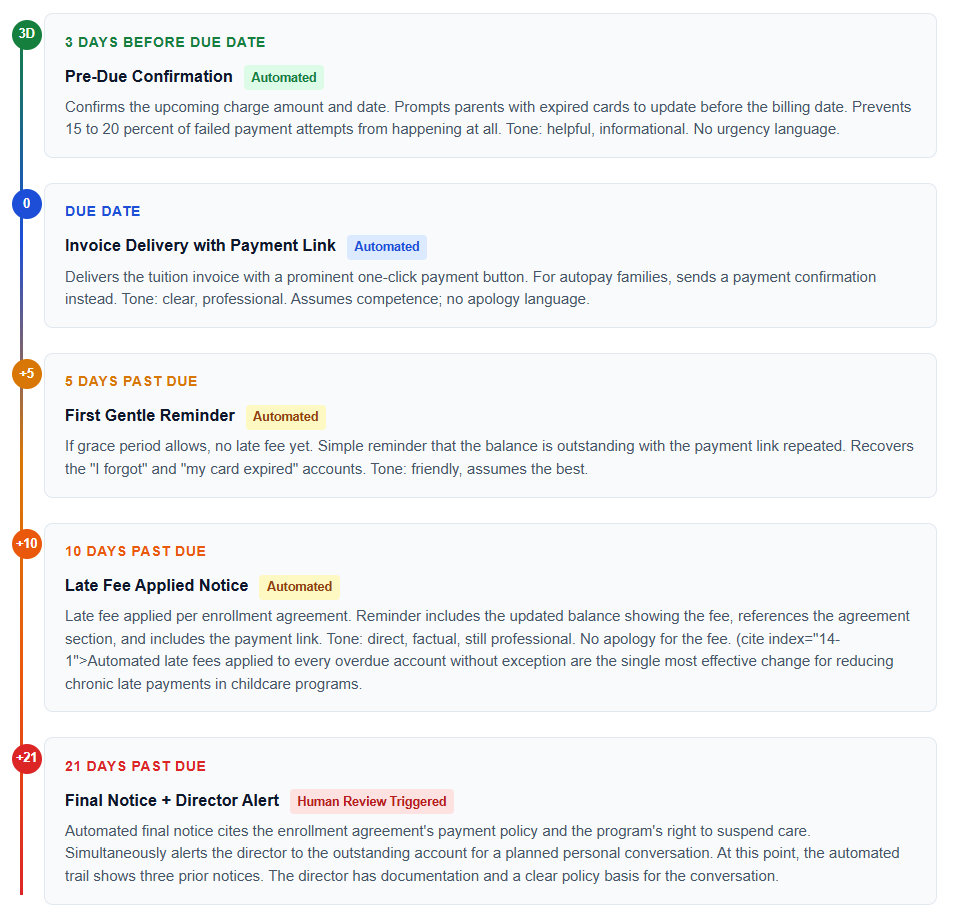
Automated reminder systems should offer multiple communication channels, including email, text messages, and in-app notifications. Customizable reminder schedules allow you to set gentle initial reminders followed by more urgent notices for overdue accounts. The five-step sequence below covers the complete payment cycle from pre-due through 30 days past due. The director’s involvement begins only at Step 5, when the automated sequence has not resolved the balance and a personal conversation is actually warranted.
What a Well-Written Childcare Payment Reminder Email Looks Like
The first reminder in the sequence sets the tone for everything that follows. It should feel like a service notification from a professional program, not a personal request for money from someone who is uncomfortable asking. The example below shows the five-day past-due first reminder, the most important message in the sequence because it recovers the largest share of late accounts.
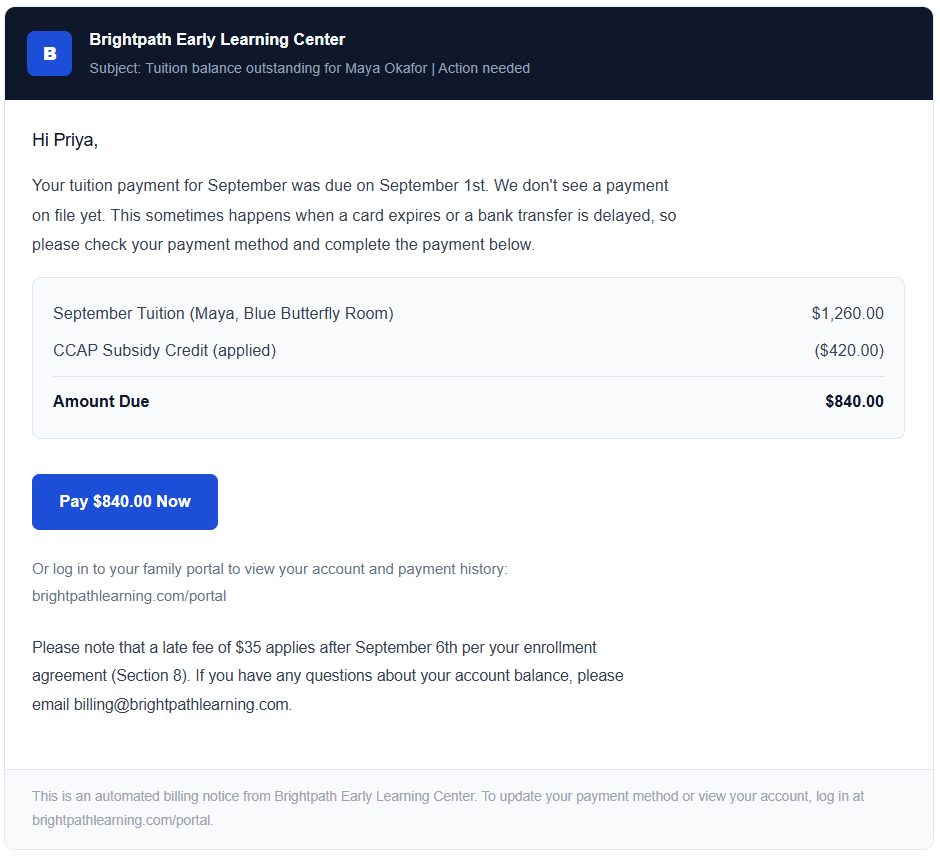
The email above does three specific things that most childcare billing reminders fail to do. First, it offers a benign explanation for why the payment might be late (“a card expires or a bank transfer is delayed”) rather than implying negligence. This reduces defensiveness and gets to payment faster. Second, it shows the subsidy credit separately, so a subsidy-assisted family sees their actual family balance rather than the gross tuition amount. Third, it mentions the late fee before it applies, referencing the enrollment agreement section, which means when the fee does apply, the family was pre-warned and the program has documentation that the warning was sent.
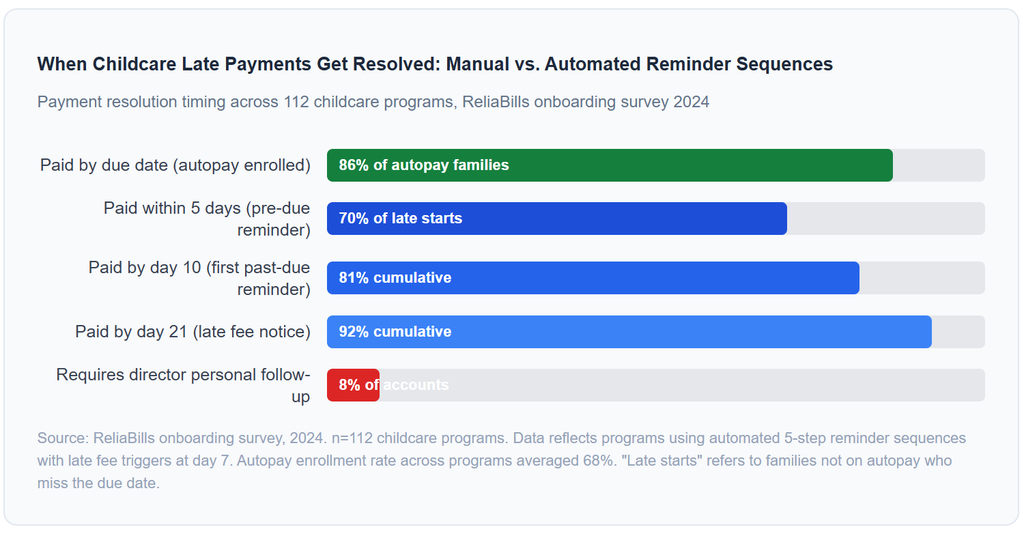
The 8 percent figure that reaches director personal follow-up is the most important number in this data set. These are the accounts where automated follow-up genuinely did not work, which means the director’s personal conversation is actually warranted rather than being the default first response to any late payment. When the director reaches out at 21 days after three automated reminders, the communication has a completely different character: it is a professional conversation about a persistent unresolved balance, supported by documentation, rather than an awkward first mention of a payment that is four days late.
Automating Late Fees: The Part Most Programs Get Wrong
Late fees are the most effective behavioral tool for reducing chronic late payments in childcare programs and the most inconsistently used one. The pattern is familiar: the director applies the late fee to some families and quietly waives it for others based on the relationship, the circumstances, or simply not wanting to have that conversation. The result is that the families who most need the behavioral signal to pay on time, the ones with chronic lateness, are the ones most likely to receive the fee inconsistently because their relationship with the director is already strained.
First late payment: automated reminder plus fee assessed. No staff action needed beyond what the system handles. Second late payment within a rolling period: automated reminder plus fee, with a brief personal note from the director. That structure is correct because it separates the fee from the relationship. The system applies the fee. The director’s personal note acknowledges the pattern, not the fee.
Manual Payment Follow-Up vs. Automated Childcare Payment Reminders
| Factor | Manual Follow-Up by Director | Automated Reminder Sequence | Impact |
|---|---|---|---|
| Consistency | Depends on director remembering, available time, and relationship comfort level | Same reminder fires for every family at every billing event | Eliminates the “fell through the cracks” accounts and fair treatment inconsistency |
| Late fee application | Applied selectively; often waived for preferred families, creating resentment | Applied automatically at the configured threshold for every account | Consistent application changes payment behavior without director negotiation |
| Relationship protection | Director’s relationship with the parent is the medium for uncomfortable requests | Billing system handles follow-up; the director relationship stays focused on child | Preserves the director-parent relationship for the conversations that actually matter |
| Speed of recovery | Delayed by the director’s comfort with confrontation and availability | Fires on schedule; recovers “forgetters” within 5 days | Average days to payment drops significantly vs. manual follow-up |
| Documentation | Verbal conversations leave no record; disputes become “he said, she said” | Every automated notice is timestamped and stored in the family account record | Director enters personal follow-up with a complete communication trail as support |
| Director time cost | 3 to 6 hours per week across a 40-family program | Under 30 minutes per week reviewing exception accounts | Recovered time goes to program delivery, enrollment, and staff development |
| Subsidy billing handling | Co-payment calculation is manual; families are often billed incorrectly | Split billing at account level; reminders show the family’s net co-payment only | Eliminates the most common billing dispute in subsidy-assisted programs |
Setting Up Automated Payment Reminders for Your Childcare Program
Update your enrollment agreement with late fee and autopay authorization language
Before configuring any automated billing, the enrollment agreement must explicitly authorize automated payment collection and define the late fee amount, grace period, and the conditions for fee application. Without this language in the signed agreement, automated late fees are not enforceable and automated charges may be disputed as unauthorized. Update the template before your next enrollment season and collect signatures from existing families at annual renewal. This step takes one afternoon and protects every automated action that follows it.
Configure each family account with their billing structure before the first charge
For private-pay families, set the monthly tuition amount, billing date, grace period, and late fee. For subsidy-assisted families, configure the gross tuition, the subsidy credit, and the family co-payment as separate fields so reminders show the family their actual balance rather than the gross tuition amount. For families on payment plans or installment schedules, configure the installment amounts and dates so each installment generates its own reminder rather than lumping all future amounts into one notice.
Write the five reminder messages before enabling the sequence
Draft all five messages before activating the reminder system. The pre-due confirmation, the due-date notification, the first past-due reminder, the late fee notice, and the 21-day final notice each need calibrated language. The tone should escalate gradually from warm and informational to professional and direct without ever becoming accusatory or threatening. Test each message by reading it as a parent who has simply forgotten to pay. If the message would make you defensive or embarrassed, revise it. ReliaBills and similar billing platforms allow you to customize reminder message templates at the account level or program level before activating automated delivery.
Enroll every new family in autopay at sign-up, not as a follow-up
The highest-impact single change for reducing late payments in any childcare program is making autopay enrollment part of the initial sign-up process rather than an optional follow-up. A parent who authorizes autopay at enrollment is not making a billing decision every month. The charge happens, they receive a confirmation, and their relationship with the program stays focused on their child. Programs that collect autopay authorization alongside the enrollment agreement consistently see 65 to 80 percent of their billing resolve at the billing date without any reminder involvement at all.
Set up a family payment portal for self-service balance visibility
A portal where parents can view their current balance, payment history, and upcoming charges, and update their payment method eliminates the majority of billing questions that currently reach the director or office staff. When a parent can see at 10pm that their payment failed, update their card, and complete payment without contacting anyone, the administrative follow-up for that account is zero. Deploy the portal alongside the reminder system, include the portal link in every reminder message, and mention it to families at enrollment as a convenience feature rather than introducing it only when there is a problem.
Define when the director gets involved and what the script is
The automated sequence handles the first 21 days. The director’s personal follow-up is triggered at 21 days past due, after three automated reminders, with a documented communication trail and a clear policy basis for the conversation. The script for that conversation should be prepared in advance: acknowledge the balance, reference the communication that has already been sent, and offer a payment plan as an option if the family has a genuine financial difficulty. The conversation is significantly easier when the director arrives at it with documentation rather than opening it from scratch at drop-off.
Common Mistakes and What I Got Wrong at First
Sending automated reminders without telling families they were coming
The first wave of automated payment reminders sent to families who had previously received only personal, conversational follow-up from the director created confusion in some programs. Families who received a reminder from “Tuition Billing at [Center Name]” when they expected a personal email from “Ms. Sarah” sometimes did not recognize the sender, opened the message suspiciously, or responded to the director asking if there was a billing problem. A one-time program communication before activating automated billing, explaining that the center has updated its billing system and that families will now receive automatic tuition confirmations and reminders, eliminates this friction entirely.
Applying the late fee to the same invoice that announces it
A common configuration error is setting up the late fee to apply on the same communication that first notifies the family their payment is late, so a family receives a message saying “your payment is late and you have been charged a $35 late fee” without ever receiving a warning that the fee was approaching. Families who have never been told a late fee exists, or whose enrollment agreement does not explicitly describe it, will dispute this. The pre-due reminder and the first past-due reminder should both mention the upcoming late fee threshold before it applies. When the fee appears on the 10-day notice, it should be expected, not surprising.
Sending reminders to the wrong parent in a co-parenting household
Co-parenting families with a designated billing contact, usually specified in the enrollment agreement or a billing authorization form, should receive reminders only to the billing contact, not to both parents. A late payment reminder sent to the non-billing parent creates conflict in co-parenting situations, can be perceived as involving the non-responsible party in a financial matter, and sometimes generates angry calls from both parents simultaneously. Configure billing communications at the family account level with a clearly designated payment contact and send all billing reminders only to that contact.
Using the same reminder tone for all stages of the sequence
A pre-due confirmation that uses the same urgent language as a 21-day past-due final notice creates reminder fatigue. If every message feels like an emergency, none of them feel like an emergency, and the behavioral response to escalating urgency disappears. The pre-due confirmation should be neutral and helpful. The first past-due reminder should be gentle and solution-focused. The late fee notice should be direct and factual. The final notice should be formal. Each step’s tone should be noticeably different from the previous one so the escalation registers with the recipient.
Not including a one-click payment link in every reminder
Payment reminders that require families to log in to a separate portal, navigate to their account, and initiate payment are consistently paid 40 to 60 percent more slowly than reminders with a direct one-click payment link. Every reminder message must contain a payment button or link that takes the parent directly to payment completion, pre-populated with their account balance, without requiring them to remember a login or navigate a menu. The easier the payment action, the faster the payment happens. Every additional step between the reminder and the payment link is a step that delays collection.
Frequently Asked Questions
1. What are childcare payment reminders?
Childcare payment reminders are automated notifications sent to parents before and after a tuition due date to confirm upcoming charges, prompt payment of outstanding balances, and notify families when a payment fails or a late fee has been applied. They are sent by the billing system rather than by the director, which removes the human discomfort from payment follow-up. An effective sequence includes a pre-due confirmation three to five days before billing, a due-date notification with a payment link, and a sequenced past-due series that escalates in tone over 30 days before requiring director involvement.
2. How do you send a late payment reminder without damaging the relationship?
The most effective approach is to send automated reminders from the billing system rather than personal messages from the director. When a reminder comes from the billing team rather than from the director by name, it is received as an administrative process rather than a personal request. The message tone for the first two reminders should be informational and helpful, offering a benign explanation for why the payment might be late and providing an easy payment link. The director steps in personally only at 21 days, after the automated trail shows three prior notices, which gives them documentation and a clear policy basis for the conversation.
3. Can you charge late fees for childcare without a signed agreement?
No. Late fees are only enforceable if the enrollment agreement the family signed explicitly defines the fee amount, the grace period in days, and the conditions under which the fee applies. A late fee applied without this written authorization is not legally defensible and can result in a refund demand or a complaint to the state childcare licensing office. Update your enrollment agreement to include specific late fee language before enabling automated late fee application, and collect a signed acknowledgment from existing families at their next enrollment renewal.
4. What should be in a childcare payment reminder email?
A childcare payment reminder email should include the center name and logo; the parent’s and child’s names so it is clearly specific to their account; the amount due with a clear breakdown showing tuition, subsidy credits, and any fees; the due date and whether it has passed; a prominent one-click payment link; the payment methods accepted; a brief reference to the late fee policy if the payment is overdue; and contact information for billing questions. Keep billing reminders separate from other program communications. Combining payment reminders with newsletters or classroom updates dilutes the urgency and reduces response rates.
5. How many days late should late fees be applied for childcare?
Most childcare programs apply late fees after a grace period of three to seven days, with the fee defined in the enrollment agreement. The most common structures are a flat fee of $25 to $50 after the grace period expires or a daily fee of $5 to $15 per day. The critical principle is that the fee must be applied consistently to every family at the same threshold rather than selectively based on the director’s judgment. Inconsistent late fee application is both operationally ineffective and a potential fair treatment concern. Automated late fee triggers that apply to every account at the same threshold solve both problems simultaneously.
6. What is the difference between childcare payment reminders and dunning emails?
In billing software, dunning refers to the automated sequence of communications sent to recover outstanding payments. Childcare payment reminders are the childcare-specific application of dunning, calibrated for the family relationship context. The underlying automation logic is identical. The difference is tone, timing, and the escalation pace. A childcare reminder sequence starts warmer, escalates more gradually, and always includes a one-click payment link because the goal is removing friction rather than applying pressure. The practical result is the same: systematic follow-up that recovers most late balances before human intervention is required.
Recent Articles:
- How to Manage Security Service Contracts and Customer Data in One System
- Customer Data Management for Pet Service Businesses: Track Pet and Owner Records