
Childcare billing automation removes manual invoice creation, payment follow-up, and late-fee enforcement from your administrative routine. When tuition is collected on a fixed, automated schedule, centers consistently reclaim 10 to 20 hours of staff time per month and see measurable improvement in on-time payments, often within the first billing cycle.
What is Childcare Billing Automation?
Childcare billing automation is the use of software to automatically generate, send, and collect tuition invoices on a predefined schedule, without requiring manual action each billing cycle. Rather than creating invoices individually, administrators configure tuition plans once, and the system handles generation, delivery, payment collection, failed-payment retries, and record-keeping on an ongoing basis.
Key terms: recurring billing (automatic invoicing on a fixed schedule), installment billing (splitting larger fees into scheduled payments), invoicing software (the platform that manages invoice creation and delivery), and autopay (automatic charge of a stored payment method on the due date).
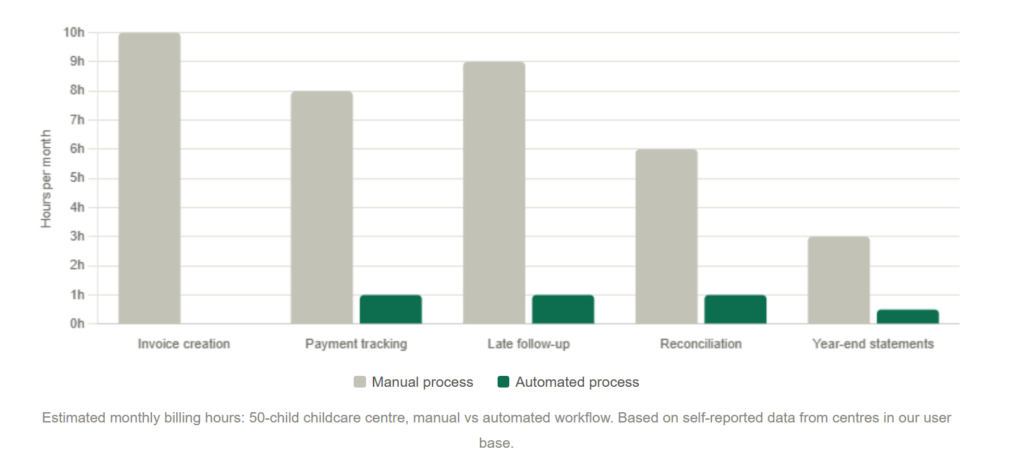
The Real Cost of Manual Tuition Billing
Most childcare directors I’ve spoken with describe the same monthly pattern: the last week of the month becomes an invoicing sprint. They’re creating statements one by one, printing or emailing them, tracking who’s paid on a spreadsheet, following up on overdue accounts, and manually entering received payments. It is relentless, it repeats every 30 days, and it scales badly as enrollment grows.
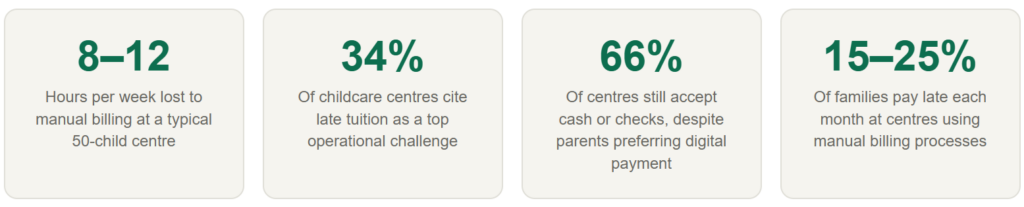
The numbers from the broader sector confirm what we see in practice. According to data from EduTrak, billing admin alone can consume 8 to 12 hours per week at a typical center, and 34% of childcare centers report late tuition payments as a top operational challenge. LineLeader’s childcare research puts the figure higher, at 7 or more hours per week for directors who are also managing reminders and reconciliation manually.
There’s also a harder-to-measure cost: the relationship friction that comes from staff having to ask parents for money in person. A director chasing a late payment at school drop-off is not doing the work they were hired to do. Automation moves that conversation out of the hallway and into the inbox, where it belongs.
How Childcare Billing Automation Works
The mechanics are simpler than most administrators expect. You configure each family’s tuition plan once, including their rate, billing frequency, payment method, and any discounts. From that point on, the system handles every step of the collection cycle without human input, unless something goes wrong.
Here is what the automated cycle looks like in practice:
1. Enrolment and plan setup
When a new family enrolls, you create their tuition profile: rate tier (full-time, part-time, drop-in), billing date, payment frequency, and any applicable sibling discounts or subsidy splits. This is a one-time setup that takes two to four minutes per family.
2. Invoice generation
On the scheduled billing date, the system generates each family’s invoice automatically. Recurring charges, variable add-ons (late pickup fees, meals), and any outstanding balances are calculated and combined without staff involvement.
3. Delivery and autopay collection
Invoices are emailed to parents immediately. Families enrolled in autopay are charged on the due date automatically. Those paying manually receive a payment link they can action from their phone in under 30 seconds.
4. Automated reminders and failed payment handling
The system sends payment reminders on a defined schedule. If a payment fails (expired card, insufficient funds), the family is notified automatically, and the system retries the charge according to your configured retry rules, without staff needing to follow up manually.
5. Payment posting and reporting
Received payments post to each family’s account in real time. Directors see current balances, outstanding amounts, and revenue totals in a live dashboard without needing to reconcile a spreadsheet at month-end.
The key distinction from generic accounting software is that steps two through five repeat automatically every billing cycle, indefinitely, until a plan is modified or cancelled. There is no trigger required from your team month to month.
Real-World Examples and Case Data
Abstract claims about time savings are easy to make. Here is what the transition actually looks like at specific center types.
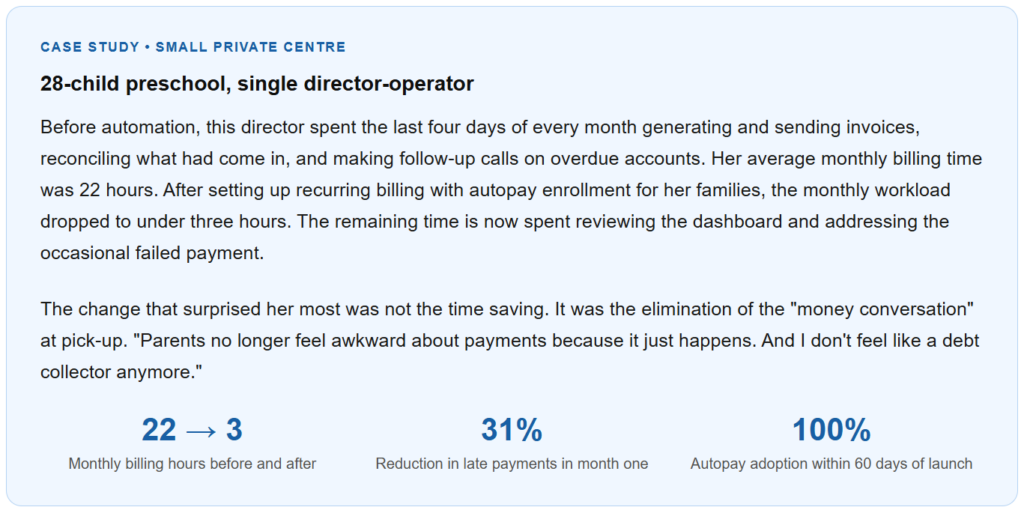
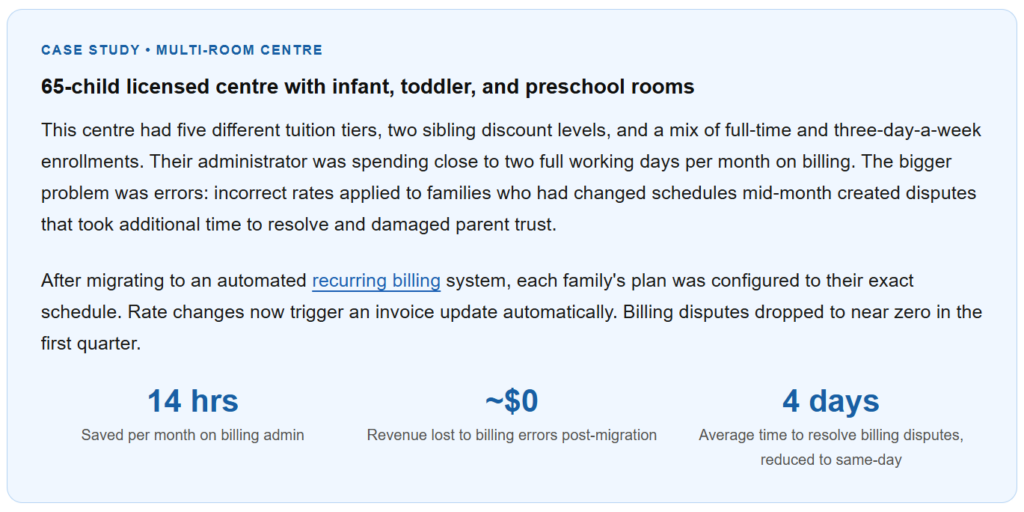
These are not outliers. The pattern is consistent: the initial setup investment (typically three to five hours to configure all family plans) is recovered within the first automated billing cycle. After that, the administrative return compounds monthly.
Key Benefits of Childcare Billing Automation
Predictable cash flow, without the chase
When tuition is collected on autopay on the same date each month, center revenue becomes highly predictable. Directors can plan staffing, supplies, and operating expenses against a known monthly inflow rather than waiting to see what comes in. Families who are late by default become on-time payers because their payment processes before they think about it.
Fewer billing errors across complex rate structures
Childcare centers deal with billing complexity that generic invoicing software was not designed for: part-time schedules, sibling discounts, subsidy splits, late pickup fees, and enrollment changes mid-month. Automated systems calculate these correctly at invoice generation time, not at the point where a human does the math under deadline pressure. The error rate falls dramatically, and with it the administrative cost of dispute resolution.
Improved parent experience
Parents who pay online through a portal or autopay report significantly higher satisfaction with administrative touchpoints than those still receiving paper statements. The convenience of a one-tap payment from a phone, combined with automatic receipts and a visible payment history, removes a genuine friction point from the parent relationship. Research from childcare management providers indicates that families enrolled in autopay are 40% more likely to remain enrolled long-term, though improved retention is influenced by multiple factors beyond billing alone.
Year-end tax statement generation without the January scramble
Every January, administrators at manual-billing centers field the same wave of requests: parents need documentation of childcare payments to claim the Child and Dependent Care Credit. An automated system has a complete payment history for every family and can generate and deliver year-end statements in a single batch run. What used to take several days of searching through records becomes a ten-minute task.
Staff freed for higher-value work
Hours reclaimed from billing administration go back into the educational mission: curriculum planning, staff development, parent communication, and actually being present with children. In small centers where the director is also the primary teacher, this is not a marginal improvement. It can be the difference between running a sustainable program and burning out.
Common Mistakes (And What I Got Wrong at First)
Most centers that struggle with billing automation don’t struggle because the software is difficult. They struggle because of how they set it up in the first month. These are the errors I see most often, and in a few cases, the ones I made myself when setting up early accounts.
Mistake 1: Migrating mid-cycle instead of at the start of a billing period
Switching billing systems mid-month creates a partial-period problem: families who’ve already received a manual invoice now also receive an automated one, or vice versa. Always time the cutover to the first day of a new billing cycle. Give yourself at least two weeks to configure family plans before that date.
Mistake 2: Not enrolling families in autopay from the start
Sending automated invoices is only half the benefit. If families still pay manually, you’ve removed invoice creation from your workload but kept collection follow-up. The full time savings come when families are on autopay. Make autopay enrollment part of your intake paperwork, not an optional add-on you ask families to consider later.
Mistake 3: Setting up one billing template for all families
It’s tempting to create a single recurring billing template to speed up setup. The problem is that your families don’t all have the same rate, the same billing date, or the same schedule. Centers that use one generic template end up spending more time on corrections than they saved on setup. Spend the extra time upfront to configure each plan individually. It takes about three minutes per family and pays back immediately.
Mistake 4: Ignoring the failed payment workflow
Automated billing does not mean zero failed payments. Cards expire, accounts run short, and banks flag recurring charges. If you don’t configure your retry logic and notification timing before going live, failed payments sit unresolved and create the same overdue-account problem you were trying to eliminate. Set up your retry schedule and your staff notification rules on day one.
Mistake 5: Underestimating the parent communication needed at launch
Parents who have been paying by check for three years will be disoriented by a sudden shift to digital invoices. Send clear communication at least two weeks before the first automated billing cycle, explaining what’s changing, why, and what they need to do (usually click the link and set up their payment method). Centers that skip this step see a spike in support questions in month one that offsets the time savings they were expecting.
What I got wrong at first: The first time I helped a center migrate to automated billing, I focused entirely on the software configuration and assumed the families would figure out the rest. They didn’t. Three days after the first automated invoices went out, the director was fielding calls from parents who didn’t know what the email was, thought it might be spam, and had never set up an online payment before. The billing itself worked perfectly. The communication plan was what needed the most attention. I’ve built a two-week parent communication sequence into every migration since.
Manual Billing vs. Automated Billing: Side-by-Side
The table below compares the two approaches across the dimensions that matter most to childcare center directors.
| Factor | Manual billing | Childcare billing automation |
|---|---|---|
| Invoice creation | Created individually each cycle | Generated automatically on schedule |
| Late payment rate | 15–25% of families late each month | Drops significantly with autopay enrollment |
| Admin time per month | 8–12 hours (50-child center) | 2–4 hours (exceptions and oversight only) |
| Billing errors | High risk with complex rate structures | Eliminated once plans are configured correctly |
| Failed payment handling | Manual follow-up required | Automated retry + family notification |
| Sibling discounts & subsidy splits | Calculated manually each cycle | Applied automatically per family plan |
| Year-end statements | Assembled manually in January | Generated and sent in one batch |
| Setup investment | Minimal (already in use) | 3–5 hours initial configuration |
| Parent payment experience | Paper or manual digital invoicing | Self-serve portal, autopay, digital receipts |
How to Get Started With Childcare Billing Automation
The migration from manual to automated billing is a one-time project with a straightforward sequence. Here is the practical order of operations.
Step 1: Audit your current billing setup
Before touching any software, list every rate tier in your center, every family’s current rate, all active discounts, subsidy arrangements, and your billing dates. This audit typically takes two to three hours but prevents configuration errors later. If you have families on non-standard arrangements (deferred payment or payment plans for outstanding balances), document those separately. Tools like installment billing can handle structured repayment plans alongside regular tuition.
Step 2: Configure your billing templates
Set up your center’s recurring billing templates in your chosen platform. Create one profile per rate tier (full-time infant, part-time toddler, preschool five-day, and so on) and then assign families to their appropriate template. Avoid the single-template shortcut described in the mistakes section above.
Step 3: Communicate with families before you go live
Send a written notice to all families at least 14 days before the first automated billing date. Explain what’s changing, when the first automated charge will occur, and exactly what they need to do to set up their payment method. Include a direct link to the payment portal. Follow up one week later with a reminder for families who haven’t yet added their payment method.
Step 4: Configure your failed payment and reminder workflows
Set your payment reminder schedule (typically 3 days before the due date and on the due date itself), your failed payment retry logic (retrying after 3 days and again after 7 days is a standard starting configuration), and your staff alert rules so you’re notified of unresolved failures that need a personal touchpoint.
Step 5: Run your first automated cycle and review the results
After the first cycle completes, review the total invoices generated, payments collected, failed payments, and any invoices that required manual adjustment. This review usually surfaces one or two configuration issues that are easy to fix before month two. After the first cycle runs cleanly, the system runs itself.
ReliaBills supports all of the above for childcare and service businesses, with recurring billing, installment billing for outstanding balance management, automated reminders, and a parent-facing payment portal. The platform is designed around the idea that billing should be set up once and managed by exception, not rebuilt every month.
Frequently Asked Questions
1. What exactly is childcare billing automation?
Childcare billing automation is the use of software to automatically generate, send, and collect tuition invoices on a set schedule, replacing manual monthly invoice creation, payment tracking, and follow-up calls. Once a family’s tuition plan is configured, the system handles every step of the billing cycle without staff involvement unless an exception occurs.
2. How much time does automated billing actually save?
Centers consistently report saving between 10 and 20 hours per month on billing administration after switching to automation. The specific amount depends on center size, billing complexity, and how many families enroll in autopay. A 28-child single-director center might go from 22 hours to 3 hours per month. A 65-child center with a dedicated administrator typically reclaims 14 to 16 hours per month.
3. Can automated billing handle different rates for different families?
Yes. A well-configured recurring billing system lets you set individual tuition plans per family, supporting different rate tiers (full-time, part-time, drop-in), sibling discounts, subsidy splits, and variable add-on charges like late pickup fees or meal costs. Each family’s plan calculates independently every billing cycle.
4. What happens when a family’s payment fails?
An automated system detects the failure and triggers a defined workflow: the family receives an immediate notification explaining what happened and how to resolve it, and the system retries the charge according to your configured retry schedule (commonly at 3 days and 7 days). Staff receive a notification for any failures that remain unresolved after retries, so manual follow-up is targeted rather than routine.
5. Is childcare billing automation practical for a small center with 20 families?
Yes, and often more so than for larger centers. At 20 families, a single director usually manages billing personally alongside every other operational responsibility. Even eliminating 8 to 10 hours of monthly billing work at that scale has a significant quality-of-life impact. Setup time is proportionally shorter too, since there are fewer family plans to configure.
Bottom Line
Childcare billing automation is not a technology project. It is a decision to stop doing the same manual work every 30 days and redirect that time toward the reason you opened a childcare center in the first place. The software setup takes a few hours. The benefit runs indefinitely.
The biggest barrier most directors face is not the learning curve. It is the fear that something in the automated process will go wrong and create more work than it saves. That risk is real, but it is almost entirely concentrated in the initial configuration and the first billing cycle. Centers that invest in a careful setup, a clear parent communication plan, and a properly configured failed-payment workflow find that the system runs cleanly after that, with only exception-based input from staff.
If your current billing process requires you to do something manually every month, that is a process worth automating. The time savings compound, the error rate falls, and the cash flow becomes predictable. For most childcare directors, the question is not whether to automate. It is why they waited as long as they did.
Recent Articles:
- Billing Software for Cleaning Services: How to Get Paid Consistently
- Recurring Invoicing for HOA and Property Management Companies

Brant Pallazza is the Founder and President of ReliaBills, an invoicing and recurring billing platform built to help small businesses secure predictable cash flow. With over 20 years of experience in direct response marketing and e-commerce leadership, including a 13-year tenure managing over $500 million in gross sales at Digital River. Brant writes actionable guides on automated billing, payment processing, and scaling SMBs.