

The right billing software for pet services does three things your current system probably doesn’t: it invoices automatically after each appointment, follows up on unpaid balances without you making an awkward call, and keeps a clean record of every client’s payment history, so membership packages, multi-pet households, and recurring grooming schedules stop falling through the cracks.
What is Pet Services Billing Software?
Pet services billing software is a payment and invoicing platform built around the specific business models common in pet care, appointment-based sessions, package deals, boarding day rates, recurring grooming schedules, and vet clinic service codes. Unlike generic invoicing tools, it connects scheduling, client records, and payment collection into one workflow. Key terms include appointment-based invoicing, package billing, recurring visit billing, and recurring billing automation. It’s the operational layer that turns a completed service into collected revenue, without a manual step in between.
How Pet Services Billing Software Works
The billing cycle in a pet services business is short and high-frequency, a groomer might process 12–20 appointments a day, a boarding facility might run weekly invoices per pet, and a vet clinic handles everything from routine checkups to emergency services with wildly variable costs. A billing platform built for this industry maps to that rhythm. Here’s what the standard cycle looks like:

The multi-pet household problem
One client, three dogs, different grooming schedules, and one payment method on file. This is one of the scenarios that breaks generic billing tools, they’re designed for one contact, one invoice, one payment. Good pet services billing platforms handle this natively: eainvoice, ands a sub-record under the client, each service generates its own line item, and payment can be batched or split depending on how the owner prefers it. Your customer management setup is what makes this work cleanly.
Package and prepaid block billing
Dog training packages, grooming bundles, and boarding prepayment are all forms of prepaid billing that standard invoicing tools handle poorly. The billing platform needs to track remaining sessions, decrement the balance on each use, and notify both you and the client when the package is running low. These are the edge cases most software comparisons skip entirely, and they’re the ones that cause the most billing disputes in real practice.
Real-world Use Cases by Pet Service Type
- Dog groomers: Auto-invoice at appointment close. Recurring grooming schedules on recurring billing, every 4 or 6 weeks, without manual setup.
- Pet sitters & walkers: Weekly invoices that batch all walks or drop-ins for the period. Packages of 10 or 20 walks tracked with automatic session decrement.
- Veterinary clinics: Variable invoices with service codes, lab fees, and medication line items. Installment billing for large emergency procedures or surgical costs.
- Boarding facilities: Day-rate billing with check-in/check-out dates. Prepayment collection at booking, with automatic balance invoicing on departure.
- Dog trainers: Training package billing with session tracking. Clients pay upfront for a 6- or 8-week program; software tracks attendance and remaining sessions.
- Doggy daycare: Daily or weekly billing with drop-in vs. subscription rates. Members on auto-pay; drop-ins billed on pickup. Both in the same system.
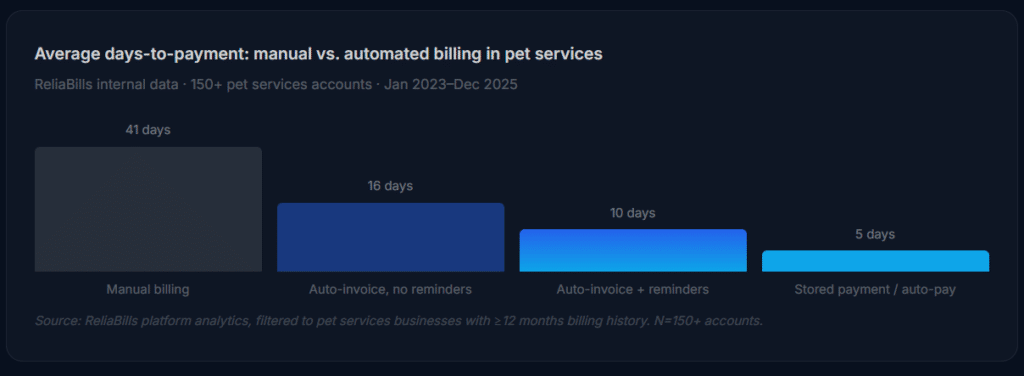
Key Benefits for Pet Service Businesses
The efficiency argument for billing automation is well-covered elsewhere. What’s less discussed is the emotional toll of chasing payments in an industry built on personal relationships, nobody wants to text a grieving pet owner about an overdue invoice. Automation handles the awkward parts so you don’t have to.

No-show and cancellation policy enforcement
One of the highest-value use cases in this industry is automated no-show fee collection. If a grooming slot goes empty because a client didn’t cancel within 24 hours, the billing platform can automatically generate and send a cancellation fee invoice without any staff interaction. Whether or not you choose to waive it is still your call, but the invoice exists and was sent, which changes the dynamic of the conversation entirely.
Clean records for multi-year client relationships
A groomer or vet who’s been seeing the same family’s pets for seven years has a payment history that tells a story: which clients always pay same-day, which ones need two reminders, and which ones are genuinely reliable despite sometimes being 30 days out. A billing platform makes that history visible and actionable, you can segment clients, apply different reminder cadences, and make informed decisions about who gets a payment plan and who needs a card on file before their next appointment.
Risks and What to Watch For
Deposit and prepayment disputes
Boarding and training businesses often collect deposits at booking. If the billing software doesn’t track the deposit against the final invoice and clearly show the client what was paid vs. what remains, you’ll spend more time explaining charges than collecting them. Verify that your platform handles partial payment ledgers before you go live with deposit billing.
State-specific pet care regulations
Some states require licensed veterinary facilities to provide itemized invoices at the point of service, not days later. A billing platform that sends invoices on a delay or doesn’t support itemized line items for medications, labs, and procedures can create compliance issues for clinics. Check your state’s veterinary practice act before selecting a platform.
Integration with your scheduling tool
The billing trigger in most pet services businesses is appointment completion. If the billing software doesn’t integrate with your scheduler, whether that’s a purpose-built pet software, a Google Calendar setup, or an industry tool like Gingr or MoeGo, you’re back to manual invoice creation. The integration quality matters as much as the billing features themselves.
Billing Software Comparison: Pet Services vs. Adjacent Tools
| Tool type | Recurring billing | Package / session tracking | No-show fee automation | Multi-pet households | Deposit management | Best for |
|---|---|---|---|---|---|---|
| Pet services billing software Best fit | ✓ | ✓ | ✓ | ✓ | ✓ | Groomers, sitters, vets, boarding |
| Generic invoicing software | ~ | ✗ | ✗ | ✗ | ~ | Freelancers, product businesses |
| Industry-specific pet software (Gingr, MoeGo) | ✓ | ✓ | ✓ | ✓ | ✓ | All-in-one PM; higher cost |
| Square / point-of-sale | ✗ | ✗ | ✗ | ✗ | ✗ | In-person card-present only |
| Accounting software (QBO, Xero) | ~ | ✗ | ✗ | ✗ | ~ | Back-office, not AR management |
Partial support requiring workarounds. The right choice depends on whether you need a standalone billing layer or a full practice management platform.
Feature Checklist: What Pet Services Businesses Actually Need
| Feature | Why it matters | Priority |
|---|---|---|
| Appointment-triggered invoicing | Invoice generates the moment a service is marked complete, no manual step and no delay | Essential |
| Stored payment methods (card on file) | Clients authorize once; every future invoice collects automatically | Essential |
| Automated payment reminders | Removes the awkward follow-up; reduces days-to-payment by 40–60% | Essential |
| Multi-pet / multi-service per client | One household, multiple pets, different service schedules, must work natively | Essential |
| Package / prepaid session tracking | Training bundles and grooming packages need a session ledger, not just an invoice | High |
| Deposit and partial payment support | Boarding and surgical cases require deposits with clear final-balance billing | High |
| Reminder pause per client | Pause automated follow-ups during grief periods or sensitive situations | High |
| Scheduling integration | Connects to your booking tool so invoice triggers are automatic, not manual | High |
| No-show / cancellation fee automation | Auto-generates and sends cancellation fee invoices without staff involvement | Situational |
Common Mistakes And What We Got Wrong at First
1. Setting up reminders without a pause mechanism
The first question we now ask every pet services business before enabling automated reminders: “What happens when a pet dies?” It sounds blunt, but an automated invoice reminder landing in a client’s inbox the day after losing a pet is a business relationship killer. If your billing platform doesn’t let you pause reminders per client with one click, you need a manual process to cover this, or you need a different platform.
2. Invoicing after a batch instead of after each appointment
End-of-week batch invoicing feels efficient but produces the worst collection rates in this industry. Clients forget what the charge is for, dispute line items they’d have accepted at the time, and deprioritize a “bill for last week” versus a same-day invoice for a service they just received. Invoice at appointment close, every time, for every client. The open rate data backs this up: same-day invoices get paid 2–3x faster than batched ones.
3. Skipping deposit tracking and going by memory
Boarding facilities and training businesses collect deposits constantly. We’ve seen owners track these in a notebook, a sticky note, or a separate spreadsheet column, then lose the thread when a client disputes their final bill. Every deposit needs to live in the billing system as a partial payment against the future invoice, not in a separate record. If your current tool can’t do this, you’re one disputed charge away from a bad Google review.
4. Not collecting a card on file at the first appointment
Asking for a stored payment method at appointment number five is much harder than at the intake form stage. Clients who are new and excited about their first grooming visit, signing their boarding agreement, will fill in a card number the same way they’d accept any standard business requirement. Long-standing clients who have always paid by invoice will push back. Make card-on-file part of your onboarding paperwork, not a later conversation.
5. Choosing a platform based on the cheapest processing rate
A 0.3% difference in transaction fees matters far less than whether the platform handles your actual billing model. A dog trainer running 6-week packages, session-by-session tracking, and prepaid renewals will spend more staff hours working around a basic invoicing tool than the savings ever justify. Evaluate platforms on workflow fit first, then negotiate on rate.
How to Get Started: Implementation Roadmap
The phases below are built for pet services businesses specifically, not a generic software rollout. The order matters: skipping phase one causes the problems that make phases two and three painful.
1. Audit your client records (week 1)
Pull every active client and verify: do you have a current email address, the correct pets listed, and a clear billing model (per-visit, package, or recurring)? Also pull your AR aging, any invoices over 30 days are your first priority once the system is live. Your customer management data needs to be clean before anything else will work.
2. Configure billing models by service type (week 2)
Map each service to a billing trigger and template. Grooming appointments get same-day invoices at close. Boarding gets a deposit invoice at booking and a balance invoice on departure. Training packages get a prepaid invoice with session tracking. Set up your recurring billing schedules for any clients on monthly retainers (such as daycare memberships or monthly wellness plans). Get these templates right before enabling anything automatic.
3. Pilot with 5–10 clients (week 3)
Run one full billing cycle, including a reminder sequence, with a small cohort before enabling batch automation. Check that invoices look professional, payment links work, reminders fire at the right intervals, and payments land in the correct account. Fix what breaks here, not after sending to your full client list.
4. Full migration and card-on-file rollout (month 2)
Move all clients onto the platform and send a card-enrollment email to your full list. Frame it as a convenience for them, no need to pay each time, no worrying about outstanding invoices. For larger emergency or surgical costs, offer installment billing options so clients know flexible payment is available. ReliaBills provides a free-tier entry point that includes unlimited clients and invoice sending, useful for testing the workflow before committing to payment processing fees. Once card-on-file enrollment reaches 50%+, your collection cycle compresses to near-zero.
Frequently Asked Questions
1. What’s the difference between generic invoicing software and billing software built for pet services?
Generic invoicing tools assume one client, one invoice, one payment. Pet services businesses deal with multi-pet households, package billing, recurring grooming schedules, boarding deposits, and the emotional complexity of the client relationship. Purpose-built billing platforms handle these natively, the workarounds required to make a generic tool fit cost more in staff time than a proper platform would have.
2. How does billing software handle packages like 10-visit dog training bundles?
A billing platform with package support creates a session ledger tied to the prepaid invoice. Each completed session decrements the ledger, and both you and the client can see the remaining balance. When the package is nearly exhausted, the system can trigger an automatic renewal notice. Without this feature, you’re tracking sessions manually, which is where billing disputes typically start.
3. Can I pause automated reminders for a client going through a difficult time?
Yes, any billing platform worth using in this industry lets you pause reminders per client with a single action. The pause can be indefinite or time-limited. This is a non-negotiable feature for pet services businesses where the client relationship is personal and the emotional stakes are high.
4. How should I handle boarding deposits in billing software?
The correct approach is to record the deposit as a partial payment against a future invoice, not as a separate transaction in a different system. When the boarding stay ends, the billing platform generates the full invoice with the deposit already applied, showing the client exactly what was paid and what remains. This eliminates the most common source of billing disputes in boarding facilities.
5. Is billing software secure enough to store client payment information?
Reputable billing platforms use PCI-DSS-compliant tokenized card storage, meaning raw card numbers are never stored on your system or theirs. The token references the payment method held securely by the payment processor. Look for SOC 2 Type II certification as an additional indicator of data security practices.
6. What’s the best way to get clients to put a card on file?
Make it part of your new client intake form, not a separate conversation later. Frame it as standard practice (“like a hotel authorization”) and emphasize the convenience: they won’t need to pay each time, and they’ll receive an invoice summary regardless. New clients accept this far more readily than established ones who are used to paying by check or cash. Expect 60–80% enrollment when it’s presented as default at intake.
Recent Articles:
- CPA Billing Software: Complete Guide to Automating Accounting Firm Invoicing
- Pool Service Billing Software: The Complete Guide for Pool Maintenance Companies