

Automating personal training billing and fitness class package payments is not about replacing the personal touch that keeps clients coming back. It is about removing the friction and awkwardness of money conversations from every single session so both you and your client can focus on what actually matters. Trainers and studio owners who have made the switch report not just time savings, but a measurable improvement in client relationships once billing stops being a recurring point of tension.
What Is “Automating Personal Training and Fitness Class Package Billing”?
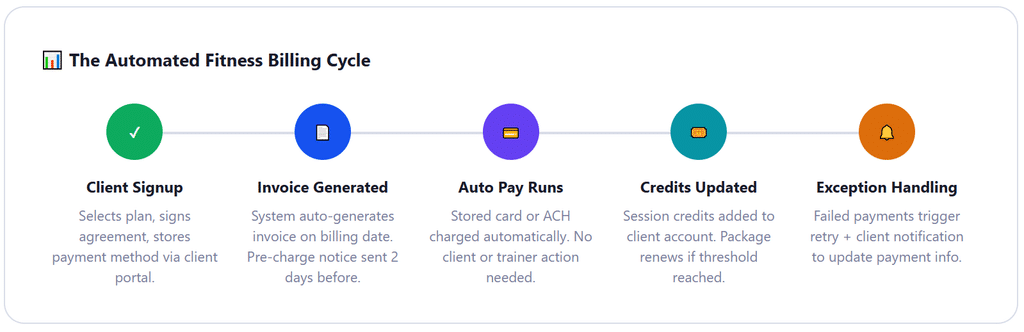
Automating personal training billing and fitness class packages means configuring a billing system to charge clients on a defined schedule or per package purchase, without requiring manual invoice creation or payment collection after each session. The system stores the client’s payment method at signup, generates invoices automatically based on the billing model (monthly membership, session package, or drop-in), processes charges via Auto Pay or stored card, tracks session credits, and handles reminders and failed payment recovery without staff intervention.
The key distinction from simply accepting payments online is automation of the full cycle. A trainer who sends a Stripe link after each session is accepting online payments, not automating billing. True automation means the payment initiates on a schedule or trigger, the client’s account updates automatically, and no manual steps are required between the session and the payment clearing.
Why Fitness Billing Is More Complicated Than It Looks
Most billing guides treat personal training like a simple subscription service: charge the same amount on the same day every month, done. Real fitness billing is messier. Clients have 10-session packages that expire. Group classes use credit systems where one credit equals one session, but pricing varies by class type. Monthly memberships pause when clients travel. Personal training sessions get rescheduled constantly, and in-person trainers often have a mix of clients on monthly plans, package plans, and drop-in rates all running simultaneously.
The result, without automation, is a billing environment that demands constant attention. GetApp’s analysis of 1,619 verified fitness software reviews found that 89% of personal trainer software users rated recurring billing as an important or highly important feature. That is a strong signal about how significant the billing burden actually is in day-to-day fitness business operations.
The other thing most billing guides miss is that fitness billing has specific compliance considerations that differ from general service billing. Personal training packages can qualify as advance payment for future services, which in some states triggers specific disclosure requirements. Session credits that expire have legal implications in jurisdictions with consumer protection laws around prepaid services. And auto-renewal of fitness contracts is specifically regulated in several states, including California, New York, and Florida. None of this is covered in generic billing automation guides, and all of it matters when you are setting up automated charging for fitness clients.
The Three Billing Models and Which One Fits Your Business
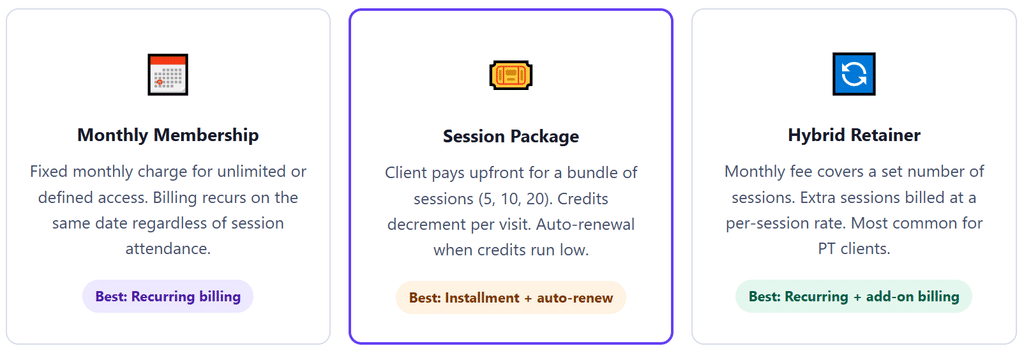
Fitness billing falls into three primary structures. Most trainers and studios use a mix of all three, but the core automated billing setup differs for each. Understanding which model each of your services fits before configuring your billing system prevents the most common setup mistakes.
Monthly Memberships: The Simplest to Automate
Monthly memberships map directly to standard recurring billing logic. A client pays $199/month for unlimited group classes, or $299/month for four personal training sessions. The charge runs on the same date each month, the system handles it automatically, and the client’s access renews without any action from either party. This is the easiest model to configure and the one with the highest collection rate because there is no decision point for the client each billing cycle.
The complication arises with pause requests. A client traveling for three weeks should not pay full price for a month they cannot use. Your billing system needs to support a formal pause workflow where the membership billing halts for a defined period and resumes automatically at the end of it, without requiring you to cancel and recreate the billing profile. Practices that manually cancel and recreate memberships during pauses consistently lose billing continuity data and create administrative headaches at resumption.
Session Packages: The Hardest to Track Without Automation
Session packages are where manual billing breaks down fastest. A client buys a 10-session pack, uses three sessions over the next four weeks, then has a week off, and by week six no one is certain whether they are on session six or seven. Without automated session tracking, trainers are constantly doing mental math or checking notes during the session itself, which is a poor experience for everyone involved.
The billing automation angle on session packages has two components. First, the package purchase itself should process via a one-time charge or as an installment plan if the package value is large enough to warrant it (10 sessions at $120/session is $1,200, which many clients prefer to split into two or three payments). Second, the auto-renewal trigger when sessions run low should be configured in advance, with the client’s authorization, so the package renews automatically before they run out of credits rather than leaving a gap between packages that interrupts their training momentum.
The Hybrid Retainer: Best for Personal Training Relationships
The hybrid retainer is where most personal trainers land once they have been in business for a few years and understand their clients’ actual usage patterns. A client pays a monthly base rate that covers a defined number of sessions, and any additional sessions in that month are charged at a per-session rate. The base charge runs automatically on the monthly billing date; additional session charges are issued as one-time add-ons alongside the recurring invoice. Billing software that handles both recurring base charges and one-time add-ons in the same client profile manages this cleanly. Software that requires separate profiles or separate billing streams for each charge type creates reconciliation complexity that defeats the purpose of automation.
How Automated Fitness Billing Works: The Complete Workflow
1. Client Onboarding and Payment Authorization
When a new client signs up, they complete a digital agreement that covers the service terms and, critically, explicit written authorization to charge their stored payment method automatically. This authorization is what enables Auto Pay rather than a portal that requires the client to log in and approve each charge. The agreement should specify the billing amount, frequency, auto-renewal policy, cancellation terms, and how session credits work. State-specific fitness contract laws apply here, particularly in California, New York, and Virginia, which have explicit requirements around right of cancellation, refund policies on unused sessions, and auto-renewal disclosures. A fitness-focused service agreement reviewed by an attorney is worth the investment for studios processing more than $10,000 per month in recurring billing.
2. Billing Profile Configuration
In your billing system, create a profile for each client that captures their plan type (membership, package, or hybrid), billing amount, billing date, payment method, and session credit balance if applicable. For package clients, configure the auto-renewal threshold and whether renewal requires client approval or processes automatically. For hybrid clients, configure the base monthly amount as a recurring invoice and enable the ability to add one-time session charges alongside the base invoice in the same billing cycle. Billing software that does not support one-time charges alongside recurring invoices in the same client profile forces manual workarounds that eat up the time savings automation is supposed to provide.
3. Automated Invoice Generation and Pre-Charge Notification
On the billing date, the system generates and delivers the invoice automatically. Two to three days before the charge runs, clients receive a courtesy notification showing what will be charged and from which payment method. For monthly membership clients, this notice reduces surprise charges and chargebacks. For package clients whose auto-renewal is triggering, the advance notice gives them a window to change their plan or skip the renewal if they have an upcoming break, reducing the “I didn’t know you were going to charge me again” conversation that creates friction even with clients who intended to continue.
4. Automatic Payment Processing and Credit Allocation
On the billing date, the stored payment method is charged automatically. The payment posts to the client’s account in real time. For package plans, session credits are added to the client’s balance immediately upon payment confirmation. ACH bank debits settle in one to two business days; card payments typically settle same day or next day. The trainer or studio owner sees a real-time dashboard of who has paid, who is processing, and who has a balance. No spreadsheet tracking, no manual reconciliation, no Sunday-evening catch-up session.
5. Failed Payment Recovery and Dunning
Cards expire. Banks decline unusual charges. Account balances run low. A good billing system catches these failures immediately, retries the charge on a defined schedule (typically at three and seven days after failure), and notifies the client to update their payment information via the self-service client portal. For fitness businesses specifically, a failed payment should also pause the client’s session credits until payment resolves, so you are not delivering sessions against an account that has not paid for them. This is a policy decision that needs to be in the service agreement, but it is an important safeguard against the slow accumulation of uncollected session debt that manual billing environments commonly develop.
6. Session Tracking and Credit Deduction
Every session attended or class checked in should decrement the client’s credit balance automatically, tied to the scheduling system. When the client’s balance reaches the auto-renewal threshold (for example, two sessions remaining on a 10-pack), the renewal invoice generates automatically. Clients receive a notification that their package is renewing and their stored payment method will be charged on the renewal date. This notification window, typically five to seven days, gives clients a chance to pause the renewal if they need a break, which is better for the relationship than an unexpected charge and subsequent refund conversation.
Real-World Use Cases Across Fitness Business Types
Independent Personal Trainers
An independent trainer with 15 to 25 clients is the profile where billing automation produces the fastest, most dramatic time savings. Without automation, this trainer is spending four to six hours per week on billing tasks: tracking session counts, sending payment requests, following up on overdue balances, reconciling Venmo against a handwritten client list. The typical client mix is a combination of package clients and monthly retainers, which means no single billing model covers everyone.
After configuring automated billing with a billing platform like ReliaBills, the same trainer manages their entire billing in under 45 minutes per week. The time not spent on billing goes into program design, client outreach, or rest. The indirect benefit is that trainers who stop worrying about whether clients have paid are measurably more present during sessions, which clients notice even without being told why.
Boutique Fitness Studios
Studios running group classes have a higher volume of lower-value transactions than personal training, which makes the administrative case for automation even stronger. A studio with 150 active members processing weekly class credits manually is managing hundreds of individual credit transactions per month. Automated class credit systems that integrate with scheduling platforms handle this in the background: a client books a Tuesday spin class, their credit balance decrements automatically, and a low-balance alert generates a renewal invoice when they are down to their last two credits.
The pricing nuance that boutique studios need to address upfront is credit value by class type. A 60-minute yoga class and a 45-minute HIIT class should not necessarily cost the same number of credits, and many studios charge different credit values by class length or instructor level. Your billing system needs to support variable credit values per class type, not just a flat “one class equals one credit” model, or you end up manually adjusting credits after every specialty class booking.
Corporate Wellness Programs
Corporate accounts present a different billing structure entirely: the employer pays a monthly or quarterly flat fee for employee access to training sessions or class packs, and the employees consume credits individually. The billing relationship is with the employer, not the individual employees, but the session tracking is at the individual level. This is where billing automation and customer management need to work together: the employer account is the billing entity, with individual employee sub-accounts tracking session usage. Corporate billing at the flat-fee employer level while tracking individual employee usage is a use case that general billing platforms often struggle with and fitness-specific platforms handle better.
Key Benefits of Automating Fitness Billing
⏱ 5 to 7 Hours Recovered Per Week
The average trainer or studio administrator billing manually spends 5 to 7 hours per week on billing tasks that automated systems handle overnight. That is nearly a full working day returned to revenue-generating or personal time.
💬 Eliminated Money Conversations Mid-Session
When billing is automatic, clients never need to bring cash, receive a payment request, or hear about their balance during a session. The training relationship stays clean and professional on both sides.
📉 Dramatically Lower Outstanding Receivables
Auto Pay with stored payment methods consistently reduces outstanding A/R by 80 to 90% compared to manual collection. The 89% of fitness software users who rate recurring billing as important are responding to exactly this outcome.
🔁 Automatic Package Renewal Before Credits Run Out
Auto-renewal at a low-credit threshold means clients never have a session gap between packages. Continuity of billing is one of the strongest predictors of long-term client retention in fitness.
📊 Real-Time Revenue Visibility
A billing dashboard shows total monthly recurring revenue, upcoming renewals, at-risk accounts (low credits, expiring cards), and outstanding balances at a glance, without manual data entry or spreadsheet maintenance.
🔒 Compliance-Ready Documentation
Automated billing creates a timestamped, auditable record of every charge, authorization, and client acknowledgment. This documentation is essential if a client ever disputes a charge through their bank or makes a complaint to a state consumer protection office.
Key Risks and Things to Watch For
⚠️ State Fitness Contract Laws
California, New York, Florida, Virginia, and several other states have specific laws governing fitness contracts, including right of cancellation periods, refund requirements on unused prepaid sessions, and mandatory auto-renewal disclosures. These apply before your billing system runs a single charge. Review your state’s fitness services act before configuring auto-renewal billing.
⚠️ Auto-Renewal Without Advance Notice
Charging a package renewal without advance notice to the client is the single most common source of fitness billing disputes. Even if the authorization is documented, a client who receives an unexpected charge files a chargeback. The fix is a configurable advance notice window of five to seven days before every auto-renewal, allowing clients to pause or cancel before the charge runs.
⚠️ Session Credits Not Matching Attendance
If session credit deduction is not connected to your scheduling system, credits and attendance fall out of sync. A client who cancels but is still marked as attended loses a credit they should retain. A client who attends but is not checked in builds up unpaid session debt. The credit tracking system must integrate with scheduling, not run separately.
⚠️ Pausing Memberships Without Policy Clarity
Clients request membership pauses frequently: for vacations, injuries, and work travel. Without a written pause policy in the service agreement, every pause request becomes a negotiation. Define in advance: how many pauses per year are allowed, minimum and maximum pause length, whether paused months extend the contract end date, and whether sessions or credits accumulate during a pause.
⚠️ Card Decline Rates in Fitness Are Higher Than Average
Industry data from payment processors shows decline rates of 5 to 10% on recurring fitness charges, higher than most other subscription categories. Fitness clients often have cards that expire between training cycles, and gym-related charges are flagged more frequently by fraud prevention systems. Card account updater services and proactive expiry alerts are more important in fitness billing than in most other service categories.
⚠️ Delivering Sessions Against Unpaid Accounts
Without a billing system that pauses session credit access when payment fails, trainers end up delivering sessions to clients whose billing has lapsed. The client has received the service; collecting after the fact is significantly harder than collecting before. Configure your system to suspend credit access on payment failure and restore it when payment clears, and communicate this policy clearly at onboarding.
Comparison: Fitness Billing Approaches
| Billing Approach | Admin Time/Week | A/R Risk | Client Experience | Package Tracking | Best For |
|---|---|---|---|---|---|
| Cash / Venmo Per Session | 5-7 hours | High | Awkward, transactional | Manual only | Solo trainers with under 5 clients |
| Manual Invoice Per Cycle | 4-6 hours | High – client must act each time | Moderate | Manual only | Trainers starting to formalize billing |
| Online Payment Link | 3-4 hours | Moderate | Easier but still client-initiated | Manual only | Transitional – not a long-term system |
| Recurring Billing, Auto-Invoice | 1-2 hours | Low-moderate | Good – predictable charges | Requires separate tracking | Monthly membership clients |
| Auto Pay + Package Tracking | Under 1 hour | Very low | Seamless – auto-renews before gap | Automated with scheduling sync | Most training businesses, all sizes |
| Auto Pay + ACH + Expiry Alerts | 30 min or less | Minimal | Best in class | Full automated credit management | Studios with 50+ active members |
What I Got Wrong at First: Common Mistakes in Fitness Billing Automation
Mistake 1: Setting up auto-renewal without a pre-charge notice window
The first time a trainer sets up automated package renewal, the instinct is to configure it to charge immediately when credits hit the threshold. A client goes from three remaining sessions to a new 10-pack appearing in their account with a charge on their card, and nobody warned them it was coming. Chargebacks follow. The fix is a configurable notice window: when credits drop to the threshold, trigger a notification rather than a charge, and schedule the charge for five to seven days later. Clients who want to pause can do so. Everyone else renews without any friction and without any surprises.
Mistake 2: Running session credit tracking in a separate spreadsheet from billing
Early in automation, many trainers set up recurring billing for monthly fees but continue tracking session credits manually. The billing is automated; the tracking is not. When credits and billing run in parallel but separate systems, they fall out of sync within a few weeks. A client cancels and reschedules twice in one month, and no one is certain whether they are owed two sessions or just one. The only solution is a billing system that manages both the financial transaction and the credit balance in the same platform, or a scheduling system that feeds credit deductions directly into the billing system. Parallel manual tracking defeats the core purpose of automation.
Mistake 3: Not disclosing the auto-renewal policy in the initial agreement
A package that auto-renews is a recurring charge. Clients who sign up for a 10-session pack thinking they are making a one-time purchase, then discover weeks later that their card was charged again automatically, are not just surprised. Many of them file chargebacks or complaints. The solution is not softer billing practices; it is clearer upfront disclosure. The service agreement must state explicitly that packages auto-renew when credits reach the threshold, what the renewal amount will be, and how to cancel or pause auto-renewal if the client prefers to renew manually. Fitness contracts in several states legally require this disclosure. Putting it in the agreement protects both you and the client.
Mistake 4: Allowing session credit accumulation during a membership pause
When a client pauses their monthly membership for two weeks, the default assumption in some systems is that the pause simply delays billing. What some trainers do not anticipate is a client who pauses for six weeks, then comes back expecting to claim all the sessions they would have attended during the pause period as credit. The membership was paused; unused sessions during that window do not accumulate as credits. This must be in writing in the service agreement before the first pause request arrives, because the conversation is far more difficult to have after the fact. Define pause terms clearly: billing pauses, credits do not accumulate, the contract end date extends by the pause duration.
Mistake 5: Not factoring processing fee differences between card and ACH billing
A trainer billing $2,400/month in recurring client payments on credit cards at a 2.9% processing rate is paying $69.60/month in processing fees, or $835/year. The same billing volume processed via ACH bank debit typically costs 0.5% to 1%, or $12 to $24/month, saving $545 to $690 per year. This difference scales significantly as volume grows. Offering ACH as the default payment method, or incentivizing it with a small discount, materially improves net revenue without changing any pricing. Most trainers who have never thought about processing fee optimization are surprised by how quickly this adds up at even modest billing volumes.
How to Get Started: Setting Up Automated Fitness Billing
Audit your current client mix and categorize each billing model
Before touching any software, list every active client and assign each one to a billing model: monthly membership, session package, or hybrid retainer. Note whether each client currently auto-renews or pays package by package. This audit tells you exactly what billing profiles you need to configure, and it often reveals a messier mix than trainers realize. Clients who should be on packages are on informal month-to-month arrangements, and clients on monthly billing are technically using session credits that were never formally set up. Cleaning this up in the audit phase prevents configuration confusion later.
Update your service agreement with auto-renewal language and state-compliant terms
Your service agreement needs to cover: billing model and amount, billing cycle and date, auto-renewal policy and threshold (for package clients), right to cancel, refund policy on unused sessions, pause policy terms, and explicit written authorization for recurring automatic charges. If you operate in a state with specific fitness contract laws (California, New York, Florida, or Virginia), have an attorney review the agreement before deploying it. For the authorization language specifically, both Nacha rules (for ACH debits) and card network rules require explicit cardholder consent for stored payment method charging. The agreement signature is this consent.
Choose billing software that handles your specific package logic
For fitness billing, the critical software requirements beyond standard recurring billing are: support for session credit tracking alongside billing, the ability to add one-time charges alongside recurring invoices in the same client profile, configurable auto-renewal with pre-charge notice windows, membership pause and resume functionality, and a client-facing portal where clients can view their credit balance and update payment information. ReliaBills supports recurring billing, installment plans, Auto Pay with stored payment methods, and a client self-service portal. For studios that also need scheduling integration, evaluate whether a native integration or an API connection best fits your scheduling platform. See the features overview for configuration details.
Migrate clients to billing profiles in order of complexity
Start with your monthly membership clients, the simplest billing model to configure and the one least likely to generate questions during transition. After your first clean billing cycle with monthly clients, migrate package clients, being careful to configure the auto-renewal threshold and notice window before any renewals are due. Handle hybrid retainer clients last, since they require both recurring base billing and the ability to add session charges, and the configuration takes more careful review. For each group, send a communication explaining the billing change before the first automated charge, what they will see on their card statement, and where to view their account or update payment information.
Set up card expiry alerts and failed payment workflows before launch
Configure expiry alerts to fire 30 days before a stored card expires, directing clients to update their payment method via the client portal. Set the failed payment retry schedule to three and seven days after initial failure, with client notification on the first failure. Define whether session credit access is suspended on payment failure (recommended) and at what point in the collections process you escalate to direct contact. These configurations prevent the majority of payment collection problems before they occur, which is far less disruptive than resolving them after a failed charge has already created an awkward client interaction.
Review the dashboard weekly for the first month, then step back
For the first four to six weeks of automated billing, review the billing dashboard daily. Look for unexpected failures, misconfigured billing amounts, or clients who enrolled but did not complete payment method setup. After the first full billing cycle runs cleanly across all client types, reduce to a weekly dashboard review. By week eight, most trainers are spending 30 to 45 minutes per week on billing, handling only genuine exceptions, and have genuinely forgotten what it felt like to spend Sunday evenings chasing payment requests.
Frequently Asked Questions
1. What is the best way to automate personal training billing?
The most effective setup combines a signed service agreement with explicit Auto Pay authorization, a billing platform that supports both recurring membership billing and session package billing with credit tracking, and a configurable auto-renewal workflow that sends clients advance notice before charging. Trainers who implement all three consistently recover 5 or more hours per week and reduce outstanding receivables by 80 to 90%.
2. How do I set up automatic billing for fitness class packages?
Configure each client on a billing profile with their package size, price, and auto-renewal threshold. Set the system to notify the client when credits reach the threshold and charge the stored payment method after a 5 to 7 day notice window. Connect credit deduction to your scheduling system so attendance automatically reduces the balance. Your service agreement must authorize this auto-renewal explicitly. See installment billing for large package payment plans.
3. Are there legal requirements for auto-renewing fitness packages?
Yes. California, New York, Florida, and Virginia have specific fitness services laws covering cancellation rights, refund policies on prepaid sessions, and auto-renewal disclosures. The FTC’s negative option rule also requires clear disclosure of auto-renewal terms at the point of purchase. Your service agreement must state that packages auto-renew, the renewal amount, and how to cancel. Consult an attorney familiar with your state’s fitness contract laws before deploying auto-renewal billing at scale.
4. What happens when a client’s payment fails?
A properly configured billing system retries the failed charge at 3 and 7 days after the initial failure and notifies the client to update their payment method via the client portal. Session credit access should be suspended until payment resolves, disclosed in the service agreement upfront. Fitness recurring charges have a 5 to 10% average decline rate, higher than most subscription categories, making proactive card expiry alerts especially important.
5. How do I handle membership pauses without losing billing continuity?
Use a billing system that supports pause and resume on subscriptions, preserving the client profile and payment method during the pause. Define your pause policy in the service agreement upfront: how many pauses per year, minimum and maximum pause length, whether the contract end date extends by the pause duration, and that session credits do not accumulate during a pause. Consistent policy application eliminates the one-off negotiations that make pause management administratively difficult.
6. Is ACH or credit card better for fitness billing?
ACH bank debits cost 0.5 to 1% to process versus 2.9% for credit cards, saving $600 to $700 per year on $2,400/month in recurring billing. ACH is well suited to recurring fitness billing where the amount is consistent and the client relationship is long-term. The tradeoff is a 1 to 2 day settlement delay and a slightly higher initial setup. Offering both and defaulting to ACH with a small discount typically results in 40 to 60% ACH adoption by the first billing cycle. See the full ACH payment guide for setup details.
7. Can I use the same billing system for memberships and session packages?
Yes, but your platform needs to support both in the same client profile. Monthly memberships use standard recurring billing. Session packages use a combination of one-time or installment charges plus session credit tracking with auto-renewal. Platforms that require separate setups or separate payment authorizations for each model create more administrative work than they eliminate. The goal is one payment method on file per client, covering all their billing types.
The Bottom Line
The trainers and studio owners who have automated their billing describe the same shift: the week they stopped thinking about who had paid and who had not, they became better coaches. Not because they were suddenly more skilled, but because the mental overhead of an unresolved billing relationship during a session is real, and removing it changes the quality of attention a trainer brings to the work.
The setup is a one-time investment. An updated service agreement, a billing platform configured for your specific combination of memberships and packages, and clear communication to clients before the first automated charge. After that, billing becomes a weekly 30-minute review of exceptions rather than a daily part of your operational load. For the infrastructure details, see our guides on recurring billing, installment billing for large packages, and the automated billing and payment collection setup guide.
Recent Articles:
- Recurring Billing for Restaurant Meal Plan Subscriptions
- How to Automate Seasonal Billing for Landscaping Companies

Brant Pallazza is the Founder and President of ReliaBills, an invoicing and recurring billing platform built to help small businesses secure predictable cash flow. With over 20 years of experience in direct response marketing and e-commerce leadership, including a 13-year tenure managing over $500 million in gross sales at Digital River. Brant writes actionable guides on automated billing, payment processing, and scaling SMBs.