
Most small business owners do not build their own invoices in a vacuum, they copy last month’s document, change the date, update the line items, and hope they did not forget anything. That process works at five invoices a month. It quietly breaks down at twenty, and it becomes a genuine liability at fifty. Automating invoice generation removes the copy-paste step entirely, and despite what the word “automation” implies, none of it requires you to write a line of code.
Main Takeaway
Automating invoice generation means setting up a system that creates and sends invoices based on a trigger, a date, a completed order, or a signed contract, rather than you building each one manually. For non-technical business owners, this is achieved entirely through no-code tools: visual setup screens, dropdown menus, and pre-built templates. No developer, no script, no spreadsheet macro. The result is fewer errors, faster payment, and hours returned to you every month.
What Is Automated Invoice Generation?
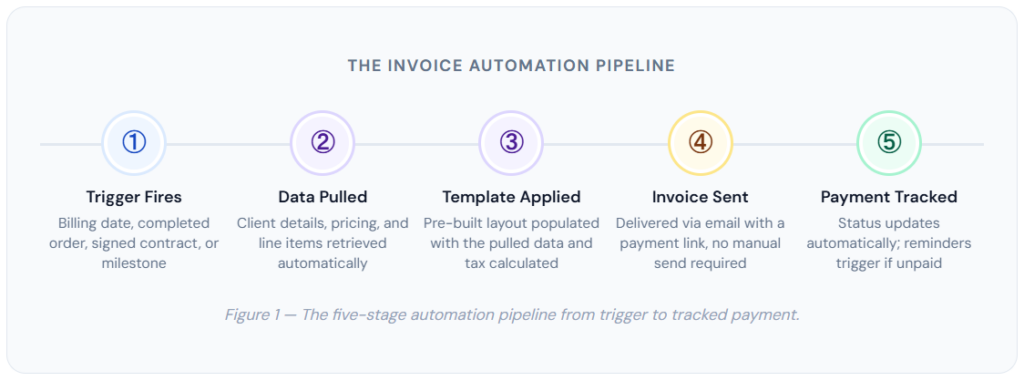
Automated invoice generation is the process of creating and sending invoices through a software system that responds to a defined trigger, such as a billing date, a completed sale, or a finished project milestone, without a person manually building the document each time. The system pulls client details, pricing, and line items from existing records, applies them to a pre-configured template, calculates totals and applicable tax, and delivers the invoice through email or a payment portal. The person’s role shifts from creating invoices to configuring and reviewing a system that creates them automatically.
How Automated Invoice Generation Works
Stripped down to its mechanics, invoice automation is a simple chain: something happens (a trigger), the system pulls the relevant data, builds a document from a template, and sends it. Understanding each link in that chain demystifies the entire process and makes it obvious why no coding knowledge is required to set it up.
Triggers: What Starts the Process
A trigger is simply the event that tells the system “generate an invoice now.” Different businesses need different triggers, and most invoicing platforms support several simultaneously. The most common ones are a calendar date (for recurring billing arrangements), a completed milestone in a project tracker, a closed deal in a CRM, a new order placed in an e-commerce store, or a client signing a proposal or contract. Setting a trigger is typically a matter of selecting it from a list and specifying a condition, such as “on the 1st of every month” or “when a deal moves to Closed-Won.”
Templates: What Gets Generated
The template is the visual and structural layout of the invoice, your logo, your business details, the fields that appear, and how line items are formatted. You configure this once. Every automatically generated invoice pulls from the same template, ensuring consistent branding and, critically, ensuring that every legally required field is present every time. This is one of the underappreciated benefits of automation: a well-built template embeds compliance into the process itself, which is far more reliable than remembering to check a checklist on every individual invoice.
Data Sources: Where the Details Come From
Automated invoicing only works if the system has somewhere to pull client and pricing information from. This is usually your own customer database within the invoicing platform, but for businesses using separate tools, integrations connect the invoicing system to a CRM, an e-commerce platform, or a project management tool. The practical implication is that the quality of your automated invoices depends on the quality of your underlying client records, a detail covered further in the risks section below.
Real-World Examples: How Different Businesses Automate Invoicing
The shape of invoice automation looks different depending on how a business actually operates and gets paid. These examples reflect the most common setups small businesses use today.
📅 Monthly Retainers
A consulting or agency client is billed automatically on the same date every month, with the invoice template referencing the retainer scope.
🛒 E-Commerce Orders
Each completed checkout automatically generates a corresponding invoice, with shipping and tax fields populated from the order data.
🏗️ Project Milestones
A contractor’s project management tool triggers an invoice each time a defined phase is marked complete, common in installment billing arrangements.
🤝 Signed Proposals
A freelancer’s e-signature tool fires an invoice the moment a client signs a proposal, capturing the deposit amount automatically.
💳 Subscription Renewals
A SaaS or membership business generates and sends a renewal invoice ahead of each billing cycle, tied directly to the subscription record.
🔧 Service Call Completion
A field service business (HVAC, plumbing, or IT support) triggers an invoice the moment a technician marks a job complete on a mobile app.
What this looks like in practice: A two-person bookkeeping firm serving 35 monthly retainer clients moved from manually duplicating last month’s invoice in a spreadsheet to a calendar-triggered automation. The owner reported the monthly invoicing task, previously a half-day exercise, now takes about 20 minutes of review before the batch sends itself.
Key Benefits of Automating Invoice Generation
The case for automation goes beyond simple time savings, though that is usually the benefit that gets a business owner’s attention first. The deeper value shows up in accuracy, cash flow, and the professional impression your billing process makes on clients.
Fewer Errors, Fewer Disputes
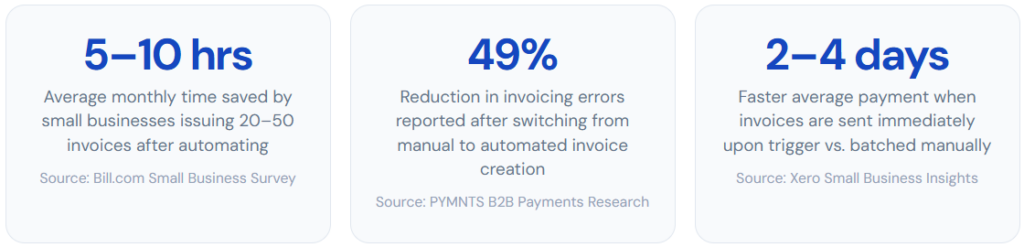
Every manually created invoice is an opportunity for a typo, a missed line item, or an outdated client address to slip through. Automation removes the human transcription step entirely, the data comes directly from your records, not from someone re-typing it under time pressure at the end of a busy month. Fewer errors mean fewer client queries, and fewer queries mean faster payment, since every clarifying email exchange adds days to your collection cycle.
Invoices Go Out the Same Day, Every Time
One of the most consistent findings in payment research is that invoices sent promptly are paid faster than those sent with delay, and automation guarantees promptness by removing the dependency on someone remembering to do it. A trigger-based system sends the invoice the moment the condition is met, whether that is midnight on the 1st of the month or the instant a technician closes out a job ticket from their phone.
A More Professional Client Experience
Clients notice billing consistency, even if they never say so directly. An invoice that arrives on the same date every month, formatted identically, with a working payment link and accurate details, signals an organized, dependable business. This matters disproportionately for new client relationships, where billing professionalism is one of the few concrete signals a client has about how seriously you run your operation. Combined with solid customer management practices, automated invoicing becomes part of a broader pattern of reliability that clients come to expect and trust.
Scales Without Adding Headcount
Manual invoicing time grows roughly in proportion to your client count, ten more clients mean roughly ten more invoices’ worth of manual work every cycle. Automated invoicing does not scale this way. Once your triggers and templates are configured, adding the fifty-first client costs you almost nothing in additional invoicing time. This is the benefit that becomes most valuable as a business grows past the point where manual processes were ever sustainable.
Risks and Things to Watch For
Invoice automation is a low-risk addition to most small businesses, but it is not entirely without pitfalls. The risks here are almost always process risks, not technical ones, which is good news, because process risks are easy to prevent once you know what to look for.
| ✅ What Good Automation Delivers | ⚠️ What to Watch For |
| → Consistent, error-free invoices generated and sent without manual effort | → Stale client data producing accurate-looking but outdated invoices |
| →Built-in compliance, every required field present by default via the template | → Incorrect triggers firing invoices before work is actually complete |
| →Faster payment from same-day delivery the moment a trigger fires | → Over-automating without a review step for unusual or high-value invoices |
| →Time and effort that scale sublinearly as your client base grows | → Template errors replicated across every invoice until someone notices |
Garbage In, Garbage Out
Automated invoicing is only as accurate as the underlying data it draws from. If a client’s billing address changed three months ago and your records were never updated, every automated invoice since then has quietly gone out with the wrong address. This risk is manageable with a simple habit: review and update client records at the moment something changes, rather than waiting until an invoice bounces or a payment gets delayed. Strong customer management discipline is, in a very real sense, the foundation that invoice automation sits on top of.
The Risk of Premature Triggers
A trigger configured too loosely can generate an invoice before the underlying work is genuinely finished, for example, a project management integration that fires on “task marked complete” rather than “milestone approved by client.” This creates an awkward situation where a client receives a bill for work they have not yet signed off on. The fix is to be deliberate about trigger conditions, testing them against your actual workflow rather than assuming the most obvious-sounding trigger is the correct one.
⚠ Keep a review step for exceptions: Full automation works well for routine, predictable billing, but high-value invoices, first-time clients, or unusual project scopes benefit from a manual review step before sending. Most platforms allow you to flag specific invoice types for review rather than automatic send, giving you the speed of automation with a safety check where it matters most.
Template Errors Compound Quickly
Because automation applies the same template to every invoice, a mistake in that template, a wrong tax rate, an outdated bank account number, or a broken payment link gets replicated across every invoice sent until someone catches it. This is the inverse of automation’s main benefit: consistency cuts both ways. The mitigation is straightforward: test your template thoroughly before activating automation and periodically spot-check a handful of automatically generated invoices to confirm everything is rendering and calculating correctly.
Automated Invoicing vs. Related Approaches
Invoice automation is often discussed alongside related billing concepts, and it helps to understand precisely how it differs from each so you can choose the right combination of tools for your business.
| Approach | How It Works | Manual Effort Per Invoice | Error Risk | Best For |
|---|---|---|---|---|
| Automated Invoice Generation | Trigger-based creation and sending from a template | Minimal, review only | Low | Any business issuing repeat or scheduled invoices |
| Manual Invoicing (Spreadsheet/Doc) | Owner builds each invoice individually from a copied template | High, full creation each time | High | Very low invoice volume, one-off projects |
| Recurring Billing | Automatic charge and invoice on a fixed schedule | Minimal | Low | Subscriptions, memberships, retainers |
| Installment Billing | Fixed total split into scheduled payments, often milestone-triggered | Minimal | Low | Project-based work with phased payments |
| Invoice Templates Only (No Trigger) | Pre-formatted document, but still manually created and sent each time | Medium | Medium | Businesses with irregular, unpredictable billing events |
The relationship between invoice automation and recurring billing deserves a closer look, since the two are frequently used together but are not identical. Recurring billing specifically refers to the payment side, automatically charging a stored payment method on schedule. Invoice automation is the documentation side, generating and sending the invoice itself, whether or not a payment is automatically collected alongside it. Many businesses run both simultaneously: the invoice generates and sends automatically, and the payment processes automatically against a card or bank account on file, with the receipt following once the charge clears.
Time Spent on Invoicing: Manual vs. Automated
The chart below illustrates the time cost of invoicing as a business scales from 10 to 100 monthly invoices, comparing a fully manual process against an automated one. The manual line grows steadily because every additional invoice requires the same fixed amount of creation time. The automated line stays nearly flat because the setup cost is paid once and the marginal cost of each additional invoice approaches zero.
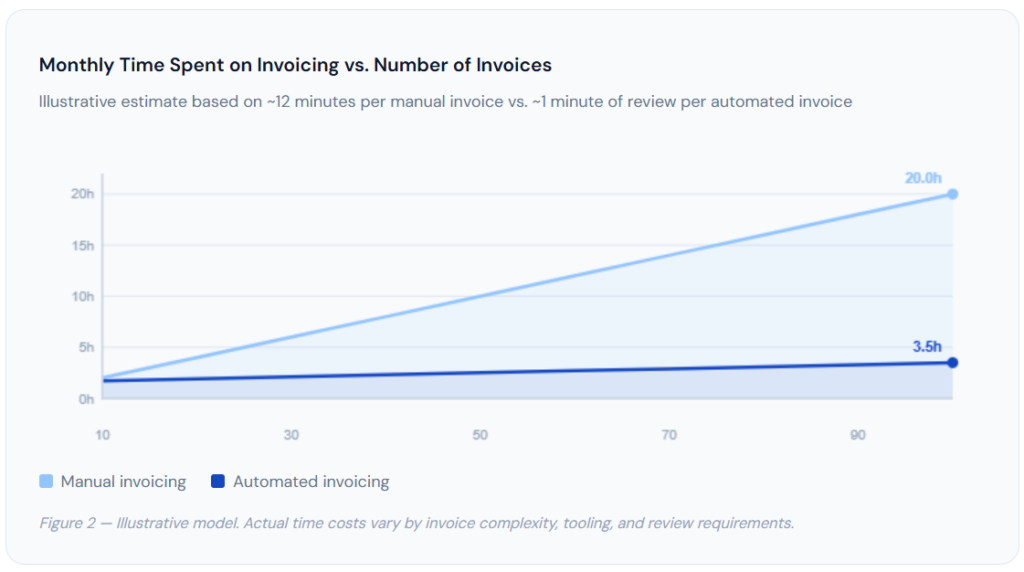
At 100 invoices per month, the manual approach consumes roughly 20 hours, the equivalent of half a work week spent purely on document creation. The automated approach, even accounting for an initial setup investment, holds steady at a couple of hours of review and exception-handling. That gap only widens as invoice volume grows, which is why invoice automation tends to become not just convenient but operationally necessary once a business crosses a certain size.
How to Get Started: Setting Up Your First Automated Invoice
None of the steps below require technical skill. They require about an hour of focused setup time and a clear sense of how your billing actually works today, which you likely already have, even if it currently lives in your head rather than in a system.
1. Map Your Current Billing Triggers
Before opening any software, write down what currently causes you to create an invoice. Is it a date on the calendar? A completed project? A signed agreement? Most businesses have two or three distinct triggers, even if they have never described them that way. This list becomes your automation blueprint.
2. Choose a No-Code Invoicing Platform
Look for purpose-built invoicing software that supports the trigger types you identified, calendar-based billing, milestone-based billing, or both. Confirm the platform offers a visual setup process rather than requiring API or script configuration. Platforms like ReliaBills are built specifically so that a non-technical owner can configure automation through forms and dropdown selections.
3. Build Your Invoice Template Once
Add your business details, logo, payment instructions, and tax settings to a single template. Reference the invoice requirements checklist to confirm every required field is present before activating automation; this is the single most important quality check since the template will be reused indefinitely.
4. Connect Your Client Records and Set the Trigger
Import or connect your existing client list so the system has accurate names, addresses, and pricing to pull from. Then configure your trigger, a billing date, a CRM stage, or a milestone completion, and link it to the template you built. Most platforms let you do a test run that generates a sample invoice without actually sending it, which is worth doing before going live.
5. Activate, Monitor, and Adjust
Turn automation on for a small subset of clients first if you want extra confidence before rolling it out fully. Review the first batch of automatically generated invoices closely, then check in weekly for the first month. After that, a monthly spot-check is typically enough to catch any drift in your data or template before it becomes a pattern.
Getting started with ReliaBills: ReliaBills lets you configure invoice triggers, templates, and client records entirely through guided, visual setup screens, no code, no spreadsheets, no developer required. Most small businesses have their first automated invoice configured within a single sitting. Start your free trial →
Frequently Asked Questions
1. Do I need to know how to code to automate invoice generation?▾
No. Purpose-built invoicing platforms like ReliaBills offer no-code automation through visual setup screens; you configure triggers, templates, and schedules using forms and dropdowns rather than writing scripts or working with an API. Coding becomes relevant only if you want to connect invoicing to a fully custom application or an unusual internal system that has no existing integration, which is not a requirement for the vast majority of small businesses. If your current process involves spreadsheets and copy-pasting, the leap to automated invoicing is a configuration task, not a technical one.
2. What triggers can generate an invoice automatically?▾
The most common triggers are a recurring billing date (for example, the 1st of every month), a completed milestone in a project management tool, a closed deal in a CRM, a new order placed in an e-commerce platform, or a signed contract or proposal. Most invoicing platforms support multiple trigger types simultaneously, so different parts of your business can automate invoicing in the way that fits how that part of the business actually operates, a retainer client billed monthly and a project client billed by milestone can both run through the same platform with different trigger rules.
3. Is automated invoicing safe for tax and compliance purposes?▾
Yes, when configured correctly. Automated invoices still need to include all legally required fields, a unique invoice number, your tax registration details where applicable, the correct tax rate, and so on. Reputable invoicing platforms build these requirements into the template itself, so every automatically generated invoice is compliant by default rather than depending on someone remembering to check a list each time. The risk is not automation as a concept; it is using a poorly configured or outdated template. Reviewing your template against an invoice requirements checklist before activating automation and periodically afterward keeps this risk low.
4. Can I still customize invoices if the process is automated?▾
Yes. Automation handles the repetitive parts of invoicing, generating the document, populating client details, and calculating totals, while still allowing you to set custom line items, add notes, apply discounts, or adjust amounts before the invoice goes out. Most platforms let you review and edit auto-generated invoices before they are sent or set rules so that only certain invoice types (high-value, first-time clients, unusual scopes) require manual review while routine invoices are sent without any intervention. This gives you the speed of full automation with a safety net exactly where you want one.
5. How much time does invoice automation actually save?▾
Estimates vary by business size and invoice complexity, but small businesses issuing 20 to 50 invoices per month typically report saving 5 to 10 hours per month after switching from manual to automated invoicing. The time savings come not just from skipping the document creation itself but from eliminating the downstream work caused by manual errors, chasing missing details, correcting and re-sending invoices, and answering client questions caused by inconsistent formatting. As invoice volume grows, the time savings scale up significantly, since manual invoicing time grows roughly linearly with volume while automated invoicing time stays close to flat.
Recent Articles:
- Invoice Numbering Best Practices: How to Stay Organized
- How to Invoice Clients Who Always Pay Late (Scripts Included)