
Choosing the right billing method is a critical decision that directly impacts how efficiently a small business operates and how stable its cash flow remains. Billing is not just about sending invoices, it is about ensuring that revenue is collected consistently and without unnecessary delays. When billing processes are inefficient, even profitable businesses can struggle to maintain financial stability.
Two of the most common approaches are Auto Pay and manual invoicing, each offering distinct advantages and limitations. Manual invoicing gives business owners full control over billing, while Auto Pay automates payment collection for greater efficiency. Understanding the differences between these two methods is essential for making the right choice.
This comparison of auto pay vs manual invoicing will help small business owners evaluate which option aligns best with their operational needs, customer expectations, and long-term growth plans. By examining both approaches in detail, businesses can make more informed decisions about their billing strategies.
What Is Manual Invoicing?
Manual invoicing is a traditional billing method where businesses create, send, and track invoices without automation. This process typically involves generating invoices using spreadsheets or basic tools, emailing them to customers, and manually recording payments. While simple in concept, it requires consistent effort and attention to detail.
In small business settings, manual invoicing often includes tasks such as entering customer information, calculating totals, applying taxes, and monitoring due dates. Business owners must also follow up on unpaid invoices, which can be time-consuming and inconsistent. As the number of clients increases, managing invoices manually becomes more complex.
Manual invoicing is still commonly used in industries that rely on one-time or customized services. Freelancers, consultants, and project-based service providers often prefer this method because it allows flexibility in billing. However, it can become inefficient as the business grows or handles higher transaction volumes.
What Is Auto Pay?
Auto Pay is a billing method that automates the payment process by charging customers automatically on a scheduled basis. Instead of waiting for customers to initiate payments, businesses collect payments directly based on pre-authorized agreements. This significantly reduces delays and improves payment consistency.
Customers typically authorize Auto Pay by providing payment details and agreeing to recurring charges for products or services. Once set up, payments are processed automatically according to a defined billing cycle. This eliminates the need for repeated invoicing and manual follow-ups.
Auto Pay is widely used in subscription-based and recurring billing models, such as SaaS platforms, memberships, and ongoing service contracts. It plays a key role in modern billing systems by improving efficiency and ensuring predictable revenue streams. For businesses focused on scalability, Auto Pay offers a strong operational advantage.
Key Differences Between Auto Pay and Manual Invoicing
Payment collection: automatic vs customer-initiated
Auto Pay automatically collects payments based on pre-approved schedules, removing the need for customer action. Manual invoicing, on the other hand, relies on customers to review invoices and initiate payments themselves. This fundamental difference directly impacts payment speed and reliability.
Time and effort required for billing management
Manual invoicing requires ongoing administrative effort, including creating invoices and tracking payments. Auto Pay significantly reduces this workload by automating most of these tasks. As a result, businesses save time and improve operational efficiency.
Risk of late or missed payments
Manual invoicing has a higher risk of late payments because it depends on customer behavior. Auto Pay minimizes this risk by ensuring payments are processed automatically. This leads to more consistent and predictable revenue.
Level of customer involvement in the payment process
Manual invoicing requires active participation from customers, which can lead to delays or errors. Auto Pay simplifies the process by reducing customer involvement after initial setup. This creates a more seamless payment experience.
Scalability for growing businesses
Manual invoicing becomes increasingly difficult to manage as transaction volume grows. Auto Pay is highly scalable and can handle large numbers of transactions without additional administrative effort. This makes it more suitable for businesses planning to expand.
Pros and Cons of Manual Invoicing
Pros:
- Greater control over each invoice: Businesses can customize each invoice based on specific client needs or project details. This flexibility is useful for unique or one-time services. It allows for more personalized billing.
- Flexible billing for one-time or custom services: Manual invoicing works well for businesses that do not follow fixed pricing structures. It allows adjustments based on scope, time, or deliverables. This is ideal for project-based work.
- Simple setup with minimal tools: Manual invoicing does not require advanced software or integrations. Basic tools like spreadsheets or templates are often sufficient. This makes it accessible for new or small businesses.
Cons:
- Time-consuming administrative work: Creating and managing invoices manually takes significant time. This reduces productivity and diverts attention from core business activities. Over time, this becomes inefficient.
- Higher risk of errors and missed invoices: Human error can lead to incorrect billing or forgotten invoices. These mistakes can delay payments and damage credibility. Consistency is harder to maintain manually.
- Increased likelihood of late payments: Customers may forget or delay payments without reminders. Manual follow-ups are often inconsistent. This leads to unpredictable cash flow.
- Limited scalability: As the business grows, managing invoices manually becomes more complex. The workload increases without improving efficiency. This limits growth potential.
Pros and Cons of Auto Pay
Pros:
- Ensures timely and consistent payments: Payments are processed automatically, reducing delays. This creates a reliable revenue stream. Businesses can better predict income.
- Reduces administrative workload: Automation eliminates repetitive tasks like invoice creation and follow-ups. This frees up time for strategic work. It also reduces operational costs.
- Improves cash flow predictability: Scheduled payments provide consistent income. This helps with budgeting and planning. Financial stability improves significantly.
- Enhances customer convenience: Customers do not need to remember due dates or manually pay invoices. This simplifies their experience. It also increases satisfaction and retention.
Cons:
- Requires customer authorization and trust: Customers must agree to automatic charges, which may require reassurance. Trust plays a key role in adoption. Some customers may hesitate initially.
- Less flexibility for one-time billing scenarios: Auto Pay is not ideal for irregular or custom billing needs. It works best for recurring payments. Businesses with varied services may need alternatives.
- Potential setup and integration effort: Implementing Auto Pay may require system integration and setup time. Businesses need to configure billing rules and payment gateways. However, this is usually a one-time effort.
How Each Method Impacts Cash Flow
Manual invoicing often results in delayed payments because it depends on customer action. Even with clear terms, customers may take time to process and pay invoices. This creates inconsistent cash flow and makes financial planning more difficult. Over time, delays can accumulate and impact operations.
Auto Pay, on the other hand, ensures payments are collected on schedule without relying on customer reminders. This creates predictable revenue streams and reduces financial uncertainty. Businesses can plan expenses more confidently with consistent income. This reliability is especially important for growing businesses.
Consistent cash flow is essential for maintaining operations, paying employees, and investing in growth. Businesses that struggle with irregular payments often face unnecessary financial stress. Choosing the right billing method can significantly improve financial stability.
Which Option Is Better for Different Business Types?
Service-based businesses with one-time projects → Manual invoicing
These businesses benefit from flexible billing tailored to each project. Manual invoicing allows adjustments based on scope and deliverables. It provides greater control over pricing.
Subscription-based businesses → Auto Pay
Subscription models rely on recurring payments. Auto Pay ensures consistent billing and reduces missed payments. It is the most efficient option for this structure.
Freelancers and consultants → Hybrid approach
Freelancers often handle both one-time and recurring clients. A combination of manual invoicing and Auto Pay provides flexibility. This approach balances control and efficiency.
Businesses with repeat customers → Auto Pay for efficiency
Businesses with regular clients benefit from automated payments. Auto Pay reduces administrative work and ensures timely collections. It improves overall efficiency.
When Should Small Businesses Switch to Auto Pay?
Small businesses should consider switching to Auto Pay when they begin offering recurring services or subscription-based products. This ensures consistent billing without manual effort. It also reduces the risk of missed invoices.
Frequent late payments are another indicator that automation is needed. Auto Pay eliminates reliance on customer reminders and follow-ups. This improves payment reliability significantly.
Businesses scaling operations also benefit from Auto Pay. As transaction volume increases, manual invoicing becomes unsustainable. Automation supports growth without increasing workload.
Can Businesses Use Both Auto Pay and Manual Invoicing?
Yes, many businesses successfully use a hybrid approach that combines both billing methods. This allows them to maintain flexibility while benefiting from automation. Different billing scenarios can be handled using the most suitable method.
For example, businesses can use Auto Pay for recurring services and manual invoicing for one-time projects. This ensures efficiency without sacrificing customization. It also improves overall billing management.
A hybrid approach is often the most practical solution for businesses with diverse service offerings. It allows them to adapt to different customer needs. This flexibility supports both growth and customer satisfaction.
Best Practices for Choosing the Right Billing Method
Evaluate business model and billing frequency
Understanding whether your business relies on recurring or one-time payments is essential. This determines which billing method is more suitable. It ensures alignment with operations.
Understand customer preferences and behavior
Customer expectations play a key role in payment methods. Some prefer automation, while others prefer manual control. Adapting to preferences improves payment success rates.
Consider scalability and future growth
Businesses should choose systems that support expansion. Manual invoicing may work initially but becomes limiting over time. Automation supports long-term growth.
Assess available billing tools and automation features
The right tools can simplify billing significantly. Features like tracking, reminders, and integrations improve efficiency. Choosing the right platform is critical.
Prioritize cash flow stability
Consistent cash flow should be a top priority. Billing methods that reduce delays and improve predictability are more beneficial. Stability supports sustainable growth.
How Automation Enhances Both Billing Methods
Automation improves both manual invoicing and Auto Pay by streamlining processes. It reduces the need for repetitive tasks such as invoice creation and payment tracking. This increases efficiency and accuracy.
It also minimizes human errors that can lead to disputes or delays. Automated systems ensure consistency across all transactions. This improves reliability and professionalism.
Additionally, automation provides better visibility into financial data. Businesses can track payments, monitor performance, and make informed decisions. This enhances overall financial management.
Key Benefits of Choosing the Right Billing Approach
- Improved cash flow consistency: The right billing method ensures payments are received on time. This reduces financial uncertainty. It supports better planning.
- Reduced administrative workload: Automation minimizes manual tasks. This allows teams to focus on growth. It improves productivity.
- Fewer billing errors and disputes: Structured systems reduce mistakes. This improves accuracy and trust. It also speeds up payment processing.
- Better customer payment experience: Convenient billing improves satisfaction. Customers are more likely to pay on time. This strengthens relationships.
- Increased operational efficiency: Efficient billing systems streamline workflows. This reduces delays and improves performance. It supports scalability.
Common Use Cases
- Subscription services using Auto Pay: These businesses rely on consistent recurring payments. Auto Pay ensures uninterrupted billing cycles. It improves retention.
- Freelancers using manual invoicing for custom work: Freelancers benefit from flexible billing. Manual invoicing allows customization. It suits project-based work.
- Small businesses adopting hybrid billing models: Hybrid approaches combine flexibility and efficiency. Businesses can adapt to different scenarios. This improves overall operations.
- Membership-based organizations: Memberships require recurring billing. Auto Pay simplifies collections. It ensures consistent revenue.
- Service providers with recurring clients: Regular clients benefit from automated payments. This reduces administrative work. It improves cash flow.
How ReliaBills Helps Small Businesses Choose and Implement the Right Billing Method
ReliaBills helps small businesses simplify and optimize their billing processes by combining automation with flexibility. Instead of relying on disconnected tools or manual workflows, businesses can manage invoicing, payments, and customer data within a single platform. This reduces common inefficiencies associated with auto pay vs manual invoicing, such as missed invoices, delayed payments, and inconsistent tracking. By streamlining these processes, businesses can improve accuracy, save time, and maintain better financial control.
A key advantage of ReliaBills is its powerful recurring billing and Auto Pay functionality, which is ideal for businesses with repeat customers or subscription-based services. It allows businesses to automate invoice generation and payment collection on a scheduled basis, ensuring consistent and timely payments. This significantly reduces overdue invoices and eliminates the need for manual follow-ups. As a result, businesses experience more predictable cash flow and improved customer payment behavior.
ReliaBills PLUS enhances these capabilities with advanced automation, detailed reporting, and comprehensive customer management tools. Businesses gain access to real-time insights into payment trends, outstanding balances, and overall financial performance. These features support data-driven decision-making and help identify opportunities for improvement in billing operations. Ultimately, ReliaBills provides a scalable solution that empowers small businesses to implement the right billing method while supporting long-term growth.
How to Create a New Recurring Invoice Using ReliaBills
Creating a New Recurring Invoice using ReliaBills involves the following steps:
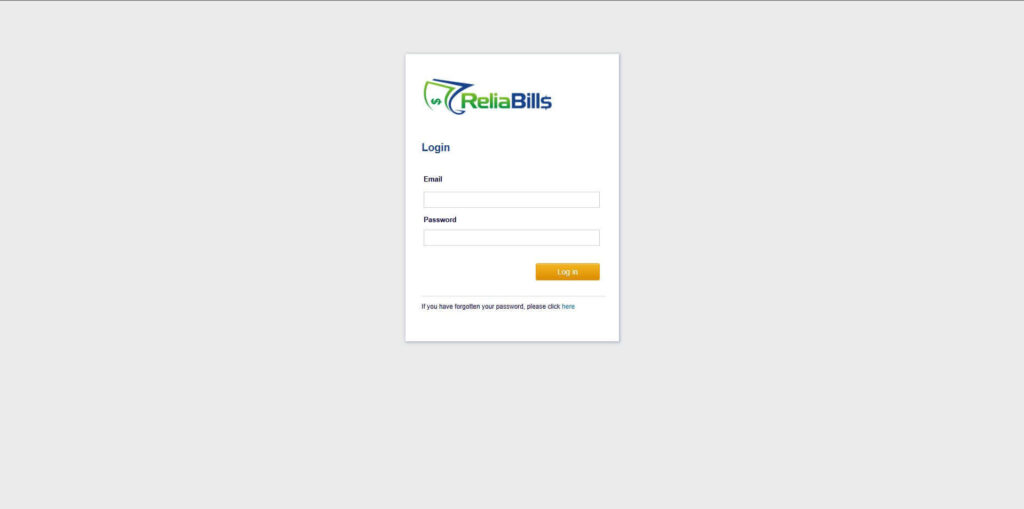
Step 1: Login to ReliaBills
- Access your ReliaBills Account using your login credentials. If you don’t have an account, sign up here.
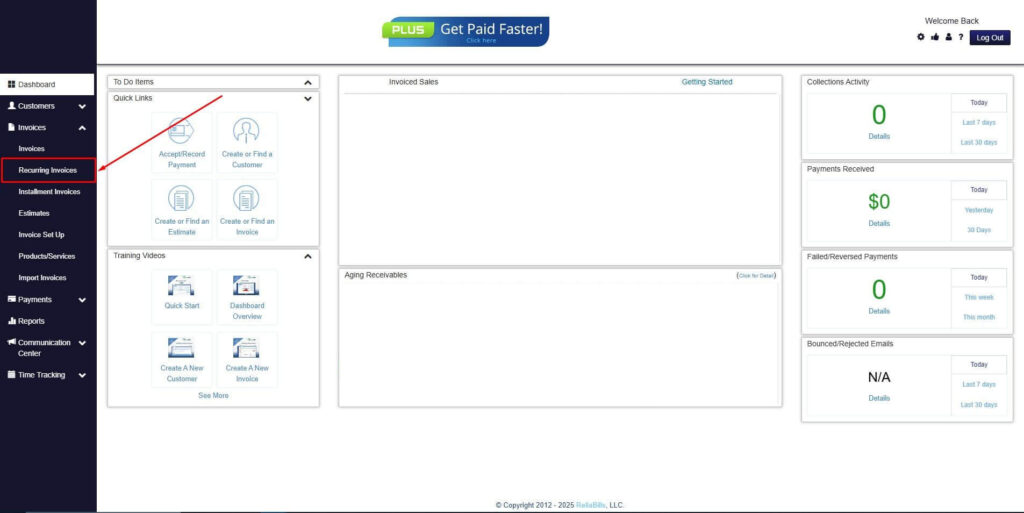
Step 2: Click on Recurring Invoices
- Navigate to the Invoices Dropdown and click on Recurring Invoices for an overview of the list of your existing customers.
Step 3: Go to the Customers Tab
- If you have already created a customer, search for them in the Customers tab and make sure their status is “Active”.
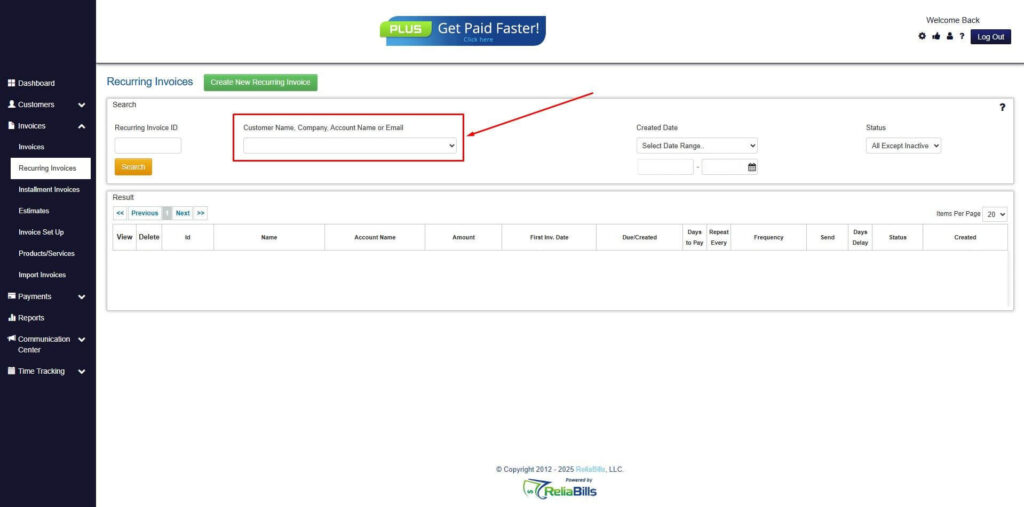
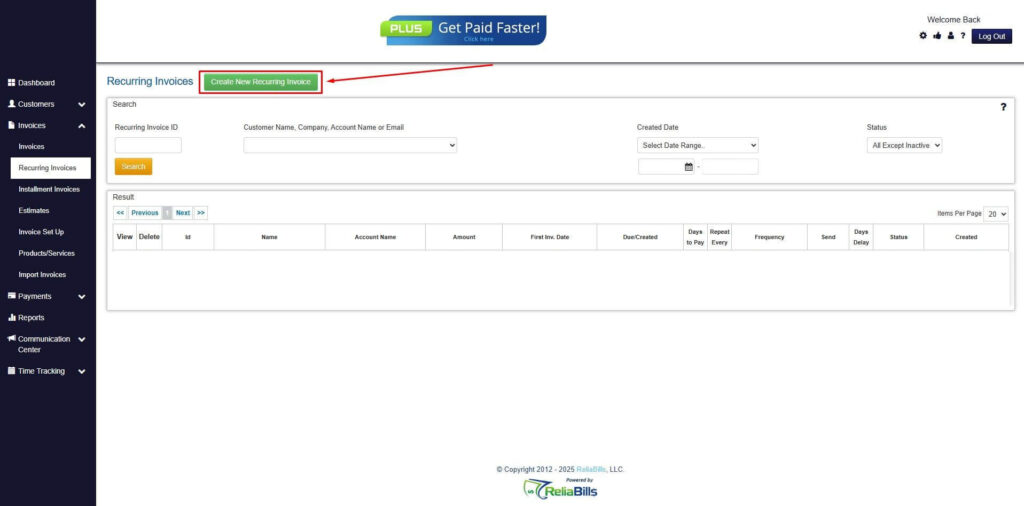
Step 4: Click the Create New Recurring Invoice
- If you haven’t created any customers yet, click the Create New Recurring Invoice to create a new customer.
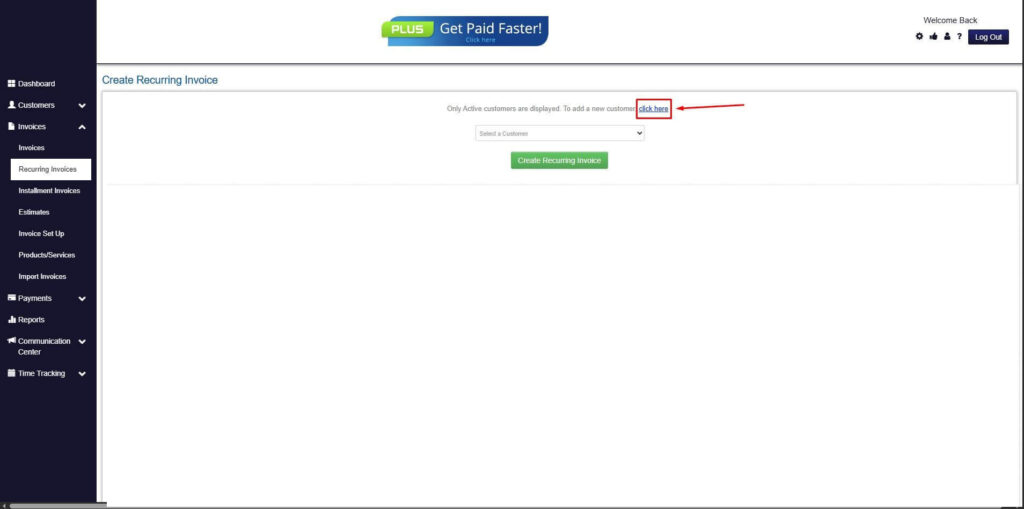
Step 5: Click on the “Click here” Button
- Click on the “Click here” button to proceed with the recurring invoice creation.
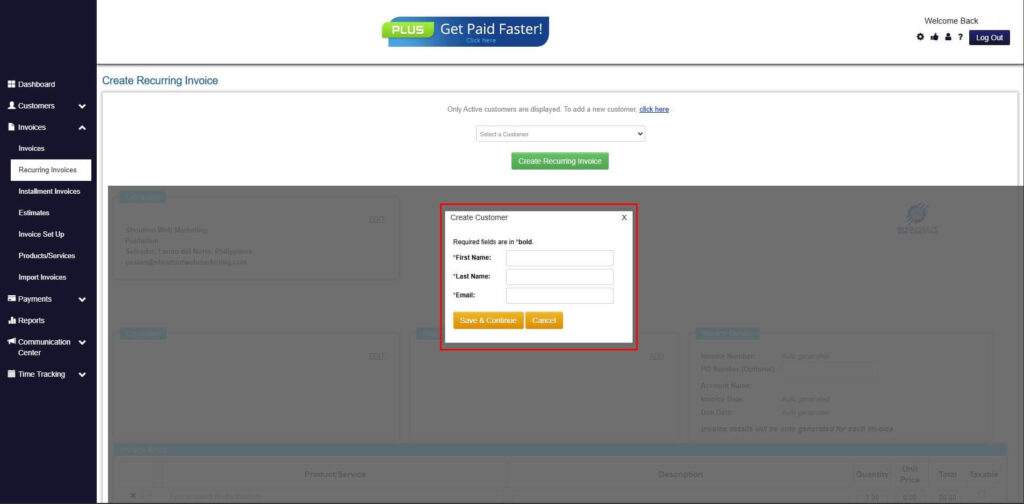
Step 6: Create Customer
- Provide your First Name, Last Name, and Email to proceed.
Step 7: Fill in the Create Recurring Invoice Form
- Fill in all the necessary fields.
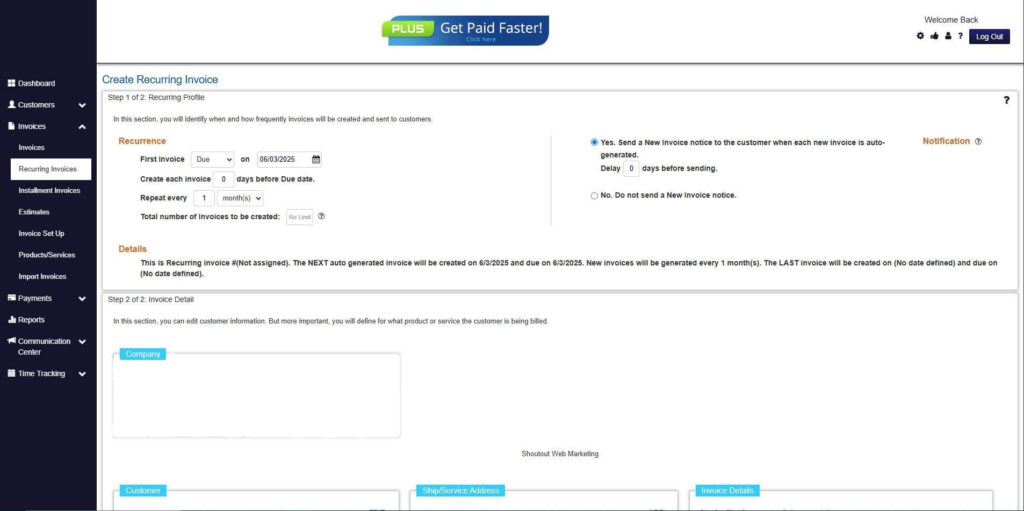
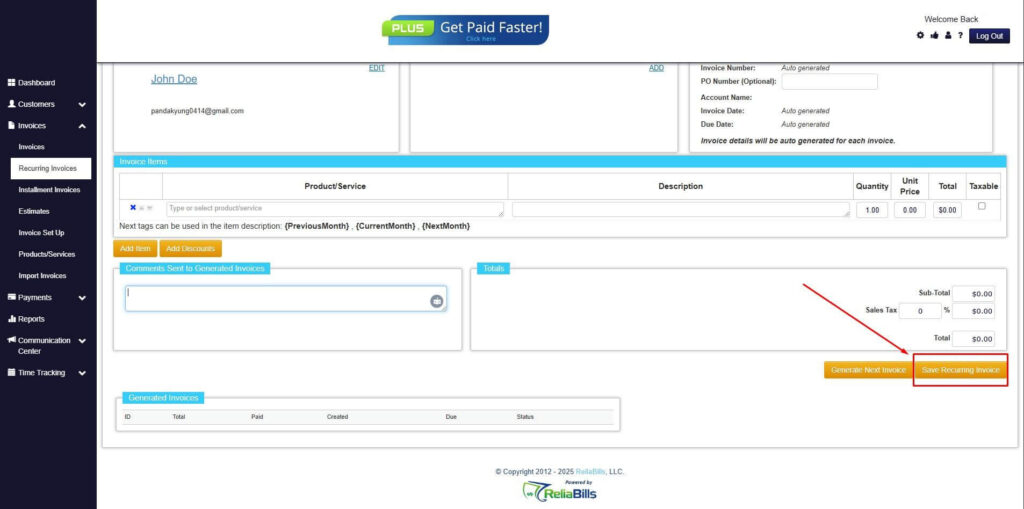
Step 8: Save Recurring Invoice
- After filling up the form, click “Save Recurring Invoice” to continue.
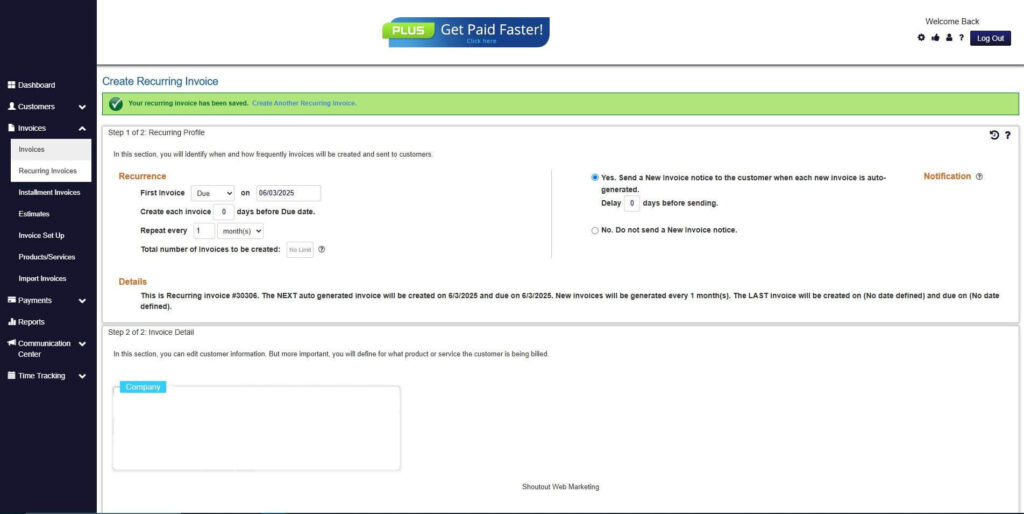
Step 9: Recurring Invoice Created
- Your Recurring Invoice has been created.
Frequently Asked Questions (FAQs)
1. What is the difference between Auto Pay and manual invoicing?
Auto Pay automatically collects payments based on pre-approved schedules. Manual invoicing requires customers to initiate payments after receiving invoices. The key difference lies in automation and customer involvement.
2. Which is better for small businesses?
The best option depends on the business model. Subscription-based businesses benefit from Auto Pay, while project-based businesses may prefer manual invoicing. Many businesses use a hybrid approach.
3. Can I use both Auto Pay and manual invoicing?
Yes, combining both methods allows flexibility and efficiency. Businesses can tailor billing based on specific scenarios. This is a common and effective strategy.
4. How does Auto Pay reduce late payments?
Auto Pay eliminates the need for customers to remember due dates. Payments are processed automatically. This ensures timely collections.
5. Is manual invoicing still effective for small businesses?
Yes, especially for businesses with custom or one-time services. However, it becomes less efficient as the business grows. Automation is often needed for scalability.
Conclusion
The comparison of auto pay vs manual invoicing highlights that both methods have unique strengths and limitations. Manual invoicing offers flexibility and control, while Auto Pay provides efficiency and consistency. The right choice depends on the nature of the business and its billing needs.
Businesses should consider their operational model, customer preferences, and growth goals when selecting a billing method. In many cases, a hybrid approach offers the best balance between flexibility and automation. This allows businesses to adapt to different scenarios effectively.
As small businesses continue to evolve, adopting automated billing solutions becomes increasingly important. Automation not only improves efficiency but also ensures stable cash flow and better financial management. Investing in the right billing system is a strategic step toward long-term success.