
Non-commercial invoicing is an essential part of many business operations, even though these invoices do not directly generate revenue. These invoices are commonly used for sample shipments, donations, product replacements, or internal transfers. While they are not commercial transactions, accurate documentation is crucial for tracking inventory, maintaining financial records, and ensuring compliance.
Manual creation of these invoices can be time-consuming and prone to errors. Inconsistent labeling, missing details, or lost invoices can lead to confusion, delayed reporting, and potential compliance risks. For businesses that issue these invoices regularly, mistakes can compound over time, creating unnecessary administrative burdens.
Automating non-commercial invoice creation is becoming increasingly important. With modern billing software, companies can standardize templates, streamline workflows, and reduce errors, ensuring that all non-commercial invoices are accurate, traceable, and audit-ready. This guide explains how to implement automation effectively, why it matters, and how it can simplify your workflow.
What Is a Non-Commercial Invoice?
A non-commercial invoice is a document used to record transactions that are not intended for resale or revenue generation. Examples include sample shipments to potential clients, internal transfers of products between locations, product replacements under warranty, or charitable donations. Unlike commercial invoices, non-commercial invoices may often carry zero or nominal values, but they still require detailed descriptions, traceable records, and proper labeling.
The primary purpose of these invoices is accountability and documentation. They help finance teams track inventory, ensure accurate reporting, and maintain internal and external compliance. Even though these transactions don’t generate revenue, they are just as important to a business’s operational and regulatory processes.
Understanding the function and purpose of non-commercial invoices allows businesses to set up effective automation rules, ensuring that these invoices are consistent, accurate, and easy to audit.
Why Automate Non-Commercial Invoice Creation
Manual creation of non-commercial invoices is prone to errors such as inconsistent descriptions, incorrect values, and missing labels. Automation significantly reduces these risks by enforcing consistent templates, automatically populating required fields, and maintaining accurate records.
Beyond error reduction, automation saves significant time and administrative effort. Employees no longer need to repeatedly input data or cross-check invoices against previous transactions. Finance teams can instead focus on analyzing financial data, supporting operational decisions, and maintaining compliance with internal policies and regulatory requirements.
Automation also improves documentation and audit readiness. Every generated invoice is stored in a centralized system with version history and traceable transaction details. This makes audits smoother, simplifies reporting for internal reviews, and ensures businesses maintain a clear record of all non-commercial transactions.
Common Errors in Manual Non-Commercial Invoicing
Incorrect descriptions or values
Mistakes in describing products or services can lead to confusion internally or with regulatory agencies. Manually entering details often results in inconsistent phrasing or errors in pricing, quantity, or product codes, especially when transactions are frequent.
Missing or inconsistent labeling
Non-commercial invoices often require labels like “Sample,” “Internal Transfer,” or “Donation.” Inconsistent labeling can cause misreporting and make it difficult to reconcile transactions for audits or internal tracking.
Duplicate or lost invoices
Repeatedly creating invoices manually increases the risk of duplicate entries or missing documents, which can complicate accounting records, reconciliation, and reporting.
Compliance-related mistakes
Non-commercial invoices must sometimes adhere to customs or internal regulatory rules. Missing fields, incomplete documentation, or incorrect classification can lead to compliance issues or delays in reporting.
Delayed internal approvals
Manual workflows often require multiple departments to review or approve invoices. Delays can result in late documentation or inconsistent records across departments.
How Billing Software Automates Non-Commercial Invoices
Billing software simplifies the process by providing templates, automated data population, scheduling, and integration with accounting systems. Templates ensure that every invoice follows a consistent format and includes all required fields. Automated population pulls customer, product, and transaction details directly from your system, eliminating repetitive manual entry.
Recurring billing functionality allows businesses to schedule repeated invoices, whether for monthly sample distributions, warranty replacements, or internal transfers. Integration with accounting and recordkeeping systems ensures that every invoice flows seamlessly into the broader financial workflow, reducing errors and saving administrative time.
Automation also allows for verification and approval workflows, so even automated invoices can be reviewed before they are finalized. This extra layer of oversight ensures accuracy while still maintaining the efficiency of automation.
Step-by-Step: Automating Non-Commercial Invoice Creation
Create dedicated invoice templates
Set up templates specifically for non-commercial purposes, including required fields, standardized descriptions, and labeling rules to ensure accuracy across all transactions.
Define automation rules and triggers
Specify which types of transactions should automatically generate an invoice. For example, sending a sample product or recording a donation can trigger an automated workflow.
Schedule recurring workflows
For repeat activities such as monthly internal transfers or recurring donations, set up recurring invoice schedules to eliminate the need for manual creation.
Integrate with accounting and record systems
Connect the automated invoices with your accounting or ERP systems so that all data flows seamlessly, avoiding duplicate entry or reconciliation errors.
Implement review and approval processes
Even automated invoices should be reviewed. A quick verification ensures anomalies are caught early, maintaining accuracy without slowing down the process.
Automation for Recurring Non-Commercial Transactions
For businesses that regularly issue non-commercial invoices, automation ensures that repeated transactions are handled consistently. Repeat shipments, monthly sample distributions, or recurring internal transfers can all be automated, reducing the risk of duplication or missed invoices. Consistency across billing cycles not only improves accuracy but also simplifies reconciliation and reporting processes.
Over time, automated recurring workflows prevent compounding errors. Manual repetition is often the source of mislabeling, duplicate entries, or incomplete documentation, which can accumulate and create larger operational headaches. By automating these recurring transactions, businesses maintain reliable and traceable records while saving time.
Compliance and Documentation Benefits
Supports regulatory and customs requirements
Automated invoices include all required fields and standardized formats, making it easier to comply with internal policies and external regulations, such as customs declarations or audit guidelines.
Maintains audit-ready records
Every invoice, including its creation timestamp and any adjustments, is automatically logged. This ensures that finance teams have traceable, complete records for internal reviews or external audits.
Ensures traceability and version control
Automation allows businesses to track changes, updates, and approvals on every invoice. This reduces errors, improves accountability, and prevents disputes about what was invoiced and when.
Centralized documentation
All invoices are stored in a single system, making it easy to search, retrieve, and analyze historical transactions. This centralized approach improves efficiency and transparency across teams.
How ReliaBills Simplifies Non-Commercial Invoice Automation
ReliaBills streamlines non‑commercial invoice workflows by eliminating repetitive manual tasks. Businesses can create templates with standardized fields and non-commercial labels, ensuring every invoice is accurate and consistent. This removes the need to repeatedly enter descriptions, values, or internal codes, reducing errors and saving administrative time.
Recurring billing is a standout feature that allows automatic generation of invoices for repeat transactions, such as monthly sample shipments, internal transfers, or regular donations. Scheduled automation ensures invoices are issued on time and with correct details, reducing the risk of omissions and freeing teams from manual follow-ups.
The platform also provides customizable fields and centralized tracking, giving finance teams a clear overview of all invoices, payment history, and status in one dashboard. Combined with automated reminders and reporting tools, ReliaBills improves audit readiness, enhances transparency, and makes non-commercial invoice automation faster, more reliable, and error-resistant.
How to Create a New Recurring Invoice Using ReliaBills
Creating a New Recurring Invoice using ReliaBills involves the following steps:
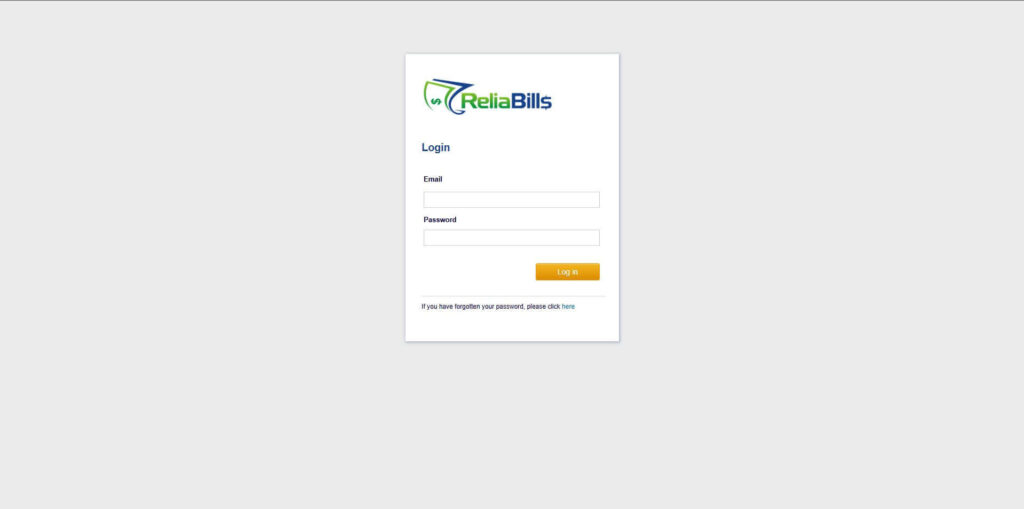
Step 1: Login to ReliaBills
- Access your ReliaBills Account using your login credentials. If you don’t have an account, sign up here.
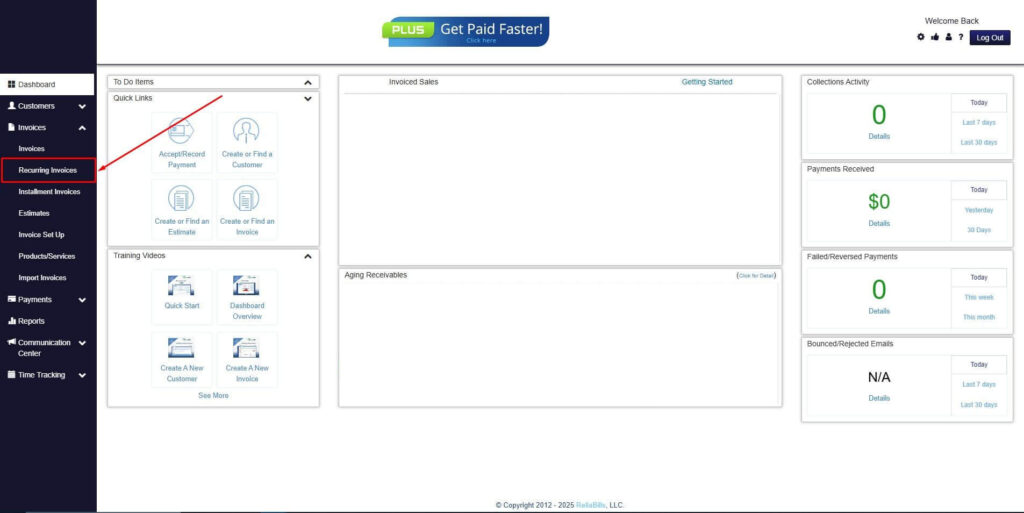
Step 2: Click on Recurring Invoices
- Navigate to the Invoices Dropdown and click on Recurring Invoices for an overview of the list of your existing customers.
Step 3: Go to the Customers Tab
- If you have already created a customer, search for them in the Customers tab and make sure their status is “Active”.
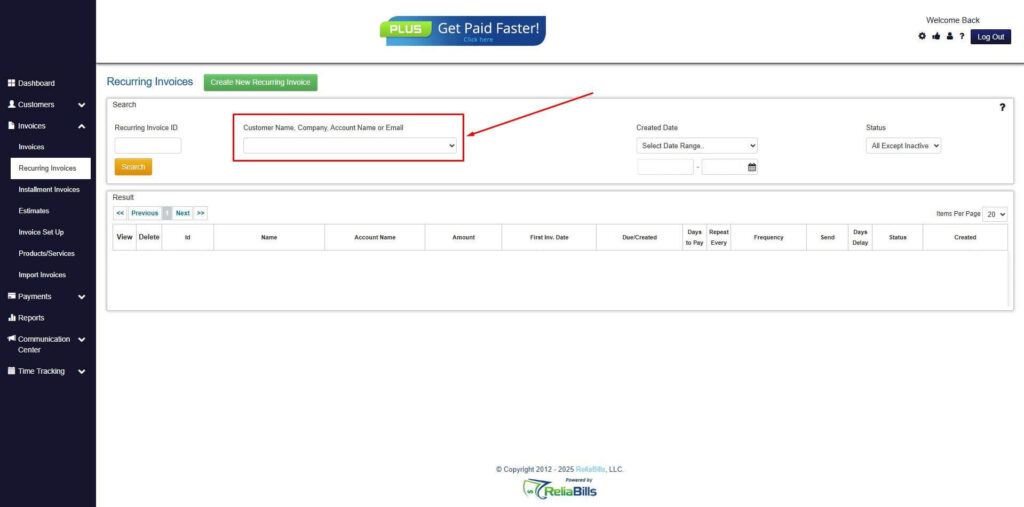
Step 4: Click the Create New Recurring Invoice
- If you haven’t created any customers yet, click the Create New Recurring Invoice to create a new customer.
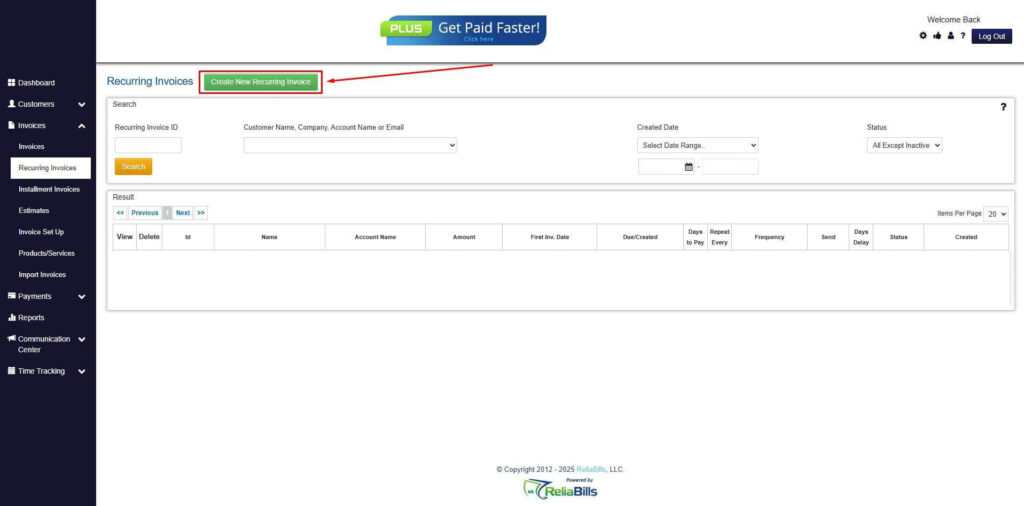
Step 5: Click on the “Click here” Button
- Click on the “Click here” button to proceed with the recurring invoice creation.
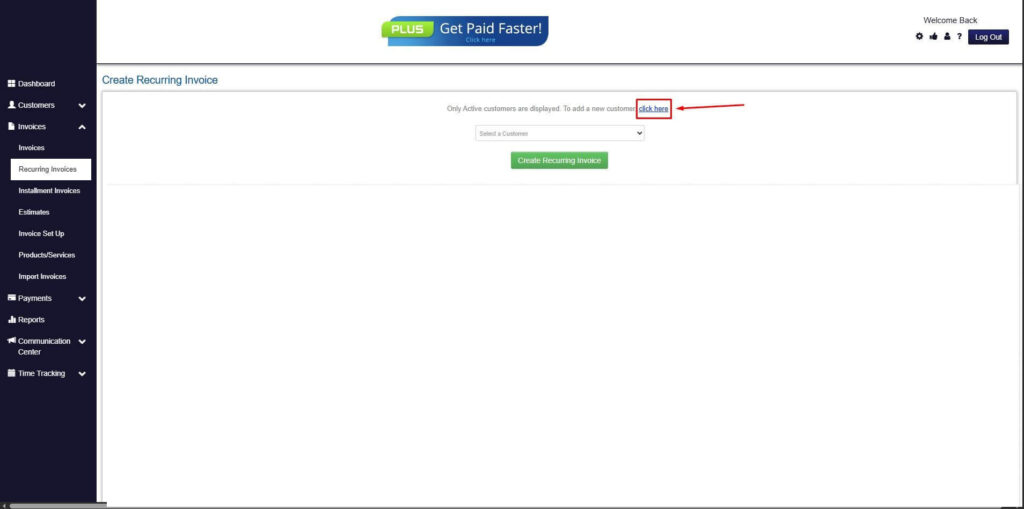
Step 6: Create Customer
- Provide your First Name, Last Name, and Email to proceed.
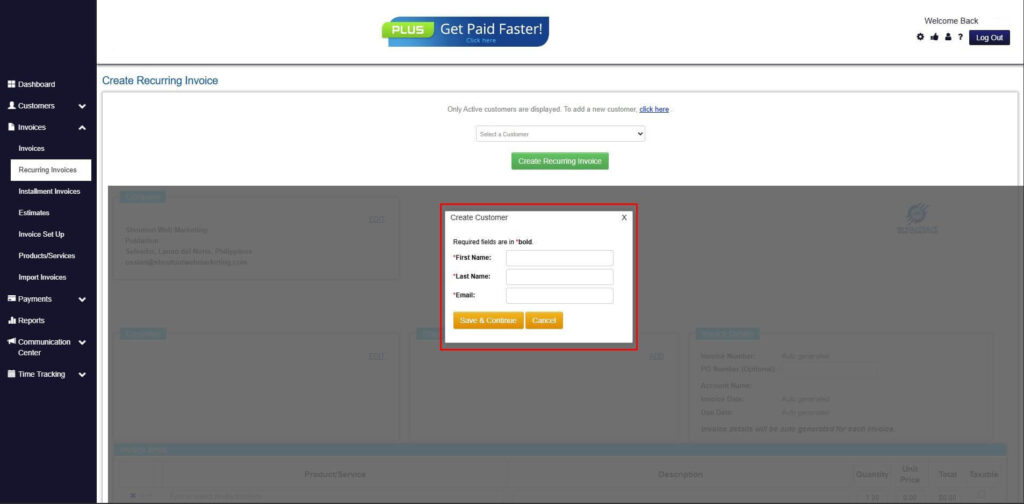
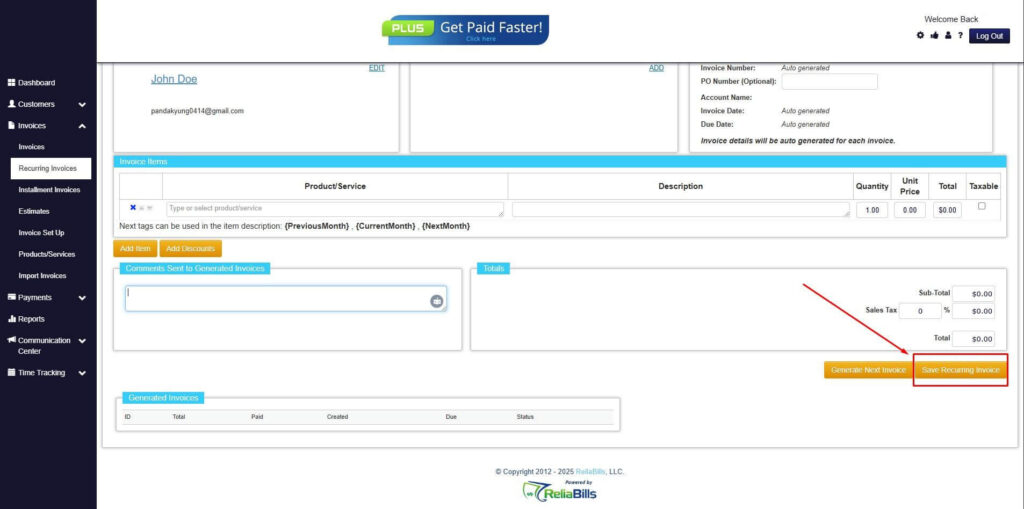
Step 7: Fill in the Create Recurring Invoice Form
- Fill in all the necessary fields.
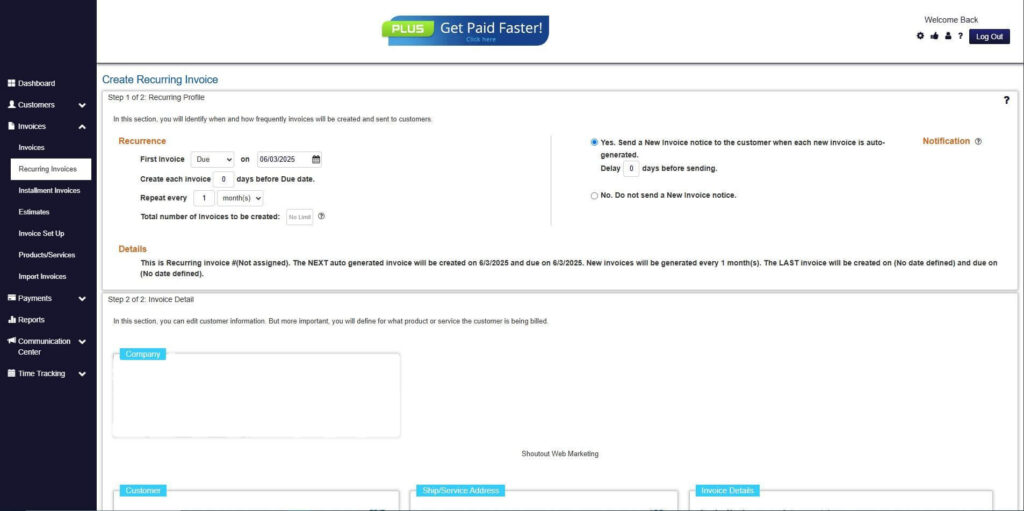
Step 8: Save Recurring Invoice
- After filling up the form, click “Save Recurring Invoice” to continue.
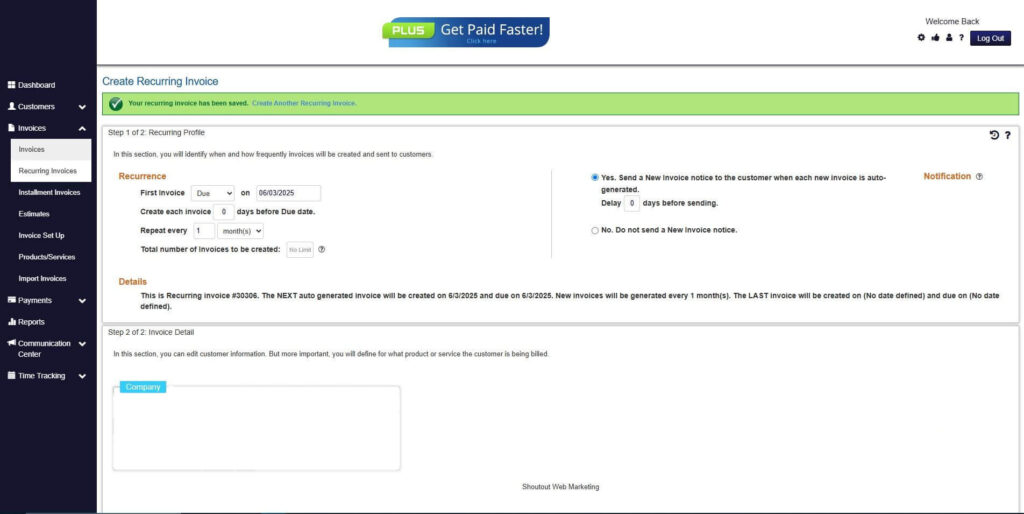
Step 9: Recurring Invoice Created
- Your Recurring Invoice has been created.
Frequently Asked Questions
1. Can non-commercial invoices be zero-value?
Yes. Many non-commercial invoices, such as samples, internal transfers, or donations, carry zero or nominal values. The primary purpose of these invoices is documentation, traceability, and internal accountability rather than revenue generation.
2. Are automated non-commercial invoices compliant with regulations?
When properly configured, automated invoices are compliant with both internal policies and external regulations. Automation ensures that all required fields are included, standardized labeling is applied, and audit-ready records are maintained for customs, internal reviews, or regulatory inspections.
3. Can non-commercial invoices be recurring?
Absolutely. Automation allows recurring invoices for repeat transactions such as monthly sample shipments, internal transfers, or regular donations. Scheduled workflows reduce manual work, maintain consistency, and prevent errors in repeated billing cycles.
4. Is automated non-commercial invoice creation suitable for small businesses?
Yes. Small businesses benefit from automation by saving time, reducing manual errors, and improving recordkeeping. Even organizations with limited staff can maintain accurate, traceable, and compliant invoice records without significant administrative overhead.
5. How does automation prevent errors in non-commercial invoices?
Automation reduces human error by standardizing templates, automatically populating data, scheduling recurring invoices, and integrating with accounting systems. This ensures consistent descriptions, values, and labels while minimizing duplicate or missing invoices.
6. Can automation help with audit readiness?
Yes. Automated systems store all invoices in a centralized, traceable system, including creation timestamps, adjustments, and approval history. This makes audits faster, simpler, and more reliable, and it ensures transparency across departments.
Conclusion
Automated non-commercial invoice creation streamlines processes that are traditionally manual, repetitive, and error-prone. Using billing software reduces mistakes, saves time, improves audit readiness, and ensures compliance. By implementing templates, automation rules, recurring workflows, and verification processes, businesses can confidently manage non-commercial invoices.
ReliaBills simplifies this process further with automated recurring billing, centralized tracking, and customizable invoice fields, helping businesses maintain accuracy, accountability, and efficiency in all non-commercial transactions.