

When you ship goods internationally, the most important document in your paperwork stack is the commercial invoice. It tells customs officials what you’re shipping, who it’s going to, and how much the shipment is worth. Without a complete and accurate commercial invoice for customs, your shipment can be delayed, held, or even returned to the sender.
Creating this document may feel overwhelming, especially if you are new to global trade. But once you understand what customs authorities require, you can build a professional invoice that speeds up clearance, avoids penalties, and keeps your shipments moving. This guide walks you through the essential elements of a commercial invoice for customs and shows how a reliable invoicing platform can make the entire process easier.
What Is a Commercial Invoice?
A commercial invoice is the primary document used in international shipments to declare the details of the goods being exported. Customs authorities rely on it to determine taxes, duties, and whether the shipment meets import regulations. Think of it as a legal record that outlines the value of your merchandise, who is involved in the transaction, and how the goods will be delivered. It is also used for financial documentation, freight claims, and international payment processing.
Seller and Buyer Details
Every commercial invoice for customs must clearly identify both parties. This includes the full legal names, business addresses, contact numbers, and tax identification numbers if applicable. These details help customs match the shipment with the importer and exporter, and they can prevent delays caused by unclear or incomplete information.
Goods Description
One of the most important parts of the invoice is a detailed description of the goods. Customs needs to understand exactly what is being shipped to classify the items correctly and calculate duties. Your goods description should include:
- Product name or item title
- Quantity and unit of measure
- Unit price and total value
- Country of origin
- Harmonized System (HS) code
- Weight and packaging details
Being clear and specific reduces the chances of inspection or clearance delays.
Terms of Sale and Delivery
This section outlines who is responsible for shipping, insurance, duties, and transport. Most businesses rely on INCOTERMS, which are internationally recognized terms that define buyer and seller responsibilities. Examples include EXW, FOB, CIF, and DDP. Including the correct term on your commercial invoice ensures that both parties and customs officials know exactly how the shipment is handled.
Additional Information
Some shipments require extra details depending on the country, product type, or value. Additional information may include:
- Export license or permit numbers
- Certifications or declarations
- Insurance value
- Reason for export such as sale, sample, return, or warranty replacement
Providing supplemental data upfront helps avoid customs requests that can slow down the process.
Tips and Best Practices
Creating a commercial invoice for customs becomes easier when you follow a few simple practices:
- Double check all product values to avoid miscalculations.
- Use correct HS codes to prevent reclassification.
- Avoid vague descriptions like “parts” or “samples.”
- Ensure your invoice matches your packing list.
- Keep digital copies for records and compliance checks.
Benefits of a Professional Customs Broker
Although many businesses can prepare their own commercial invoices, working with a customs broker can make the process smoother. Brokers understand local import laws, duty rates, and documentation requirements. They help reduce delays, manage compliance risks, and handle communication with customs officials. For high value or complex shipments, a customs broker can save time and avoid costly mistakes.
Essential Information in a Commercial Invoice
To summarize, a complete commercial invoice should include:
- Seller and buyer information
- Invoice number and date
- Detailed goods description
- HS codes
- Country of origin
- Unit price and total amount
- Shipping and delivery terms
- Additional permits or declarations
These elements help customs assess your shipment quickly and accurately.
Why Try ReliaBills
If you want a smoother and more organized way to prepare your commercial invoice for customs, ReliaBills is a great option. The platform helps you build clear and compliant invoices using customizable templates designed to match different business needs. You can add item details, pricing, shipment notes, and customer information in one place, which reduces manual errors and speeds up preparation.
ReliaBills also supports recurring billing, which is helpful for exporters who ship goods to the same clients regularly. Instead of creating a new invoice every time, you can automate your billing cycle and generate consistent invoices with updated line items when needed. This helps you stay accurate and efficient, especially if your business handles frequent or high volume shipments.
With automation tools, reminders, digital sending, and secure cloud storage, ReliaBills keeps your invoicing streamlined. You can maintain organized records for customs compliance, reduce paperwork, and ensure your shipments always include the correct documentation.
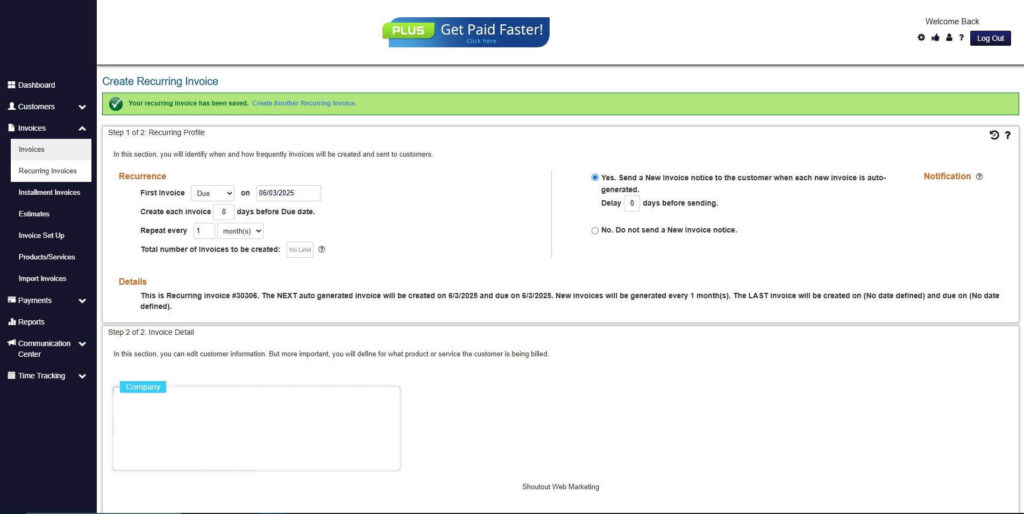
How to Create a New Recurring Invoice Using ReliaBills
Creating a New Recurring Invoice using ReliaBills involves the following steps:
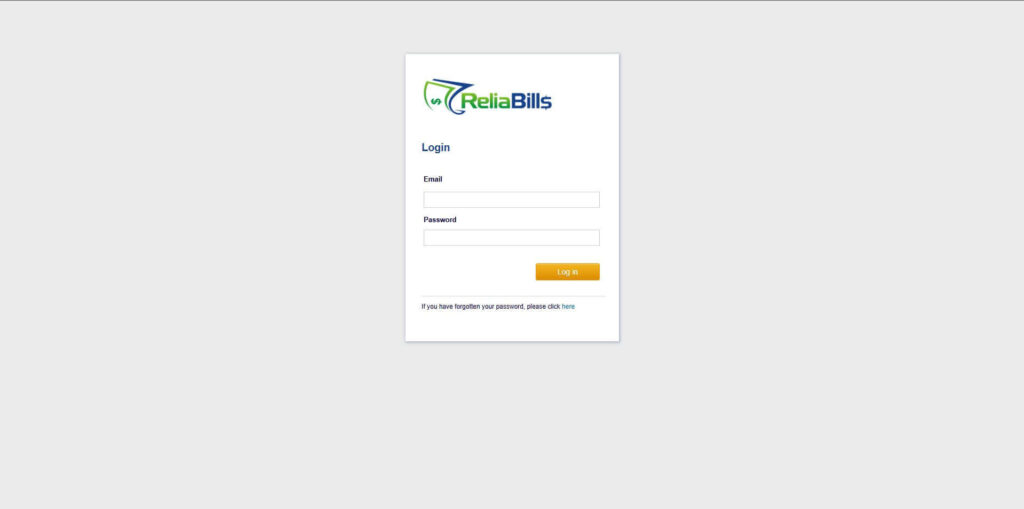
Step 1: Login to ReliaBills
- Access your ReliaBills Account using your login credentials. If you don’t have an account, sign up here.
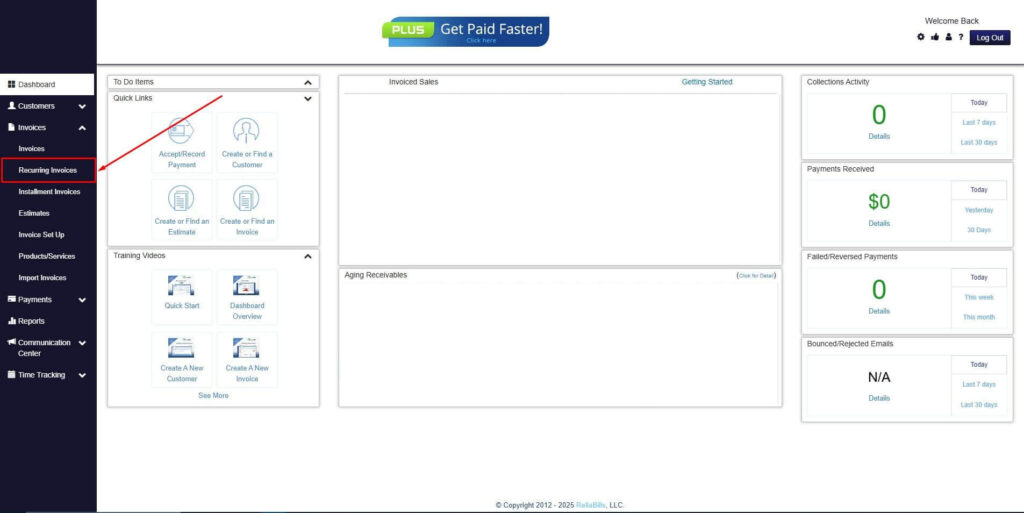
Step 2: Click on Recurring Invoices
- Navigate to the Invoices Dropdown and click on Recurring Invoices for an overview of the list of your existing customers.
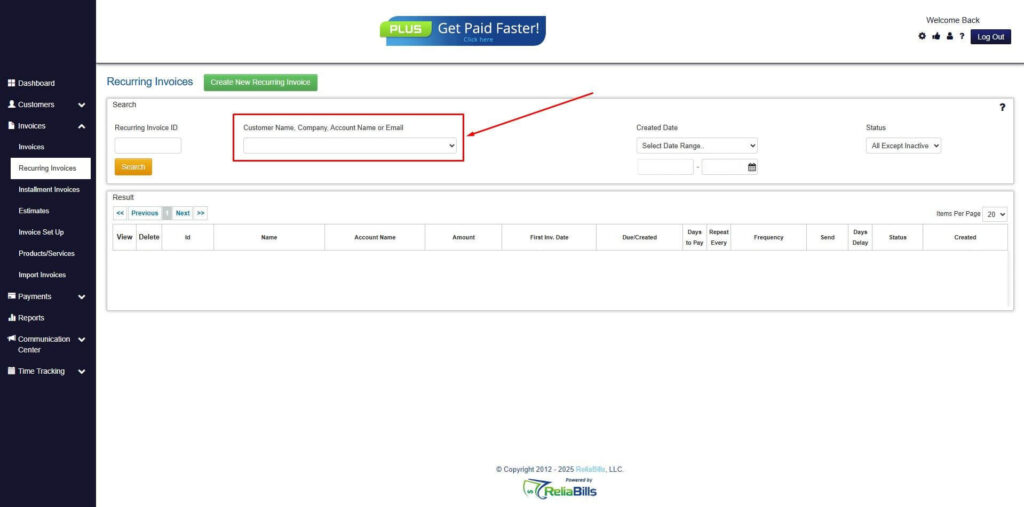
Step 3: Go to the Customers Tab
- If you have already created a customer, search for them in the Customers tab and make sure their status is “Active”.
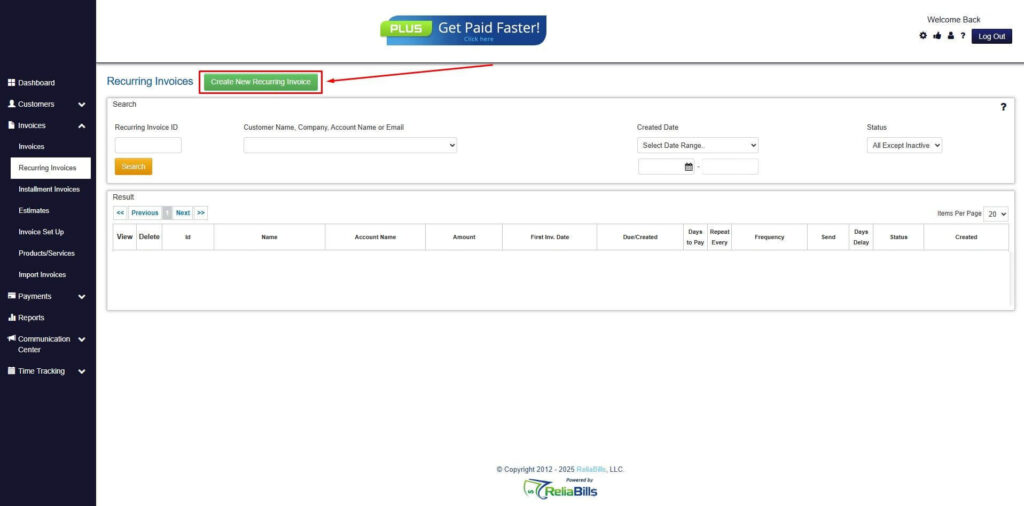
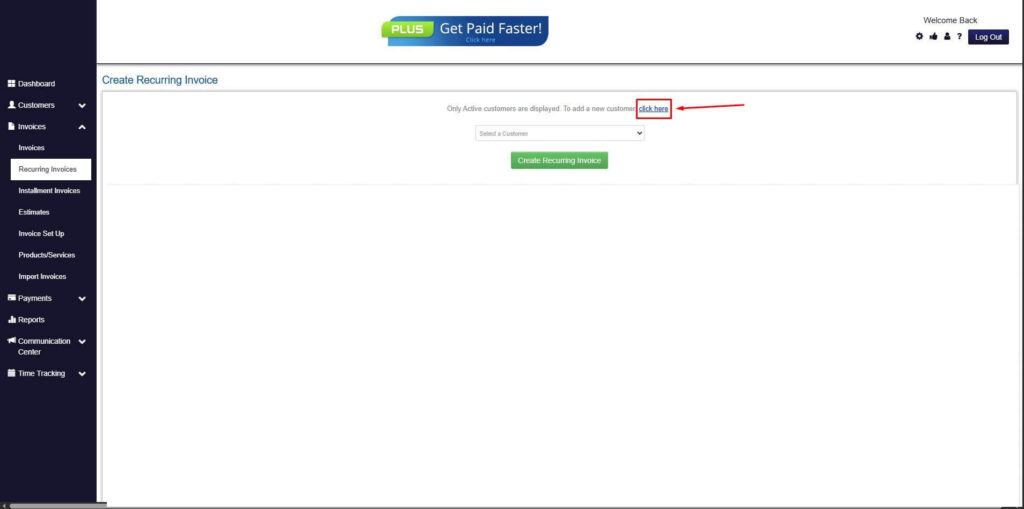
Step 4: Click the Create New Recurring Invoice
- If you haven’t created any customers yet, click the Create New Recurring Invoice to create a new customer.
Step 5: Click on the “Click here” Button
- Click on the “Click here” button to proceed with the recurring invoice creation.
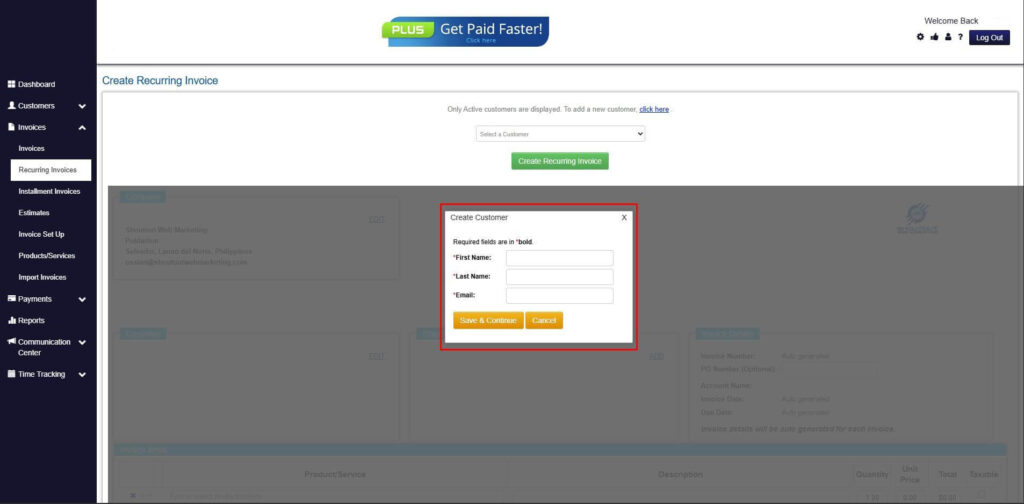
Step 6: Create Customer
- Provide your First Name, Last Name, and Email to proceed.
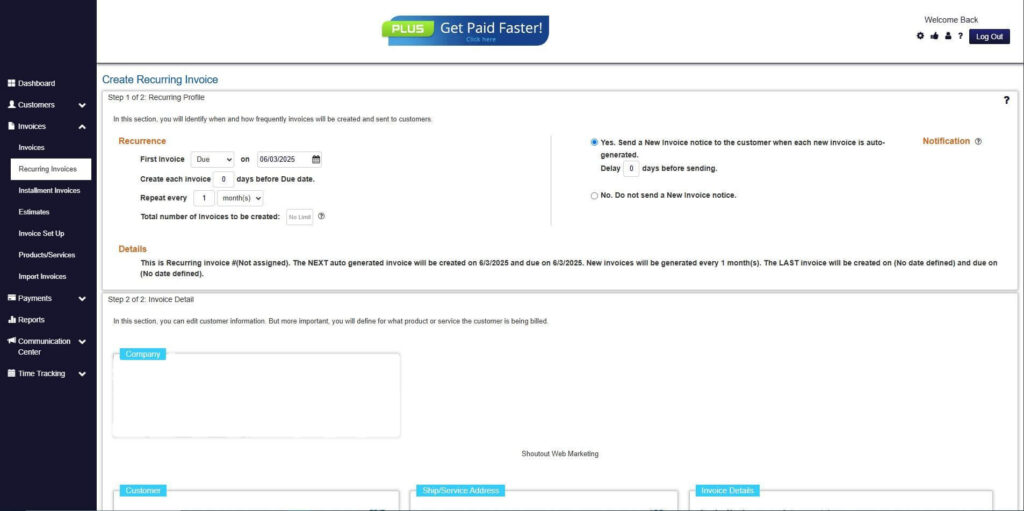
Step 7: Fill in the Create Recurring Invoice Form
- Fill in all the necessary fields.
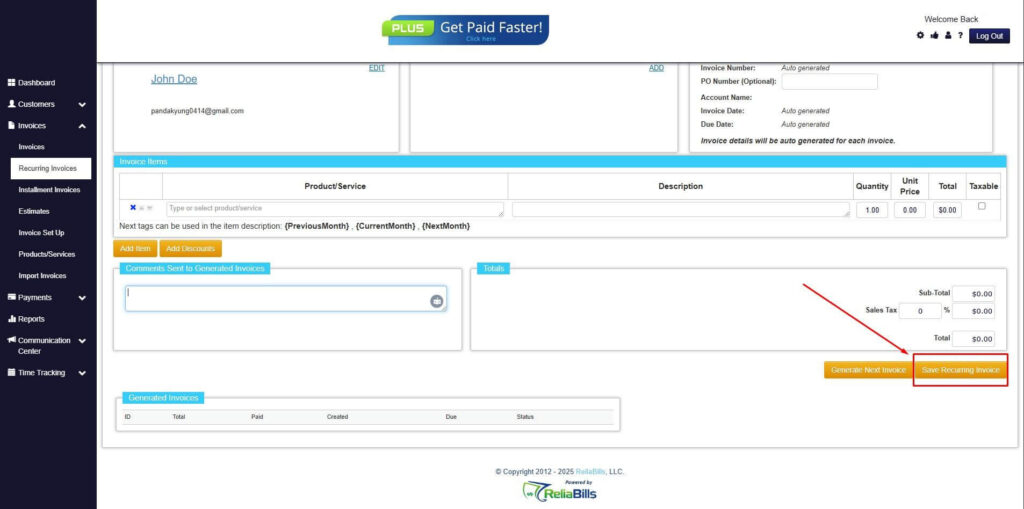
Step 8: Save Recurring Invoice
- After filling up the form, click “Save Recurring Invoice” to continue.
Step 9: Recurring Invoice Created
- Your Recurring Invoice has been created.
Frequently Asked Questions
1. Is a commercial invoice the same as a packing list?
No. A commercial invoice shows product value and transaction details, while a packing list only describes the physical contents of the shipment.
2. Does every international shipment need a commercial invoice?
Most commercial shipments do, since customs relies on it to determine duties and verify the goods being imported.
3. Can I use a handwritten commercial invoice?
It is possible, but digital invoices are preferred because they are clearer, more professional, and less likely to contain errors.
4. Do I need an HS code for each item?
Yes. Every product must have the correct HS code to ensure accurate duty calculation and classification.
5. What happens if my commercial invoice has errors?
Mistakes can lead to delays, penalties, or rejected shipments, which is why accuracy and completeness are essential.
Conclusion
A complete and accurate commercial invoice for customs helps shipments move through international borders without delays. By including the right details, using best practices, and staying compliant with regulations, you make the process much smoother. ReliaBills adds efficiency by helping you create clear invoices, automate billing, and stay organized for stress free international shipping.