
Membership data management is the ongoing process of collecting, updating, and syncing member records (contact info, payment methods, billing status, and plan tier) across every system that touches billing. Clubs that treat it as a continuous workflow, not a one-time setup task, see fewer failed charges, fewer disputes, and far less manual cleanup at month end.
What Is Membership Data Management?
Membership data management is the practice of keeping every piece of member-related information, personal details, payment credentials, subscription tier, billing history, and communication preferences accurate, synchronized, and accessible across the systems a club uses to run its business. For a billing team, that usually means the point where a customer management system, a recurring billing engine, and sometimes an installment billing schedule all need to agree on the same facts about the same person.
Membership Data Management, Expanded
At a club, “member data” isn’t one database, it’s several that need to stay aligned:
| Data category | Examples | Where it typically lives |
|---|---|---|
| Identity data | Name, date of birth, emergency contact | CRM or front-desk software |
| Billing data | Card on file, billing address, plan tier | Recurring billing platform |
| Payment history | Charge dates, amounts, failed attempts | Invoicing software |
| Plan and status | Active, frozen, cancelled, past due | Customer management system |
| Communication | Email, SMS opt-in, preferred contact method | Marketing or CRM tool |
The core challenge isn’t storing this information. Most clubs can do that easily enough. The challenge is keeping it consistent when a member updates their card at the front desk but not online, or when a staff member manually adjusts a billing date and forgets to log why.
Membership data management is the discipline of closing those gaps before they turn into billing errors.
How It Works: The Member Data Lifecycle
Think of it as five recurring stages, not a one-time setup:
- Capture: A new member signs up, and their identity and payment data enter the system, usually through a membership form or front-desk terminal.
- Validate: The system checks for duplicate entries, expired cards, or missing fields before the record goes live.
- Sync: Data moves between systems, CRM to billing platform to invoicing tool, ideally through an integration rather than manual re-entry.
- Maintain: Ongoing updates happen: plan changes, card expirations, address changes, pauses, and freezes.
- Reconcile: Billing records are checked against payment processor data on a regular cycle to catch mismatches before they compound.
| Stage | Owner (typical) | Most common failure point |
|---|---|---|
| Capture | Front desk / online signup | Incomplete or mistyped fields |
| Validate | Billing system (automated) | No duplicate check in place |
| Sync | Integration / manual export | Systems update on different schedules |
| Maintain | Member services team | Changes made in one system, not another |
| Reconcile | Billing or finance team | Done quarterly instead of monthly |
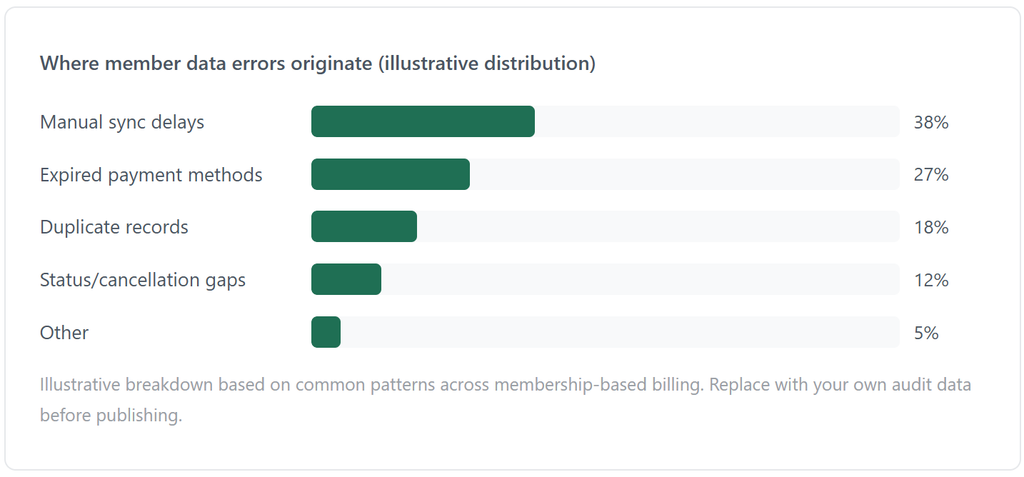
Clubs running recurring billing without a reconciliation step tend to discover data drift only when a member complains. By then, the error has often repeated for two or three billing cycles.
Real-World Examples and Use Cases
Example 1: Card expiration cascades
A member’s card expires in March. The billing system flags the failed charge, but the CRM record is never updated to reflect “payment issue, pending resolution.” Front-desk staff, looking only at the CRM, tells the member their account is active. Two more failed charges follow before anyone catches it. This is one of the most common gaps in clubs that run billing and front-desk software as separate, unconnected tools.
Example 2: Plan upgrades that don’t sync
A member upgrades from a basic to a premium tier in person. The upgrade is logged in the customer management system, but the recurring billing schedule isn’t updated to match, so the member is billed at the old rate for two more cycles, creating a revenue gap the club may not notice until a manual audit.
Example 3: Installment plans going stale
For clubs offering installment billing on annual memberships paid in monthly chunks, a single missed sync between the payment schedule and the member’s active status can mean continuing to bill someone who already cancelled, or worse, not billing someone who’s still an active member.
Key Benefits of Strong Membership Data Management
- Fewer failed payments. Accurate, current payment data reduces decline rates tied to expired or outdated cards.
- Lower dispute and chargeback volume. When billing records match what the member actually agreed to, there’s less room for “I was never told” disputes.
- Faster staff resolution time. Front-desk and support staff spend less time untangling mismatched records when systems stay synced.
- Cleaner reporting. Revenue and retention numbers are only as reliable as the underlying member data.
- Better member experience. Members notice when a club gets their billing right consistently. It’s one of the quieter signals of professionalism.
Key Risks and Things to Watch For
| Risk | Why it happens | What it costs |
|---|---|---|
| Duplicate member records | Signups through multiple channels (app, front desk, website) | Double billing, support confusion |
| Stale payment methods | No automated card-update reminders | Increased decline rate |
| Manual sync delays | Systems not integrated, relying on exports | Billing lag of days or weeks |
| Inconsistent cancellation handling | No single source of truth for “active” status | Billing members after they’ve left |
| Compliance gaps | Payment data stored outside PCI-compliant systems | Legal and financial exposure |
The riskiest pattern isn’t any single error. It’s relying on manual reconciliation as the main safety net. Manual checks catch problems after they’ve already cost money or trust. Automated validation and sync catch them before.
Membership Data Management vs. Related Concepts
| Concept | What it covers | How it relates |
|---|---|---|
| Membership data management | Keeping member records accurate and synced across systems | The foundation everything else depends on |
| Recurring billing | Automating repeat charges on a schedule | Depends on accurate member data to charge correctly |
| Invoicing software | Generating and sending bills or receipts | Pulls directly from member and billing data |
| Customer management | Tracking the full member relationship, not just billing | Where most member data originates |
| Installment billing | Splitting payments into scheduled chunks | Requires tightly synced status and schedule data |
Membership data management isn’t a competing concept to these. It’s the layer that makes all of them work reliably.
How to Get Started
For clubs still managing member records across spreadsheets, a standalone CRM, and a separate billing tool, the fastest wins come from consolidation, not more tools.
A practical starting sequence:
- Audit where member data currently lives and identify every place a billing-relevant field (card, plan, status) gets updated.
- Pick one system as the source of truth for billing status. This is usually the recurring billing platform.
- Set up automated sync or, at minimum, a weekly reconciliation check between systems.
- Turn on automated card-expiration and failed-payment alerts rather than relying on manual review.
- Document who owns updates to member records and when they’re expected to happen.
Common Mistakes Clubs Make Early On
- Treating data cleanup as a one-time project. Member data decays continuously: cards expire, people move, and plans change. A single cleanup sprint buys a few clean months, not a permanent fix.
- Not assigning clear ownership. When “someone” is responsible for keeping records accurate, usually no one actually is, and updates fall through during busy periods.
- Over-trusting manual entry. Front-desk updates typed into one system but not another are one of the most consistent sources of billing errors in membership-based businesses.
- Delaying reconciliation until something breaks. Monthly or even weekly reconciliation catches small mismatches before they compound into disputed charges.
- Underestimating compliance requirements. Storing payment data outside a PCI-compliant system, even “temporarily,” creates risk that’s easy to avoid with the right billing platform from the start.
Frequently Asked Questions
1. What’s the difference between membership data and billing data?
Membership data includes identity and preference details like name, contact info, and plan tier. Billing data is the subset tied directly to payment: card details, charge history, and billing status. Good membership data management keeps both aligned.
2. How often should club billing records be reconciled?
Monthly, at minimum, for most clubs. Businesses with higher transaction volume or frequent plan changes benefit from weekly reconciliation to catch issues before they compound across multiple billing cycles.
3. Can spreadsheets handle membership data management?
For very small clubs, briefly, yes. But spreadsheets don’t sync automatically, don’t flag expired cards, and don’t scale past a few dozen members without manual errors creeping in.
4. Does membership data management help with compliance?
Yes. Centralizing payment data in a PCI-compliant billing platform, rather than scattering it across spreadsheets or unsecured tools, is one of the most direct ways to reduce compliance risk.
5. What’s the first system a club should fix if data is a mess?
Usually, the billing platform, such as ReliaBills, is where member status and payment data most directly affect revenue. Once the billing system becomes the source of truth, syncing other systems to it becomes far more manageable.
Recent Articles:
- Property Management Income Reporting: How to Track Rent Revenue and Vacancies
- How to Track Agency Revenue and Client Profitability with Reporting Software