
Catering customer data management is not an administrative nicety reserved for large operations. It is the system that determines whether your team serves a client’s 80-person corporate lunch with the same precision on the third event as it did on the first and whether that client calls you again for the fourth. Every missed dietary detail, every repeated question about a client’s preferred linen color, and every invoice dispute from a missing deposit record is a data management failure with a cost that compounds over time.
What Is Catering Customer Data Management?
Catering customer data management is the systematic process of collecting, organizing, and using information about your event clients across every touchpoint in the catering relationship, from the first inquiry call through post-event follow-up and future rebooking. It encompasses how you store contact and billing details, how you record event-specific requirements, how you track dietary and allergen restrictions, how you maintain payment history, and how you use all of that accumulated information to serve repeat clients more efficiently and more accurately than the first time.
The definition matters because most guides treat this topic as a software selection question, which platform should you use to manage clients? The platform question is real, but it is secondary. The primary question is what data you capture, when you capture it, who on your team has access to it, and how it flows from the initial booking into the kitchen, onto the event floor, and back into the client file afterward. A well-structured spreadsheet can outperform a poorly implemented CRM if the underlying data model is correct. The reverse is equally true.
The Real Cost of Poor Client Records
The operational damage from inadequate catering data management is easy to underestimate because the failures tend to appear as separate, unrelated incidents: the kitchen served shrimp to a guest who had listed a shellfish allergy three events ago because that information lived in an email no one remembered to check. A corporate client’s accounts payable team disputed the invoice because the deposit was recorded in a notebook the sales coordinator kept at her desk and no one else could find. A repeat booking was lost because the client called to discuss their annual gala and the team had no record of what they ordered last year, no record of the service issues they raised in the feedback email, and no way to demonstrate that any of it had been heard.
These are not random failures. They are predictable outcomes of a data model that stores client information in too many places, with too little structure, and with no consistent process for carrying it from one event to the next.
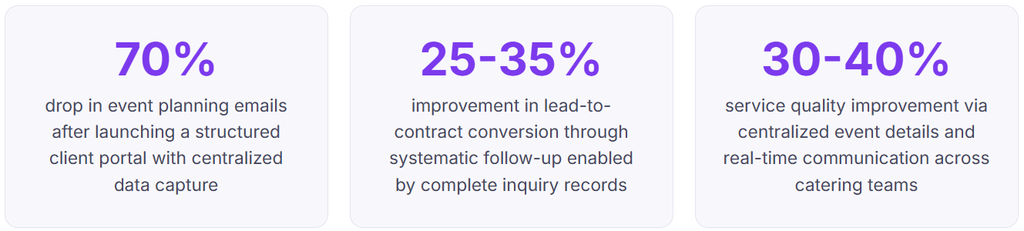
The revenue impact of poor data management is harder to measure but equally real. A corporate client who books three events per year with an average value of $8,000 per event represents $24,000 in annual revenue. The probability of retaining that client over five years depends significantly on whether your team can demonstrate, at every rebooking conversation, that they know the client’s history, preferences, and service expectations without making the client repeat themselves. Repeat catering clients who feel known and remembered by their caterer rebook at significantly higher rates than those who feel like they are starting from scratch each time.
What an Event Client Record Should Contain
Most catering teams capture some version of the data listed below. The problem is not typically what they capture but where it lives and whether it is accessible to the right people at the right time. The goal is a record structure where every piece of information captured during the sales process flows automatically into the operational execution phase and archives back into the client profile after the event.
Below is a realistic client record for a mid-size corporate catering client, showing what a well-structured profile looks like in practice.
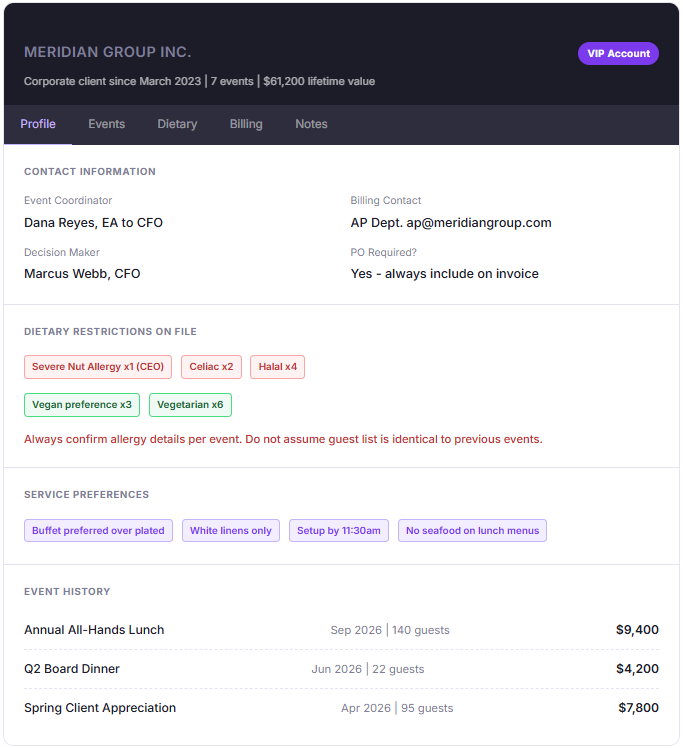
The record above illustrates two things that most catering data systems miss. First, it separates the event coordinator, billing contact, and decision-maker into distinct roles with different communication needs. Second, it distinguishes dietary restrictions (highlighted in red, with a standing warning not to carry assumptions between events) from service preferences (highlighted as informational notes that persist unless the client changes them). These are not cosmetic distinctions. They represent fundamentally different types of information with different risk profiles and different maintenance requirements.
The payment and billing layer
Client records that track event history without connecting to payment and billing history are incomplete in a way that creates operational and financial problems. When a client calls to book a new event, your team should be able to see in the same record whether this client has a history of paying on time, whether they have any outstanding balances from prior events, what their standard deposit and payment terms are, and whether they require a purchase order number on every invoice.
The payment layer of a client record connects directly to your invoicing software workflow. A catering client with an established payment pattern (corporate clients often pay Net 30 via ACH; social event clients typically pay with a deposit structure) should have those terms pre-configured in their record so that every new event invoice is issued with the correct terms from the start, without anyone having to remember or look up what was agreed previously.
How the Data Flows: From Inquiry to Archive
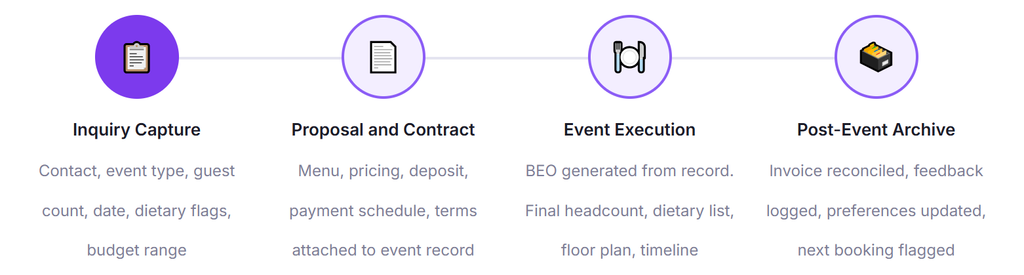
The value of a data management system depends almost entirely on when data is captured and how completely it moves through the event lifecycle. A system where data has to be manually re-entered at each stage will inevitably accumulate gaps and errors. The design goal is a single-entry model where information captured at inquiry populates the proposal, feeds the BEO, informs the kitchen briefing, and archives back into the client profile, with no re-keying at any stage.
1. Inquiry capture: more than name and date
The initial inquiry form or call is the highest-leverage data capture moment in the entire catering relationship. Every field your team captures here flows into everything that follows. At minimum, capture event type, expected guest count, date and time, venue, dietary flags (a simple yes/no with a notes field is sufficient at this stage), budget range, how they found you, and who the billing contact is. The last two fields are consistently omitted from standard inquiry forms and consistently matter later.
2. Proposal: the record becomes a contract
When a proposal is generated, it should draw its client and event details from the inquiry record rather than being typed fresh. The proposal stage is where menu selections, pricing, deposit requirements, and payment schedule are added to the record. Once accepted, the proposal becomes the contract, and the contract terms feed directly into your billing configuration for this event. This is where connecting your client data to your installment billing or deposit collection workflow produces the most administrative time savings.
3. Final confirmation: the headcount and dietary update
Between contract signing and event day, two things almost always change: the guest count and the dietary restriction list. Your data system needs a defined final confirmation window, typically 5 to 7 days before the event, where the client submits the final headcount and a confirmed dietary restriction list. This final confirmation should update the event record, trigger a revised BEO, and if the count change affects the invoice, automatically generate a billing adjustment. Managing this manually across multiple simultaneous events is where errors accumulate fastest.
4. Event execution: data in the hands of the team
On event day, your floor captain and kitchen lead need access to the same record in a format they can actually use under operational conditions. A printed BEO is still standard for kitchen teams. A mobile-accessible version is increasingly expected by floor staff. The critical requirement is that both outputs are generated from the same source record, not from separate documents that may have diverged during the revision process.
5. Post-event: archive, reconcile, and flag for rebooking
Within 48 hours of an event, the record should be closed with three actions: invoice reconciliation (final charges confirmed against what was delivered), feedback capture (any service notes from the floor team or client), and rebooking flag (if this is an annual or recurring event, set a follow-up date in the client profile). The post-event archive step is the one most frequently skipped under operational pressure, and its absence is precisely why repeat client conversations start from zero instead of building on what came before.
Real-World Use Cases by Catering Type
Corporate lunch and meeting catering
Corporate clients are the use case where catering data management pays the highest dividend per investment. A company that books weekly or biweekly lunch meetings is a repeat customer whose operational complexity grows every time they add a new team member or acquire a subsidiary with different dietary requirements. Without a structured record, each delivery is effectively a new event. With one, your team knows that Building B requires setup by 11:15 because the meeting starts at 11:30, that the CFO has a documented tree nut allergy that takes precedence over any substitution, and that this account pays on Net 30 terms and always needs a PO number on the invoice.
For clients in this category, the billing layer is equally important. A corporate account that orders 48 times per year across two locations represents a significant receivables management challenge without a system that tracks what was ordered, what was invoiced, what was paid, and what terms each purchase was made under. Connecting the client record to a recurring billing configuration for standing weekly orders, with exceptions handled as one-off event records, is the structure that makes this manageable at scale.
Wedding and social event catering
Social events present a different data challenge: the client relationship is typically single-event, but the planning cycle is long (6 to 18 months for large weddings), involves multiple decision-makers (bride, groom, parents, planner), and generates an unusually high volume of touchpoints and change requests across that timeline. The risk is not repeat-booking failure. It is executing a single event flawlessly for a client who has been building their vision for a year and expects you to have absorbed every conversation you have had with them.
For this client type, the communication log inside the client record is as important as the event specification. Every tasting visit, every menu revision, every guest count update, and every phone call about the seating arrangement for the head table should be timestamped and attached to the event record. When a dispute arises at the event about something the client “definitely told us,” a complete communication log is the difference between a professional resolution and a public review disaster.
Institutional and contracted catering
Healthcare facilities, universities, and corporate campuses that contract a restaurant catering operation for ongoing services represent the most complex data management scenario. Multiple departments, rotating contacts, centralized billing accounts, and sub-accounts for different cost centers all need to be reflected in the data structure. A flat client record model, where all purchases for a university’s multiple departments roll up to a single account with no segmentation, produces billing confusion and contact management failures that the university’s AP team will not tolerate for long.
Key Benefits of Structured Data Management
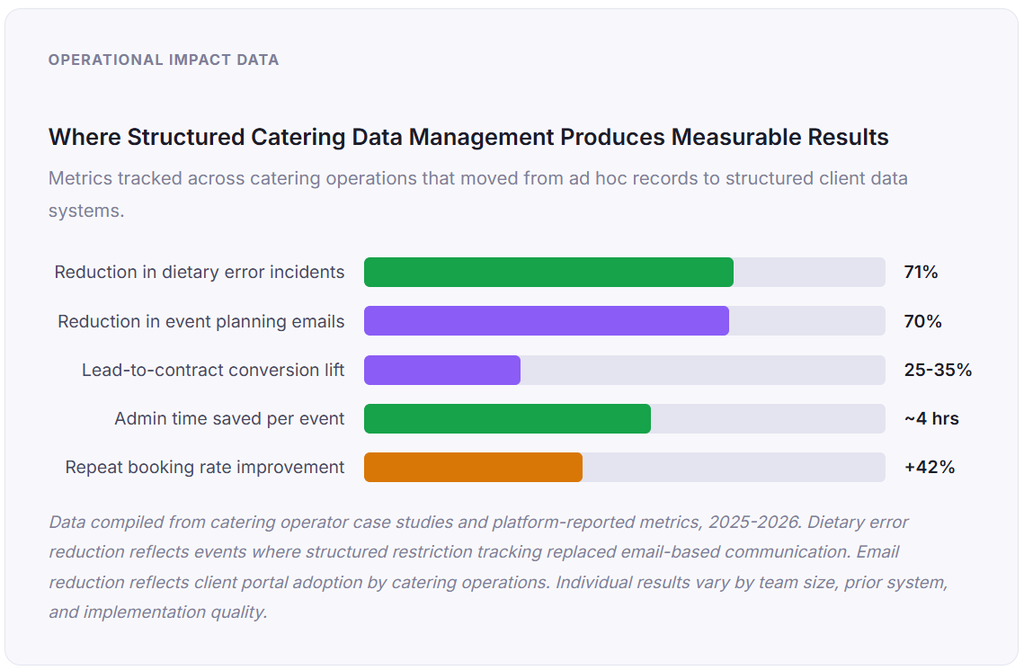
Liability reduction through documented dietary tracking
This benefit is rarely framed clearly in catering software marketing, but it is one of the most financially significant. A documented, timestamped record of the dietary restriction information provided by a client, confirmed against what was communicated to the kitchen team, is your primary defense in any dispute or legal claim arising from an allergic reaction at an event. The absence of that documentation, or its presence in an inaccessible format, is a liability that no amount of verbal care in execution can fully offset.
Personalization that converts repeat inquiries into bookings
When a corporate client calls to book their fourth annual team lunch and your coordinator can immediately reference last year’s menu, the preferences updated after the event, and the headcount change that happened mid-cycle, the rebooking conversation takes 12 minutes instead of 45. More importantly, it communicates something about your operation that clients do not often verbalize but consistently act on: they feel known. That feeling of being remembered and understood is what distinguishes a vendor relationship from a preferred partner relationship, and it drives rebooking decisions at a level that pricing and menu quality alone do not.
Risks and Things to Watch For
Stale dietary data carried between events
The most operationally dangerous assumption in catering data management is that the dietary restriction list from a client’s last event accurately reflects the requirements of the next one. Guest lists change. Employees leave and join. A client’s regular attendee who developed a gluten intolerance since the last event will not always proactively update your records. Your system must enforce re-confirmation of dietary requirements for every event, even for clients you have served twenty times, and it must not allow the previous event’s dietary data to auto-populate the new event record without an explicit confirmation step.
Data access without appropriate controls
A client record that includes dietary restriction information, contact data, and payment history is a privacy-sensitive file. In a team environment, all staff having access to all client records creates both a data security risk and a GDPR or CCPA compliance consideration depending on your jurisdiction and client base. Define access tiers: sales staff see inquiry and proposal data, kitchen teams see event-specific dietary and operational data, and billing staff see payment and invoice data. Not everyone needs everything, and restricting access by role also reduces the risk of accidental data modification during event execution.
System fragmentation after staff turnover
The most common data management failure in catering operations is not a software problem. It is a process continuity problem triggered by staff turnover. When an event coordinator leaves and the client records for their accounts live primarily in their personal email, their handwritten notes, or a spreadsheet on their local drive, that institutional knowledge leaves with them. Centralized, platform-based data management is partly an investment in making client relationships robust to the personnel changes that are inevitable in a high-turnover industry.
Comparison: Catering Data Management Approaches
| Approach | Data Centralization | Billing Integration | Dietary Tracking | Repeat Client Value | Best For |
|---|---|---|---|---|---|
| Email threads + personal notes | None | None | Unstructured | Rebuilds from scratch each event | Solo operator, 1-5 events/year |
| Shared spreadsheet (Google Sheets) | Partial | Manual | Basic, error-prone | Depends on discipline | Small teams, under 20 events/year |
| Generic CRM (HubSpot, Salesforce) | Good | Requires integration | Not purpose-built | Good for contact management | Sales-focused operations; requires customization |
| Catering-specific platform (Curate, Caterease) | Excellent | Built-in | Purpose-built | Full event history per client | Mid to large catering operations |
| Billing platform with customer management layer | Contact and payment focus | Native | Requires supplemental system | Strong for billing history and repeat invoicing | Operations where billing complexity is the primary pain point |
| Hybrid: CRM + invoicing platform | Good to excellent | Native (invoicing side) | CRM side handles it | Full picture when well-integrated | Growing operations that need both operational and financial depth |
The most important column in the table above is “Repeat Client Value,” because that is where the business case for data management investment is made or lost. A system that handles first-time event execution adequately but provides no foundation for the second conversation with a client is a system that makes your team start from zero every time, regardless of how well the first event went.
For catering operations where billing complexity is the most immediate operational problem, platforms like ReliaBills provide the customer management layer for contact and payment history alongside native support for deposit collection, installment payment structures, and recurring billing for standing contracts, without requiring a separate CRM integration for the financial data.
What I Got Wrong at First: Common Catering Data Management Mistakes
Mistake 1: Treating the BEO as the primary record rather than a generated output
The BEO is the kitchen and floor team’s operational document. It is not the data management system. When BEOs become the primary client record, you end up with a collection of event-specific documents that have no connective tissue. You cannot easily see what a corporate client ordered across all their events over the past two years. You cannot quickly pull the dietary restrictions from the last event to cross-reference against the new one. You cannot generate a proposal that pre-populates from client history. The BEO is the end of the data flow, not the beginning of it.
Mistake 2: Storing dietary restrictions as free-text notes
A notes field that reads “someone has a nut allergy, I think, check with Dana” is worse than no documentation at all, because it creates a false sense that the information is captured. Dietary restrictions, especially those with allergy or medical implications, must be stored as structured, tagged data with specific guest attribution where possible. “Severe peanut allergy, CEO Marcus Webb, confirmed [date]” is a dietary restriction record. Everything else is a liability.
Mistake 3: Failing to capture the billing contact separately from the event contact
In corporate catering, the person who coordinates the event is almost never the person who processes the invoice. When the invoice goes to the event coordinator instead of accounts payable, it sits in the wrong inbox and ages past due while nobody in AP knows it exists. This causes payment delays that look like client non-payment but are actually routing failures. Capturing the billing contact email at the inquiry stage and verifying the PO requirement before the invoice is generated takes two minutes and eliminates the most common source of corporate invoice payment delays.
Mistake 4: Not archiving post-event notes before moving to the next job
The 48-hour window after an event is the highest-value data capture moment in the entire relationship, and it is consistently sacrificed to the operational urgency of the next event on the calendar. The service note from the floor captain about the temperature of the room affecting the appetizer presentation, the client’s comment about the new station layout working better than last year, and the guest feedback card that mentioned the dietary labeling being unclear are the data points that make the next event better, and the client conversation at rebooking time feels genuine. Skipping post-event archiving because the next event is tomorrow is a false economy that costs you the compounding value of repeat client relationships.
Mistake 5: Building a data system that only the coordinator knows how to use
A client data system that lives primarily in one person’s head, email, or personal folder is not a system. It is a single point of failure. The standard for a functional catering data management system is that any qualified team member should be able to pull the full profile for a client they have never worked with and have everything they need to conduct an intelligent rebooking conversation or generate an operationally accurate event record. If your system cannot pass that test, it needs restructuring before you add more events to it.
How to Get Started with Catering Customer Data Management
The right starting point depends on where your operation currently stores client information. If the answer is “in email and in people’s heads,” the priority is establishing a minimum viable record structure before evaluating any software. Define the 15 to 20 data fields that every new client record must contain, build a template for capturing them, and enforce that template on every new inquiry before touching any platform selection question. A disciplined spreadsheet is a better foundation for platform migration than a CRM full of incomplete records.
If you already have some form of client record in a spreadsheet or basic system, the migration priority is the data types that carry the most operational risk: dietary restrictions and billing contacts. Audit your existing records for those two fields specifically. Any record that has a dietary restriction in a free-text notes field rather than a structured, tagged format needs to be corrected before the next event that client books. Any record that does not distinguish the billing contact from the event coordinator needs that field added immediately.
For billing and payment history specifically, connecting your client records to a platform that tracks deposit collection, payment schedules, and outstanding balances in the same location as the client profile eliminates one of the most common administrative failure modes in catering operations: the invoice that went to the wrong contact, the deposit that was collected but not recorded in the right place, and the payment plan that was agreed verbally but never reflected in the system. Platforms that support both installment billing for large event contracts and recurring billing for standing corporate accounts allow you to manage both payment structures against the same client record, with full visibility into payment history at the profile level.
Finally, implement a post-event archive protocol as a non-negotiable operational step within 48 hours of every event. Even if nothing else changes immediately, closing event records with notes from the floor team and updating client preferences based on what actually happened at the event is the single highest-leverage data management habit a catering team can build. It is the step that transforms a collection of one-time event records into a compounding asset that makes your team more valuable to repeat clients with every booking.
Frequently Asked Questions
1. What is catering customer data management?
Catering customer data management is the process of collecting, organizing, updating, and securely storing information about catering customers and their events. This can include client contact details, event dates and locations, guest counts, menus, dietary requirements, invoices, payments, contracts, preferences, and communication history. Good data management helps catering businesses coordinate events accurately, provide consistent service, and quickly access information when clients book again.
2. What information should be in a catering event client record?
A catering client record should generally include the customer’s name and contact information, event type, date and time, venue, estimated guest count, selected menu, service requirements, dietary restrictions or allergies, special requests, pricing or quotation details, contract information, invoices, payment status, and relevant communication history. For larger events, it can also include vendor contacts, setup requirements, equipment needs, and a designated on-site contact.
3. How is a dietary restriction different from a food preference in a client record?
A dietary restriction is a requirement that may affect a person’s health, safety, or ability to consume certain foods, such as a food allergy, celiac disease, or medically required diet. A food preference is generally a personal choice, such as preferring vegetarian food or avoiding a particular ingredient. Catering businesses should clearly distinguish these categories in their records and communicate allergies and other safety-critical requirements to the appropriate food-service staff.
3. How should a catering business handle repeat corporate clients differently from one-time event clients?
Repeat corporate clients can benefit from a more detailed, ongoing account record that tracks recurring event information, billing arrangements, approved contacts, preferred menus, service expectations, and previous event history. One-time event clients typically require a record focused on the specific event, contract, payment, menu, and service requirements. For repeat clients, businesses should still verify important details for every new event rather than automatically assuming previous information remains accurate.
4. What is the biggest operational risk of poor catering data management?
One of the biggest operational risks is incorrect or missing information being used during event preparation or service. This can lead to wrong guest counts, missed dietary requirements, incorrect menus, scheduling problems, billing errors, or failures to communicate important changes. If allergy information is incomplete or mishandled, the consequences can be particularly serious because food allergies can create significant health and safety risks.
5. Do I need specialized catering software, or can a general CRM work?
A general CRM can work for many catering businesses if it can store customer records, event details, notes, communications, tasks, and relevant documents. Specialized catering software may be more useful when the business needs features such as event-specific workflows, menu management, proposals, contracts, catering invoices, guest counts, production planning, or event scheduling. The right choice depends on the business’s size, workflow complexity, and the amount of catering-specific information it needs to manage.
6. How should dietary restriction data be managed between multiple events for the same client?
Dietary information should be stored in a way that allows the business to reference previous requirements while confirming them for each new event. A client may have a recurring dietary requirement, but the guest list and specific requirements can change from one event to another. Businesses should distinguish between information that belongs to the client profile and restrictions that apply only to particular guests or events. Allergy and other food-safety information should be clearly flagged, access should be limited to appropriate staff, and the current event’s requirements should always be verified before food preparation.
Recent Articles:
- Installment Billing for Large Landscaping Projects: How to Break Up Big Jobs
- Parent Payment Portal: Why Childcare Centers Need Online Payment Options