
A childcare payment portal is not a convenience add-on. It is the infrastructure that determines whether tuition arrives on time, whether your administrative staff spends their week chasing checks or actually running the program, and whether families feel confident choosing your center over a competitor that does everything digitally. Centers that move billing online consistently see late payments drop within the first 60 days of adoption.
What Is a Childcare Payment Portal?
A childcare payment portal is a secure, parent-facing web interface through which families can view their tuition balances, review invoices, make one-time or recurring payments, and manage their billing preferences without ever stepping into your front office. From the center’s side, the same system tracks payment status in real time, flags overdue accounts, and integrates directly with whatever invoicing software your staff uses to manage accounts receivable.
The term is sometimes used interchangeably with “parent portal,” but the two are not identical. A parent portal, in the broadest sense, may include daily activity logs, photo sharing, and attendance records. A childcare payment portal is specifically the billing and payment layer of that experience: the module that replaces the envelope of cash, the check dropped off at reception, and the spreadsheet your director updates by hand every Friday afternoon.
The Real Cost of Not Having One
Every childcare center director knows the feeling: it is Thursday, payroll is Friday, and three families have not paid yet this week. You spend 45 minutes calling and texting, get one response, and go into Friday morning still short. The other two families eventually pay, but not before your director has absorbed the stress of covering the gap from the operating account.
This is not a story about problem families. Most late childcare payments come from friction and forgetfulness, not from unwillingness to pay. Busy parents forget due dates. Checkbooks are rarely on hand at 7 a.m. drop-off. Venmo and Cash App are easy but create reconciliation headaches on your end. And when payment is a manual process on both sides, the gap between “money owed” and “money received” widens every cycle.
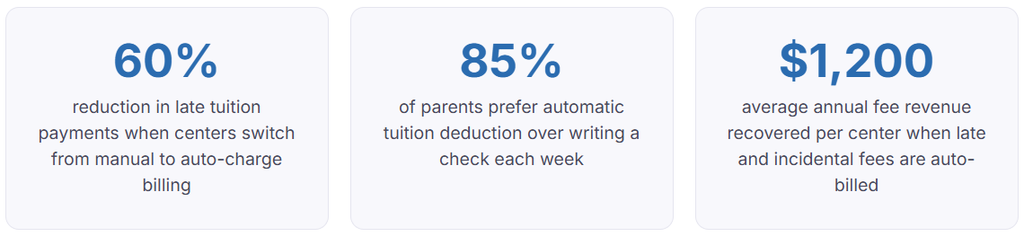
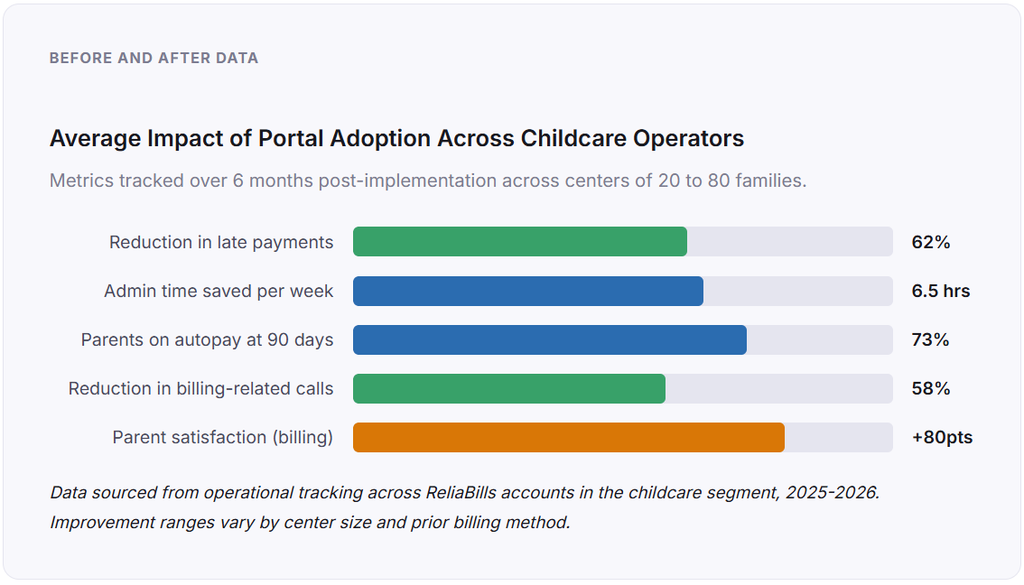
Beyond the tuition itself, there is the administrative cost to consider. A center with 40 families receiving weekly invoices by email or paper is generating and tracking roughly 2,000 invoices per year. Without a portal, someone is recording each payment by hand, matching it to the right account, calculating any outstanding balance, and sending reminders. That is not a minor task. In a survey of childcare operators who subsequently adopted online billing, the median time savings was 6.5 administrative hours per week. At a rate of $20 per hour, that is $6,760 in recovered staff time per year, from a single operational change.
How a Childcare Payment Portal Works
Understanding the mechanics helps you evaluate different platforms against what your center actually needs. Here is the full cycle, from invoice generation to payment reconciliation.
1. The center configures billing rules
You set up each family’s tuition amount, billing frequency (weekly, biweekly, or monthly), due date, and any applicable fees. This setup happens once at enrollment and updates only when the family’s plan changes. Centers using recurring billing configure autopay at this stage as well.
2. Invoices are generated and delivered automatically
On the scheduled billing date, the system generates an invoice for each family and delivers it to their email and their portal account simultaneously. No one on your staff has to remember to send invoices. The system handles it at the configured time, every cycle, without exception.
3. Parents receive a notification and log in to pay
The parent receives an email notification linking directly to their portal dashboard. From there they can see their current invoice, their payment history, any outstanding balance, and any upcoming charges. They pay by credit card, debit card, or ACH transfer. Families enrolled in autopay are charged automatically and receive a receipt without needing to take any action.
4. Payment is processed, and the account is updated in real time
Once a payment clears, the family’s account balance updates immediately, and the invoice is marked as paid. Your administrative dashboard reflects the change without any manual entry. If a payment fails due to insufficient funds or an expired card, the system flags the account, notifies the parent, and can trigger an automatic retry or a reminder escalation depending on your settings.
5. Overdue accounts are flagged automatically
Families who have not paid by the due date are automatically added to an overdue queue. The system can send a first reminder on day one, a second on day five, and escalate to you for manual follow-up on day ten. You define the thresholds. The system enforces them consistently without any staff member having to decide who gets a reminder today.
6. End-of-period reporting closes the cycle
At the end of each billing period, your portal generates a receivables report showing what was invoiced, what was collected, what is outstanding, and which accounts are overdue beyond the threshold. This replaces a manual spreadsheet and produces documentation ready for your accountant, tax filing, or a funding audit if your center accepts subsidy programs.
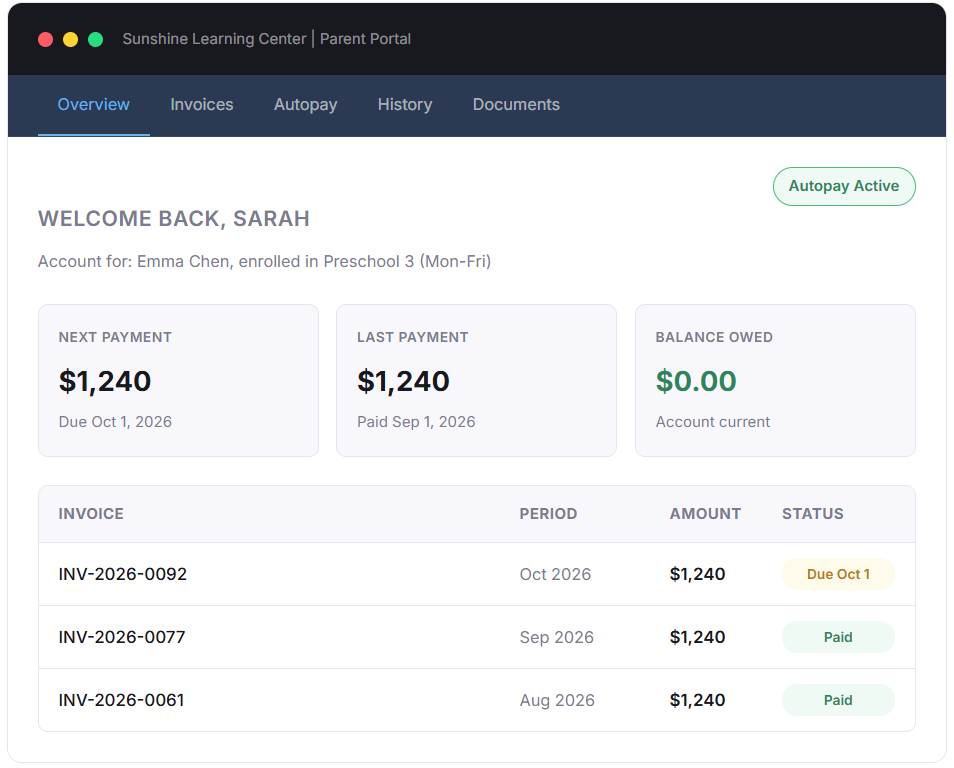
Here is what a parent-facing portal dashboard looks like in practice. This mockup reflects the experience families encounter once they log in.
What to Look For: Key Features of a Childcare Payment Portal
Not all portals are built the same way, and the differences that matter most are not always the ones that appear first in a product demo. Below is the feature set that actually determines whether a portal improves your billing operations or just adds a layer of complexity.
Autopay with multiple stored payment methods
The ability for parents to store a card or bank account and authorize recurring charges is the most impactful single feature. Autopay removes the action required from the parent each cycle, which eliminates the forgetfulness problem entirely for the families who enroll in it. Look for a portal that allows parents to store multiple payment methods and designate a backup so a failed primary charge does not immediately trigger an overdue notice.
Subsidy and split-payment support
If your center accepts childcare assistance from state or federal programs, you need a portal that can record a subsidy payment from a third party and then calculate and bill the parent’s copay as a separate transaction. Centers that handle this manually often find that the copay billing step gets delayed or miscalculated, causing reconciliation problems at month end.
Prorated billing and mid-period enrollment
A child who enrolls on the 12th of the month should not receive a full month’s invoice. Most portal systems can be configured to prorate automatically based on enrollment date, but some require manual adjustment. This matters more than it sounds: manual proration errors are among the most common causes of parent billing disputes at the enrollment stage, and they create a poor first impression at exactly the moment you want to establish trust.
Configurable payment reminders
The ability to set automated reminders at defined intervals before and after a due date is the closest thing to a set-and-forget solution for late payment follow-up. The most effective reminder cadence we have observed is a soft notification 5 days before due, a reminder on the due date, and a firm notice 3 days after. Centers that use this cadence consistently see their overdue accounts drop to under 5% of the billing pool within one quarter of implementation.
Reporting and export
Your portal’s value as an administrative tool depends on how easily you can get clean data out of it. Look for receivables aging reports, payment history exports in a format your accountant can use, and the ability to pull a subsidy reconciliation report for program compliance documentation.
Real-World Use Cases by Center Type
Childcare payment portals solve different problems depending on the size and structure of your operation. The scenarios below reflect how the same underlying tools apply across different contexts.
The single-location daycare with 25 to 50 families
This is where the administrative time savings hit hardest. A director running a small center is typically handling billing alongside every other operational task. Before implementing a portal, the billing cycle for a 40-family center often occupies 8 to 10 hours per month across invoice creation, sending, reminders, and reconciliation. After implementation, that same director reports 60 to 90 minutes monthly, with most of that time reviewing the dashboard rather than entering data.
The financial impact compounds quickly. One center in this size range tracked a specific change: they moved from accepting checks and Venmo to a portal with autopay in January. By March, their average days outstanding had dropped from 12 days to 3, and their monthly bank deposit trips went from six to zero.
The multi-site childcare group
For organizations running multiple locations, a portal with centralized customer management is not a convenience, it is an operational necessity. Without it, reconciling payments across locations requires either consolidating data from multiple separate systems or maintaining a master spreadsheet that is perpetually out of date. A portal connected to a single customer management layer gives administrators a unified view of all family accounts regardless of which location they attend.
The after-school program with variable billing
Programs that bill based on days attended, activity enrollment, or a combination of recurring tuition plus incidental fees represent the most complex billing scenario in childcare. A portal with configurable line items, the ability to add ad hoc charges, and a parent-facing invoice view that clearly breaks down what each charge is for reduces the volume of parent inquiries your staff has to handle by a significant margin.
Key Benefits for Centers and Families
For parents, the benefit is direct: they know what they owe, and they can pay at 10 p.m. from their phone while the kids are asleep, and they never have to worry about whether the check they dropped off was deposited and recorded correctly. The transparency that a portal provides, specifically the ability to see a clean invoice and payment history at any time, reduces the anxiety that some families feel around childcare billing, particularly in months when they have multiple competing financial pressures.
For centers, the benefits extend beyond the obvious cash flow improvements. A portal creates a documented payment record for every family, which is valuable if you ever need to pursue a disputed balance, document compliance with a subsidy program, or simply answer an accountant’s question about a specific transaction from eight months ago.
Risks and Things to Watch For
Processing fee absorption
Every payment method carries a processing cost. Credit and debit card transactions typically run 2.5 to 3.5%. ACH transfers run 0.5 to 1%. If you absorb these fees rather than passing them to parents, they will reduce your effective tuition revenue. If you pass them to parents (common practice for card payments), you need to communicate this clearly at enrollment to avoid perception of hidden charges. The most effective approach is to make ACH free and apply a disclosed surcharge for card payments, then let families choose.
Data security and PCI compliance
A portal that stores payment credentials must be PCI-DSS compliant. This is not negotiable, and it is not something you can verify by looking at the website. Ask any platform you evaluate directly about their compliance certification level and how they handle a data breach notification. If they cannot answer clearly, keep looking.
Parent adoption friction
The most common reason childcare payment portals underperform is incomplete parent adoption. If 30% of your families refuse to create accounts and continue paying by check, you now have two parallel billing systems to manage, which is worse than having none. Enrollment communication and a clear, supported onboarding process for families are as important as the platform you choose. This is the implementation risk most operators underestimate.
Over-reliance on automation without oversight
Autopay is powerful, but it requires monitoring. Cards expire. Bank accounts change. A recurring charge that fails silently without someone reviewing the dashboard is an account that slides into delinquency before anyone notices. Set a weekly review of failed and pending payments as a standing operational task, regardless of how automated your system is.
Comparison: Payment Portal vs. Other Childcare Billing Methods
| Capability | Cash / Check | Venmo / Zelle | Email Invoice | Payment Portal |
|---|---|---|---|---|
| Parent can pay anytime, anywhere | No | Yes | Partial | Yes |
| Automatic recurring billing | No | No | No | Yes |
| Automated payment reminders | No | No | Manual | Yes |
| Real-time account balance for parents | No | No | No | Yes |
| Clean payment history for tax purposes | No | App only | Manual tracking | Yes |
| Subsidy and split payment support | No | No | No | Yes |
| Bank deposit required | Yes (weekly) | Transfer needed | Depends | No |
| Reconciliation with center records | Manual | Manual | Semi-manual | Automatic |
| Processing fee | None | None (bank) / 1.75% (card) | Varies | 0.5 to 3.5% depending on method |
| Best for | Micro-centers (under 10 families) | Informal arrangements only | 10-20 families, minimal automation | Any center prioritizing cash flow and administrative efficiency |
Venmo and Zelle come up frequently in conversations about childcare billing because parents already use them and the transactions feel instant. The problem is not the payment itself; it is everything around it: you have no integrated invoice, no automatic reconciliation, no payment history the parent can access for their dependent care FSA or tax documentation, and no way to automate recurring charges or reminders. Using peer-to-peer payment apps for business billing is functional in the very short term and painful at any meaningful scale.
What I Got Wrong at First: Common Childcare Billing Mistakes
Mistake 1: Launching the portal without an onboarding plan for parents
The assumption was that emailing families a link and a username would be enough. It was not. About a third of families did not log in at all during the first billing cycle, and a subset of those continued paying by check for months afterward. What worked was a brief enrollment meeting or phone call walkthrough for families who needed it, combined with clear communication that the check option was going away after a 60-day transition period. Setting that deadline is what actually moved families to the portal.
Mistake 2: Not configuring autopay enrollment as the default option at enrollment
Making autopay opt-in rather than opt-out meant that most families chose the path of least resistance, which was not setting it up. Flipping this so that autopay is the default and families actively choose to pay manually instead increased autopay enrollment from 38% to 71% within one enrollment cycle, with no increase in parent complaints.
Mistake 3: Passing card processing fees without disclosing them upfront
Adding a 3% convenience fee on credit card payments without mentioning it in the enrollment agreement generated exactly as much friction as you would expect. Families felt misled even though the fee was disclosed at checkout. The fix was including the fee structure in the enrollment paperwork and on the portal login page, with a clear note that ACH payments carried no surcharge. Parent complaints about fees dropped to near zero after this change.
Mistake 4: Not monitoring failed autopay transactions
An automated system gives you the illusion that everything is running when it might not be. A family with an expired card will have their autopay fail silently unless someone is looking at the dashboard. In one case, a family’s account accumulated three months of unpaid tuition before anyone noticed, because the system was marking the charges as “pending retry” rather than “overdue,” and no one had set up an alert for failed payment notifications. Set those alerts on day one.
Mistake 5: Treating the portal as a standalone tool rather than part of an integrated billing system
A portal that is not connected to your center’s invoicing workflow is just a payment button. The full operational value comes when the portal feeds into your accounts receivable reporting, when invoices are generated from the same system that tracks enrollment, and when your end-of-period reports close automatically rather than requiring manual compilation. This integration is what separates a payment portal from a billing system, and it is worth evaluating explicitly before you choose a platform.
How to Get Started
The transition to a payment portal is not as operationally heavy as most center directors expect before they go through it. The typical implementation timeline from platform selection to first billing cycle runs 3 to 6 weeks, with most of that time in the parent communication and onboarding phase rather than the technical setup.
Start by auditing your current billing process. Document every step, including the ones you do not think of as billing, like reminding a parent at drop-off, recording a cash payment on a sticky note, or manually calculating a prorated rate for a mid-month enrollment. Every manual step in that audit is a candidate for elimination.
Then evaluate platforms against the feature list in this guide, weighted by the specific problems your audit surfaced. If late payments are your primary pain point, prioritize autopay robustness and reminder automation. If subsidy management is your complexity, make that your first evaluation filter. And if you are managing multiple sites, centralized customer management across all accounts is non-negotiable.
Plan your parent communication strategy before you go live. Draft a letter explaining why you are making the change (for them: easier, no more checks, payment history for tax purposes), when the change takes effect, and what support is available for families who need help setting up their account. Frame it as an improvement for families, not an administrative decision for your center, and your adoption rate will be meaningfully higher.
For centers that want to combine a payment portal with broader billing automation, including installment payment plans for summer camp or annual program deposits, platforms like ReliaBills support both the portal layer and the recurring billing infrastructure in a single system, which eliminates the integration work of connecting separate tools. If you are also considering structured payment plans for larger fees, the installment billing guide covers how to configure those schedules in a way that works both for family cash flow and for your receivables reporting.
Frequently Asked Questions
1. What is a childcare payment portal?
A childcare payment portal is a secure, parent-facing online system through which families can view invoices, check account balances, make payments by credit card or bank transfer, and enroll in autopay. For the center, it automates invoice delivery, tracks payment status in real time, and generates receivables reports without manual data entry.
2. How much does a childcare payment portal typically cost?
Portal costs fall into two categories: software subscription fees and payment processing fees. Subscription fees typically range from $30 to $150 per month depending on the platform and number of families. Processing fees vary by method: ACH payments run 0.5 to 1% per transaction, while credit and debit card payments typically run 2.5 to 3.5%. Many centers offset this by applying a disclosed card surcharge and offering ACH as a fee-free option.
3. Can parents make split payments through a childcare portal, such as for divorced families?
Most childcare payment portals support split billing, where two accounts are associated with a single enrolled child and each receives an invoice for their designated portion. This is a standard need for separated families and for situations where a portion of tuition is covered by an employer childcare benefit. Verify split payment support explicitly during any platform evaluation, as the implementation quality varies significantly between systems.
4. How do childcare portals handle government subsidy programs?
Portals with subsidy support allow you to configure a family’s account with a total tuition amount, a designated subsidy credit from a named program, and a parent copay amount that is billed through the portal. The subsidy payment from the agency is recorded separately. At month end, the system produces a reconciliation showing both streams. Centers that accept multiple subsidy programs from different agencies will want to verify that the platform can handle multiple subsidy sources per account before committing.
5. Is a payment portal secure enough for storing bank account and card information?
Reputable childcare payment portals do not store raw card or bank data on their own servers. Instead, they use tokenization, where the sensitive data is held by a PCI-DSS-certified payment processor and replaced with a non-sensitive token in the portal’s own database. When evaluating a platform, ask specifically about their PCI compliance level and whether payment credentials are tokenized through a third-party processor or stored directly. The former is standard practice; the latter is a red flag.
6. What happens when a parent’s autopay payment fails?
When an autopay charge fails, the portal should immediately notify the parent by email with a link to update their payment method, flag the account in the center’s dashboard, and optionally schedule an automatic retry after a defined interval. How gracefully a system handles failed payments is one of the more important features to test during a trial period. Look specifically at how quickly the parent is notified, whether there is an automatic retry, and how the failed charge affects the family’s account status and outstanding balance display.
7. Can parents access their childcare payment history for tax purposes?
Yes, and this is one of the features parents most appreciate once they have experienced it. A portal maintains a complete payment history that parents can access at any time, download as a statement, and use to substantiate dependent care FSA claims or the childcare tax credit on their annual return. Centers that previously had to manually generate annual statements on request find this feature eliminates those requests entirely.
Recent Articles:
- Installment Billing for Pet Care Packages and Annual Wellness Plans
- How to Track Client Payments and Outstanding Balances as a CPA Firm