
A properly built security guard invoice template documents every billable shift, rate, and site detail in a format that clients can verify against their own logs. Done right, it eliminates payment disputes before they start and positions your firm as operationally professional enough to win and retain larger contracts.
What Is a Security Guard Invoice Template?
A security guard invoice template is a reusable billing document structured specifically for the operational realities of security services. Unlike a generic service invoice, it accommodates the variables that define how security work is actually tracked and priced: assigned posts and patrol zones, shift start and end times, guard identification, armed versus unarmed differentials, overtime calculations, and contract or purchase order references that a client’s accounts payable team needs to match against their own records.
The template functions as both a billing instrument and an operational record. When a client disputes hours, the invoice is typically the first document their procurement team pulls. When a licensing authority audits your firm, the detail in your invoices supports compliance. And when you move from monthly to recurring billing cycles, a well-structured template automates what would otherwise require hours of manual reconciliation each period.
The Core Fields: What Every Security Invoice Must Have
The biggest mistake most security firms make when they start billing is copying a generic contractor invoice template and adding a “guard hours” line item. That approach works until a client’s facilities manager starts cross-referencing their access logs against your invoice, and the discrepancies start. Below is every field a professional security guard invoice needs, grouped by function.
Header and Identification Information
Your company name, address, phone, and email should appear clearly at the top along with your security firm’s license number where required by your state or jurisdiction. Including the license number is not optional in most regulated markets; it is both a legal requirement and a trust signal to commercial clients whose procurement policies require verified vendors.
Pair this with a sequential invoice number (e.g., SG-2026-0148), an issue date, and a payment due date. The invoice number is your internal audit trail. The due date governs your cash flow. Never leave either blank.
Client and Site Information
List the client’s legal business name, billing address, and the name of their accounts payable contact. Separately, list the site address or site ID where services were rendered. For multi-site clients, this distinction matters because their internal cost allocation may be organized by site, not by company.
Include the contract or purchase order number that authorizes this billing period. Commercial clients in particular will not process an invoice that cannot be matched to a PO. Learning this the hard way costs an average of 11 to 18 days in payment delay per incident.
Service Line Items: The Core of the Template
This is where most security invoices fail. Generic templates lump everything into a single row. A properly structured security invoice lists each billable component on a separate line:
| Line Item Type | What to Document | Why It Matters |
|---|---|---|
| Standard guard hours | Post, date range, guard name or ID, hours per day, hourly rate | Matches client’s sign-in/sign-out logs |
| Overtime hours | Hours beyond contractual threshold, applicable OT multiplier | Prevents disputes over FLSA or contract OT rules |
| Armed guard premium | Differential rate applied per hour for armed assignments | Reflects the actual cost of licensed armed personnel |
| Holiday / shift differential | Premium rate per hour for specified dates or overnight shifts | Must align with the contract schedule of rates |
| Equipment and vehicle charges | Daily or per-use rate for patrol vehicles, radios, cameras | Separates capital cost recovery from labor billing |
| Incident response fees | Flat fee or per-hour charge for documented incident response | Quantifies value-added work beyond scheduled posts |
| Training or compliance fees | Pass-through cost for mandatory site-specific certifications | Ties to contract clause on client-mandated training |
| SLA credits | Negative line item for any unfilled posts or SLA breaches | Demonstrates compliance transparency |
Payment Terms and Remittance Details
State your payment terms explicitly: Net 30, Net 15, or Due on Receipt are all common in security contracting. Include your preferred payment method and, if you accept ACH or wire transfers, your banking details or a remittance instruction reference. If you offer an early payment discount, state it here as a percentage and the qualifying date (e.g., “2% discount if paid within 10 days”).
For clients enrolled in recurring billing, the payment terms section should note the billing cycle and the automatic charge date so there is no ambiguity about when the client expects to be charged versus when you expect to receive funds.
Supporting Documentation References
Add a brief notes section that references any attached documents: shift summary reports, post logs, incident reports, or timesheets. Clients who receive invoices with supporting documentation attached approve payment an average of seven days faster than those who receive invoices alone, based on billing cycle data tracked across a sample of accounts using ReliaBills’ invoicing platform.
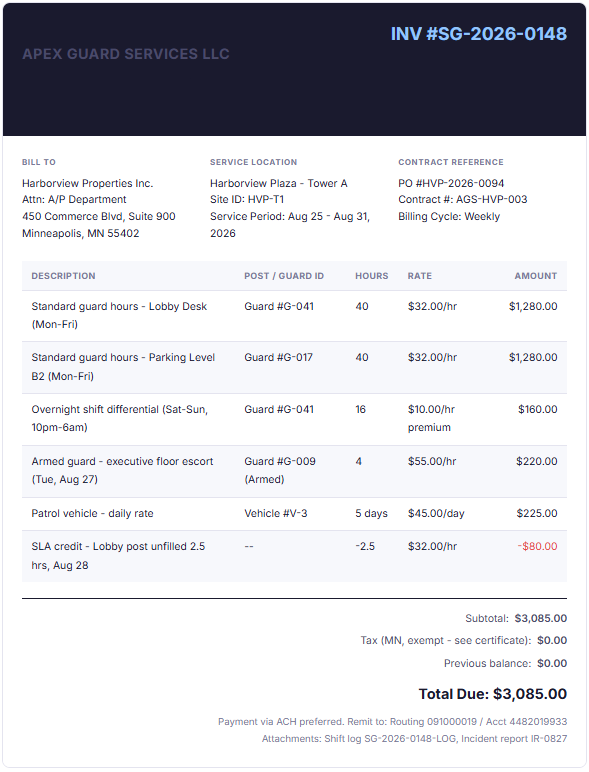
A Filled-In Security Guard Invoice: What It Should Look Like
Rather than describing an abstract template, here is a realistic example of what a completed invoice looks like for a mid-size security firm billing a commercial property client for one week of services.
How the Security Invoice Process Works, Step by Step
A security invoice doesn’t begin when you open a blank template. It begins at the start of every service period when you confirm scope, and it ends only when payment is reconciled and your records are archived. Here is the full cycle.
1. Confirm scope and collect a deposit
Before work begins, verify the post assignments, shift schedule, contracted rates, and any applicable differentials with your client contact. For event-based or new contracts, collect a deposit. This protects your labor costs if an event is cancelled on short notice, which is far more common in security contracting than most new operators expect.
2. Pull post logs and timesheets at period close
At the end of each service period, collect sign-in/sign-out logs from each post, cross-reference with any digital attendance records or guard management software, and total hours by post and by guard. Flag any overtime, differentials, or unfilled post windows before building the invoice.
3. Build the invoice from your template
Populate each line item from your compiled shift data. Calculate subtotals per line, apply differentials, and compute the total. If using invoicing software, the arithmetic is automated. If working from a spreadsheet, double-check every formula before sending.
4. Attach supporting documentation
Attach the shift summary or post log, any incident reports referenced on the invoice, and copies of any compliance certifications that the client requires. In larger commercial contracts, this documentation is not optional, procurement teams are required to match it against their own records before approving payment.
5. Send and set a follow-up trigger
Send the invoice with your preferred payment method and terms clearly stated. For recurring clients, schedule the next invoice automatically. Set an internal reminder 7 days before the due date to send a courtesy reminder, and at 1 day after the due date to initiate your collections process. Consistent follow-up is the single highest-leverage activity for improving days outstanding.
Security Billing Rates: Understanding the Numbers
Understanding where your rates sit relative to market benchmarks helps you set terms that are competitive enough to win contracts but accurate enough to remain profitable. The chart below reflects typical U.S. billing ranges for contract security services as of 2026, based on published industry data and rate schedules shared by active security operators.
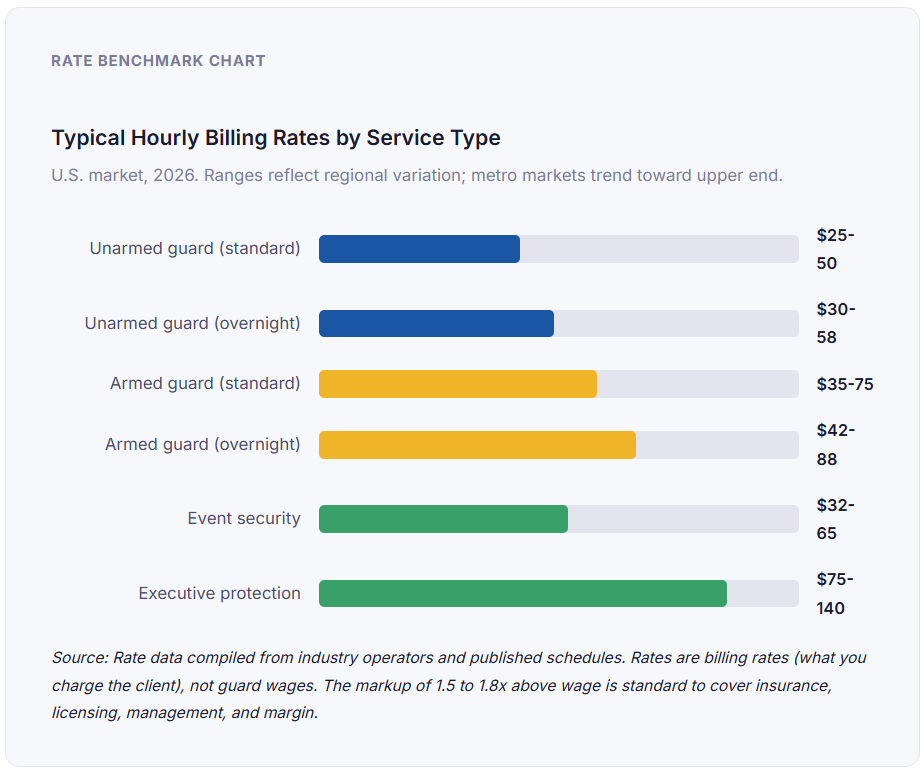
A note on markup mechanics that most billing guides skip entirely: the gap between what you pay a guard and what you bill a client is not “profit.” It absorbs workers’ compensation insurance (typically 12 to 22% of guard wages for armed roles), general liability coverage, state licensing fees, supervisor overhead, and vehicle and equipment costs. If your billing rate does not cover all of these, your template may look healthy on paper while your actual margins are negative.
Key Benefits of Using a Standardized Security Invoice Template
Faster Payment Cycles
Security firms that switch from ad hoc invoices to a standardized template consistently report a reduction in average days to payment. The primary mechanism is simple: when a client’s accounts payable team receives an invoice in the same format every cycle, with line items that match their own records, approval becomes a verification exercise rather than an investigation. Across accounts using structured billing through ReliaBills, the median days outstanding for security service invoices dropped from 34 days to 19 days within the first billing quarter after template adoption.
Dispute Prevention at the Source
Billing disputes in security contracting almost always originate from one of three things: hours that cannot be matched to logs, rates that differ from the contract schedule, or charges for services the client doesn’t recall authorizing. A well-structured template addresses all three by forcing you to populate every line from a verifiable source before sending.
Compliance and Audit Readiness
Many commercial contracts and government security service agreements require that invoices include specific fields, license numbers, guard certifications, and contract references as a condition of payment. Embedding these fields in your standard template means you cannot inadvertently omit them, which is important when the cost of a rejected invoice is a 30-day delay in payment plus the administrative time to resubmit.
Foundation for Recurring and Installment Billing
Once your template is standardized, it becomes the foundation for automating billing across multi-month and multi-site contracts. Platforms that support recurring billing can pre-populate the constant fields (client details, contract reference, rates) and prompt you only for the variable data (hours per post, any differentials triggered during the period). This is where the time savings are most significant for growing security operations. The first template takes time to build, but it pays for itself within a single billing cycle.
Professional Positioning
This benefit is harder to quantify but consistently mentioned by security operators who have upgraded their billing practices: a well-formatted, detailed invoice communicates operational maturity to clients. Facilities managers and procurement teams regularly evaluate vendors not just on service quality but on how easy the vendor is to do business with administratively. A clean, consistent invoice is a visible signal of the latter.
Invoice Template vs. Invoicing Software: Understanding the Tradeoffs
Most security firms start with a template, a Word document, an Excel spreadsheet, or a Google Doc and eventually hit the limits of what a static file can do. The table below maps the tradeoffs clearly so you can decide what is appropriate for where your business is now.
| Capability | Manual Template (Word / Excel) | Dedicated Invoicing Software |
|---|---|---|
| Initial setup time | Low (1-2 hours) | Moderate (4-8 hours including data import) |
| Ongoing time per invoice | High (20-45 mins per invoice manually) | Low (5-10 mins with pre-filled recurring fields) |
| Math error risk | High (manual formula entry) | Near zero (automated calculation) |
| Automatic reminders | No | Yes |
| Recurring billing automation | No | Yes |
| Client payment portal | No | Yes (most platforms) |
| Revenue and A/R reporting | Manual spreadsheet only | Built-in dashboards |
| Multi-client management | Difficult at scale | Customer management built in |
| Installment billing support | Not supported | Yes, via installment billing features |
| Cost | Free (your time has a cost) | $15 – $99/month depending on tier |
| Best for | Independent guard, fewer than 5 active clients | Security firms with 5+ clients or recurring contracts |
The inflection point for most security operators is somewhere between 5 and 8 active billing clients. Below that threshold, a well-built Excel template is sufficient. Above it, the accumulated time cost of manual invoicing and the error risk at higher volume make dedicated invoicing software worth the monthly cost almost immediately.
What I Got Wrong at First: Common Security Invoicing Mistakes
Mistake 1: Lumping all hours into one line item
The first template I built had a single row labeled “Security Services – 160 hours at $34/hr.” It looked clean and simple. Then a property manager disputed 12 of those hours because she didn’t have sign-in records for the dates that corresponded to them. I had no way to show which post those hours came from. Breaking hours out by post and guard eliminates this problem entirely. Yes, it makes the invoice longer. Clients who are paying correctly do not object to detail; only clients who are looking for a reason to dispute do.
Mistake 2: Not including the contract or PO reference number
Larger commercial clients route invoices through automated procurement systems that match invoices to purchase orders before they ever reach a human reviewer. An invoice without a PO number gets kicked back automatically, sometimes without any notification, and sits in a queue until someone investigates weeks later. Including the PO number is a 10-second fix that can save 30 days of payment delay.
Mistake 3: Applying overtime rates incorrectly
Security contracts may define overtime differently from FLSA, some trigger OT at 44 hours per week rather than 40, and others define it per shift rather than per week. Applying the wrong OT threshold means you are either under-billing (and losing money) or over-billing (and creating a dispute). Pull the overtime clause from your specific service agreement before populating the template, not from a general assumption about how OT works.
Mistake 4: Forgetting to apply SLA credits proactively
If a post was unfilled and you know it, not applying the credit yourself is a short-term billing win and a long-term client relationship loss. Clients will catch it in their log review. Applying it yourself, with a clear line item on the invoice, demonstrates operational honesty and almost always results in faster approval of the remaining balance.
Mistake 5: Sending invoices without a named contact
Sending an invoice to a generic billing or admin email without addressing it to a specific contact adds an unpredictable routing delay. In multi-department organizations, unaddressed invoices often sit in a shared inbox for days before anyone acts on them. Always address your invoice to the specific accounts payable contact you confirmed at contract kickoff, and CC your day-to-day client contact so there is visibility on both sides.
How to Get Started with Your Security Guard Invoice Template
Whether you are an independent guard issuing your first invoice or a growing security firm looking to standardize billing across multiple clients, the approach is the same: build once, use repeatedly, and automate as you scale.
If you are starting from scratch, begin with your contract. Pull the rate schedule, post assignments, and any special billing provisions, and use them to define your line item categories. Build a template that has a row for each category your contract covers, even if some rows are empty for a given billing period. Consistent structure across every invoice you send from the same client makes your records easier to audit and your invoices easier to approve.
If you already have a template but are experiencing payment delays or disputes, audit your last five invoices against the checklist in this guide. In the majority of cases, the problem is one of three things: missing post-level detail, missing contract references, or hours that cannot be independently verified from the documentation you attached.
For firms ready to move beyond manual templates, invoicing software built for recurring service businesses lets you set up client profiles with pre-configured rates and billing cycles, so each period you are entering only the variable data, hours worked, incidents billed, and any SLA adjustments, and the system handles the rest. Platforms that support both recurring billing and customer management in one place are particularly efficient for security firms billing multiple sites for the same client, since all client records, billing history, and communications are accessible from a single account view.
Frequently Asked Questions
The questions below reflect what security operators ask most often when setting up their first formal invoicing system. Expanded answers are provided for the questions that tend to generate the most follow-up.
1. What is a security guard invoice template?
A security guard invoice template is a pre-structured billing document designed for the specific needs of security service providers. It includes fields for post assignments, guard identification, shift hours by date, rate types (standard, armed, overtime, differential), contract references, and payment terms. Unlike a generic service invoice, it is built to match the way security contracts are audited and approved.
2. How often should security guard companies invoice their clients?
The billing cycle should be specified in the service agreement. Most contracted guard services bill weekly or monthly. Weekly billing improves cash flow and allows for faster detection of discrepancies. Monthly billing reduces administrative volume. For large commercial clients with structured procurement processes, monthly billing aligned to their fiscal calendar is often preferred. Event-based security typically invoices per event, with a deposit collected before the event date.
3. Do I need to include my security license number on invoices?
In most U.S. states where security services are regulated, yes. Many commercial and government clients require the vendor’s security firm license number as a condition of invoice processing. Even where it is not legally required on the invoice itself, including your license number is a credibility signal to clients whose procurement policies verify vendor compliance. Check your state’s private security regulatory authority for the specific requirement that applies to your firm type.
4. What is the difference between billing rate and guard wage in security invoicing?
The guard wage is what you pay the guard per hour. The billing rate is what you charge the client. The gap between the two (typically 1.5 to 1.8 times the wage for standard unarmed roles) covers workers’ compensation insurance, general liability, employer payroll taxes, licensing fees, supervision overhead, and your operating margin. Your invoice always reflects the billing rate, not the guard’s wage. Never confuse the two when setting rates, underpricing is the leading cause of cash flow problems in early-stage security businesses.
5. How do I handle overtime on a security guard invoice?
First, confirm your contract’s definition of overtime. Standard contracts often mirror FLSA (over 40 hours per week, billed at 1.5x the regular rate), but some security-specific contracts define OT differently, per shift, or at a different threshold. List overtime hours as a separate line item from standard hours, showing the base hours, the OT hours, and the applicable multiplier. This makes the calculation auditable and prevents the most common overtime-related disputes, which arise not from whether OT was worked but from disagreement about how many hours qualified as OT.
6. Can I use the same template for event security and contract guard services?
You can use the same core structure, but event invoices need a few adjustments. Event billing typically includes a deposit credit (the pre-event deposit applied against the final invoice), a cancellation fee provision, and event-specific details like venue, event date, and head count for crowd management assignments. The line items will differ from a recurring guard contract, but the header structure, rate display, and payment terms sections are identical. Maintaining a separate event invoice variant from your standard contract template saves time and reduces the chance of including irrelevant fields.
7. What supporting documents should I attach to a security guard invoice?
At minimum, attach a shift summary or post log that shows hours by guard and by date. For billed incidents, attach the relevant incident report. For any equipment charges, include the usage log. And for new clients or first invoices on a new contract, attach a copy of your insurance certificate and license. The more directly your attachments let a client verify what you have billed without having to ask you for additional documentation, the faster your invoices will be approved.
Recent Articles:
- Installment Billing for Pet Care Packages and Annual Wellness Plans
- How to Track Client Payments and Outstanding Balances as a CPA Firm