

A 12-person CPA firm billing $2.4 million annually with a 30-day average payment lag carries roughly $200,000 in accounts receivable at any given moment. If 15% of that sits more than 60 days overdue, that is $30,000 sitting idle, often because no reminder went out between the invoice send and the 90-day write-off conversation. CPA payment tracking software does not just make collections more convenient. It makes the difference between a firm that manages its own finances as well as it manages its clients’ and one that does not.
What is CPA Payment Tracking Software?
CPA payment tracking software is a platform that helps accounting firms monitor the status of every client invoice in real time, track outstanding balances across the full client portfolio, automate payment reminder sequences, and report on accounts receivable aging. Unlike general invoicing software, the best implementations for CPA firms integrate directly with practice management systems, support trust accounting compliance (keeping client funds legally separated from operating funds), and accommodate the multiple billing models that accounting work generates: hourly, fixed-fee, retainer, milestone, and hybrid arrangements.
Key terms to understand: DSO (days sales outstanding, the average time from invoice to payment), AR aging (a report showing outstanding invoices bucketed by how long they have been unpaid), WIP (work in progress, billable time delivered but not yet invoiced), trust accounting (the legal requirement to hold client funds in a separate account until earned), and retainer billing (a recurring fixed fee collected in advance for ongoing services). See also: Recurring Billing, Installment Billing, Invoicing Software, and Customer Management.
Why Payment Tracking Is a Bigger Problem for CPAs Than Most Firms Admit
There is a particular irony in CPA firms having poor visibility into their own receivables. These are the professionals that clients rely on to understand their own financial position. The same firm that warns a client about 60-day receivables in their product business will quietly carry a stack of its own unpaid invoices without a systematic process for monitoring or collecting them.
The scale of the problem is documented. According to a 2026 analysis of payment reminder software for accounting firms, a majority of CPA firms identify collections and AR management as a top-five operational bottleneck, a consistent finding across firm size bands in the AICPA’s 2025 PCPS CPA Firm Top Issues Survey. The same analysis notes that the average DSO for accounting firms billing monthly retainer clients sits at 38 to 44 days. High-performing firms with automated reminders and advance billing bring that figure closer to 20 to 28 days.
The structural cause is predictable. Inside Public Accounting’s 2026 analysis of firm cash flow and collections identifies the shift toward ongoing advisory work as a key factor: “As more revenue comes from work delivered throughout the year, firms need billing and collections processes that work consistently.” A practice built on tax season cadences, where billing happens at defined points in the year, does not automatically translate to a practice built on monthly advisory and bookkeeping retainers, where collections discipline needs to operate continuously.
What Your AR Dashboard Should Show
The AR dashboard is the operational center of your payment tracking system. It should answer, at a glance and without clicking through to individual invoices, three questions: how much total revenue is outstanding, which clients account for the largest balances, and how long specific invoices have been aging. Below is what a well-structured firm-level AR dashboard looks like.
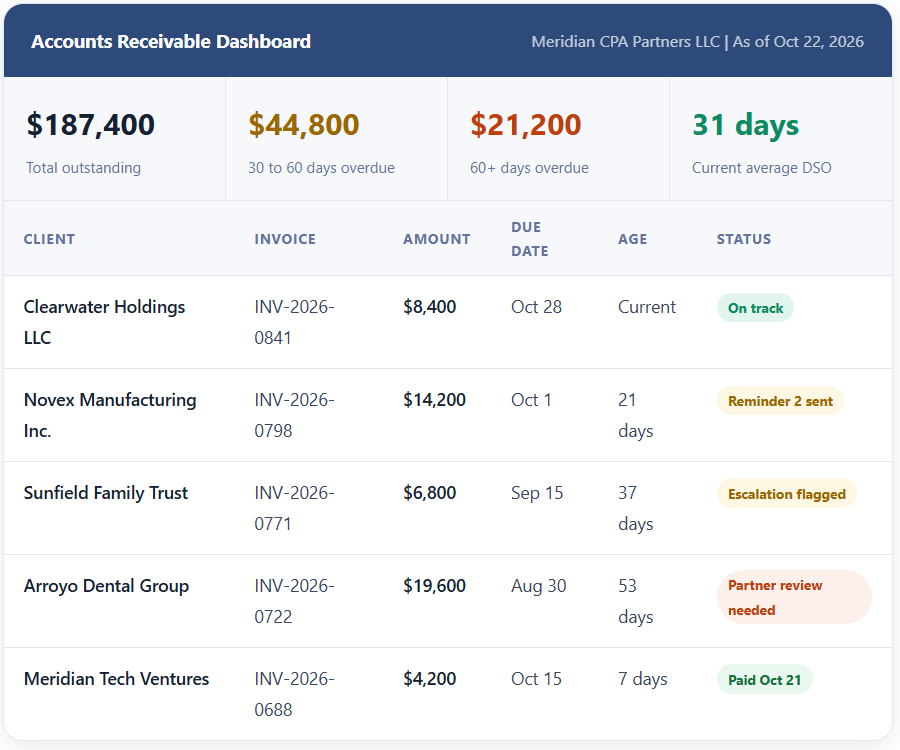
Three things make this dashboard useful rather than decorative. First, the summary statistics at the top show the 60-plus day bucket prominently, because that is the number that requires partner attention this week, not at month-end. Second, every row shows the number of days aged rather than just the due date, because “37 days” is more actionable than “September 15.” Third, the status column reflects action already taken (Reminder 2 sent, Partner review needed) rather than just payment status, so anyone who opens the dashboard knows both what has happened and what still needs to happen.
The WIP-to-AR Gap: The Metric No One Else Talks About
Most CPA firm billing guides discuss AR. Very few discuss the WIP-to-AR gap, which is the difference between time that has been delivered and time that has been invoiced. For firms with large amounts of WIP sitting uninvoiced, the AR dashboard understates the true revenue picture. Canopy’s practice management platform specifically addresses this with a WIP report that shows “all outstanding billable time that you need to make a billing decision on,” grouped by client with chargeable rate calculations. A firm with $187,000 in AR and $65,000 in uninvoiced WIP has a very different cash flow picture than its AR dashboard alone suggests.
Tracking Payments Across Multiple Billing Models
CPA firms are unusual among professional services businesses in that they commonly operate four or five distinct billing models simultaneously, often within the same client relationship. Each model has a different payment tracking requirement, and a system built only for one will create blind spots in the others.
Hourly Billing
Time-and-materials billing requires tracking time logged against each client matter, converting approved time to an invoice, delivering the invoice, and then monitoring payment status. The key gap most firms have here is the WIP stage: time is logged but not invoiced, sitting as an asset the AR dashboard cannot see. A billing platform that shows both WIP and outstanding invoices in the same client view eliminates this blind spot. The payment tracking starts at the time of entry, not at the time the invoice is sent.
Fixed-Fee Engagements
Fixed-fee work (tax returns, audit engagements, specific consulting projects) is billed at a defined price regardless of hours. Payment tracking for fixed-fee work is simpler in some ways (the invoice amount is known at engagement start) but more complex in others: billing timing matters. An engagement billed entirely at completion leaves the firm absorbing months of senior staff time before any revenue is collected. Fixed-fee engagements benefit from milestone billing: a percentage at signing, a percentage at a defined midpoint, and the balance at delivery. For more on structuring these payments, see our guide to installment billing.
Monthly Retainers
Ongoing bookkeeping, controller services, and advisory retainers are best tracked as recurring billing with advance collection: the client pays at the start of each month before services are delivered. As Insightful Accountant’s analysis of firm billing software notes, “Recurring billing automates billing for ongoing client work to reduce delays between service delivery and payment. This is especially beneficial for accounting firms with retainer clients and predictable service schedules.” Advance retainer billing converts a common DSO problem (waiting for clients to pay last month’s work) into a cash flow advantage. For a deeper look at setting up recurring billing, see our guide to recurring billing.
| Billing Model | Best Billing Timing | Key Tracking Need | DSO Risk |
|---|---|---|---|
| Hourly (T&M) | Monthly, in arrears after time approved | WIP aging plus AR aging together | Medium (time must be approved before billing) |
| Fixed-Fee Project | 50% at signing, 50% at delivery (minimum) | Milestone trigger and balance tracking | High if billed entirely at completion |
| Monthly Retainer | Advance: 1st of month for that month | Recurring billing schedule per client | Low when billed in advance with auto-pay |
| Hybrid (retainer + hourly) | Retainer advance; hourly in arrears monthly | Two separate tracking streams per client | Medium (variable component creates AR exposure) |
| Tax season engagement | 50% deposit at signing; balance at filing | Deposit tracking and balance-due timing | Medium (high volume in short window) |
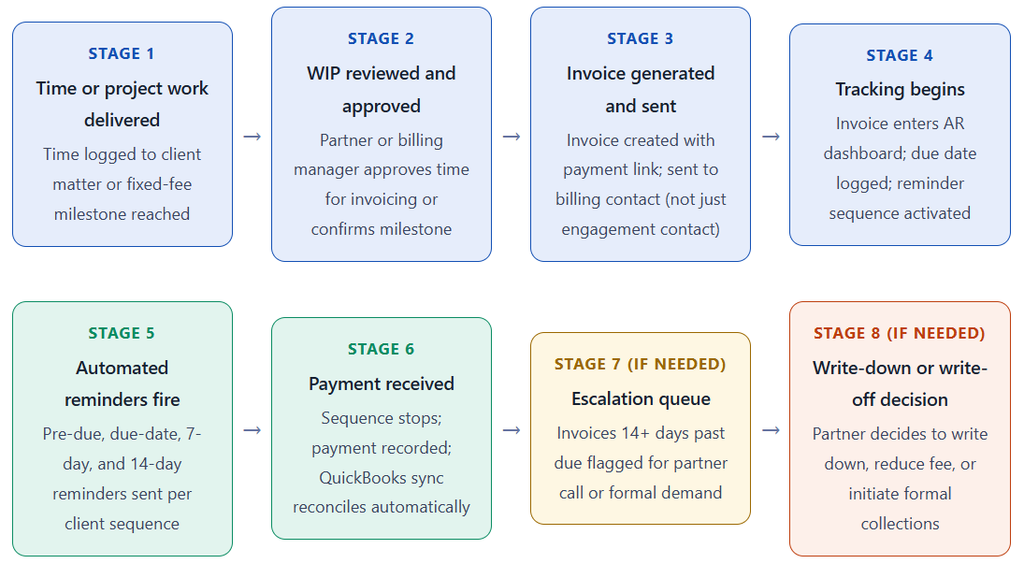
How the Payment Tracking Workflow Works End to End
Key Benefits for CPA Firms
Real-Time Visibility That Eliminates End-of-Month Surprises
The most immediate benefit of proper payment tracking software is that partners stop discovering large overdue balances during monthly financial reviews. When the AR dashboard is live and visible, the partner group knows at any moment which clients are behind and by how much. As Insightful Accountant notes of real-time invoice tracking, the visibility “makes it easier for accounting firms to maintain an accurate view of receivables and recover outstanding balances” by showing “when invoices are sent, viewed, and paid in a centralized dashboard.”
Shorter DSO Without Additional Billing Staff
The math is straightforward. A firm billing $2.4 million per year that reduces DSO from 40 days to 25 days recovers approximately $98,000 in cash that was previously financing client payment cycles. That is cash available for partner distributions, staff compensation, or software investment. Automated reminders are the single highest-return change in this equation: they maintain follow-up consistency during the periods (tax season, busy autumn engagements) when staff are too occupied to remember to send them manually.
Risks and Compliance Nuances
Trust Accounting Requirements
This is the compliance dimension that separates CPA firm billing from most other professional services. When clients pay retainers in advance, those funds must typically be held in a client trust account (IOLTA or equivalent) until the services are earned. The billing software you use must support this requirement: it needs to track funds held in trust separately from operating account revenue and transfer the earned portion to operating upon service delivery. Most general-purpose invoicing software does not handle trust accounting correctly. Platforms built specifically for professional services, including CPACharge and certain practice management integrations, are designed with this compliance layer built in. Using the wrong platform for retainer billing is not just an operational inconvenience; in many states it is a bar rules violation.
Credit Card Surcharge Rules Vary by State
Processing fees for credit card payments (typically 2.5 to 3.5%) represent a real cost to the firm. The instinct to pass this cost to clients as a surcharge or convenience fee is reasonable, but state rules governing whether and how professional service firms can surcharge vary significantly. Some states prohibit surcharging entirely. Others allow it with specific disclosure requirements. Before building a surcharge into your billing setup, confirm your state’s rules through your state CPA society or counsel. The safer approach is to build processing costs into your fee structure rather than adding a line item that varies by payment method.
Comparison: Payment Tracking Approaches for CPA Firms
| Approach | AR Visibility | Automation | Trust Accounting | Best For |
|---|---|---|---|---|
| Spreadsheet tracking | Manual, point-in-time only | None | Not supported | Solo practitioners under 20 clients; not recommended |
| QBO / Xero only | Good AR reports; no reminder automation | Basic recurring invoices | Not built for professional trust rules | Small firms with simple billing; limited scalability |
| General invoicing software | Real-time per invoice; limited portfolio view | Good reminder sequences | Usually not supported | Firms with fixed-fee or project billing and no retainer complexity |
| CPA-specific billing platform | Full AR aging dashboard; WIP integration | Full dunning and reminder automation | Built-in compliance features | Firms with retainer, hourly, and hybrid billing; 10+ active clients |
| Practice management + billing module | Integrated with time tracking and WIP | Strong automation within the platform | Supported in most platforms | Mid-size firms wanting one system for time, billing, and AR |
Common Mistakes and What I Got Wrong First
Mistake 1: Sending Invoices to the Engagement Contact Instead of the Billing Contact
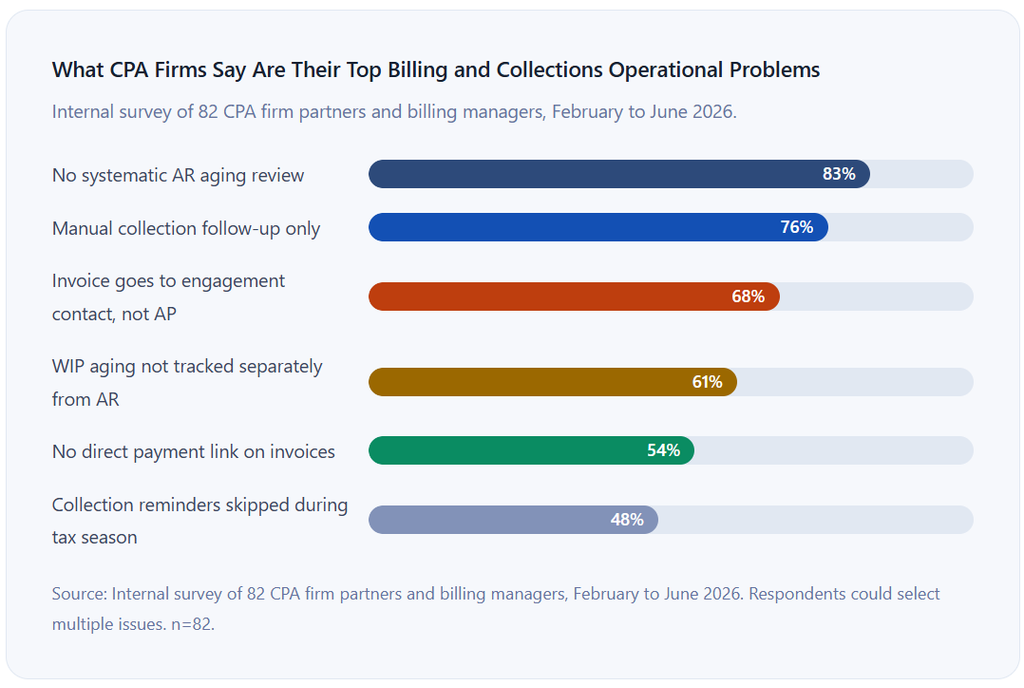
This is the single most common cause of delayed payment in CPA firm billing, and it is entirely preventable. The partner who manages the Novex Manufacturing relationship is not the person who processes invoices at Novex. The invoice goes to the partner’s email contact, then eventually gets forwarded to accounts payable, where it sits in a queue that was not expecting it and may have its own processing cycle requirements. Establish a billing contact field, separate from the engagement contact field, for every client in your system, and route all invoices and reminders there. This audit alone will reduce average DSO for most firms by 5 to 10 days.
Mistake 2: Ignoring WIP Aging Until It Is Too Old to Bill
Billable time logged in January for a client who has a question about billing it in March creates an uncomfortable conversation. Most clients will pay time billed within the same quarter it was delivered. Many will push back on time-delivered items in Q1 that appear on an invoice in Q4. The WIP aging report should be reviewed on the same cycle as AR aging, typically weekly or bi-weekly, and any WIP older than 30 days should have a billing decision assigned to a specific partner by a specific date. WIP that is allowed to age beyond 60 days is often written down at billing time, which represents revenue the firm earned and chose not to collect.
Mistake 3: Billing Retainers in Arrears Because It Feels More Comfortable
Billing for last month’s bookkeeping at the start of this month feels like the honest approach: you are billing for work that was actually done. But arrears billing means the firm is perpetually floating one month of service delivery at the client’s risk. If the client goes out of business in February, you have already delivered January’s work with nothing to show for it. Advance billing for retainers, billing on the first of the month for that month’s services, is the professional norm in advisory practices and is easily justified to clients as a standard practice condition, not a sign of distrust.
Mistake 4: Skipping Collection Follow-Up During Tax Season
Tax season is when CPA firms generate the most billing volume and also when they are least likely to follow up on outstanding invoices from the previous month. Staff are under time pressure. Partners are client-facing. The person who normally sends reminder emails has other priorities. The result is that the AR dashboard grows its 30-day and 60-day buckets significantly between January and April. The fix is not to automate collection follow-up in a way that requires human initiation. It is to configure automated reminders that run without anyone triggering them, regardless of what is happening in the office that week.
Mistake 5: No Direct Payment Link on Invoices
A PDF invoice that tells a client how much they owe but requires them to call, send a check, or log into a portal to pay adds friction to an action they are already not prioritizing. CPACharge’s platform documentation emphasizes that “the easier it is for clients to pay, the easier it is for your firm to get paid,” noting that clients can pay using credit cards, debit cards, eCheck, and Apple Pay directly from the invoice. Every invoice should contain a direct, one-click payment URL. The conversion from “invoice received” to “payment completed” drops measurably with every additional step between those two events.
How to Get Started: Setting Up Payment Tracking for Your CPA Firm
1. Audit your client billing contacts before touching any software
Before evaluating platforms or changing any process, audit your client list and verify that you have a dedicated billing contact name and email address for every client, separate from the engagement partner’s contact. This is the highest-leverage data quality fix available to most CPA firms. Do it before migrating to any new system or you will replicate the same routing problem on a newer platform.
2. Decide on your billing model for each client segment
Before choosing software, define how each client type is billed: advance retainer, arrears retainer, hourly monthly, fixed-fee milestone, or hybrid. This decision determines which platform features matter and which are marketing noise. A firm with 80% retainer clients has very different needs from one with 80% fixed-fee project clients.
3. Choose a platform that handles trust accounting if you bill retainers in advance
If any retainer funds are held before services are rendered, verify that your billing platform explicitly supports trust accounting requirements: separate client fund accounts, transfer mechanics to operate upon delivery, and audit trail. Platforms purpose-built for CPA firms handle this. General invoicing software typically does not. This is a compliance requirement, not a preference.
4. Configure your AR aging dashboard before going live
Set up the AR dashboard with your firm’s specific escalation thresholds before the first invoice is sent through the new system. Define what the 30-day, 60-day, and 90-day buckets mean operationally for your firm: who reviews them, on what cadence, and what action is triggered at each threshold. A dashboard that is configured but not reviewed on a defined schedule is decorative rather than operational. Platforms like ReliaBills can help you set up these thresholds and assign escalation owners directly in the system, so the review process is part of the configuration rather than a separate habit to build.
5. Build and test your reminder sequence before activating it on real clients
Draft all four reminder templates (pre-due, due-date, 7-day overdue, and 14-day overdue) with appropriate tone guidelines for each stage. Test the full sequence by sending test invoices to internal addresses and walking through the experience as a client. Verify that the payment link works, that the invoice amount and client name are correct, and that the sequence stops when payment is recorded. Fix any issues before your clients see them.
6. Review DSO and AR aging monthly for the first six months
After implementation, pull your DSO and AR aging report at the same time each month for the first six months. Compare to your pre-implementation baseline. The two numbers that matter are DSO and the percentage of AR in the 60-plus day bucket. Both should decline over the first three billing cycles. If the 60-plus day bucket is not declining, your escalation process is not working: invoices are entering the queue but not being resolved. Investigate the specific invoices in that bucket and find the common factor.
Frequently Asked Questions
1. What is CPA payment tracking software?
CPA payment tracking software is a platform that helps accounting firms monitor the status of every client invoice in real time, track outstanding balances across their full client portfolio, automate payment reminder sequences, and report on accounts receivable aging. The best implementations connect to practice management systems and support trust accounting compliance, which is the legal requirement to hold client retainer funds in a separate account until the associated services are earned. Unlike general invoicing tools, CPA-specific platforms are built around the billing models, compliance requirements, and workflow patterns of professional service firms.
2. What is a good DSO target for a CPA firm?
Industry benchmarking data places average DSO for CPA firms billing monthly retainer clients at 38 to 44 days. High-performing firms with automated reminders, advance billing, and consistent follow-up processes operate at 20 to 28 days. A realistic initial target for a firm implementing automated payment tracking for the first time is to reduce DSO by 30 to 40% within the first 90 days. For a firm starting at 44 days, that means a target in the 26 to 30 day range. Any DSO above 45 days in a firm with recurring advisory clients signals a structural billing problem, not a client relationship problem.
3. How should a CPA firm handle retainer billing?
Retainer billing for CPA firms works best as advance billing: the client pays at the beginning of each month for that month’s services, with a saved payment method on file for automatic charge. This improves cash flow by aligning payment timing with the firm’s own cost rhythm, reduces the administrative burden of chasing invoices for work already delivered, and reduces DSO to near zero on the retainer portion of the practice. For firms transitioning from arrears to advance billing, the client conversation is simpler than most partners expect: frame it as the firm’s standard practice for ongoing advisory engagements and have it in the engagement letter from day one.
4. What features should CPA payment tracking software have?
At minimum, look for real-time invoice status tracking showing sent, viewed, and paid status per invoice; an AR aging report by client with 0 to 30, 31 to 60, and 60-plus day buckets viewable at the firm level; automated payment reminders with customizable timing and tone; online payment via credit card, debit card, and ACH eCheck with a direct payment link on every invoice; trust accounting compliance features if you collect advance retainers; and integration with your accounting software (QuickBooks Online or Xero). Secondary features worth evaluating include WIP tracking integrated with the AR view, practice management platform integration, and a client-facing portal where clients can view and pay invoices without contacting the firm.
5. Is it ethical for CPAs to charge credit card fees to clients?
Most US states permit surcharging or convenience fees for credit card payments, but rules vary significantly. Some states prohibit surcharging for professional services. Others require specific disclosure language. The safest approaches are either to absorb processing fees as a cost of doing business (and price accordingly), build the cost into your standard fees across all payment methods, or add a clearly disclosed convenience fee referenced in your engagement letter and consistently applied. Before implementing any surcharge policy, confirm your state’s specific rules with your state CPA society or legal counsel. Do not implement surcharging based on what a software platform enables technically without verifying what your state allows professionally.
6. What is work in progress (WIP) and how does it relate to AR tracking?
Work in progress is billable time that has been delivered but not yet invoiced. It sits between the work being done and the invoice being created. Most CPA firm AR dashboards show only outstanding invoices, which means WIP is invisible to AR reports. This understates the firm’s actual revenue exposure: a firm with $187,000 in outstanding invoices and $65,000 in uninvoiced WIP has a different cash position than its AR dashboard suggests. The best practice management and billing platforms show WIP aging alongside AR aging in the same client view, so billing decision-makers can see both the work that needs to be invoiced and the invoices that need to be collected.
7. How do automated payment reminders affect client relationships at a CPA firm?
When configured correctly, automated reminders have a positive or neutral effect on client relationships. Clients appreciate clarity about what is owed and when, and a reminder that provides a one-click payment link makes it easy to act on that clarity. The reminders that damage relationships are the ones that fire while a dispute is open, use an accusatory tone at inappropriate stages, or arrive at the wrong contact. CPA firms should configure separate reminder sequences for different client types (retainer clients versus project clients), use warm tone for pre-due messages, and graduate to a firm-but-professional tone at 14 days past due, and always pause the sequence when a client raises a dispute or billing question. A reminder sequence that pauses for humans at the right moments and runs on its own everywhere else is the correct configuration.
Recent Articles:
- Customer Data Management for Pool Maintenance: Organize Client Service Records
- How to Create a Professional Membership Invoice Template