
IT service providers lose between 5 and 12 percent of their billable revenue before a single client disputes an invoice. That leakage happens in the gap between work delivered and work billed: time entries logged late, tickets closed without billing codes, project scope additions that never generate a change order, and recurring charges that vary month to month but get invoiced at the same flat amount. IT client billing software closes those gaps by connecting time tracking, service ticketing, and invoicing into a single automated flow. The result is not just fewer billing errors. It is a materially higher percentage of every hour worked that actually appears on an invoice.
What Is IT Client Billing Software?
IT client billing software is a platform that automates the end-to-end billing workflow for IT service providers, from time capture and ticket closure through invoice generation, delivery, payment collection, and reconciliation. Unlike general-purpose invoicing tools, IT billing software is designed for the specific complexity of technology service billing: multiple clients with different pricing models, variable monthly charges that shift with device counts or license seats, hourly work billed against service agreements, and project work that requires milestone-based invoicing separate from ongoing managed service fees.
The core architecture connects three systems that most IT providers currently run in isolation: a professional services automation (PSA) or service desk tool that tracks tickets and time, a billing engine that converts those records into invoices with the correct rates per client, and a payment collection layer that charges stored payment methods and handles failed payment recovery without manual intervention. When all three are connected, the billing process becomes largely automatic. When any one of them is disconnected, the gaps between them are where revenue leaks.
IT billing software connects directly to recurring billing for managed service contracts, installment billing for hardware financing or project payments spread over time, and invoicing software for one-time project or break-fix charges. The customer management layer tracks each client’s contract terms, rate agreements, and payment history in one place accessible to both technical and billing staff.
IT Service Billing Models: Which Structure You Are Running
Before configuring any billing automation, you need to know which billing model applies to each client, because the automation logic differs significantly across models. Most IT service providers run at least two of these simultaneously, which is part of why billing is complex enough to require purpose-built software.
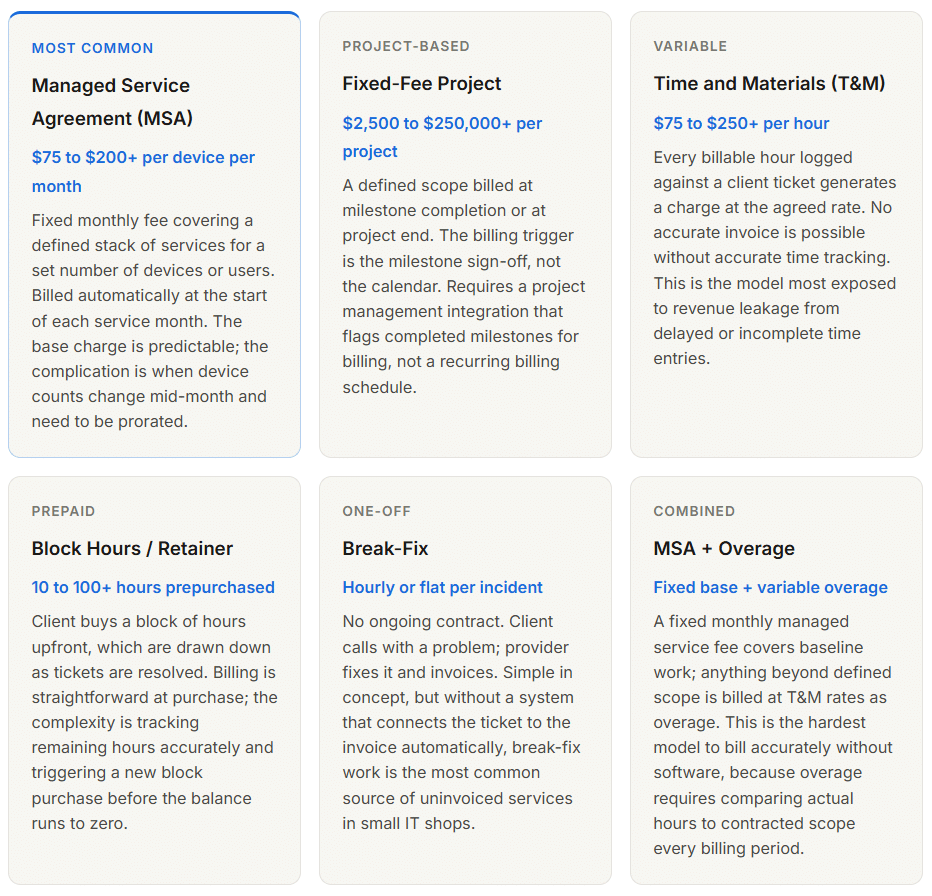
Most IT service providers run between two and four of these models simultaneously across their client base. The billing software needs to handle all of them in the same platform, with different automation logic for each, while presenting a unified view of all outstanding receivables across every client and billing type.
Where IT Providers Lose Revenue Before the Invoice Is Sent
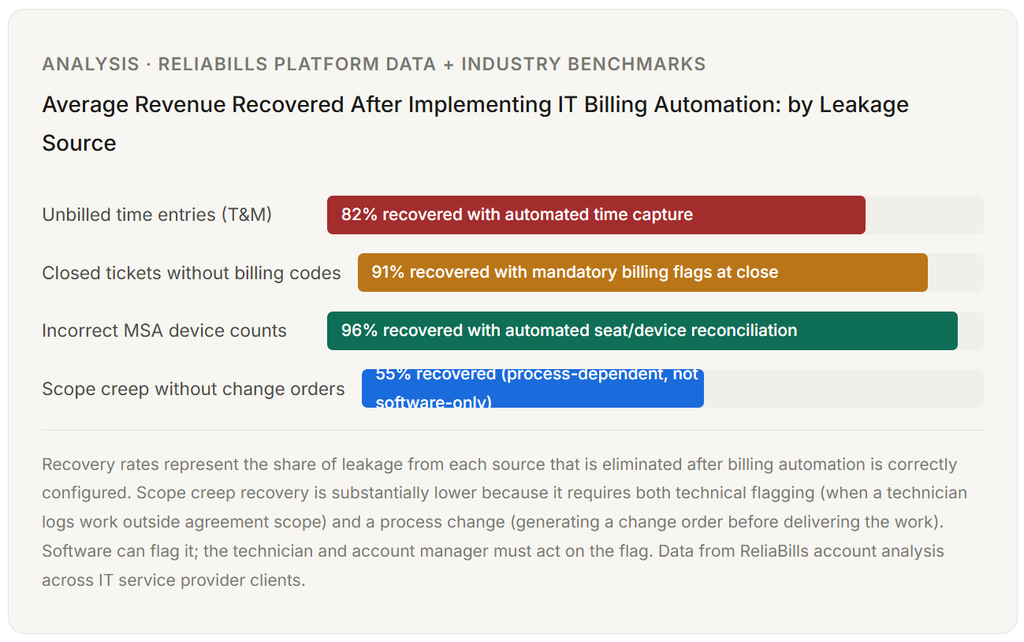
The revenue leakage problem in IT billing is more quantifiable than most providers realize, and more expensive than they expect. The leakage happens in predictable places, which means it is also preventable in predictable ways.
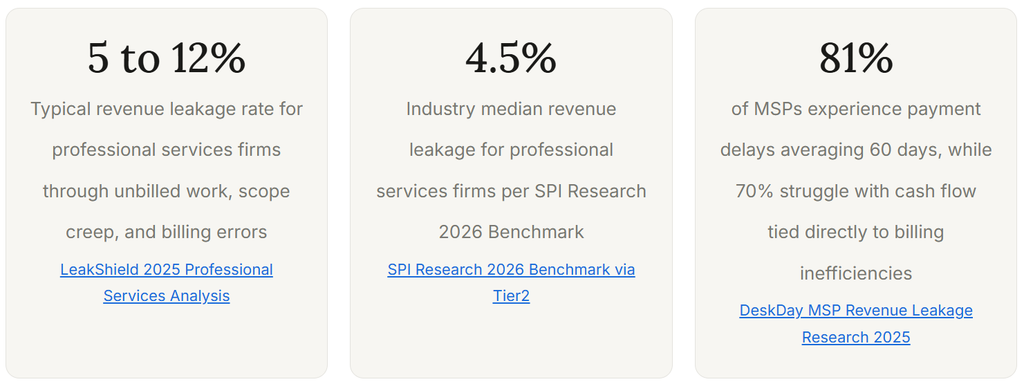
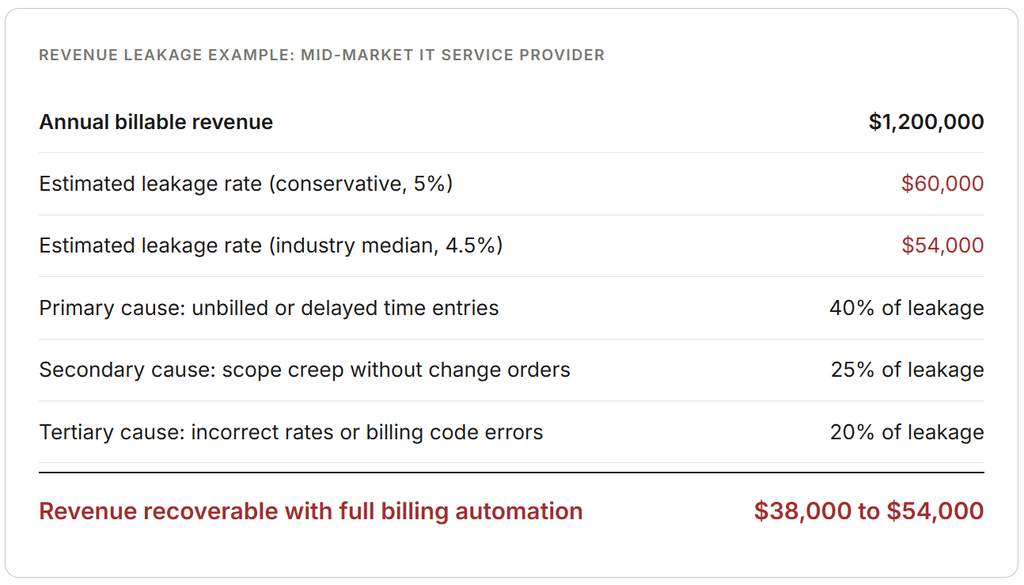
To make those percentages concrete, here is what revenue leakage looks like for a mid-size IT service provider at specific revenue levels.
The Time Entry Trap
The single largest source of IT billing revenue leakage is delayed time entry. LeakShield’s 2025 professional services analysis identifies unbilled time as 40% of total revenue leakage, with time entry lag as the primary mechanism. When technicians log their hours at the end of the day, they underreport. When they log at the end of the week, the underreporting compounds further as memory compresses effort. A 30-minute client call that was not logged at the time of the call is rarely added accurately on Friday afternoon. It simply disappears.
For an IT service provider billing 10,000 hours annually at $150 per hour, a 2% error rate in time entry translates to $30,000 in lost revenue per year, and that calculation assumes the error is random rather than systematic. When technicians routinely log time late, the error is not random. It consistently skews toward underreporting, because memory compresses rather than inflates effort.
Scope Creep Without a Change Order
“While you’re in there, could you also check on the backup server?” That sentence, or something like it, is delivered to IT technicians dozens of times per month at most MSPs. Each instance represents additional work that may or may not get logged, may or may not be billable under the existing agreement, and almost certainly does not trigger a change order unless the IT provider has a formal process for capturing and billing out-of-scope requests. Scope creep accounts for approximately 25% of professional services revenue leakage, and it is particularly prevalent in managed service agreements where the boundary between covered and uncovered work is often not clearly defined for technicians in the field.
How Automated IT Billing Works
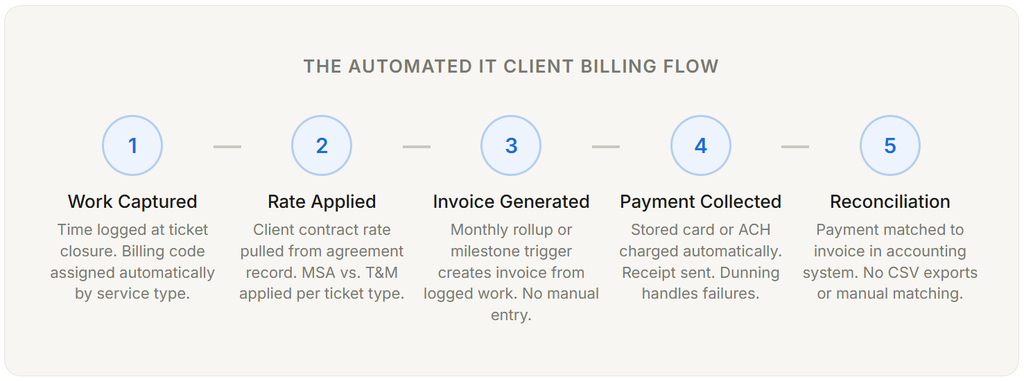
The automated billing flow for an IT service provider has five distinct stages, and each stage requires a specific configuration to function without manual intervention. Most IT billing automation breakdowns occur because one of these stages was left manual while the others were automated, creating a gap that billing staff has to fill by hand.
The Rate Assignment Problem Most IT Billing Setups Get Wrong
Stage two, applying the correct rate to each service event, is where most IT billing configurations have a hidden gap. An IT service provider with 30 clients, each with slightly different contract terms, needs the billing system to know what this client’s rate is for remote support, what their rate is for onsite work, whether their weekend rates are different, and whether this specific ticket type falls inside or outside their managed service agreement. When that rate logic is not configured correctly in the client agreement record, the billing system either applies the wrong rate or flags the ticket for manual review, which creates the invoice approval backlog that billing managers spend hours on every month.
Real-World Use Cases by IT Business Type
The billing automation approach differs based on the type of IT service business, not just the billing model. The same software often handles these scenarios, but the configuration priorities are meaningfully different.
Managed Service Provider (MSP) with 50 to 500 Clients
For an MSP, the highest-value billing automation is the monthly MSA invoice generation and the device count reconciliation that precedes it. If the MSP bills per device per month and device counts change as clients add workstations, hire staff, or decommission equipment, the invoice amount changes every month. Without automation that pulls current device counts from the RMM (remote monitoring and management) platform and applies the per-device rate, the invoice either reflects last month’s count (underbilling) or requires a manual audit before every billing cycle (high admin overhead). Automated device count reconciliation connected to the RMM eliminates both problems.
Freelance IT Consultant or Small IT Firm
For solo consultants and small teams, the primary billing problem is not device count reconciliation. It is time entry discipline and invoice generation speed. A freelance IT consultant billing at $150 per hour who regularly invoices 7 to 10 days after project completion is giving clients an implicit 7 to 10-day interest-free loan on every project. That delay compounds into 30 to 45-day payment cycles when the client’s own 30-day payment terms start from the invoice date rather than the completion date. Automated same-day invoicing, triggered by project milestone sign-off, moves the payment clock forward by the exact number of days between completion and invoice delivery.
IT Staffing and Staff Augmentation Firm
Staff augmentation billing has a specific complexity that most billing guides do not address: the time entries come from consultants who are physically at client sites, often without easy access to internal time tracking systems during the workday. Automated time capture that works from a mobile device or client-site computer, with approval routing built into the billing platform, is the solution that prevents the “I’ll log my time when I get back to the office” pattern that creates the Friday afternoon underreporting problem. ReliaBills supports this through its invoicing software integration layer, which accepts time entries from mobile-accessible interfaces and routes them directly to client billing records.
Key Benefits of Automated IT Client Billing
Revenue Recovery Without Adding Clients
The most direct benefit of IT billing automation is recovering the 5 to 12% of revenue that manual billing loses to leakage, without acquiring a single new client or raising any rates. For a $1.2 million MSP, recovering 5% of leakage adds $60,000 in annual revenue. That improvement comes entirely from billing more accurately for the work already being delivered, which makes it the highest-margin growth available to any IT service business.
Shorter Days Sales Outstanding
FlexPoint’s 2026 MSP billing analysis cites PYMNTS research showing that manual payment processes require 67% more time for follow-up and produce 30% longer days sales outstanding (DSO) compared to automated collection. For a provider collecting $100,000 per month, the difference between a 30-day DSO and a 45-day DSO is $50,000 in cash that is consistently tied up in accounts receivable and unavailable for operating expenses or investment. Automated billing with stored payment methods and automatic collection on the invoice date collapses DSO to single digits for those clients.
Billing That Scales Without Proportional Staff Growth
Manual billing scales linearly: more clients means more billing hours, which means more billing staff. Automated billing scales differently. The configuration cost is largely fixed. Adding 20 new clients to an automated billing system adds minimal incremental billing overhead because the system generates and delivers invoices without human action per invoice. This scaling advantage compounds as the business grows, because the revenue increase from new clients is not offset by a proportional increase in administrative cost.
Consistent Client Experience Regardless of Billing Complexity
Clients who receive accurate, clearly formatted invoices that arrive on the same date every month have fewer billing questions, fewer disputes, and a more professional perception of the IT service relationship. The inverse is also true: an IT provider whose invoices arrive at inconsistent dates, contain different formatting each month, or occasionally include line items the client cannot reconcile against their service history generates friction that eventually affects the client relationship even when the technical service is excellent.
Comparison: Manual Billing vs. Partial Automation vs. Full Automation
| Capability | Manual Billing | Partial Automation (invoicing tool only) | Full Automation (integrated IT billing) |
|---|---|---|---|
| Time entry to invoice | Manual compilation. 3 to 7 days average. | Invoice created faster, but time was still imported manually. | Automatic from ticket close. Same-day or scheduled. |
| Revenue leakage | 5 to 12%. Highest in unbilled time and tickets. | 3 to 7%. Reduced by invoicing efficiency, not capture. | 0.5 to 2%. Near-total capture from automated time and ticket flagging. |
| Multi-rate client billing | Manual rate lookup per client per invoice. Error-prone. | Rate stored in invoicing tool, but not connected to service desk. | Rate applied automatically from the client agreement record at ticket close. |
| Recurring MSA billing | Invoice created manually each cycle. Device count checked by hand. | Invoice auto-generated, but device count is still manual. | Invoice generated with live device count from RMM integration. |
| Payment collection | Invoice sent and payment awaited. Follow-up manual. | Online payment link included. Follow-up is still manual. | Automatic charge from stored payment method. Dunning handles failures. |
| Accounting reconciliation | Manual CSV exports and deposit matching. 6 to 8 hours/week. | Invoice pushes to the accounting system, but payment matching may still be manual. | Payment automatically matched to the invoice in the accounting system. Near-zero manual work. |
| Admin time per billing cycle | 10 to 20+ hours for 30 clients | 4 to 8 hours for 30 clients | Under 2 hours for 30 clients (exceptions only) |
The partial automation scenario is where most IT service providers currently sit, and it is worth examining why it is not enough. An invoicing tool that generates formatted invoices faster does not close the time entry gap that produces leakage. It produces the same revenue leakage faster and with better formatting. The leakage itself is a capture problem at the service delivery layer, not a formatting problem at the invoice layer. Solving it requires connecting the service desk to the billing engine, not just upgrading the invoicing tool.
Key Risks and Edge Cases
The Mid-Month Device Count Change
For MSPs billing per device per month, mid-month changes create a proration challenge that most billing systems handle imperfectly. A client who adds 10 workstations on the 15th of the month should be billed for half a month on those devices in the current invoice and a full month in the next. Manual proration is error-prone. Automated proration requires the billing system to know both the add date and the per-device rate. If the system is configured to bill at the beginning-of-month device count with no mid-month adjustment, the provider is consistently underbilling for growing clients.
Out-of-Scope Work Delivered Before the Change Order Is Signed
The most common dispute in MSP billing is out-of-scope work that was delivered without prior written authorization. The technical work was done, the technician logged the time, the billing system created the charge, and the client disputes it because they were never told it would be billed separately. The solution is not a billing process change. It is a service delivery process change: the technician must flag the out-of-scope request before delivering the work, and the account manager must confirm the billing basis with the client before the technician proceeds. Billing software can flag these events; the workflow to resolve them requires a human decision before the work is delivered.
Failed Payments on High-Value MSA Invoices
A $5,000 monthly managed service invoice that fails on the first charge attempt represents a significant cash flow event. Without an automated dunning sequence, the billing team discovers the failure at the end of the month during reconciliation, at which point the payment is 30 days late and the conversation with the client is considerably more awkward. An automated sequence that retries within 48 hours, notifies the client at day 3, and escalates to account management at day 7 recovers the large majority of these failures before they become uncomfortable. The recurring billing layer in a properly configured IT billing system handles this automatically, which is one of the functions that standalone invoicing tools consistently lack.
Common Mistakes IT Service Providers Make with Billing (What I Got Wrong First)
1. Treating the invoicing tool as the billing system
An invoicing tool that generates PDF invoices quickly is a better manual billing process, not billing automation. True IT billing automation connects service delivery (the ticket and the time entry) to invoice generation without a manual compilation step in between. Providers who invest in better invoicing software without connecting it to their service desk continue to lose revenue to unbilled time and tickets. The invoicing tool is the last mile of the billing process. The first mile, where revenue leakage is concentrated, is the connection between the service desk and the billing engine.
2. Configuring recurring billing without verifying the rate against the signed contract
The most common rate error in IT billing is the billing system containing last year’s rate for a client whose contract was renewed at a different rate. The invoice goes out at the old rate. The client pays it. Nobody notices until an account review or an audit. The discrepancy compounds monthly and is often several years old before it surfaces. Verifying every client’s billing rate against the current signed contract before configuring recurring billing is a one-time audit that prevents ongoing revenue loss.
3. Allowing technicians to log time at the end of the day or end of week
The revenue leakage from delayed time entry is not a discipline problem. It is a process design problem. When technicians are expected to log time at the end of the day, the incentive structure and the accuracy both deteriorate. Time logged at ticket close, immediately after the work is completed, produces the highest accuracy and the lowest leakage. This requires a service desk workflow that prompts the technician for time at ticket resolution, not an expectation that they will remember the work they did six hours ago when they fill in their timesheet before going home.
4. Not having a formal process for out-of-scope work
Every IT service provider has a rate for out-of-scope work written into their MSA. Very few have a process that ensures that rate is actually applied when the work occurs. The gap between “we bill out-of-scope work at $X per hour” and that money actually appearing on an invoice is where scope creep absorbs 25% of total leakage. The process fix requires two things: a service desk workflow that flags tickets as potentially out-of-scope based on service category or time, and an account manager who communicates the billing basis to the client before the work is completed. Without both, the billing system can generate the invoice, but the client will dispute it.
5. No payment method on file for recurring clients
An IT service provider who sends a monthly invoice and then waits for the client to pay it has built a voluntary payment model into a billing relationship that should be automated. For recurring managed service clients, the correct setup is a stored payment method (ACH preferred for the lower processing fees and absence of card expiry) that is charged automatically on the first of the service month. Clients who are invoiced monthly and pay voluntarily have an average DSO of 28 to 45 days. Clients who are charged automatically have an average DSO of zero to three days. That difference in cash flow timing is significant for a business managing operational expenses month to month.
How to Get Started with Automated IT Client Billing
The setup sequence for IT billing automation is more specific than most guides acknowledge. The order matters because later stages depend on the accuracy of earlier ones.
Step 1: Audit Every Client Contract Against Your Billing System’s Rate Records
Before automating anything, verify that every client’s billing rate in your system matches their current signed contract. This audit takes half a day for a typical MSP and typically reveals one to three clients whose rates are incorrectly configured. Automating with incorrect rate data produces consistently wrong invoices at speed, which is worse than the manual process it replaces.
Step 2: Configure Service Desk Billing Codes at the Ticket Type Level
Every ticket type in your service desk should have a default billing code that determines whether the work is billable, at what rate, and under which client agreement it falls. Tickets that cannot be automatically assigned a billing code should surface as exceptions requiring review at closure and not be allowed to close without one. This is the configuration that prevents tickets from falling through the billing cracks.
Step 3: Store a Payment Method on File for Every Recurring Client
Before the next billing cycle, contact every recurring client and collect a stored payment method. For clients invoiced monthly at a fixed managed service fee, ACH bank account authorization is the preferred method: lower processing fees than card, no expiry events, and fully automatic collection without any action required by the client each month. ReliaBills supports ACH enrollment through a secure link that the client completes without sharing their banking details directly with your staff.
Step 4: Build the Invoice Generation Workflow from Ticket Close to Billing Batch
Configure the workflow that moves closed, coded tickets into a billing batch at the end of each billing period (or at milestone completion for project work). The billing batch should be reviewable before invoices are sent, but the review should be an exception-flagging exercise (why did this ticket not get a billing code?) rather than a manual recreation of what was done (let me open each ticket and check the time logs).
Step 5: Configure Dunning for Failed Payment Events
Set up an automated dunning sequence for any client on automatic payment collection: retry within 48 hours, notify the client on day 3, and escalate to the account manager on day 7. For high-value managed service accounts, the escalation should route to a named account manager rather than a generic follow-up email, because the relationship context matters when discussing a payment failure on a five-figure monthly invoice.
Frequently Asked Questions
1. What is the difference between PSA software and IT billing software?
Professional services automation (PSA) software is a broad category that includes project management, ticket tracking, time logging, resource scheduling, and billing capabilities in a single platform. Examples include ConnectWise Manage, Autotask, and HaloPSA. IT billing software is a narrower term that refers specifically to the billing, invoicing, and payment collection components of a PSA or to standalone billing platforms that integrate with PSA tools. Some IT service providers use a full PSA with built-in billing. Others use a PSA for service delivery and a separate billing platform for invoicing and payment collection. The right architecture depends on client volume, billing model complexity, and whether the accounting integration the business needs is available natively or requires a third-party billing layer.
2. Can I bill multiple pricing models for different clients in the same platform?
Yes, and this is a core requirement for any IT service provider with a mixed client base. A platform that handles per-device managed service billing, hourly T&M billing, block-hour retainer drawdown, and fixed-price project milestones in the same system, with different rate logic applied per client per ticket type, is what genuine IT billing automation requires. The key configuration is the client agreement record that specifies which billing model applies to which categories of work for that specific client. When a ticket is closed, the billing system should be able to determine automatically: is this covered under the MSA, is it billable at the overage rate, or is it a T&M charge against an open ticket? That determination should happen from the agreement record, not from a billing coordinator’s judgment at month-end.
3. How do I handle billing for out-of-scope work without damaging the client relationship?
The key is making the billing basis clear before the work is delivered, not after. When a technician identifies work that falls outside the client’s managed service agreement, the correct process is to pause before completing the work, notify the client that the request appears to be outside the current agreement scope, confirm whether they want to proceed on a billable basis, and get a written acknowledgment (an email reply is sufficient) before completing the work. Billing software can flag these events at the ticket level; the conversation happens between the technician or account manager and the client. Out-of-scope billing that is disclosed before delivery almost never generates disputes. Out-of-scope billing that appears on an invoice without prior disclosure almost always does.
4. What payment method should IT service providers use for recurring monthly clients?
ACH bank account authorization is the preferred payment method for recurring managed service billing. Bank accounts do not expire, which eliminates the card-expiry failure mode that accounts for approximately 12% of recurring payment failures in card-based billing. Processing fees for ACH are typically a flat amount per transaction rather than a percentage of the transaction amount, which produces significant cost savings on high-value monthly invoices. A $5,000 monthly managed service invoice charged via card at 2.9% costs $145 in processing fees. The same invoice via ACH typically costs under $1. For an MSP with 50 clients at that average invoice value, the difference is over $86,000 per year in processing fees. The enrollment friction for ACH is slightly higher than card enrollment, but for recurring clients on a long-term managed service agreement, it is a one-time setup step that pays for itself immediately.
5. How do I calculate how much my current billing process is costing me?
Start with your total annual revenue and multiply it by 5%, which is the conservative end of the industry-benchmark leakage range for professional services firms. That number is a floor estimate of revenue you are currently delivering but not invoicing. Then audit your last three months of invoices against your service desk ticket log: how many closed tickets have no billing record? How often do technicians log time the day after the work rather than at ticket close? How many clients are paying 25 or more days after invoice delivery? Each of these data points has a dollar value you can calculate. Taken together, they will almost certainly produce a number that is larger than the annual cost of billing software that addresses them, often by a factor of 5 to 10 or more.
6. Can ReliaBills handle IT service billing if I am not using a PSA?
Yes. ReliaBills is designed to handle recurring billing for managed service agreements, one-time invoicing for project and break-fix work, installment billing for hardware or project payments spread over time, and client record management, all without requiring a PSA integration. For IT service providers who use a PSA, ReliaBills can function as the billing and payment collection layer that connects to it. For those who manage their service delivery through lighter tools or spreadsheets, ReliaBills handles the complete billing workflow from invoice generation through payment collection and reconciliation, with automation that reduces monthly billing administration to exception review rather than full-cycle manual processing.
Recent Articles:
- How to Handle Gym Membership Cancellations and Refunds in Billing Software
- Installment Billing for Large Catering Events: Collect Deposits and Final Payments