
Gym membership cancellation handling in billing software is the process of stopping recurring charges on the correct date, calculating and issuing any prorated refund owed, generating a timestamped cancellation confirmation, and logging the event with enough documentation to defend against a chargeback or regulatory inquiry. Most gyms handle the first step (stopping the charge) and skip the rest, which is exactly why gym membership billing generates more chargebacks, FTC complaints, and state consumer protection actions than almost any other recurring billing category. The billing software configuration is the compliance infrastructure. Getting it right protects revenue and protects the gym legally.
What Is Gym Cancellation Billing Software?
Gym cancellation billing software refers to the billing system configuration and workflow that manages the complete process when a gym member requests cancellation: stopping future recurring charges at the correct time, calculating any prorated credit or refund for the unused membership period, issuing a cancellation confirmation with a timestamp, logging the cancellation with supporting documentation for dispute defense, and updating member status in the gym’s CRM and access control system simultaneously.
This is distinct from simply “cancelling a subscription” in a basic billing tool. Gym membership cancellations involve state health club statutes that define cooling-off periods and refund obligations, proration calculations that depend on billing cycle position, freeze history that may have paused the membership term, and documentation requirements that determine whether a chargeback dispute will succeed or fail. A billing system that handles general recurring billing but does not support gym-specific cancellation workflows leaves the gym managing these edge cases manually, which is where billing disputes originate.
The foundation is a properly configured recurring billing system that treats each membership as a contractual billing relationship with defined terms, not just a scheduled charge. When the cancellation request arrives, every element of that relationship needs to resolve correctly: what the member owes, what the gym owes back, and what the record shows. See customer management for how member records connect to the billing workflow throughout this process.
The Complete Cancellation Workflow in Billing Software
A properly configured gym cancellation workflow handles every step automatically from request to final billing record. Here is what that looks like end-to-end:
Automated Gym Cancellation Workflow: 6 Steps from Request to Record
1. Cancellation request received and timestamped (Automated)
Member submits the cancellation via the portal, email, or in person. System logs request date and time immediately. This timestamp is the start of the notice period calculation and the chargeback defense record.
2. Effective cancellation date calculated (Billing logic)
System applies a contract notice period (0 days, 30 days, or end-of-cycle) to determine when billing stops. State health club cooling-off period is checked. Freeze history is factored in if applicable.
3. Proration calculated and refund or credit determined (Billing Logic)
Daily rate (monthly fee divided by days in cycle) multiplied by unused days from effective cancellation date to next billing date. Refund or credit applied to payment method on file or next statement.
4. Future scheduled charges cancelled in the billing system (Automated)
All upcoming recurring charges for this member are removed from the billing queue. No charge should process after the effective cancellation date under any circumstance.
5. Confirmation email sent with cancellation details (Automated)
Member receives timestamped confirmation showing the request date, effective cancellation date, final billing date, refund amount and timing, and access end date. This email is the member’s cancellation proof and the gym’s dispute defense.
6. Member record updated: status, access, and billing history archived (Staff Review)
CRM status updated to cancelled with effective date. The access system was notified to revoke entry on the correct date. Full billing history, cancellation request, and confirmation are retained in the member record indefinitely for dispute defense.
Why every step needs to be in the billing software, not a spreadsheet
When any of these six steps happens outside the billing system, in a spreadsheet, a paper form, a verbal confirmation, or a manual calendar entry, the audit trail has a gap. Zenoti’s 2026 gym billing guide describes exactly this failure mode: “If the answer involves a second system, the leak survives the purchase.” A chargeback dispute that requires the gym to prove cancellation was properly handled requires a single, consistent, timestamped record. Multiple systems with gaps between them do not produce that record.
Proration: The Math That Prevents the Most Disputes
How to calculate a prorated refund correctly
Host Merchant Services’ 2026 proration guide establishes the calculation standard directly: “The total monthly membership fee is divided by the number of days in that specific plan, which establishes the exact cost of 24 hours of gym access. The daily rate serves as the basis for all fair partial charges.” The formula is monthly fee divided by billing cycle days equals daily rate. The daily rate multiplied by unused days equals the refund or credit owed.
For a member paying $55 per month on a 30-day billing cycle who cancels on day 12, the daily rate is $55 divided by 30, which equals $1.83 per day. The remaining days are 30 minus 12, which equals 18 days. The prorated refund is $1.83 multiplied by 18, which equals $32.94. That is the amount that should return to the member’s payment method or appear as a credit on their next statement if they are transitioning to a different plan. Rounding up or down to a “close enough” number and failing to process the exact amount is what generates the small-dollar chargebacks that cost far more in dispute fees than the prorated amount itself.
The Regulatory Landscape Every Gym Operator Must Understand
FTC actions against gym operators in 2025 and 2026
The FTC sued LA Fitness operators in August 2025 for making cancellation deliberately difficult, requiring members to cancel in person or by mail through a complicated process. Alston and Bird’s August 2025 legal analysis describes the complaint: “The FTC alleges LA Fitness has required consumers wishing to cancel to either go to the gym or send a cancellation notice by mail, and that both methods are opaque and complicated.” The same action noted that LA Fitness did not clearly inform consumers they could cancel add-on services independently of the core membership.
The FTC’s broader Click-to-Cancel rule, finalized in 2024, was vacated by the Eighth Circuit Court of Appeals in 2025 on procedural grounds. Cloud Studio Manager’s August 2026 legal summary clarifies the current state: “The FTC has reopened negative-option rulemaking, while other federal protections and state automatic-renewal laws continue to operate.” The federal rule is not currently in effect, but state-level auto-renewal laws in California, New York, Colorado, and other states impose essentially the same requirements independently.
State health club laws and what they require from billing software
ManageMemberships’ 2026 guide describes the operational compliance standard that matters regardless of the federal rule status: “If a member who signed up online cannot cancel online with fewer than three steps, you are already out of compliance with multiple network and state requirements.” The Visa and Mastercard network rules, independent of federal law, require accessible cancellation processes and clear billing disclosures. For gym operators, the practical billing software requirement is this: the cancellation method must match the signup method. Members who joined online must be able to cancel online. Members who joined in person may be required to cancel in person, depending on your state. ABC Fitness’s 2026 compliance article is direct: “Audit your cancellation workflow. If a member who signed up online cannot cancel online with fewer than three steps, you are already out of compliance.”
Real-World Use Cases by Gym Type
Independent gyms and boutique fitness studios
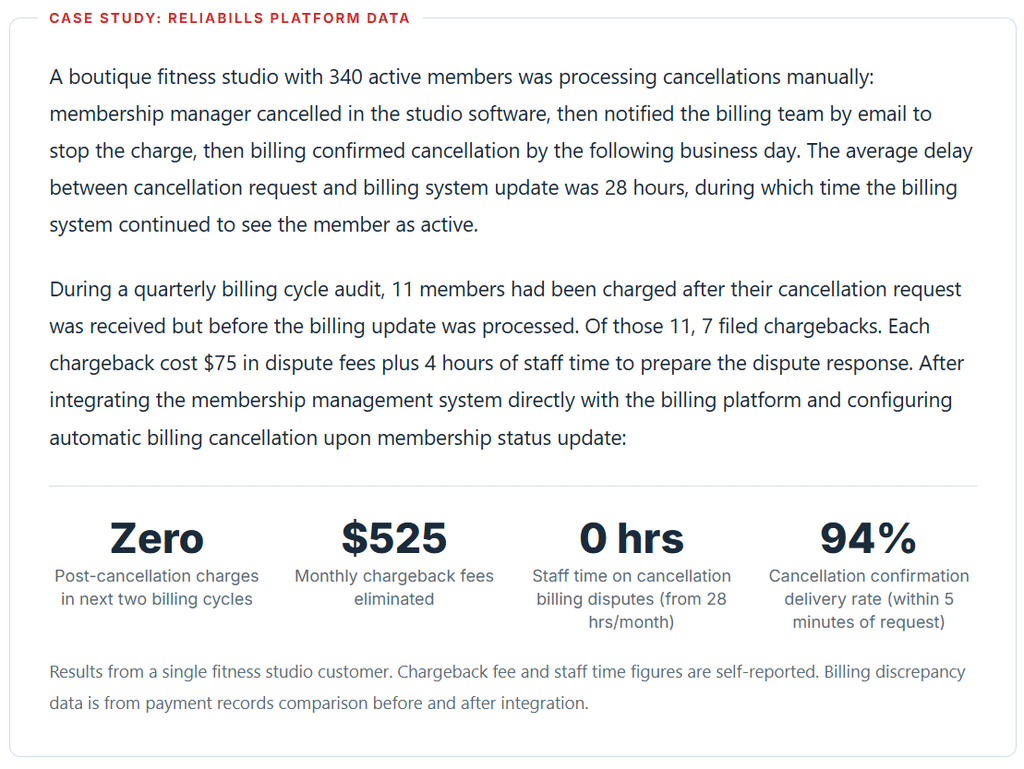
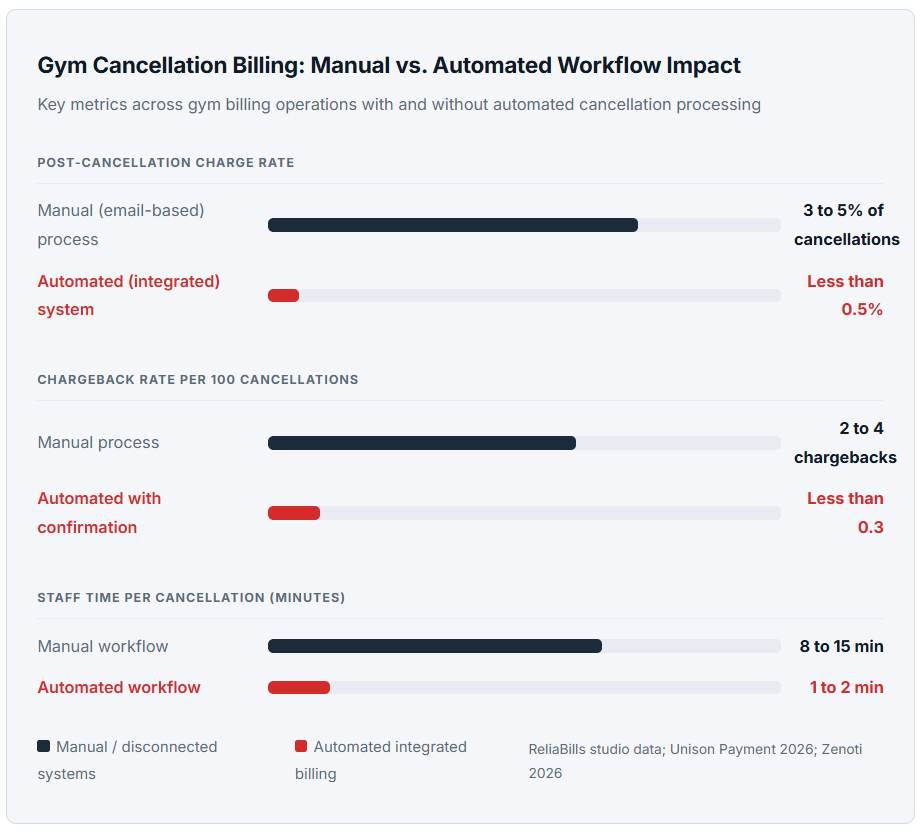
For independent gyms and boutique studios (yoga, Pilates, cycling), the cancellation billing problem is almost always the same: the cancellation was processed in the membership management system, but the billing system was not updated simultaneously, and the next monthly charge fired before the billing system learned about the cancellation. The member files a chargeback. The chargeback costs $50 to $100 in fees, damages the gym’s chargeback ratio, and generates a relationship-ending interaction with a member who was probably otherwise satisfied. This scenario is entirely preventable with a billing system that connects directly to the membership management system so cancellation updates propagate to both systems at the point of the request, not after a manual sync.
Multi-location gym chains
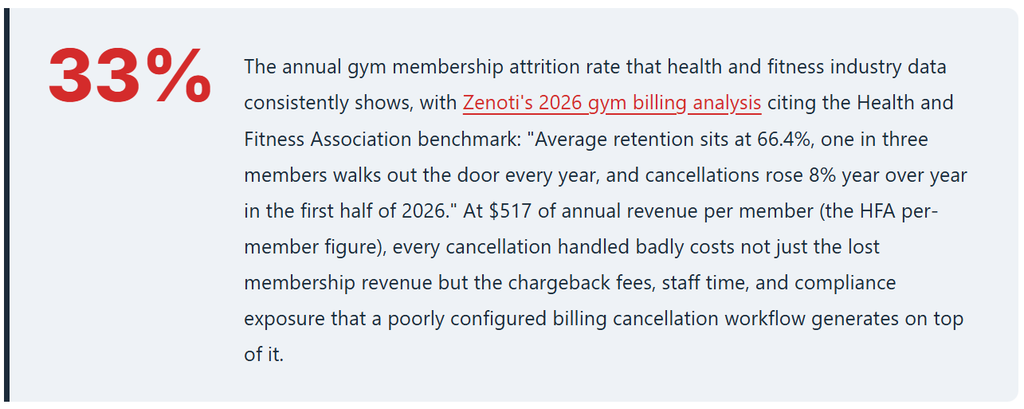
For chains with multiple locations, the cancellation problem compounds: a member who cancels at Location A may still have active billing records at the chain level that need to update. Unison Payment Solutions’ 2026 gym billing guide identifies the operational consequence: “One chargeback costs you $50 to $100 in fees and damages your chargeback ratio. A clean cancellation costs you nothing but the lost revenue.” For chains with high chargeback ratios from cancellation errors, payment processors can increase fees, require reserves, or terminate merchant accounts entirely. The billing system architecture at chain scale needs to handle location-level cancellations at the entity level, not location-by-location.
Corporate wellness and employer-sponsored memberships
Corporate wellness memberships have a third-party billing layer: the employer pays for some or all of the membership. When a member leaves their employer, cancellation must happen at both the member level (access ends) and the corporate billing level (employer charge ends). The timing matters: if the member’s last day of employment is the 15th and the next corporate billing cycle is the 1st, there are 15 days of membership that need proration or credit handling. Most billing systems do not handle this automatically. Most gyms handle it manually and create billing discrepancies that persist for months before surfacing as disputes.
Cancellation Types and How Each Is Handled Differently in Billing
| Cancellation Type | Billing action required | Refund due? | Chargeback risk if mishandled |
|---|---|---|---|
| Voluntary within cooling-off | Full refund, immediate billing stop | Yes, the full amount | High (state law violation) |
| Voluntary, end of cycle | Stop billing at the end of the current period, no refund | No | Moderate (if charged after the end date) |
| Voluntary, mid-cycle | Prorated refund for unused days or credit to account | Yes, prorated | High (incorrect proration triggers dispute) |
| Medical cancellation | Cancel immediately, refund per state statute (usually prorated) | Yes, often the full remaining prepaid period | High (state law mandates process) |
| Gym closure or relocation | Full prorated refund of unused prepaid term, immediate billing stop | Yes, full prorated balance | Very high (member has legal right to cancel) |
| Involuntary (failed payment) | Access suspension per dunning policy; no refund required | No | Low if a dunning sequence is documented |
| Freeze-then-cancel | Effective date must account for freeze extension of term | Depends on freeze terms | High (most commonly disputed scenario) |
What I Got Wrong at First: Common Gym Cancellation Billing Mistakes
Mistake 1: Cancelling in the membership system without automatically updating the billing system
The most common source of post-cancellation charges is a two-system gym operation where membership status and billing status are not synchronized in real time. A front desk employee cancels the member in the gym software (access deactivated, class bookings removed). The billing system sees an active member with a scheduled charge in 4 days. Nobody bridges the gap before the charge fires. The member files a chargeback.
Fix: Membership cancellation must trigger immediate billing cancellation in a single action. If the two systems do not have a native integration that passes cancellation status in real time, the cancellation workflow must include an explicit billing system step that cannot be skipped. For gyms using ReliaBills alongside a separate membership platform, configure a webhook or direct API connection so membership status changes propagate to billing immediately. The manual “remember to also update billing” step should not exist in any cancellation workflow.
Mistake 2: Rounding proration amounts instead of calculating to the cent
Host Merchant Services’ 2026 guide documents the consequence: “Failing to prorate correctly and overcharging a member, even by a few dollars, gives the consumer legal grounds to dispute the monthly charge, putting the complete payment at risk of reversal.” A $3 proration error on a $55 monthly charge creates a chargeback exposure on the full $55 plus $75 in dispute fees. The proration error that creates a $3 dispute costs the gym $78 total. Calculate to the cent, issue the exact refund, and document the calculation in the member’s cancellation record.
Fix: Configure your billing system to calculate proration using the exact formula: monthly fee divided by billing cycle days, multiplied by unused days. Never round to a convenient number. Process the exact prorated refund to the original payment method within the timeframe required by your state (typically 10 to 30 days). Include the proration calculation in the cancellation confirmation email so the member can verify the math.
Mistake 3: Using cancellation friction as a retention strategy
The FTC’s August 2025 action against LA Fitness makes the legal exposure explicit. Arnold and Porter’s 2026 FTC advisory summarizes the enforcement trend: “The FTC has made clear it is prioritizing enforcement regarding deceptive billing and cancellation practices involving recurring subscriptions.” Making cancellation deliberately difficult (in-person only for online signups, multiple phone calls required, specific forms that are hard to find) is not a retention strategy; it is a regulatory liability. Members who cannot cancel file chargebacks instead, which costs more than the lost membership revenue, and file state AG complaints that draw regulatory attention.
Fix: The cancellation pathway must be as easy as the signup pathway. Members who joined online must be able to cancel online in three steps or fewer. The cancellation page should be findable from the member portal without a search. Staff should be trained to process cancellation requests promptly and professionally rather than using retention scripts that feel like obstruction. A member who cancels easily and is treated well sometimes returns. A member who had to fight to cancel does not.
Mistake 4: Not retaining cancellation documentation after the membership ends
Chargebacks can arrive up to 120 days after a transaction. A member who cancels in January and then files a chargeback for March and April charges in June needs the gym to produce documentation of the cancellation: when the request was received, what the confirmation said, and when billing stopped. If that documentation is in the member’s active record and the active record was archived or deleted when the membership ended, the gym cannot produce it. Most chargeback disputes where the gym cannot produce documentation result in the chargeback succeeding even when the gym’s position is correct.
Fix: Configure your billing system and CRM to retain all cancellation documentation in archived member records indefinitely, or at minimum for 24 months. The cancellation request date and time, the confirmation email content, the effective cancellation date, the proration calculation, and the refund processing record should all be retrievable from the member’s archived record in a single lookup. This retrieval should take less than two minutes when a chargeback dispute arrives.
How to Set Up Your Gym Cancellation Billing Workflow
Audit your current cancellation workflow for billing gaps
Map every step of how a member cancellation currently reaches your billing system. Identify any manual steps, any time delays, and any scenarios (freeze-then-cancel, mid-cycle, cooling-off period) that are not handled automatically. For any step that requires a human to bridge two systems, calculate the post-cancellation charge risk during the gap period. This audit typically reveals the source of most gym chargebacks within the first 30 minutes.
Configure online self-service cancellation
Members must be able to cancel online if they signed up online. Build a cancel option into your member portal that requires 3 steps or fewer: find the option, confirm the cancellation request, receive a confirmation. The portal should accept cancellations at any time, not only during business hours. Each online cancellation generates an automatic billing system update and a confirmation email simultaneously.
Set up proration rules for each membership type
In your billing software, configure the proration formula for each membership tier: daily rate calculation method (monthly fee divided by cycle days), whether mid-cycle cancellations receive refunds or credits, how freeze periods affect the effective cancellation date, and the refund processing timeline. For installment billing memberships where a member has prepaid a longer term, configure the prepaid refund calculation separately. Test each scenario with a real billing calculation before activating.
Build the cancellation confirmation template
Every cancellation confirmation email should include the request timestamp, the effective cancellation date, the final billing date, the refund amount and method (if applicable), the access end date, and a reference number for the cancellation record. This email is simultaneously the member’s proof of cancellation and the gym’s primary chargeback defense. Retain a copy in the member’s record. Include contact information for questions about the cancellation or refund status.
Run a monthly cancellation billing audit
At the end of each billing cycle, run a report comparing members with cancelled status in the membership system against active billing records. Any member whose membership is cancelled but who has a scheduled charge in the next 7 days is a post-cancellation charge risk. Address those records before the charge fires, not after. This 30-minute monthly review prevents the chargebacks that consume 4 hours each in dispute preparation and resolution. For automated billing systems, this report should run automatically and flag exceptions without manual query generation.
Frequently Asked Questions
1. What is the FTC click-to-cancel rule, and does it apply to gyms in 2026?
The FTC’s click-to-cancel rule, finalized in 2024, was vacated by the Eighth Circuit Court of Appeals in July 2025 on procedural grounds. The FTC has since opened a new rulemaking process, but no federal click-to-cancel requirement is currently in force as of 2026. However, California, New York, Colorado, and other states have enacted their own auto-renewal laws that impose essentially the same requirements. Visa and Mastercard network rules independently require accessible cancellation processes. The FTC’s August 2025 lawsuit against LA Fitness for difficult cancellation practices was brought under existing federal consumer protection law, not the vacated click-to-cancel rule. Gym operators should treat easy online cancellation as a current operational and compliance requirement, not a future regulatory consideration.
2. How should a gym calculate a prorated refund for a mid-cycle cancellation?
Divide the monthly membership fee by the number of days in the billing cycle to get the daily rate. Multiply the daily rate by the number of unused days from the effective cancellation date to the next billing date. Process that exact amount as a refund to the original payment method or as a credit to the member’s account. For a $60 monthly fee on a 30-day cycle with cancellation on day 10, the daily rate is $2.00 and the prorated refund for the remaining 20 days is $40.00. Document the calculation in the member’s cancellation record and include it in the confirmation email so the member can verify it. Incorrect proration, even by a few dollars, creates a chargeback exposure on the full monthly charge.
3. How should gyms handle a member who cancels after a membership freeze?
If the membership contract defines the term by access eligibility rather than calendar dates, freeze periods extend the membership term by the freeze duration. A 3-month freeze on a 12-month contract means the contract runs 15 months from the start date. The effective cancellation date must account for this extension. If billing continued at a reduced rate during the freeze, the final charge calculation must reflect what was actually owed and collected during the freeze period versus the active rate. The signed digital freeze agreement with an explicit end date is the critical document for any chargeback arising from freeze-period billing. If that agreement does not exist, the chargeback dispute is very difficult to win regardless of the underlying facts.
4. What documentation should a gym retain to defend against a cancellation chargeback?
The minimum documentation required to successfully defend a gym cancellation chargeback is: the original signed membership agreement showing the cancellation terms, the timestamped cancellation request (email, portal submission, or signed in-person form), the cancellation confirmation sent to the member showing the effective date and refund amount, the billing record showing when recurring charges stopped, and any refund processing confirmation. All of this documentation should be retained in the member’s archived record for at least 24 months after cancellation. Chargebacks can arrive up to 120 days after a transaction, and disputes arising from billing after cancellation can reference charges from the months immediately after cancellation.
5. What is the difference between voluntary and involuntary gym membership cancellation in billing?
Voluntary cancellation occurs when a member requests to end their membership. Involuntary cancellation occurs when a membership ends because of failed payment that was not recovered through the dunning sequence. The two types require different billing handling and different reporting. Voluntary cancellations may require prorated refunds, generate confirmation emails, and are logged as member-initiated churn in retention reporting. Involuntary cancellations require a documented payment failure history, may trigger access suspension before full cancellation, and are logged as payment-failure churn separately from voluntary cancellation. Mixing the two in reporting obscures whether the gym has a member satisfaction problem (voluntary churn), a payment collection problem (involuntary churn), or both. Most retention analytics require this distinction to generate actionable insights.
6. How long does a gym have to process a membership refund after cancellation?
The refund timeline depends on your state’s health club statute. Most states with dedicated health club laws require refunds within 10 to 30 days of a valid cancellation request. California requires refunds within 10 days. Some states require refunds within a shorter window for cancellations occurring during the cooling-off period. For credit card refunds, the bank processing timeline adds 3 to 10 business days to the refund appearing on the member’s statement, but the gym must initiate the refund within the statutory window regardless of processing time. Configure your billing system to initiate refunds at the point of cancellation processing rather than as a separate manual step at the end of the billing cycle.
Recent Articles:
- Installment Billing for Large Catering Events: Collect Deposits and Final Payments
- Collection Automation for Lawn and Landscape: How to Reduce Overdue Accounts