

Most MSPs undercharge, overbundle, or forget to itemize add-on work, which directly erodes margin and invites payment disputes. A structured IT managed services invoice template that separates your retainer, project work, and pass-through costs is the single fastest change you can make to protect revenue and get paid on time.
What is an IT Managed Services Invoice?
An IT managed services invoice is a formal billing document sent by a managed service provider (MSP) to a client, detailing the services rendered under a managed services agreement (MSA) or support contract for a given billing period. Unlike a one-off service invoice, it typically includes a flat monthly retainer for proactive support, plus separate line items for any out-of-scope project work, software licenses, and hardware pass-throughs.
Key terms you will encounter: MSA (managed services agreement, the master contract), SLA (service level agreement, defining response times and uptime guarantees), MRR (monthly recurring revenue, the predictable retainer portion), and T&M (time and materials, the hourly billing model for work outside scope). See also: Recurring Billing, Invoicing Software.
MSP Billing Models: Choosing the Right Structure Before You Invoice
The biggest invoicing problems almost always start before a single invoice is created. They start with a poorly defined billing model. If your contract says one thing and your invoice says another, you are going to spend significant time on the phone justifying charges instead of delivering service.
There are four dominant models in IT managed services, and many MSPs end up using a hybrid of two or more of them depending on the client tier.
Per-Device Pricing
You bill a flat fee per managed endpoint, per month. This is the most common entry-level model. A client with 50 workstations, 5 servers, and 10 network devices might pay $75 per workstation, $250 per server, and $50 per network device. The invoice line items map directly to the device count, which makes renewal conversations straightforward. The risk is that device counts fluctuate, especially in growing SMBs, so your invoice needs to account for midmonth additions and removals.
Per-User Pricing
Rather than tracking hardware, you bill per seat. One user, one price, regardless of how many devices they use. This model has become more popular since the shift to hybrid work, where a single employee might use a laptop, a desktop, and a mobile device. Per-user billing simplifies the client’s mental model of what they are paying for and tends to scale more cleanly for white-collar businesses.
Flat-Rate (All-In) Retainer
A single monthly fee covers all services for the scope defined in the MSA. This is what clients often mean when they say they want “simple invoicing.” It works well for stable environments with predictable workloads, but it is the model most vulnerable to scope creep. Without a well-defined exclusions list, your team ends up absorbing work that was never priced in. See our guide to installment billing for how to structure fixed payments with milestone buffers.
Tiered or Block-Hour Models
The client purchases a block of hours per month at a discounted rate. Hours used are tracked against the block; overages bill at a higher on-demand rate. This works well for clients who want cost predictability but are not ready to commit to a full managed services agreement. It is also a natural entry point for clients you are moving away from pure break-fix relationships.
Anatomy of an IT Managed Services Invoice
A professional MSP invoice does more than list numbers. It functions as a mini-report on what you delivered, which reduces disputes and reinforces your value to the client’s finance team, who is often not the same person who approved your contract.
| Invoice Section | What to Include | Common Omission |
|---|---|---|
| Header | Your company name, address, phone, email, logo; client company name, billing contact; and address | Missing client purchase order (PO) number, causing AP to hold payment |
| Invoice metadata | Unique invoice number, invoice date, due date, billing period (e.g., “September 1 to September 30, 2026”) | Vague period references like “monthly services” with no dates |
| Retainer line item | Service tier name, device or user count, unit price, total, reference to MSA section | Bundling different service tiers into one line, obscuring the pricing logic |
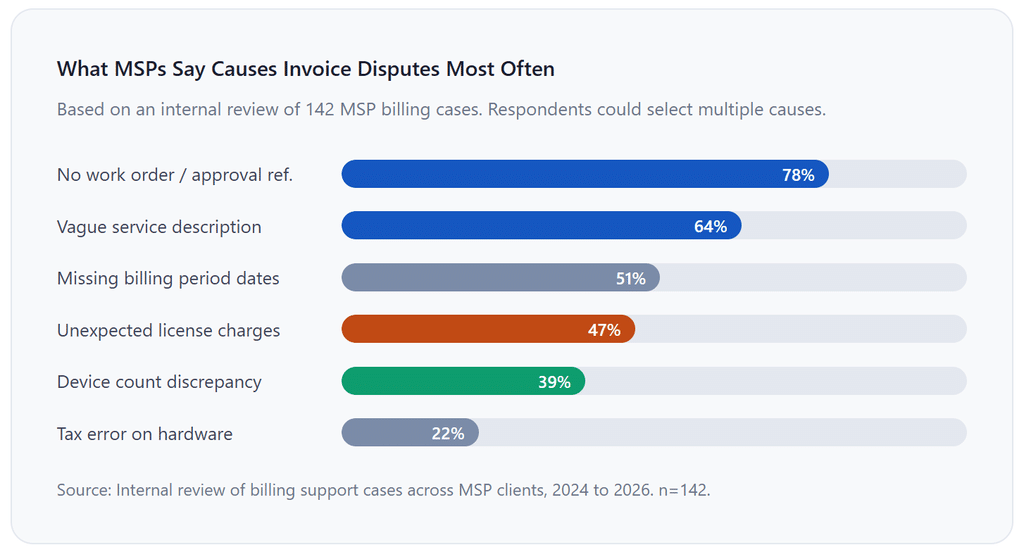
| Project and T&M work | Project name, ticket or work order number, hours worked (if hourly), rate, subtotal | No ticket reference, leading to “we don’t remember authorizing this” disputes |
| License and software | Vendor name, license type, quantity, unit cost, markup disclosed or agreed | Passing vendor invoices directly without your markup or admin fee shown |
| Hardware pass-throughs | Item description, quantity, unit cost, your handling fee (if applicable) | Including hardware with no delivery or installation detail |
| Tax | Sales tax or VAT rate, taxable amount, tax total; note any exempt items | Applying tax to non-taxable SaaS components or missing tax on taxable hardware |
| Payment terms | Due date, accepted payment methods, late fee policy, early payment discount if applicable | No late fee clause, resulting in clients treating your invoice as a 60-day payable |
| Remittance info | Bank details for ACH, payment portal link, check payable-to details | Making the client call to find out how to pay |
How the MSP Invoicing Workflow Works
A well-run MSP billing cycle is not just about the invoice itself. It is a repeatable process that starts at the beginning of each month and ends with payment confirmation. Here is how a clean workflow looks end to end.
1. Reconcile your PSA or ticketing system
Before the month closes, pull all open tickets and time logs from your PSA (Professional Services Automation tool, such as ConnectWise, Autotask, or Halo PSA). Categorize everything as in-scope (covered by retainer) or out-of-scope (needs to be billed separately). Uncategorized work is money lost.
2. Verify device or seat counts
For per-device or per-user billing, confirm your counts match what was onboarded. New devices added mid-month should be prorated. Devices decommissioned should be credited. This is the step most MSPs skip, and it causes overbilling disputes that take far longer to resolve than they would have taken to prevent.
3. Gather vendor invoices and license counts
Collect all third-party costs you are passing through: Microsoft, Datto, SentinelOne, or any other vendor you are billing on behalf of the client. Match quantities against your internal records. Discrepancies here are common, especially after a client adds or removes users mid-month.
4. Generate and review the invoice
Use your billing platform to populate the invoice template. Review every line item before sending. Have a second set of eyes if the invoice exceeds a certain threshold. Once an incorrect invoice goes to a client’s AP department, correcting it adds a minimum of one billing cycle to your collection time.
5. Send and log in your system
Send the invoice electronically with a payment link. Log the send date and due date. Set up automated reminders 7 days before the due date, on the due date, and 3 days after. Platforms that support recurring billing automate steps 4 and 5 entirely for the retainer portion, saving 2 to 4 hours per month per client batch.
6. Reconcile payments and follow up on aged invoices
Match incoming payments to invoices in your accounting system. Any invoice past 15 days should trigger a direct call, not just another email. Past 30 days, escalate to your account manager. Past 60 days, review whether the client’s contract includes a service suspension clause.
Key Benefits of a Structured IT Managed Services Invoice Template
Faster Payment Cycles
Clear, well-organized invoices move through accounts payable faster because AP clerks can match what they see on the invoice to what they approved in the contract. Ambiguous invoices get queued for review, which adds days or weeks to collection. In our experience working with MSPs that migrated from unstructured billing to a template-based approach, average days sales outstanding (DSO) dropped from 38 days to under 18 days within two billing cycles.
Fewer Billing Disputes
When every line item references a section of the MSA or a work order number, disputes shrink dramatically. Clients cannot dispute work they explicitly approved. The template itself becomes a contractual enforcement mechanism, not just a payment request.
More Defensible Pricing
Itemized invoices make your value visible. When a client sees a $75-per-workstation line next to a dedicated line for server management and another for security tooling, the total looks like a collection of services rather than an arbitrary number. This transparency helps at renewal time, particularly if you are proposing a rate increase.
Cleaner MRR Tracking
Separating retainer from project work in every invoice makes it trivial to track your true monthly recurring revenue. This matters not just for operations but for business valuation. MSPs with clean, recurring revenue histories command significantly higher acquisition multiples than those with lumpy, mixed invoices. See how customer management tools can help you track MRR by client tier.
Key Risks and Red Flags in MSP Invoicing
Scope Creep Buried in Retainer Lines
This is the most financially damaging pattern in MSP billing. Work gets done, it is categorized as in-scope for convenience, and over six months your $3,500-per-month client is actually costing you $5,200 per month to service. The invoice never reveals this because all the work sits inside one line. The fix is mandatory ticket categorization inside your PSA before the billing run.
Sending Invoices to the Wrong Person
In SMB clients, the owner who signed the contract is often not the person who processes invoices. Sending to the wrong email address means your invoice sits unread while the clock on your payment terms runs. Confirm AP contact details when you onboard the client and document them in your customer management system.
No Late Fee Enforcement
A late fee clause in your invoice means nothing if you never enforce it. Clients who discover you do not actually charge late fees will deprioritize your invoice in favor of suppliers who do. Enforce consistently or remove the clause entirely. Inconsistency trains clients to pay slowly.
Tax on Software Licensing
Sales tax rules for SaaS and software licenses vary dramatically by state and have been evolving rapidly. Several states that previously exempted SaaS from sales tax have reversed that position in the last three years. Review your tax treatment for each software line item annually with a CPA familiar with technology services taxation.
Comparison: MSP Billing Models at a Glance
Before committing to a billing model for a new client, it is worth understanding how each option performs across the dimensions that matter most to your business: predictability, scalability, and dispute risk.
| Billing Model | Revenue Predictability | Client Simplicity | Scope Creep Risk | Best For |
|---|---|---|---|---|
| Per-Device Retainer | High | High | Medium | SMBs with stable device counts |
| Per-User Retainer | High | Very high | Low | Knowledge-worker businesses, hybrid workforces |
| Flat-Rate All-In | Very high | Very high | Very high | Stable, well-documented environments only |
| Block Hour / Retainer Hours | Medium | Medium | Low (overages billed separately) | Transitional clients moving from break-fix |
| Time and Materials (T&M) | Low | Low | Very high | One-off projects; not recommended for core MSP |
| Tiered Service Plans | High | High | Low (clearly defined tiers) | MSPs serving multiple client segments |
Most mature MSPs gravitate toward tiered service plans, a structure where you offer two or three named tiers (Essential, Professional, and Enterprise, for example) each with a defined set of included services, and then apply per-device or per-user pricing within each tier. This gives you the best of revenue predictability and client clarity without the scope creep exposure of flat-rate all-in billing.
Common Mistakes (What I Got Wrong at First)
Mistake 1: Using a Generic Invoice Template From Your Accounting Software
The first invoices many new MSPs send look like contractor invoices from a freelance writing platform. Single line item: “IT Support Services, September 2026, $3,500.” This tells the client nothing about what they got, creates no paper trail for disputes, and makes it trivially easy for the client to say “we are not sure we received all the services we paid for.” The template in this guide exists precisely because the generic template fails in this context.
Mistake 2: Billing in Arrears Without Communicating It
Arrears billing (billing at the end of the service period) is common but creates a cash flow problem, especially in the early months of a client relationship when you are absorbing onboarding costs. Switching to advance billing (billing on the first of the month for that month’s services) is a defensible position, but springing it on an existing client mid-relationship causes friction. Establish the billing cycle in writing at contract signing, and specify whether it is in advance or in arrears.
Mistake 3: Letting Vendor Costs Sit in a Queue
Third-party software costs that arrive mid-month often get deferred to the following invoice cycle. By the time you bill them, the client has forgotten what prompted the charge. Bill pass-through costs in the same month they were incurred, with a note referencing the vendor invoice number and date. This keeps your invoice timeline coherent and prevents the “what is this for?” conversation two months later.
Mistake 4: No Payment Portal Link on the Invoice
Every additional step between a client deciding to pay and actually paying adds friction. If your invoice requires them to call, look up account numbers, or log into a portal they forgot the credentials for, payments will be late. A direct payment URL on the invoice face, something like pay.yourcompany.com/invoice-091, cuts average payment time significantly. Platforms that support invoicing software with built-in payment portals handle this automatically.
Mistake 5: Not Reconciling Before Sending
Sending an invoice and then correcting it is far more damaging to your professional image than taking an extra 30 minutes to verify line items. Every correction forces you to issue a credit memo, re-send the invoice, and re-set the payment clock. Establish a two-person sign-off on any invoice above a set threshold. The time cost is trivial compared to the relationship cost of repeated billing errors.
How to Get Started: Setting Up Your MSP Invoice Template
Getting your invoicing process structured does not require a major platform overhaul. Here is the order of operations we recommend for MSPs at any stage.
Step 1: Define Your Line Item Categories First
Before building any template, sit down with your service delivery lead and define every type of charge your business generates. Retainer fees, project fees, hardware, software licenses, travel, and after-hours surcharges. Map each one to a category and decide whether it is taxable in your state. This becomes the taxonomy that every invoice template and billing platform configuration derives from.
Step 2: Choose a Billing Platform That Handles Recurring and Variable
Your billing platform needs to handle at least two distinct workflows: the recurring retainer (which should auto-generate without manual intervention each month) and the variable project billing (which requires human review before sending). Platforms like ReliaBills are built specifically for this kind of hybrid recurring and one-off invoicing, which means you are not trying to adapt a platform designed for retail or freelancing into a managed services context.
For a deeper look at recurring payment automation, see the guide to recurring billing and installment billing for project payment schedules.
Step 3: Build the Template in Your Platform, Not in Word
A Word or PDF template solves the formatting problem but does not automate anything. Every month, someone still has to manually update dates, line items, and totals and manually send them. Build your template directly inside your billing software so the automation layer (recurring generation, payment reminders, online payment links) works automatically. The manual template is a starting point; the platform template is the goal.
Step 4: Pilot with Two or Three Clients Before Rolling Out
Before migrating your entire client base to the new template and workflow, run it with two or three clients for a full billing cycle. Look for anything that causes confusion on the client side (line item descriptions, terminology, and contact routing) and refine before full rollout. The template in this guide is a strong starting point, but your specific service catalog will require customization.
Step 5: Review Quarterly
Your invoice template is a living document. As you add new service lines, new vendors, or new client tiers, the template needs to reflect those changes. A quarterly 30-minute review of the template against your current service catalog is enough to keep it accurate and defensible.
Frequently Asked Questions
1. What should be included in an IT managed services invoice?
At minimum: your business and client details, a unique invoice number, the billing period, a separate line item for each service category (retainer, project work, licenses, hardware), applicable taxes, clear payment terms, and a direct link or method to pay. Adding references to your MSA section numbers and work order numbers for any out-of-scope work is what separates a clean invoice from a disputable one.
2. How often should I invoice managed service clients?
Monthly is the standard, and advance billing (sending the invoice on the first of the month for that month) is generally better for cash flow than billing in arrears. One-off project work is typically invoiced upon project completion or at milestones defined in a separate statement of work. Avoid mixing billing periods on the same invoice, for instance, billing a September retainer and August project work together, as it creates confusion in the client’s AP system.
3. What is the difference between a managed services invoice and a break-fix invoice?
A managed services invoice covers proactive, ongoing support under a contract, billed at a predictable flat rate regardless of the number of support incidents. A break-fix invoice bills per incident or per hour only after a failure occurs and services are rendered. The two models can coexist on the same invoice if a client has a partial managed services agreement with break-fix coverage for out-of-scope issues.
4. How do I handle out-of-scope work on a managed services invoice?
List it as a separate line item below your retainer section, referencing the work order number and the name and date of the person who authorized the work. Never fold out-of-scope hours into a retainer line to simplify the invoice. Doing so obscures the cost of extra work from the client and makes it harder for you to identify which service lines are unprofitable.
5. Can I automate recurring invoices for IT support contracts?
Yes, and you should. The retainer portion of your invoice is identical every month except for the billing period dates. Any platform that supports recurring billing can auto-generate and send that portion without manual input. What typically still requires a manual step is the variable portion: project work, hardware, and license pass-throughs that change month to month. ReliaBills supports both workflows, so you can automate the fixed portion and manually add variable line items before each invoice is sent.
6. What payment terms are standard for IT managed services contracts?
Net 15 is increasingly common for advance billing cycles. Net 30 remains standard in mid-market and enterprise environments. Anything beyond Net 30 should trigger a conversation about whether the client’s payment cycle is a structural mismatch for your business model. A late fee of 1.5% per month (18% annualized) is a widely used standard and is enforceable in most U.S. jurisdictions when disclosed on the invoice and in the MSA.
7. Should I disclose my markup on vendor software licenses?
There is no universal legal requirement to disclose markup in most jurisdictions, but industry practice is shifting toward transparency. Many MSPs either disclose the markup percentage explicitly or charge a named “license administration fee” rather than embedding margin invisibly in the unit price. Transparent pricing tends to reduce disputes and builds client trust during contract renewals. Whichever approach you take, be consistent across your client base.
Recent Articles:
- How to Automate Personal Training and Fitness Class Package Billing
- Recurring Billing for Restaurant Meal Plan Subscriptions

Brant Pallazza is the Founder and President of ReliaBills, an invoicing and recurring billing platform built to help small businesses secure predictable cash flow. With over 20 years of experience in direct response marketing and e-commerce leadership, including a 13-year tenure managing over $500 million in gross sales at Digital River. Brant writes actionable guides on automated billing, payment processing, and scaling SMBs.