

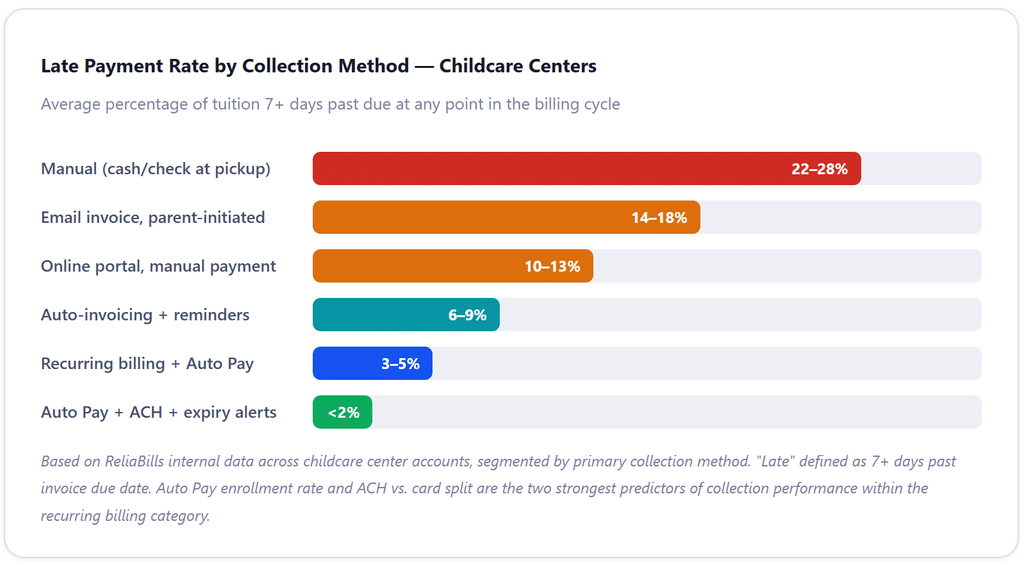
Recurring billing for childcare tuition is the single most impactful operational upgrade most centers can make. Automating weekly or monthly tuition collection eliminates the most time-consuming administrative burden in childcare operations and consistently pushes late-payment rates below 5% compared to the 15–25% that manual collection typically produces. The centers that have solved the cash flow problem aren’t collecting differently; they’ve built a system that collects automatically.
What Is “Recurring Billing for Childcare Tuition”?
Recurring billing for childcare tuition is the practice of automating periodic tuition invoicing and payment collection on a defined schedule, weekly, bi-weekly, or monthly, using a billing system that stores parent payment methods and charges them automatically on the due date. The system generates invoices, processes payments, sends receipts, and handles reminders without requiring manual action from center staff.
It is distinct from simply accepting online payments. A parent who logs in to a portal and pays each week is making a manual payment online, that’s a convenience upgrade, not automation. True recurring billing means the system initiates the charge on the due date without any action from the parent or the center. The parent authorizes it once at enrollment; the system handles every subsequent billing cycle until enrollment ends or the family updates their account.
The Real Cost of Manual Tuition Collection
Most childcare centers that rely on manual tuition collection share a version of the same Tuesday afternoon: three families haven’t paid for last week, two more are a week behind from before that, and the director is deciding between sending an awkward reminder text and saying something at pickup, neither of which feels professional, and neither of which actually solves the problem.
The financial stakes are higher than they look. Childcare centers operate on margins under 1%, which means a single week of late tuition payments can tip a profitable month into a deficit. That isn’t a hypothetical; it’s a structural feature of the industry. Payroll runs on a schedule. Rent runs on a schedule. Supplies run on a schedule. Tuition, if it runs on a “whenever families get around to it” schedule, creates a predictable cash gap every billing period.
According to LineLeader, childcare administrators without billing automation spend 7 or more hours per week on collection-related tasks, chasing late payments, reconciling accounts, and sending manual invoices. That’s nearly a full day of an administrator’s work week, every week, devoted to tasks a billing system could handle overnight.
The fix isn’t stricter late fee enforcement or more persistent follow-up calls. Both of those tactics work only at the cost of relationship friction, and in childcare, parent relationships are everything. The fix is recurring billing, removing the manual steps from both the parent’s side and the center’s side, so the payment happens reliably regardless of how busy either party is that week.
Weekly vs. Monthly Tuition Billing: Which Cycle Actually Works Better
This is one of the most practically important decisions in tuition billing, and it’s one the top search results almost universally skip over. The answer isn’t obvious, and it depends on both your market and your operational structure.
The Case for Weekly Billing
Weekly tuition collection aligns naturally with how most families think about childcare, as a week-by-week commitment that mirrors the workweek. For centers that charge by the day or by the session, weekly billing makes the math transparent: five days at $X per day equals one weekly invoice. It also reduces your per-cycle exposure if a payment fails. A failed weekly payment represents one week of fees; a failed monthly payment represents four. In markets where family finances are more variable, hourly workers, gig economy parents, and small business owners, weekly billing improves collection rates because the amount per cycle is smaller and more manageable.
The complication with weekly billing is administrative volume. Without automation, weekly billing means four times the invoices, four times the reminders, and four times the reconciliation compared to monthly. With automation, the volume difference disappears; the system handles each cycle identically regardless of frequency, but the initial setup and the reporting complexity are slightly higher.
The Case for Monthly Billing
Monthly billing simplifies cash flow forecasting and aligns better with most centers’ expense cycles, rent, insurance, and payroll typically run monthly. A center billing monthly can predict exactly how much revenue it expects in a given month and plan expenses accordingly. It also simplifies the family’s financial planning; a monthly charge of $1,200 is predictable in a way that four weekly charges of $300 sometimes aren’t (because billing dates don’t always fall in the same pattern relative to the family’s own pay cycle).
The best practice for monthly billing is to align the tuition due date with the center’s largest expense date. If rent is due on the 1st and payroll runs on the 25th, set tuition due on the 25th of the prior month, so incoming revenue precedes outgoing expenses rather than trailing behind them. This single scheduling decision closes the early-month cash gap that many childcare operators describe as their most persistent financial stressor.
What the Data Actually Shows
A 2024 survey by Procare Solutions found that over 78% of parents prefer automatic recurring billing for childcare tuition, regardless of frequency. The preference for automation outweighs the preference for any particular billing cycle. If you’re trying to decide between weekly and monthly, start with whatever cycle your current families are enrolled under, automate it fully, and reassess after one semester whether the frequency itself is creating any issues.
How Recurring Childcare Billing Works: The Complete Workflow
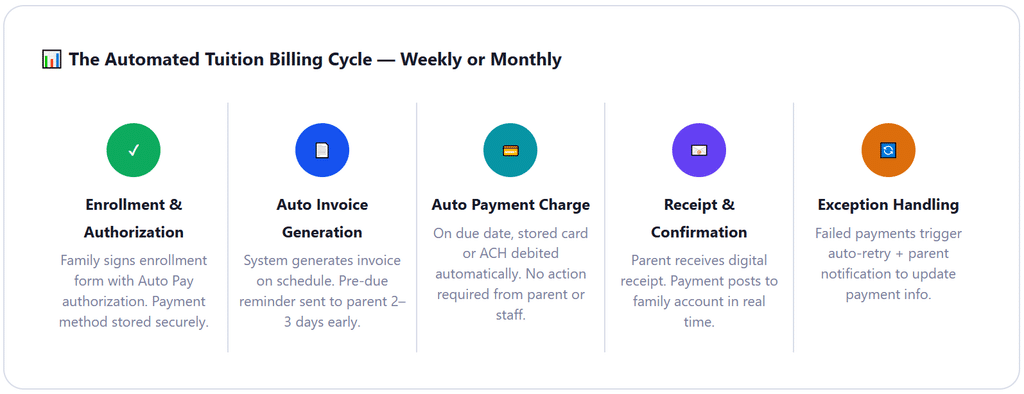
Automating tuition collection isn’t a single feature, it’s a chain of connected steps. Here’s how the full workflow operates when it’s properly configured, from family enrollment through year-end reconciliation.
1. Family Enrollment and Payment Authorization
At enrollment, every family completes a tuition agreement that includes their billing schedule (weekly or monthly), the tuition amount, any applicable discounts (sibling rate, subsidy reduction), and an explicit authorization to charge the stored payment method automatically on each due date. This authorization, collected digitally through the parent portal or as a signed paper form, is the legal and operational foundation for everything that follows. Without it, any automatic charge constitutes an unauthorized debit. With it, the system can run indefinitely without re-collecting consent.
2. Billing Profile Configuration per Family
In the billing system, each family gets a profile that captures their tuition rate, billing frequency, start date, any subsidy amount that offsets their private-pay balance, and their payment method. Families with multiple enrolled children can have sibling discounts applied at the profile level rather than requiring manual adjustment each billing cycle. Special billing arrangements, part-time care, drop-in days, and school-year-only enrollment are handled as exceptions in the profile, not as separate manual processes.
3. Automatic Invoice Generation and Pre-Due Reminder
On the configured schedule, the system generates and delivers each family’s invoice automatically, no staff action required. Two to three days before the due date, an automated reminder email goes to the parent summarizing what will be charged, from which payment method, and on what date. For Auto Pay families, this functions as a courtesy notification that reduces surprise charges and chargebacks. For any families not on Auto Pay, this reminder is the primary prompt to initiate payment through the parent portal.
4. Automatic Charge on Due Date (Auto Pay)
On the due date, the system charges the stored payment method, credit or debit card or ACH bank debit, and deposits the funds to the center’s bank account. ACH typically settles in 1–2 business days; card payments may settle the next day. The payment posts automatically to the family’s account in the billing system, eliminating any manual reconciliation step. The center director can open the dashboard at any point and see exactly which families have paid, which are pending, and which failed, in real time, without any manual data entry.
5. Failed Payment Detection, Retry, and Parent Notification
When a payment fails, due to an expired card, insufficient funds, or bank account change, the system catches it immediately, retries the transaction on a defined schedule (typically 3 and 7 days after the initial failure), and simultaneously notifies the parent with instructions to update their payment method via the parent portal. This self-service resolution model means most failed payments get resolved without any staff involvement. The small percentage that don’t resolve through the retry cycle are escalated to a staff review queue, clearly flagged in the dashboard.
6. Late Fee Application and Escalation Policy
If a payment fails and the family doesn’t update their information within the grace period, a late fee applies automatically, no staff discretion, no awkward conversation. The late fee amount and timing should be defined in the enrollment agreement and applied consistently. Most centers use either a flat late fee ($15–$25) or a daily accumulating fee ($5–$10 per day). The key is that automation makes the policy self-enforcing: the system applies the fee without requiring the director to decide whether to charge it, eliminating the inconsistency that makes late payment policies ineffective in manual environments.
7. Year-End Tax Documentation
Families need documentation of their annual childcare payments for dependent care FSA reimbursement and the Child and Dependent Care Tax Credit (Form 2441). A good billing system generates year-end statements automatically, totaling paid per child, per family, per calendar year, with the center’s EIN included. This documentation request used to be one of the highest-volume January administrative tasks for childcare offices. Automated billing makes it a one-click export per family.
Real-World Use Cases: How Different Childcare Programs Structure Recurring Billing
Full-Time Infant and Toddler Centers
Full-time infant and toddler care typically commands the highest per-week rates in childcare, often $350 to $600+ per week in major markets. At these rates, monthly billing reduces transaction friction (fewer large charges per month) and simplifies family budgeting. Most centers serving this population find monthly AutoPay with ACH as the default payment method produces the best combination of low processing fees and high collection reliability. The stability of full-time enrollment also makes monthly billing simpler to administer, these families have consistent schedules and consistent weekly rates with fewer mid-cycle adjustments.
Preschool Programs (Part-Time and School-Year)
Preschool programs often run on a school-year calendar with summer as a separate enrollment period or with a significant enrollment drop. Weekly billing works well here because it naturally accommodates the schedule gaps around holidays and school breaks. If the center doesn’t charge for weeks when the program isn’t in session, weekly billing reflects that accurately without requiring manual credit calculations. For school-year programs that charge a flat monthly rate regardless of the number of school days in a given month, monthly billing aligned to the academic calendar is the cleaner approach.
After-School Programs
After-school programs face the most complex billing environment: variable pickup times, activity-based add-ons, summer program transitions, and families who use the service inconsistently across the week. Installment billing approaches can work well here, an annual program fee billed in 10 equal monthly installments across the school year, because they smooth revenue for the operator and make the cost predictable for families who participate most weeks regardless of whether they use every session.
In-Home Daycare Providers
Independent home-based care providers often have the least structured billing of any childcare type, and the most to gain from automation. A home provider caring for six children who switches from cash-at-drop-off to weekly auto-pay billing typically recovers 8–12 hours per month of time previously spent on collection conversations and manual tracking. The parent relationship dynamic also improves: the awkwardness of asking for cash at drop-off disappears when the payment is already handled, and parents report feeling more professional about the arrangement.
Key Benefits of Recurring Billing for Childcare Tuition
📅 Predictable Weekly or Monthly Revenue
Tuition arrives on a consistent schedule, enabling accurate payroll planning, expense management, and cash reserve building throughout the year.
⏱ Hours Recovered Every Week
Directors stop spending Monday mornings reconciling weekend payments and Tuesday afternoons having awkward money conversations. That time goes back to program quality.
📉 Late Payments Drop Dramatically
Auto Pay with stored payment methods consistently reduces late tuition to below 5%, from the 20%+ typical of manual collection, without any change in late fee policy.
🤝 Better Parent Relationships
The awkwardness of cash collection at pickup disappears. Parents feel more professional about the arrangement; directors interact with families about their children, not their balances.
📊 Real-Time Financial Visibility
A billing dashboard shows who has paid, who is pending, what revenue is projected for the week or month, and which accounts require attention, at any moment, without manual tracking.
🧾 Automated Year-End Tax Statements
Annual childcare payment statements for FSA reimbursement and the Child and Dependent Care Credit generate automatically, eliminating a major January administrative burden.
Risks and Things to Watch For
⚠️ Missing or Vague Billing Authorization
Charging a parent’s card without explicit written authorization is an unauthorized transaction under Nacha rules (for ACH) and card network rules (for credit/debit). Your enrollment agreement must include clear auto-pay authorization language before the first charge runs. Verbal consent isn’t sufficient.
⚠️ Card Expiry Between Billing Cycles
A parent who enrolled in September may have a card that expires in January. Without proactive expiry alerts, sent 30 days in advance, the January tuition fails, and the director discovers it on a Monday morning. Good billing software sends automated expiry notices before the charge attempt.
⚠️ Subsidy Payment Timing Mismatches
Government childcare subsidies often arrive 30–60 days after service delivery at rates below private-pay tuition. If your billing system doesn’t properly account for the subsidy offset, families may receive invoices for the full tuition rate rather than their net copay, generating confusion and disputes. Track subsidy and private-pay billing separately in your system.
⚠️ Mid-Year Schedule Changes Without Billing Updates
A family that reduces from full-time to part-time enrollment in February needs their billing profile updated before the next cycle runs, not after. Establish a policy that any enrollment change requires a billing update confirmation, and route schedule change requests through whoever manages billing setup.
⚠️ Summer Enrollment Drop Without Revenue Planning
School-age programs typically see 20–40% enrollment drops in summer as families shift to camps and vacations. If your recurring billing is tied directly to enrolled headcount, that revenue drop is automatic and predictable, but your fixed costs aren’t dropping with it. Build a cash reserve during the school year to cover the summer gap, and communicate clearly to families whether summer enrollment is required to hold their spot.
⚠️ Inconsistent Late Fee Enforcement
The most common failure in late fee policies isn’t the policy itself, it’s inconsistent enforcement. When late fees are waived for some families and applied to others, the policy becomes negotiable, and families learn they can push back successfully. Automated late fee application removes the discretion entirely and makes the policy self-executing, which is fairer and more effective.
Comparison: Recurring Billing vs. Other Childcare Collection Approaches
| Collection Method | Late Payment Rate | Staff Time/Week | Parent Experience | Setup Complexity | Recommended For |
|---|---|---|---|---|---|
| Cash / Check at Drop-Off | 20–28% | 5–8 hours | Inconvenient, easy to forget | None | Home providers with 1–3 families only |
| Email Invoice, Manual Payment | 14–18% | 4–6 hours | Moderate, requires login each time | Low | Centers starting to modernize billing |
| Online Portal, Parent-Initiated | 10–13% | 2–4 hours | Better, convenient but still manual | Moderate | Centers with tech-comfortable parent base |
| Auto-Invoicing + Reminders | 6–9% | 1–2 hours | Good, less to remember | Moderate | Centers not yet ready for Auto Pay |
| Recurring Billing + Auto Pay | 3–5% | <1 hour | Best, set-and-forget for families | Moderate one-time setup | Most childcare operations, the gold standard |
| Auto Pay + ACH + Expiry Alerts | <2% | Minutes | Seamless, proactive notifications | Higher, requires full billing platform | Multi-site centers, high-volume programs |
What I Got Wrong at First: Common Mistakes in Childcare Recurring Billing
These are the mistakes that come up in the first semester after setting up automated billing, predictable, avoidable, and worth knowing before you launch.
Mistake #1: Launching without billing authorization language in the enrollment agreement
The most common first-month problem: a center sets up Auto Pay for all families, runs the first billing cycle, and receives calls from two or three parents who weren’t expecting a charge. Not because they didn’t know about tuition, they obviously know they owe tuition, but because they didn’t explicitly authorize automatic billing from a stored payment method. Adding one paragraph to the enrollment agreement before the first automated charge eliminates this entirely. It takes 20 minutes to draft; failing to do it can take hours of explanation and goodwill repair to fix.
Mistake #2: Setting the billing due date without aligning it to the center’s expense cycle
Tuition due on the 1st sounds clean and intuitive. But if rent is also due on the 1st, payroll processes on the 27th, and ACH takes 2 days to settle, tuition collected on the 1st doesn’t actually arrive until the 3rd, after the 1st has already passed. Setting tuition due on the 25th of the prior month means incoming funds precede outgoing expenses, and the early-month cash gap closes permanently. This isn’t a billing software change; it’s a policy decision made during initial setup. Most centers that make it report it as the most impactful cash flow improvement they’ve implemented.
Mistake #3: Treating sibling discounts as manual invoice adjustments
Centers with sibling discount policies often apply them by manually reducing the invoice amount each billing cycle. When this isn’t automated, the discount gets missed, the family is overcharged, and the director gets an email. Configure sibling discounts in the family billing profile at enrollment as a fixed amount or percentage that applies automatically to every cycle, rather than as a manual adjustment. If your billing software doesn’t support profile-level discounts, that’s worth factoring into your platform evaluation.
Mistake #4: Running both a manual and automated billing system simultaneously during transition
The temptation during a billing system migration is to keep the manual process running “as a backup” while the new system rolls out. In practice, this means some families are being billed twice, others are falling through the cracks between systems, and reconciliation becomes a nightmare. Pick a transition date, migrate fully, and accept that the first cycle may require closer oversight, but don’t run parallel systems. The transition period is where most billing errors during implementation actually occur.
Mistake #5: Not communicating the change to families before the first automated charge
Even when the billing authorization is correctly documented, families who receive their first automated charge without advance notice often experience it as a surprise, especially if it comes from a new merchant name or payment descriptor they don’t recognize. Send a clear email to all families at least one week before the first automated billing cycle, explaining what will be charged, when, from which account, and what they’ll receive as confirmation. This communication eliminates 90% of the inbound questions and objections during the first automated billing cycle.
How to Get Started: Setting Up Recurring Tuition Billing
Audit your current billing setup and identify the specific problems you’re solving
Before choosing software or building enrollment forms, spend 20 minutes documenting exactly what your current billing process looks like: how many families pay late per cycle, how much time staff spend on collection, what payment methods you currently accept, and whether you have any families on subsidy. This audit gives you a baseline to measure improvement against, and it clarifies which features you actually need versus which ones software vendors will try to sell you.
Update your enrollment agreement with Auto Pay authorization language
Add a payment terms section to your enrollment agreement that specifies the billing frequency (weekly or monthly), the due date, accepted payment methods, late fee policy, and, most importantly, explicit written authorization for automatic charges to the stored payment method. For existing enrolled families, send an updated addendum and collect signatures before the first automated cycle. This document is your legal protection and your family’s clarity. Do not run automated billing without it.
Choose a billing platform that supports recurring billing with AutoPay and a parent portal
Your platform needs to do four things well: store payment methods securely, generate recurring invoices on schedule, process Auto Pay charges automatically, and give parents a self-service portal to update their information and view payment history. ReliaBills supports all of these for childcare operators, with recurring billing configured from each family’s profile. See the full features overview for payment method options and configuration details. For childcare-specific feature requirements, the childcare billing software guide covers what to evaluate before choosing a platform.
Set up family billing profiles and align your due date to your expense cycle
For each enrolled family, create a billing profile that captures their tuition rate, billing frequency, start date, sibling discounts, any subsidy offset amount, and their payment method. Set your tuition due date to precede your largest monthly expense by 2–3 business days. Configure sibling discounts at the profile level, not as manual invoice adjustments. For part-time or variable schedule families, confirm whether their rate changes weekly or is fixed regardless of attendance.
Communicate the change to families before the first cycle runs
Send a center-wide email at least one week before your first automated billing cycle. Explain what recurring billing means, how Auto Pay works, what the billing confirmation email will look like, and where parents can access their parent portal to update their payment information or view their account. Frame the change as a convenience improvement, which it genuinely is for most families. Acknowledge that the first cycle may feel different and invite any questions before the billing date rather than after.
Monitor the first 2–3 billing cycles closely, then step back
After launch, review the billing dashboard daily for the first two to three cycles. Look for failed payments, missing payment method submissions, or families whose billing profiles have incorrect amounts. Most issues surface in the first cycle and resolve quickly once identified. By the third or fourth automated cycle, your monitoring involvement should drop to a weekly dashboard review and handling the occasional exception, typically a card update or a family that needs a billing schedule change due to a schedule modification.
Frequently Asked Questions
1. What is recurring billing for childcare tuition?
Recurring billing for childcare tuition is the automated process of invoicing and collecting tuition on a defined weekly or monthly schedule. The system stores the parent’s payment method at enrollment, generates invoices automatically, charges via Auto Pay on the due date, and sends receipts without any manual action from staff or parents after initial setup.
2. Is weekly or monthly tuition billing better for daycare centers?
Both work well when fully automated. Weekly billing keeps per-cycle amounts smaller and aligns with how families think about childcare. Monthly billing simplifies cash flow forecasting and expense alignment. The most critical factor is that billing is automated via Auto Pay, a 2024 Procare Solutions survey found over 78% of parents prefer automatic recurring billing regardless of frequency.
3. Do I need special software to run recurring billing for childcare?
You need software that supports recurring invoice scheduling, stored payment methods, Auto Pay processing (ACH and card), and a parent self-service portal. General invoicing tools handle the invoice side but often lack the parent portal and Auto Pay enrollment workflow. ReliaBills supports all of these for childcare operators of all sizes.
4. How do I handle subsidy families in a recurring billing system?
Invoice subsidy families for only their net copay, the difference between full tuition and the agency reimbursement, and track the agency payment separately. Not all billing platforms handle this automatically, so confirm your platform’s subsidy workflow before setup. Subsidy rates and copay amounts change periodically, so build in a process for updating billing profiles when agency notifications arrive.
5. What happens when a parent’s payment fails?
The system should automatically retry the charge (typically at 3 and 7 days after failure) and notify the parent immediately to update their payment method via the parent portal. Most failed payments come from expired cards or account changes, not refusal, and resolve through the retry cycle without staff involvement. Persistent failures surface in the billing dashboard for staff review.
6. What authorization do I need before charging parents automatically?
You need explicit written authorization in the enrollment agreement or a separate payment authorization form, signed before the first charge. For ACH, Nacha rules require written or verifiable electronic authorization. For card charges, card network rules require explicit cardholder consent. Verbal authorization is not sufficient for either method. This is the most important compliance step in setting up childcare Auto Pay.
7. How much does recurring billing reduce late tuition?
Significantly. Manual collection typically produces late payment rates of 20–28%. Centers using recurring billing with Auto Pay enrollment consistently achieve late rates below 5%, often under 2%, because the charge happens automatically on the due date without relying on parent action. The transition from manual to Auto Pay recurring billing is the single most reliable tuition collection improvement available to childcare operators.
Recent Articles:
- How to Automate Collections for Security Service Agreements and Contracts
- Installment Billing for Tax Preparation: How to Offer Payment Plans to Clients

Brant Pallazza is the Founder and President of ReliaBills, an invoicing and recurring billing platform built to help small businesses secure predictable cash flow. With over 20 years of experience in direct response marketing and e-commerce leadership, including a 13-year tenure managing over $500 million in gross sales at Digital River. Brant writes actionable guides on automated billing, payment processing, and scaling SMBs.